Everyone and their mom knows that Periscope is becoming more and more popular. In fact, according to TechCrunch, over a million people signed into the app in the first 10 days after the launch on March 26.
That’s just incredible!
Want to know the best part?
Periscope still “fresh”, and you (as a marketer) have a HUGE opportunity to start growing your network. This is why I decided to create this guide; to show you step-by-step where to start and how to crush it with live video streaming.
Let’s get rolling…
Fundamentals: How to Develop a Successful Plan
As with anything in marketing, you need to start with a plan. Why? Because this way you’ll know where you are going, why you are going there and exactly how to get there.
Most importantly, a well-thought plan helps you stay focused on the right things, which ultimately will save you a ton of time and money.
In simpler words: Without a plan, you’re going to fail.
The question is: How can I develop a plan?
Start by following the next steps:
1) Set Your Goals
You need to know exactly why you are using Periscope in the first place. Just because your competitors are doesn’t mean you should. Start by answering the next questions:
What do I want to accomplish?
Do you want to drive traffic to other channels? Do you want to get more leads or customers? Do you want to build your brand? Whatever you want to achieve, just write it down.
Writing your goals will invite accountability and will be easier to measure the results. The more specific, the better.
For example, if you decide to use Periscope to drive traffic to your blog or social media accounts, your goals could be:
- 1st quarter: 5,000 extra visitors
- 2nd quarter: 8,000 extra visitors
- 3rd quarter: 10,000 extra visitors
- 4th quarter: 12,000 extra visitors
This way, all your goals will be measureable and tracking results will be relatively easy.
Now that you know what you’re trying to achieve, you need to define why you’re trying to achieve it. Numbers alone don’t mean nothing. You need to know the why.
Why do you want 5,000 extra visitors? Why do you want 10 leads every day? How can these goals influence your business? Write it down.
2) Perform a Competitive Analysis
One of the worst mistakes you can make is to try to develop a strategy from scratch. It can work, but chances are that you’ll fail.
It is much better to analyze what competitors are doing, and then model those things that are giving them the most success. This way, your chances to win increase.
Start by following your competitors on Periscope and analyze what kinds of videos they create, how often they’re sharing new content, what topics they’re covering and even the gaps or what they’re not covering in their strategy.
Become an active member of their communities. You’ll learn a lot by watching.
3) Create a Differentiator
When you’ve been studying your competitors for a while, you start noticing certain patterns on what they do – you start noticing gaps.
And when you find gaps in your competition’s strategies you can create content that helps your audience in better ways.
This is where you need to find a differentiator. Something that makes your content unique – it might be your style, specific topics or certain angles your competitors don’t cover – this will help you stand out from the crowd and get noticed.
For example, Derek Halpern, from Social Triggers, focuses on “scooping” marketing and entrepreneurship insights from a psychological perspective. That’s his differentiator.
How to Setup and Use Periscope
Now that you’ve created a plan, you’re ahead of most of your competitors. However, in order to get results you need to get familiar with the app.
Don’t worry, it’s really straightforward, just follow these steps below and you’ll be ok.
1) Download the app – you can choose between Apple or Android.
2) Sign-up – you have two options:

You can either:
A. Log in with your Twitter credentials (the easier one)
B. Sign up with your phone number
3) Create a username – Periscope still has a lot of usernames available, so this is your opportunity to get the name you really want.
Although there is no real science of choosing the right username, it’s highly recommended that you go personal and choose your real name.
4) Do something cool – the best thing about Periscope is that it’s really simple. Once you’ve signed up, you have three options:
- Follow people
- Start a broadcast
- Watch other people’s broadcasts

I recommend that you start by watching other people’s broadcasts, so you can see how the thing works – you only need to click the globe icon to see who’s live right now.
How to Crush it With Live Video Streaming
I’ve seen many people fail with video streaming just because they focus on applying trendy techniques, but forget to follow the principles.
Remember, techniques change over the time, but principles remain the same. This applies to any subject, so if you learn and master principles, you’ll always ok.
Here are the 5 counterintuitive principles of live video streaming:
1) Tell a story that matches up with your audience’s worldview – It’s not a big secret that storytelling is a powerful tool to engage an audience. However, there are good and bad stories, so you need to make sure you’re telling a story your audience really want to hear.
Of course, you need to know your audience to make this works. You need to know who they admire, what are their problems, what makes them feel good or bad – this is where buyer personas come in handy – so you can start creating stories around those things.
For example, Spotify constantly shares behind-the-scenes videos with celebrities their audience admire.
2) Develop a distribution plan before you start the broadcast – People only have 24 hours to watch a replay. This means that you have a limited amount of time to promote your videos. If you start to develop a distribution plan after your presentation, you’re screwed.
Instead, start planning with at least 2 days of anticipation, this way you’ll always have an ace up your sleeve. For example, I always create a list of 100 to 250 people who might be interested in what I’m going to publish the upcoming week. Then, once the content goes live, I let them know about it.
You can also let your audience know ahead of time. For example, you may say “this Thursday at 2PM Central I’ll be on Periscope discussing how to market electric cars. Mark your calendars! I’ll tweet with the link once we go live.”
3) Encourage users to participate – You’ll reach more people and be more effective if you can turn your audience into promoters. This is why you need to encourage them to comment and share.
Giveaways are a great way to encourage people to participate, so you can try to create some kind of “mini-contest”. For example, Doritos is releasing a contest that consists on tagging three people with the hashtag #DoritosRoulette. Those people participate as a team and have the opportunity to win great prizes.
Of course, they share the live event through Periscope. It’s a really smart strategy.
4) Use Periscope to solve specific needs – If you focus on solving your audience’s problems, they’ll come back again and again – you’ll create a loyal community. Start by asking your audience what topics they want you to talk about, and start developing ideas based on that information.
How to Create the Perfect Headline for Your Broadcast
I don’t need to tell you that headlines are basically the most important thing of any piece of content. If your headline sucks, nobody will care about the rest of your article, video or audio. This is why you need to spend enough time on this.
But don’t worry, creating a good headline is not that hard. There’s lots of information on headline copywriting you can get through, but in the meantime you can start by following the next “hacks”:
Step 1: Find a proven headline idea
Instead of using a headline you think might work, it’s much better to use a headline that has a proven record of success – there are two options:
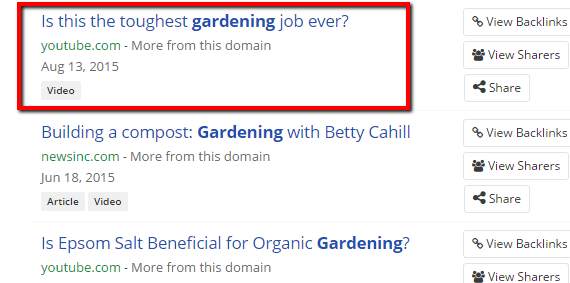
A) Reverse engineer BuzzSumo results:
First, go to BuzzSumo and type in a keyword related to your main topic.

B. Select “Video”:

C. Then, sort the results by Twitter shares:

D. Select 2-3 successful headlines and create a template.

For example: Is this the ______ [Your Topic] job ever?
B) Find popular YouTube videos:

- Go to Youtube and type in a keyword related to your main topic
- Look for videos with over 100,000 views
- Take 2-3 of them and create templates
For example: Top [number] [your topic] mistakes (and how to avoid them)
Step 2: Use Twitter to Test Your Headlines and Find a Winner
Once you have 3-5 headlines, it is time to test which of them is best. To do that, you need to have access to:
- Twitter account with at least 1,000 followers (or at least get someone with a high follower count to retweet you)
- Your best time to tweet
First, tweet out one of your headlines when most of your audience is online, wait 24 hours and then tweet out the other headline. Repeat the process with each of your headlines and see which of them got the most engagement. That’s the winner.
This might not be an exact science, but will give you an educated clue of what people want.
As an alternative, you can list out your headlines in 1-3 tweets and ask your followers which they like best. In most cases, this will only work if your audience is copywriters, marketers, or writers.
How to Get More Periscope Followers
The more followers you have, the more reach you’ll get, right? Here are some ways to get the most out of your current resources to get more Periscope followers:
1) Follow Other People
I’ve heard a lot of people who say that the “follow back” approach doesn’t work. That’s BS. It works extremely well. As long as you just follow relevant people and avoid spam you’ll be fine.
The first step is create a list of at least 100 people in your industry who are already using Periscope to market their businesses. Then, follow them and start the conversation.
Start watching their broadcasts, commenting and even creating content around them. If you do that, you’ll definitely get noticed and a good percentage of them (and their followers) will follow you too.
2) Respond to Every Single Comment
People always come back to the places where they feel appreciated.
Think about it: Which store would you come back to? The store where employees are rude, or the store where everyone treats you incredibly well?
The answer is obvious.
If you treat every member of your community like if she or he were the most important person in the world, they’ll feel really appreciated. And one of the best ways to demonstrate your appreciation online is by responding to their comments.
This will encourage more people to follow you because it will help turn followers into evangelists.
3) Don’t Go to the Third Round
Some people will analyze everything you do, including the good and bad things.This is why you need to be careful with what you do. Not only on Periscope, but in all social networks.
What I mean by “don’t go to the third round” is that if someone starts to post negative comments on your videos, don’t fight with them.
You can reply once, but if that person replies back, no matter how much you want to tell them how wrong he or she is, just don’t do it. Ignore that person. If people see that you offend your audience, they won’t follow you.
4) Be Constant
People like to follow people who constantly shares new stuff. If you’re expecting that people follow you because you published a video 3 months ago, you’ll not see the results that you want.
The best you can do is creating a publishing schedule. This way, you and your team can develop ideas and keep your calendar full.
You can schedule a 20-30 minute meeting each week or month to do this.
How to Increase Your Reach
1) Leverage the Power of Brand Evangelists
It doesn’t matter how small your follower base is, you’ll always have a small group of people who always are sharing, commenting and linking to your content.
These are your “brand evangelists”.
Most people make the mistake of trying to connect and engage with every one of their followers. It’s much more effective to focus on creating strong relationships with your evangelists and then let them introduce you to their own audiences.
Focus your energy on the few and you’ll get the most out of the masses. It’s a smarter approach to social media.
2) Find Your Best Time To Go Live
As with anything in social media, there are better times to publish your content than others. For example, Buffer found that on average, tweeting at 5 PM can increase your chances to get noticed.
It doesn’t mean you should share your videos at that time, but it definitely means that you can increase your reach by finding the exact hour where most of your audience is online, so you can share your content at that time.
There are no tools to do this with Periscope yet. However, since Twitter owns this app, a huge percentage of your Periscope followers are already on Twitter (if not all of them), which is very useful.
You can use tools like FollowerWonk or Hootsuite to find your best time to publish content on social media. In addition, this guide from Hubspot will guide you step-by-step through an effective process.
3) Create Co-Branded Content
One of the best ways to grow your audience is by creating relationships with people who have an established audience in your industry, but who aren’t your competitors. This way you can collaborate to create content that both of you can use.
For example, Noah Kagan recently launched a co-branded free training course where he and other industry experts collaborate to help you get your first 1 million visitors. They created special deals, so people who subscribe to the course can get products they own at special prices.

It’s a win-win.
You can look for relevant people in your industry who are doing it well on Periscope, and then create co-branded live video streaming, so both of you can get introduced to a different audience, and therefore, grow yours.
How to Hack the Advanced Twitter Search to Evangelize Your Videos
One of the best things about Twitter is that you can easily find people who might be interested in your content. Just need to type a keyword in the search bar and Twitter will show you all the people who have shared content on that specific topic.
And when someone shares something on Twitter you know two things:
- That person is interested in your topic
- That person likes to share content related to that topic
That is very useful because now all you need to do is put your content in front of them.
Here’s how:
Step 1: Go to Twitter and type in a keyword that describes your main topic. For example, if I was going to share a video related to greenhouses, I could look for “gardening”.

Another option is to look for a specific name. If you know that one of your competitors is doing it well with Periscope, you can search for their name.
Step 2: Click on “more options” and select “Advanced Search”.

Step 3: Fill the form as you need, just make sure to add #Periscope in the section called “these hashtags”. This way, Twitter will show you only tweets that have that specific hasthag.
Remember, we want to find people who might be interested in attending your live video streaming, so is highly important that you follow this step.

Step 4: Make a list of all the people who appear in the results and let them know about your upcoming event. Since they’ve seen and shared similar content before, they’re very likely to attend to your streaming, too.

You can use the following script:
Hi NAME,
I noticed that you tweeted out a Periscope broadcast the other day: TITLE OF THE BROADCAST
Great stuff, I really enjoyed it, too.
I actually have a broadcast on TOPIC coming out on DATE
Let me know if you want a heads up when it comes out :)
Cheers,
NAME
Note: For this strategy to work, I recommend that you create a list of at least 50 people. Also, If you’re wondering how to find a person’s email, you can read this post.
How to Get Tangible Results
One of the biggest problems people have with live video streaming is they don’t know how to achieve results. I’ve found that the reason for it is they simply don’t know how to connect it with business objectives.
We talked about setting your goals earlier in this guide for that simple reason. When your goals are clear, everything is much simpler.
Here are 4 ways to connect the dots between Periscope and your core marketing goals, so you can see tangible results. Choose those ones that better fit your business objectives.
1) Humanize Your Brand
One of your main goals as a brand is to build strong relationships with your audience, and Periscope helps you do that in a very unique way – you can basically open the gate and give to people an inside-look to your company.
Think about it: What better way to humanize your brand than sharing what you do in a common day?
Reality TV is so popular because people love to connect with other human beings. If you share behind-the-scenes content to your audience, they’ll feel more connected with you, and therefore they will trust you more.
2) Product Demos
What better way to offer proof than showing your audience a live product demonstration? This way, they can see in real time how your product actually works and the results they can achieve if they decide to buy it.
3) Customer and Audience Research
Audience research is one of the hardest things when it comes to online marketing (especially when you don’t know where to look). However, once you get it done, you’ll an unfair advantage over your competition.
Periscope gives you the opportunity to learn what your audience really wants, in real-time. You can conduct live Q & A to see what specific questions they ask, you can study comments people are making to find patterns on the way they think, and you can even find untapped keywords they’re using to describe their problems.
This information will help you develop better strategies and help your audience in unique ways.
4) Create Exclusive Content For Your Subscribers
You can create a private group for your blog subscribers and share content that only people who are in your private community can see. This will create an athmosphere of exclusiviness, which people love so much.
Over to You
Periscope is new and fresh. If you think it’s right for your business and goals, then take a dive and start a broadcast using the guidelines we discussed.
Hopefully this guide has shown you that Periscope is a powerful social media tool to grow your brand.
What other tips, techniques and insights do you have about Periscope?
About the Author: Josue Valles is a content marketing evangelist, strategist and die-hard entrepreneur. He constantly blogs about Inbound Marketing, SEO and Social Media Marketing at Engagebit. You can also follow him on Twitter.

from The Kissmetrics Marketing Blog http://ift.tt/1hRhQCT
via
IFTTT


 Redpepper, the agency McMullen works for, produced Claire’s award-winning Project BFFcampaign, which drove tween girls in droves to a sweepstakes for a custom BFF necklace-creation tool. One lucky winner’s design was sold worldwide. Gen Z’s sense of creativity and individuality was peaked, and over 20 days, the campaign resulted in three times the Facebook growth, a 27% increase in Instagram followers and nearly 100,000 visitors to the website and mobile experience.