Friday, 2 February 2018

Stop Guessing, Start Converting: Here are the Keywords to Use for Awareness, Consideration, and Decision Stage Content

People think SEO is all about traffic.

But I’m here to tell you that’s not the case.

Yes, if you do it correctly, SEO should bring in lots of traffic.

Ultimately, though, SEO is about revenue.

It’s about driving in new customers to buy stuff.

And that’s why most people do keyword research wrong.

Here’s the common mistake I always see.

People do two things when researching new keywords:

  1. They look at estimated monthly search volume
  2. And they compare that to the competition

That’s a good start, of course. But it’s often not enough.

The problem is that it leaves a giant, black hole in your SEO strategy where it matters most: The bottom line.

Only comparing volume and competition leads you to make questionable decisions.

In this scenario, you typically select the highest searched keyword that you can compete for.

It’s like a popularity contest. Keywords are chosen for their ability to drive traffic, not for their ability to convert.

That’s the problem we’re going to fix today in this article.

I’m going to show you how to side-step this common mistake. You’ll see the ‘missing ingredient’ from your keyword research. And you’ll discover how to not just get traffic, but more leads and customers, too.

But first, we need to relate keyword research back to something you’re already familiar with:

The Buyer’s journey.

Why your content and keywords should align with buyer’s journey stages

A recent study found that “55% of consumers visit stores before buying online.”
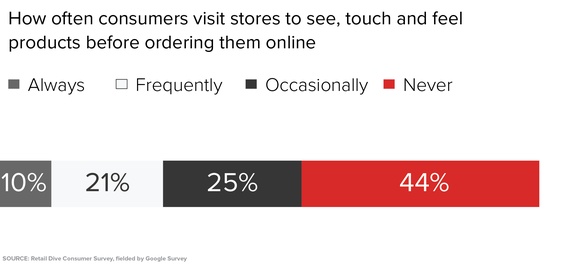
Wait a second. What?

People visit physical stores and then buy online?

That’s odd.

You’re used to seeing the reverse. People will research stuff online before buying.

The study goes on to confirm that “more than half (56%) of 18-24 year-old shoppers say they buy products sight unseen.”
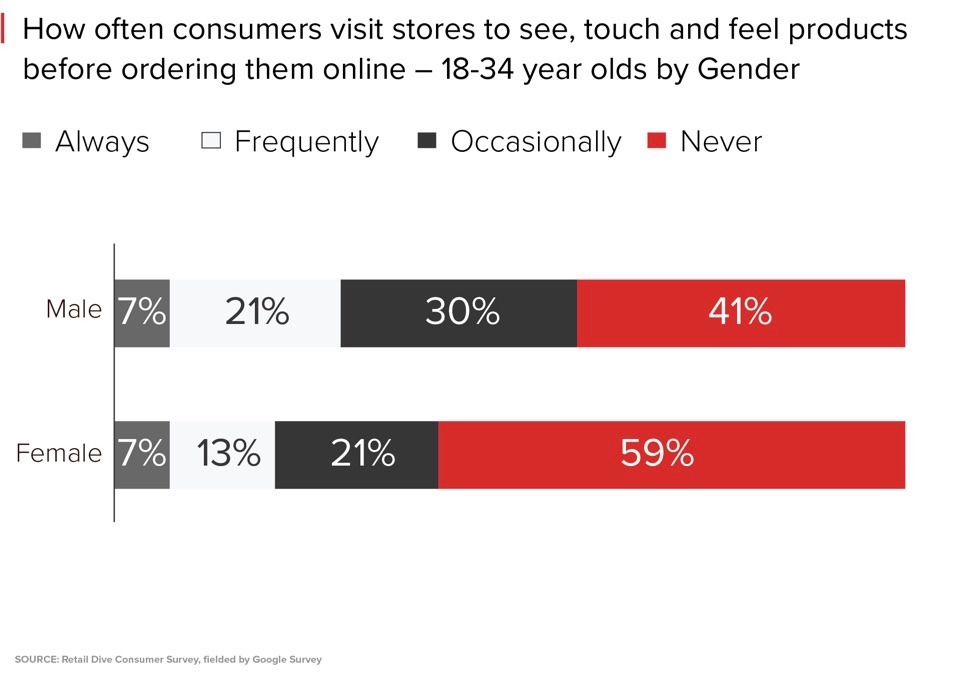
The theory behind such a high rate of physical inspections comes back to the product.

The more “high-touch” it is, the more common someone wants to see it or feel it in person, first.

That makes sense when you consider it.

You might buy socks on Amazon, without ever looking at them. But if you’re going to throw down a few hundred bucks on a new jacket, you’re going to want to make sure it fits properly.

What this means for companies, though, is that we live in an omnichannel world.

People not only research things online extensively before buying. They now also will research stuff offline, buy online, and vice versa.

Google calls this early research period the Zero Moment of Truth (ZMOT). Their data shows that almost all consumers today will research extensively before buying.

And what’s happening, is that they’re slowing moving through the stages of the buyer’s journey.

Here’s a perfect example of what visitors are experiencing when they get sick:
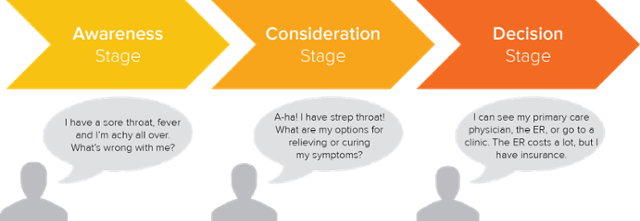
A healthy person is never going to buy cough medicine.

Why would they? They don’t have a need for it just yet.

Only when their throat starts to hurt, do they realize they have a problem.

Next, they’ll take a look at all the various alternatives they could buy.

And that’s no easy feat, because we’re literally surrounded by medication.

Now, we know what customers are doing before buying (more or less).

Our goal is to construct a conversion funnel that lines up with each step.

Consumers own the shopping experience. They’re going to shop how they want, when they want.

No amount of advertising or campaigns we run will change that.

So don’t fight it. Instead, adjust and respond accordingly.

Bringing this back to SEO, it means you need to create pages on your site for each step.

This is the content mapping process. You take each customer persona, and figure out what they would want to see in the Awareness, Consideration, and Decision steps.
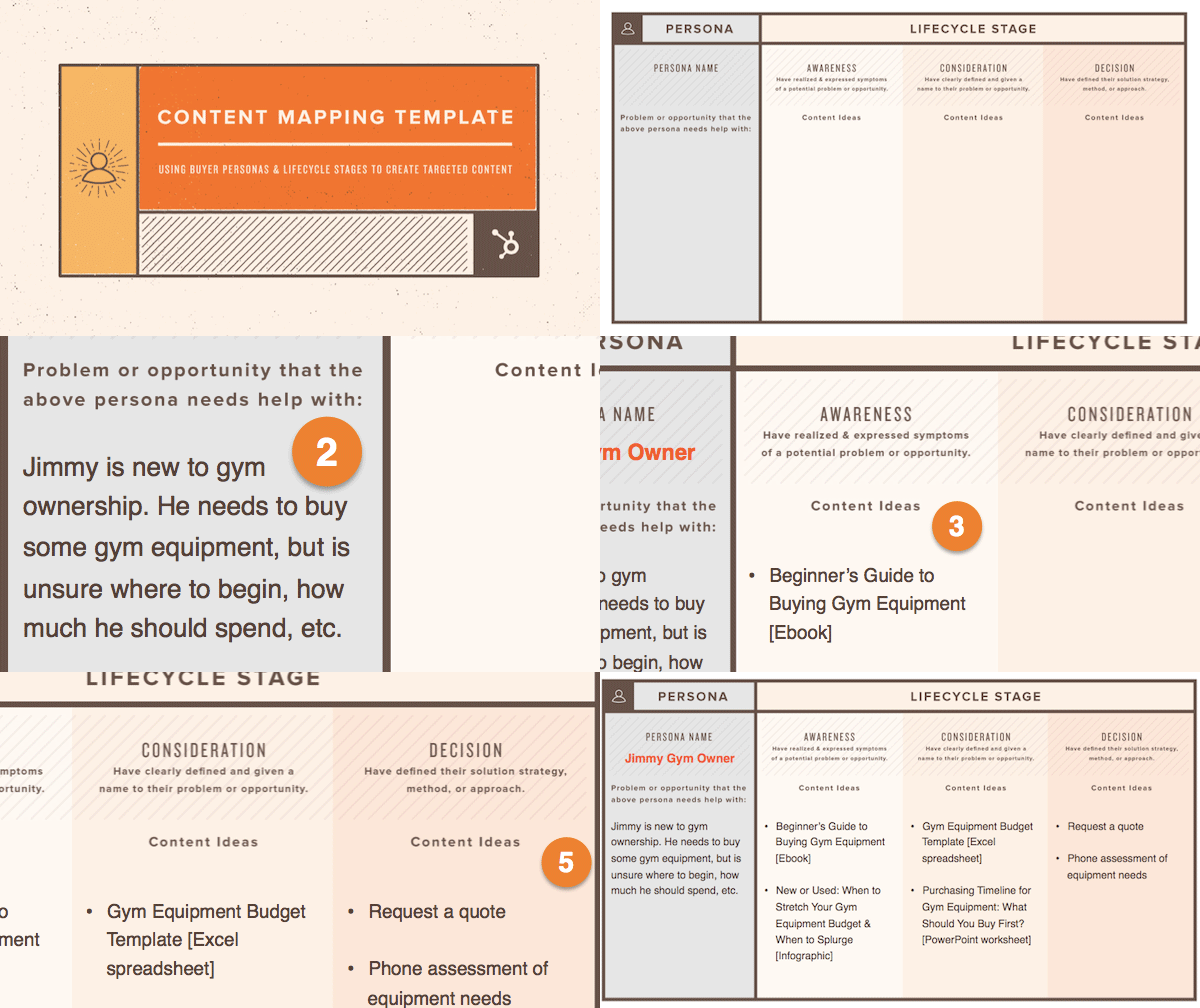
The reason we’re spending so much time here is because most website I see are lopsided.

They either have too much Awareness content, like blog posts. And not enough Decision-stage stuff that will convert they people they’ve brought in.

B2B companies often suffer from the reverse. They have too much Decision-stage content that only talks about their company, their products, or their services.

Why’s that a problem?

Because it means they can’t optimize for Awareness keywords to bring in enough search volume.

See what I mean?

Keyword research and optimization is completely dependent on your site content.

You can’t optimize an About page for a big, popular keyword like “content marketing.”

I mean, you can. But it won’t rank anytime soon.

That’s why one of the first things I do when starting work with any B2B company, for example, is to build out their content assets, first.

They need content targeting each funnel stage:

Before we can optimize each to bring in leads and customers.

I know. It’s kind of a chicken and egg problem.

But search engines are too sophisticated today.

You can’t fool them. At least, not for very long.

When companies come to me, suffering from lots of traffic but low deal flow, I like to use the following trick.

Treat SEO like PPC.

Yes, you heard me. I want you to take a PPC-based approach to keyword research.

How to find keywords by funnel stage

PPC only focuses on keywords that convert.

You don’t care about traffic or clicks or impressions or any other vanity metric.

Literally, the only thing that matters, are the ‘money keywords’ that drive leads or sale.

Tiny variations on a word suddenly matter. One word substitution in a phrase becomes a big deal.

So I want you to organize SEO keywords by match types. Just like you’d do with a PPC campaign:
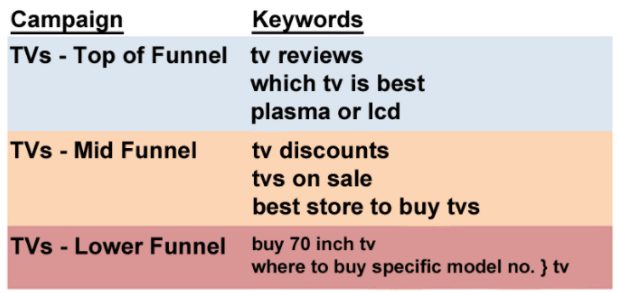
At the top of the funnel, people are simply looking around at various TVs.

In the middle, they’re looking for pricing information.

And at the bottom, they’re ready to purchase.

But more importantly, do you see the specific words they’re using at each point?

  • “Reviews” at the top.
  • “Best store” in the middle.
  • “Buy” at the bottom.

That’s what we want to focus on here.

People use specific words that indicate which stage of the funnel they’re in. That’s how you identify them.

And that’s how we’ll take them to optimize content in a few seconds.

Here’s a good starting point from the HubSpot’s Inbound Conference:
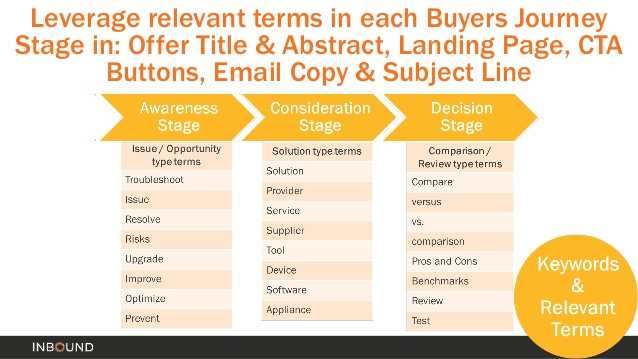
People in the Awareness stage often use “issue or opportunity” terms. That makes perfect sense when you think about it. People are just beginning to realize their problem.

Think about how you found this very post you’re reading right now.

Why’d you click on this one and not one of the hundreds of others that crossed your stream today?

Because you identified with the problem.

The Consideration stage is when people start looking for solutions. They start looking for “tools,” “suppliers,” or “services” that can remove this pain point from their life.

Here, they’re comparing alternatives.

There might be five different software options that solve their pain point. So they’re gathering data on which one is right for them.

Finally, “reviews,” “benchmarks,” or “tests” can help someone make the ultimate Decision.

Of course, real life is a little more complicated and nuanced.

But try to keep it simple.

These three ‘buckets’ are fine for including in your keyword research.

Now, when you’re going to start researching keywords, you’re not just looking for volume and competition.

Instead, you’re starting with funnel stage.

You’re deliberately looking at keywords under Awareness, for example.

Then, you can drill down into the volume and competition for each. So you’re only ultimately comparing queries in the same funnel stage.

For example, pull up Ubersuggest and type in your search queries.

Mine is “keyword research.” :)

Ubersuggest will do exactly what is says: suggest new potential variations based on the original keyword.

So you’ll get a massive list of potential options, all with their estimated volume, CPC, and competition measures.

But first, we need to make this data relevant.

Scroll down to the very bottom of the tool and hit “Export.”
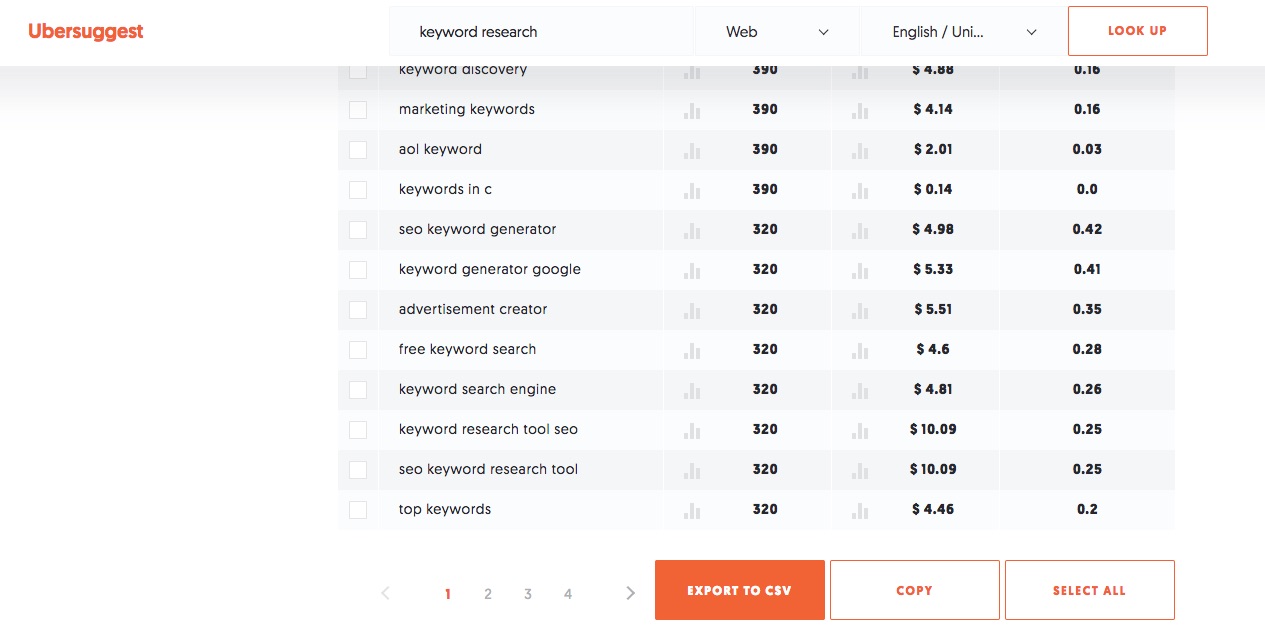
Exporting the data into a CSV file will allow you to start adding more context to each keyword.

For starters, you’d want to start assigning a Funnel Stage from the three options we’ve covered above.
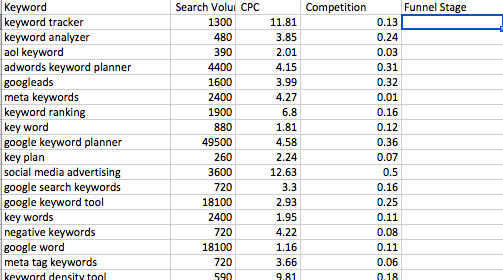
Now, you can add one more column for the important piece:

The landing page.

Keyword research is nothing without pages to optimize.

So let’s look at examples for each step of the funnel to see how you can complete this process.

Step #1. Top of the Funnel

“Las Vegas” gets over a million searches each month.

Crazy, right?

Just getting a tiny slice of that would get you tons of traffic.

But you know what?

Most of that traffic would be completely useless if you were selling products or services.

(Ad revenue might be a different story.)

The reason is because “Las Vegas” is just too general.

You don’t understand the search intent behind that query. Which means you probably can’t figure out how to optimize a page on your site for it.

People looking for this could be looking for the weather, for example.

They’re not exactly ready to buy show tickets or a hotel room just yet.

Not only that, but you’re also most likely competing against the big boys with huge budgets.

I like to look at the top few PPC results to get an idea of how smart advertisers are targeting different keywords.

And “Las Vegas” shows some tough companies:
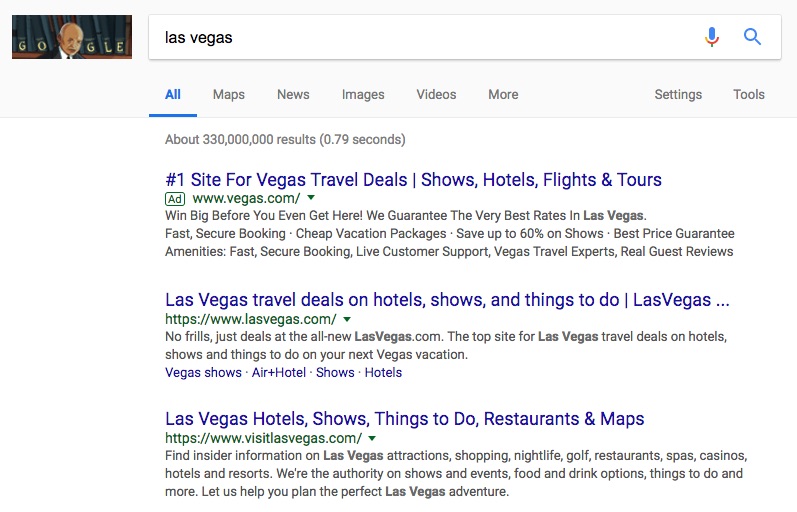
That’s why most people suggest a long-tail approach to top-of-the-funnel keywords.

You can target a ton of less competition queries that are also experiencing the problem you’re describing.

Take “UX mistakes,” for example.

No, people won’t Google this and convert immediately. But you can easily target keywords like this with blog content:

You’re getting them into your website initially, so that you can send them into other resources or retarget them with ads down the line.

Here’s how I like to generate new top-of-the-funnel keywords.

Write down all of the pain points customers experience. Follow that up with the benefits of your product or service.

Take these potential topics and start building out your categories for your blog.

Now, for each one, see if you can attach the following top-of-the-funnel keyword modifiers:

  • Fix
  • Issue
  • Problem
  • Troubleshoot
  • Upgrade
  • Prevent
  • Optimize

Plug these variations into Ubersuggest. It will spit out dozens of new awareness keywords, perfect for new blog post topics.
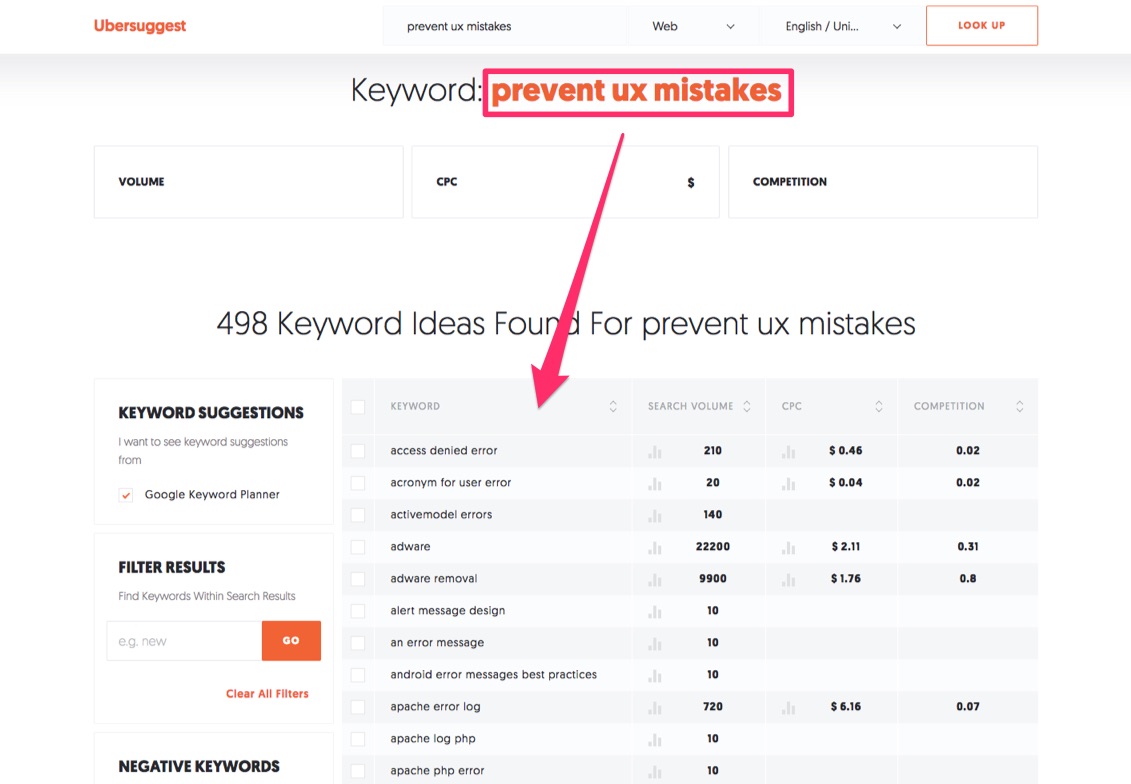
Now, see if you can find a few related ‘clusters’ of these keywords.

If you have a really popular one, that can serve as the ‘hub’ for the specific variations underneath.

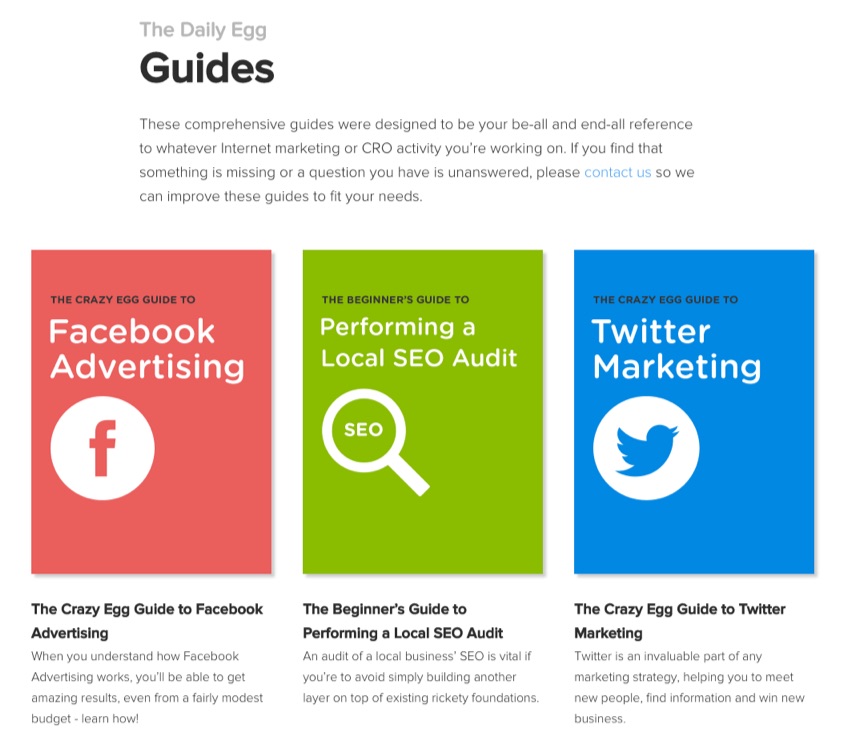
Hub pages can be really long, in-depth resources, like my guides that span several different topics:
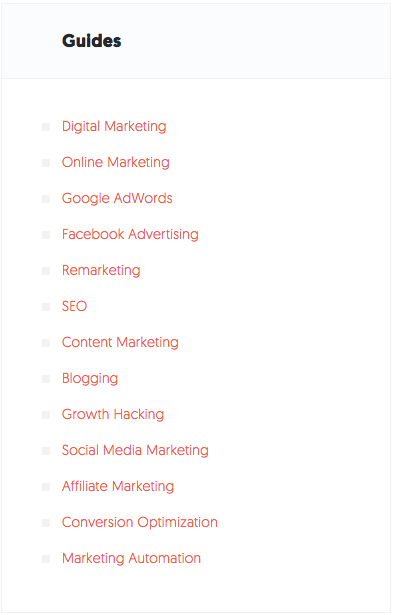
Each of these guides can internally link to relevant blog posts that cover similar topics.

And you’re building out a ‘web’ of relevant terms for Google to index.

Beyond just bringing in traffic, guides can also help you start turning strangers into leads.

Here’s how.

Step #2. Middle of the funnel

People in the consideration stage are now looking for options.

They’re looking for solutions to the pain they just realized.

Now, they’ve skipped over generic terms like “Las Vegas.” And are now looking for something specific, like “Las Vegas hotel rooms.”
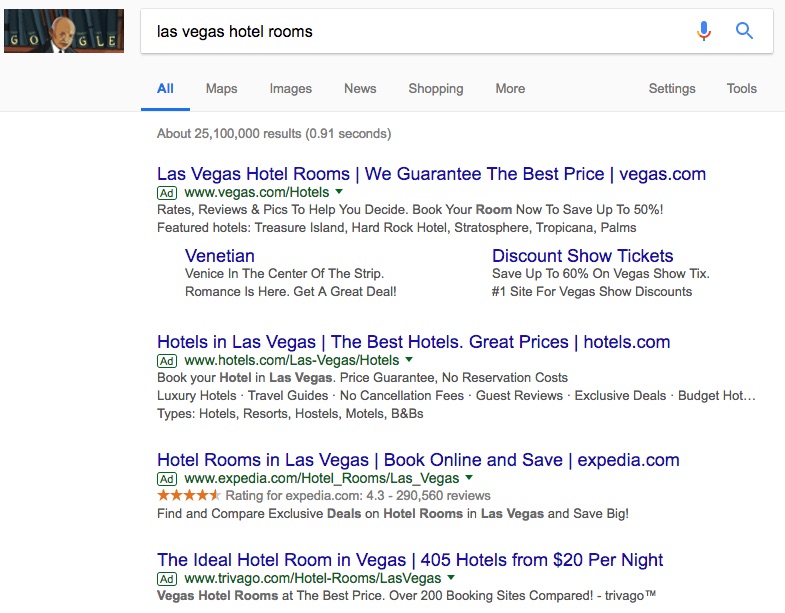
Here, your objective changes.

You want to go from pages that will attract eyeballs to ones that will get people to stick like glue.

And that affects everything you do.

For example, someone who’s interested in a blog post around some pain point isn’t going to spend three hours on your site.

The time and energy someone’s willing to invest needs to rise proportionately, first.

Once you do get that ‘buy in,’ you can use in-depth resources like guides to keep them reading or coming back.
Remember what we learned earlier?

Consumers will often research at least ten different resources prior to purchasing.

So do you want those ten steps to be on your site, or someone else’s?

Now, let’s repeat the process we took in the last step.

Isolate those same key product or service benefits. But this time, apply the following variations:

  • Solution
  • Provider
  • Supplier
  • Vendor
  • Comparisons
  • Software
  • Features

People in this stage are comparing alternatives.

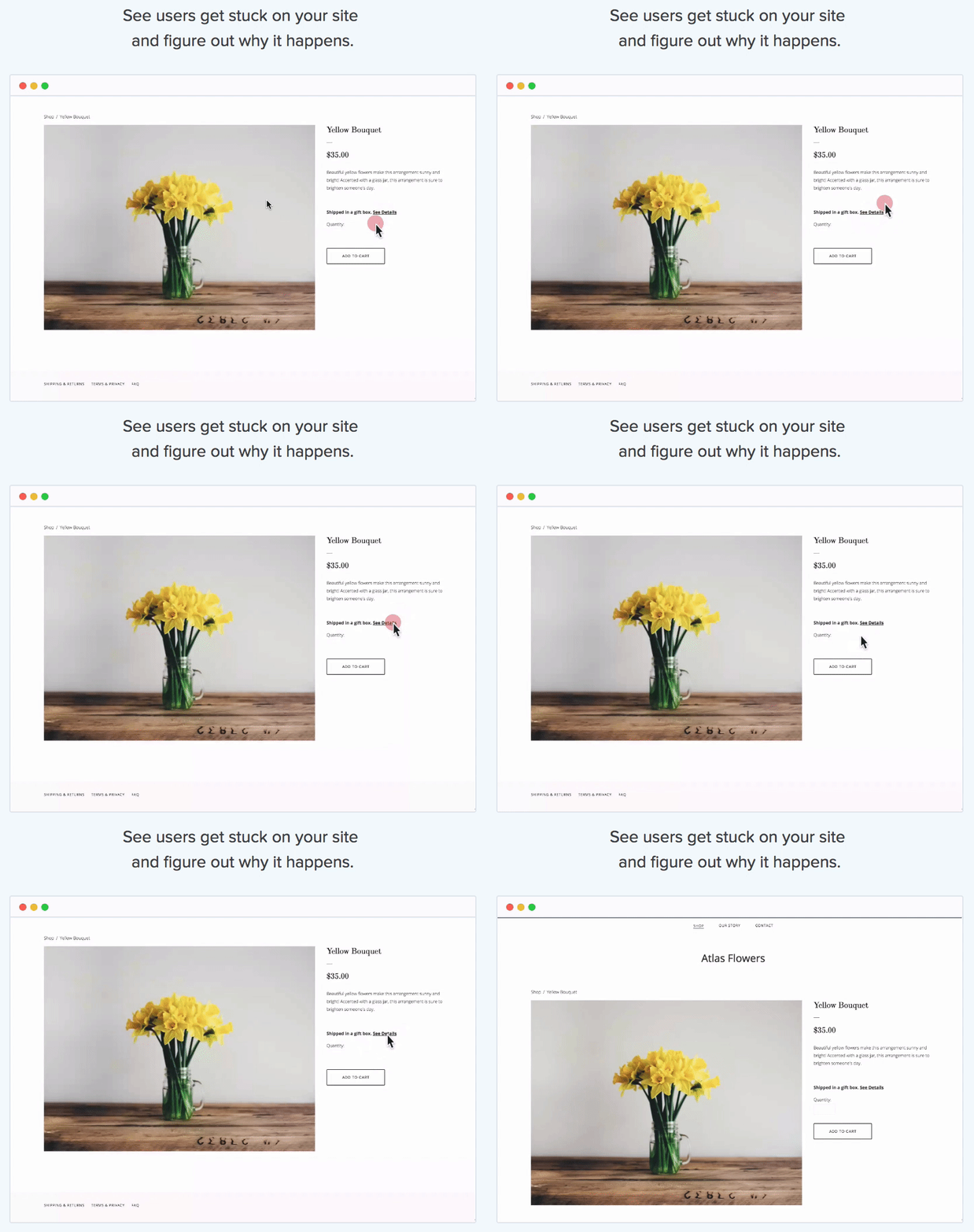
You don’t just want to ‘tell’ them about your features. You want to literally show them.

For example, head on over to the Crazy Egg recordings feature page.
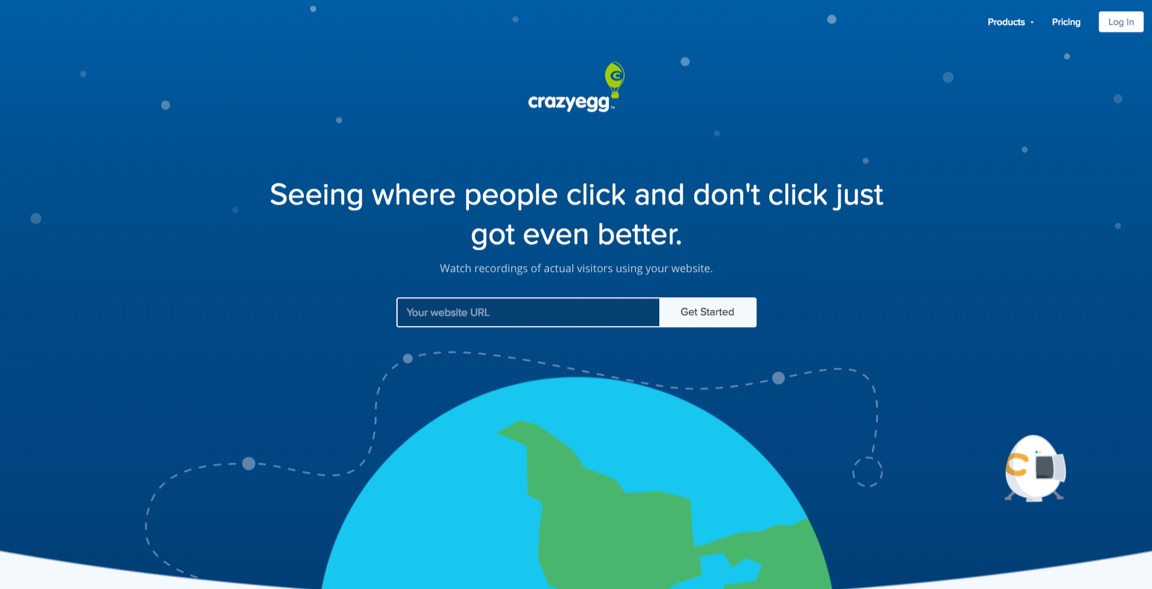
Keep in mind that this is just one feature of several.

But we’ve gone through a ton of time (and money) trying to make it tell the best story.

We want to literally show people what the product does for them.
What does this have to do with keyword research?

Everything!

You want to transition someone’s interest in the middle of the funnel.

They’re looking for answers.

The keywords people use to find this page will bring with it a certain expectation.

They’re expecting to find something specific when they type in “ux design features.”

If the content on the page doesn’t line up with their expectation, they hit the back button.

And then you know what happens to your rankings?

They fall like a rock.

See, SEO isn’t just about keywords. It’s about optimizing for someone’s experience.

Ultimately, the best experience doesn’t just influence rankings.

It also dictates whether someone is going to take the next step to make a decision.

Or if they’re going to hit the back button on their browser to look for someone else.

Step #3. Bottom of the funnel

You’ve scoped out a few hotels for your upcoming trip to Vegas.

What do you do next?

You’re going to look for price comparisons for the actual weekend in question.

Now, you’re getting into crunch time.

You want to make a decision. But only after weighing all the options.

This is where you often start seeing branded queries pop up, for example.

You’re going to start punching in dates.

Soon-to-be consumers in the Decision stage will also use queries like the following:

  • Pros vs. cons
  • Benchmarks
  • Reviews
  • Ratings
  • Pricing

If you’re looking for the “best CRMs” in the last step, in this one, you’re pricing each one of them out.

You’re looking at the ‘next steps’ involved.

Kalia Strong includes a few other excellent modifiers to start regularly including in your bottom of the funnel keyword research, too.
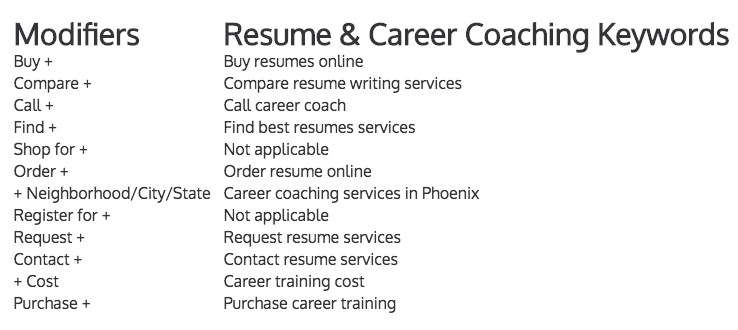
At this point, someone is trying to decide if they should move forward. And if so, should they move forward with you?

Again, connect that back to your site content now.

Let’s say I’m interested in HubSpot. But I know from some initial research that it can get pricey.

So what do I search for when I’m trying to weigh my options?

Check out the very first paid result for this example:
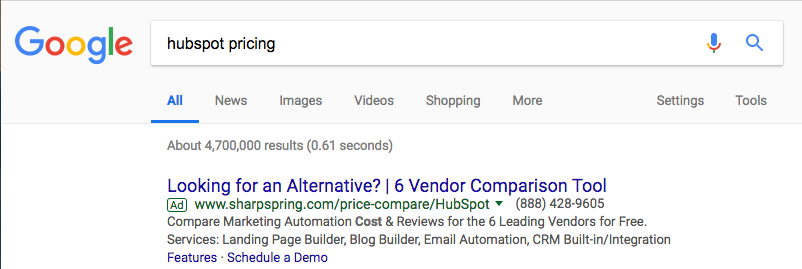
(Now do you see why we think more like a PPC-er when doing SEO?)

SharpSpring has helpfully put together a product comparison for me, available for download, of course.
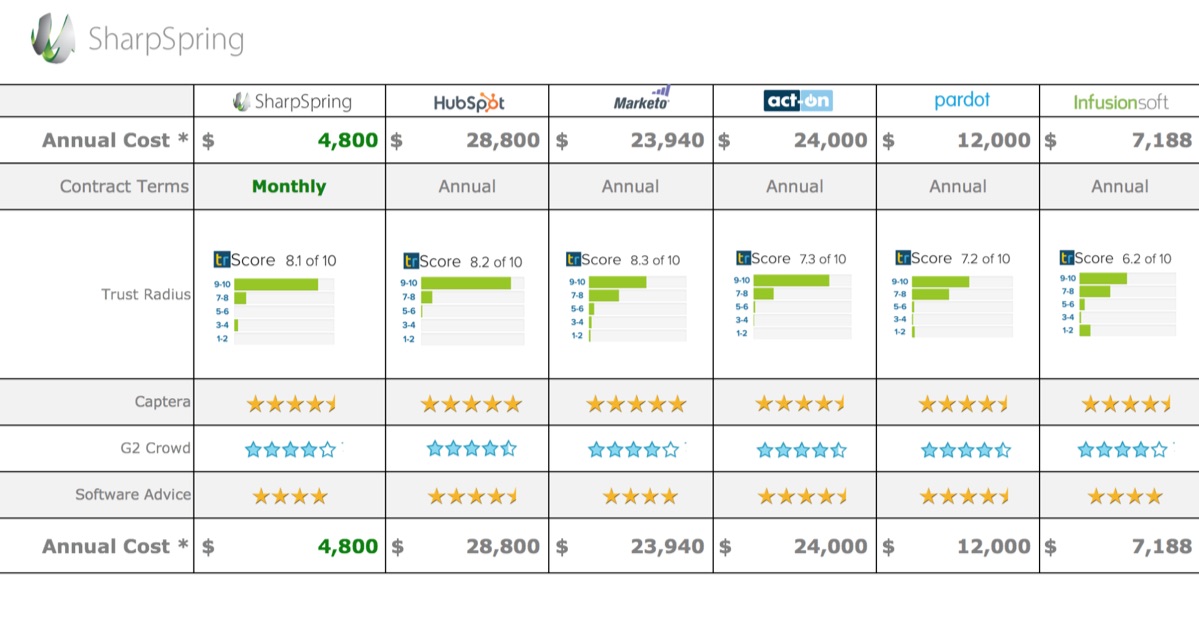
Of course, SharpSpring is a HubSpot alternative.

They’re positioning themselves against HubSpot.

So this page is optimized with “comparing HubSpot SharpSpring.”

SharpSpring’s URL structure gives away their “alternatives” SEO strategy.

They’re building out multiple pages just like this to bring in people who’re ready to make a decision.

Dig around on their site for a few seconds and you’ll see these comparison pages pop up again:
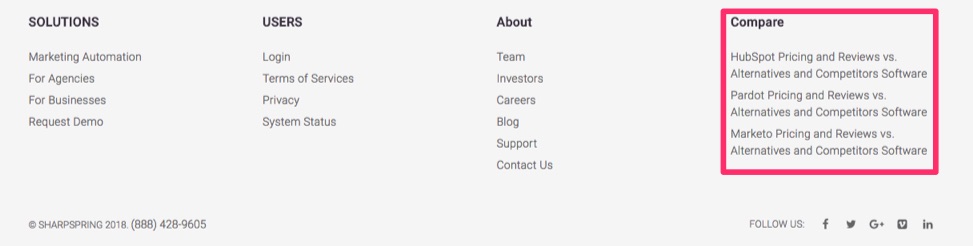
And again:

Obviously, these pages won’t get a ton of organic traffic by themselves.

But that’s the beauty of this strategy.

They don’t need to!

All of the keywords you’ve targeted earlier in the process were designed to bring in people.

They will get people interested.

These pages are built with one thing in mind: convert.

Then, each page can have it’s own relevant search query assigned:

  • Marketing automation vendor comparison
  • HubSpot pricing and reviews
  • Marketo pricing and reviews
  • Act-On pricing and reviews
  • Pardot pricing and reviews
  • Infusionsoft pricing and reviews

That’s the chicken and egg problem illustrated.

On the one hand, you need to change how you’re segmenting keywords by funnel stage.

You want to bring in people at each step. Or transition ones from the step before.

BUT, you often can’t do that until you have the appropriate pages that also target each funnel stage.

Otherwise, you’re trying to optimize pages with irrelevant search queries. Ones with mismatching search intent.

So even if you did get clicks and visits, they won’t line up with visitor expectations.

Which means instead of buying, they’re going to bounce.

And go buy from someone else.

Conclusion

Traditional keyword research often fails.

It fails because people only consider volume and competition.

If they can reasonably compete for a term, they’ll go after the one with the best traffic metrics.

But traffic doesn’t mean much without buyers.

And too often, the most popular keywords only bring in traffic. They bring in people who’re looking for information around their problems.

However, these people are weeks or months away from acting to solve that problem.

That’s where the buyer’s journey becomes relevant.

You need to first consider funnel stages, and how to help people at each one.

Only then should you dig deeper into comparing search volume and competition.

Because then you’re comparing apples to apples. You need to make sure two keywords are directly related, first, before you can reasonably select one over the other.

Then, you can tack on different modifying words to bring up tons of related topics.

And this is where SEO starts.

Because you need to be armed with enough related searches, to then go out and build (or modify) the appropriate pages.

Without content and site pages targeting each step, those keywords aren’t going to do you any good.

Not only do the keywords need to target the appropriate search intent, but so do your pages.

That means if someone is looking for “best CRM,” they’re not looking for you to brag about being the “best CRM.”

They’re looking for a comparison of CRM alternatives so that they can choose who the ‘best’ is.

So it’s two sides of the same coin.

To convert more visitors, you need better search terms. But to dominate those search terms, you need better pages, too.

What are your top converting keywords and what do those pages have in common?

About the Author: Neil Patel is the cofounder of Neil Patel Digital.


from The Kissmetrics Marketing Blog http://ift.tt/2BPnoHu
via IFTTT

#SproutChat Recap: Marketing Predictions for 2018

Social media is a constantly evolving space, with some changes being more drastic than others. Predictions were made before 2018 of what marketing would look like this year and with the new year underway, we took time talk about how these trends will actually pan out.

From Facebook to influencer marketing to video content—participants weighed in with their two cents as marketing professionals.

Community, Not Audience

Marketers know they have to flex when it comes to social platforms, but Facebook’s latest news had brands in a fluster. Utilizing a mixture of quality content, investing in your existing relationships and some paid budget can help you as Facebook updates their algorithm.

The Turn to Micro-Influencers

Influencer marketing saw quite a bit of movement in 2017, but the shift to micro-influencers will be noticeable this year. Brands will turn to their biggest brand champions, where they have existing relationships, rather than use big names with no connection to the brand.

Video Is Here to Stay

Marketers have come around and fully embraced video in their social content strategies. In 2018, we continue to see this trend going strong with a particular focus on live streaming. Social is the most real-time marketing channel out there, so time is of the essence with this feature.

Crafting the Story

Storytelling has always been vital for brands, but teams will be even more pressed to create narratives that do well in ephemeral messaging. Brands will have to dig deeper and find ways to engage with their audience even further.

Join us next Wednesday to talk with Sprout All Star Elite, Erika Heald, about the value of supporting customer stories with case studies. Until then, be sure to join our Facebook community to connect with other social media marketers.

This post #SproutChat Recap: Marketing Predictions for 2018 originally appeared on Sprout Social.


from Sprout Social http://ift.tt/2DWR7UP
via IFTTT

Thursday, 1 February 2018

10 Website Personalization Hacks to Skyrocket Your Conversion Rates

I’ll be honest: I don’t like general marketing statements.

You know the ones. I cringe a little bit when I hear “know, like, and trust.”

The problem is that these are too flimsy. They’re not actionable or instructive. And they very rarely come with cold-hard data behind it.

Turns out, though, that there’s a little truth in this one.

People do like to buy from people they know. Or, maybe more accurately, who know them.

Here’s what I mean.

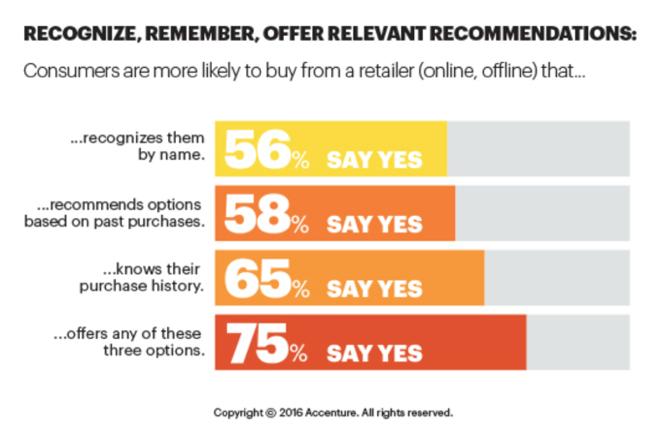
Accenture recently released data that shows that three-fourths of customers want to purchase from companies that:

  • Knows them by name
  • Remembers their past purchases
  • Recalls their purchasing history

It’s no wonder that by 2020, Gartner is predicting ‘smart personalization engines’ will increase profits 15%.

What, exactly, does that mean?

It means a company will be able to understand what buyers are looking for and give it to them in real-time.

This is why personalization is such a big deal.

Not only do customers prefer it. But it can also get them to buy more, more often.

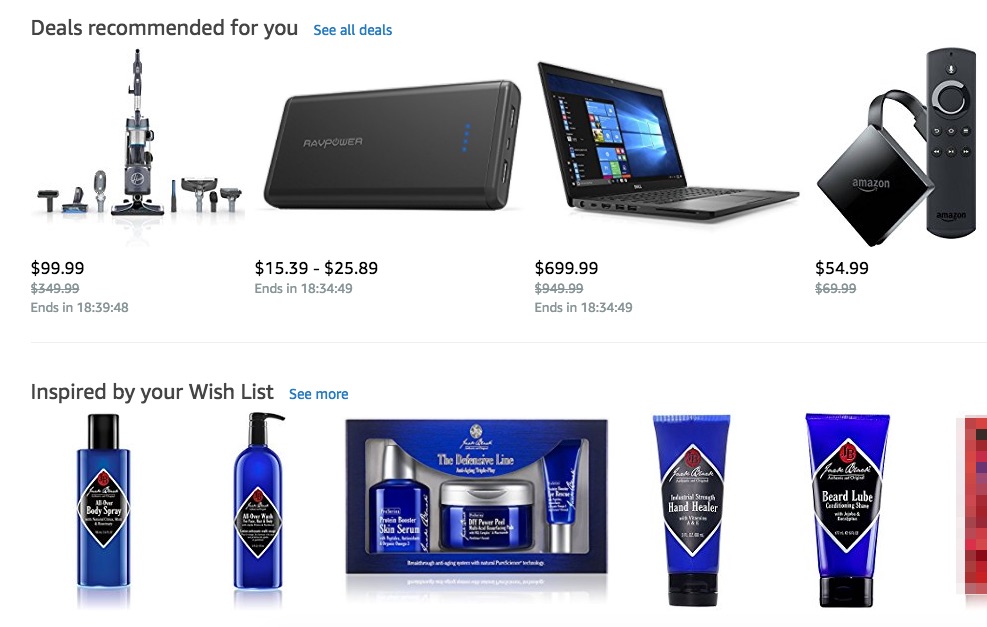
Go login to Amazon to see this for yourself.

What’s the first thing you see, straight away on their homepage?

  • Deals recommended for you
  • And products inspired by your Wish List

In almost every study you can find, personalization has the power to increase conversions across the board.

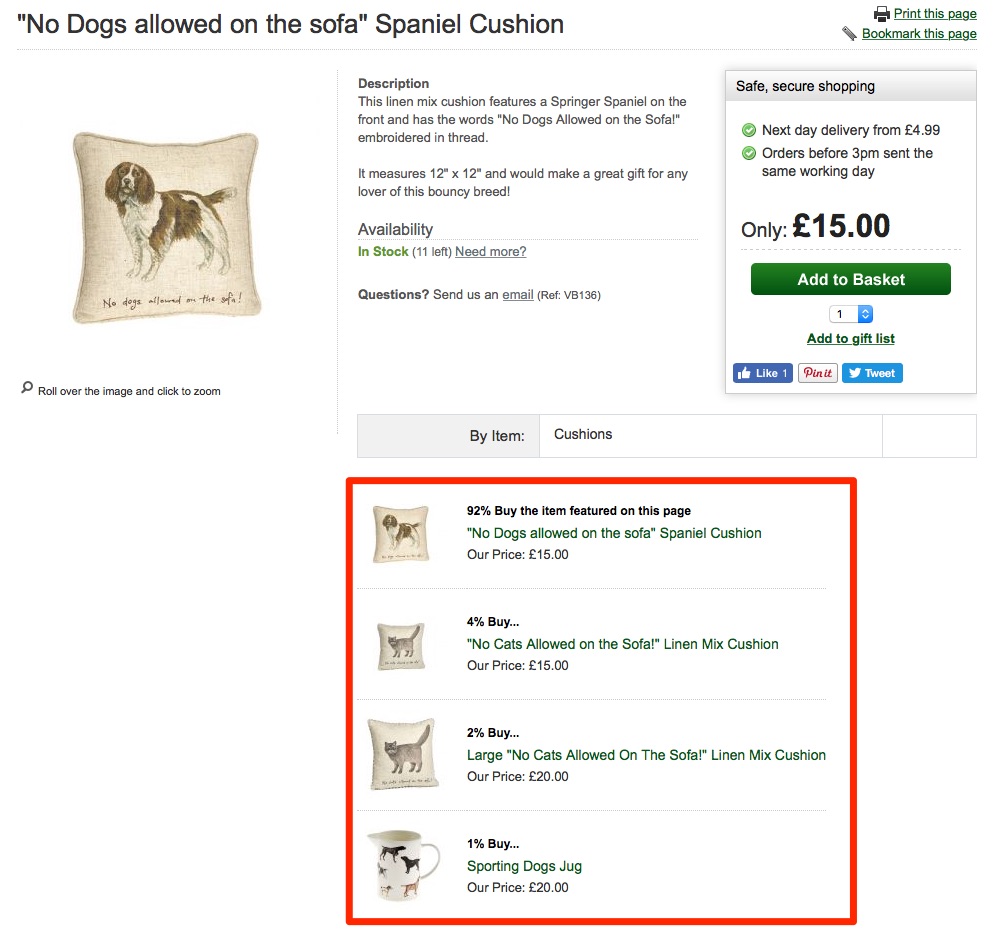
At Home in The Country added Amazon-like product recommendations and increased revenue 13%.

Personalizing your marketing is almost guaranteed to increase results.

I say “almost,” because most companies still struggle with actually doing it.

On the one hand, 77% of them will agree that it’s crucial. While on the other, 60% struggle with implementing it.

Fortunately, I’ve learned a few tricks over the years.

And I’m going to share them all with you in this article.

But there’s one thing you need to realize, first.

Personalization starts with collecting data.

You need to know more about current customers before you can ever serve them personalized content or messages.

So let’s begin there, with a few simple places to start.

  1. Track Pageviews
  2. Overlays
  3. Survey Responses
  4. Link Clicks
  5. Ad Campaign Interaction
  6. Tag and Filter Results
  7. Smart Lists
  8. Location Data
  9. Dynamic Content Blocks
  10. Referral Source

1. Track Pageviews

Customer surveys are important.

Getting qualitative data can help you figure out exactly what people are struggling with, in their own words.

It’s one of the best places to uncover customer habits or preferences.

And we will cover survey-based information in a minute.

But you can rarely start with surveys.

The problem is convenience. Surveys might take a few minutes to complete.

However, if someone doesn’t know who you are, they’re never going to agree to a survey.

They’re not going to take time out of their busy schedule because there’s nothing in it for them.

That means you need a different approach initially.

One of my go-to techniques to begin with is to simply tailor messaging based on the page someone is on.

You can also use past pageview history to help personalize messaging, too. I’ll show you how to do this with a few tools later on.

But let’s keep it simple for now.

Someone came to your site and is now looking at your product page. They’re trying to check out the features to see how it can help them.

Check out how Drift did this recently when I visited their features page:

The main headline on the page talked about “Automating your sales funnel with Playbooks.”

They’re trying to promote one of their features that can help companies replace steps in their sales process with bots to automatically book sales meetings for them.

Then, guess what the on-page message said?

It reiterated the same message.

“Drift Helps thousands of businesses book more sales meetings with bots…”

The call to action was perfectly aligned with the page content.

This is like ‘message match’ in advertising, where you match the same value props from an ad someone clicks to the landing page people see next.

See how simple that is?

You should already know what content or messaging is on each page.

So it’s fair to assume that people visiting that page will be interested in it, too.

OK, that was an easy one. Let’s see the same underlying tactic, applied to a new CTA.

2. Overlays

Admittedly, pop-up overlays are annoying.

I don’t love them as a visitor, either.

And yet, I still use them. All the time.

Why?

Because they work.

Check out this quote from Bryan Harris from Videofruit:

“We did in-depth analysis of our revenue last year and found pop-up, welcome mat and slide box opt-in subs accounted for just over $250,000 in revenue.”

When there’s a quarter of a million on the line, of course you’ll use an overlay, too.

The trick is to treat overlays like ads.

Why don’t people like banner ads? Because they’re irrelevant.

They’re advertising products or services that you could care less about.

The trick, again, is message match.

You infer what people want by looking at the pages they’re visiting.

Let’s take a blog as an example. You might have thousands of posts on your site.

There’s no way you can customize unique overlay messages for each one.

Instead, use the blog post category as a guide.

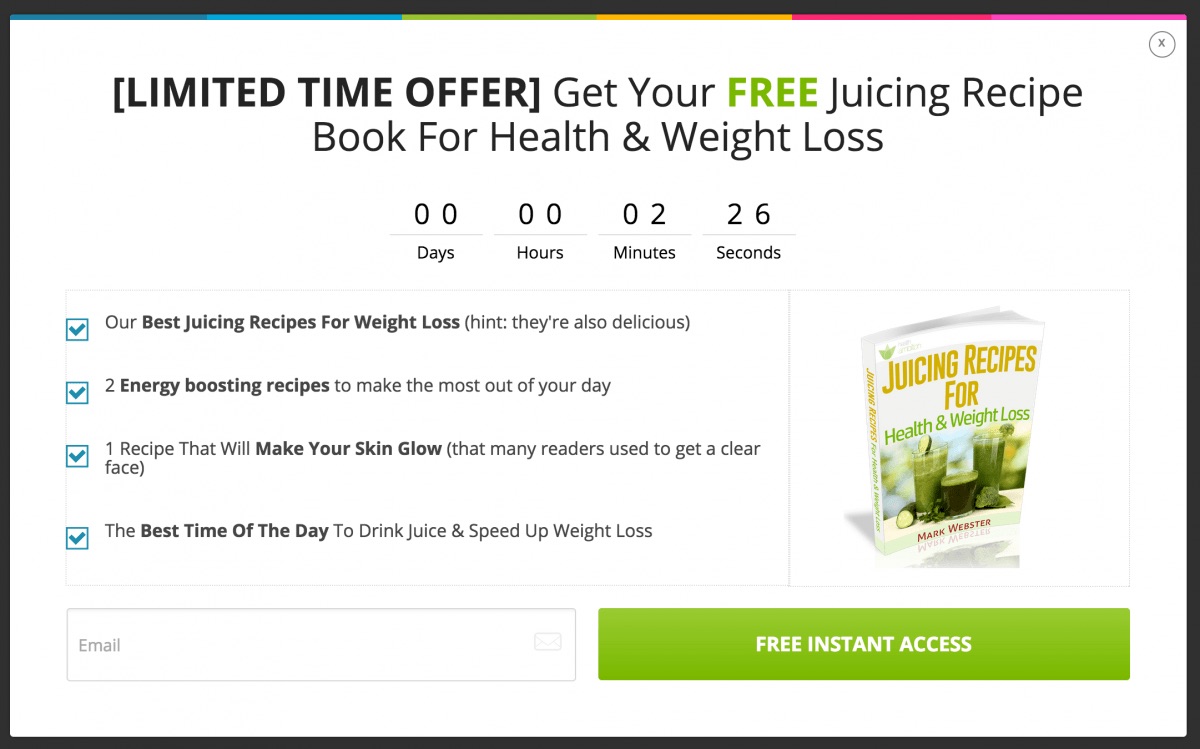
Authority Hacker used OptinMonster to target both category and post tags. They created new offers that perfectly lined up with the content in each of those blog posts.

So the “juicing” category, for example, had a juicing-related ebook offered:

Simple, right?

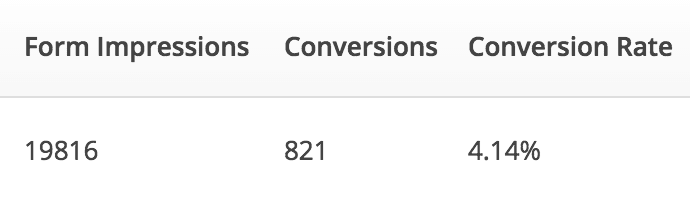
And what do you know — the conversion rate for this single pop-up was well over 4%.

I’ll show you some advanced personalization techniques in a few moments.

But you can already see that implementing personalization, at least on a small scale, isn’t too challenging.

Chances are, you’re already running campaigns like these.

The trick is to look at how you can make them more relevant to the people already visiting.

The fastest ways to increase results is to start with low-hanging fruit. And that’s the current audience you already have.

3. Survey Responses

Customer surveys only become useful once you have a sizeable audience and database.

Math is the problem.

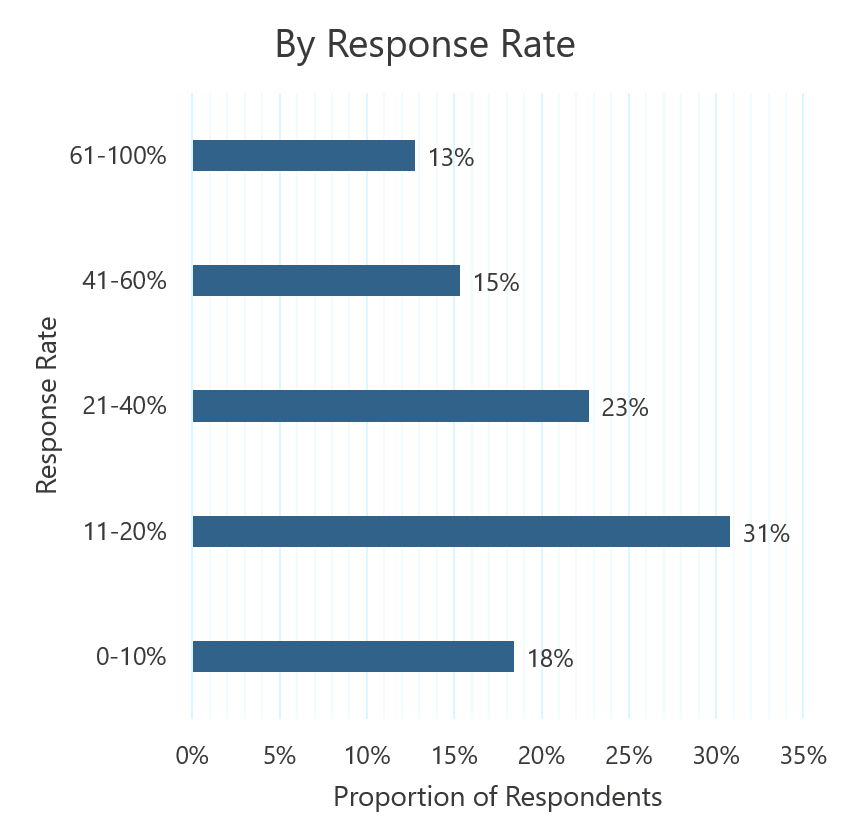
First, response rates tend to be pretty low.

Some surveys, like Net Promoter Scores (NPS) will be a little higher than most. But you’re still only looking at responses from a fraction of the list.

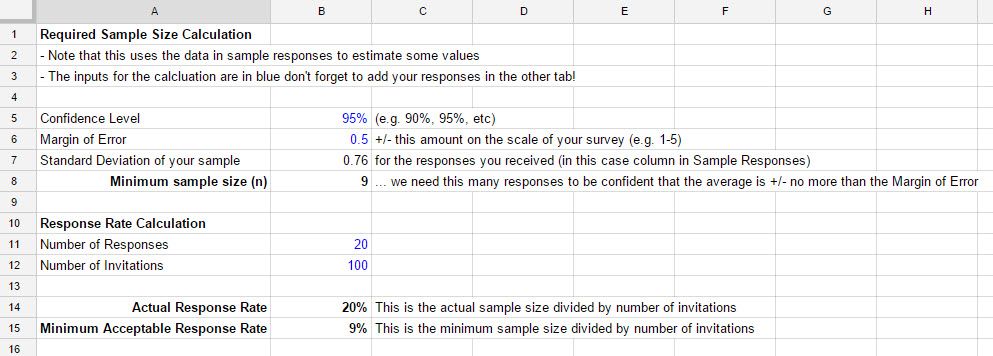
The second problem is statistical significant and the third is confidence level.

In other words, you run the risk of making bad decisions based on incomplete information.

So you typically need to run your results through a calculation, like this one from Genroe, to make sure your sample size is large enough.

But once you jump through all of these hurdles, customer surveys can be gold.

Not only for general business or marketing campaigns, but for better personalizing results for them, too.

Here, I’ll show you what I mean.

You need to connect whatever survey tool you use back with a CRM or marketing automation platform.

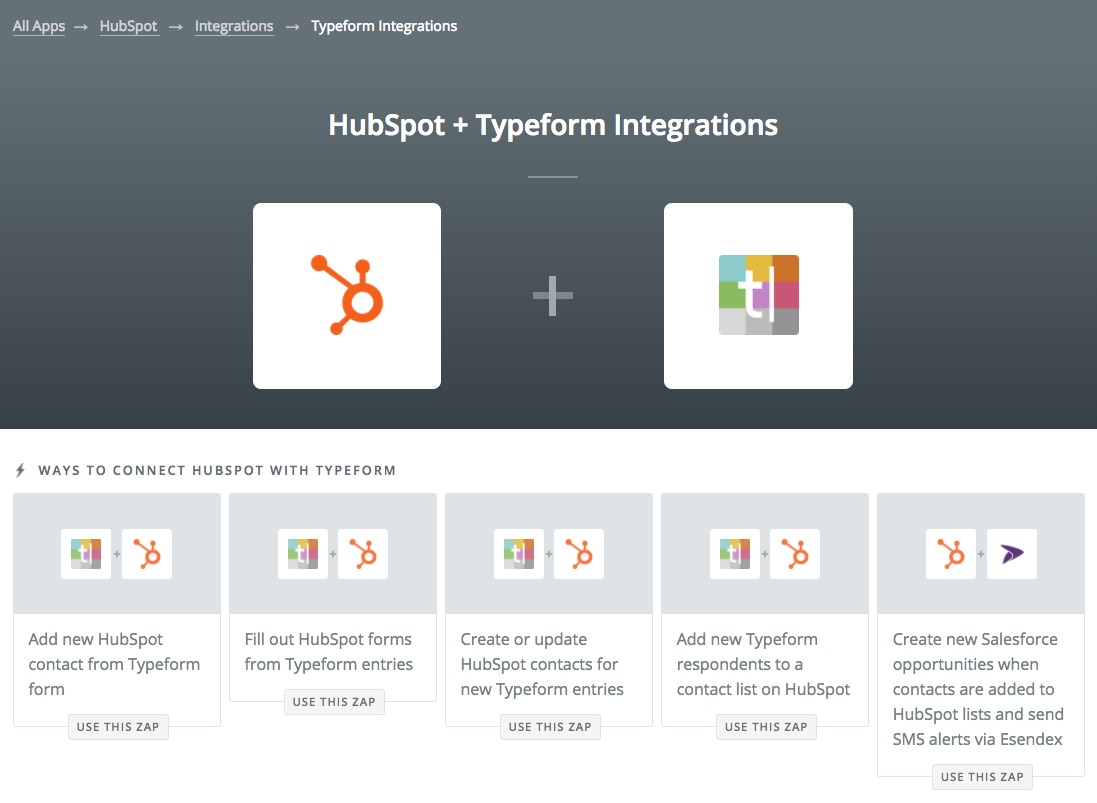
Personally, I like Typeform and Gravity Forms, depending on what you’re using them for.

Both have solid integrations right out of the box. That means you can often connect directly from Gravity Forms to ActiveCampaign, for instance.

New customer responses will flow automatically into your CRM, updating the contact’s record.

Otherwise, you can also use Zapier to connect both tools for you.

The sky’s the limit when you connect apps like Typeform and HubSpot, for example.

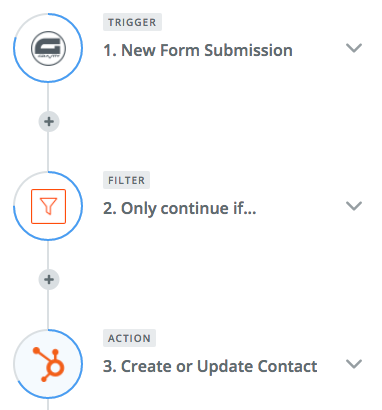
Zapier works by setting a trigger and action.

In this case, the trigger would be a new form fill.

The action would by updating that contact’s record.

You can also use an intermediary step to filter out results based on other criteria (like if they’re a lead and not a customer).

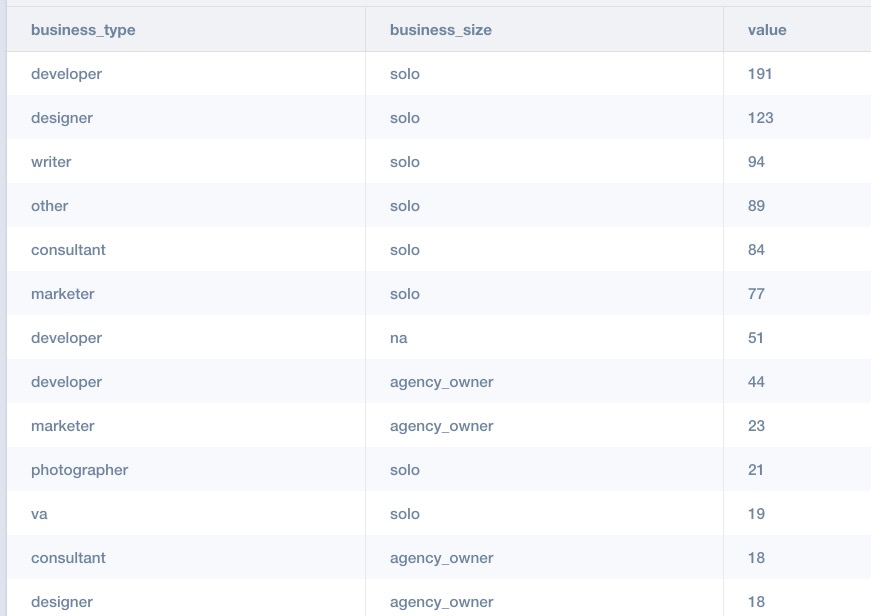
OK, so what’s happening here?

Survey responses are added back to each customer’s database record. They’re essentially segmenting themselves, letting you know what kind of business type or size they fall into.

In other words, they’re doing all of the work for you!

Segmenting new leads or customers is tough because you don’t know enough about them.

But it becomes really easy when they literally tell you all the answers.

Now, you’re going to build out automated sequences based on this information.

So all of the people that match “solo” + “developers” will receive completely different messages and offers than the “agency owner” + “designer.”

4. Link Clicks

I can already hear a few objections to the last tip.

“What if you can’t get enough people to answer those surveys?”

No problem! Here’s another trick I like to use.

Again, you’re going to need a marketing automation tool to help you organize everything.

There are so many options here now. HubSpot, Drip, ActiveCampaign, ConvertKit, InfusionSoft: they’re all good.

Many times, you try to get someone to answer a survey, but they won’t.

To make matters worse, they stop responding to a lot of your emails and other messages.

How can you win them back?

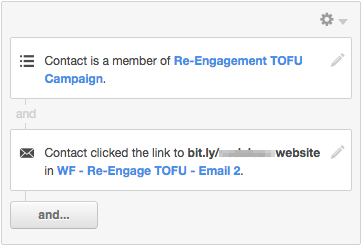
You need to test a few options. You can start by sending out an email with various links, for example.

Each link might have a different value proposition.

So one might be related to a “website,” while another is “SEO.”

Then, you track which ones they click.

If they click “website” and not the other ones, you now know what they’re most interested in next time they visit your site.

Again: We’re not just talking about personalizing emails, here.

That stuff is helpful. But ultimately, the main objective is to personal your website.

The problem is that you can’t do that until you know more about what makes each person tick.

Although, by now, if you follow these first few steps, you should be getting a whole lot closer.

5. Ad Campaign Interaction

Most people won’t buy something the first time they hit your site.

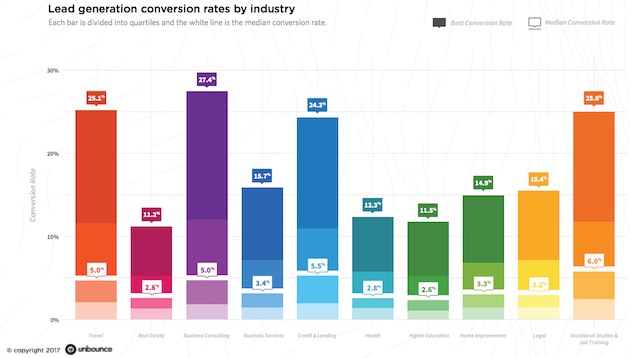
A recent Unbounce study found that somewhere between ~2-6% of people who hit a landing page might purchase.

Unfortunately, that means the vast majority of your site visitors are probably going to leave without giving you anything.

Hopefully, you did get one thing from them before they left.

Remarketing or retargeting campaigns can read that little browser cookie and automate ad campaigns to past visitors.

Once again, though, you don’t want to stop there.

You also want to be able to track how people respond to those ads.

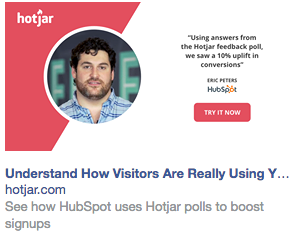
Let’s say you visit Hotjar, but leave without signing up. Now, they’re going to retarget you on Facebook with this case study ad:

Nice, right?

Ultimately, though, they want to see if you click that case study and signup.

They can see which value propositions worked best. Hotjar has like five tools in one.

They want to see which one of those tools piqued your interest the most.

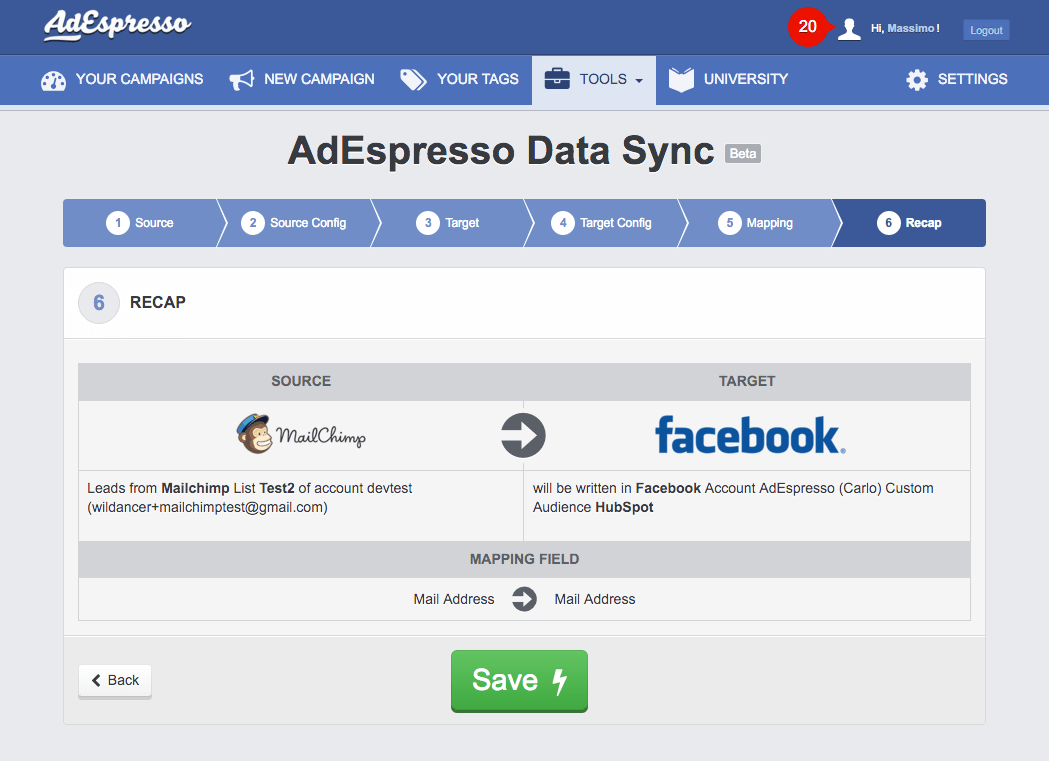
Then, following our theme here, they can use a tool like AdEspresso’s data sync to create a two-way connection between your retargeting campaigns and customer database.

Once the connection is created, your contact records will be tagged, filtered, and updates with the appropriate data.

And here’s where things get fun.

6. Tag and Filter Results

Website personalization techniques need to be triggered.

They need to have some data source telling them how or what to personalize page content with.

So far, we’ve been collecting tons of data points.

Now, it’s time to start using them.

Your marketing automation tool should be recording all of these interactions and updating records accordingly.

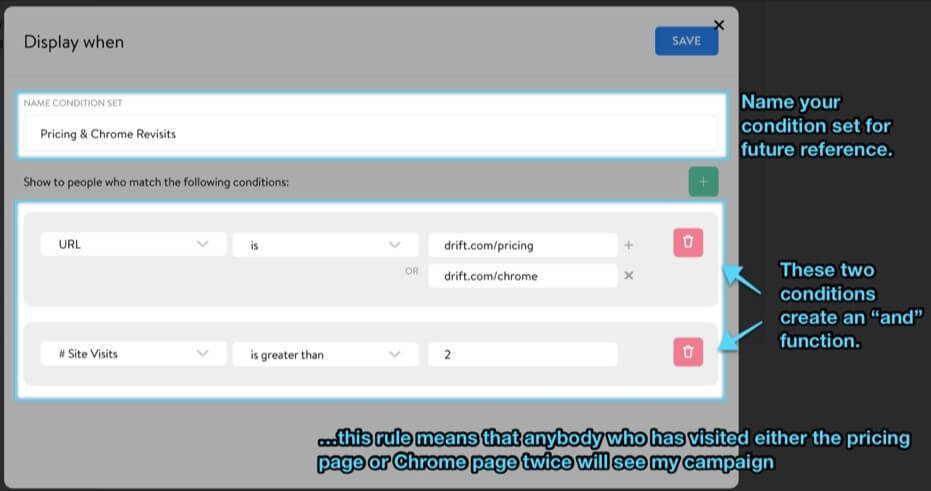
That’s typically done through a combination of events, actions, tags, or conditions. Here’s what that looks like inside ConvertKit:

‘Conditions’ are like IF/THEN statements.

They say, “If this happens, then do this.”

First, you start by assigning the criteria that needs to be met. That might include specific page views and a number of site visits, like this Drift example:

The “then” part is what you do with the information. We’re getting really close to that part.

7. Smart Lists

“Smart lists” work with similar conditions.

You can set criteria that dictates if someone can join the list or not.

Think of it like segmentation.

If someone visits your Pricing page, for example, there’s a pretty good chance they’re interested in purchasing your product.

What makes these lists “smart,” though, is that they update constantly in the background.

So these lists will add people or kick them off certain lists based on all of their interactions.

Relate this back to your marketing funnel.

  1. If someone visits your site for the first time, add them to a list to receive retargeting ads
  2. If they click on the ad and download an ebook, remove them from the first list and add them to a new lead list
  3. If they sign up for a free trial of your software, remove them from all other lists and add them to the free trial one

Make sense so far?

Hopefully, because ultimately these lists will be used to power website personalization.

8. Location data

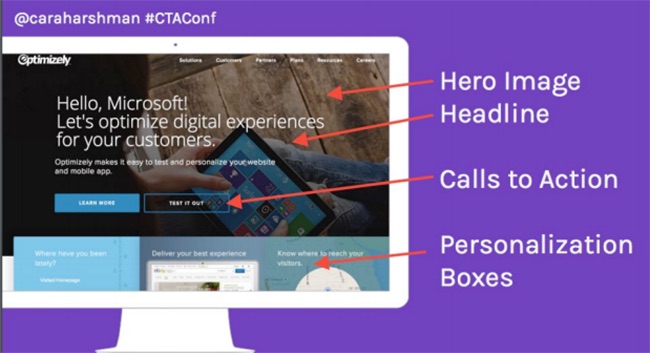
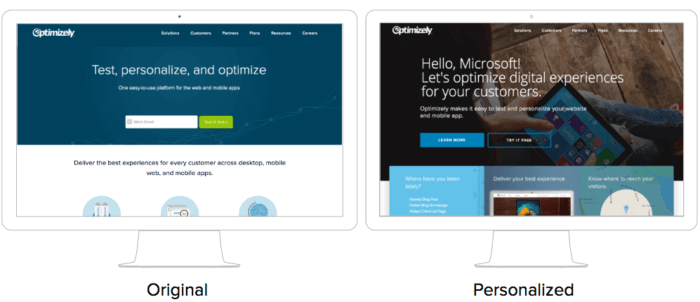
Cara Harshman, former head of content at Optimizely, announced at the Call to Action Conference that they saw over a 117% lift in people signing up for an account based solely on their homepage personalization.

How did they do this?

First, they collected data!

They identified key accounts, like Microsoft or Target, to go after. Then, they used a database to help trigger the appropriate site messaging.

Optimizely has 25 different audiences pre-created, using everything from demographic data and previous behavior.

If they don’t have your personal data already, they’ll use other criteria.

For example, visit their site in the morning and you’ll likely get a warm cup of coffee:

In this case, they’re looking at location to help personalize what’s appearing.

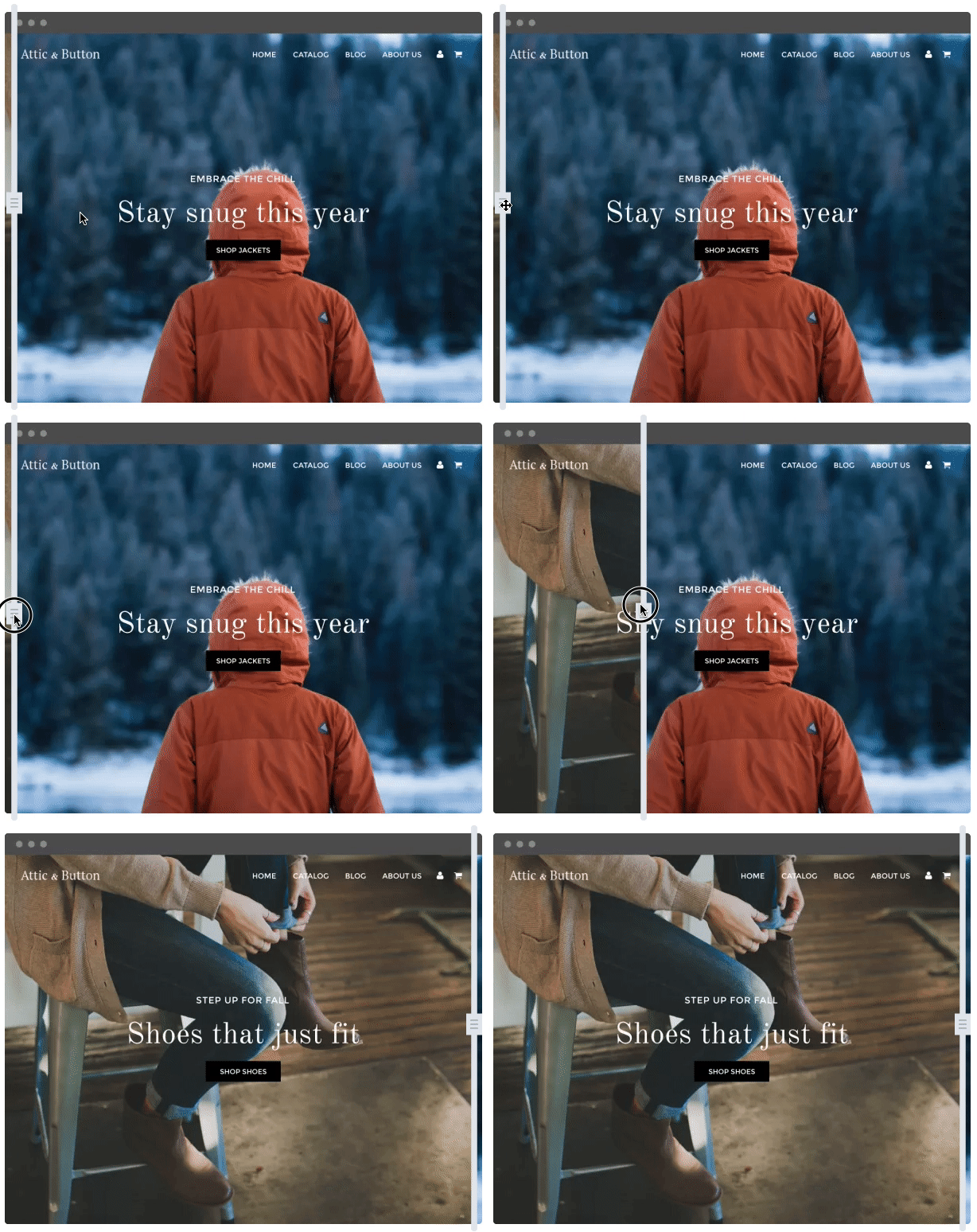
Optimizely will also use location to showcase different products.

If you’re in a warm climate, you’ll see warm stuff. If you’re in a cold one, you’ll see more jackets and boots.

Optimizely goes to such extensive personalization lengths because they’re one of the leading providers of the technology.

But they’re not the only one.

9. Dynamic content blocks

Most websites today run on content management systems (CMS).

HubSpot’s calls their offering a “content optimization system.”

The difference?

They have site personalization baked into the process.

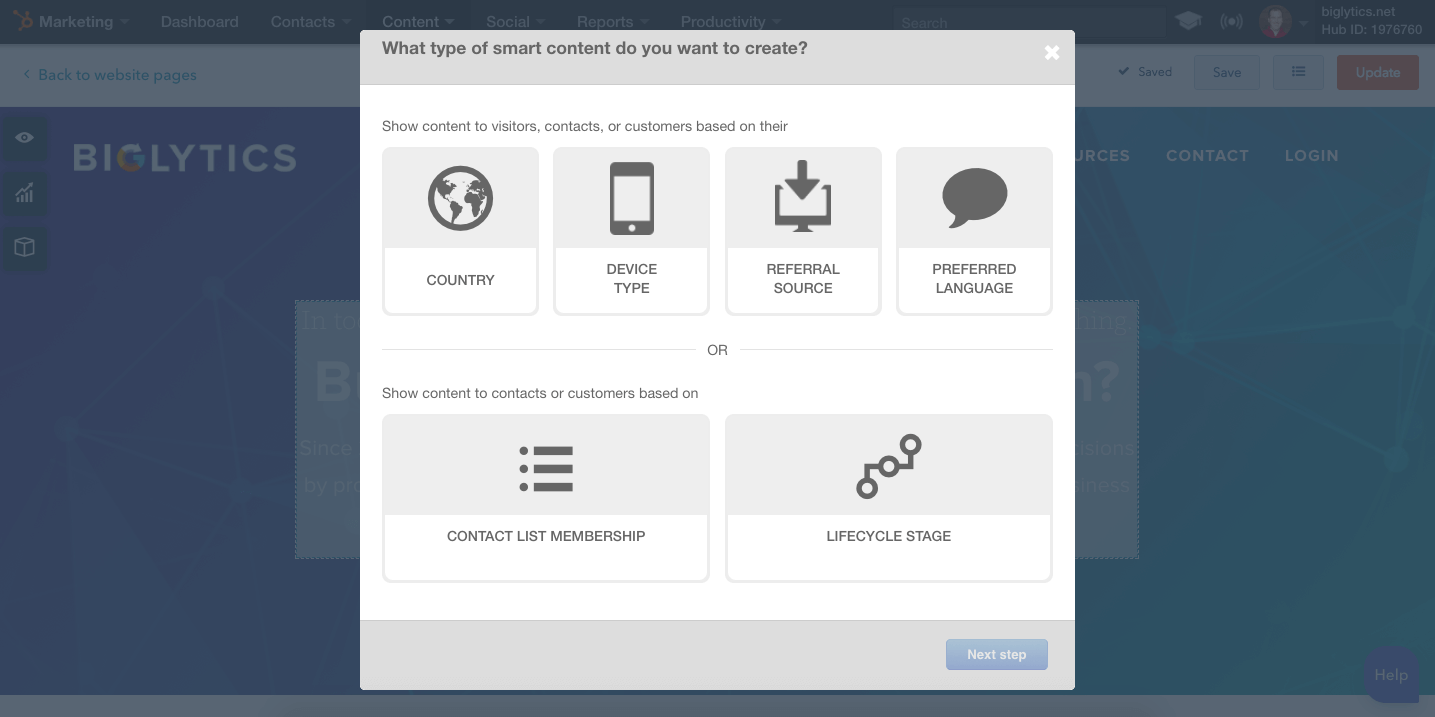
Their toolset already includes a full CRM and marketing automation suite. That makes it easy to create ‘smart content’ that references the data they already have:

The first few, including country or device type, are helpful when you have limited data.

However, the real power comes down below with contact list membership or lifecycle stage.

This brings us back to the smart lists from earlier.

If someone is on a specific contact list, they’ll receive a different experience from everyone else.

And using this combination of ‘smart’ features can literally automate your entire website personalization strategy across everyone who visits.

HubSpot’s toolset also allows you to customize just calls to action if you want.

That way, you don’t have to overhaul your site. You can simply replace content blocks, like you would with a banner ad.

But HubSpot will reference their database to determine what to show someone, and when.

10. Referral source

There’s one final tip if you’re still stuck or without these high-priced tools.

You can use referral source to segment your marketing funnel.

For example, someone visiting your site based on a PPC ad will see something different than another who came from social media.

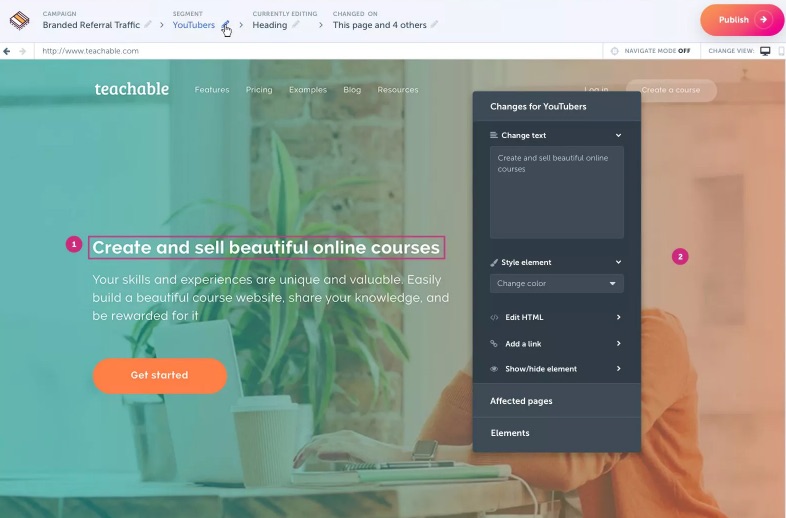
RightMessage is a new tool that can help you personalize pages based on referral source.

So you can create a single landing page design, for instance, but customize all of the content based on if someone is visiting from a partner website, email message, or it’s their very first time to your site.

The tool comes from Brennan Dunn, who was able to use its content personalization techniques to increase sales on one page by 70%.

Not so fast, though.

Before Brennan was able to see those awesome results, they had to put together 81 different variations!

How?

By going through a lot of the same steps in this article!

He used detailed survey responses to pinpoint what his customers needed.

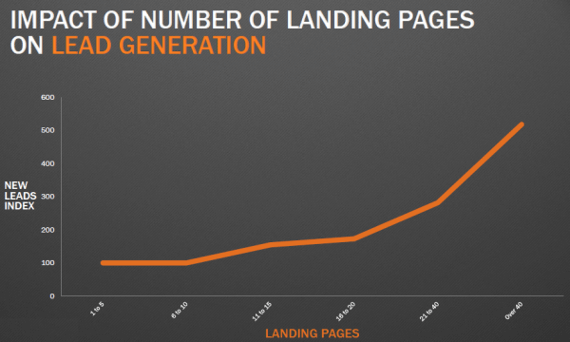
Studies show that more landing pages tend to equal more conversions. However, that doesn’t just mean more offers. It also means more relevant ones. It means more variations on the same pages you’re already using.

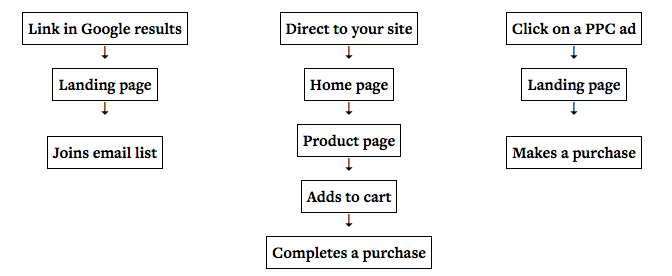
Think about your own user flow for a minute.

How do people go from one step the next?

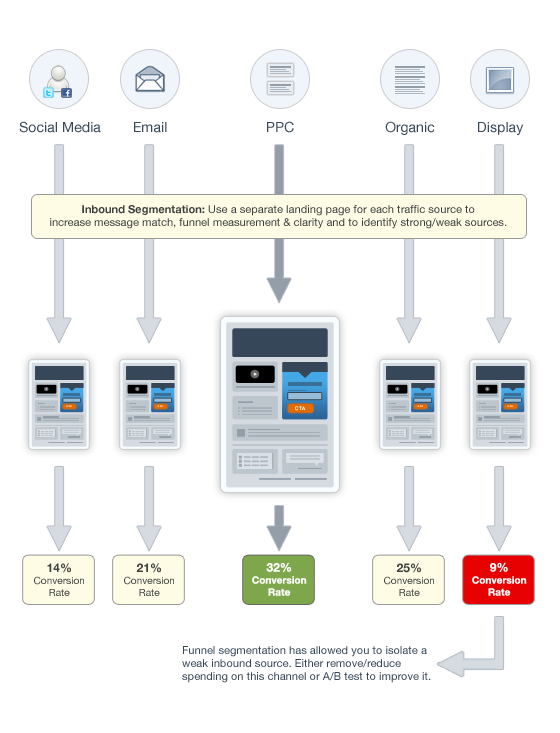
When you start plotting it all out, you’ll see drastically different end points along each step:

PPC traffic tends to convert well because people are typing in exactly what they’re looking for.

They have intent. That means they should receive a landing page offer, most likely.

But someone who arrives to a blog post from Google?

They’re just starting to get a lay of the land.

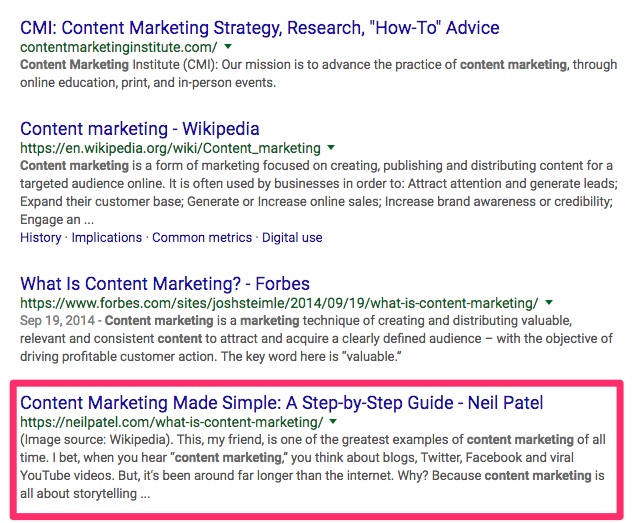
Say you Google “content marketing,” for example.

That’s a pretty generic search query. Chances are, you’re just looking for information at this stage.

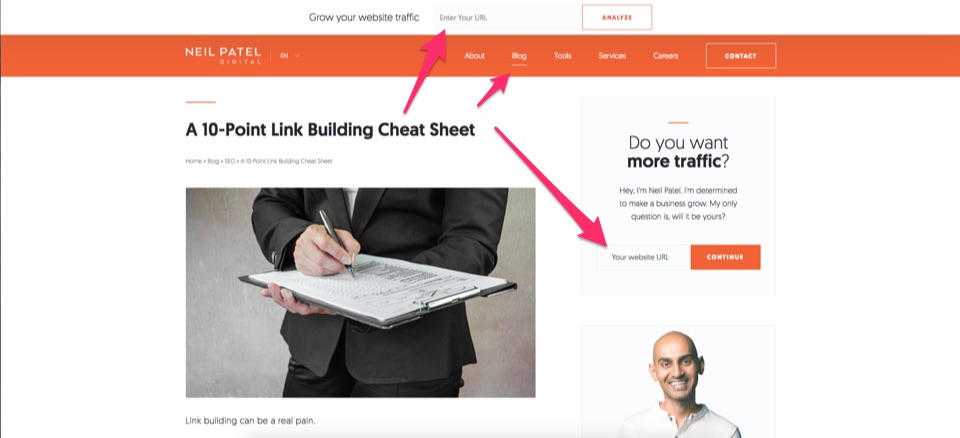
So instead of a product offer, your next step is probably to learn more information about the website you’re currently on:

Why are we talking about this?

Because it shows that someone’s referral source can often clue you into what they want.

Want more tips? I give some in this video:

Conclusion

Personalization is one of the leading trends in marketing.

Almost everyone agrees that it’s important. And almost every study shows positive results.

Why don’t more website look like Amazon’s then?

Because implementing personalization is much easier than it looks.

The tools are out there. Sure, many can get pricey when you’re on big plans.

But the technology exists and is affordable to most legitimate businesses.

The problem is that most companies don’t collect enough useful data points about each customer.

They gather demographic data, like household income. But not key data, like “what are they looking for on my site?”

Surveys can help. However, you’ll need enough people on your list, first.

Instead, start relying on more behavior data.

People are literally already telling you exactly what they want. Their clicks and actions are out there in the open.

You just need to know where to look to find it.

What’s your favorite example of website personalization in action?

About the Author: Neil Patel is the cofounder of Neil Patel Digital.


from The Kissmetrics Marketing Blog http://ift.tt/2E3LpzP
via IFTTT
Top Takeaways From Sprout Sessions: Inspiring Action

Five days and ten sessions later, we’re still buzzing from all the awesome insights we’ve learned at our second digital conference, Sprout Sessions: Inspiring Action. We’re grateful not only to all of our incredible speakers, but also to everyone who participated in this epic week of education and inspiration.

Our goal for this series was to move beyond theories and concepts to provide more tangible, actionable advice and tactics that attendees can put into practice immediately. Simply put, we wanted to inspire action. And by the end of the week, we could practically feel the forward momentum happening in offices across the country.

If you were unable to join us for all of the sessions or just couldn’t take notes fast enough, here’s what you missed:

1. Don’t use influencers to push sales. Use them to humanize your brand.

Ben Trinh from Postmates helped us navigate the rapidly evolving world of influencer marketing by pointing out that brands are starting to focus less on direct sales and more on connecting and engaging with audience in a more meaningful way. Part of this is knowing what type of influencer is right for your campaign’s goals. He shared that brands should utilize micro-influencers when they’re really trying to get granular and hyper-local in their focus and target, while celebrities may be a better fit for national/global campaigns.

He also preached a message of patience, stating that awareness is a long game that can be difficult to quantify in traditional week over week results.

He urged, “Don’t let the first round of results dictate the success of an influencer campaign. Let your learnings dictate your next campaign and continue to improve for the future.”

Of course, this is only the tip of the iceberg. For more on the current and future state of influencer marketing, check out Trinh’s full session here.

2. Use your mission and core values as a lens to evaluate your content.

We know that great stories = great content. But how do you find the stories that are the best fit for your brand? Storytelling masters Leigh-Anne Lefurge and Lauren Gebhardt from March of Dimes believe you have to start by looking within your organization. Lefurge and Gebhardt said having a company-wide dialogue to establish and agree upon your mission, core values and company manifesto is critical to your storytelling success.

“If you can’t articulate these, chances are other people are having trouble as well,” they cautioned.

The March of Dimes social team is also a huge proponent of incorporating user-generated content (UGC) into your social strategy.

“All around you, people are already telling your story,” Lefurge said. “And not just from the general public, but also from popular social influencers, your organization’s own employees and volunteers and even third party stories from celebrities and other news sources.”

But no matter the source, the ladies cautioned, “if your messages don’t ultimately support your mission and core values, then it’s not worth the share.”

To learn more from Lefurge and Gebhardt about how to incorporate emotional storytelling into your content strategy, watch the entire session here.

3. Consider the consumer experience. Don’t overlook how your content will look to your audience.

When creating compelling digital content, Joe Sargent from Effen Vodka told it like it is: “You get 3 seconds to capture a person’s attention when they’re scrolling through their social feeds. People consume with their eyes; they aren’t reading your beautiful copy.”

He urged marketers to engage visually and quickly—and to be mindful at all times of what the content and experience will look like to consumers.

The actual content needs to follow some guidelines, too. In his current role at Effen and the brand’s partnership with 50 Cent, Sargent has witnessed what can go wrong when posts veer off course.

The rapper’s content is at its best when posts are relevant, engaging, informative and give the brand personality. But when posts aren’t relevant to the brand or industry, are overly aggressive towards competitors and their customers or run the risk of legal repercussions, the negative impact on loyalty and retention can be severe.

To see some of the real-life campaigns Sargent has seen the most success with, check out the full session here.

4. Emotion is what drives action.

If you’re scratching your head trying to tie together the correlation between social strategy and a pool of sprinkles, chances are you missed Madison Utendahl’s chat on how the Museum of Ice Cream uses online content to inspire action offline.

And while some may argue that inherently visual spaces (like the Museum of Ice Cream) are an easy sell on a visual platform like Instagram, Utendahl was quick to point out, “Action doesn’t always mean ticket sales.”

For this museum, it’s not just about inspiring visits. The way Utendahl described it, it seems as if the team has a bigger offline vision.

“We want to inspire people to believe in the power of imagination, and that anything is possible,” Utendahl said.

To see the famous sprinkle pool and learn more about the museum’s inspiring offline and online mission, watch the full session here.

5. Decide what a crisis looks like for you.

One of the most insightful moments during our very own Andrew Caravella’s talk was when he made the point that crises can take many forms. We tend to think of a crisis as universally negative or detrimental, but the truth is that it can be subjective. What may be considered a crisis for you may not be as impactful to another brand. So before you begin creating a response plan or strategy, it’s equally, if not more, important to first identify possible crisis scenarios unique to your brand.

Caravella also pointed out that crises ring true across all channels. So even if a crisis begins on social, that doesn’t necessarily mean it’s going to stay there or that it’s the best channel to address it. Some crises may require a multi-channel approach.

Caravella explored several reasons why social has complicated crisis management, as well as actionable strategies to best address and resolve potential problems. This information could have a huge impact on your brand’s reputation one day, it’s a can’t-miss session. Watch it here.

6. If you don’t define your brand, someone else will write that story for you.

If you’re having trouble wrapping your head around what your “employer brand” is, Alicia Garibaldi from Glassdoor suggested considering, “What do people say about your company when you’re not in the room?”

Garibaldi outlined four main ingredients to an employer brand:

  1. Your company mission and values
  2. Your company culture
  3. Your employees
  4. Your reputation

She emphasized just how important it is to define your brand and what you value as the first step to creating a successful recruitment strategy.

And like many brands are beginning to realize, she was also quick to point out how important your employees are in defining your brand.

“Employees are your brand ambassadors,” Garibaldi said. “Treat them as if you would treat a customer.”

She went on to share that both company value and employee testimonials are the two most valuable types of marketing candidates. View the full session here for more actionable strategies for boosting recruitment.

7. Don’t just market your product, build a brand.

Okay, we’re definitely sensing a theme here. When Dropbox found itself drowning in a sea of similar brands, they decided it was time to make some significant changes. But it wasn’t their product that needed an update, it was their brand.

And even though the rebrand included new colors, a new logo and new visual style, Dropbox’s Social Lead, Susan Chang, claimed it was the change in overall messaging that made the biggest difference.

“It’s not enough to just market your features anymore,” she said. “You’ve got to connect to your audience’s emotions and aspirations to establish a relationship with your consumers.”

When all the other brands were talking about teamwork and simplifying workflow, Dropbox went inspirational. And their new message was born. To see the full evolution of their branding and to learn the important role social plays in connecting with their customers, watch the full session here.

8. It’s more important to listen to a customer’s needs than to talk about your solution.

We can’t help but start with some of the more eye-opening stats Sprout’s Sales Development leads, Kelly Marberry and Jenny Poore, shared with us at the onset of the session:

  • It takes 18 phone calls or more to make a connection with prospect
  • Callback rates are 1%
  • Social outperforms other sales methods by 2x the ROI

“The saying goes that when one door closes, another window opens,” Marberry said about the staggering numbers. “And today’s window is social media.”

In this digital age, there’s really no need to build a case for social selling. The conversation should focus instead on how to do it right. And according to Marberry and Poore, it takes an intelligent and personalized approach to be successful.

“It’s more important to listen to a customer’s needs than to talk about your solution,” said Marberry. “That doesn’t change from phone calls to social.”

But now with the power of social media, sales people have more insight into their prospects than ever before. Marberry and Poore advocate extensive research and discovery through social listening, a multi-channel outreach, and establishing credibility through thought leadership.

Watch the full session here to learn more about how you can harness the power of social to get into the consumer mindset and sell more effectively.

9. Use social listening to speak your customer’s language.

This candid agency roundtable touched on several topics including the evolution of the client/agency relationship, how agencies can empower clients to create their own compelling content and the most effective ways to prove social ROI to clients.

Although the entire session was chock-full of priceless expertise, when the conversation shifted to the advantages of social listening, it felt like we had struck gold.

Nicole Spears from Mindstream Interactive shared a story about how one of their clients had been using the word “scent” in their messaging, but found through social listening as a fly on the wall that most people use the word smell instead.

“It’s small changes like that made from insights you get through social listening that can really make the conversation more authentic,” Spears said.

Bingo. The other speakers agreed, sharing their own experience with listening and how they each incorporate it into their creative process.

Our agency partners are an incredible resource and we were pretty grateful we were able to gather a few of them together to pick their brains. Listen to the full session here.

10. When you write like everyone else, you’re saying “our products are like everyone else’s.”

Sprout’s very own Director of Brand Content, Lizz Kannenberg, blew our collective mind with her presentation on brand voice design—the systematic approach of applying solution-based principles to the development of brand voice and tone.

Not enough brands make their voice a priority. And the result is an unfortunate echo effect in the marketplace where everyone is saying the same things over and over again with no clear differentiation.

In the session, Kannenberg outlined the four primary phases of voice design:

  1. Gather inspiration
  2. Generate ideas
  3. Bring those ideas to life
  4. Listen, learn and evolve

She suggested that when it comes to step one we should look within and revisit our own brand position.

“Your brand position is your North Star,” she declared. “Remember what your customers love about your product, what your customer’s emotional needs are and what sets you apart from other brands. At the center of all that is your brand position.”

And that’s just step one. To learn the rest of the brand voice design process, as well as some real-world applications, view the full session here.

And that’s a wrap! Another heartfelt thank you to all of the speakers and viewers who participated.

Here at Sprout we live by the mantra, “Always Be Growing.” Not only is this phrase proudly displayed on the wall at our headquarters, but we also take great care to ensure its meaning is the driving factor behind everything we do as an organization.

And when re-imagined in the context of Sprout Sessions, it translates into arguably the most important takeaway of all: never stop learning.

This post Top Takeaways From Sprout Sessions: Inspiring Action originally appeared on Sprout Social.


from Sprout Social http://ift.tt/2nws27W
via IFTTT