Subscription-based companies face a problem.
They willingly lower prices to get people in the door.
Each monthly charge is only a tiny fraction of their costs.
That means it could take months for them to breakeven on each customer.
Unfortunately, most people that sign up don’t stick around that long.
People who sign up for a new desktop app or install a new mobile one often leave just as fast as they sign-up.
If apps can’t keep people around, they’ll slip into negative cash flow. They pay out more than they bring in on a per-user basis.
So it almost doesn’t matter how their Series A was or how much of their angel round is still in the bank.
Because they’re going to blow through it pretty quickly.
There are a few ways to fix this.
But one of my favorite over the years is remarketing.
It scales better than most online marketing tactics.
You can create the audiences and campaigns once. And then they’ll automatically run based on actions people do, or don’t, take with your app.
Thankfully, Google has recently introduced a few new features to make this tactic even more powerful.
I’m going to show you how to use those to increase retention and lower churn once and for all.
But first, you need to understand why remarketing or retargeting is a powerful churn antidote.
Why remarketing ads to boost app retention?
An old study came out years ago that shed light on the problems most apps face.
One of the most surprising findings was that up to 70% of free trial signups are “accidental.” Meaning, they never actually consider becoming a lead or customer.
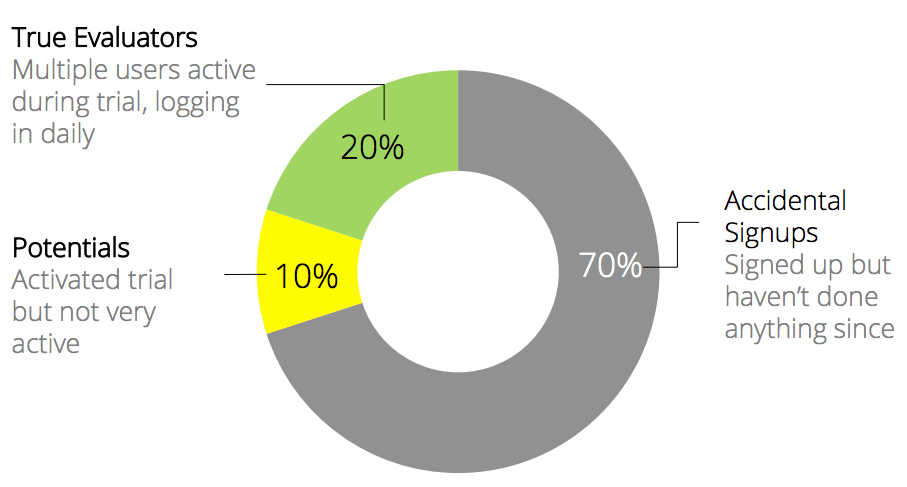
In other words, most apps are already behind right out of the gate.
Despite this example’s age, you know the behavior to be true.
Think about the last time you signed up for a free trial.
If you were interested in a new task management app, for example, you probably signed up for a few different ones.
And then you maybe chose one.
The depressing part for product people is that these numbers continue to fall of a cliff after each day.
Apps only have a 21% retention rate on the very first day. It falls to only 1.89% by the end of three months.

Think about that for a second.
You probably have to hang on to a customer for at least 90 days to break even. Except, only about 1-2% of the people signing up will stick around.
There are similar stats across the board. It doesn’t matter where you look.
Localytics found that mobile app retention is a little closer to 20% after 90 days.

Again, still not good. Retaining 20% of your customers is no way to build a thriving, profitable business.
But you know what?
This shouldn’t be a surprise.
This is similar to other companies when you think about it.
Ecommerce companies routinely see 2% conversion rates. Meaning, the vast majority of site visitors they get will leave without purchasing a single thing.
Ecommerce companies are also similar because they need to sell a TON of products to become profitable.
Average one-off sales around ~$15 bucks isn’t going to cut it.
They either need to drastically increase that average order value. Or, they need to keep people around for the long haul so they continue buying.
All of that means they need to use scalable marketing tactics. They can’t pick up the phone and call each person.
Which brings us back to remarketing and retargeting.
I’ll come right out and say it:
Most ads suck today.
There’s a reason why nobody pays attention ads anymore.
Just look at the number of people now using ad blocking technology. The numbers have literally exploded in the past few years.
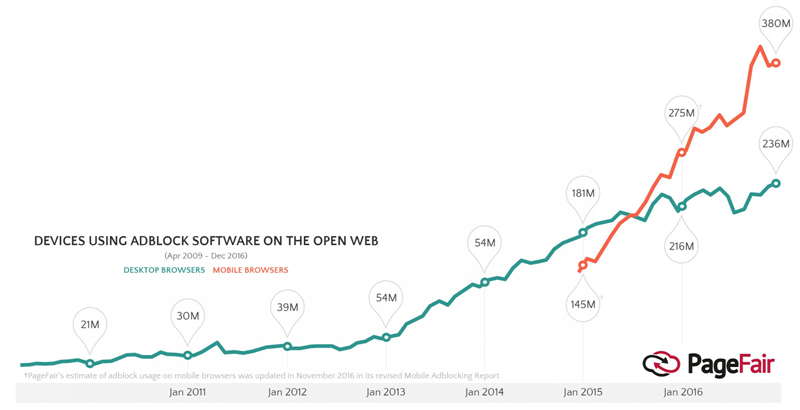
That’s over 300 million people, up from 54 million only three years ago!
Why are people blocking ads in record numbers? Because most of them are completely irrelevant.
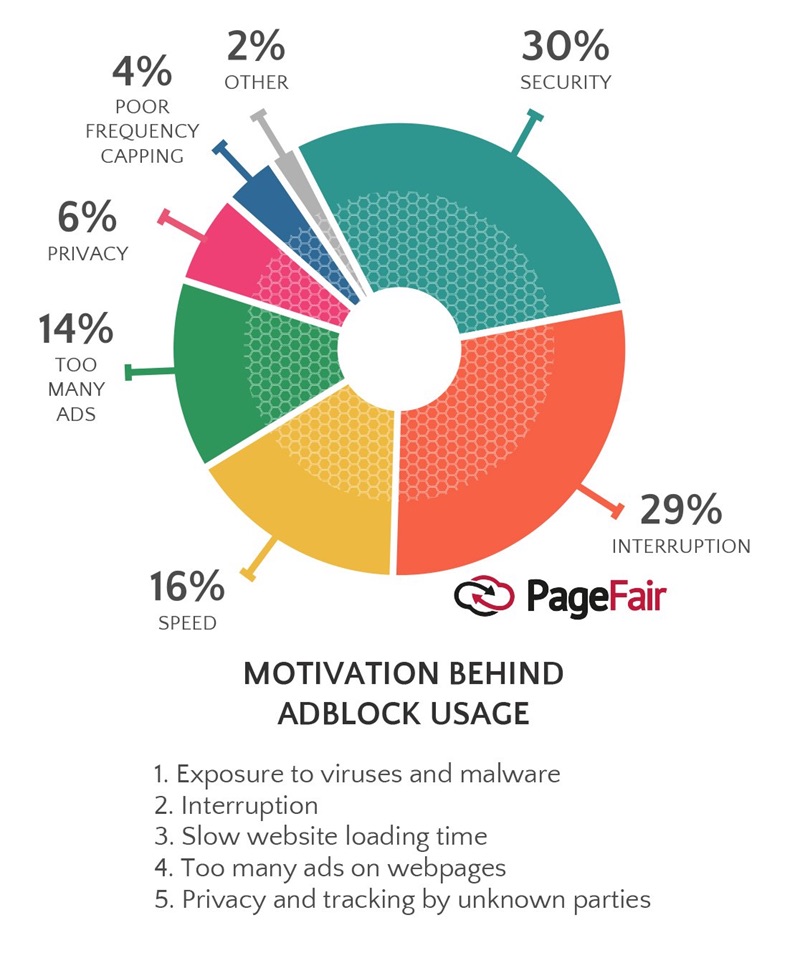
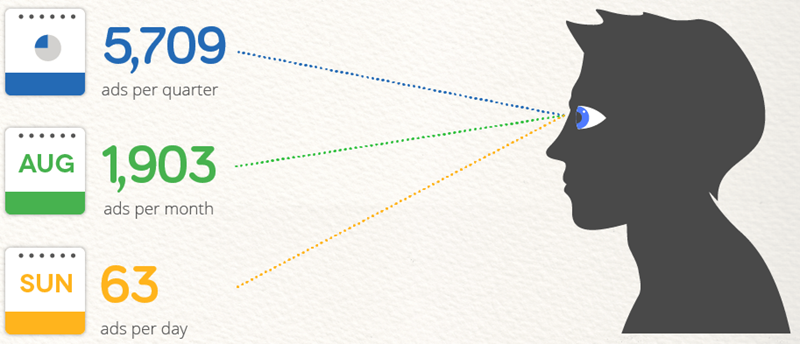
People hate ads because they offer nothing. And they’re completely overwhelmed by the sheer number of ads coming at them on a daily basis.
Remarketing and retargeting ads are the exception to the rule, though.
It’s typical to see the conversion rate for a marketing campaign fall over time.
People get used to seeing your ad on Facebook, for instance, so they start ignoring it.
And over time, those numbers keep getting worse and worse.
However, the conversion rates for remarketing ones actually improve.
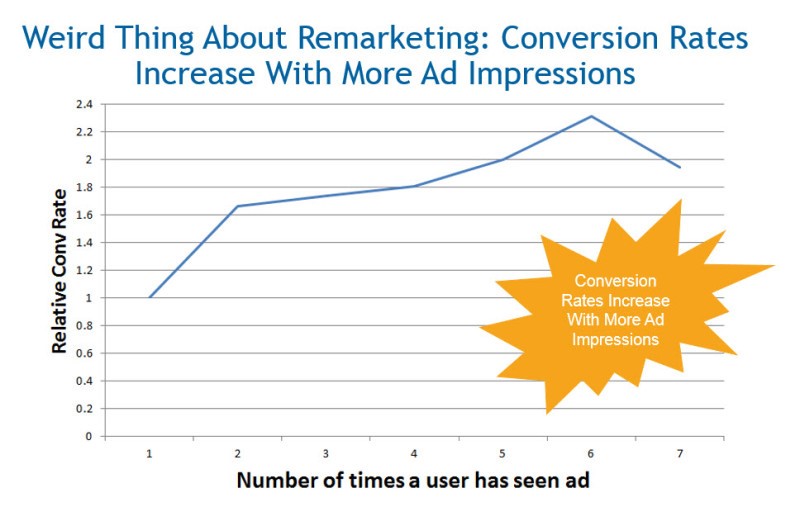
A lot of it comes down to the ‘rule of seven.’ People need to interact with your brand several times before they’re ready to purchase.
Remarketing can do that at scale. You set it up once, then just tweak the results.
You can literally set-and-forget campaigns.
So reaching 100 users doesn’t require any extra work than reaching 100,000. Except, of course, a bigger ad budget.
First, let’s discuss a quick primer on AdWords retargeting options. Then, we’ll get into the new fun stuff you can do with them.
How AdWords Remarketing works
Retargeting ads are pretty simple on the surface.
Each new visitor that comes to your site or downloads your app gets tracked.
That tracking pixel allows you to then serve them ads.
The best part is that today’s pixels give you all kinds of control over what you send them.
So you can serve new ads based on actions or inactions within your app.
Most of the time, these retargeting ads will be display-based.
That means they’re banner ads shown across Google’s Display network that reaches over two million websites and apps.
Google’s remarketing lists for search ads (RLSA) audiences can personalize text-based search ads, too. We’ll dive into these in the next section.
The first step to setting up retargeting campaigns is to create different audiences.
These audience lists are dynamic. Meaning, people will join or leave depending on the criteria you set up.
Then, you’ll can tailor ad campaigns or different creative based on the specific audience you’re targeting.
Login to AdWords and navigate over to the settings. Inside, you’ll see “Shared Library.” And under that, you’ll see the “Audience manager.”
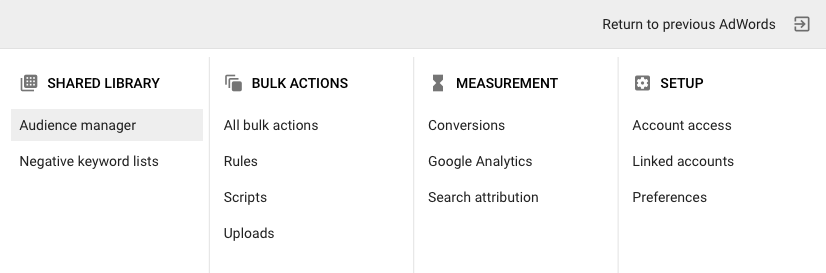
Here is where you can create or edit all the different dynamic audience lists you’ll use.
After you get up and running, you’ll probably want to have a bunch of different audience lists.
The best approach is think about your sales funnel.
Ad campaigns should target each stage.
That way, people at the top see one offer. While people in the middle or bottom see a completely different one.
Apps need to actually go even further. Because as we’ve seen, free trial signups or app installs doesn’t count for much.
So you’ll want to create more for people who’ve started a free trial but not converted. Or, people who’ve installed the app but haven’t visited within a certain number of days.
Inside the Audience manager, look for “Remarketing” and then “Audience lists.”
Right off the bat, the second option down is “App users.” Let’s look at a few ways to set these up.
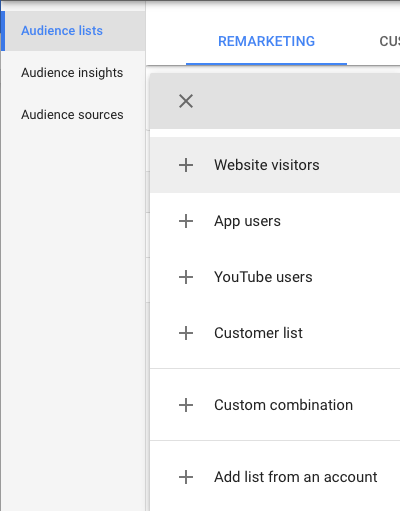
The “List Members” option is how you control the audience criteria. These settings dictate whether someone gets added here or not.
Profitable retargeting campaigns comes down to good segmentation.
The tighter the segmentation, typically the higher the conversion rate.
So you wouldn’t want to choose “All users of an app” for your first retargeting list.
Why? Because it’s too generic!
You wouldn’t be able to create personalized, relevant ads for each person on that list.
Instead, you’ll want to dig deeper into the other options on the “List members” selection.
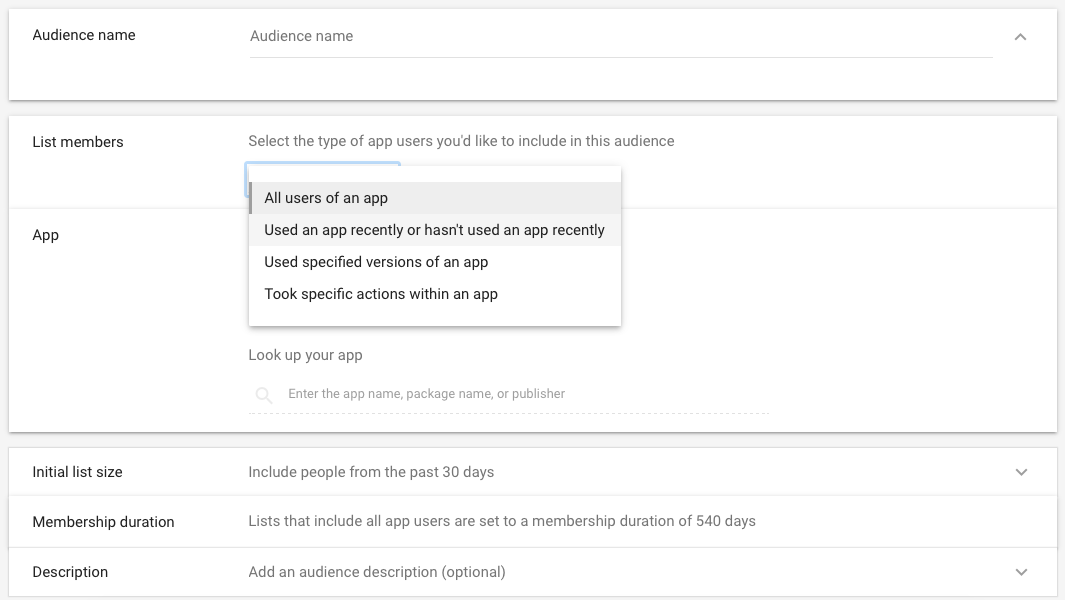
For example, start with “Took specific actions within an app.”
Personally, I would tie these into your specific onboarding milestones.
Did someone upload their first image, yes or no? Did they send their first email campaign, yes or no?
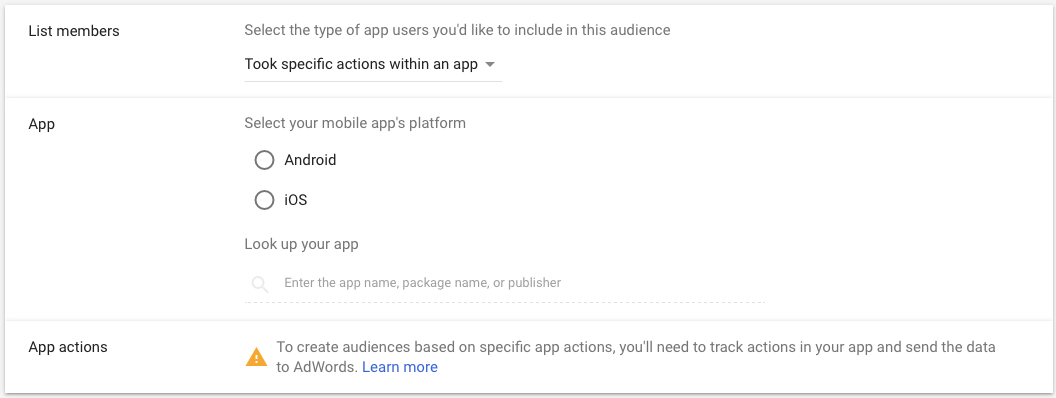
Lincoln Murphy calls these ‘success milestones.’
They’re essentially micro-conversions that lead people from one tiny commitment to the next.
If someone progresses through all of these steps within a certain number of days, your chances of retaining them shoots up dramatically.
Which brings us to the second app option.
You can also create a retargeting list based on user recency.
In other words, has this person visited your app within the past X number of days?
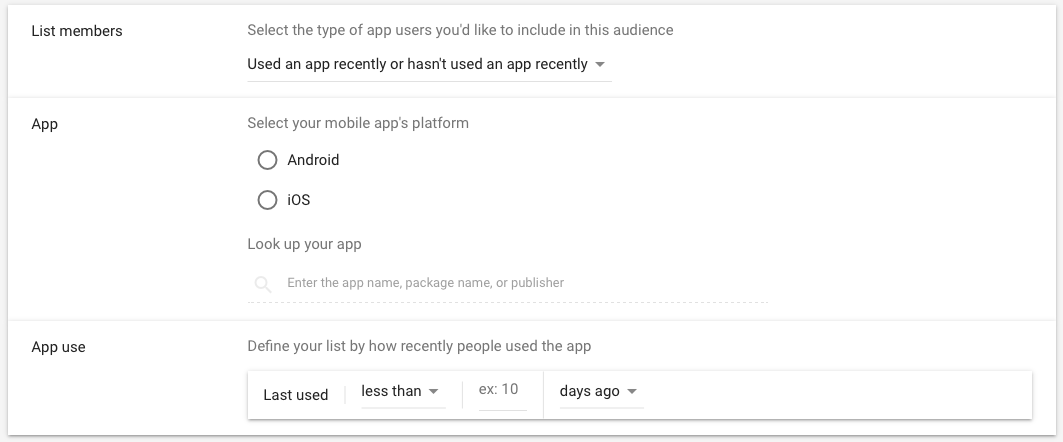
Treat these like you would a drip email sequence.
It’s almost like an autoresponder.
If people visit more often, you can send them upsell notifications faster.
But if people don’t visit, you can send them re-engagement campaigns about interesting features to get them back into your app.
You can also set up retargeting audiences inside Google Analytics if you want to use website behavior. Head over to the admin panel and look for “Audience Definitions”:
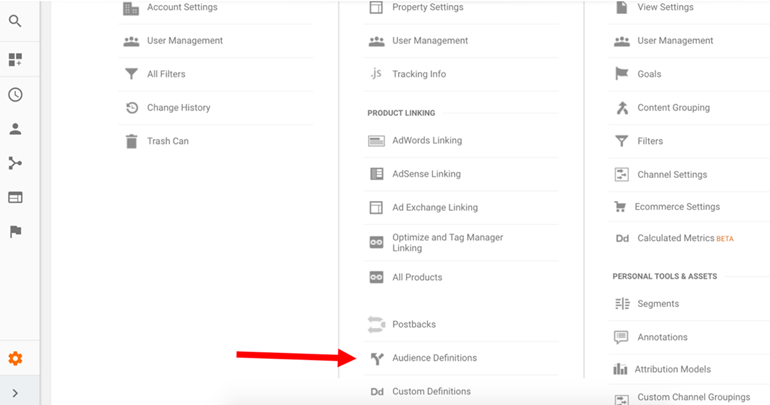
Underneath, you’ll be able to create new audiences from site interactions, like pages visited.

Here, you can create new segments of people who visit your Pricing page, for example, but don’t convert.
Pretty cool, right?
All of these audiences can be created around the most common objections.
That way, you can test different ad creatives to overcome pricing questions vs. feature ones.
The sky really is the limit.
But there are a few new features that can put your ads on a whole new level.
New option #1: RLSA audiences and IF functions
Google’s search network ads are among the best converting channels, period.
Nothing else comes close.
A big reason is because you can target ads based on intent.
You can use the mirror the exact words someone typed in.
Google’s RLSA audiences can help you retarget search network ads.
That way, you can cue off recent interactions they’ve had with your brand.
Why is this so powerful?
People routinely buy from brands they recognize.
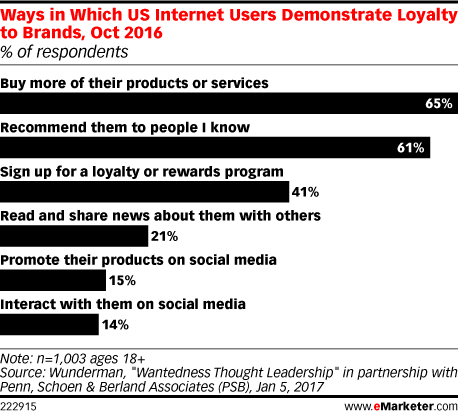
RSLA audiences pack two punches:
- People will recognize your brand name vs. the competitive ads they see, and
- You can also match someone’s intent based on the words they’re searching
So RLSA audiences are like gold for people who’ve signed up, installed, and then neglected to do anything else.
But it gets even better.
Last year, Google released IF functions for AdWords.
These allow you to take personalization one step further.
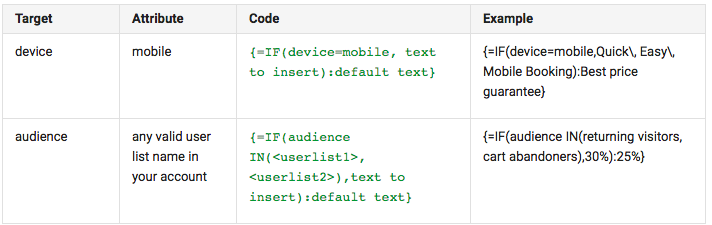
You can create an ad template that will switch words based on someone’s condition.
For example, you can tell if they’re using a mobile device instead of a desktop one.
Then, you can change the ad text from “Get our mobile app” to “Download now.”

It provides an extra layer of detail that most other advertisers can’t match.
You can customize these further based on your previous interactions.
So ad text can be personalized based on if someone’s previously downloaded your app vs. if they’re a loyal customer vs. if they’re a new potential impulse purchase.

And best of all, it’s like dynamic text replacement. You don’t need to create a hundred different ad variations.
You just need a few. Then, you can use IF functions to do all the customization for you — automatically.
They’re also pretty easy to use once you learn the ‘language.’
You can customize based on devices or all of these retargeting audiences you just created.
And here’s where the fun starts.
Remember we discussed funnel stages?
Now, you can create search ads that can cycle through offers based on where someone is in your funnel.
Sequential retargeting can be used to start with basic offers for top-of-the-funnel people, like an ebook or guide. Then, you can get more direct the further down your funnel they get.

Now, let’s say you get someone to download or sign up for your app.
Maybe they interact with five times over the course of five days. You know you have them on the hook.
Why not try to increase the discount percentage to get them to buy before it’s too late?
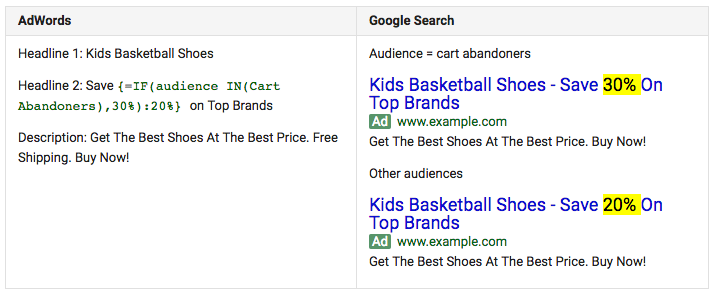
Or vice versa. Someone who’s interacting more often than others will probably convert anyway.
So why not pull back on your conversion offer to save a few bucks.
Either way, you’re boosting app retention and increasing profitability across the board.
And if you’re still struggling to get people into your funnel in the first, this next tip is for you.
New option #2. YouTube and mobile retargeting
Retargeting ads have one great weakness.
If you want to segment each audience as much as possible, you’re going to require A LOT of people in your initial sample.
Think about it.
The number of people who have downloaded your app, gone through the first two success milestones, but haven’t been back for 10 days is going to be pretty small.
That means you constantly need to fill the top of your funnel.
You need to continually get new people to interact with your brand.
That way, you’ll get enough people down to the bottom to make these campaigns worth it.
But you’re not just going to rush off and blow your whole budget on new search ads.
CPCs might not matter in the grand scheme of things.
However, they do when you overspend on clicks that don’t go anywhere.
Instead, we want to build up these retargeting audiences for as little as possible. The cheaper per person, the better.
That’s why video views come into play.
Video views offer one of the cheapest ways to quickly build up your audiences.
Seriously, you can pay a few cents per view and pixel every person.
Head back to your “Audience manager” from earlier.
Look for the YouTube option to unlock a plethora of new targeting criteria:
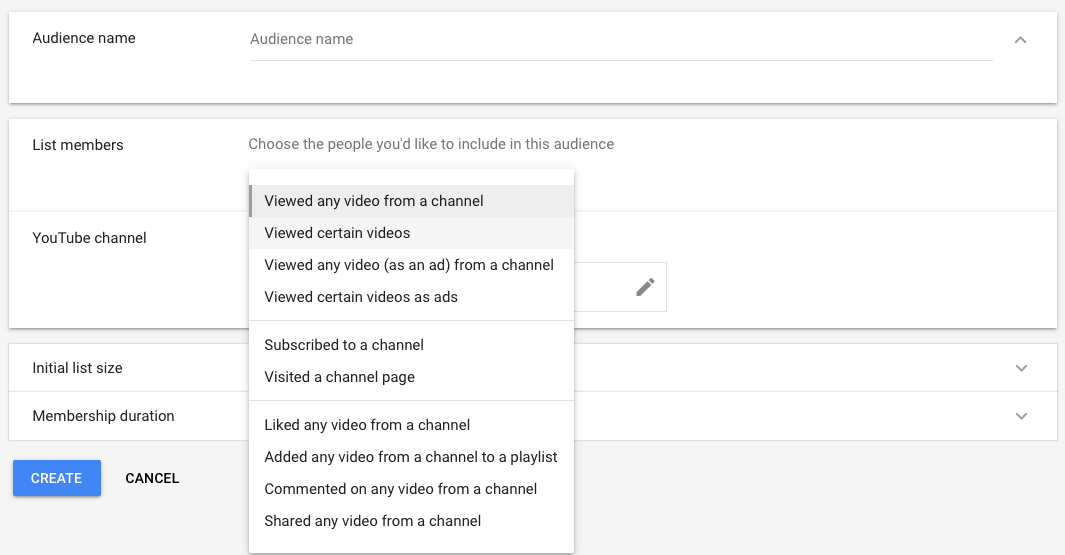
You can add people to these lists based on almost any interaction they do on YouTube.
Not only is YouTube the second largest search engine on the internet.
But they get a billion views per day from mobile devices.
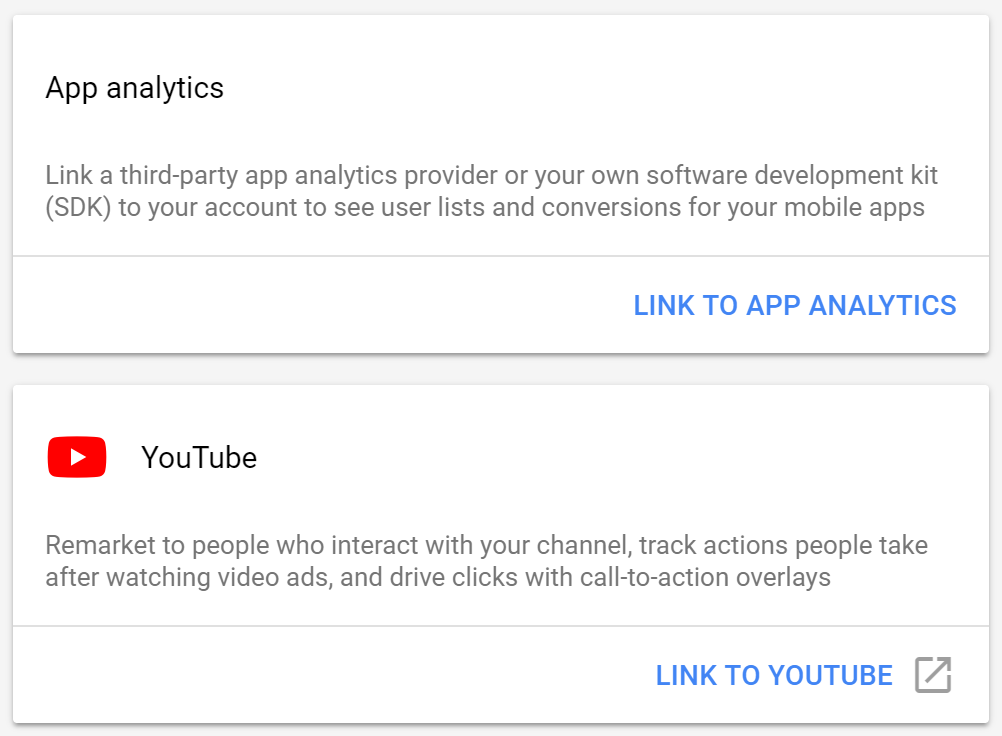
Beyond YouTube, you can also hook into your SDK analytics, too.
That means you can unlock new audiences based on if they’ve interacted in both places: Mobile videos and then mobile interactions.
Think about a typical marketing automation sequence.
If you can use multiple triggers like mobile video views and mobile download to know exactly where someone is in your funnel at any given time.
And that means you should know exactly which ad to serve them to get them to stick around, too.
New option #3: Customer match retargeting
I’ve saved the best for last.
So far we’ve been focused on just getting people into your app and sticking around for the first few days.
But that’s not enough.
Not when a huge chunk of your users will bounce within the first month.
Subscription economics mean you need customers to stay for months and months and months.
Otherwise, you don’t break even.
Any money spent so far has been a complete waste.
Well, say hello to customer match retargeting.
These audiences are created around people you know intimately.
You already have some history with them.
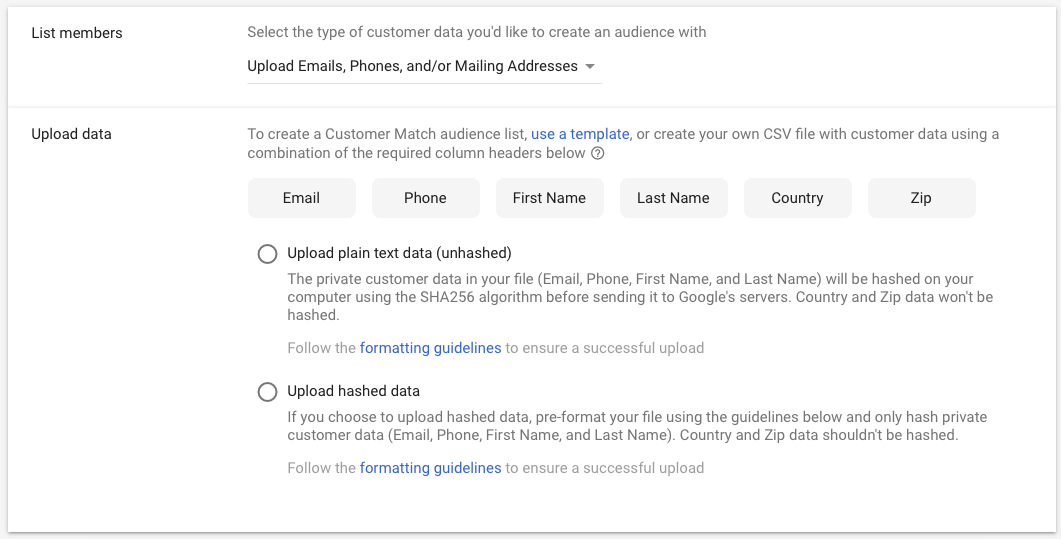
They’ve give you their email addresses, phone numbers, or more.
Maybe they’ve even purchased from you in the past.
The point is you have specific customer data that can now be used to continue retargeting them.
Take email addresses for example.
Now, you can combine messaging in multiple channels to keep them around.
Best case scenario, someone whips out their credit card and signs up for your app.
Awesome! Don’t stop messaging them.
You want to continue following up to make sure they know they made the right decision.
You don’t want them to get cold feet and visit a competitor’s site to check for a cheaper price.
Social ad platforms across Twitter, Facebook, and LinkedIn all offer some sort of ‘email match’ feature like this.
They will take the email addresses you upload, scan them against their massive library, and align as many as possible.
But Google’s email match rate far exceeds those other options.
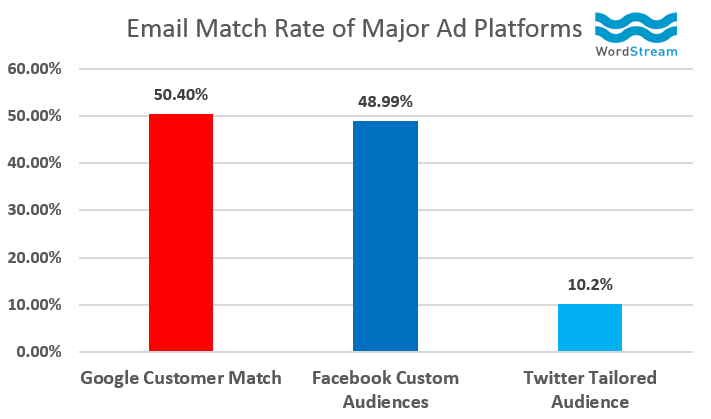
That means they’ll be able to successfully match a greater percentage of your app users
Google also just released the ability to target addresses and phone numbers. This is perfect for mobile apps.
Many times, you can get their mobile phone number but not an email address.
So now, you have another workaround to still build up your retargeting audiences.
At the end of the day, marketing is a numbers game.
You need to get a ton of people into your funnel.
And then you make little iterative tweaks to increase the number of people moving along each step.
Boosting retention is the same way.
You should still test new product onboarding techniques, on-site messaging, and email campaigns.
But you should also use retargeting campaigns that virtually run themselves.
The trick is to make sure you’re properly segmenting people based on their interactions with your app.
Because that’s the hard part.
If you can successfully create new audiences based on user interactions, serving them the right ads at the right time becomes a breeze.
Conclusion
Unfortunately, most people who sign up for a new app won’t stick around.
That’s true for desktop apps and it’s even more true for mobile ones.
Retention numbers across most studies are grim.
Some might be as high as 20% of users stick around. While others go as low as ~2%.
That means your job switches at a certain point.
You need to go from just worrying about acquisition-based channels, to retention-based ones.
Getting people to look at your app might not be the problem.
The issue that’s undercutting your profitability is your churn rate.
I love using retargeting campaigns because you don’t have to manually run them.
I won’t lie:
There is a lot of work up front to get everything set up. You have to invest a lot of time and energy planning out your audiences.
But from there, it’s all downhill.
Lining up your ad creatives becomes easy because you know exactly what each audience wants.
And then once you start them, you just have to monitor performance.
You never have to manually fuss with adding or removing people from each audience.
The ad campaigns run themselves.
That means you can get back to improving the product.
And you can be confident knowing that you already have campaigns on autopilot that are doing the work for you.
What are your most successful retargeting campaigns to date?
About the Author: Neil Patel is the cofounder of Neil Patel Digital.

from The Kissmetrics Marketing Blog http://ift.tt/2CamiGo
via
IFTTT
/https%3A%2F%2Fblueprint-api-production.s3.amazonaws.com%2Fuploads%2Fcard%2Fimage%2F711630%2F104c1ea5-fd7a-424b-8585-1f8decf6d8c1.jpg)


/https%3A%2F%2Fblueprint-api-production.s3.amazonaws.com%2Fuploads%2Fcard%2Fimage%2F711000%2Fbe3a0d4b-9b26-4808-bd9d-c2c1ec0b9a47.jpg)


