Wednesday, 2 June 2021

How to Create a Free Google Website For Your Business

How to Create a Free Google Website for Your Business

A web presence is essential for getting found online, especially these days. According to Statista.com, nearly a third of consumers in the United States look online for a local business every day. It’s simple: websites are essential for attracting new customers.

A website proves invaluable in other ways, too, like showcasing your products and increasing leads. However, your website doesn’t need to cost a fortune and include the latest features. If you’re a small business that just wants to let customers know who you are and what you do, a free Google website may be just what you’re looking for.

What is Google’s Free Website Builder?

Google’s free website builder is part of Google My Business and helps customers discover you online.

When creating your website, Google takes the information in your GMB business profile and uses it for the building blocks of your website. Aside from some customization, you’re pretty much good to go from there.

Although there’s no cost, free Google websites are professional-looking and offer a selection of contemporary themes.

Google’s website builder is suitable for everyone, even for beginners. There’s no need for technical expertise with a free Google website and no worries regarding extensive backups.

Additional benefits with a free Google website are:

  • You don’t need to rely on social media: Not every potential customer is on social media, and many may not be on the platforms you like best. Having a website of your own, where people can Google your name or what you sell and find your information without signing in to Facebook or Twitter, can bring in those customers.
  • Ease of use: One of the main benefits of a free Google website is its simplicity, and it delivers great-looking websites. For instance, even the free version of WordPress can seem overwhelming for the absolute beginner, with menus, pages, sub-menus, etc.
  • It provides the essentials: If you’re not looking for the whole e-commerce experience, then a free Google website is all you need for reaching out to a broader audience.

Here are some more reasons why you should use a free Google website for getting online.

Why Should You Build a Website Using Google’s Free Tool?

Only 64 percent of small businesses have websites. Meanwhile, 70 percent of potential customers are more likely to buy from a business with a website.

This means 36 percent of businesses may be missing out on 70 percent of buyers.

Websites make businesses seem more legitimate, particularly if the website looks professional. Google websites, which take almost no time to set up and require minimal maintenance, can look like you spent hours of time and thousands of dollars to make it look great.

If Google’s free website gets you found, why not take advantage of its ease of setup and free features?

Google Website Builder Features

The number one thing that sets Google’s business websites apart from others is that it automatically makes the site for you. You can alter things as you need, but if you have a Google My Business account and select the website option, it automatically populates the information on a site for you using a template you choose.

Don’t let its simplicity fool you. A Google My Business free website offers you plenty in the way of features.

For instance, it provides you with built-in optimization so customers can:

  • contact or message you
  • place orders
  • get quotes for services
  • book your services or arrange deliveries

Additionally, a free Google website allows you to “showcase what makes your business special” via:

  • images
  • stories
  • posts

Other features worth mentioning are:

  • integration with Google Maps and Calendar
  • image carousel and video links
  • connection with Google Drive

Besides the above, Google gives you automatic updates, advertising, and it’s mobile-friendly too.

As you can see, a free Google website offers a lot to the new business owner, but how does it compare with others?

Google Website Builder Versus WordPress and Other Similar Tools

The Google website builder one-page format beats many other options in the simplicity stakes.

Additionally, it creates a website with almost no effort on your side, which is where Google’s product stands out from similar tools. It also lets you import images with a few clicks, and you can track analytics, so all in all, it offers you the essentials.

The other main advantage over its rivals is you’re not starting from scratch, and you aren’t making all the decisions yourself.

Although it may seem basic to some, Google gives you a functional, great-looking website, and with some imagination, it delivers impressive results.

For inspiration, look at what Steel Mailbox did with theirs. This Google business website starts with the basics that could be pulled in from their business information (e.g., the directions function).
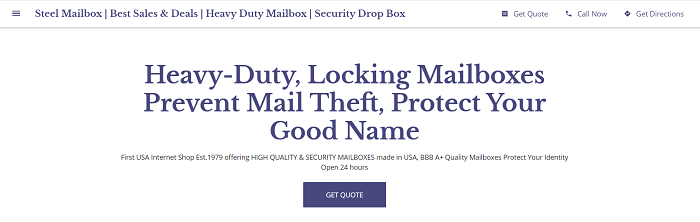
Free Google Website - Steel Mailbox example

If you click the “hamburger” in the upper left, you see options the company chose to add, which jump you to different page areas. One cool feature they added was a list of mailbox types with brief definitions of each one. This allows people shopping for mailboxes to understand what type they need without having to dig through Steel Mailbox’s non-Google site.
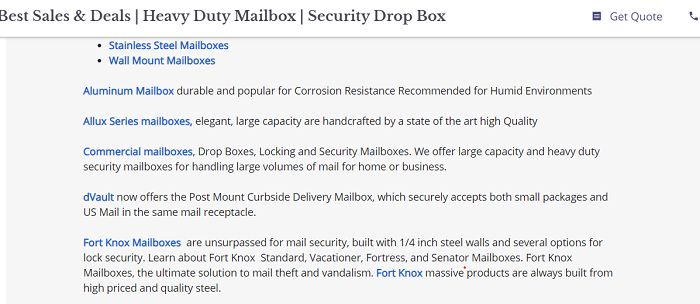
Free Google website - Steel Mailbox links to main site

If a customer clicked on one of those blue links, they would be taken directly to the type of mailbox they’re looking for. If they went through the main site—and you can have both a simple Google business site and a more in-depth one—they would likely have to do more digging to find precisely what they need.

What a great feature for customers on the go.

When it comes to this type of website, perhaps its weakest area is ongoing SEO optimization, but you can use a free or paid-for tool to find keywords and include them in your descriptions and posts.

WordPress

While bloggers, Fortune 500 companies, and small businesses use WordPress to build their websites, it’s actually a content management system.

You’ve two options for getting started. WordPress.com gives you the free version, while WordPress.org offers a paid one.

At the free level, the most significant difference between Google and WordPress is that you can create multiple pages within your site, while Google has a one-page format.
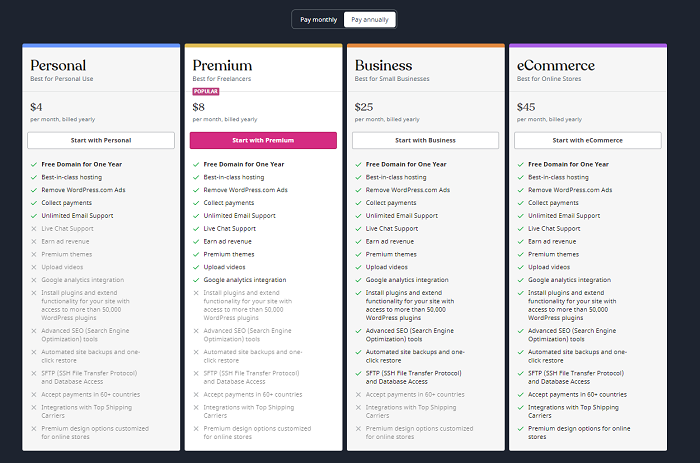
Free Google website - competitor WordPress price levels

When you get to the paid levels, you can add additional functions.

While WordPress offers many more functions than Google websites, no matter which level you use, you have to start from scratch. Nothing is auto-populated. Nevertheless, there are plenty of tutorials online if you’re just learning, and you won’t need to do any coding.

Wix

Wix is another free website builder, although it also offers premium and e-commerce plans too. Getting started is simple. Just sign up or log in with Facebook or Google to get started.
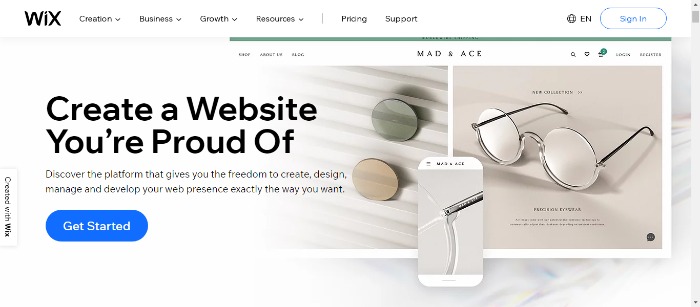
Free Google website vs Wix

Like WordPress, the free level is relatively limited in functionality. If you’re willing to pay, though, you can access hundreds of templates, additional types of analytics, and more.

Wix provides 500 different templates, and its drag and drop feature means beginners can use it without needing technical expertise.

Other features include:

  • media galleries
  • mobile optimization
  • unlimited fonts
  • a personalized SEO plan

Wix also provides coding for visitor tracking, while its analytics tool shows your sales, traffic, and visitor behavior.

How to Customize Your Free Google Website

After you have set up your Google My Business page (detailed steps are in the next section), you’ll be able to see your site free google website in a standard setup. You can then start customizing from there.

Free Google website - Google my business

The list nearest your sample site includes things you can do right now, like add photos, text, and themes. The one furthest left includes:

  • home
  • posts
  • reviews
  • messages
  • products
  • insights

Take some time to get to know these options and which each one does.

From the home page, you can also:

  • finish your profile by adding opening hours, descriptions, and logos
  • update customers on news and events
  • create a custom @yourbusiness email address
  • launch virtue tours and create adverts

You can see the themes, add pictures with a photo gallery, and edit your site’s categories from the other menu.
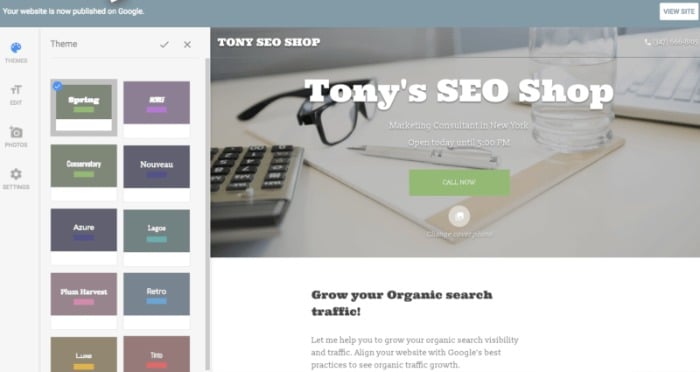
Free Google website - Tony's SEO Shop website example

To best set up your site, follow these steps:

  1. Choose your theme: For customizing, the most obvious starting point is by looking at the themes. There are ten to choose from, all with different colors and styles of text. Click on them one by one to see which theme most closely matches your business’s style and the image you want to convey.
  2. Add Photos: Click on the top right-hand corner of the header picture, drag your photo, or upload one from your computer. To add other images, click on “photos” on the left-hand side.
  3. Editing: Edit text by clicking the blue “Edit” button under photos.
  4. Additional changes: Click “More” to change settings, publish, or for advice on getting customers.

It’s that easy! You’ve finished building your free Google website, and you should be ready to start getting noticed online.

How to Build Your Free Google Website

Before building your website, set up your Google my Business Page, if you haven’t already. Here’s how to do just that.

  1. Go to Google’s website builder.

    You’re looking for the “website” heading. It’s the third one along at the top.

  2. Add your business name and click the blue arrow.

  3. Add your business category.

    If your service or industry isn’t clear cut, add the class representing your company the best. Click “Next.”

  4. Select your location preferences.

    Now, Google asks if you want your business location to appear on your website. Either select “Yes, I want it to appear on my website” or “No, I prefer not to.” Depending on the type of business, you may need to include an address. Choose the appropriate option and click “Next.”

  5. Choose if your business provides deliveries or services.

    Choose if your business provides deliveries or services. This step is optional.

  6. Add your region and click “Next.”

  7. Add your phone number.

  8. Add your business address details, including country and zip code.

  9. Verify your accout.

  10. Do this by clicking on the “Home” page, which you’ll find at the top of the menu on the left, and following the “Verify” link.

You’re ready to start building your free Google website!

Create a Free Google Website FAQs

What Is the main benefit of a free Google website?

Unlike its rivals, you’re not starting from scratch, and you aren’t making all the decisions yourself. Although it may seem basic to some, a Google site gives you a functional, great-looking website, and with some imagination, you’ll get impressive results.

How do I set up a Google My Business Page?

Google provides step-by-step instructions.

Do I Need Technical Expertise to Build a Free Google Website?

No, a free Google website creates a professional-looking website with minimal input from you.

How Does a Free Google Website Compare With Its Rivals?

While other options offer additional features, Google outshines its competitors regarding simplicity and ease of use.

Conclusion

Having an online presence is a necessity these days. If would-be customers can’t find your website, you’re likely missing out on clients.

However, building a website doesn’t mean spending a lot of money or needing technical expertise. Instead, you can begin by starting with a free Google website and set it up in a few easy steps.

Once you’re online, you can start benefiting from additional leads, more customers, and increased conversions—all the things you need for increasing your business success rate and growing a thriving enterprise.

How has using a free Google Business website affected your business?


from Blog – Neil Patel https://ift.tt/3uSwFdv
via IFTTT

Tuesday, 1 June 2021

How to Create Unique Gift Guides for E-Commerce Content

How to Create Unique Gift Guides for E-Commerce Content

Whether it’s for a loved one or a colleague at work, getting a gift for someone is never easy. 

One reason is there are billions of options to choose from. The other reason is most people don’t have the time to look through millions of catalogs to pick one.

That’s why if you run an e-commerce store, you should make it easy for your customers to select one of your products as a gift.

To do that, you must equip your customers with a gift guide to help make the selection process easier.

Why Should You Create Gift Guides for Your E-Commerce Site?

Besides making it easier for your customers to decide which of your products to buy as a gift, gift guides serve many other purposes. Here are a few more reasons why you should create a gift guide for your e-commerce site:

Gift Guides Boost Brand Awareness

One of the most significant reasons to create a gift guide is to help boost brand awareness. Particularly during holiday seasons, holiday gift guides are a popular form of content. Because they’re helpful in inspiring purchases, consumers are likely to share them with their networks. As a result, you’ll enjoy a boost in brand awareness.

Gift Guides Can Increase Sales

Every business-related activity you undertake must ultimately have an impact on your bottom line. That’s exactly why you must invest in a gift guide for your e-commerce store. A well-designed gift guide is an effective tool in helping you increase sales on your e-commerce store.

Gift Guides Provide Blog and Social Media Content

Another reason to invest in creating a gift guide for your e-commerce site is gift guides provide you with engaging content for your blog. They also make for excellent social media posts. As a result, you’ll be able to maintain high engagement rates with your target audience.

Gift guides are also able to help you achieve many of your marketing and sales goals.

How to Create Unique Gift Guides for Your E-Commerce Business

Now that you know what a gift guide is and why having one on your e-commerce is essential let’s dive into how you can create one.

1. Identify Your Audience

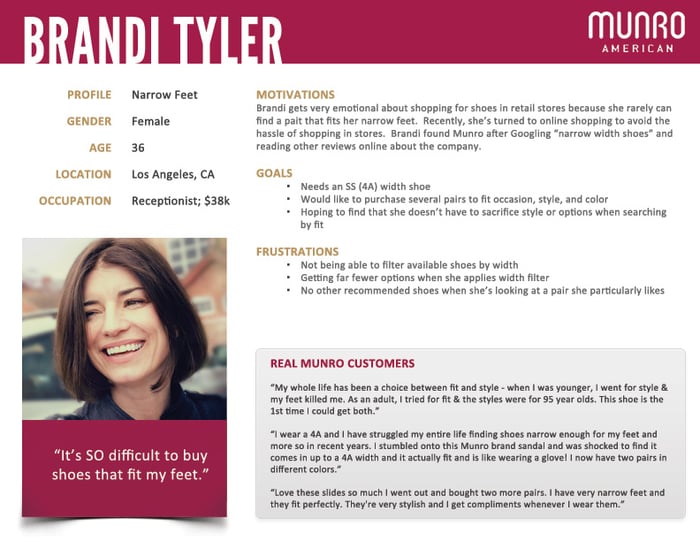
Audience research is one of the most critical steps in creating a gift guide. That’s because knowing your audience is key to developing accurate buyer personas.

Audience research plays a critical role in developing effective gift guides.

For your gift guide to be appealing, you must understand your target audience enough to create personalized recommendations.

Here are a few tips:

Collect Demographic Data

Demographic data refers to your target audience’s physical attributes. Examples include:

  • age
  • gender
  • marital status
  • occupation
  • geographic location

Understand Your Audience’s Psychographic Data

Psychographic data is information about your target audience’s:

  • values
  • attitudes
  • interests
  • personality traits
  • beliefs

Both demographic and psychographic data are essential to understanding your customers’ needs, pain points, and aspirations. As a result, you can tailor a gift guide that will be relevant by offering personalized product recommendations.

2. Choose Items to Include in Your Gift Guides

Once you understand your audience, the next step of creating your gift guide becomes easier: choosing the products to include in your gift guide.

Though you may be armed with rich customer data, choosing the right products to include in your gift guide can be a daunting task. A few tips to guide you in choosing unique gift ideas include:

Look at Your Sales Data

The most effective way to choose items is to look at your sales data. Your data will give you insight into:

  • buying trends and habits
  • popular products
  • unique segments

Besides your own sales data, you can also leverage tools like Google Trends to identify emerging opportunities in your niche.

Ask Your Customers

Another effective way of figuring out what to include in your gift guide is to ask your customers. The best way to do this is to leverage interactive content like surveys, polls, and quizzes. These will give you insight into your audience’s preferences. To leverage interactive content, you can invest in an interactive content tool. Alternatively, you can create polls on your favorite social media channels.

Consider Creating Gift Bundles

Not sure what to include and exclude in your gift guide?

Then consider creating gift bundles.

Gift bundles are an excellent way of showcasing your product range. For your bundles to be effective, you must get the right mix. Tips for getting the right mix include bundling:

  • complementary products from your product range
  • products you’ve succeeded in cross-selling
  • fast-selling products with slow movers

You can also consider collaborating with other brands that target a similar audience to yours but don’t sell the same products you do.

Consult Your Suppliers

Your suppliers are another avenue you can leverage to know which products to include in your gift guide. Ask them which products are moving fast in their inventory or those they anticipate to be buzzworthy.

The success of your gift guide lies in knowing which products are relevant to the season. Invest time in ensuring the products you include will resonate with your target audience.

3. Craft Headlines for Your Gift Guides That Evoke Emotions and Inspire Action

Like all other types of content, your gift guide depends on a powerful headline for success. Take your time to craft one that:

Evokes the Readers Emotions

Gift buying is usually an emotion-driven endeavor. When your customers shop around for a gift, they do so (in most cases) for someone they have an emotional connection with. Hence, they want a gift that will have an emotional impact.

That’s why your gift guide headline must evoke your target audience’s emotions.

To craft such a headline, use personalization. Speak directly to your customer by using the word “you.” You can also create emotion-evoking headlines by using words that trigger an emotional response in your readers.

Inspires Readers to Take Action

Your gift guide headline must also inspire readers to take action, preferably purchasing one of your products. To do this:

  • use active voice and avoid passive voice
  • use power words
  • paint a picture of the benefits of reading your gift guide

A well-written headline is essential to hooking your target audience and getting them to browse for the perfect gift for their loved one or colleague.

4. Find Quality Product Images

Once your customers click through into your gift guide, you must immediately grab their attention. The best way to do that is to use high-quality product images. Here’s an excellent example from Brightland’s gift guide:

Gift Guides - Find Quality Product Images

Besides attention-grabbing, images also help:

  • Give instant information: Human beings are visual creatures and process images faster than text.
  • Make your gift guide easy to scan: Images are an excellent way of helping your readers scan your gift guide.
  • Images encourage sharing: People love sharing helpful stuff they find on the internet. Those who love your gift guide are more likely to share it if you use high-quality images.

Getting the images to use in your gift guide is quite easy. Your first port of call would be to get your manufacturer’s product images. However, a better option would be to hire a professional photographer and take your own images. Doing so allows you to place your products in a setting of your choice, resulting in personalized images.

5. Determine the Format of Your Gift Guides

Gift guides come in all shapes, sizes, and styles. As you plan on creating your own, you must determine which is the best format for your guide. Examples of the gift guide formats include:

  • blog post
  • slideshow
  • infographic
  • video
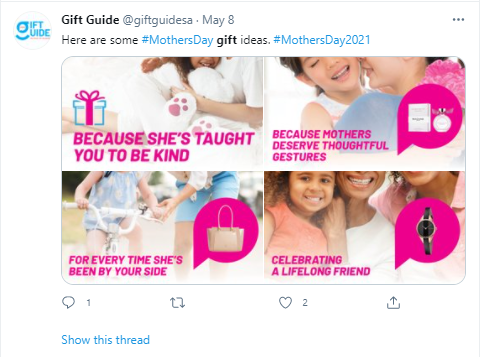
  • social media post (like Instagram posts)

How do you know which content format to use?

There are a couple of factors you can use to guide you on the best format for your gift guide:

Your Audience

When deciding which content format to use, the first port of call must always be your audience. Check your blog and social media analytics to see which content types perform well with your audience.

The Platforms You’ll Market Your Gift Guide On

The platforms you use to market your gift guide are another factor determining the format of your guides.

Your Niche

Finally, another essential factor that impacts the format you should use for your gift guide is your niche. If you’re in a visual niche, your gift guide may not need as much text as one in a niche where info plays a bigger role in driving conversions.

6. Market Your Gift Guides

With your gift guide ready, it’s time to show it to the world.

How do you get eyeballs on your gift guide?

Here are a few tips to help you market your gift guide to the right audience.

Share It on Social Media

One of the best marketing channels for your gift guide is social media.

Market your gift guides on social media to get it in front of more people.

With over 3.6 billion monthly active users, social media gives you access to over half of the world’s population.

That’s not the best part.

Particularly when you run paid ads, you can hyper-target your campaigns to reach people who match your ideal customer profile (ICP).

Send It to Your Email List

Another excellent marketing channel for your gift guide is email. Although it’s one of the oldest and most basic digital marketing channels, email is still one of the best when it comes to marketing your gift guide.

One of the best advantages of email marketing is most of the people on your list are already interested in what you have to offer. The chances of them knowing other people interested in being gifted with your product are also high.

Another advantage of email is you can segment your email list, enabling you to create personalized messaging. You can also consider making a personalized gift guide for each segment, increasing the chances of conversion.

Leverage SEO

Search engine optimization (SEO) is still applicable to marketing your gift guide. While basic, it’s easy to forget to implement best practices like:

  • keyword research
  • adding tags to your images
  • strategic linking
  • focusing on user experience (UX)

Make it easy for your customers to find your gift guide when they’re looking for gift ideas. Having an effective SEO strategy is exactly what you need to do that.

Creating your gift guide is only half the battle. Getting it in front of the right people’s eyes is the other half. With your well-designed gift guide and these three gift guide marketing tips, chances of your gift guide succeeding in driving sales.

FAQ: Gift Guides Best Practices

Shopping for gifts is never easy. It becomes a more difficult task if you have a long recipient list. That’s why your customers appreciate a helpful gift guide. While we’ve covered how you can create a unique gift guide for your e-commerce site, you probably have a few questions regarding gift guide best practices. Let’s quickly answer a few before we wrap up.

Do Gift Guides Really Help Boost Sales?

There are two main reasons gift guides work so well. The first is people don’t have time for gift shopping—yet they have to. The second is there are just too many products to choose from. Gift guides solve both problems by helping your customers find and decide on what to gift their friends and loved ones.

How Do I Improve the Chances of My Gift Guide Converting?

One word: data.

Before getting started with your gift guide, you must gather all the data you can about your target audience and market. Scour your sales records, and use competitor analysis tools and any other data collection tool you can get your hands on. Use these to mine every piece of data that will help inform the design and creation of your gift guide. Doing it this way will ensure you create a hyper-targeted gift guide.

Conclusion

Creating a gift guide is a must if you run an e-commerce business. They don’t just boost your sales during holiday seasons; gift guides also help raise your brand awareness.

Gift guides are the perfect marketing tool as they attract high-intent shoppers.

That’s why you must include them in your marketing strategy. However, for them to work, you must ensure yours is unique and well-crafted. Use the tips above to create your first (or next) gift guide for the next holiday season.

Have you ever used gift guides to boost sales on your e-commerce store?


from Blog – Neil Patel https://ift.tt/3uHqMzq
via IFTTT
How to Get Backlinks for a New Site with No Money

How to Get Backlinks for a New Site With No Money

Learning how to get backlinks can help you jumpstart your brand, with no investment upfront.

The idea is simple: just ask a site for a backlink.

However, sometimes these requests get lost in a flood of emails. The average person receives 88 emails a day alone. Other times, requests gets ignored or flat-out denied because they aren’t high priority.

What do you do?

You have to create a backlink request that is impossible to ignore or turn down.

Why Is It Important to Know How to Get Backlinks?

You’ve probably heard backlinks can benefit SEO.

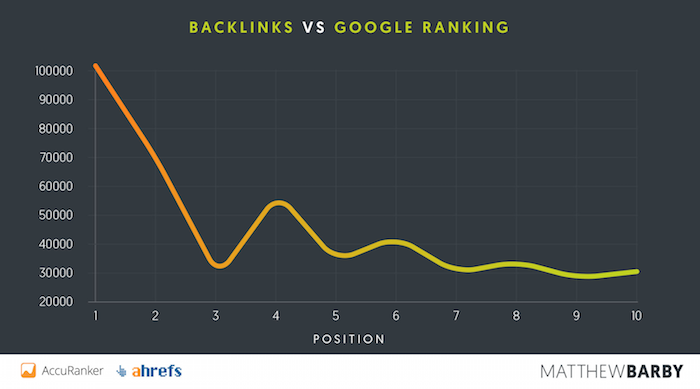
They are a component of how Google ranks websites. The number of backlinks you actually need to land on the first page of Google results is enough to make most marketers give up.

how to get backlinks - google rankings vs backlinks

Even the ninth and tenth positions have an average of over 30,000 backlinks.

That’s why you should get started right away.

15 Tips to Get Backlinks

It’s time to get strategic and create a backlink request plan that gets into the mind of other site owners. Here are some tips to get you closer to more yesses. Here are 15 effective tips for getting more backlinks for your website:

1. Understand What Site Owners Are Looking For

Some sites get links just because they pitch themselves well. On the flip side, even sites with amazing content that can’t pitch themselves well don’t get backlinks.

This is why you have to nail this part of your request.

Like every part of marketing, it’s about knowing what your audience is looking for and speaking to that in your request. If you only talk about how amazing you are and miss the key points of what they are looking for, you’re likely to be overlooked.

The next few tips will cover some of those things site owners look for.

2. Emphasize What Benefits the Site Gets

The reason why any blog accepts backlinks is ultimately to help themselves. To get a link, you have to tell the site owner what benefits they will get.

Here’s a little secret: Most sites are looking for the same benefits, such as:

  • content relevant to their site
  • detailed content
  • well-written content
  • a legitimate site

3. Write Relevant and Competitive Content

If you don’t have content worth linking to, no one will link to you. At the heart of generating backlinks is creating great content, and it needs to be better than other content in your industry.

Here’s a simple way to do that. Type the topic of the keyword you’re looking to target into Ubersuggest and click “Search.”

Click on these titles to browse the articles, looking for:

  • How many images does the blog post have?
  • What is the word count of the blog post?
  • What is the title?
  • What is the featured image?
  • What is the title tag and meta description?

Follow up with these tactics in your article:

  • Include higher quality images than any of the competition.
  • Have a higher word count on your blog post—or at least make every word matter.
  • Write a more compelling title.
  • Use an interesting featured image.
  • Write a title tag and meta description that is more focused.

Essentially, your goal is to analyze the competition, then do everything better.

4. Keep the Content Detailed and Deep

We talk a lot about long-form content, but comprehensive content might be even more important.

You can have a 6,000-word article that’s trash, or a 1,000-word article that hits it out of the park.

The sweet spot is somewhere in the middle. If you write long content, it will naturally have to be detailed. Longer content gets more links and usually has higher SERP rankings.

Readers love long-form content (and search engines do too).

All of that said, if you have to choose either detail or length, go with detail.

5. Make Sure the Content Is Well-Written and Well-Produced

Your content has to tell readers something clearly.

Seth Godin’s blog is a great example of this. He posts every day in a voice that’s casual and often breaks the rules of grammar.

People love Seth’s blog because it brings a unique perspective to the table. The improper use of a semicolon isn’t going to turn readers away from that.

Don’t ignore grammar, but don’t get obsessed with it.

The same goes for content that isn’t text-based, like videos and infographics. Share knowledge that’s worth your readers’ time.

6. Prove Your Site Is Legitimate

You don’t have to have a custom design theme to appear legit, but make sure that the sites you’re pitching know you’re the real deal.

Linking to your social profiles can help with that.

If your site is new, you won’t have much clout. You’ll have to be even more persuasive. Put in the hard work to create top-tier content, and you might very well be rewarded.

7. Sell Your Value

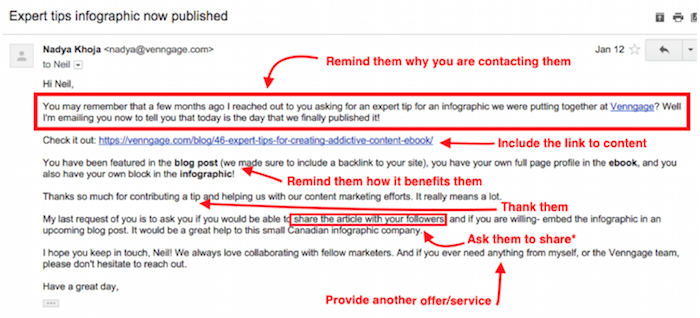
It sounds pretty simple, right? Yet, this step can often be overlooked. Your link request needs to sell your article or page as an invaluable resource, and you need to make the benefits crystal clear.

Here’s a good example:

How to Get Backlinks - Request template

How can you communicate benefits in your pitch?

You need to have real benefits to offer.

The most important benefit is relevant content. You need to have something that will add more value to the resource you’re inquiring about. Having a relevant article is all you really need, but if you can offer more, that’s even better.

Specifically, if you have an established audience you can promote to, that’s gold. That’s what every site owner dreams of.

8. Make Your Pitches Short

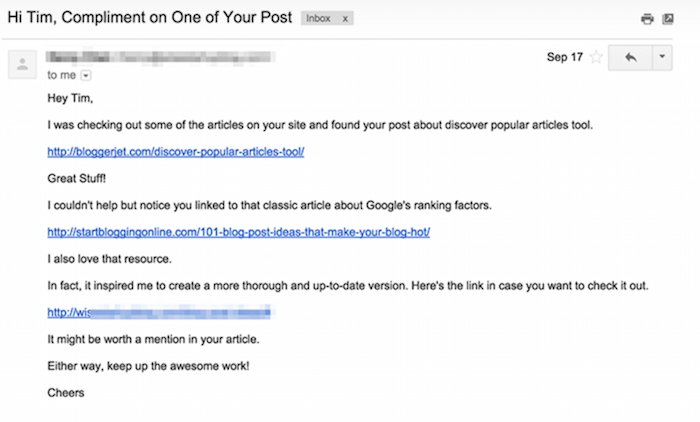
Brevity matters a lot. Take a look at an example of a pitch:

How to Get Backlinks - Example request

There are lots of single lines, and it’s easy to find and click on the links. It’s to the point, and there’s no question what the email is about.

9. Leverage Public Relations

Building relationships is one of the best ways to build backlinks. When people don’t know who you are, they won’t link to your website.

One great way to start building relationships and establishing yourself as an expert in your industry is by being active on social media.

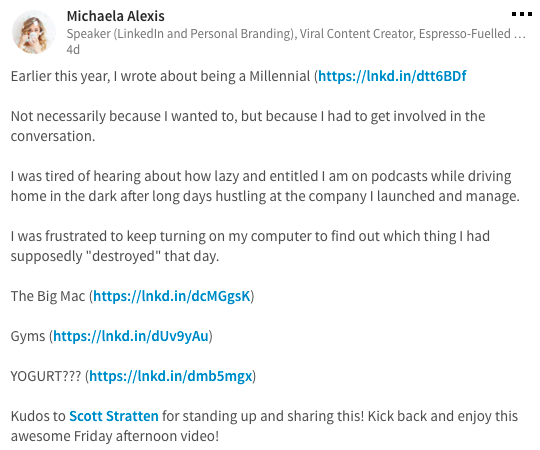
Here’s a post from Michaela Alexis, for instance.

How to Get Backlinks - Leverage Public Relations

What does she do well here? She keeps her personality intact.

Avoid sounding boring and bland. Rather, insert a bit of yourself into each statement.

As you stay active on social media, you’ll start interacting with a variety of people. You’ll have the opportunity to meet others in your industry and maybe even guest blog for them or hop on a video call. When the opportunity comes, don’t pass it up.

Guest blogging can quickly turn into a backlink, and establishing yourself as an expert can do the same when people ask you for a quote on a particular topic.

10. Do an Original Study

If you have data no one else has, that makes you a valuable resource. When others want to reference your study, they have to link to where they got it.

That means you’ll get a backlink. Doing your own study may seem like a massive amount of work.

Google Forms has the answer. You can create a custom survey, copy the link, and send it out. This is a simple way to create an original study, collect your own data, publish it, and encourage backlinks.

After all, you’re the only one with the data.

11. Create an Infographic or Original Image

Since infographics are visual and easy to scan, readers love to browse them. That means content marketers love to share them.

If you create an infographic for your website and someone shares it on their site, they have to link to your website. You can create an infographic for free or a small price (depending on the graphics you choose) with tools like Venngage. Once you create and publish your own infographic, you can also reach out to other blog spaces in your niche and ask them to share it if it’s pertinent.

12. Write Testimonials for Other Websites

Writing testimonials or reviews for others might sound counterintuitive, but doing so could be good for your SEO and backlinking strategy.

When you do, the website may include a spot for a backlink or link to your website.

While it feels like you’re helping the other business generate leads, you’re also helping your own website’s rankings. That’s well worth the small contribution.

13. Link Externally and Then Reach Out

Why would you spend time linking to other people’s websites?

Think about this: You link to another website and then reach out to let them know you enjoyed their article so much you shared it on your own website.

Since you gave them a backlink, it’s not unlikely they’ll give you a backlink in the future.

Here’s what you could say:

Hello, [name]!

I just wanted to let you know that I really enjoyed your [blog post you linked to]. You’ve been creating content for quite a while, and I’ve always found your information valuable to my business.

In fact, I enjoyed the particular article so much that I linked to it in [the article you wrote]. Let me know what you think of the piece!

I’ll keep doing what I can to share your remarkable content with my audience in the future.

Thanks again for all the awesome insight.

[your name]

14. Comment on Other Relevant Blog Posts

Before you go off and start passionately commenting on other blog posts and throwing out backlinks every which way, let me explain something.

While you might occasionally have an opportunity to tactfully include a backlink in your comment, more often than not, the comment needs to be for the primary purpose of building a mutual relationship with the author:

  • If you don’t know what to say, make the author’s day.
  • If you want to share a bit more, you can add some meaningful insight into the topic at hand.
  • If you want to craft a comment that merits a response from the author and helps build the relationship, add your own commentary to the discussion.

That’s a recipe for relationship building, which is a recipe for backlink building.

15. Align Social Signals

If you’re serious about building out your backlinking strategy and rising through the ranks, then aligning social signals is a must.

Social signals communicate to search engines how active and updated your website is. The more active your website, the better your rankings.

You may not have the time to leverage every single social platform. In that case, choose one or two that you can keep up with, and post at least once a day on the platforms you’ve chosen.

Check that all of the information on your social profiles matches your website’s information. Things such as company name, address, and phone number need to be aligned to communicate to search engines that your website is up to date.

This is a simple but effective way to build your rankings with very little extra work.

Writing the Pitch to Get Your Backlink

First, think about your subject line. You need to spend more time on your subject line than any other part of your request because it might determine whether or not someone will click on it. There are no wrong answers here, but you do want to write something compelling.

Here are a few suggestions to get you started, but keep in mind that it’s super important to use your natural voice:

  • [Name], are you interested in partnering up?
  • I’d like to give you something for free.
  • It’s time to take your content to the next level.
  • Your article is missing something!

Next, you’ll need to write the actual body of the pitch. Be friendly and approachable, and don’t forget to state the benefits you’re giving the recipient.

Reach out to other sites that have linked to that resource, and let them know you have a better version. This works like a charm for getting links, and it also establishes your site as an authority.

The basic idea here is to offer suggestions on someone’s site and politely ask them to return the favor.

This is powerful because it hits upon a social trigger called reciprocity. The person you send this template to will already be willing to help you.

FAQs about How to Get Backlinks

How do beginner’s get backlinks?

People who are new to SEO and are just starting to build their website’s backlink profile can use strategies like researching competitor backlinks and approaching the same sources, using tools to search for brand mentions and asking for URLs for mentions that do not have them, and reaching out to influencers in their industry to request brand mentions and links.

How do you get valued links to a website?

First, identify high-quality, relevant links. Your goal is to get links from pages with high page authority (PA), and from websites with high domain authority (DA). You can use tools like Ubersuggest to find these scores.

Search for websites with .gov or .edu domains, as these typically have more authority. Otherwise, look for trade journals, well-respected organizations in your industry, etc.

Once you have a list of targets, use the templates and tips provided in this guide to reach out and request backlinks.

Conclusion on How to Get Backlinks

You don’t need a lot of money or celebrity status to learn how to get backlinks. Backlinks are an important ingredient in your SEO strategy, but they don’t happen by accident. Rather than sitting around and waiting for them to happen, be proactive and start asking for them.

Creating content that others want to link to and developing relationships with the real people behind other websites across the internet can help you bump up your backlink game and start seeing real improvements in your SEO rankings.

How do you reach out for backlinks?


from Blog – Neil Patel https://ift.tt/3ePbzYw
via IFTTT
End of contract: How to build a business case for continuing the agency-client relationship

For agencies, a successful renewal has the potential to reinvigorate your client relationships. It’s a chance to emphasize the value of social, learn more about your client’s future strategy and share your vision for the road ahead. That said, nailing this opportunity to express your value can rightfully bring on some nerves.

Client renewal conversations can be challenging, but if you’re confident in the work you’ve done, then it’s all a matter of preparation. Shake out your nerves, and use the following tips to build a strategic, quantitative business case for continuing your agency-client relationship. 

Nearing the end of a contract term isn’t the end of the world

In fact, it’s quite the opposite. Renewal calls offer agencies a chance to educate clients on how social impacts key metrics across their business. Lean into the teaching opportunity and keep building on the relationship you’ve established with your great work. 

It’s all a matter of preparation. Take time to review all your conversations and efforts from the ending contract term to determine what proof points will be most impactful during the renewal process. Once that’s done, create an updated proposal and get ready to expand your services in meaningful ways.

How to prepare for client renewal conversations

We spoke with Katie Dubow, President of Garden Media Group, winners of our 2020 Always Be Growing Sprout Partner Value Award, for tips on how to prepare for successful client renewal conversations. Here’s what she had to say: 

Be proactive

Retaining a client is much easier than finding new business, so invest in planning. Be proactive and start renewal conversations early so you have time to find opportunities to wow your client as their contract nears its end. 

“About three months before the contract renewal date, we start conversations internally,” says Dubow. “What do we have left in the budget that we haven’t completed? How can we continue to knock it out of the park in these last three months? Are there free reports, bonus posts or anything else we can deliver to the client to exceed expectations?”

Strengthen your case by hosting a separate call to discuss past performance and future goals. Use the information you receive to ensure that your renewal proposal covers all the client’s most pressing goals and concerns. 

Dubow advises scheduling the renewal conversation with time to spare. “When working on social media for clients we try and plan two months in advance so the editorial calendar can be completed and ideally there is no hiccup in service.”

Manage expectations

According to Dubow, managing expectations is the best way to make a strong case for ongoing client renewals. “You should know during the months of work if you have a strong case for renewal.” 

Great agencies lay the groundwork for retention from the very beginning. Communicating openly about the full scope of deliverables—including any potential risks or pitfalls—can help you take control of a situation if things don’t go as planned. 

Do this by identifying any potential roadblocks to success as soon as possible. Your clients rely on you to be the expert, so they might not know what information you need to meet and exceed their social goals. Ask thoughtful questions, provide regular reporting, and don’t expect your clients to understand the nitty-gritty details of your service offerings right off the bat. 

Go the extra mile

It’s the little things that can elevate your agency from a service provider to a partner. Outcomes matter, but what leaves a lasting impression is the experience you deliver to your clients.

Dubow’s advice? “Do your job, do it well and do it with as little lift from the client as possible.” 

“After you’ve nailed that part, don’t forget to make each client feel special. Even if the ‘gift’ you’re offering is for all clients, make your clients feel like they are part of your business community and vice versa.”

These gestures don’t have to be extravagant. It could be a simple birthday card or a small gift to celebrate the launch of a major campaign. Ensure all your packages come with the white glove service needed to make your agency indispensable, and renewal conversations will be in your favor. 

4 social media reports that can strengthen your case for renewal

When building a business case for client renewals, sharing reports is only half the battle. Demonstrate your effectiveness by framing your client reports in the context of their overarching business goals and the impact social drives. The following reports can help you gather the metrics you’ll need to position yourself as a necessary partner in your client’s success. 

Audience growth and engagement

Awareness and engagement metrics align with several social media goals. An audience growth report that trends upward will always translate to a job well done.  

Take this performance report to the next level by digging into the spikes and dips. What content drives the most action? What does that say about audience preferences? The more in-depth findings you can share, the more valuable your services become. 

Sprout's Cross Channel Performance Report

Sprout users can leverage the Profile Performance Report, which provides a high-level aggregate of performance data across multiple channels, to frame renewal conversations. Start with the big picture, then drill down into areas of success and growth opportunities. 

Customer responsiveness 

Social media management services don’t hit pause when the clock strikes 5 p.m. Seventy-seven percent of consumers expect brands to respond within 24 hours of a message, according to new research conducted by the Harris Poll on behalf of Sprout Social. For agencies, maintaining high standards of engagement on social may be a given, but that doesn’t mean it’s easy work. 

Show that your agency is uniquely positioned to keep up with your client’s audience with Sprout’s suite of Internal Reports. Use the Inbox Team Report specifically to show just how quickly customers can expect a response when they reach out on the accounts you manage.  

Sprout's Inbox Team Report

Brand share of voice

On social, brand share of voice measures how much your client is dominating the conversation in their industry. Beyond gauging brand visibility, a healthy share of voice demonstrates the time, skill and strategy that your team has put into your client’s social media presence. 

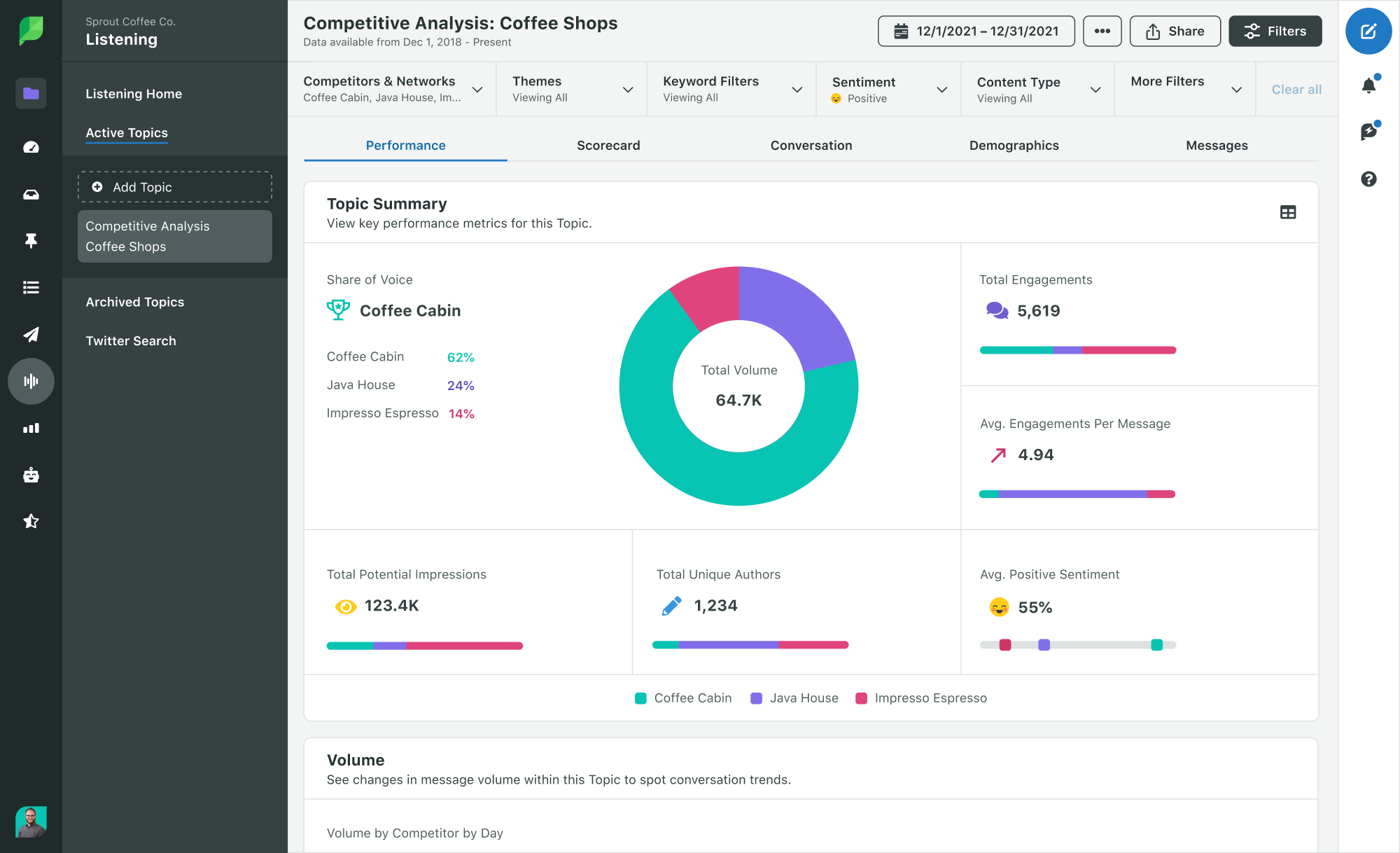
Sprout’s Competitive Analysis Listening Performance Report calculates share of voice by dividing the number of messages sent within a topic by the number of those messages containing specific brand mentions. The report measures share of voice estimates for your clients and their top competitors. 

Sprout's Competitive Analysis Performance Listening Report

Using social listening tools to go beyond traditional monitoring practices demonstrates the value of your services and partnership. As an agency, you can surface unparalleled insights into the conversations happening not just around clients’ brand but around their industry as a whole, driving smarter marketing decisions that generate results. 

Brand sentiment

Sentiment data speaks volumes, quantifying how people feel about a business. In today’s world, emotions are the number one factor in making purchase decisions. Positive feelings toward a brand can directly support revenue growth. 

Sprout's Listening Performance Sentiment Summary

If you’ve helped clients navigate and respond to crises on social, sentiment analysis is a great way to prove your impact. Use it to compare how brand sentiment has changed or rebounded as a result. Pair these insights with a customer responsiveness report to highlight the tangible fruits of your brand management efforts. 

Make your case with confidence

To make a successful business case for a client renewal, you’ll need a winning combination of qualitative and quantitative proof. Reflect on your work and what makes your social media services a cut above the rest. When it’s time to crunch the numbers, download our Social Media Metrics Map to find the stats you need to showcase your impact. 


The post End of contract: How to build a business case for continuing the agency-client relationship appeared first on Sprout Social.


from Sprout Social https://ift.tt/3wP9sdy
via IFTTT

20 Creative YouTube Video Ideas You Should Use in 2021

20 Creative YouTube Video Ideas

If you’re looking for YouTube video ideas to make an impact on YouTube or other platforms, you’re in the right place.

Videos are a powerful tool for marketing and advertising, but unfortunately, there’s no secret formula for being successful with videos. What there is, however, is plenty of opportunity for success if you can be creative, authentic, and target your proper audience.

It’s no surprise that there’s been a spike in YouTube video consumption over the past years. 73% of adults in the U.S use YouTube and, on average, each YouTube visitor spends 11m 24s per day watching videos. Many of these are ones suggested to them by the YouTube algorithm, once they’ve stopped watching the original video they selected.

Another reason YouTube viewing has spiked is that consumers stopped limiting themselves to TV and started consuming videos in other ways; primarily via YouTube, though there are other popular video streaming platforms.

Furthermore, users search on YouTube for solutions to problems the same way they do on Google. Another popular use of YouTube is to learn and get more information about products and brands via product reviews.

That’s what a post from the Think With Google platform, a source for market trend insights, shows.

In an environment full of opportunities for businesses, the entrepreneurs who take the lead are those who know how to use the online medium to make creative and appealing content. That is, not just sell products and services.

Do you want to ride this wave, but don’t know exactly how?

You’ve come to the right place!

Don’t miss all the YouTube video ideas I have for you.

20 Great YouTube Video Ideas

20 Great YouTube Video Ideas - shot of someone recording

To help you think of ideas for informative or funny videos to create, I am going to list some insights in this article.

Feel free to use those that make the most sense for you and your business.

Check out the YouTube video ideas below, and also suggestions of cool themes for videos that can go with these ideas.

1. Explainer Videos

Videos are known as a content format that offers quick consumption as its main advantage.

Users love videos where people or brands explain things to them.

Explainer videos with presentations about how and the best ways to use your products may raise engagement and the number of views on your channel

Audiovisual content that helps anticipate the possible questions of consumers might even shorten the buying cycle.

2. Review Videos

Reviews work as social proof of what you think about a product or service.

They can be used to find new books, watch a new series on Netflix, or find a product relevant to your interests.

From the moment you share your experience, as well as your perception and ideas, you might help others who are interested in that subject You influence their purchasing decisions.

A typical example is bloggers who buy makeup products and create video reviews of their opinions or share comparisons to other products.

Another idea for a YouTube video is to watch a series or movie and talk about how it relates to a concept that’s relevant to your audience/in your field. This is a creative option that will probably draw attention among the interested audience who also watched that content.

3. Storytelling Videos

As I’ve already mentioned here on the blog, storytelling is one of the main powers in content nowadays.

After all, consumers don’t want to just hear about products or services; they want to understand how products can provide solutions to the problems in their lives.

When you tell a personal story during your YouTube video, you can help people who are living in that situation or will go through it in the future.

If you can tell a story they empathize with, they can identify with you, and this may encourage them to spend money with your brand.

This works by talking about things like an important event in your career or sharing a challenge you’ve conquered.

Some influencers use video ideas like this to talk about surgeries they underwent, how they chose their colleges, or document their teenage fun moments.

To be relevant and make sure your audience gets interested in your story, don’t forget to adapt it to the reality of your business.

4. Advice and Tips Videos

Tips videos are insights or recommendations, usually filmed with one person talking into the camera and demonstrating, that may help improve consumers’ lives, be it on a personal, professional, or business level.

Would you like an example?

The article you are reading right now. It could be adapted to an audiovisual format.

In this case, I myself would be in the video, offering tips about ideas for your YouTube videos. I would show you demos for each tip, and I’d be talking you through each one. Easy to understand, right?

To be successful when recording YouTube videos with tips, don’t forget to think about what will make life easier for your audience and base your tips around these ideas.

This could involve apps, sites, strategies, behaviors, or simply creative ideas, like this one.

5. Q&A Videos

Have you considered reading questions from your audience and finding opportunities to answer them on video?

Comments and messages received on social media or on the videos themselves can be used as ideas for videos.

The starting point could be common questions from your consumers or even your own videos.

You only have to tell the audience that you’ll be preparing a specific video to answer questions about a certain subject.

To make it even more organized, create a hashtag to make it easier to identify and sort these questions.

As soon as you’ve selected the most interesting questions, get ready to reply to them, turn on the camera, and go ahead.

But don’t forget to mention the person who created the question, so they can feel even closer to you.

This strategy will also motivate other people to interact more with your YouTube channel.

6. Webinar Video Ideas

Webinars are videos streamed live to promote relevant content.

This makes content more interesting and generates value for the audience.

Generally, all you need to do a webinar is to choose a good subject and save at least 20 minutes to talk about it.

If the audience reacts positively, you can extend the stream.

What you need to keep in mind is that the most important thing is not the length of the video, but to meet the expectations of your audience.

Done correctly, this is a powerful tool to establish your authority before your audience.

Pro Tip: use Ubersuggest to find good webinar content ideas

Ubersuggest is a free powerful tool to find great content ideas for your webinars.

It will help you to find out if people search about the topics you want to talk about during your webinar videos.

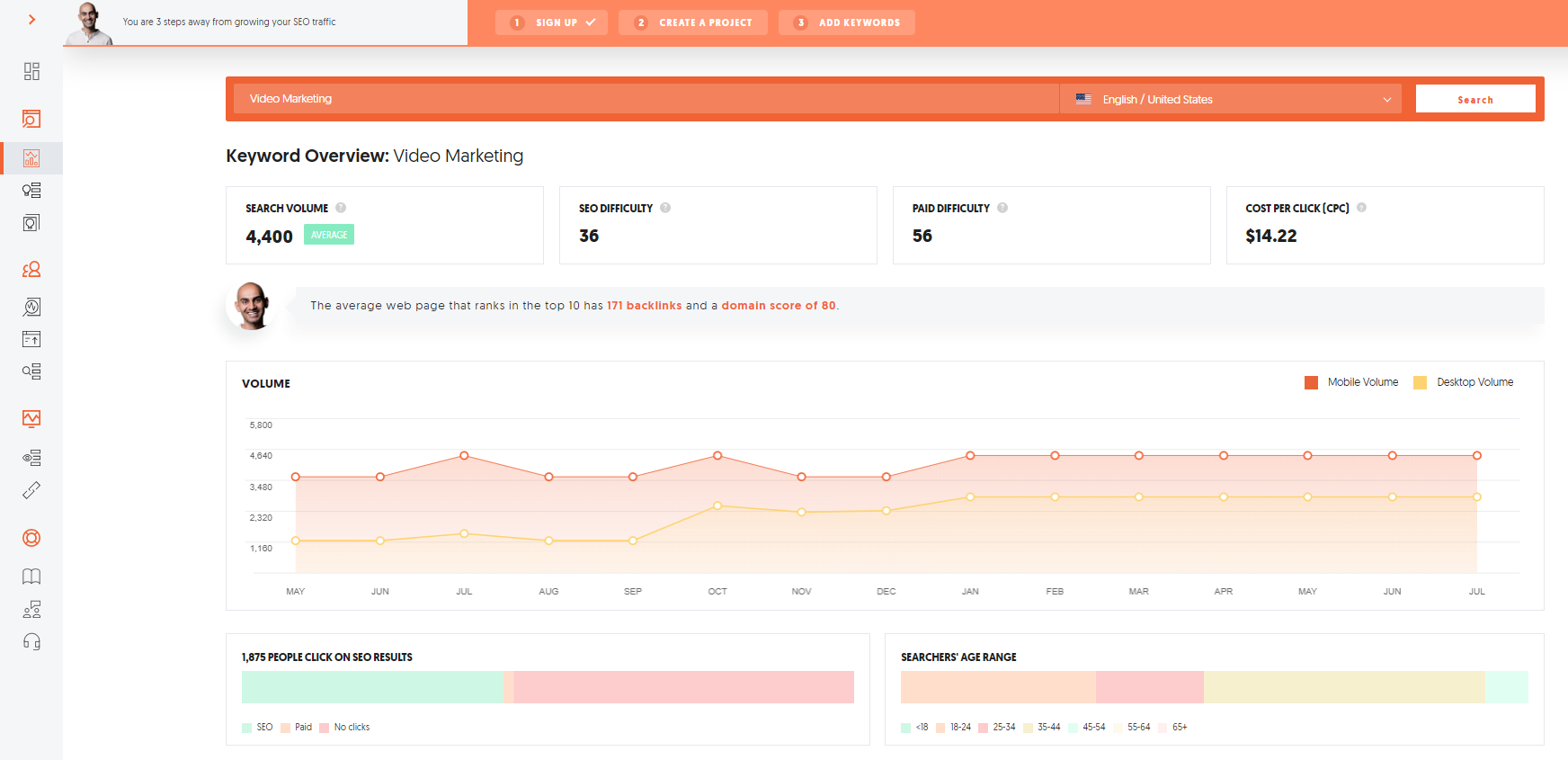
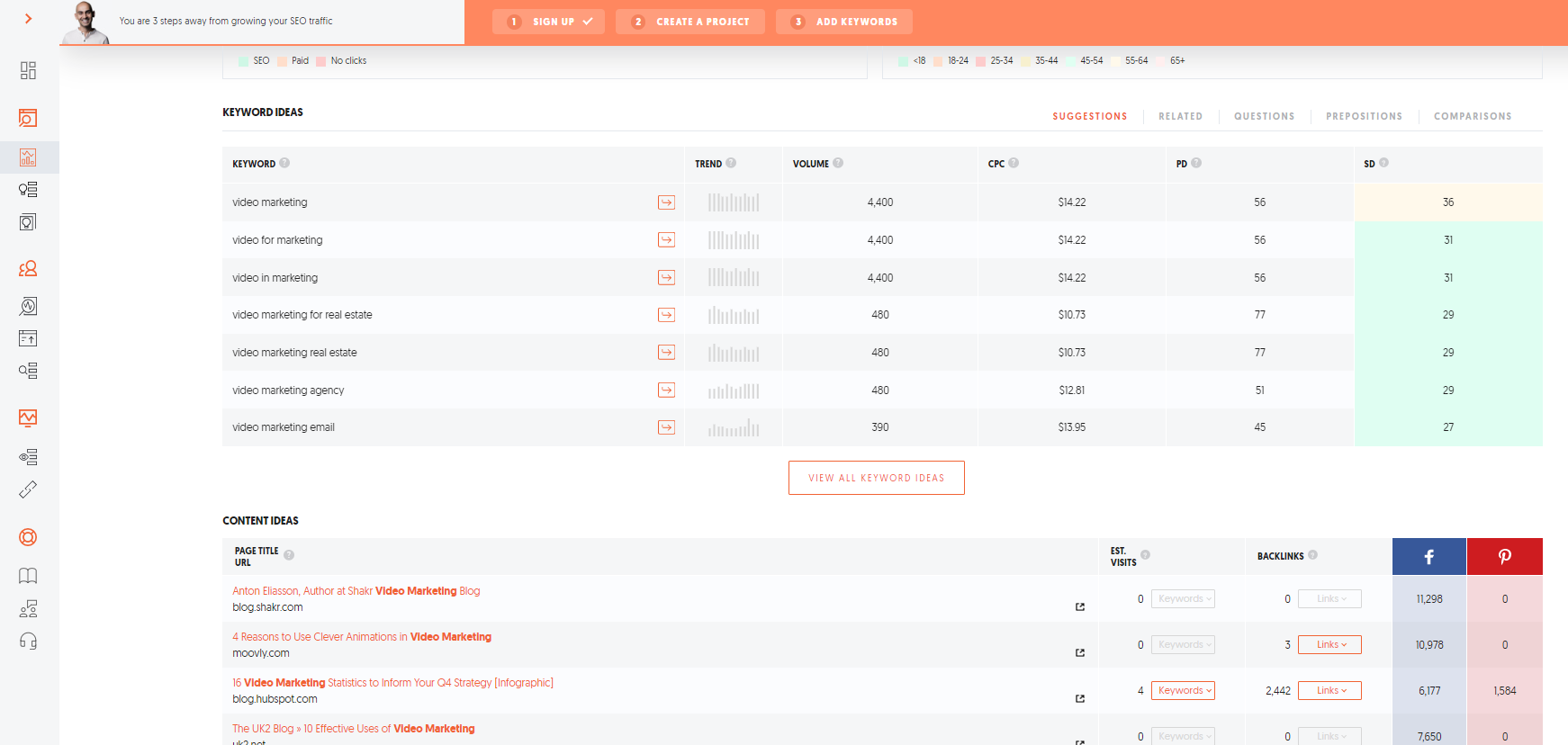
You can search for more generic topics such as “Video Marketing” as an example to find out how many people are searching for that topic.

use Ubersuggest to find good webinar content ideas - youtube video ideas

As we can see in the example above, Video Marketing has an average of 4,400 searches per month on Google.

However, if you want to find more ideas, you can simply scroll down the page and check out similar keywords and content ideas that will help you find a good webinar topic.

use Ubersuggest to find good webinar content ideas 2

7. List Videos

Lists are another creative and informational YouTube video idea.

Lists are simple, popular, and usually attract attention due to containing quantities.

These can be lists of tips, lists of books, articles, or inspiring behaviors. You decide.

To record this kind of video, start with a short introduction about why you chose that subject.

Next, to make it more interesting for the audience, introduce each item on the list and make comments about why each of them is in the order you chose.

8. DIY YouTube Videos

DIY YouTube Videos - youtube video ideas

DIY means do it yourself.

While it sounds like one of those passing trends, this is a video idea that usually works well, because it’s teaching someone how to do something by themselves.

This could involve anything from crafts using recyclable materials to digital content templates, for example.

However, to make this kind of video, you must have mastered the subject of the video. If you show you can’t do the thing you claim to be an expert on, or you can’t work your own product, your customers won’t be able to trust you.

After all, showing you can’t teach a user how to do something can be bad for your image and the image of your business.

9. Motivational Videos

Encouraging words are good for everyone.

It’s natural for human beings to depend on encouragement and motivation to overcome difficulties and move on.

As cliché as it sounds, this is the sort of thing that everyone likes to receive.

One example is motivational videos shared on Facebook that go viral; you know, the videos you suddenly start receiving from multiple people.

To make your own motivational video, think about what you can say to help your audience feel motivated.

Prepare your speech to be full of emotion and record it.

This will make your videos more human and will bring you and your brand even closer to your audience.

And if it goes viral, even better, right?

10. Product Unboxing Videos

Product unboxing is another creative idea for YouTube videos.

Think of a product you’ve just bought or received as a gift.

Next, grab the camera and open the package in front of your audience, showing your impressions about the product you have in hand.

Digital influencers make lots of these videos, especially to show their audiences what they “received that week.”

This is another way to help consumers anticipate their questions about the quality and appearance of certain products.

When you open items in front of the camera, you make their choice easier if they are still wondering if it’s worth purchasing or not.

11. Challenges Videos

Challenges Videos example, mannequin challenge - youtube video ideas

Uniquely fun, challenge videos go viral fairly easily.

Remember the ice bucket challenge and the mannequin challenge? These are just two examples of challenge videos that went viral and even had celebrities joining in.

To increase the chances of other people joining the challenge, try tagging the people you are challenging in your video.

Just be careful challenging celebrities, because they usually charge to take part in these things – unless your idea is very creative and uncommon.

It’s worth trying to create your own challenges for videos.

12. React Videos

Reacts are simply reactions, and recording how you react to a certain situation.

When well planned, these can be good ideas for funny and creative videos.

There’s great freedom of subjects; you can record a video reacting to movies, sitcoms, videos from other people, or even messages you received.

13. Gameplay Videos

Increasingly popular with young people who like games, gameplay videos are recordings focused on this particular universe of games.

They can show you playing your favorite game, your opinion about a game you got recently, information about releases or how to go to the next level.

Since this is a niche type of video, only use this idea if you really understand the subject (and play well, of course).

The gamer audience is very critical and well-informed about the particularities of the industry.

14. Event Coverage Videos

Is an interesting event for your audience taking place in your hometown? Go over there with a camera and a few creative video ideas.

To make event coverage more interesting, try contacting the organizers to find out who you can interview on location.

This will make your videos more professional and may direct new users to your channel.

15. Travel Videos

Travel videos are the darlings of people who like going on trips and meeting other cultures.

You have probably watched this kind of content before, right?

All you need to do to make this kind of content is to start taking your camera with you on your next trips, and record your journey through those destinations and share your experiences. You don’t even have to travel far from home; chances are, anywhere you live has something interesting nearby.

In your videos, you can talk about the history and interesting facts about the places you visit. People interested in those locations may find your brand through your videos about that place, opening you up to potential new audiences.

It also helps people who are interested in visiting those regions get more information about them. It’s a nice strategy that also works as a tip of which outings and restaurants are better value for money, for example.

16. Tutorial Videos

As the name itself shows, tutorials are made to teach concepts or techniques to your audience.

There’s a range of subjects and levels of complexity taught by digital influencers in different industries.

Examples? How to contour your face or how to make your own planner.

To choose the best tutorials to share in your channel, consider your market niche and also how much you know about the subject.

Tutorial videos must be objective and easy to replicate.

That is, your audience needs to know how to do the task shown in the tutorial without much trouble.

17. Tag Videos

Tags are one of the most recent YouTube video ideas and are very interesting. They make it possible to get closer to your followers.

When used in videos, tags help you sort videos according to your keywords, making searches easier for users.

It’s like a hashtag for videos, encouraging user actions.

It works like this:

Let’s imagine I’m publishing a video with the tag “50 facts about me”.

When YouTubers use this same tag, they must mention 50 facts about themselves.

So this is like an editorial line for videos, with a good potential for going viral.

18. Memory Videos

People like to remember things that happened at certain times. This is a fact.

But, like everything your company will publish online, videos about memories must be relevant.

Be careful not to make something too commercial. If you go overboard, the number of “dislikes” might grow.

YouTube published a video about 2018 that has accumulated millions of views.

So far so good – but the video looks like advertising, not like a summary of 2018.

The audience reacted very negatively to that.

And the video broke the record for the highest number of dislikes on the platform.

19. Interview Videos

Interview Videos - youtube video ideas

Guest participation can also turn into ideas for creative YouTube videos.

Hosting an expert in a certain subject can offer more relevant content to your audience and make their experience with your videos even richer for them.

You and your host can build your audience together.

It’s an exchange where both sides win.

Did you get a great response from your audience? Consider making interviews a regular feature in your video channel.

Your audience will be pleased!

20. Chalk Talk

Ever seen a YouTube video where an expert on a certain subject shows their reasoning on a board, like back in your school days? This technique is called chalk talk.

It works like a video lesson using drawings, graphs, flow charts, and text written on a whiteboard.

If the content is relevant and useful to the public, the chances of getting “likes” and positive comments are very high.

Conclusion – What YouTube Idea Will You Use First?

There are plenty of YouTube video ideas out there in the digital universe. You get to choose which types spark ideas for you and mesh with your brand.

The more authentic, creative, enthusiastic, and relevant you are, the more your audience will like you.

If you want help with a video marketing strategy let our agency know. Our team of experts can help!

Did you like the tips we shared in this article? Tell us in the comments if you’ve already used any of these video ideas or if you have any other tips to share with readers of this blog.


from Blog – Neil Patel https://ift.tt/2RU9u54
via IFTTT