Wednesday, 1 September 2021

9 AI Tools For Media Creation

9 AI Tools For Media Creation

Artificial intelligence (AI) tools for media let you create content at scale in a previously impossible way and you don’t even need design experience to create something impressive.

AI isn’t new. The film and gaming industries both use it regularly, for instance. But, these sectors have only scratched the surface of AI capabilities.

On a seemingly daily basis, new AI tools emerge to help people create articles, video scripts, logos, and more. Naturally, these tools have investors excited. However, they’ve plenty to offer to content creators, marketers, and digital agencies too.

Let’s look at how some of these AI tools for media can transform the way you work.

1. Podcastle
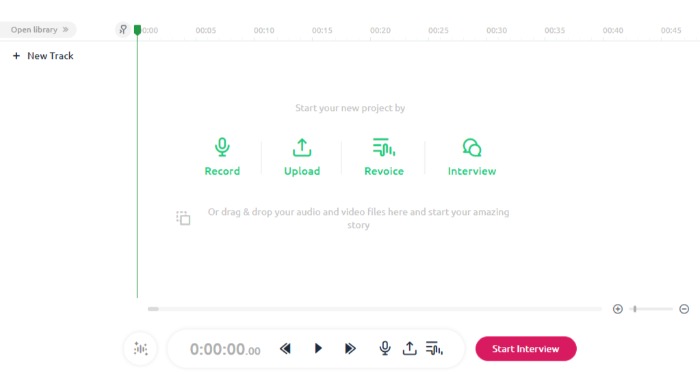
AI Tools for Media Creation - Podcastle

Podcastle, which has raised more than $1 million, is an extension for the Google Chrome browser. This free tool lets you create custom podcasts with just a few clicks.

With Podcastle, you can:

  • quickly transcribe your podcasts
  • create and edit content with the text editors
  • turn text into podcasts
  • revoice content
  • record live interviews
  • make autosaves
  • access unlimited content publishing and projects

Getting Started with Podcastle

Set up a Podcastle account by clicking on the green “create” link in the top right-hand corner.

Depending on what you want to do next, visit the tutorials page for step-by-step instructions.

Podcastle Cost

Podcastle’s free service gives you access to:

  • 45 minutes of one-time audio recordings
  • four hours of monthly audio recordings
  • capacity for one host and two interviewees
  • magic audio processing

And more.

There’s also a “storyteller” package for $11.99 a month. Storyteller has all the above features, plus:

  • additional recordings and interviewing capacity
  • 10 hours of transcription every month
  • high-quality downloads and revoicing
  • unlimited magic audio processing

2. Let’s Enhance

AI Tools for Media Creation - Let's Enhance

Let’s Enhance takes any photo you upload and analyzes the photo quality, color, contrast, etc. Then, if the picture needs enhancement, it automatically color corrects and retouches the image with minimum input.

Other features include:

  • batch processing
  • custom sizing
  • resolution increasing
  • resizing and upscaling

This program isn’t just for personal use. Let’s Enhance is also recommended for real estate and e-commerce, where you need clear, high-quality images.

Getting Started With Let’s Enhance

Upload an image to Let’s Enhance, and the algorithm enhances it as much as possible without compromising quality.

The algorithm provides a slider for tweaking parameters like contrast, hue, brightness, and saturation. You can also apply additional filters.

Let’s Enhance Cost

Let’s Enhance has subscription, business, and pay-as-you-go options.

Subscriptions for personal use run from $0 for a one-time, five-credit trial to $34 for 500 image credits per month.

Businesses can pay from $72 for 1,000 credits per month to $290 for 5,000 credits per month, plus get API access.

Pay as you go options range from $9 to $39 and let you use the program only when you need it.

3. QuillBot
AI Tools for Media Creation - Quillbot

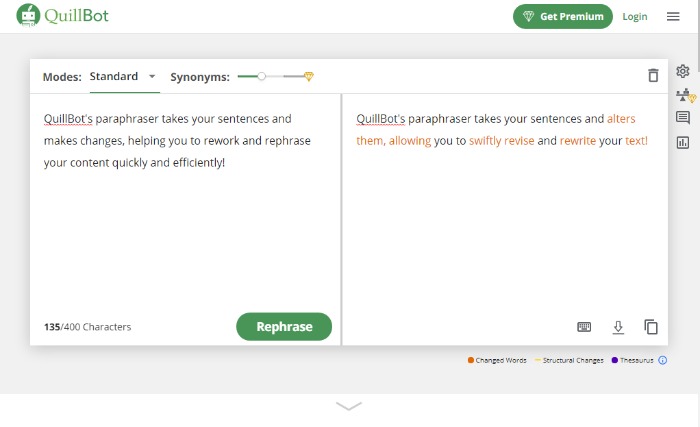
QuillBot is one of the few quality paraphrasing tools on the market. This comes in handy when you want to avoid being repetitive when writing long pieces. It may also help you rework product descriptions.

The program has two main modes: one with synonyms and one without.

The first preserves the original sentence’s meaning while only changing certain words.

The second mode alters the word order so the sentence sounds more natural.

Other features include:

  • grammar checker
  • summarizer
  • citation generator

Getting Started With QuillBot

Upload or paste a document into QuillBot, then hit the “Paraphrase” button.

There’s nothing more to it! (However, be sure to proofread, just to be safe.)

QuillBot Cost

The free version gives users a 700 character paraphraser and a 5,000 character summarization limit. Free users also get:

  • three synonym options
  • three writing modes
  • Chrome and doc extensions

Premium gives a 25,000 Summarizer and 10,000 Paraphraser character limit and processes 15 sentences simultaneously, as well as:

  • four synonym options
  • seven writing modes
  • wider range of tones
  • sentence shortener and expander

Premium costs $14.95 for month-to-month use, $9.95 a month if paid semi-annually, or $6.67 per month for the annual option.

4. KinetiX

Investors believe in Europe-based KinetiX, which recently secured $608k in capital funding. It turns your videos into 3D animations with quick editing options and filters.

Other features include:

  • customization and collaboration
  • prototyping
  • 3D visualization
  • access to characters and animations
  • automated workflow

Getting Started With KinetiX

KinetiX uses a drag-and-drop interface available on the front page. Just drop in any .fbx file or paste in a YouTube URL and click the “generate” button underneath.

You can upload a selection of video content, like your own recordings, MP4, and YouTube content.

The tool then creates an animated character in seconds.

KinetiX Cost

The KinetiX tech AI tool is free for personal use. However, if you want to use it for commercial purposes, fees begin at 15€ per month.

5. Articoolo
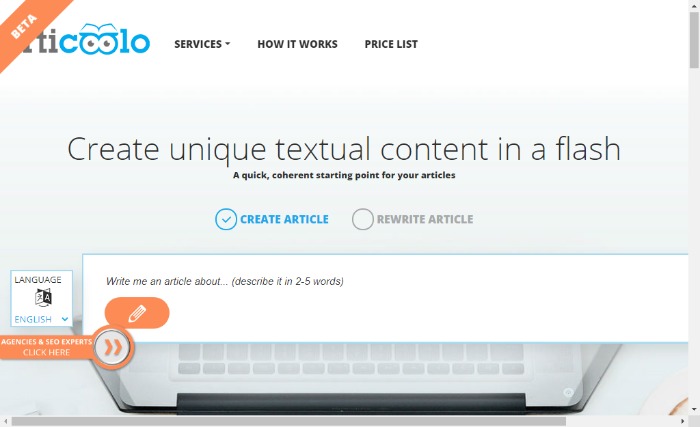
AI Tools for Media Creation - Articoolo

Articoolo is an AI writing assistant that generates content in a fraction of the time it would take to write it yourself.

Additionally, it has a

  • quote and image finder
  • title generator
  • article summarizer
  • writer’s helper

Most marketers and business owners need content in a hurry at some point, or you may spend time looking for that perfect quote or image. This AI app can do that quickly.

It’s also great for anyone that wants a starting point with title ideas or to rewrite large volumes of content for repurposing.

Getting Started With Articoolo

To start using the tool, enter your topic and then wait for Articoolo to get to work. That’s all you need to do!

Articoolo Cost

Pay per use ranges from $19 for ten articles or $99 for 100 articles.

Subscribers pay $29 a month for 30 pieces and up to $99 a month for 250 articles.

6. Word.ai
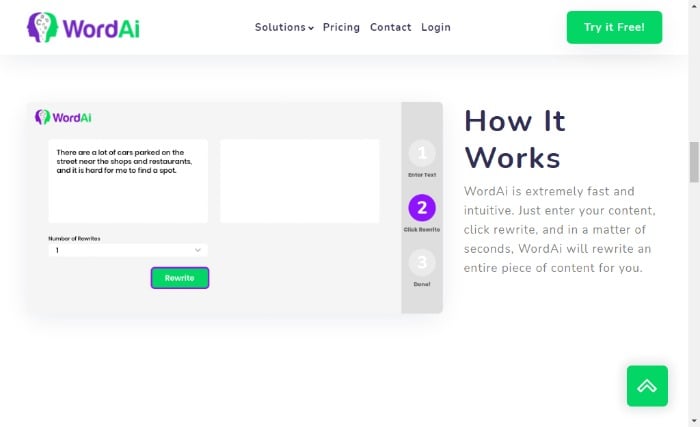
AI Tools for Media Creation - Word AI

Word.ai helps copywriters rework content with a natural-sounding voice. It creates up to 1,000 rewrites of an article, giving users plenty of variety if they want to use the same piece of content in multiple ways. It can also work as an editing tool.

Other features include:

  • sentence restructuring
  • split sentences
  • quality enhancement
  • clarity enhancement

Getting Started With Word.ai

  1. Click the green button in the top right-hand corner of the screen. The button will take you to the subscription deals.
  2. Click the “start my free trial” button for your preferred option.
  3. Then Word.ai asks you to sign up and create a password.

Word.ai Cost

New users get a free three-day trial. After that, you can pay $57 per month or an annual fee that breaks down to $27 per month (quite the deal in comparison!). For heavy use, they offer an enterprise level at various prices.

7. Synthesia

If you need to create video content in a hurry, Synthesia could be the tool. Each video can be up to thirty minutes long, and you can upload any custom backgrounds and your own avatar.

Features include:

  • 50 available languages
  • PowerPoint capabilities
  • synthetic or authentic voices
  • background music

Aside from marketing videos or product demos, you could use it for:

  • training
  • personal videos
  • video chatbots

Getting Started With Synthesia

  1. Click “create account” in the top right-hand corner to create a free demo video and understand Synthesia better.
  2. To start creating your content, enter your text into the browser. Your video will be ready in minutes.

Synthesia Cost

Personal pricing is $30 a month for video credits. Custom pricing is available too, but you must speak to the sales team.

8. Rephrase.ai

Rephrase.ai is a powerful video creation tool that enables people to quickly create and share quality videos in a matter of minutes.

You can add text, images, animations, and video clips within the easy-to-use interface.

It has a wide use of applications, including educational and explainer videos, personalized customer touchpoints, digital marketing, and outreach. To understand how the video creator works, they offer a handy tutorial.

Getting Started With Rephrase.ai

  1. Begin by signing up and selecting the category you’re interested in.
  2. Answer a series of questions about how and why you plan to use the program.
  3. Watch a short instructional video, then accept terms and conditions.

Rephrase.ai Cost

Plans begin at $25 for ten banner credits a month. Each credit equals one minute of video. Rephrase.ai also has an enterprise option—contact them for details.

9.Designs.ai

Designs.ai incorporates several AI tools for media creation, including a logo and banner maker and a mock-up generator.

You create designs by dragging shapes on the canvas, which you then adjust with your mouse or keyboard input. You also have the option of changing variables for fonts, colors, and backgrounds.

Features include:

  • cloud storage
  • massive image library
  • speech maker
  • assistive tools
  • unlimited usage and projects
  • branding kit

Getting Started With Designs.ai

Click “Try for free” in the upper right-hand corner, choose which project you want to try out, and follow the prompts to get started.

Designs.ai Cost

Design.ai’s basic tier is $29 per month, and its pro level is currently $69 per month. If you pay annually, you save 34 percent. For large-scale work, contact them about an enterprise contract.

Frequently Asked Questions About AI Tools for Media Creation

What Are the Different Types of AI Tools for Media Generation?

AI tools for media are in extensive use and serve a wide variety of purposes. These include natural language generation, voice synthesis, sentiment classification, and text summarization.

How Do AI Tools for Media Help in Content Creation?

Tools that generate content are usually made for a specific purpose and consist of software-generated texts and visuals. They may include chatbots and automatic translation tools, as well as writing assistants for blogs, social media, and PPC ads. The list goes on and on.

These tools help save you time and resources, especially if you lack the expertise to create the content or visuals yourself.

How Much Do AI Tools for Media Cost?

There is a range of AI tools to create content that engages customers and improves conversions. The costs vary depending on your needs and the type of tools you’re using.

What Are the Three Types of AI?

AI is a broad term used to describe a machine that can perform human intelligence processes. The three types of AI are narrow-AI, general AI, and superintelligence.

AI Tools for Media Creation Conclusion

For a long time, artificial intelligence has helped us perform everyday tasks more quickly and efficiently. Now, AI became more intelligent, creating media like articles and videos.

With these tools, a marketer can create quality content with ease, even if they don’t have expertise in making videos, creating podcasts, or graphic design.

Even for the experienced, AI tools for media have multiple advantages, saving people time and freeing up their resources for other tasks.

Tools like Rephrase.Ai, Word.AI, and KinetiX are changing how we create content and make it


from Blog – Neil Patel https://ift.tt/2WOWUGq
via IFTTT

How to Create a B2B Content Strategy

How to Create a B2B Content Strategy

B2B and B2C content marketing require entirely different strategies. However, whether you’re targeting businesses or individual consumers, one point remains the same: Content matters. 

Content is how you boost brand awareness, build trust in your company, and empower your customers to solve their problems. However, you can’t just create the occasional blog post or paid ad and hope to generate results. 

Instead, you need a targeted B2B content marketing strategy to reach your marketing goals. 

Let me show you why a strategy is so important and help you figure out how to reach those valuable business prospects.

Why Do You Need a B2B Content Marketing Strategy?

A content marketing strategy is like a roadmap or a blueprint. While it’s not set in stone, a marketing strategy is a set of guidelines to help you get from point A to point B. 

Without a roadmap, you’re more likely to get lost. There’s a higher chance you’ll lose sight of your business goals, and you might struggle to get back on track. 

A marketing strategy, then, is key to helping you create the right content at the right time to reach your target clients in the shortest time possible.

You can’t just use any old content marketing strategy, though. 

As mentioned, B2B content marketing presents different challenges from B2C content marketing. With B2B, you’re targeting other businesses, whereas, with B2C, you’re targeting individual consumers. 

While consumers might be impressed by influencer marketing and emotive product launch campaigns, businesses won’t be swayed by these tactics. Instead, businesses want authoritative content. 

They want useful, actionable information to help them solve real commercial challenges and grow their organizations. A clear, methodical marketing strategy can help you create the content needed to impress this audience.

How to Create a B2B Content Marketing Strategy

Every B2B content marketing strategy is unique. However, successful content marketing campaigns typically start with well-defined objectives and a clear understanding of your long-term goals. 

Remember, don’t let the whole idea of a marketing “strategy” intimidate you. It’s surprisingly simple to get started once you understand what’s involved, so if you’re ready to build a successful content marketing campaign, here’s where to begin. 

1. Identify Your Audience and Their Needs

There’s nothing more important than your user base. 

Remember, the whole point of creating content is to convert your audience into paying clients, so your content must meet their specific demands and needs. If your content doesn’t resonate with your audience, they won’t move through your sales funnel.

How do you identify your audience, though? 

  1. First, create your buyer personas. 
  2. Then, segment your prospective audience into subgroups based on, for example, buyer behavior. 
  3. Decide whether you’ll target all these subgroups or if you want to focus on one or two specific segments. 
  4. Once you’ve identified your audience, you can tailor your content to match their specific demands.

Ultimately, what matters to your core audience should matter to you, so you must first identify their problems and then consider how you can solve them through your content.

2. Use Micro-Targeting to Narrow Down Your Focus

You’ve identified your target audience, you know what matters to them, and you’re ready to give them a great user experience. 

Now, it’s time to actually find those businesses online and generate brand awareness. How do you ensure that your content reaches the right audience, though? It’s all about using the right short and longtail keywords.

Start by using microtargeting. Through microtargeting, you use analytics data to reveal key information such as buyer behavior, preferences, and popular search terms or keywords. Then, you can use a variety of popular keywords in your content to help your audience find you through Google and other search engines. 

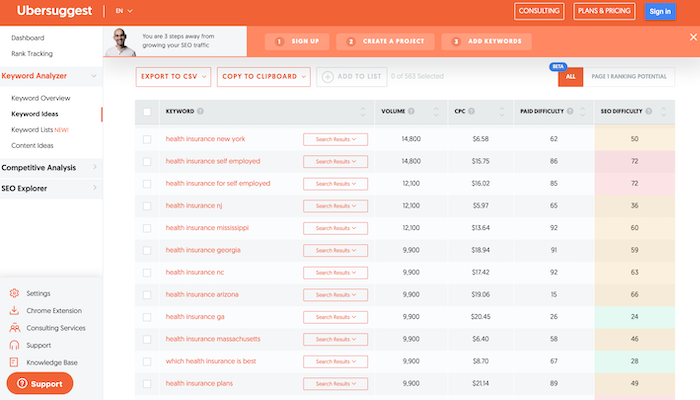
Check out Ubersuggest for your keyword research. Enter a primary keyword, such as “health insurance,” and scroll through the “keyword ideas” for inspiration:

B2B Content Marketing Strategy - Use Ubersuggest for Longtail Keywords

Carefully chosen keywords can help you reach the businesses most likely to require your services.

3. Research Competitors in Your Niche

Unless you’re in a super unique niche, chances are you have numerous competitors vying for your audience’s business. 

Look at what makes them successful and research what they’re offering your target customers. What can you offer that sets you apart from your competition? 

You need a unique selling point (USP) to draw customers, so consider what you could do better than your competitors and highlight what makes you unique when you’re selling your goods and services to prospects. Here are some tips for doing just that: 

  • Identify your competitors.
  • Evaluate their strengths and weaknesses. 
  • Clarify what makes your business unique and build your USP around your strengths.

Not sure where to get started? Look to your target audience. Who else are they following? What other businesses are they interested in? Go back to your audience research and see what it reveals. 

4. Define Your Goals

Every great marketing strategy needs clearly defined goals to help you stay on track and measure your progress. 

How do you choose the right goals? By following the SMART objective. SMART goals are Specific, Measurable, Achievable, Relevant, and Time-bound. 

In other words, you’re setting a clear, realistic goal that you can achieve in a certain amount of time. The results are measurable, meaning there’s some quantifiable way you can measure your success and track whether you achieved the goal. 

To set SMART goals, ask yourself the right questions. For example, what are you trying to achieve? What steps will you take to reach your objective? Finally, how will you know if you achieved your goal? 

If you don’t have the answers to questions like these, your goals need a little more work before you’re ready to develop your marketing strategy.

5. Create Multi-Layered Content

Sure, words are great. After all, you’re trying to impress your audience and demonstrate your industry expertise. 

Too much text is pretty daunting, though. If someone’s reading your article and they’re confronted by line after line of unbroken text, you could quickly lose their interest. 

The answer? Multi-layered content. With multi-layered content, you’re basically using media such as text, videos, and images to create a visually engaging user experience.

We’ll use one of my own posts on visual marketing as an example. Sure, I include plenty of informative text to educate readers:

How to Create a B2B Content Marketing Strategy - Create Multi-layered Content (an example)

However, I also include images to illustrate my points and break up the walls of text:

How to Create a B2B Content Marketing Strategy - Include Images (NeilPatel example)

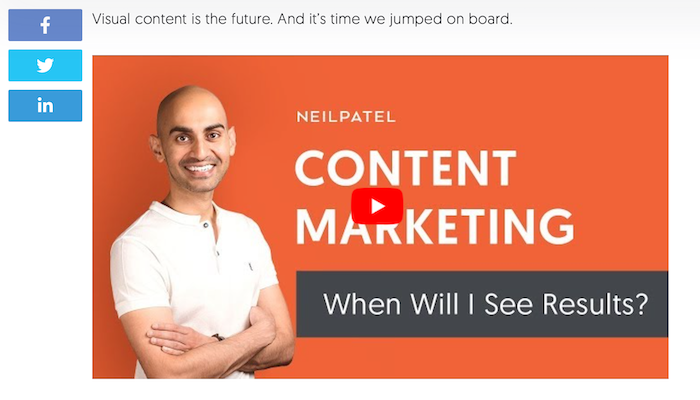
Finally, I include videos for users who prefer a more interactive experience:

How to Create a B2B Content Marketing Strategy - Include Videos (NeilPatel example)

You’re targeting business clients. They’re busy people. Keep your content engaging and break it up with a blend of media types to hold their interest and keep your business memorable. 

6. Measure Your Results

How do you know if you’re achieving those SMART goals you set earlier? By measuring your results or tracking progress using tools like Google Analytics. 

Tracking metrics gives you key insights into what works and, of course, what doesn’t. Once you know what content works best, you can invest your energy into those areas and grow your business more effectively. 

Try not to worry if you haven’t met some performance goals. Honestly, not everything you try will work out. Not every ad will generate leads, partnerships can fail, and some content may go unnoticed. 

That’s all okay. In fact, it’s normal. Remember, you’re experimenting with different angles, so if something’s not working, just pivot and try something new. 

7. Prioritize Link Building and Collaboration

Want to build brand exposure? Consider collaborating with other businesses. More specifically, make (and accept) some guest posts. 

You might be wondering how letting another entrepreneur post on your website helps your own marketing goals. However, this is your opportunity to showcase your connections to your audience. 

If your audience sees that other industry leaders want to collaborate with you, then guess what? They’ll immediately trust you more, which makes them more likely to explore your services.

On the other hand, say you want to make a guest post on another website. Great. Not only will the post boost your exposure and increase your authority within your niche, but it’s essentially free advertising for your brand. Sounds like a win-win, right? 

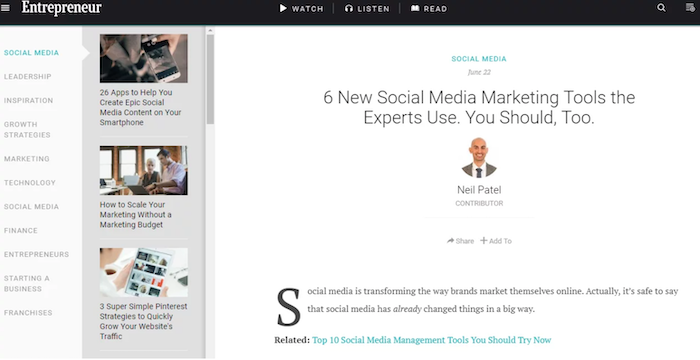
Here’s an example from when I guest posted on Entrepreneur. Through this opportunity, I had the chance to reach a wider audience and help support their marketing goals: 

How to Create a B2B Content Marketing Strategy - Prioritize Link Building (Neil Patel on Entrepreneur)

Don’t be afraid to collaborate as part of your B2B content marketing strategy.

8. Promote Your Content Across Different Platforms 

Where do your prospective customers hang out? If you researched your audience earlier, you already know the answer to this question, so your focus should now be on reaching these prospects as part of a targeted marketing campaign.

How you reach these potential clients all depends on your audience demographics, but here are some general tips. 

First, improve your website’s discoverability in search engines. The goal is to secure a first-page search ranking for your chosen keywords, so optimize your pages for SEO by adding meta descriptions, including alt text with your images, and using keywords strategically. 

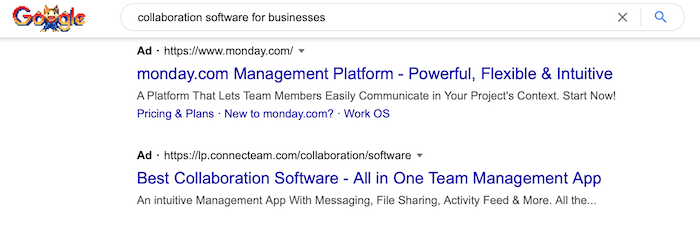
Next, run a paid ads campaign. Paid ads ensure you shoot to the top of the search rankings for specific keywords. Monday.com, for example, is one of the first search results you see when you Google “collaboration software for businesses:” 

How to Create a B2B Content Marketing Strategy - Promote Your Content on Different Platforms

Aside from Google Ads and LinkedIn, you could also run paid ads on popular platforms like Twitter and Facebook. It all depends on where your target audience spends their time, so do your research to generate the best ROI from your paid ad campaigns.

Do you need any advice on choosing the right keywords for paid ads or platforms to market your B2B company? Check out my consulting services to see how my team could help.

Frequently Asked Questions About B2B Content Marketing

Before you start building your own B2B content marketing strategy, here are some quick takeaways to reflect on.

What Is B2B Content Marketing?

B2B content marketing is a strategy for creating, sharing, and promoting content designed to appeal to a business audience. The goal is to use content to build brand awareness and find new clients.

How Is B2B Content Marketing Different From B2C?

With B2B marketing, you’re targeting business clients. You’re trying to demonstrate your experience, expertise, and skill to convince businesses to work with you. 

On the other hand, B2C marketing involves targeting individual consumers. You’re focusing on nurturing leads, building an emotional connection with people, and convincing them to buy a specific product.

What Makes a Good B2B Content Marketing Campaign?

A good B2B content marketing campaign should help build trust in your company, provide valuable information to your audience, and inspire companies to choose your products and services. 

Above all, a great content marketing strategy should establish you as an industry leader or innovator in your chosen niche. 

Research your target audience to understand what challenges they face, and create content designed to help solve those problems. You should also check out competitors for content ideas and keep an eye on news channels. Aim for a blend of evergreen and timely content to keep your articles, videos, and podcasts varied and fresh. 

B2B Content Marketing Guide: Conclusion

Do you want to establish your company as an industry leader? Are you trying to convince businesses to choose your company over your competitors? Then a solid B2B content marketing strategy can help you stay on track. 

Focus on creating useful content and cultivating a sense of trust in your company, and don’t be afraid to step back and make changes if something’s just not working. Remember, a strategy is a roadmap: It’s not set in stone. Let it guide you, but don’t let it hold you back when you’re ready to move in a new direction. 

Have you tried B2B content marketing yet? How are you finding the process?


from Blog – Neil Patel https://ift.tt/2Ymn6ZL
via IFTTT

Twitter's new Safety Mode tries to take the pain out of going viral

Could use a little help.

Attention can be a blessing and a curse, especially on Twitter.

The social media platform announced a new feature Wednesday seemingly designed to mitigate the sometimes troubling and often all-encompassing effects of going viral. Dubbed Safety Mode, the setting allows Twitter users who suddenly find themselves on the receiving end of unwanted attention the chance to chill things out — even if just for a bit.

"Safety Mode is a feature that temporarily blocks accounts for seven days for using potentially harmful language — such as insults or hateful remarks — or sending repetitive and uninvited replies or mentions," explains Jarrod Doherty, a senior product manager at Twitter, in a blog post.

Notably, the feature isn't available to everyone yet. According to Doherty, as of Sept. 1, only a "small feedback group" using iOS, Android, and Twitter.com will have the option to enable Safety Mode.

Once that feedback group starts turning it on, Safety Mode will begin proactively blocking accounts at Twitter's discretion.

"Authors of Tweets found by our technology to be harmful or uninvited will be autoblocked, meaning they’ll temporarily be unable to follow your account, see your Tweets, or send you Direct Messages," continues Doherty.

Various Twitter account features.
Credit: Twitter
Twitter's Safety Mode.
Credit: twitter

Of course, there's always the chance that the algorithm powering this feature will be too enthusiastic in its blocking, leading to false positives and claims of shadow banning. Or, even worse, that it will disproportionately affect certain types of accounts over others.

Doherty admits as much, writing that "we won’t always get this right and may make mistakes[.]"

As such, Twitter intends to "observe how Safety Mode is working and incorporate improvements and adjustments before bringing it to everyone on Twitter."

We imagine that everyone will want it, kinks ironed out or no.

Twitter sees both daily main characters piled on for increasingly absurd takes, and regular people finding momentary fame for bon mots of pure joy. Sometimes, that attention is very much desired. Other times, not so much.

SEE ALSO: Twitter adds an edit tweet feature, but it's not what you think

Whether you're a medical expert desperately trying to share much-needed vaccine information, or a scientist explaining the devastating effects of climate change, a well-functioning Safety Mode promises a world with less online abuse.

It sounds nice.


from Mashable https://ift.tt/2V53YOn
via IFTTT

Twitter finally launches Super Follows as OnlyFans stumbles

Get that money.

Let the dollar signs flow.

Twitter announced Wednesday that it has finally, officially, started the rollout of Super Follows. The feature, first revealed back in February, allows users to charge a monthly fee in exchange for access to additional content. Twitter will take a cut of the earnings.

"With Super Follows, people can monetize bonus, 'behind-the-scenes' content for their most engaged followers on Twitter," a spokesperson explained in an emailed press release. "And in exchange, these followers get special access to more of their favorite authentic Twitter content and conversations." 

This newfound ability, as of now still limited to a select number of U.S. Twitter accounts, allows users to generate revenue for creators in the form of a $2.99, $4.99, or $9.99 monthly subscription. It comes at an interesting time in the world of online content creation, following on an August debacle from OnlyFans, in which the platform threatened to ban sexually explicit content only to later walk the threat back.

While Twitter's plan for Super Follows was in the works long before OnlyFans' August announcement, it's perhaps difficult to overlook the fact that it has come so soon after OnlyFans alienated its sex worker user base.

But will sex workers find success with Super Follows? We reached out to Twitter in an attempt to determine what type of moderation it will apply to Super Follow content, but didn't get any specifics.

"Super Follows is being gradually rolled out to a limited group of people," wrote a Twitter spokesperson in response. "As this feature becomes more widely available and we continue to learn and make iterations, we'll be expanding it to more people and will share relevant policy details."

Presumably, at a minimum, when it comes to content paywalled via Super Follows, Twitter will use the same standards it applies to other content on its platform.

Twitter defines "adult content" as "any consensually produced and distributed media that is pornographic or intended to cause sexual arousal." The company writes that users "can share graphic violence and consensually produced adult content within your Tweets, provided that you mark this media as sensitive."

Exclusive Super Follow content accessible behind a paywall.
Exclusive Super Follow content accessible behind a paywall. Credit: twitter

In other words, Super Follows could — at least in theory — represent an alternative income source for sex workers wary of putting all their eggs in the OnlyFans basket. However, it's worth noting that sex worker advocacy groups like Hacking//Hustling have accused Twitter of "shadowbanning," suggesting Twitter might not be a welcoming home after all.

That fact is compounded by Twitter's Super Follow payout provider, Stripe, an online payment processor used by companies like Instacart and Lyft. Stripe lists entire categories of restricted businesses, one of which is "Adult content and services," which require prior written approval from the company to use its service.

Even without official word from Twitter, we'll likely soon know the company's position on sex workers using Super Follows to earn income.

That's because starting Wednesday, iOS users in both the U.S. and Canada can Super Follow certain accounts. Twitter says that it will expand beyond those countries (but still iOS only) over the next few weeks, and that support for Android and the Twitter website will come "soon."

SEE ALSO: OnlyFans realizes the whole purpose of the site was explicit content and backtracks

Whether Super Follows is ultimately a success, or goes the way of Fleets, will likely depend on whether or not the feature is embraced by content creators of all types. When it comes to who can and cannot use the platform to earn income, Twitter very much has a say in that.


from Mashable https://ift.tt/3gURPn4
via IFTTT
Fact-checking study finds everyday news readers have a pretty good bullshit detector

A study found that crowdsourced groups can stack-up to pro fact-checkers.

Between the anti-vaxxers taking horse medicine to fight COVID-19 and Trump supporters still pushing The Big Lie, the fight to curb online misinformation may feel hopeless at times.

A new study by researchers at MIT may be a small ray of light we can really use right now: Many people actually do have a pretty good bullshit detector when it comes to online misinformation.

The study, titled "Scaling up Fact-Checking Using the Wisdom of Crowds," has found that crowdsourced fact-checking for accuracy from regular, everyday news readers stacks up to the work performed by professional fact-checkers.

Or, as MIT is putting it, crowds can "wise up" to fake news.

For the study, MIT researchers hired 1,128 U.S. residents using Amazon’s Mechanical Turk, which is the ecommerce giant's marketplace platform where users can hire online gig workers for odd jobs and menial tasks.

Researchers then presented the participants with 20 headlines and lead sentences from 207 news articles that Facebook had flagged for fact-checking via its algorithm. Participants were asked questions in order to create an accuracy score for each story, related to how much of the news item was "accurate," "true," "reliable," "trustworthy," "objective," "unbiased," and "describing an event that actually happened."

The stories were picked out by Facebook for a variety of reasons. Some were flagged for possible misinformation, others popped on the radar because they were receiving lots of shares, or they were about sensitive health topics.

Researchers also game the same flagged stories to three professional fact-checkers.

The pro fact-checkers didn't even always align with each other. All three fact-checkers agreed on the accuracy of a news story in 49 percent of cases. Two fact-checkers agreed on around 42 percent. In 9 percent of the cases, all three had disagreed on the ratings.

However, the study found that when they broke the normal readers into groups of 12 to 20 news readers and adjusted the makeup to even out the number of Democrats and Republicans in each, the laypeople's accuracy ratings correlated with the fact-checkers.

"One problem with fact-checking is that there is just way too much content for professional fact-checkers to be able to cover," says the co-author of a paper detailing the study, Jennifer Allen, who is also a PhD student at the MIT Sloan School of Management. "The average rating of a crowd of 10 to 15 people correlated as well with the fact-checkers' judgments as the fact-checkers correlated with each other. This helps with the scalability problem because these raters were regular people without fact-checking training, and they just read the headlines and lead sentences without spending the time to do any research."

"We found it to be encouraging," she said.

According to the study, the estimated cost of readers evaluating news in this manner around $0.90 per story.

People who took part in the study also participated in "a political knowledge test and a test of their tendency to think analytically." Those who scored well in those tests placed most alongside the fact-checkers' accuracy scores. Overall, the ratings of people who were better informed about civic issues and engaged in more analytical thinking were more closely aligned with the fact-checkers.

Mainstream social media platforms have recently dabbled in crowdsourced fact-checking. Twitter, for example, launched Birdwatch at the beginning of the year. The program allows users to add contextual information to tweets that could be misleading or potentially spread misinformation.

The study is positive news in the sense that everyday newsreaders appear to be able to, mostly, suss out misinformation. However, at scale, one would have to certainly consider bad actors deliberately trying to confirm or perpetuate misleading information.

"There’s no one thing that solves the problem of false news online," says MIT Sloan profession and senior co-author of the study, David Rand. "But we’re working to add promising approaches to the anti-misinformation tool kit."


from Mashable https://ift.tt/3gUEUBz
via IFTTT

Share of voice: Measuring it for social media, PPC, SEO and PR

As brands find new channels and avenues to promote their products, there’s no shortage of data to track and measure. The sheer amount of performance data available often leaves marketers overwhelmed. Which metrics matter to you and which ones should you focus on?

Share of voice (SOV) is a metric that illustrates your place in the market, making it a great place to start. It puts can put all of your other social media metrics into context so you can understand where your brand stands.

Does your brand come up in relevant conversations about the type of products you sell? Do people consider your company a leader in the industry? If not, you might have a problem with your brand’s share of voice.

In this post, we explore this metric in-depth and show you ways you can build up your share of voice on social media and other channels.

What is share of voice?

Share of voice is a measure of the market your brand owns compared to other brands in the same industry. It gauges brand awareness and customer engagement to show you how you stack up to the competition.

In the traditional sense, share of voice determines how big your media spending is compared to that of your competitors.

As digital marketing channels have grown, the share of voice definition has since evolved to include online visibility as a whole. It now encompasses various elements of digital marketing and advertising. This includes mentions on social media and traffic for certain keywords.

Why you need to measure share of voice

Measuring your brand’s share of voice helps you see the bigger picture and where your brand fits into it. It adds context to your performance data, allowing you to pinpoint opportunities for growth and improvement.

There are plenty of areas where calculating your share of voice benefits your business:

Audience insights

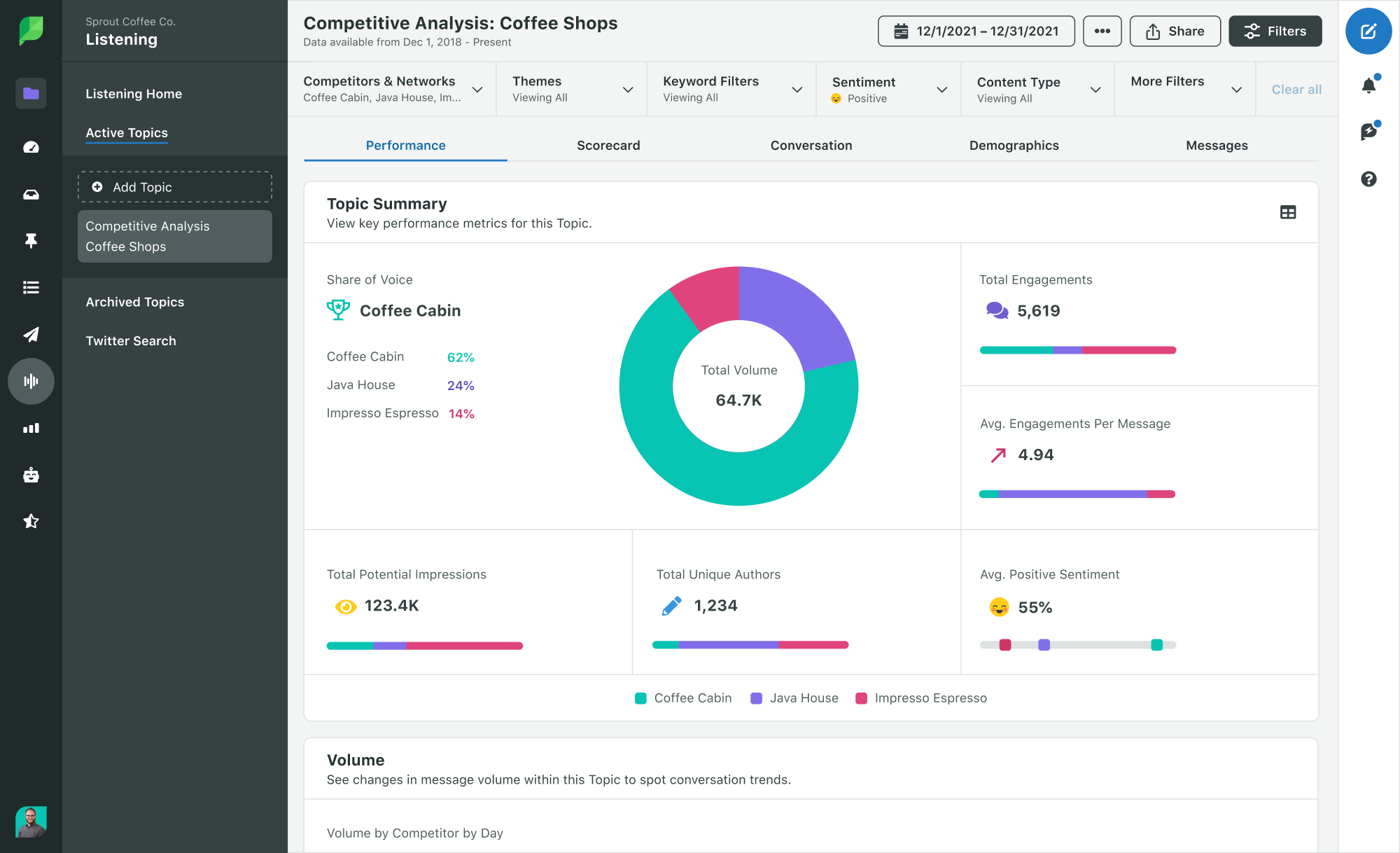
Social media share of voice metrics extract insights from authentic conversations that are happening on social media. They look at what people are saying about a certain brand or topic and use that information to determine consumer opinions and preferences. Sprout Social’s social listening tools are one way to gain these insights from customer conversations.

listening topics overview in Sprout

With share of voice data, you may be able to identify exactly why people are choosing your brand over the competition or vice versa. For instance, maybe your products are more budget-friendly or your customer service is exceptional. Or perhaps your competitors have a website that’s a lot more intuitive than yours and they offer better shipping options.

Moreover, you may even be able to identify opportunities to reach untapped audience segments. For example, if you run a skincare line, there are people who’ve always wanted to use your products but would prefer fragrance-free versions of them

Competitor research

Knowing your competitors is the key to setting your brand apart. Identifying their strengths and weaknesses will help you develop strategic ways to catch up or get ahead.

Using SOV calculation, you can find out exactly where you stack up to the competition. Which brand is dominating the conversations in your industry? How much share of voice do they have compared to yours? Where are the conversations happening? And what’s the sentiment around those conversations?

Understanding the answers to these questions will help you identify opportunities to improve and set your brand apart. You can uncover new opportunities by conducting in-depth competitor analysis with a share of voice lens.

Brand management

Share of voice data shows you the number of conversations around your brand and the sentiment behind those conversations. This allows you to monitor your brand reputation and benchmark it against that of your competitors.

Changes in those benchmarks could indicate a brewing controversy or a potential product issue. It’s particularly important to track while running a new campaign. This helps prepare you to quickly develop an appropriate response and manage your brand reputation.

How to measure share of voice

Use the following formula to calculate share of voice:

Share of voice = Your brand metrics / Total market metrics

The same share of voice formula applies across all marketing channels with slight variations on the specific metrics. For example, while you track brand mentions for social SOV, link clicks will determine organic search SOV.

Now it’s easier than ever to calculate share of voice with tools that can do the hard work for you and give you fairly precise results.

Generally, there are four major areas to focus on when calculating share of voice:

Social media share of voice

Consumer conversations across different social platforms add up to your social media share of voice. This makes it a highly accurate metric since you’re measuring actual posts and conversations from consumers.

Social media analytics tools simplify this process by identifying all your brand or product mentions across platforms. You can then compare your brand measures against those of the competition to find out just where you stand.

The social listening tools from Sprout Social will help you visualize share of voice data. You also get a breakdown of the data based on engagements, impressions, unique authors and sentiment. You can also narrow down the results by network, keywords and other advanced filters.

share of voice data overview from Sprout listening

PPC share of voice

Your PPC share of voice measures your ad visibility by comparing the potential number of times an ad could’ve showed up vs. the actual number of times it showed up. Google AdWords lets you calculate this as Impression Share and takes into consideration your campaign and keyword settings to determine this “potential” visibility.

Here’s how to find this dat: from your Google AdWords account, go to the Campaigns tab and click on the columns icon. Then select Modify columns and click on Competitive metrics. You can then choose the impression share columns you want to track.

adwords modify column window with competitive metrics to show impression share

You can use your PPC SOV data to determine how effective your campaigns are currently, or where you need to fine-tune your budget.

SEO share of voice

Calculating share of voice on organic search is a little less straightforward, but can be accomplished by using SEO tools that compare your search visibility on important keywords for your business to competitors.

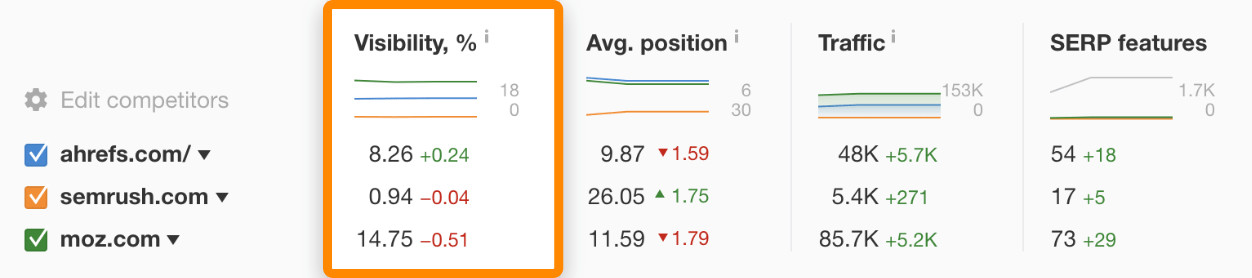
First, you need a list of main keywords relevant to your industry. These are keywords that get the most clicks for a particular topic. Then paste this list into a tool like Rank Tracker from Ahrefs and enter your competitors’ domains. In the “Competitors” overview tab, the visibility metric will show you your organic search share of voice.

This is the share of all clicks from the keywords you tracked that landed on each site. Use this data to determine if you have gaps in your visibility on key topics for your business, and where you may need to increase your competitive research efforts.

ahrefs competitors overview highlighting the visibility field

Media share of voice

Media share of voice measures your brand mentions across news websites and blogs. Which industry publications are talking about your brand and in what context? How many industry experts or journalists are writing about you and in what light? This gives you an idea of your brand popularity among peers and industry experts.

Additionally, you can also identify which publications are talking about your competitors and compare how many publications are mentioning them compared to you. This will give you an idea of which publications to focus on for your outreach and PR efforts.

To calculate your media SOV, you can use the same social listening tools that you use for calculating your social media SOV. Tools like Sprout already include news outlets and blogs in their analysis, so you just need to select the appropriate filters to narrow down the results on media mentions.

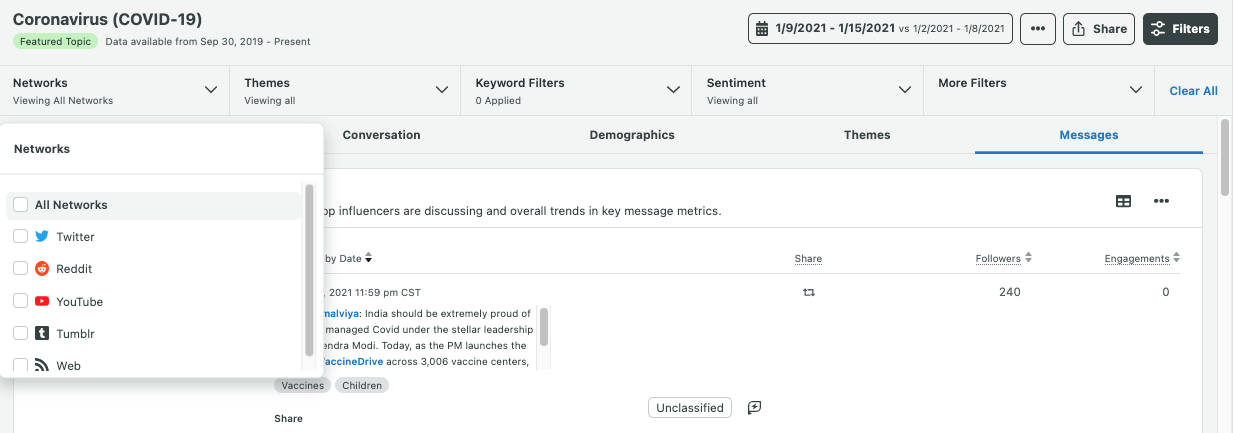
listening source filters in Sprout Social

5 Ways to boost your share of voice on social media

Social media is a great channel to actively increase your brand share of voice for quicker results that you can measure and refine.

It can take time to analyze the impact of your SEO and PPC campaigns, which also delays your SOV measurement. And you have a little less control over your media SOV since it involves working with third-party publications.

Meanwhile, social media is easier to control and adjust. You can quickly analyze performance and then make changes to optimize your efforts.

Try out these five tips to boost your social media SOV specifically.

1. Always be active on social channels

For your brand to gain visibility on social media, you need to be active.

A single Tweet a day or Instagram post an Instagram post a day isn’t going to cut it when you consider the millions of conversations happening on social networks every day. Plus, social algorithms continue to prioritize behaviors like active engagement and regular posting. Unless you actively and consistently share content, all the noise will drown out your voice. That means your competitors have the perfect opportunity to grow their share of voice while you’re left behind.

To increase your brand voice on social media, you need to start posting frequently and consistently. You can use our research on the best times to post or examine your analytics to look for trends in how posts at different times of day perform. Keep on track by creating a social media calendar to plan your content ahead of time, and schedule your posts consistently.

2. Engage, don’t just broadcast

Avoid the mistake of solely using social media as just another content distribution channel. Rather, it’s a place for communities to connect and engage with each other.

That means in addition to posting regularly, you should also engage with your audience. Respond to their comments and messages – whether it’s to answer a question, resolve a complaint or provide support.

Beyond customer queries and complaints, consider responding to positive brand mentions. Use the opportunity to acknowledge and thank your loyal customers for choosing you.

In fact, the Sprout Social Index, Edition XVII: Accelerate found that consumers think that the top traits that make a brand best in class on social offer strong customer service (47%) and engage their audience (46%).

It’s no wonder that brands like Wendy’s are so popular on social media. The fast-food chain actively responds to fans and haters alike.

You can use the right content formats to create more opportunities for your followers to engage with you. Create social media polls, ask them questions, get them to vote between two options in your Instagram Stories or start a hashtag challenge and get them to participate.

You can also encourage people to share user-generated content to drive more social media visibility for your brand. Then engage with those posts and share them on your accounts.

3. Create share-worthy social content

One of the best ways to get people talking about your brand is to create share-worthy content.

Create content that provides value to your audience, which will then encourage them to share it with their audience. That means your content should do any one of the following:

  • Educate and inform them
  • Inspire them
  • Entertain them

You could share tips, motivational quotes and how-to guides that are practical and relevant to your audience. Or you could share the latest industry news to inform them about the landscape. You could even share relevant memes and jokes that your audience can relate to. Whatever you decide to share, make sure it resonates with your audience and fits your brand voice and identity.

Cult Beauty, for instance, regularly shares makeup inspiration videos, skincare tips and memes related to the beauty industry.

Did somebody say 'dream team'? ✨

Posted by Cult Beauty on Wednesday, July 7, 2021

4. Push conversations to social

If your customers are engaging in other channels like your blog posts or customer service, consider finding ways to drive conversations to your social profiles. You can consolidate conversations that are occurring across multiple platforms to drive more engagement and ultimately increase your mentions and share of voice.

One way to get your customers to go to social rather than email or phone support is to highlight social customer care on your website. This could be faster response times, easy communication or even getting quick answers with chatbots.

Pushing conversations to social will drive more engagement for your brand socials. It also increases your brand’s social share of voice since there are more conversations and mentions of your brand on social.

In many cases, the conversations will be visible to the public. So a good customer response will reflect positively on your brand reputation. As our Index data on the value of customer care shows, demonstrating how you respond to customers with questions and concerns can help push other prospects closer to a purchase.

5. Go beyond social to drive interest

Increasing your brand’s share of voice doesn’t stop at social media. There are plenty of ways to boost your brand voice using other marketing channels:

  • Seek out guest posting opportunities on reputable blogs and feature industry influencers in your own blogs. This is a great way to gain brand mentions in major publications, which can simultaneously boost your media and organic search share of voice. Moreover, when those publications and influencers share the content with their social media followers, it will spark conversations about your brand and boost your social media SOV.
  • Ramp up your SEO efforts to get your content on the first page of Google and get more visibility. For starters, focus on user intent in your keyword research and use those keywords to create high-quality content that people are searching for.
  • Run attractive and enticing paid ads through channels like social and paid search to boost brand awareness. Test out different types of copy and ad creative to see what delivers the best results. You can also adjust your keyword and campaign targeting to drive more visibility for your ads.

Tap into your share of voice data

Your social data can tell you a lot about your brand’s share of voice and how to boost it for overall business success. Yet according to the latest Sprout Social Index, Edition XVII: Accelerate, a whopping 46% of marketers still use social data only as a marketing resource rather than bringing it into org-wide strategy. So capitalize on the opportunity to leverage your social data and grow your share of voice while uncovering valuable customer insights.

Download the latest Sprout Social Index to learn more about how other marketers are using social data.


The post Share of voice: Measuring it for social media, PPC, SEO and PR appeared first on Sprout Social.


from Sprout Social https://ift.tt/3BvpTOj
via IFTTT