I'm a visual learner. I'm always going to know more about something if I can see it, and I know I'm not the only one out there.
So if I'm looking to tell people about places I've been, products that work for me, or anything I want, really, Instagram Guides are a great way for me to show people rather then simply tell them about it. Want to create one and get the word out about something important to you? Here's how to do it.
1. Head to your profile page and tap the plus sign in the top right corner to create new content
2. In the menu that appears, tap "Guide" at the bottom
Find "Guide" in the pop-up menuCredit: Screengrab / instagram
3. Choose a Guide Type: Give people a Guide to a place, a Guide to products you'd recommend, or make a Guide out of your own posts to tell people about anything you want
***Let's say you want to create a Guide for your favorite Carly Rae Jepsen products (totally hypothetically, of course)***
4. Choose "Products"
5. Search various accounts for the products you want to recommend. You might check Carly Rae Jepsen's official account, for example
6. Select the specific products you want in your Guide (you'll choose one at a time, here)
One at a time, select the products you want to showcaseCredit: SCREENGRAB / INSTAGRAM / @carlyraejepsen
7. Select posts on Instagram that feature that product, relate to it, or otherwise tell people something you want them to know about it. Then tap "Next" in the top right
Select the posts you want to use in your GuideCredit: SCREENGRAB / INSTAGRAM / @carlyraejepsen
8. Add a title, choose your cover photo, add descriptions if you want, or add more products to your Guide. You'll need at least 2 items. When you're done, tap "Next"
Edit details about your GuideCredit: SCREENGRAB / INSTAGRAM / @carlyraejepsen
9. Tap "Share"
Your Guide will be published and appear in the "Guides" section of your profile!
Find your published Guide in the "Guides" section of your profileCredit: SCREENGRAB / INSTAGRAM / @carlyraejepsen
Now go forth into the Insta-verse and tell people about some stuff.
A/B testing is brilliant. It lets you compare two or more versions of the same page element, paid ad, or another variable to see which one performs the best. In other words, it’s a key way to improve your content, increase user engagement, and boost conversion rates across your site. What’s not to like?
Additionally, with A/B testing, the results are clear and speak for themselves. For example, if you test two versions of a newsletter, it’ll be obvious from the results which version “worked” best based on the numbers.
How do you know why either version A or B performed best, though, and how do you gain deeper insight into your campaign performance?
This is where secondary goals can help you out. Let me show you why secondary goals matter in A/B testing, and how you can use them in your own marketing development.
Primary Vs. Secondary Goals in A/B Testing
Before we get started, let’s be clear on what’s meant by “primary” and “secondary” goals in A/B testing.
A primary goal is, quite simply, your main objective. It’s the priority goal of your campaign or the goal you’re hoping to achieve when you run an A/B test.
For example, say you’re a personal trainer. You have a notice on your landing page, encouraging people to sign up for a free sample week or taster session. Maybe it looks something like this from My Soul Sanctuary:
Your primary goal might be identifying how many people click through to complete this form because you’re trying to increase your sign-up numbers.
Secondary goals, on the other hand, give you more insight into user behavior and how people interact with your website. They help you reach your primary goal by providing a detailed insight into your A/B test results.
For example, the personal trainer might also want to know how many people share their content on social media, or sign up for their newsletter while on their website:
Knowing the answers to these questions offers additional insight into how well the content is performing—rather than tracking submission form sign-ups alone.
If you want to increase conversions, grow your business, and improve your ROI, you need to track primary and secondary goals. Otherwise, you only have half the data you need to market your business effectively.
7 Secondary Goals to Track in GA for A/B Testing
Ready to track some secondary goals? To help you get started, here are seven metrics I suggest you measure as part of your A/B testing.
1. Add-to-Cart Actions
Tracking the “add-to-cart” metric allows you to identify how often customers add items to their cart and which pages get the most traction. Knowing how many times the “add-to-cart” action is triggered lets you split your audience into two categories:
those who view a product page but don’t add the item to their cart
You can use Google Tag Manager (GTM) to track cart actions. GA has detailed instructions for how to do this. Once you’re set up, you can run some different A/B tests. For example, you might test if more people proceed to checkout if there is a discount advertised for the product, and so on.
2. Interaction With Site Features
It sounds obvious, but it’s useful to track how often people interact with certain website features. Otherwise, it’s hard to tell whether your website offers visitors the great user experience they’re looking for.
From an A/B testing perspective, you might track features such as how many times users click CTA buttons, how many users engage with your live chat, and how many people click on your email address to contact you.
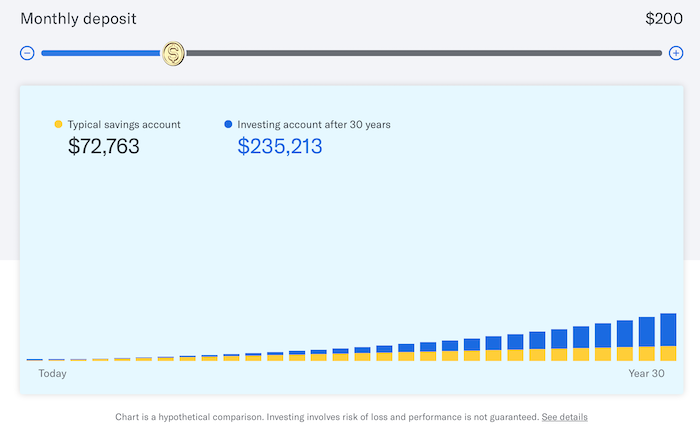
The exact features you track vary depending on your business goals. For example, Betterment, an investing website, has multiple different features, such as quizzes and investment calculators worth tracking:
In the above example, you might be inclined to track if the calculator performs better if it’s placed higher on the page, or if different colors mean more clicks.
3. Rage Clicking on Page Features
If you’re unfamiliar with rage clicking, it’s basically when someone repeatedly clicks on a page element, but nothing happens. This typically occurs because a page element looks clickable even if when it’s not, or because a link on your page isn’t working.
With Google Analytics, you can track, for example, if there’s a single page generating a high amount of rage clicks. Or, you can see if there’s a certain type of page element which generates a lot of rage clicks e.g., a button, line of text, or image.
Rage clicking can frustrate your audience to the point where they lose trust in your business and leave your website, so it’s crucial to track the cause of these events. Again, you can track rage clicks in GA through Google Tag Manager by inserting the appropriate tags into the HTML where you want to start tracking.
4. Highlighting Page Text
Why does it matter if people highlight a portion of text on your page? Well, there are two reasons.
First, they might be highlighting the text so they can take action on it. For example, if lots of people highlight and copy your phone number, then maybe it needs a hyperlink.
On the other hand, people may highlight text to copy it into Google and search for related content. In which case, there’s a chance your website isn’t providing the answers they’re looking for. This last scenario is bad from a marketing perspective, obviously.
How do you track a secondary goal like this? Well, in the first scenario, you might run an A/B test to see if more people call you if you hyperlink your phone number. Compare the results in GA to check if it’s worth keeping the hyperlink or not.
5. Newsletter Sign-ups
Newsletters are a great way to expand your audience reach and deliver high-quality, informative content straight to your subscribers’ inboxes. First, though, you need people to sign up for your newsletter (which isn’t always easy.)
If you’re low on newsletter subscribers, there are a few variables you can play with during A/B testing. For example, you might track if people are more likely to subscribe to your newsletter during the checkout process or if a brighter, more colorful banner on your landing page results in more subscribers.
Newsletters and similar content like free guides and e-books can really help you build brand trust, so this definitely isn’t a secondary goal you should ignore. In fact, every marketer should have it near the top of their priority list.
6. Category and Subcategory Pageviews
Category and subcategory pageviews are equally important.
Your category page contains a list of related pages on your site, so it’s easier for visitors to find what they’re looking for.
Subcategory pages branch off from category pages and allow you to provide more structure to a customer’s web experience.
What should you be tracking on these pages? Well, you might track how many people click on certain subcategory pages, your bounce rate for various pages, and whether there’s a subcategory with very low engagement levels.
Then, you can play with optimizing the names of each page, changing the order of the categories, or making the subcategories clearer and more condensed. GA allows you to track both category and subcategory events, so make full use of the available features.
7. Social Media Sharing Buttons
It’s awesome when people share your content. Not only does it mean you’re resonating with your target audience, but it means they’re introducing other people to your brand. In other words, social media shares count as free marketing, which is always a bonus.
From an A/B testing perspective, you might want to track how many people are sharing your page content, and if there’s any platform outperforming the others. Perhaps no one shares your blogs, but you discover your videos are shared frequently, or maybe more people share your content on Instagram than elsewhere.
GA can help here to an extent, but it’d be worth checking out the analytics tools on your social media platforms, too.
How to Measure Your Secondary Goals for A/B Testing
OK, so you have some goals in mind. Now, you need a means of measuring these goals to see if you’re actually reaching your objectives.
First, you need to establish your baseline measurements. You need to know how your website and all its features are performing right now so you can set an appropriate end goal.
If you don’t already have your baseline measurements, go back and collate some data, and then you’ll be ready to track your progress.
Do you have a baseline? Great. Now let’s consider how Google Optimize can help you measure those all-important secondary goals.
Google Optimize is a GA extension. It allows you to run experiments and track different outcomes, and you can measure the results via Google Analytics. If you don’t already have a Google Optimize account, head to optimize.google.com and click the “Get Started” button.
After creating your profile, link it to your GA account. Google has some comprehensive instructions for this, so check them out if you get stuck.
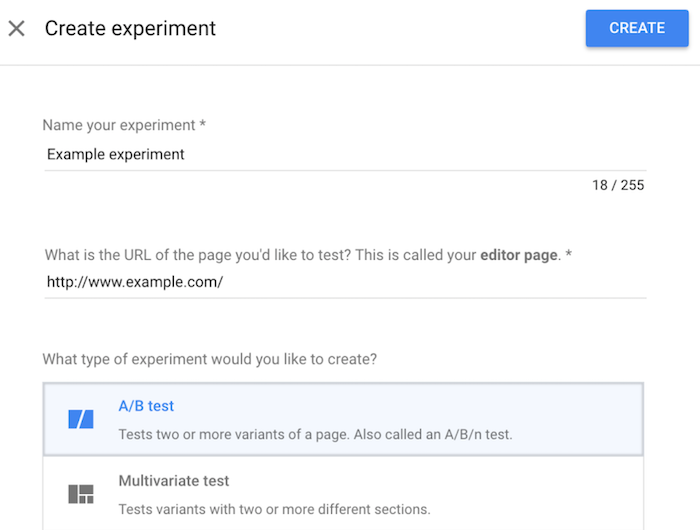
Once you’re all set up, create an experiment within Google Optimize by heading to the “Experiments” page and clicking the “Create Experiment” option:
Add your variables, configure your specific objectives, and let your experiment run. Once the experiment concludes, track your results by clicking the “Reporting” tab from the experiment’s page. Repeat the process if you want to try new variants.
To be clear, you’re not restricted to Google Optimize, though. You can also use data from sources like GA and even Facebook Analytics to build a comprehensive understanding of how your secondary goals are performing.
Frequently Asked Questions About Secondary Goals for A/B Testing
A/B testing can seem a little daunting, so here’s a quick recap of the main points I’ve covered to highlight the role of secondary goals in your A/B testing strategy.
What is A/B testing?
A/B testing, or split testing, allows marketers to test two versions of the same variable, such as paid ads or page elements, to identify which version performs better. The idea is to run both versions simultaneously to see which one has the highest impact.
What’s the difference between primary and secondary goals in A/B testing?
In A/B testing, the primary goals relate to the performance of each variable. In other words, primary goals allow you to track how tweaking a variable impacts visitors’ behavior.
Secondary goals, or metrics, give you further insight into how your visitors behave while they are on your website. Secondary goals matter because they help you improve the overall user experience on your site which, in turn, increases your conversions in the long run.
Which secondary goals should you track for A/B testing?
The secondary goals you should track vary depending on your unique goals. However, metrics you should focus on include newsletter signups, add-to-cart actions, and interactions with other site or page features. You might also track conversion rates, depending on your primary goal.
How do you measure secondary goals for A/B testing?
First, measure current performance so you have a benchmark to test against. Then, use analytics tools such as Google Optimize to measure each goal. Compile your results and devise a strategy based on your findings.
Secondary Goals: Conclusion
When you perform A/B testing, don’t limit yourself to tracking primary goals and metrics. Instead, make sure you’re measuring those all-important secondary goals to gain crucial insight into how your website’s performing and whether the user experience is optimal.
The best part? You don’t need a host of complicated tools to measure secondary metrics. Simply track your analytics data in GA, or check out one or two other measuring tools to build a more comprehensive picture of your performance.
Are you tracking your A/B secondary goals? Which measuring tool do you find most effective?
from Blog – Neil Patel https://ift.tt/3AWvygx
via IFTTT
Break-ups have always been difficult, but now that everything is online, there's the added displeasure of separating yourself from your ex digitally, too.
Keeping your audience engaged with your content is a full-time job in itself. You must constantly evaluate your current content’s engagement metrics while also anticipating the needs of your growing audience.
With this in mind, new and updated content is crucial to any successful digital marketer’s strategy. How can you generate new content without spending more time than you have available? With transcription services.
In this guide, I’ll explain what transcription services are and what they can do for digital marketers. This will include a look at one particular use case—repurposing content—to give you an idea of just how valuable these services can be.
What Are Transcription Services?
Transcription services are business services that transcribe audio to text. The audio is most often pre-recorded and is then transferred to transcription professionals, who are trained in shorthand. They are able to quickly and accurately transcribe audio from many different sources.
You also have the option of AI-powered transcription tools, such as Otter and Rev. These services combine AI with trained professionals to deliver a top-notch experience.
From podcasts and videos to workshops and live speeches, a transcription service can help you to preserve your audio in text format. This can later be used for reference or, as I’ll outline below, as a way to repurpose your marketing content.
When are Transcription Services Used
Transcription services are most often used by physicians, scientists, researchers, and other technical professionals. Their spoken notes are transcribed into written notes and reports that can be used for reference or recordkeeping.
When you think of transcription, you may also think of court proceedings and police investigations. These, too, are used for recordkeeping (often public record) and as a way to make the proceedings accessible to all.
However, transcription can offer great benefits to digital marketers, too. One of the most effective ways to use transcription is to repurpose content and create high-value content in multiple formats.
5 Ways to Use Transcription Services to Repurpose Your Content
There are plenty of benefits transcription services can provide to digital marketers, and repurposing of content is just one. Here are five ways you can use transcription to expertly repurpose your content.
1. Turn a Video Into a Blog Post
Whether a new or established digital marketer, I can safely assume you never feel as if you’re hitting your weekly or monthly blog post targets. By transcribing your videos into blog posts, you can get that much closer to reaching your goal.
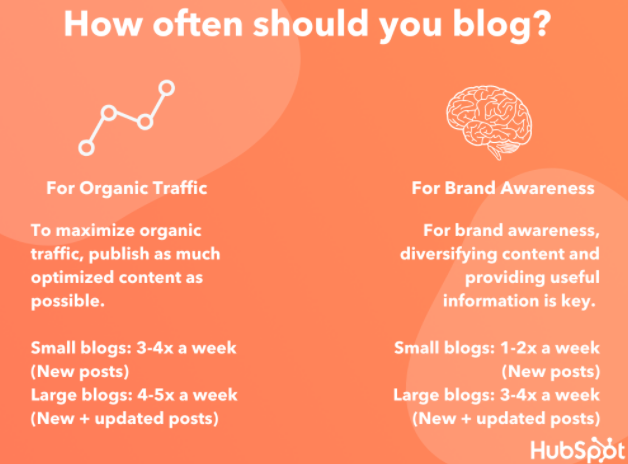
How many posts should you publish a week? According to HubSpot, the sweet spot can be anywhere from one post to five posts per week.
However, this will depend on the size of your website and what you hope to achieve. For a small website with a goal of maximizing organic traffic, for example, three to four new posts per week is recommended.
Another benefit of turning videos into blog posts is accessibility. While many digital media platforms offer closed captioning, they aren’t always the ideal way to digest content. By turning videos into blog posts, you can ensure all of your traffic has access to your content in multiple ways.
Of course, you should aim to bulk up these blog posts in ways that benefit the readers. These include using visuals (e.g., images, infographics, charts) and adding more in-depth examples.
The transcription should serve as a starting point to creating engaging, valuable blog posts.
2. Turn a Podcast Into a Video or Blog Post
You don’t need to forfeit multimedia content entirely! You can “upgrade” your podcast to a video using transcription services. Just add some visuals and you can now share to digital media platforms like YouTube and Vimeo.
The greatest benefit here is the ability to reach a wider audience. While there is certainly crossover between podcast listeners and video watchers, there are some people who stick strictly to one format. By turning your podcast into a video (or vice versa), you open your content up to a whole new audience.
You have a few options here when it comes to adding visuals to your videos. The simplest is using one image (perhaps a solid background with your brand and website URL) throughout the entirety of the video. This isn’t appealing, but it will enable you to add your content to sites like YouTube.
For more appealing visuals, you can also try stock photos, digital imagery, or even b-roll.
How can you ensure the visuals you use are appropriate and appealing to your audience? Search YouTube for similar content keywords to see what types of videos your target audience is currently engaging with. This can ensure you are on the right track, while also giving you ideas on how to improve your content over the current offerings.
Or, you can turn your podcast into a blog post.
For example, Content Marketing Institute’s Joe Pulizzi hosts a podcast, then turns the transcript into a detailed blog post. This allows users who don’t have time to listen to still access their content.
3. Create a List-Building PDF
Do you have a video or podcast episode that would make great list-building content? Then consider hiring a transcriptionist to turn that content into text.
List-building content, also known as lead magnets, are a great way to build your email subscription list. It is an offer of free content in exchange for an email address. However, it is not as easy to attract people to your list-building content as it was before everyone had a website. Your content must be truly compelling and high-quality.
Using a unique angle, you can use the above formats to attract a targeted audience. With such an array of content types, it’s likely you have a video or podcast episode that can easily be transformed into one of the above.
4. Build a Resource for Social Media Content
There’s bound to be a Tweet-worthy quote or two from your latest podcast episode. Instead of replaying the episode and scrubbing through it, turn the episode into a transcript. This will make it incredibly easy to find social media content to share.
Without the need to scour your audio, you can now spend that time creating attractive visuals using platforms like Canva or Adobe Spark. These services allow you to create the ideal visuals for each social media platform, and they even include templates to get you started.
Do keep in mind the cost of transcription services may increase if your episode includes more than one person. This can take time and skill to navigate. On the other hand, the added benefit of transcribing multi-guest content is that multiple speakers can add refreshing insight to your social media pages, especially if the guest has their own social profile to engage with your audience.
5. Create an E-Course
If you want to create a substantive course, then consider combining multiple videos or podcast episodes on a similar topic. The resulting e-course can then be offered as a lead magnet or even a paid course.
With platforms like Kajabi and Thinkific, you can host your online course with ease. How can you ensure the course you create is profitable? The steps to creating a successful online course include:
As a paid course, the content should be of exceptional quality and it should go in-depth. Transcriptions of your previous content will be helpful to create an outline, but you should really dig deep and build out the content as best you can.
Before you employ a transcriptionist, take special care to pick your best audio and video episodes for transcription. These will form the basis of your course, but they’ll of course need to be bulked up with further examples, imagery, and more.
Transcription Services Frequently Asked Questions
Transcription is invaluable to digital marketers, but perhaps you still have a few questions. Let’s go over them.
How much does it cost to get a transcription of your content?
The cost to transcribe your content will vary. Consider that transcriptionists have various ways of charging for their work (e.g., per hour, by project) and rates will vary by experience level, location, and more.
How long does it take to transcribe audio?
Just as with cost, the length of time it takes to transcribe your audio will vary. The industry standard is two to three hours per one hour of audio. However, that assumes the audio quality is clear with little to no background noise.
Do transcribers use software?
Even professional transcriptionists rely on software to ensure efficiency and accuracy. With tools like Amberscript and Happy Scribe, you (or your editors) can collaborate with your transcriptionist in real-time. This ensures a seamless transcription experience.
Are transcription services accurate?
As with most services, you get what you pay for. The same can be said for transcription software tools, as well. The more experienced your transcriptionist (or advanced the software you use), the more accurate the transcriptions are likely to be.
Repurposing Transcriptions for Content Conclusion
Your audience craves new and updated content on a regular basis. While this can seem a daunting task, audio transcription services can offer a solution.
With transcription, you can turn your audio content into text. This text can then be repurposed into other forms of content, including blog posts, social media content, and online courses. Transcribed content can help you to satisfy the needs of your growing traffic numbers, while also providing accessible content so as to reach a wider audience.
Depending on the quality of the services you use, you may not even need to spend much time editing the transcription. This will save you immeasurable time while also expanding your reach as a digital marketer.
Which of the above content formats will you transform your audio content into?
from Blog – Neil Patel https://ift.tt/3kZZ3bL
via IFTTT
Want to tag a friend to show them something on Facebook? Or perhaps you're a parent who wants to tag your child in the ugliest, most embarrassing photo of them of all time because that's what parents on Facebook do.
We'll tackle tagging people to show them posts, first. And unfortunately for all of you with parents on Facebook, we'll go over photo tagging after.
How to tag someone in a comment section
1. First, find the post you want to show to someone
2. Go to add a comment
3. Begin typing the person's Facebook name, or type the "@" symbol first to get more suggestions.
4. Select the person's profile in the search suggestions
Search the person's name and select their profileCredit: Screengrab / Facebook
5. Once you select their profile, your comment will auto-fill and highlight their name
Maybe don't feel the need to tag Rihanna in articles about her, but you get the ideaCredit: SCREENGRAB / FACEBOOK / billboard
6. Type anything else you want to say, and then tap the arrow on the right to send
That person will be tagged in the post you commented on
How to tag people in photos
1. Go to create a new post
2. Add a photo
3. Tap blue person-shaped icon at the bottom
Tap the blue person-shaped icon at the bottomCredit: SCREENGRAB / FACEBOOK
4. Select "Tag People"
Select "Tag People"Credit: SCREENGRAB / FACEBOOK
5. Type the name of person you want to tag, or select their profile in the menu. Then tap "Done"
Type their name and select their profileCredit: SCREENGRAB / FACEBOOK
6. Your post will show as you being "with ______" with the person you tagged showing in the blank
7. Add a comment if you want, and tap "Post"
Add a genius comment like this one, if you want.Credit: andy moser / facebook
That person will be tagged in your photo
In general, you can tag people by typing there name in the designated area and selecting their profile – whether it be in a comment section, on your own profile page, or even if you write a post on somebody else's page.
You can also tag people (or yourself) in your friends' photos. If a photo has the "tag" icon (pictured below) in the top right, just tap it, then tap the area of the photo you want to tag. Type the person's name you want to tag, and select their profile. That's it! That person will be tagged in the photo.
Tag people in your friends' photos by using this icon in the top right of the photoCredit: SCREENGRAB / FACEBOOK