Tuesday, 5 July 2022

15 YouTube Video Ideas to Inspire Your Brand’s Channel

As the second most popular website in the world, YouTube’s impact can’t be overstated. It’s home to hundreds of millions of videos, the latest emerging trends, diehard communities and ample revenue opportunities.

The video sharing site isn’t just for creators. Your brand can (and should) leverage YouTube to grow your community, maximize your SEO value and help reach your larger business goals.

In this article, we share our list of the top 15 creator-led trends. Use these inspiring, educational and entertaining YouTube video ideas to supercharge your brand’s channel.

“Behind the scenes” of YouTube’s influence

First, let’s uncover why building a YouTube marketing strategy is important.

In the early- to mid-2010s, popular YouTube videos were known for featuring extreme pranks, click-bait titles and mega-star influencers. Today, those trends have fizzled out, leaving the platform in a period of transition and ripe for new opportunity.

For example, YouTube recently launched YouTube Shorts, their new short-form video experience. Shorts quickly gained over 1.5 billion monthly active users, a testament to YouTube’s enduring influence.

With over 2 billion monthly users, YouTube is more popular than it’s ever been. According to the 2022 Sprout Social Index™, 51% of consumers plan to spend more time on YouTube in the next 12 months, making it the second most prominent platform after Facebook. Yet, marketing efforts are mismatched, with only 35% of marketers planning to leverage the network.

A chart showing top platforms consumers and brands anticipate using most in the next 12 months" from the 2022 Sprout Social Index™. The chart demonstrates the top 5 most popular platforms are Facebook, YouTube, Instagram, TikTok and Snapchat.

If you want to stand out from your competition during this era of YouTube’s evolution, investing in your brand’s YouTube presence is a must.

“Unboxing” the top 15 ideas for YouTube videos

Let’s dive into 15 video ideas you can use to get more views on YouTube, grow your channel and fuel your video strategy across your social platforms.

    1. Meet the team
    2. Day-in-the-life vlog
    3. Home or office tour
    4. Product tutorial
    5. How-to video
    6. Educational video
    7. Creator partnership video
    8. Web series
    9. Live events
    10. Webinar presentation
    11. Interviews
    12. Video podcast series
    13. Q&As
    14. Testimonials
    15. Product reviews and unboxings

    1. Meet the team

    Kickstart your YouTube channel by introducing your brand. Showcase your company’s culture, values and, of course, team members. By inviting your team to step in front of the camera, you will win over your audience with authenticity.

    The Meet the Melbourne Water Team series is a great example of how YouTube videos can humanize your brand. The series acquaints you with the people behind their mission by sharing each individual’s background, passions and daily responsibilities.

    2. Day-in-the-life or behind-the-scenes vlog

    Give your followers a glimpse into the daily lives of your team (or creators you collaborate with). Whether it’s what they eat in a day or how they structure their work schedule, YouTube audiences can’t get enough of the day-in-the-life video format. Make sure your video strikes the right balance between aspirational and realistic.

    In this episode of Sprout Social’s video series, Always On, our Social Media Strategist, Olivia Jepson, shares a behind-the-scenes look at how she prioritizes and manages her time so that she can strategize, grow professionally and keep up with the speed of social.

    3. Home or office tour

    Whether your place of work includes a top-of-the-line gym, a fairytale-inspired castle or a home office, give your viewers a tour of your company’s set up. These videos are an excellent way to give your audience a peek into your brand’s culture and values.

    In Zendesk Dublin’s office tour, they emphasize the people-first, fun-based approach that defines their organization.

    4. Product tutorial

    Consumers want to see your products in action. According to the 2022 Sprout Social Index™, 59% of consumers like to see content that features a brand’s product or service. In your videos, create easy-to-follow tutorials that demonstrate the efficacy of your products.

    For maximum transparency, highlight real customers or creators. On bareMinerals’ channel, they spotlight creators using their favorite products to show viewers how to mimic their skincare and makeup routines at home.

    5. How-to video

    Chances are you’ve uttered the phrase “YouTube it” at least once. More than half of all YouTube users turn to the platform to learn how to do something they’ve never done before, whether it’s fixing an appliance, cooking a new recipe or learning a language.

    On Nike’s YouTube channel, their footwear designers teach viewers how to properly clean their sneakers. The tips help people keep their shoes in their closets (and out of landfills). The video series supports Nike’s wider sustainability initiatives, while still providing helpful information.

    6. Educational video

    Ask yourself: What’s something your customers wish they knew more about? Use your answer to brainstorm a unique educational video idea. Make sure the topic is relevant to your industry and mission, but it doesn’t have to be about a product or service you offer.

    In Greenpeace UK’s video, “What is COP26 and why is it so important?,” they explain the significance of the UN Climate Change Conference. Their channel is full of videos breaking down complex political and scientific concepts, which makes it a valuable news source for their audience.

    7. Creator partnership video

    The top-performing YouTube ad of 2021 was the Hyundai x BTS For the Earth video. It pays to collaborate with celebrities and creators, but working with them isn’t the end-all-be-all. Your partners need to be authentic and have experience with your product.

    When CAVA restaurant company sponsored the mashup between Dessert Person (a.k.a. Claire Saffitz) and Emma Chamberlain, it was a match made in Food Tube heaven. The brand promoted the partnership by offering Emma’s dishes in their restaurants for a limited time. An impressive example of how to use YouTube to support omnichannel marketing efforts.

    8. Web series

    A web series is a scripted or non-scripted installment of videos published online. They usually follow a narrative sequence, like TV shows and movies.

    Take LEGO Friends, an animated children’s series set in a world made of everyone’s favorite blocks. The creative characters, plotlines and fictional world earn the series a massive fanbase, with tens of thousands of views per video. The series also contributes to the massive success of the best-selling LEGO Friends product line.

    9. Live events

    Tap into YouTube Live, YouTube’s live streaming feature, to produce interactive experiences on your channel. When you go live, you can interact with your audience real-time via video and chat. Use live videos to replicate in-person interaction at scale.

    For example, the Monterey Bay Aquarium’s Live Sea Otter Cam captures the fun of visiting the aquarium 24/7. The live feed not only delivers cuteness overload, it also helps raise money for the aquarium.

    10. Webinar presentation

    Webinar-style YouTube videos were popularized by TED Talks, but your brand can use the same template to host an event of your own. Think of an industry leader your audience would like to learn from and invite them to speak on your channel.

    B Squared Media, a boutique digital marketing agency, used the network to host their expert webinar, “The Aftermath of the Pandemic: How Customer Care Has Changed,” featuring marketing strategist Mark Schaefer. The topic aligned with their audience’s most-pressing concerns—an ideal choice for a timely webinar.

    11. Interviews

    Interview-style videos are educational and entertaining. Whether you interview creators, your executives or other influential people, these videos make your brand seem more personable.

    Your interview guests don’t even have to be a part of your industry. Take Alaska Air’s Beyond Interview series, where pilot Captain Swani interviews football stars to talk about family, sports and more. Fans come for the megastars, and stay for Alaska Air adventure.

    12. Video podcast series

    Promote your podcast on YouTube by sharing videos of your recording sessions. Unlike standard interviews, video podcast series are less formal and more conversational.

    On goop’s YouTube channel, the wellness brand turned their podcast into a video series. By repurposing their content on YouTube, they were able to use their most popular episodes to gain thousands of new views.

    13. Q&As

    The best rapid-fire Q&A sessions are quick, fun and entertaining—the perfect combination to try on YouTube Shorts. In your Q&A videos, it’s okay to be more lighthearted than usual. Just make sure you adapt the right tone for your brand.

    A screenshot of a YouTube Short from Fabletics, featuring Liza Koshy and titled "Q&A with the one and only Liza Koshy!"

    In Fabletics’ Q&A with actress and collaborator Liza Koshy, they ask her questions ranging from her favorite breakfast foods to which animal she most identifies with. All while showing off their new collection. The result is a playful, funny and attention-grabbing video (in under 60 seconds).

    14. Testimonials

    According to the 2022 Sprout Social Index™, 39% of consumers like to see brands they follow on social post customer testimonials or real customer demos.

    Gain inspiration for your testimonial video by asking your customers for reviews and feedback. Use this as an opportunity to find your biggest brand evangelists and feature them in your video. You can also source user-generated content from your superfans to reshare on your YouTube page.

    For example, on Sprout’s YouTube channel, we created a collection of customer testimonials. Our customers’ lived experience with the Sprout Social platform made for compelling and highly engaging videos.

    15. Product reviews and unboxings

    Unboxing videos are one of the internet’s most enduring trends. The premise is simple. Consumers open, or “unbox,” a package containing products they received from a brand. Then, the creator will review the products on camera.

    The most successful unboxing videos seem authentic. Take this Stitch Fix unboxing video featuring Keegan-Michael Key. The comedian lets his personality—and his new outfits—shine in a way that feels true to his personal style and the brand’s identity.

    “How-to” find success with your YouTube content

    Now that you’re equipped with some YouTube video ideas, it’s time to start growing your channel. Let’s get started.

    1. Schedule your videos ahead of time

    In a platform like Sprout, you can use publishing and scheduling tools to make quick work of delivering social content. Upload your video. Write a keyword-driven title and description. Schedule your video. And you’re done.

    A screenshot of a New Post window in Sprout Social's publishing tool. The image shows a video being directly uploaded in Sprout Social preparing to be published on YouTube.

    Publishing and scheduling in Sprout saves you valuable time, so you can put more energy toward promoting your channel.

    2. Monitor your video’s performance

    After your video goes live, it’s time to gather insights. Use YouTube Analytics to zero in on your best performing videos. Keep track of your views, watch times and engagements.
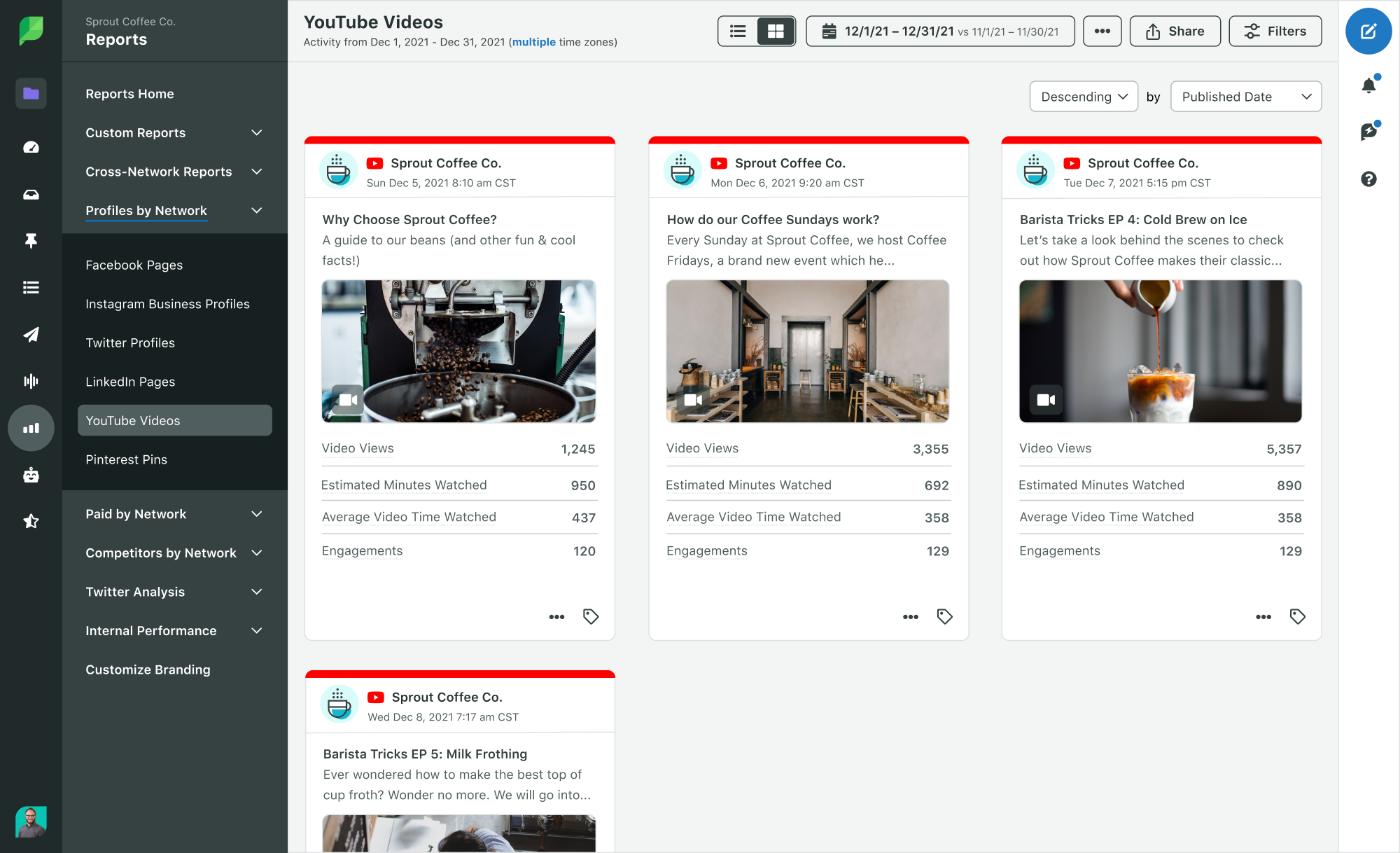
    A screenshot of Sprout Social's YouTube Video Report, showing video views, minutes watched and engagements metrics for posted videos.

    In Sprout’s YouTube Video Report, you can quickly review your top performing videos at a glance or uncover engagement metrics for each video. The report enables you to easily understand the immediate and long-term impact of your YouTube content.

    3. Find the right content mix for your channel

    When you have multiple published videos under your belt, determine which content themes pique your audience’s interest. You can use Sprout’s Post Performance Report to analyze your cross-channel performance at the post level. The metrics will help you understand which videos resonate and why.

    A screenshot of Sprout Social's Post Performance Report, showing engagement metrics and options to add different platform results to compare them to your YouTube video results.

    After you unlock your formula for success, rinse and repeat. Create more videos with similar content themes to keep your momentum going. The ideas in this article can help you get started, but it’s all about finding a creative angle that fits your brand and your audience.

    During this period of extraordinary growth and opportunity, the time to breakthrough on YouTube is now. The more you instill authenticity and listen to your audience, the more likely you are to succeed.

    Looking to learn more about how your brand can chart your path forward into the future of social media? Download the 2022 Sprout Social Index™, Edition XVIII today.

The post 15 YouTube Video Ideas to Inspire Your Brand’s Channel appeared first on Sprout Social.


from Sprout Social https://ift.tt/L6xjw3G
via IFTTT

Monday, 4 July 2022

Create an Integrated Marketing Communications Plan That Highlights the Best of Your Brand

When a customer interacts with your brand on your website, on social media channels, or in person, they should have a cohesive experience.

From brand voice to visual identity, everything should be aligned with your company’s mission, values, and goals.

This approach is called integrated marketing communications (IMC).

As more and more customers use three or more channels to research a brand, integrated marketing communications are becoming more and more important.

WSo what are integrated marketing communications, and why do they work so well? In this blog post, we’ll answer those questions and give you some tips on how to create your own integrated marketing communications plan.

What Are Integrated Marketing Communications?

The goal of integrated marketing communications is to create a consistent message and brand identity that customers will recognize across all channels.

This requires a coordinated effort that includes all aspects of marketing, from advertising and public relations to sales and customer service.

For example, if a customer sees an ad for your product on TV, hears about it on the radio, and then visits your website, they should have the same experience.

Your message should be consistent across all channels, and each channel should work together to support the others.

Why is this important?

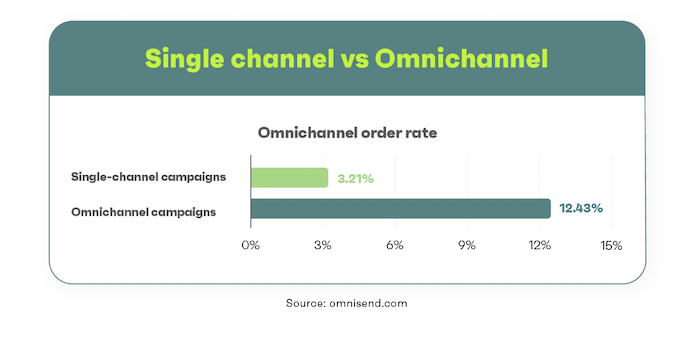
Well, in a world where 77 percent of B2B buyers spend time researching purchases online and purchase frequency is 250 percent higher on omnichannel vs. single-channel shopping, you need to make sure your message is getting through, loud and clear.

An integrated marketing communications plan will help you do just that by bringing all of your marketing efforts together into one cohesive strategy.

A chart comparing the order rate between single channel and omnichannel marketing campaigns.
The difference between single channel and omnichannel order rates.

Why Integrated Marketing Campaigns Work

Integrated marketing communications campaigns work because they provide a consistent message across all channels that are reinforced with each interaction.

This type of marketing allows you to control the conversation about your brand and ensure that your target audience is seeing the same message no matter where they encounter your brand—–whether it’s through paid advertising, social media, or even in person.

Plus, integrated marketing communications campaigns are often more cost-effective than single-channel campaigns because you can leverage existing content and assets across multiple channels.

Key benefits of an integrated marketing communications plan:

  • Rreach a wider audience than single-channel experiences
  • Kkeep your brand top of mind across all channels
  • Bbuild audience trust with consistent messaging and campaigns
  • Ssave budget by reusing content and assets

If that’s not enough, research from the Harvard Business Review found that customers who use omnichannel shopping spend 10 percent % more online and four4 percent % more in-store than single-channel customers.

Integrated Marketing Communications Examples

Looking for your next great integrated marketing communications campaign? Check out these examples for inspiration.

Budweisers’ “Whassup?” Campaign

The “Whassup?” campaign by Budweiser first aired during Monday Night Football in 1999. The campaign featured characters answering the phone saying, “Whassup?” in a comical, slurred way.

While the internet was still in its infancy, Budweiser became a pioneer by directing viewers to its website.

On the website, visitors could learn how to say “Whassup” in over 30 different languages! With this new marketing campaign, only one phrase increased visitors to Budweiser’s website and sealed the integrated marketing communications campaign’s efficacy.

The campaign was a success and won the Cannes Grand Prix award as well as the Grand Clio award. The catchphrase was also featured in pop-culture hits such as Scary Movie (2000), Friends (2003), The Simpsons (2002, 2005), and Ant-Man and the Wasp (2008).

For the 2020 Super BowlSuperbowl, Budweiser brought this campaign back in a pandemic-themed re-make titled, “Whassup again?”

Domino’s “AnyWare” Campaign

Another integrated marketing communications campaign example success story comes from Domino’s Pizza.

ToIn order to increase digital orders, Domino’s created AnyWare, which allows customers to order pizza through various platforms such as a tweet, text, Ford Sync, Smart TVs, and smartwatches.

Each new way to order was introduced with its own press release and driven to the DominosAnyWare.com website.

In 2015, Dominos also launched a national TV ad campaign featuring celebrities arguing that their way of ordering was the best.

To date, the AnyWare campaign has generated 2 billion earned media impressions including spots on The Ellen Show, Jimmy Fallon, and The Today Show. The TV campaigns generated 10.5 percent year-over-year growth for the brand.

An image of an Apple Watch with a Domino's pizza tracker on the screen.
Dominos “Anywhere” Campaign.

The Martian Movie

To promote the theatertheatre release of 20th Century Fox and Ridley Scott’s, “The Martian” in 2015, a prologue campaign was created to increase awareness and excitement.

The goal of the “The Martian” prologue campaign was to build box office hype around the new film.

An integrated marketing communications strategy was built to be consumed on a variety of channels including, but not limited to: social media, video, celebrity endorsements, and traditional PR and marketing efforts.

The campaigns included a mock episode of Neil deGrasse Tyson’s StarTalk from the year 2035, an Under Armour campaign showing “The Martian”‘s main character, Mark Watney, as a superathlete of the future, and mock-declassified NASA footage showing each character going through psychological testing before heading out into space.

The Martian opened number one at the box offices and had the second-highest fall opening of all time. It was also the number one movie in the U.S. for four4 weeks.

How to Create an Integrated Marketing Communications Plan

If you want to create an integrated marketing communications plan that highlights the best of your brand, here are a few key steps you need to take.

1. Get to Know Your Audience

Before you start developing your communications plan, you must takeit’s important that you take the time to get to know your audience.

Consider demographic factors, such as education level, gender, income, age, race, and geographic location. Then, think about behavioral and psychological traits, including things like interests, hobbies, and values.

Take demographic factors like education level, income, age, race, gender, and geographic location into consideration. Don’t forget about psychological and behavioral traits like values, hobbies, and interests.

Creating a customer profile that is specifically tailored to your ideal customer will help you make better decisions about your marketing campaign.

In some cases, you may have more than one customer profile for a given campaign. Sometimes, you may have multiple customer profiles for one campaign. In that case, it’s important to segment your audience so that you can tailor your message to each group.

For example, if you’re marketing a new line of environmentally-friendly cleaning products, you might have one customer profile that is interested in saving money and another that is interested in saving the planet.

Tailoring your message to each group will help you create an integrated marketing communications plan that highlights the best of your brand.

2. Set a Budget

Let’s face it, you might not be in a position to hire Neil deGrasse Tyson, NASA, and Under Armour in your first integrated marketing communications campaign.

But tThat doesn’t mean you can’t create a strong, compelling message.

The key is to set a realistic budget and then allocate your resources accordingly.

If you have a limited budget, focus on creating high-quality content that can be distributed across multiple channels.

If you have a larger budget, look for high-profile partnerships, influencer marketing, and other paid media opportunities.

In either case, make sure you have a clear plan for how you will spend your money and what your limits are.

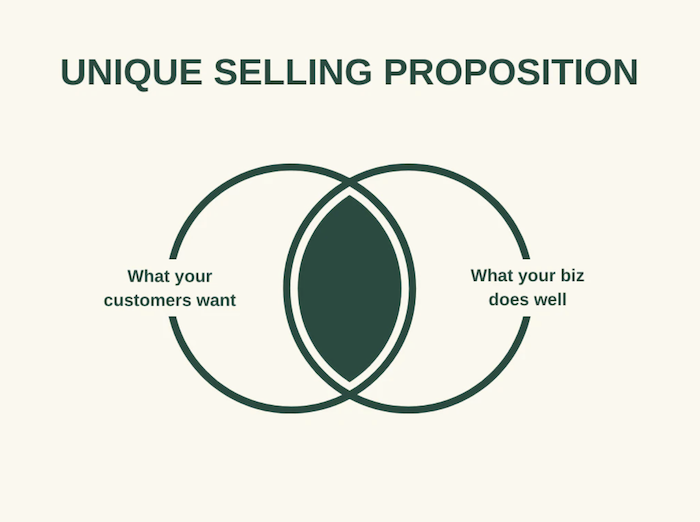
3. Outline Your Unique Selling Proposition (USP)

One of the most important parts of creating an integrated marketing communications plan is understanding what makes your brand unique.

  • What do you offer that no one else does?
  • What can you do better than anyone else?

Answering these questions will help you develop a strong unique selling proposition (USP), which will be a key component of your communications strategy.

Once you have your USP, make sure it is front and center in all of your marketing materials.

It should be the through-line that ties together your various communications channels and provides a consistent message to your target audience.

For example, if you are a luxury car brand like Audi, your USP might be “Luxurious and comfortable cars delivering excellent engine performance.”

Make sure this message is clear in your advertising, social media posts, website content, and any other marketing collateral.

If you’re selling running shoes like Nike, your USP might be “The best shoes for athletes and fitness.”

Again, this should be a consistent message across all of your communications channels.

Your USP will be the foundation of your integrated marketing communications strategy, so take the time to develop it thoughtfully.

A venn diagram depicting the difference between what your customers want and what your business does well.
Use your unique selling proposition to create an effective integrated marketing communication campaign.

4. Decide Which Platforms You’ll Use

Once you know who you’re speaking to and what you want to say, you need to decide which channels you’ll use to reach your target audience.

This will be different for every business, but some common options include:

  • Eemail marketing
  • Ssocial media platforms (Facebook, Twitter, Instagram, LinkedIn)
  • Aadvertising (digital and traditional)
  • Ccontent marketing (blog posts, infographics, eBooks)
  • Eevents and tradeshows
  • PR and media relations

Once you decide on overarching channels, you’ll also need to determine which specific tactics you’ll use on each platform.

For example, if you’re using Facebook to reach your target audience, will you primarily rely on organic posts or paid ads? If you’re using email marketing, what sort of content will you include in your newsletters?

Asking yourself these types of questions will help you create a more comprehensive and effective IMC strategy.

5. Messaging Style

While your brand voice needs to be consistent across all channels, the way you actually communicate with your audience will vary depending on the platform you’re using.

For example, the messaging you use in a Facebook ad will be different from than the messaging you use in an email newsletter.

Your tone might also change depending on whether you’re trying to build awareness, generate leads or drive sales.

Keep this in mind as you create your content calendar and start to populate it with messaging that’s in line with your brand voice and the goals of each individual piece.

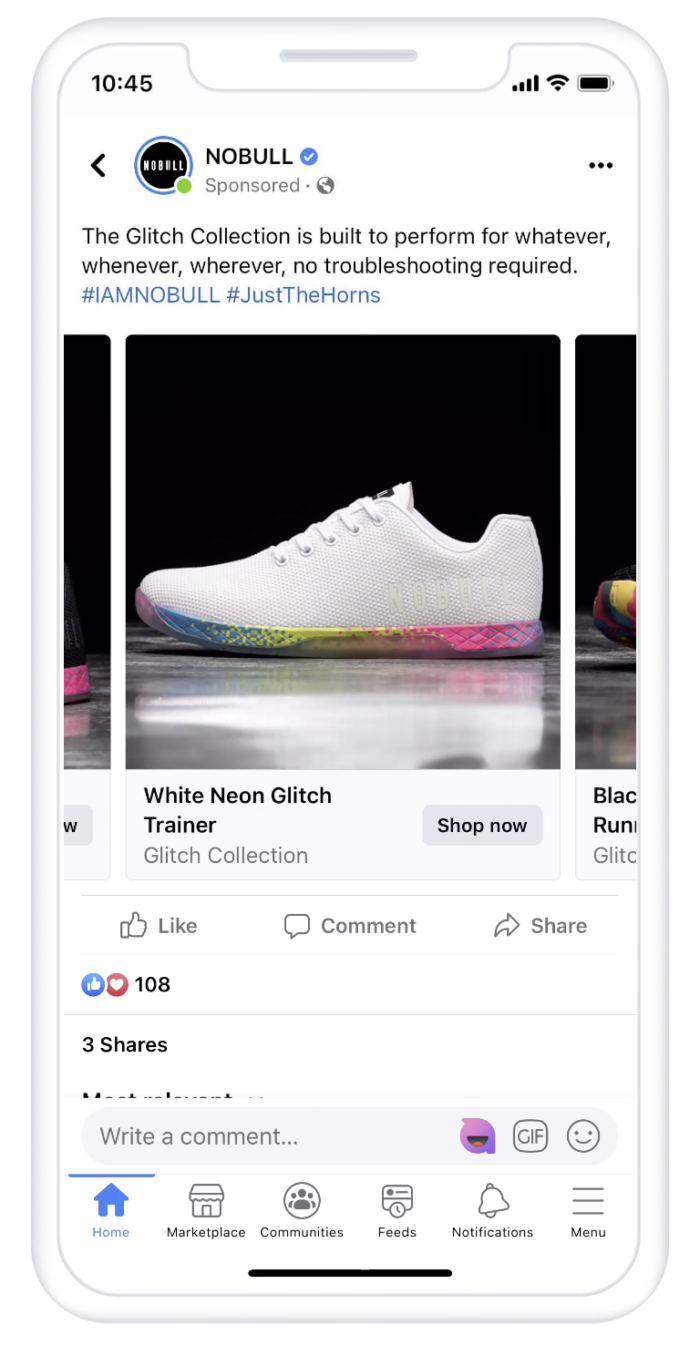
Here are two examples from sneaker company No Bull, which uses different messaging styles on Facebook ads versus Twitter posts.

An IPhone screen showing a Facebook ad of sneakers.
A Facebook ad example from No Bull.

<blockquote class=”twitter-tweet”><p lang=”en” dir=”ltr”>About to take on the week like…<br>Congrats on a great finish in Dubai, Tola!<a href=”https://twitter.com/hashtag/IAMNOBULL?src=hash&amp;ref_src=twsrc%5Etfw”>#IAMNOBULL</a> <a href=”https://twitter.com/hashtag/JustTheHorns?src=hash&amp;ref_src=twsrc%5Etfw”>#JustTheHorns</a> <a href=”https://twitter.com/hashtag/BehindTheHorns?src=hash&amp;ref_src=twsrc%5Etfw”>#BehindTheHorns</a> <a href=”https://t.co/RqlABILona”>pic.twitter.com/RqlABILona</a></p>&mdash; NOBULL (@justthehorns) <a href=”https://twitter.com/justthehorns/status/1206646654989783047?ref_src=twsrc%5Etfw”>December 16, 2019</a></blockquote> <script async src=”https://platform.twitter.com/widgets.js” charset=”utf-8″></script>

6. Set Your Targets and Goals

You’re almost ready to start putting your IMC plan into action, but first, you need to set some targets and goals. Consider the following:

  • What do you want are you looking to achieve with your integrated marketing communications strategy?
  • Are you trying to improve your external reach?
  • What about internal communications?
  • Is there a particular target audience you’re looking to engage?

Attaching numbers to your objectives is a good way to measure progress. For example, if one of your goals is to increase brand awareness, you could measure this by tracking the number of mentions your brand receives online.

Or, if you’re looking to improve customer satisfaction, you could survey your customers after they’ve made a purchase.

Other goals can include:

  • Email sign- ups
  • Social media follows and engagement
  • Website traffic
  • Sales or conversions
  • Phone calls
  • Event sign-ups and ticket sales

Once you have some goals and targets in mind, it’s time to start putting your integrated marketing communications plan into action!

7. Track and Optimize

Once your integrated marketing communications campaign is up and running, it’s important to track progress and optimize along the way.

Analytics are key in understanding what’s working and what’s not.

Be sure to keep an eye on your campaign goals and KPIs, and adjust as necessary. If you’re not seeing the results you want, don’t be afraid to change things up.

For example, let’s imagine you’re running an email campaign as part of your integrated marketing communications plan.

You might want to track metrics such as:

  • Oopen rates
  • Cclick-through rates
  • Uunsubscribe rates

If your open or click-through rates are low, you might want to consider changing up your subject lines or email content.

Or, if you’re seeing higher than average unsubscribe rates, that could be an indication that your content is not relevant to your audience.

It’s important to constantly test and measure the performance of your campaigns so that you can make necessary adjustments to ensure success. By doing so, you’ll be able to create an integrated marketing communications plan that highlights the best of your brand.

Frequently Asked Questions: Integrated Marketing Communication Plans

What does integrated marketing communication mean?

Integrated marketing communication is an approach to marketing that uses all aspects of a company’s communication channels to deliver a consistent message.

What are the benefits of using an integrated marketing communications plan?

The benefit of an integrated marketing communications plan is to ensure that all of a company’s marketing efforts are working together in harmony to deliver a consistent message.

What are the five forms of integrated marketing communications?

There are five main ways to market your product or service. They are advertising, direct marketing, internet marketing, sales promotion, and public relations. All of these methods can be used together to create a harmonious marketing plan.

Do integrated marketing communication plans help drive ROI?

Yes, integrated marketing communication plans can help drive ROI by ensuring that all marketing efforts are working together to deliver a consistent message. This will result in increased brand awareness and customer loyalty, which will lead to increased sales and profits.

Final Thoughts on Integrated Marketing Communications Plans

An integrated marketing communications plan is the key to success for any company.

By creating a plan that outlines the main ways to market your company and product, you can ensure that all of your marketing efforts are working together to deliver a consistent message.

This can result in increased brand awareness and customer loyalty, which can lead to increased sales and profits.

The end result? A more successful company that is better able to compete in today’s marketplace.

How have you found success with integrated marketing communications?


from Neil Patel's Digital Marketing Blog https://ift.tt/Dp7ozFf
via IFTTT
Sunday, 3 July 2022

5 Ways to Reinvent Customer Experiences That Will Increase Your ROI

Did you know that 17 percent of your customers could walk away from your business after just one bad customer experience? That’s a pretty significant number, especially when you’re trying to grow your business and increase your return on investment (ROI).

There’s good news, though: You don’t need to lose these buyers if you prioritize the customer experience. Below, I’ll explain what customer experiences are, why they matter, and how you can optimize your customer experience online.

What Are Customer Experiences?

Customer experience (CX) is how customers perceive any interactions they have with your company. It’s the overall impression of your company that customers build as they move through each stage of the buyer’s journey.

Think of it this way. Each time a customer interacts with your brand, even if it’s only a brief interaction, they’re building an impression of what it’s like to do business with you. This impression determines, for example, whether they’ll shop with you again or recommend you to friends.

In other words, positive (or negative) customer experiences can directly impact your bottom line. Got an unhappy customer? They might abandon their cart or never shop with you again. Got a happy customer? They might recommend your services to a family member.

Actions that can shape the customer experience include:

  • calling your help center
  • paying a bill
  • tweeting you with a query

How important is CX, though, in real terms? Very. Let me show you why.

Why Is Customer Experience Important?

For one thing, it’s hard to grow your business without customers. They’re central to everything you do. However, if you’re still not convinced CX matters, here are a few more specific reasons why the online customer experience is so important:

  • Customers are more likely to stay loyal to brands offering great CX. Given that 65 percent of a company’s business often comes from existing customers, delivering a great experience can help you work on that all-important retention rate.
  • When a customer has a great experience, they could leave a review online, which encourages others to try your business. According to ReviewTrackers, more than a third of individuals reading reviews only look at businesses with four or more stars, so great CX can help you boost your visibility.
  • The better the experience, the less likely customers are to abandon your business in favor of competitors. In other words, CX can directly affect your churn rate.

The bottom line? Happy customers are more likely to spend more, stay loyal, and recommend your brand to others. If you’re keen to boost your ROI, it pays to work on customer experience optimization.

What Do Most Businesses Get Wrong About Customer Experience?

Customer experience optimization can be challenging to get right, especially if you approach it all from the wrong angle. To help you avoid making time-consuming (and potentially costly) mistakes, here’s what businesses often get wrong about CX.

Ignoring CX

It sounds obvious, but the biggest mistake businesses make is ignoring CX completely. Why? Because customers care about their experience. In fact, four out of five people would abandon a brand after fewer than three negative experiences

Ignoring CX could damage your customer retention and even limit your ability to attract new business.

Failing to Track Metrics

Even if you do care about customer experience optimization, you’ll never know how you’re doing without tracking your performance. I’m going to touch on the best metrics to track later, but here are some key questions that performance data can help answer.

  • How many customers stop doing business with you?
  • Would customers recommend you to friends or family?
  • How easy is it for customers to resolve issues or queries?

By tracking customer experience metrics, you can optimize CX at every stage of the buyer’s journey.

Using Impersonal Communication

It’s not uncommon for businesses to treat customers as a whole unit rather than an online audience made up of multiple individuals. The issue? Well, personal communication matters: Impersonal communication won’t drive growth.

  • According to McKinsey research, 71 percent of customers expect personalized interactions from businesses.
  • What’s more, fast-growing companies see at least 40 percent of their revenue coming from personalized messaging.

If you treat your customers as numbers, they could look elsewhere for the personalized CX they want.

Neglecting to Train Employees

Sure, it’s important to build a user-friendly website and make it easy for buyers to shop with you, but the customer experience starts with your staff. What’s a common mistake companies make, though?

Failing to train their employees in the art of customer service delivery.

Customers come to you looking for a shopping experience. If your staff don’t have the knowledge, experience, or authority to resolve customer issues, then you’ll frustrate your shoppers and they could turn to your competitors instead.

Now you know what not to do, there’s still one question remaining: How do you actually improve CX to boost your revenue? Let’s take a look.

5 Ways to Improve Customer Experiences and Increase Revenue

While there are multiple ways you might drive revenue by optimizing customer experiences, here are my five favorite strategies.

1. Find Out Where You Stand

Before you can perform customer service optimization, you need to know what’s working right now by tracking key performance indicators (KPIs.)

You might already be familiar with tracking KPIs as part of your wider marketing strategy. However, in terms of measuring customer experiences, here are some metrics to track:

  • Churn rate: Your churn rate is how many customers stop using your services, e.g., they cancel their subscription. The higher the churn, the more customers you’re losing.
  • Customer effort: This is how easy people think it is to perform an action, e.g., complete checkout. A low customer effort score means people are dissatisfied.
  • Net promoter score (NPS): This is how likely someone is to recommend your business. The higher the NPS, the more likely it is that they’ll recommend you.
  • Retention rate: Your retention rate is the number of customers you hold onto over a period of time. High retention scores mean greater customer loyalty.

Here are some tips to measure metrics:

  • Measure churn by choosing a set period and dividing the number of customers you lost by the number of customers you started with. The percentage is your churn.
  • Poll customers using surveys and ask them to rate their experience.
  • Ask customers how likely they are to recommend you on a 1-10 scale.
  • Measure customer retention by choosing a set period of time, calculating how many customers you start with, and how many of those customers stay with you.

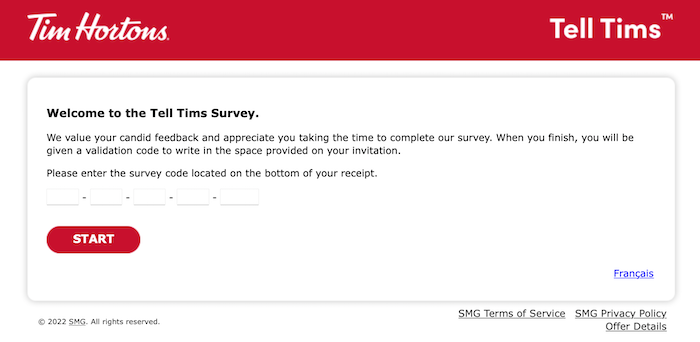
Not sure where to start with customer surveys? Email them to customers or do what Tim Hortons does and invite people to complete satisfaction surveys online:

An image of a Tim Horton's feedback survey.
An example of using surveys to find out the customer experience with a brand.

2. Improve Your Customer Service

It’s important to note that customer service differs from the customer experience. CX means every interaction a customer has with your brand, while customer service refers to interactions between a customer and employees when there’s a problem.

Unsurprisingly, then, boosting your customer service delivery can have a positive effect on your overall CX. How do you improve customer service, though? Here are some ideas.

  • According to research by Khoros, 77 percent of customers expect customer support teams to share information so they don’t need to repeat themselves. Make sure you properly integrate your customer support processes using, for example, customer relationship management (CRM) software.
  • Use chatbots: The Khoros research shows that 79 percent of customers enjoy chatting to customer service reps through these apps.
  • Identify your most loyal customers. Reward them with exclusive discounts and special offers to encourage new transactions.

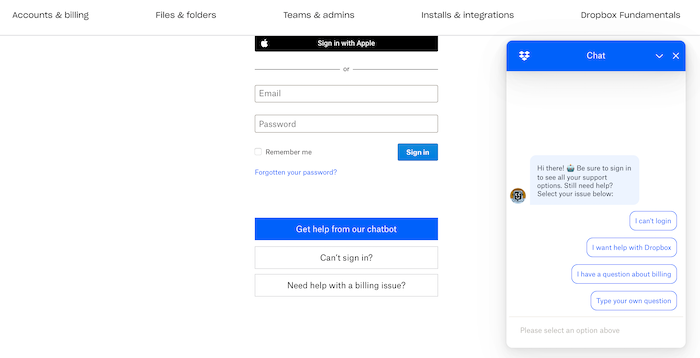
Here’s an example of a chatbot from Dropbox. Users can follow the step-by-step instructions or, if the chatbot can’t answer their questions, they can speak to a service representative or try other resources:

An image of a chatbot from Dropbox.
An example of using chatbots to improve customer service.

Improve customer service by offering various quick, simple, and effective ways to reach your team.

3. Make Conversions Easier

Zendesk’s research shows that 65 percent of customers are looking for quick, easy transactions. What does this mean?

Well, if you’re an e-commerce store, this means customers want a straightforward checkout experience. Let me give you some tips for speeding up the process.

  • Provide a guest checkout option so there’s no need for someone to create an account to buy something.
  • Offer multiple ways to pay, such as PayPal or mobile wallets like Apple Pay.
  • Make your shipping and delivery costs transparent.
  • Reduce the number of checkout screens where possible.

Are you a service provider? Then you want to ensure your sales process is seamless.

  • Offer a free trial to nurture customers along the sales funnel.
  • Explain your sales process upfront so customers know what to expect.
  • Schedule a sales call so you can get the information you need from customers to solve their problems and resolve any hesitancies.
  • Offer clear packages and transparent pricing structures tailored to various customers’ requirements.

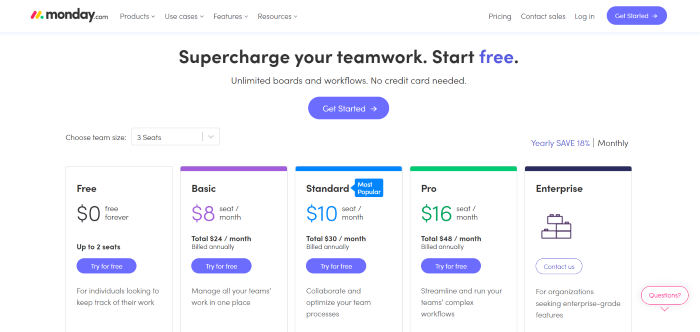
Monday.com, for example, has a very clear pricing structure.

An image of a clear pricing structure from Monday.com.
An example of using a clear pricing structure to help make customer conversations easier.

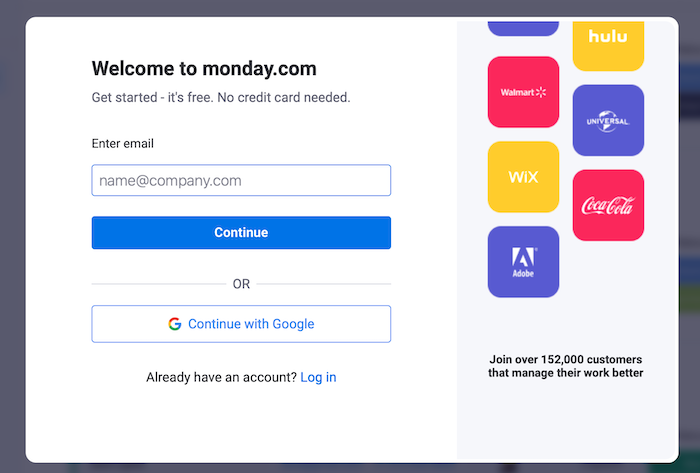
What’s more, it only takes a few steps to get started with a free account so prospects can experience the software before committing to a paid package:

An image of an account creation screen from Monday.com.
Use free accounts to allow customers to use software before committing to purchasing it.

Impress your customers and boost CX by creating a seamless, user-friendly sales experience.

4. Personalize Customer Interactions

Earlier I touched on how personalization goes a long way to help boost customer acquisition and retention. How do you personalize customer interactions, though? Here’s what you can do:

  • Build customer profiles so you know who your ideal customer is. Once you determine your audience base, you can segment your customers into groups to send them relevant marketing materials tailored to their personal preferences.
  • Take an omnichannel approach. According to Zendesk’s research, companies with higher CX scores deliver consistent, reliable experiences across all mediums, from in-store shopping to buying products through a mobile app.
  • Use the data you collect from customers to personalize surveys and try to follow up on survey responses.

Don’t forget the power of email, either. Retarget lapsed customers with personalized incentives, and send loyal customers recommendations based on their shopping history.

5. Empower Your Employees to Take Action

Who do your customers interact with? Your employees. If customers aren’t happy with your employees, there’s a risk they’ll abandon your brand completely.

What’s the answer? Empower your employees. Give them the tools they need to resolve queries, by:

  • Asking employees for their feedback. Do they feel they have the resources necessary to deliver a great service, or are they feeling frustrated?
  • Resolving identified pain points. Maybe you could streamline manual processes by updating your CRM software, or you could improve contact center protocols.
  • Finally, empowering your employee, for example, maybe they could offer a discount to incentivize a new customer.

Customer Experience Case Study: Gymshark

Gymshark, an international fitness brand, excels at employee engagement.

How? Because employees have pretty significant authority to resolve disputes, and they’re very engaged with customers online.

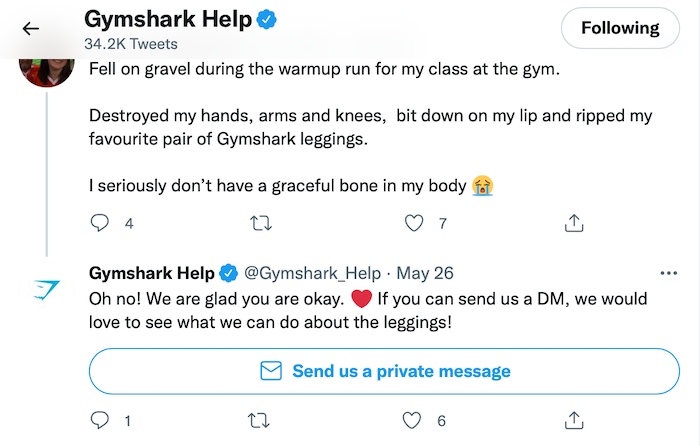
For one thing, they have a dedicated Gymshark Help social media account to answer queries, proactively engage customers, and improve the customer experience.

A tweet from Gymshark's help account assisting a customer.
An example of engaging with customers online.

Their employees are entrusted to offer real solutions, which make customers feel valued at every stage of the buyer’s journey—even after the sale.

Does it pay to give employees freedom over CX delivery? Absolutely: Operating in over 180 countries and still growing, Gymshark knows how delivering great customer experiences can boost ROI.

Frequently Asked Questions About Customer Experiences

We’ve covered why customer experiences matter and how you might improve your CX, but let me give you some key takeaways.

How do you improve customer experiences?

Learn who your customers are and how they interact with your business. Once you understand the buyer’s journey, you can equip your employees to meet their needs and exceed their expectations.

What are the main components of customer experiences?

Promoting a customer-focused culture, ensuring you’re easy to do business with, measuring customer satisfaction, and delivering on your promises all contribute to the customer experiences that individuals have with your business.

How do you track the customer experience?

Get honest customer feedback and track CX metrics at each stage of the buyer’s journey using tools to measure your churn rate, customer effort score, retention rate, and net promoter score.

What makes a good customer experience?

Great customer experience starts with your staff. Give them the knowledge they need to manage your buyers, and you’re on track to impress your customers.

Conclusion: Improving the Customer Experience Is Crucial to Business Growth

Without customers, you won’t boost your ROI and your company won’t get off the ground, so you need to prioritize customer experiences.

To perform customer experience optimization successfully, help your staff nurture individuals along the buyer’s journey. Monitor key customer experience metrics along the way, and don’t be afraid to ask customers what you’re doing right—and where you’re falling behind.

Need extra help with the online customer experience? Check out my consulting services.

What do you think makes a great CX?


from Neil Patel's Digital Marketing Blog https://ift.tt/5Tp6t9r
via IFTTT
Saturday, 2 July 2022

The Keys to Success With Amazon Advertising

Do you want to be more successful with Amazon advertising?

With millions of active customers, Amazon is the perfect place to grow your business. However, it’s not as simple as putting up products and waiting for sales to come in.

Sometimes, you may need the help of ads. Let’s take a look at how best to use them.

What Is Amazon Advertising?

Amazon advertising is paid advertising that runs on a pay-per-click model. Through them, you can feature your product listing at the top of Amazon’s search results for chosen keywords.

Rather than paying upfront for your advertising, pay-per-click ads mean you only pay when someone clicks to view your product.

PPC is very efficient because you only have to pay when you know you’ve reached your target audience. It’s still up to you to get the conversion and sell your product, but Amazon advertising gives you the opportunity to do this.

Ultimately, Amazon is a search engine and, as with most search engines, your click-through rate drops considerably if you’re not in the top few results. Building this presence organically takes time though, so having an Amazon advertising strategy is a great way to gain exposure quickly.

Over 2.5 million products are sold on Amazon only in the U.S., so it’s easy to get lost in a sea of product results pages. By mastering the Amazon ads manager, you ensure this won’t happen to your business.

Benefits of Amazon Advertising

People lead busy lives. One of the reasons Amazon has become so popular is that it’s convenient.

  • It gives people instant access to a huge array of products.
  • It makes checkout incredibly simple.
  • It offers fast delivery so people get their hands on their purchases quickly.
  • People don’t have to leave their houses to buy products.

Amazon respects the fact that people’s time is valuable, and that’s one of the reasons it’s been so successful. It’s also a key reason why Amazon ads are so beneficial for businesses.

People don’t have the time to search through pages two, three, and four of Amazon’s results. They expect to find the best results at the top of page one, and, if your product isn’t there, then your sales are going to suffer.

This is further complicated by the fact that it’s hard to distinguish your brand from the competition on Amazon. When you sell products on your own e-commerce store, you’re in complete control of your branding, however, when you sell on Amazon, you’ve got to work within its regulation.

Limited control over how you build your brand means you’re incredibly reliant on turning up at the top of the search results.

The proof is in the return on investment.

Creating an Amazon ad can bring you instant results, and businesses like Empire Case, a mobile phone and tablet accessories seller, regularly see an ROI of 200+ percent.

Amazon Advertising Examples

I’ve talked about some of the benefits of Amazon ads, but how do they apply to real-world scenarios? As you’ll see from these examples, getting your Amazon advertising strategy right can have a huge impact.

Alexandra Workwear Increased Sales by 300+ percent

Alexandra Workwear, a manufacturer of work uniforms, grew their chef workwear sales by 372 percent year on year using Amazon advertising, achieving a 500 percent return on advertising spend (ROAS).

It followed a simple strategy that brought in impressive results. They:

  1. Set up a “sponsored product campaign” on Amazon’s ad console.
  2. Used the campaign-builder to identify new keywords.
  3. Executed an aggressive bidding strategy to increase search impressions by 80 percent.
  4. Created A+ content for each product.
  5. Optimized product images and copy on the product page.
  6. Ran sponsored display ads to complement the sponsored product campaign.
  7. Expanded their reach and made more sales.

This case study reinforces the idea that appearing at the very top of the search results is extremely important, but it also shows how essential it is to optimize your product pages.

There’s no point in increasing your Amazon ads budget if your product pages aren’t persuasive enough to make sales.

You’ve got to make use of all the organic tools you have available to you. That means offering top-quality images, writing great copy, and utilizing elements like fantastic content.

Lenovo Increased Brand Awareness by 19 Points

These Amazon advertising strategies don’t just work for smaller brands; they’re also effective for large, global businesses like Lenovo computers.

To promote its premium Yoga laptop, Lenovo used a 15-second Amazon video that saw impressive results.

According to the Brand Lift study, this ad campaign coincided with a 19-point lift in brand awareness, a 5-point increase in perception as a premium brand, and a 9-point increase in purchase intention.

On the scale of a business like Lenovo, those are huge numbers, so how did it achieve them? They:

  1. Used Amazon’s ad manager to identify relevant audiences.
  2. Targeted specific groups (such as lifestyle tech enthusiasts, people in-market for laptops, and audiences with high purchase propensity.)
  3. Reached six million people.

The key takeaway from this is targeting.

Don’t assume that you already know exactly who your audience is and what they want. Go the extra mile to make sure your Amazon ads are reaching exactly the right people.

Amazon Advertising Costs

Ready to start using Amazon advertising?

First, you need to set your budget. What should you expect to spend?

This is a tricky question to answer because it varies greatly depending on your industry.

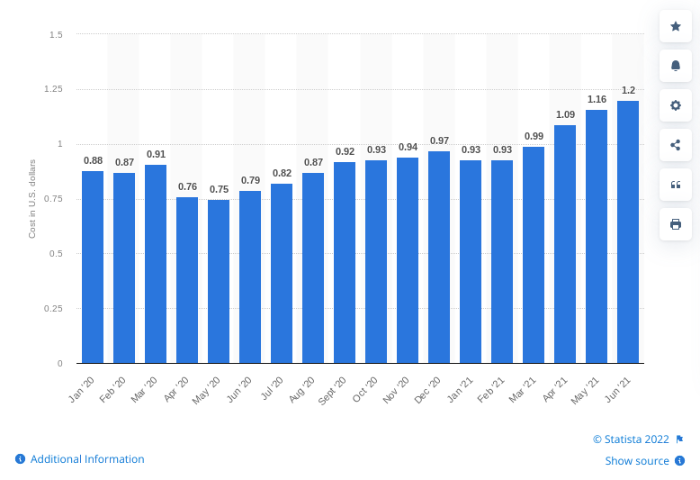
The average Amazon ads CPC in the U.S. is $1.20 per click, however, this is very much a guideline. A CPC algorithm sells each impression to the highest bidder (other factors do enter into the equation, but the value of the bid plays a big part), so the more competition there is, the more you’re likely to pay.

Bar graph of the average Amazon advertising cost per click over an 18 month period.
A bar graph showing the average CPC of Amazon advertising over an 18 month period.

However, the element that will ultimately decide your Amazon advertising costs is your conversion rate.

If you’re spending $1 for every click and converting 1 percent of those clicks, then you spend $100 to sell one product. On the other hand, you might pay $2 per click, but if your conversion rate is 5 percent, then $100 of ad spend is going to get you five sales.

The trick is to find keywords where buyer intent is highest. These might be more competitive, but, if they result in much higher conversion rates, then it’s going to offer you a better return in the long run.

Amazon Advertising Strategies: 9 Tips to Drive Sales

Let’s take a look at some of the Amazon advertising strategies you should follow to help you drive more sales.

1. Outline Your Goals

One of the first steps in any form of marketing is to clearly outline your goals.

What do you want to achieve with your Amazon advertising?

This isn’t just how many sales you want to make, or what ROAS you’d like to achieve. It starts with questions like:

  • Do you want to drive brand awareness (as Lenovo did)?
  • Do you want to increase traffic for your product?
  • Do you want to have better conversions and increase sales?

Many people will focus on sales with Amazon, but its advertising options are much more diverse than this.

Remember, people who write down their goals are around 50 percent more likely to achieve them, so this is an important step.

2. Choose the Right Amazon Advertising Campaign

One of the first things you will have to decide with your Amazon advertising is which campaign type you want to run.

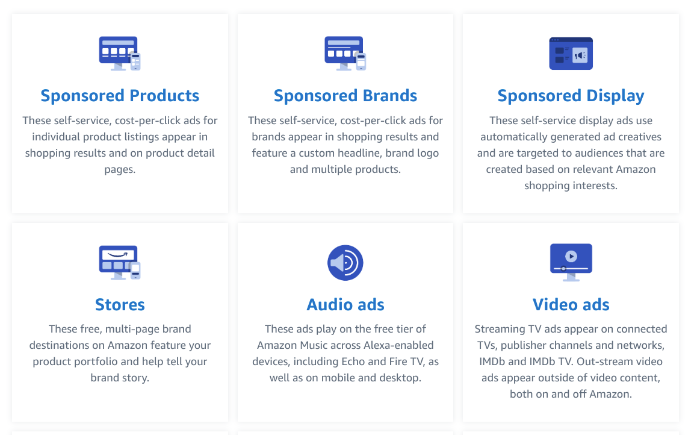
An image of the different types of Amazon ads.
Choose the best type of Amazon ad based on your goals.

When you go into your Amazon Ads Manager, you’ll be presented with different campaign types:

  • Sponsored Products: Feature your products at the top of search results.
  • Sponsored Brands: Feature your brand in shopping results.
  • Sponsored Display Ads: Display ads across relevant Amazon pages.
  • Stores: Feature your brand story and portfolio of products.
  • Audio Ads: Play on the free tier of Amazon Music.
  • Video Ads: Play on connected TVs and publisher channels and networks.

The format you choose will largely be dictated by your goals.

For example, if you’re looking to drive brand awareness, then you might choose a store, audio, or video ads campaign. However, if you’re looking to be more sales-focused, then sponsored products, brands, or display ads might be the best option.

One of the great things about Amazon advertising is that they make it very easy to set up and run your campaign, no matter what format you choose.

3. Set a Budget

As with any investment, you should have a clear understanding of what you want to spend on your Amazon ads before you begin.

The last thing you want to do is go over budget and hurt your bottom line. Amazon advertising should be increasing your profit margin, not shrinking it.

The Amazon ad manager can make suggestions for you and tell you if it thinks you need to up your budget, but ultimately, this is something you have to decide.

Amazon certainly isn’t the only ad platform you should consider (Google and the social media networks are also very valuable), so you’ve got to find the balance that works for you.

Set a budget that you’re comfortable with and then give it time to see how it performs. Once you’ve got data to work with, then you can make a more informed decision about raising or lowering your budget.

Digital ad spend is worth over $560 billion, so it’s clearly an important marketing tool. In order for it to work for you, your Amazon advertising strategy has got to work within your monetary constraints.

4. Choose the Right Products to Promote

You want your Amazon advertising to have maximum impact, so you’ve got to choose the right products to promote.

Not only are there millions of products on Amazon and heaps of competition, but you may have products that sell cheaper than the cost you’d spend per click. Therefore, some products of yours will outperform others.

Start to figure out which ones are the best fit for your Amazon ads. Thankfully, the answers are going to be in your analytics.

  1. First, go to your Amazon Seller Central dashboard.
  2. Second, identify how much traffic each of your products is already receiving.
  3. Assess which has the highest conversion rate.
  4. Look at the cost of the keywords you’d want to use.
  5. Work out your ideal profit margin.

This information is going to be crucial in helping decide which products you should start promoting.

You want to choose ones with good conversion rates that aren’t over-saturated with traffic (and therefore costly), as this is where the greatest potential lies.

5. Choose the Right Visual Assets

One of the drawbacks of e-commerce is that shoppers can’t see the products in person before buying them.

You have to overcome this by giving them the next best thing—high-quality images.

If customers can inspect your products in a similar way to how they would in a real-life store, then it’s going to result in more sales.

360-degree rotating images are a great tool for this, and they’ve been shown to increase e-commerce conversion rates by as much as 27 percent. Humans are visual creatures, and we need good images to understand the finer details of products.

6. Write Clear, Engaging Copy

You’ll often see two extremes when it comes to copy on Amazon product pages: those who neglect it, and those who stuff keywords everywhere to try and gain an SEO benefit.

Your copy has a direct impact on your conversion rate though, so it’s an important part of your Amazon advertising strategy.

Yes, you want to include the right keywords, but you’ve also got to be concise and informative.

  1. Tell the story of your business.
  2. Show the benefits of your products (and not just the features).
  3. Build your brand identity.
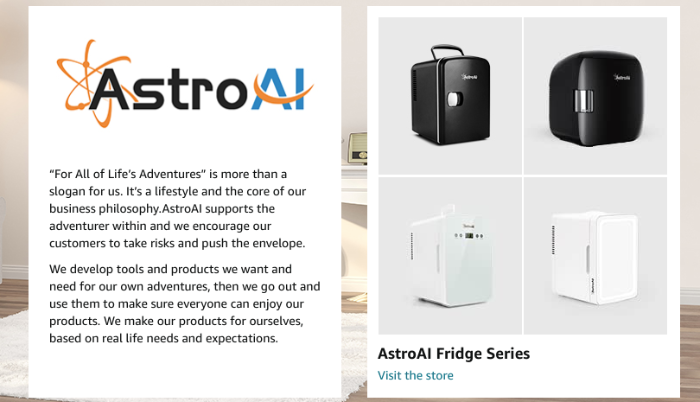
An image of AstroAI fridges, used as an example of writing engaging copy.
Writing clear and engaging copy helps drive sales.

This is also an area where you can constantly optimize.

Run some A/B tests to find out what works, and make sure your copy is helping you to get the most out of your Amazon ads.

7. Target the Right Audience

As we saw in the Lenovo case study, identifying the right target audience is a vital part of Amazon advertising.

It’s tempting to try and sell your product to everyone. However, you’ve got to focus your resources to maximize your sales. No spraying and praying.

The only way to do this is if your Amazon ads are showing to the right people.

You might find a big new audience that almost seems like the right fit and get a ton of traffic to your page, but it’s not worth it. Clicks without sales eat into your budget, and that’s what happens if your targeting isn’t quite right.

8. Add Negative Keywords

Talking of things that eat into your budget, here’s another: negative keywords.

Amazon’s algorithms are pretty smart. They’re able to understand how keywords are related and which ones might be applicable to your product. The thing is, they don’t get it right all the time.

You’ll find that if you use an automatic campaign, you’ll get some clicks for keywords that just aren’t relevant to your product. When you notice these, it’s important that you add them to your negative keywords list so you don’t show up for that query in the future.

For example, you might be advertising for keywords related to tennis, and Amazon decides that Pickleball and tennis are closely related. If you get clicks for Pickleball related queries, then you’d want to add them to your negative keywords.

Otherwise, you could be losing money.

9. Test + Optimize Your Ads

Selling products online is all about optimization.

If you’re not learning from the data you collect, then it’s difficult to move forward. What data allows you to do is run split tests. This is where you change an element of your Amazon advertising strategy and see how it performs compared to the control version.

By individually testing different elements of your Amazon ads and product pages, you can isolate which tactics work and which don’t.

Frequently Asked Questions About Amazon Advertising

What is the difference between self-service and managed amazon ads?

Self-service Amazon ads put sellers in control of their campaigns, whereas managed Amazon ads are controlled for you. Typically, managed Amazon advertising requires a minimum budget of $50,000.

Can I schedule ads in Amazon advertising?

Yes! Amazon ads can be scheduled. All you have to do is log into your Amazon ads console and select the campaign you want to edit. You’ll see a drop-down table titled more. The first tab in the drop-down is ad scheduling which allows you to choose when your ad is shown.

What are the different types of Amazon ads?

There are six types of Amazon ads: sponsored products, sponsored brands, display ads, stores, audio ads, and video ads. Each has its own benefits, so it’s worth exploring them more to find out which ones best fit your brand.

What are the benefits of Amazon Advertising?

With Amazon advertising, you can reach a huge audience with high purchase intent. Its tools also allow you to be extremely targeted with your ads, ensuring you reach the people who are most likely to benefit your brand.

Conclusion: The Keys to Amazon Advertising Success

There are some great benefits to Amazon advertising, and, to make the most of your money, the key is choosing the best strategy and slowly fine-tuning your approach through trial and error.

Amazon offers some great tools to help you target the correct audience and manage your budget, however, you’ve got to go a step further than this.

If you’re going to invest money in advertising, then your product pages have to be fully optimized, and you need to learn from your analytics.

Through A/B testing and incremental changes, you can perfect the art of Amazon advertising and make a big difference to your business.

Are you using Amazon ads? If not, when are you going to start?


from Neil Patel's Digital Marketing Blog https://ift.tt/mclr9Wk
via IFTTT
Friday, 1 July 2022

What is a Subdomain and How Does it Affect Your Site’s SEO?

When navigating the internet you may notice the URL changing as you click from site to site. Sometimes you have a simple URL like www.mysite.com. Or, you might see words added before the site like this, www.shop.mysite.com.

The word “shop” in this case, is a subdomain and it’s used to differentiate the two websites from each other.

In this guide, you’ll learn what subdomains are, how you can use them, and whether or not they impact SEO.

What Is a Subdomain?

A subdomain is an addition made to a URL string to separate and organize content on a website.

Using a subdomain allows you to partition areas of the site, such as a blog or store, from the main areas of your website.

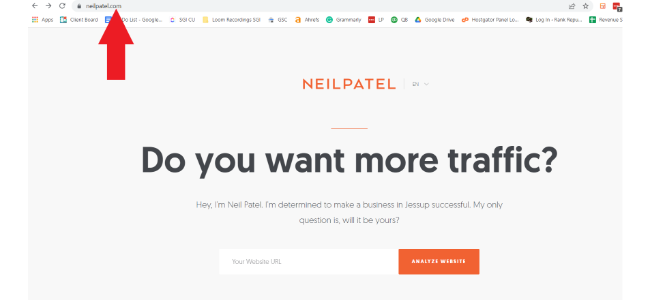
Each time you see a URL, there are essentially three main parts:

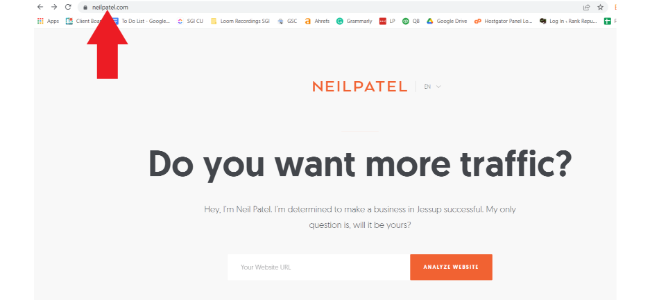
An image of Neil Patel's website, with an arrow pointing to the top-level domain of the URL.
The top-level domain of a URL.


1. Top-Level Domain or TLD: This is the extension at the end. Examples would be, .com, .org, or .io.

An image of Neil Patel's website, with an arrow pointing to the second-level domain of the URL.
The second-level domain of a URL

2. Second-Level Domain or SLD: This is the creative portion of the domain. In Neilpatel.com, Neilpatel would be the second-level domain.

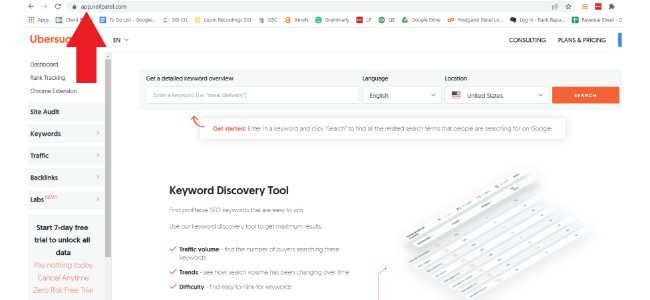
An image of Neil Patel's website, with an arrow pointing to the subdomain part of the URL.
The subdomain of a URL.

3. Subdomain: The subdomain in this scenario would be anything that comes before “neilpatel.” For example, if you go to app.neilpatel.com, the “app” part of the URL is what leads you to the keyword research tool, Ubersuggest. In this case, “app” would be the subdomain and it helps separate the tool from the rest of the site.

Many sites use this to create different sections for organization and user experience purposes.

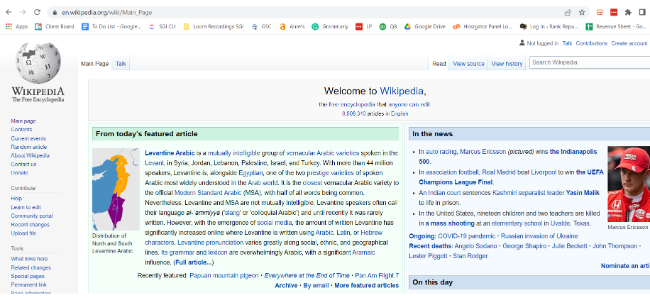
An image of a Wikipedia page.
An example of Wikipedia uses a subdomain to create different sections of their website.

If we look at the example above from Wikipedia, you’ll see they use one to differentiate the languages across their site. There are many purposes for subdomains, but they’re all used to make the experience easier and faster for the user.

Now you have an answer to “what is a subdomain.” Let’s learn how to create a subdomain.

How to Create a Subdomain

Learning how to create a subdomain is very simple and something you’ll do through your web hosting provider.

Let’s use HostGator as an example.

Step 1: Login to Your account

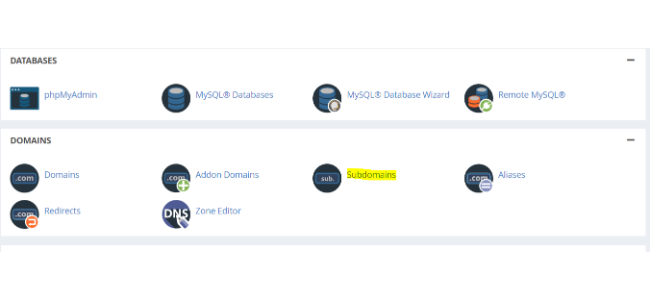
You’ll first login to your backend and scroll down a little until you find the section for domains.

An image of the backend of Hostgator, showcasing where to find the domain section.
Step one of creating a subdomain.

Step 2: Create a Subdomain

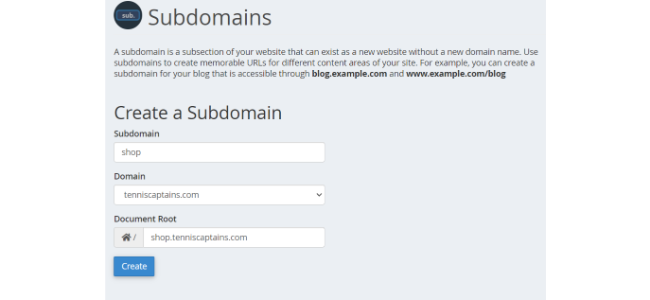
Here you’ll enter the name of your subdomain and the domain you want to attach it to. In this case, I used a tennis site as an example.

An image of the backend of Hostgator, showcasing the subdomain creation page.
Step two of creating a subdomain.

Step 3: Update DNS Records

Once you’ve created the subdomain, you’ll need to add a new domain name system record or DNS. It can take anywhere from an hour to 24 hours for the changes to update and be implemented on your site so don’t expect to jump back in right away.

Subdomain vs. Subdirectory

The biggest misunderstanding is the difference between a subdomain and a subdirectory. Here is an example of a subdomain:

  • App.neilpatel.com

Now, here is an example of a subdirectory:

In the case of a subdirectory, the addition to your URL is still part of the main domain. It’s a part of the website as a whole and doesn’t tell Google that it’s anything different.

Subdomains, on the other hand, intend to stand alone, and want Google to treat them as a separate site.

Subdirectories always come after and subdomains always come before.

The big question of the subdomain vs. subdirectory debate is, which is better for SEO?

The most important thing to understand is that Google treats a subdomain as a separate entity—which means everything you do isn’t associated with the main site. All links and content are not factored into the overall domain rating of your primary domain.

This could be a good or bad thing, depending on your goal.

If you’re doing something completely different on the subdomain that could hurt the reputation of the parent domain, then it could be a good thing. If your subdomain is entirely related to the parent domain and you’re getting all your links and content on that area of the site, then it could be a bad thing.

With customer experience being one of the most important driving factors for businesses this year, I can understand why subdomains seem desirable, but Mr. Google himself has said it:

We do have to learn how to crawl[subdomains] separately, but for the most part, that’s just a formality for the first few days. – John Mueller, Google

In most cases, the difference between the two is extremely minimal, so you’re better off focusing on something else like content audits and mobile optimization.

When Should You Use a Subdomain on Your Website?

Now that you understand some of the differences between subdomains and subdirectories, here’s when you should use one over the other.

Detach From Your Main Site

In some cases, you want to create content or do something on your site but you don’t want it associated with the main page.

Adding a store to your site is a great example of this.

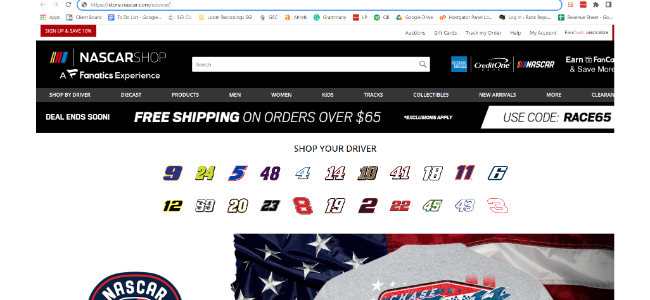
An image of NASCAR's shops homepage, used as an example of when to use subdomains.
An example of when to use a subdomain.

If we look at the image above from Nascar, we’ll see they use a subdomain for their store. This makes sense if you think about the actual purpose of Nascar.com when compared to a Nascar-related e-commerce store.

Nascar.com is trying to rank for time-sensitive news about races and drivers, while the store targets people who want to buy Nascar gear and apparel.

While they’re similar, each URL has its own purpose and should be treated separately for SEO purposes.

Improve Organization

Google tells us that on-page experience is important and so do consumers. If your site is not well organized and is difficult to navigate, people will leave, it’s as simple as that.

Subdomains help you organize your site by limiting the amount of information on it. No one wants to sift through dozens of pages to find one simple answer that they’re looking for. It’s up to you to provide your customers with a high-quality user experience and both subdomains and subdirectories can help do this.

To Separate Sites by Language

If you operate multiple companies in different countries around the world, you may want to use a subdomain for each language.

I gave you the Wikipedia example above, but plenty of international brands use this to improve site organization while also allowing Google to focus on the right language for your audience at the time.

When Should You Not Use a Subdomain?

If you’re using SEO as your primary way of generating traffic for your site, you might want to avoid subdomains. You want to create cohesiveness across your brand and that includes all aspects of your website.

There’s no reason you shouldn’t put keyword-rich content on sales and product pages as well. By treating your store as a separate site from your blog, Google isn’t taking that link juice and keyword richness and passing it off to your main site.

Keep in mind, Google won’t punish you for doing these things, but it will have no benefit to you either.

I think the focus should be on crafting high-quality and relevant content as your primary means of giving your site an SEO boost. You can still organize your site in a way that works well for everyone without having to use subdomains.

What Are the SEO Benefits of Using a Subdomain?

So far, we’ve talked quite a bit about why subdomains shouldn’t be a major focus for SEO but let’s discuss the reasons why they could actually be beneficial to you.

Improve the On-Site Experience

A massive UX study performed by Amazon Web Services found that 88 percent of online shoppers would not return to a site if they had a bad experience.

That’s no surprise. There are so many options to buy and read anything you want, why would you bother going back to a site that you didn’t enjoy?

Remember this, our job is to recreate the in- store experience but do so online. If you walked around a store for two hours and were unable to find what you were looking for and no one helped you, would you go back to that store?

The same rules apply online.

Boost Your Domain Authority

Domain authority is a rating that essentially states how well you’re trusted to provide what searchers are looking for. The better and older your site is, the higher rating it gets.

When a site is first created, it’s automatically given a score of 1.

If you’re publishing high-quality content, generating traffic, and keeping people on your site for a while, the score will go up. If you’re using black hat SEO techniques, your score can go down.

One great way to use subdomains to increase domain authority is by linking between the two domains.

For example, you can create a piece of content on your blog that includes links to products on your store. This type of back and forth linking looks good for SEO as long as you don’t overdo it.

According to Brian Dean, only 2.2 percent of content gets links from multiple websites, so every step you take helps.

Better Organize Your Content

I’ve talked a lot about user experience and content organization but it’s important to understand why this matters.

When your content is organized, it’s not just easier for people to find—it also makes it easier for Google to crawl your site. This can help Google find the keywords you’re trying to rank for faster, and if Google can easily navigate the site then users can as well.

Allow You to Include Relevant Keywords in Your URL

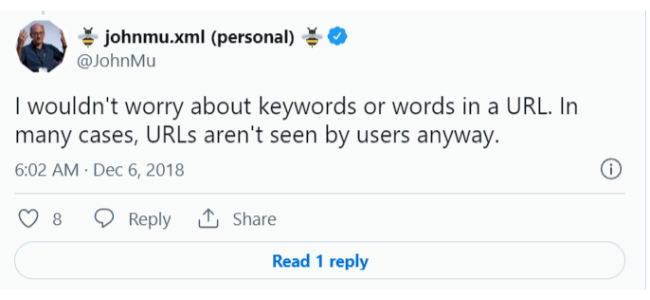
As of 2018, John Mueller said that keywords in URLs have very little to do with ranking or user experience.

A tweet from John Mu about using keywords in URLs.
John Mu explaining the keywords in URLs are not crucial to ranking.

In my opinion, they can very easily have a negative impact, but it’s much more difficult for them to have a positive impact.

That said, including keywords as an overarching subdomain to help organize content could positively affect your SEO. Again, it makes the site easier to crawl, but it also tells Google right away what that section of your site is about.

What Are the SEO Drawbacks of Using a Subdomain?

Here are some of the ways that subdomains can negatively impact your site.

Subdomains Can Dilute Your SEO

Here’s a great analogy for you.

You have two buckets that you’re filling with water and when one bucket is full, you get to drink from the bucket. But, you can’t have a drink until at least one bucket is completely filled.

If you’re dying of dehydration, is the best strategy to fill each bucket equally or focus on one bucket?

Having an unnecessary subdomain spreads your SEO efforts across two sites instead of focusing on one. This means it could take double the links and content to get the same results if you simply focused on one domain.

The consequences can be even worse if you have a blog on a subdomain. Companies with blogs get 97 percent more inbound links, so instead of those links benefiting your main site, they’ll only benefit your blog subdomain and leave your primary URL out to dry.

They Won’t Help With Internal Linking

Links to a subdomain are considered an external link. Anyone in SEO will tell you that internal linking is one of the most important ranking factors.

If you’re linking from a subdomain to a main page, it doesn’t count as an internal link and could possibly force Google to see your site as weak or “thin.”

A Little More Difficult for Google to Crawl

Earlier in the article I talked about how Jon Mueller said the algorithm needs to learn to crawl subdomains separately, but that’s not something that lasts forever. Since subdomains are a separate site, you’ll need to verify them and track everything in Search Console and Analytics separately.

All of these factors combined can make it more challenging for Google to crawl the site in the beginning with hopefully a better experience on the backend.

Frequently Asked Questions About the Impact of Subdomains on SEO

What Are the Benefits of Subdomains for SEO?

Subdomains can improve the on-site experience when used properly, boost your domain authority if you’re linking between the two sites, and can help you better organize content.

How do you set up a subdomain?

You’ll login to your cPanel, find subdomains, create a subdomain name, attach it to the primary domain, and update your DNS. Expect to wait up to 24 hours for changes to take place.

What is the difference between subdomains and subfolders?

Subdomains come before the URL while subfolders come after. Subdomains are treated as a completely different site from the primary URL while subfolders are simply new pages on the main domain. s

What are the drawbacks of using a subdomain?

The main drawbacks are you’re spreading your SEO efforts across multiple websites, which makes internal linking more difficult. They can also make your site more difficult to crawl if you don’t organize everything properly.

Conclusion: What Is a Subdomain?

Now you know what a subdomain is—so what do you plan to do now? Do you think subdomains are the right choice for your site?

While they certainly have their time and place, I’d recommend treading carefully and only using them if you absolutely have to. In terms of overall SEO ranking factors, this is pretty close to the bottom.

Instead, focus on organizing the content you have on your site, fill up your content calendar, and work towards improving your on-site SEO.

What is your opinion on subdomains? Do you think they’re good or bad for SEO?


from Neil Patel's Digital Marketing Blog https://ift.tt/CRnAWOV
via IFTTT