Friday, 7 October 2022

How to Create, Optimize, and Test Meta Ads (Formerly Facebook Ads)

As a savvy internet user, you might think no one clicks on Facebook and Instagram ads.

You’d be wrong.

In 2021, Meta made over $114 billion in revenue from advertising.

Someone’s clicking.

But who, and how do you get them to click on your ads? I’ll show you.

Many marketers who tried Facebook ads, especially in their early days, decided Facebook advertising didn’t work.

Don’t believe them.

I will share everything you need to know about how to create Facebook ads, now known as Meta for Businesses.

If you’re totally new to Facebook, you’ll need to set up Meta Business Suite, then come back to this post for a deep dive into Meta advertising best practices.

In this advanced Meta advertising guide, you’ll learn which businesses are the best fit for the platform and how to run successful campaigns.

We’ll cover the most common mistakes marketers make and the biggest factor in your ads’ success.

How Do Meta Ads Work?

Meta ads work by allowing advertisers to reach users on Facebook and Instagram from one platform.

We can’t talk about Meta ads without also mentioning Facebook ads. In October 2021, Facebook renamed itself Meta. They are working to become a social technology company, not just a social media giant.

When you create ads in Meta Business Suite, you can advertise to both Facebook and Instagram users through boosted posts, videos, photos, Stories, messenger, carousel, slideshows, playable ads, and instant experiences.

Meta ads target users based on their location, demographic, and profile information.

Many of these options are only available from Meta. After creating an ad, you set a budget and bid for each click or thousand impressions that your ad will receive.

If that sounds overwhelming, don’t worry. I’ll explain what all that means.

Who Should Advertise on Facebook (now Meta)?

Many businesses fail at Meta advertising because it’s not a good fit for their audience. So before investing time and money on Meta ads, consider whether your business model is a good fit for Facebook or Instagram.

In the past, Meta ads were more like display ads than search ads — though new versions of ads, like product ads, allow advertisers to sell products directly to users.

Here are a few types of businesses that are likely to succeed with advertising through Meta..

How To Create Meta Ads For Businesses with Low-Friction Conversions

The businesses that are most likely to succeed with Meta ads ask users to sign up, not to buy. You must use a low-friction conversion to be successful.

A visitor to your website wasn’t looking for your product. They clicked your ad on a whim. You will fail if you rely on them to immediately buy something to make your ad ROI positive.

Meta users are fickle and likely to click back to Facebook or Instagram if you ask for a big commitment (purchase) upfront. Instead, stick to simple conversions like signing up for your service, filling out a short lead form, submitting an email address, or converting inside the platform using Instagram shopping or similar.

Even if you sell products, not services, you should consider focusing on an intermediate conversion like a newsletter signup. Then you can upsell later through email marketing or retargeting ads.

Daily deal sites like Groupon, AppSumo, and Fab are good examples of businesses that can succeed with Facebook advertising. After you click one of their ads, they just ask for your email address. They’ll sell you on a deal later.

Business Model with Long Sales Cycle or Small Purchases

Even if you only ask for an email address initially, you’ll need to eventually make money from these users to be profitable.

The best business model that fits Facebook ads earn revenue from its users over time, not all at once. A user may have given you their email, but you’ll need to build more trust before they are likely to buy anything.

You shouldn’t depend on one big purchase. Several smaller purchases are ideal.

Daily deals and subscription sites are great examples of business models that can thrive on Meta. Both have customers whose lifetime value is spread out over six months or more.

At Udemy, they focus on getting users to sign up on their first visit. By aiming to be profitable on ad spend in six months (not one day), they turn Facebook users into long-term customers.

They target a 20 percent payback on ad spend on day one and 100 percent payback in six months. These numbers can serve as a rough guide for your business.

Businesses in fashion, books, and other small purchases also do well on Meta, especially Instagram.

How to Target Meta Ads

The number one mistake most marketers make with Facebook ads is not targeting them correctly.

Facebook’s ad targeting options are unparalleled. You can target by demographics and create custom or lookalike audiences to target users similar to your best customers. You can also use retargeting ads to target users who have interacted with your page, or visited your website.

On Meta, you can directly target users by:

  • location
  • age
  • gender
  • interests
  • connections
  • relationship status
  • languages
  • education
  • workplaces

Each option can be useful, depending on your audience. Most marketers should focus on location, age, gender, and interests.

Location allows you to target users in the country, state, city, or zip code that you service.

Age and gender targeting should be based on your existing customers. If women 25-44 are the bulk of your customers, start targeting them. If they prove to be profitable, you can then expand your targeting.

Interest targeting is the most powerful but misused feature of Facebook ads. When creating an ad, you have two options: broad categories or detailed interests.

Maximizing Investment with Broad Category Targeting

Broad categories include topics like Gardening, Horror Movies, and Consumer Electronics.

Meta also added targets like Engaged (1 year), Expecting Parents, Away from Hometown, and Has Birthday in 1 Week.

Broad interests may seem like an efficient way to reach a large audience. However, these users often cost more and spend less. You’ll also need to install the Meta pixel.

This used to be an ineffective way to reach audiences because it targeted too large of an audience; however, adding the Meta pixel and dynamic ads makes this far more effective.

It is worth testing, but detailed interest targeting is often more effective.

Detailed Targeting: A Powerful Meta Ad Targeting Strategy

Detailed targeting allows you to target Meta users based on more detailed interests and onsite behaviors.
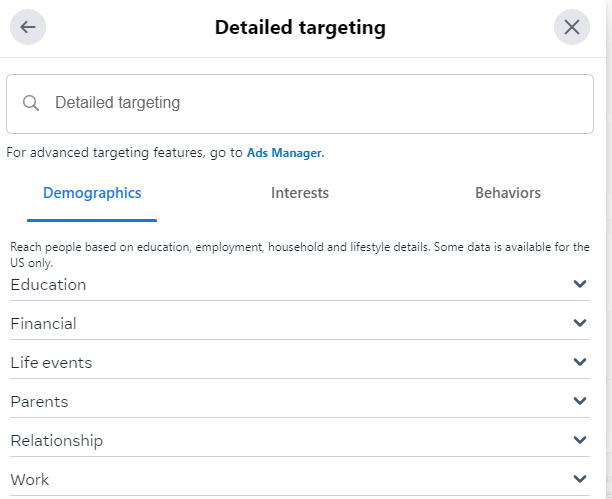
A screenshot of the detailed targeting section in meta ads manager.

For example, you can target users based on the following:

  • Ads they’ve clicked on.
  • Facebook or Instagram pages they interact with.
  • Activities across Meta, including things like which device they use or travel preferences.
  • More detailed demographics.
  • Speed of their internet connection.

Detailed targeting also allows Meta advertisers to include or exclude specific people using the “or”/”and” targeting.

For example, if you can target users who “are ” college graduates, you can then focus on those that “are ” interested in travel “or” interested in food. This lets you get a lot more detailed about your target audience.

Meta Ads Lookalike Audiences

In addition to targeting users directly, Meta allows you to target a group called Lookalike Audiences.

What are Meta Lookalike Audiences? These are Meta users that are similar to your current users. You’ll need to have Meta Pixel or other custom audience data, like an email list. Then, you can ask Facebook to find similar users.

They are highly customizable — for example, you could create a “new customer” ad, then exclude current customers from seeing your ads.

This page on Meta walks you through how to create Lookalike audiences.

Retargeting with Facebook Ads

Retargeting ads allow you to reach customers already familiar with your brand. You can double down by creating dynamic ads that show people items they are likely to be interested in.

For example, you could retarget users who have visited your site, left items in their cart, or clicked on an ad.

To create a retargeting ad, the first step is to install the Meta Pixel. Follow this guide in Meta’s Business Help Center to get started.

Images for Meta Ads

The most important part of your Meta ad is the image. You can write the most brilliant copy in the world, but if your image doesn’t catch a user’s eye, you won’t get any clicks.

Don’t use:

low-quality images

generic stock photography

any images you don’t have the rights to use

Also, don’t steal anything from Google Images. Unless you’re a famous brand, don’t use your logo.

Now that we have the no’s out of the way, how should advertisers find images to use? Buy them, create them yourself, or use ones with a Creative Commons license.

Below you’ll learn which types of images work best and where specifically to find them.

Use Images of People on Your Ads

Images of people work best, preferably their faces. Use close-ups of attractive faces that resemble your target audience.

Younger isn’t always better. If you’re targeting retirees, test pictures of people over 60. Using a 25-year-old woman wouldn’t make sense.

Facebook sidebar ad images are small (254 by 133 pixels), while Instagram feed ads should be no wider than 500 pixels. You can check out the specs for other Meta ads here.

Make sure to focus on a person’s face and crop it if necessary. Don’t use a blurry or dark picture.

Use this ad image guide on Facebook to see the size requirements for other ads, like a desktop news feed, a mobile news feed, instant articles, stories, etc.

Advanced tip: Use images of people facing to the right. Users will follow the subject’s line of sight and be more likely to read your ad text.

Aside from models, you can also feature the people behind your business and showcase some of your customers (with their permission, of course.)

The Importance of Typography in Advertising

Clear, readable type can also attract clicks. Bright colors will help your ad stand out.

Just like with text copy, use a question or express a benefit to the user. Treat the text in the image as an extension of your copy.

You can also combine text and images, like this ad for a podcast about Nashville:

A screenshot of an ad by The Nashville Retrospect, a podcast about Nashville.

Add Humor and Fun Into Your Ads

Crazy or funny pictures definitely attract clicks. See I Can Has Cheezburger, 9GAG, or any popular meme page.

Unfortunately, even with descriptive ad text, these ads don’t always convert well. If you use this type of ad, set a low budget and track the performance closely. You’ll often attract lots of curiosity clicks that won’t convert.
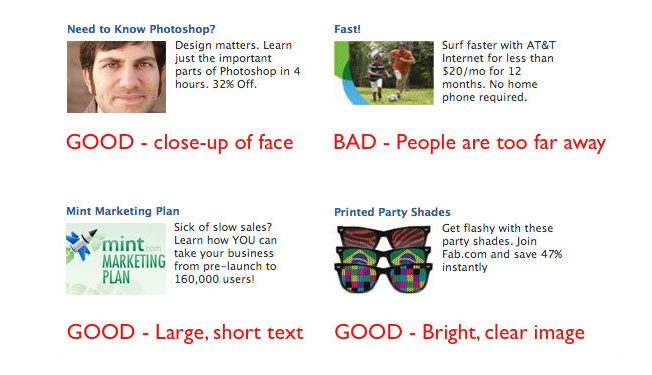
An example of advertisement humor and fun.

How to Create Images for Meta Ads

You have three options for images to use in your Meta ads: buy them, find ones that are already licensed, or create them yourself.

You can buy stock photography at many sites, including iStockPhoto. There are also sites with free stock photos like Pixabay. Don’t use stock photos that look like stock photos. No generic businessmen or stark white backgrounds, please.

Users recognize stock photos and will ignore them. Instead, find unique photos and give them personality by cropping or editing them and applying filters. You can use Pixlr, an online image editor, for both.

If you don’t have the money to buy photos, search for Creative Commons licensed images using Google Images:
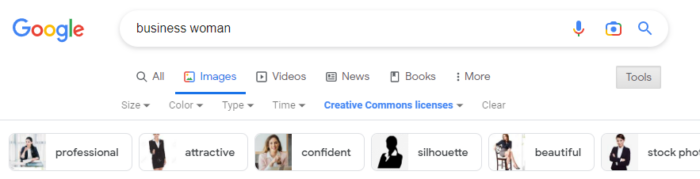
A screenshot of the Google search bar that has "business woman" typed in.

The third option is to create the images yourself. If you’re a graphic designer, this is easy. If you aren’t, you can still create typographic images or use basic image editing to create something original from existing pictures.

Rotate Ads

Each campaign should have at least three ads with the same interest targets. Using a small number of ads will allow you to gather data on each one. For a given campaign, only one to two ads will get a lot of impressions, so don’t bother running too many at once.

After a few days, delete the ads with the lowest click-through rates (CTRs) and keep iterating on the winners to continually increase your CTR.

Aim for 0.1% as a benchmark. You’ll likely start out closer to the average of 0.04%.

Writing Successful Facebook (Now Meta) Ad Copy

After seeing your image, users will (hopefully) read your ad text. Here you can sell them on your product or service and earn their click.

Despite the 40-character headline and 125-character body text limits, we can still use the famous copywriting formula AIDA.

  • (A)ttention: Draw users into the ad with an attention-grabbing headline.
  • (I)nterest: Get the user interested in your product by briefly describing the most important benefit of using it.
  • (D)esire: Create immediate desire for your product with a discount, free trial, or limited-time offer.
  • (A)ction: End the ad with a call to action.

AIDA is a lot to fit into 165 characters, but it can be done. Write five or ten ads until you’re able to fit a succinct sales pitch into the ad.

Here’s an example for an online programming course:

Become a Web Developer

Learn everything you need to become a web developer from scratch.

Save 65%. Enroll now!

This tells users what they’ll get, why it matters, and why they should care in just a few lines.

Bidding on Meta Ads

Like on any ad network, strategic bidding can mean the difference between profit and a failed test on Meta.

After you create your ad, Meta provides a suggested bid range. When you’re just starting out, set your bid near the low end of this range, so you don’t waste ad spend on an untested ad.

Your CTR will quickly start to dictate the price you’ll need to pay for traffic. If your CTR is high, your suggested bids will decrease.

You’ll need to bid more for each click if your CTR is low. Optimize your ads and targets to continually increase your CTR.

In addition to click volume, your bid will also dictate how much of your target audience you can reach.

Meta provides a great chart for every campaign showing the size of your target audience and how much of that audience you’ve reached.
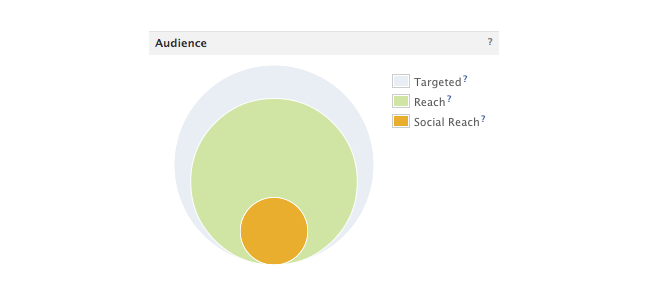
An audience chart that showcases percentage targeted, reached, and social reached.

Increasing your bid will help your ad reach more of your target audience. If your ad is performing well but reaches less than 75 percent of your target audience, you can increase your bid to get more clicks.

If your audience penetration is high, increasing your budget will increase your ad’s frequency: how many times a targeted user will see it.

Meta also offers automated bidding that uses AI to determine what bids to make. If you use this strategy, make sure to keep a close eye on your budget so you don’t overspend.

Landing Pages for Meta Ads

Getting a click on your Meta ad is only the beginning. You still need the visitor to convert.

Make sure to send traffic to a targeted, high-converting landing page. You know their age, gender, and interests, so deliver a page that solves their problems.

The landing page should also contain the registration form or email submit box that you’ll track as a conversion.

Focus the landing page on this action, not the later sale. If you want visitors to sign up for your newsletter, show them the benefits or offer a free gift for their email.

How to Track Meta Ad Performance

Like PPC ads, you’ll want to track your meta ad performance. The exact metrics that are important to you will vary by goal. For example, ad impressions and clicks are important if your goal is to increase brand awareness. If your goal is to increase your email list, then you’d want more actual form fills.

Here are a few things to keep in mind when tracking Meta ad performance.

Conversion Tracking

To track conversions, you’ll need to install Meta’s pixel. Make sure to track conversions for both specific ads and ad campaigns to get a deeper understanding of what ads are converting. Pay attention to both your ads and your audience—targeting the right audience often makes all the difference.

Performance Tracking

You also need to monitor your performance within Meta Business Suite. The most important metric to track is the click-through rate. Your CTR affects both the number of clicks you’ll receive and the amount you will pay per click.

Ads with a low CTR will stop serving or become more expensive. Ads with a high CTR will generate as many clicks as will fit within your budget. They will also cost less. Keep a close eye on CTR by interests and ads to learn which audiences work best and which ads resonate with them.

Keep in mind: Even the best ad’s performance will decline over time. The smaller your target audience is, the faster this will happen. Usually, you’ll see your traffic start to drop off in 3-10 days.

When this happens, refresh the ads with new images and copy. Duplicate your existing ads, then change the image and ad text.

Do not edit the existing ad. Delete any existing ads not getting clicks. You’ll see the new ads accruing impressions and clicks the next day.

Monitor the images’ performance over time to see which generates the best CTR and maintains their traffic the longest. You can rotate high-performing images back every few weeks until they stop getting clicked at all.

Use A/B Testing in Meta

A/B testing allows you to change variables in your ads, such as the ad copy, images, or audience, to see which strategy performs best. Meta allows you to create A/B tests in Ads Manager, so you won’t even need to use a third-party tool.

Meta Ads FAQs

Does Facebook still have ads since becoming Meta?

Yes, Facebook ads still exist. Using Meta Business Suite (formerly Facebook Business Suite), you can create ads for just Facebook or Facebook and Instagram.

How does Meta (formerly Facebook) target ads?

Meta allows advertisers to target ads based on demographic information, interests, location, and past behaviors. This makes it an ideal platform for advertisers, whether they want to reach very niche audiences or very broad audiences.

What is the Meta Ads Manager?

Meta Ads Manager is a stripped-down version of Meta Business Suite that allows you to create new ads fast. It doesn’t offer as many features, but it may be easier for some users to navigate.

What is the difference between Facebook and Meta ads?

Facebook ads are only on Facebook, while Meta Ads can currently appear on Facebook or Instagram. In 2021, Facebook changed its parent company name to Meta, and changed Facebook Business Suite to Meta Business Suite, where advertisers can manage ads on both platforms.

What are some of the available Meta Ad options?

Posts, images, carousels, boosted posts, Reels, Stories, and more.

Conclusion

Despite the learning curve, Meta advertising can be a great marketing channel for the right business. The most important things to remember are: target specific interests, use eye-catching images, give users a low-friction conversion, and track everything.

After a week or two of learning what works for your business, you’ll be able to generate a steady source of Meta conversions.

What are your best Meta advertising tips? Share them in the comments.


from Neil Patel's Digital Marketing Blog https://ift.tt/KYFbzyB
via IFTTT

Majority of U.S. adults want Big Tech to restrict misinformation on social platforms

A phone rests on a laptop keyboard. On the phone's screen is the Telegram app's blue and white logo featuring a paper airplane. The reflection of binary code can be seen on the screen, washed in a blue light.

The majority of social media users are standing behind Big Tech companies' efforts to curb misinformation, even as users of "alternative" social media sites find community in the unregulated media environments fostered by "free-speech" advocates.

The information comes from a new study by the Pew Research Center, published Oct. 6, which dives into the motivations and digital consumption habits of account holders on "alt" sites like Truth Social, Parler, BitChute, and Telegram (among others). According to the study, while 64 percent of alternative social media news consumers favor the protection of free speech even if it fosters misinformation, "the majority of all U.S. adults (61 percent) prefer that tech companies take steps to restrict this kind of content even if it limits freedom of information."

That's great news for the millions of social media users on sites like Twitter, YouTube, Instagram, and even TikTok, which have prioritized the removal of accounts spreading misinformation and instituted ways to debunk misinformation. But the rest of the report doesn't bode as well for the 64 percent that were just fine with allowing misinformation in their niche internet circles.

Diving deeper into the media diets of "free speech defenders" on alt apps, Pew Research surveyed more than 10,000 U.S. adults and analyzed posts from 200 prominent users, in addition to publicly-available posts from 2022.

The surveys show alt social media users are mainly using these sites to build communities with fellow conservative-leaning participants, and use the sites to stay up-to-date on what they think are the most pressing current events. According to several other findings:

  • 15 percent of prominent alt social accounts have been indefinitely or permanently suspended, banned, or demonetized on more established social media. Video-based site BitChute ranks highest, with a third of its prominent accounts (35 percent) having been banned or demonetized elsewhere.

  • 33 percent of alternative social media news consumers said they have participated in an in-person political rally or other political activity after learning about it on these sites. 36 percent have donated money to accounts they follow on alt sites.

  • In an assessment of posts from July 2022, "the most common phrases include some that are controversial and even inflammatory, such as wariness toward vaccines and negative associations with LGBTQ people."

  • 6 percent of the most prominent accounts associate themselves with QAnon conspiracies.

While less than 10 percent of those surveyed reported going to these sites for their daily news, the environment on alt apps is holistically against sharing traditional news sources. In posts from prominent users, 45 percent of links came from other social sites, 20 percent came from new, digital-only publications, and only 6 percent came from legacy news organizations in print, radio or podcasts, and television.

Small, loyal user bases have flocked to alt social media sites like these to digest fringe ideas and current events, validate right-leaning beliefs, and organize against what they deem violations of fundamental free speech. The numbers might not seem huge, but a vocal minority is still making noise.


from Mashable https://ift.tt/UDNJEL8
via IFTTT

Thursday, 6 October 2022

SEO Is Never Truly Done, Here are 7 Reasons Why

You’ve established your initial web presence and have an SEO strategy in place. There’s some steady traffic, and you’re even picking up some leads. Your job’s done, right? Not quite.

You see, it’s not that simple. Effective SEO is an ongoing process that takes consistent work.

Even if you’ve hit your key milestones and you’re where you want to be in the SERPs, that doesn’t mean there isn’t still room for improvement and that you don’t need to adapt. Especially when the competitive landscape is ever-changing.

Semantically-related keywords, image optimization, predictive search, and Google Analytics 4 are just some of the factors shaping SEO as we know it. In addition to these trends and developments, there are many other reasons why you should keep working on your SEO strategy.

In this piece, I detail why SEO is a continuous process. It’s not something that you can afford to ignore once you start seeing results.

Let’s get started with the first reason.

1. There’s More Than One Type of Effective SEO Strategy

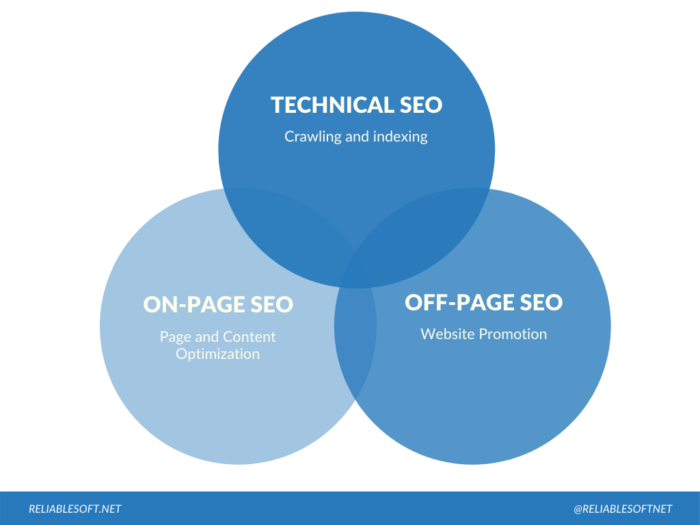
There’s more than one type of SEO, and an effective SEO strategy covers each type. In digital marketing, we divide SEO into four separate categories:

  • On-page SEO optimizes a website’s content and structure to rank higher in the SERPs. On-page SEO includes optimizing the title and header tags, meta descriptions, images, and other elements affecting how a website ranks.
  • Off-page SEO includes building backlinks to your site from other websites. The more high-quality backlinks a website has, the higher it ranks in SERPs, increasing your website’s authority and standing.
A venn diagram for technical seo, on-page seo, and off-page seo.
  • Local SEO helps to ensure that your website appears near the top of search engine results pages for relevant queries in your area. You can do several things to improve your local SEO, such as filling out your Google My Business profile. This free service from Google allows businesses to create and manage their business listing on Google.com and other Google services such as Maps and Search.

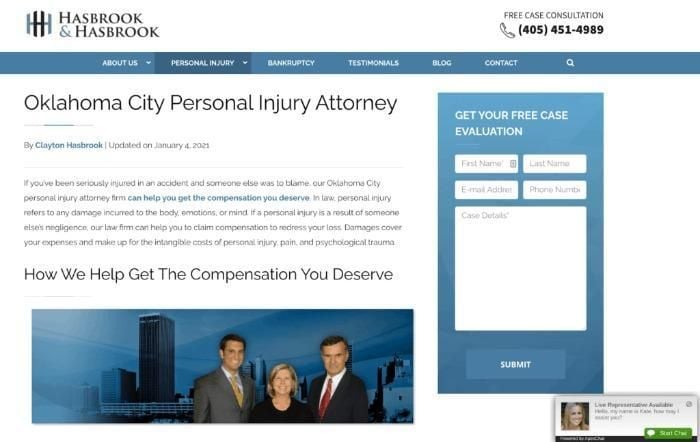
A great example of local SEO is the legal firm, Hasbrook & Hasbrook. It’s got a first-page ranking in the SERPs, attracting nearly 10,000 monthly searches for Oklahoma-centered keywords. It’s done this by using local keywords in its page titles and website URL, publishing local law content, and optimizing its Google My Business page.

A personal injury law firm page used as an example of SEO.
  • Enterprise SEO is a large-scale method of SEO. It considers your business goals, target audience, and competition. It uses multiple optimization strategies and usually covers websites with high volumes of transactions or large amounts of published data.

Even if you don’t have time for a complete SEO overhaul, you can implement a minimalist SEO plan by following these six simple steps.

2. Your Competitors Aren’t Stopping

If you’re thinking about giving up on your SEO strategy, you can guarantee your competitors aren’t.

Effective SEO takes time. You might see an initial boost in your SERPs when you begin putting your plan into action. However, for the most part, you’re in it for the long haul, and you won’t see results instantly.

Your competitors understand this, and they keep testing. If you’re not doing the same, you’re giving your competitors an open way to outrank you.

Additionally, to ensure their SEO strategy is as effective as possible, you can bet your rivals are tweaking and implementing new processes as the search engines update and evolve, leading me nicely to the next section.

3. Google’s Algorithm Changes and Evolves

Google is constantly changing and evolving its algorithm.

As seen with the helpful content update that has started rolling out in August of 2022.

Some of these changes are small, while others are more significant. Remember Panda and Penguin? These two updates sent many website owners into a tailspin when Google introduced them.

Panda emphasized quality content, while Penguin penalized sites using shady backlinking techniques and keyword stuffing. Inevitably, however, many legitimate website owners got caught up in this, causing them to lose out in the SERPs.

Then, another update, Hummingbird, considered searchers’ intent, while the Pigeon update impacted local SEO.

However, it’s not just the major updates you need to consider. It’s the constant tweaking, up to twice a day, you need to be aware of.

While not all these ever-evolving algorithms significantly impact SERPs, staying up-to-date on the latest Google algorithm news is essential so you can adjust your SEO strategy accordingly.

4. New Content You Create Still Needs Optimization

You know that awesome fresh content you keep creating? Well, it’s not enough on its own.

If you want your articles to attract organic results and reach your ideal customers, then you need to optimize each piece.

While there’s no denying the part social media plays in getting traffic to your pages, search engines deliver much more. One survey shows that Google drives eight times more traffic than all the social media sites combined, and the average top blog gets 66.47 percent of traffic from search engines.

With content optimization, what should you focus on the most?

Aside from keywords, an assessment of content using the Semrush SEO Writing Assistant tool showed that the top-performing articles measured a perfect score for:

  • SEO
  • Tone of voice
  • Readability
  • Originality

You can further optimize your content with:

  • Interlinking
  • Managing keyword density and including semantically-related keywords
  • Focusing on technical elements like meta tags
  • And covering topics in-depth

Let’s move on to search intent.

5. Search Intent Can Change Over Time

Searchers’ intent can change over time, significantly impacting how your website ranks on in the SERPs.

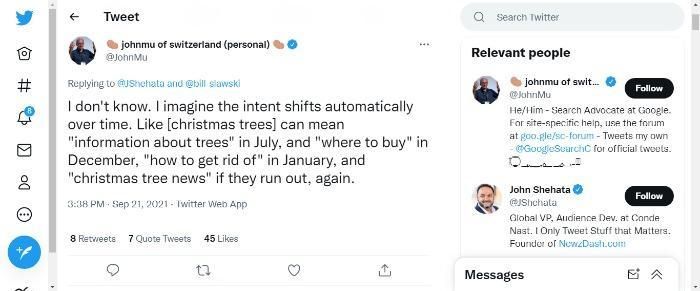
When John Shehata, VP of Condé Nast, asked Google’s John Mueller what the search engine views as a valid query, Mueller came back with this :

A tweet from John Mu.

From that, let’s go with the theory that search intent can often be seasonal.

Now, imagine you’re a hotel owner.

It’s summer, your business is booming because people are looking for somewhere to stay near the beach during their vacations. So naturally, they search for something like a ‘beach hotel (location).’ In all likelihood, they’re looking for a place to stay close to the beach in their chosen hotel.

However, come wintertime, your business slows down because people aren’t looking for beach getaways. An effective SEO strategy considers these seasonal changes in search intent and adapts its plan accordingly. For example, you might change your keywords to ‘seasonal short breaks’ (location) or similar.

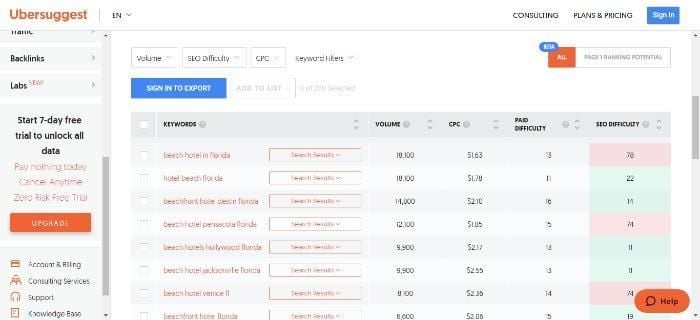
Obviously, you would do some keyword research to determine the exact phrases to use, and I’ve got a tool to help you with that to give me some ideas to run with:

Ubersuggest's keyword research.

6. Effective SEO Compliments Paid Marketing and Other Efforts

You shouldn’t just think about SEO in isolation.

Effective SEO is part of an overall strategy designed to optimize your results. When you use SEO alongside paid marketing, outreach, and other efforts, you get a balanced online marketing plan that delivers short-term and long-term results.

Ideally, you want to use SEO alongside PPC advertising. Here’s why:

  • SEM instantly boosts your traffic through targeted ads, while SEO is a slow-burner, taking up to a year to pay off.
  • SEO can increase the effectiveness of your PPC campaigns by targeting the right audience and increasing click-through rates.
  • By improving your website’s ranking in search engine results pages (SERPs), you can drive more qualified traffic to your site.
  • SEO can help you target users who are already interested in what you have to offer, resulting in a higher conversion rate.
  • Paid search and SEO work together to create a comprehensive online marketing strategy to help you achieve your business goals.
  • SEO can help you create quality content that attracts attention online. This content can be used for paid advertising campaigns, resulting in more leads and sales.

7. Effective SEO Still Drives Results

You can find countless articles online declaring ‘SEO is dead.’ Some of these articles go back to 2012 and beyond, and they’re all saying the same thing. However, I can tell you something with confidence: They’re wrong!

SEO is alive and well, but like everything else, it’s ever-changing, so you need to keep working at it if you want your SEO to be effective.

I’m not the only one that thinks SEO is still worthwhile. Search Engine Journal thinks SEO is more relevant than ever.

Then there are the marketers who still swear by SEO. Let’s take the IT sector as an example.

A recent Deloitte report notes that the industry has thrived over the past few years. Looking forward, evolving technologies like cloud computing, the move towards hybrid working, and a need to build sustainable futures are just some factors paving the way for an even brighter future.

How are companies in this sector building their visibility? As a forward-thinking industry, the IT sector is having to prepare for rapid change, and to help achieve this, they’re consistent investors in SEO.

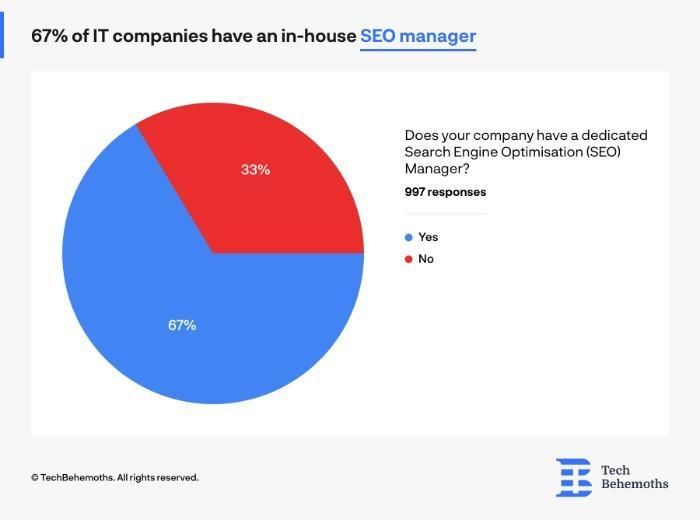
According to a survey by Tech Behemoths, 80 percent of businesses surveyed were familiar with SEO tools, and 67 percent employed a dedicated SEO manager.

A pie chart showing IT companies with an in-house SEO manager.

Further, 89.3 percent said they’d conducted an SEO audit in the last year, and perhaps the most telling result of all, 78 percent use SEO for leads.

Whatever sector you’re in, SEO can work for you, getting you fresh leads and improving conversions, and taking your business to the next level.

Conclusion

If you’ve ever wondered whether SEO is a continuous process or a once-off project, this article should leave you with no doubt that you need to keep working on it if you want your SEO to be effective.

There are many factors to consider when optimizing a website. While the necessary changes may vary from site to site, the key to success is continually optimizing for SEO.

New trends and developments, changing search intent, and evolving algorithms are some of the main reasons to consider when developing an effective SEO strategy.

By following best practices and keeping up with the latest trends, you can increase the chances that your site ranks highly on search engine results pages, bringing more visitors and potential customers your way.

What’s the best way to implement and update an effective SEO strategy? Share your tips below.


from Neil Patel's Digital Marketing Blog https://ift.tt/S9FAa1N
via IFTTT
What Is Find Places Through Reviews?

What Is Find Places Through Reviews?

If you’re a local business that wants nearby customers to find you, then you know local SEO and Google Business Profile is where it’s at. Combined with tools like featured snippets, these are essential to getting your content in front of local customers.

As a small business owner, you also understand that good reviews are imperative to winning new customers.

Now, it looks like Google is planning a new SERP feature to get your products/services in front of keen customers called find places through reviews.

According to SEO consultant Brodie Clark on Twitter, the carousels are getting tested in various regions, and on mobile, too.

How would it work, and what does it mean for your business? Well, all that remains unclear for the moment. However, I can share what we know and explain why reviews are vital to your business.

Let’s get started.

What Do We Know About Find Places Through Reviews So Far?

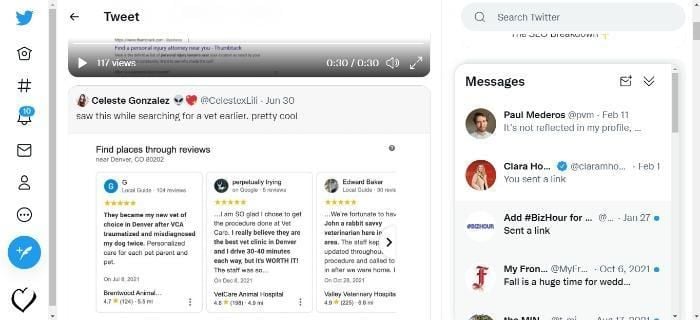
Speculation about find places through reviews began when local SEO specialists Andy Simpson and Celeste Gonzalez spotted the feature and posted the images on Twitter.

Gonzalez stated that the image appeared when she was looking for a local vet. As you can see, find places through reviews does pretty much what it says on the label.

Twitter reviews.

You’d enter the search term, and relevant reviews from local companies appear.

The tweets soon got picked up by Seoroundtable.com.

There is speculation that it would be similar to search Google for nearby places, which now appears to be going under the new name of find places through photos.

Sounds great, doesn’t it?

I can certainly see the advantages of putting a search term in Google, getting instant reviews, and then clicking through to my preferred business/service, can’t you?

Now, assuming the find places through reviews become a firm feature, what does this mean for your business, and what can you do to prepare for it?

Well, it would put the focus on online reviews, and by that, I mean positive reviews.

How Could This Change Impact Your Google Business Profile Reviews?

First, let’s look at what Google has to say about customer reviews:

‘When you reply to reviews, it shows that you value your customers and their feedback. High-quality, positive reviews from your customers can improve your business visibility and increase the likelihood that a shopper will visit your location.’

I’ll look more at the importance of answering reviews later, but let’s just park that there for now.

Second, let me share a stat with you.

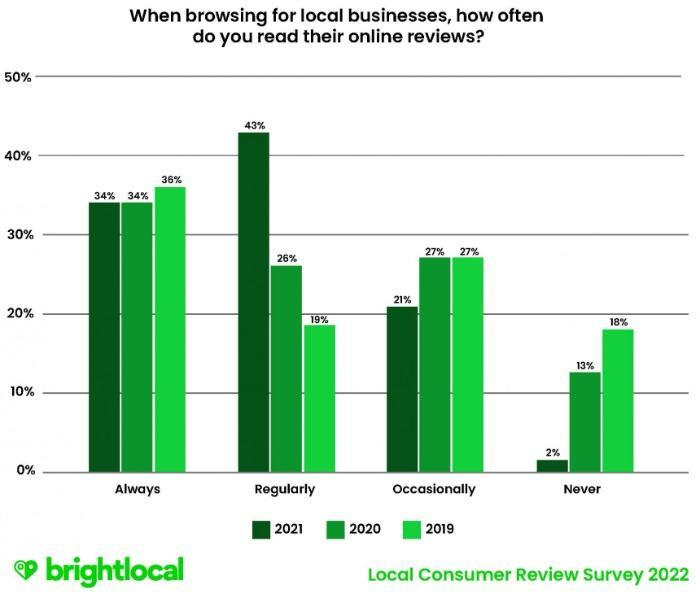
98 percent of people occasionally read reviews online. That’s an astonishing stat, right? Well, here’s another one: 77 percent of consumers always or regularly read reviews.

A bar graph showing how often people read online reviews when looking for local businesses.

If you’ve ever wondered whether reviews matter to your business, Brightlocal’s research should leave you in no doubt, especially considering the role Google plays.

Here are some more stats to get your head around.

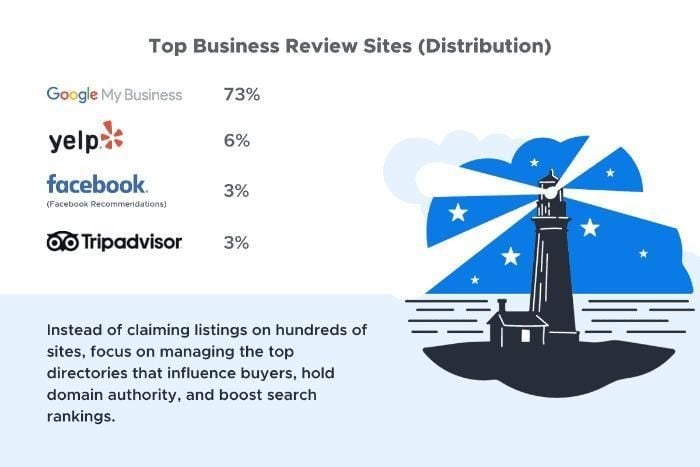
Analysis from Review Trackers estimates that 75 percent of new business is influenced by a handful of business review sites, and you don’t get any prizes for guessing which one dominates.

Yes, it’s Google with 73 percent, leaving others like Yelp! And Tripadvisor trailing far behind.

Top business review sites by distribution.

Now all of that tells me your Google business profile reviews will become even more important than they already are.

With a feature flagging what others are saying about you online when people look for a local business, positive feedback is imperative.

You’ll also want to dedicate more time to managing your profile, and combine this with resources like my guide to managing the SERPs to fully master how your business appears in Google.

Best Practices For Managing Google Business Profile Reviews

In the above section, I stressed how important Google reviews are to your business. Here, I focus on some best practices you can apply.

Respond To Your Reviews

This is review management 101.

I get it. Sometimes you don’t have the time or the energy. Other times, a buyer may have had a bad experience and left a negative review. However, whatever might be going on, you must take time to respond to reviews.

According to research from Uberall, larger global businesses respond to just nine percent of reviews.

However, this research shows that 86 percent of customers surveyed are more likely to buy from brands that do answer.

Want another reason to answer reviews? OK then. How does an increase in conversion rates grab you? Uberall also found that conversion rates (clicks on phone numbers, driving directions, and websites) increased measurably when companies answered.

When responding to reviews, always:

  • Thank your customer for their feedback, even if it’s negative.
  • Don’t use generic responses. Personalize your feedback to the reviewer’s specific points.
  • Reply quickly (more about that later)

Encourage Customers to Leave Reviews

Sometimes customers just need a nudge in the right direction. Make leaving reviews easy with follow-up emails and a link. Just go to your Google Business Profile, choose ‘customers’, then ‘reviews’, then ‘get more reviews’ to get your link. However, don’t be too pushy in getting customer feedback; they won’t appreciate it. Perhaps send an email or message out with orders inviting customers to leave feedback if they’re happy with their experience. Also, add a note encouraging buyers to contact you if they’re unhappy in any way.

Verify Your Business Profile

Without verification, your business won’t appear in online maps, and you can’t answer reviews. If you haven’t done so already, here are some directions to claim your business profile.

Use Google’s Tools

You don’t have to launch your review campaign from scratch. Google’s Business Profile Marketing Kit, gives you free stickers, posters, and social media posts for sharing customer reviews.

Report Fraudulent Reviews

If you suspect fraudulent reviews, report them to Google. You can do this by going to your business profile, clicking on reviews, and selecting the one you want to report. Then, select the ‘more’ option and choose ‘report review.’ Finally, choose the violation you’re reporting.

Signs that a review could be fake/fraudulent include:

  • Limited information or inconsistent statements
  • Generic names, no names, and no images
  • Repetitive statements or generic comments
  • A user leaving numerous reviews

You can also check your database to see if the reviewer is a customer of yours.

Respond To Reviews Quickly

The quicker you respond to reviews, the better. Customers almost always appreciate a speedy response, especially if it’s to their negative feedback.

According to Review Tracker’s research, 53 percent of customers expect a response to negative reviews within a week, while 1 in 3 expects a response within three days or less.

Check your Google My Business account regularly to see what people write, then answer and thank them.

If the review isn’t so positive, don’t worry, there’s plenty you can do.

What To Do About Bad Reviews On Google

Dealing with negative reviews is something every business owner has to face at some point. However, as Google states, responding helps with trust-building, and there’s a simple reason why: it shows there’s a person behind the brand that cares what people think, and it humanizes your business.

Responding politely to negative feedback and offering possible solutions to solve the problem also demonstrates professionalism and that you’re keen to put things right.

Additionally, if you feel the review is unfair, replying gives you the chance to give your side of the story, and if the feedback is justified, responding positively and taking it onboard shows your business is willing to learn and improve.

Google has this advice for replying to negative reviews:

  • Don’t take reviews personally. I know it’s hard, especially when you’ve put your heart and soul into your business. However, remember that most reviews aren’t personal attacks: it’s just business.
  • Ensure you understand the customer’s experience before you answer. If a customer had a problem with your service or product, they’re entitled to share that experience online. Use negative feedback as an opportunity to investigate what happened, own the mistakes you’ve made (if any) and detail the actions you’ve put in place to stop similar problems from happening again.
  • Apologize if appropriate. A simple, genuine ‘sorry’ can go a long way to winning a customer over. However, don’t apologize for things you can’t control.
  • Talk it out. Sometimes people are just venting. We all get angry and frustrated, and sometimes we overreact. Put yourself in your customer’s shoes, understand that they might not be angry at you, just the situation, and offer to talk with them via email, phone, or even face-to-face.
  • These days, shopping is often an impersonal experience. Use your name in emails and phone calls, so your reviewer knows they’re speaking to a real person that cares about putting things right.

Finally, whatever customers say about you, here are some templates to help craft answers.

FAQs

What is Find Places Through Reviews?

It’s a new feature that Google is testing to enable searchers to find a local business through online reviews. 

How Can I Optimize My Reviews?

To get the most from your reviews, encourage customers to leave them, send them a link to make it easier, include relevant keywords in responses, and add the reviews to your website.

Can I Remove Bad Reviews to Show up in Find Places Through Reviews?

If a review is fraudulent, Google has a removal request option where you can report a potential violation.

Conclusion

It seems Google is testing a ‘find places through reviews’ feature. A few SEOs have shared Tweets about it, and the feature appears to be a great addition to local search.

There’s limited information, so it’s hard to tell what this addition would mean for businesses and the impact it would have on them.

However, it’s clear it would put even greater importance on achieving positive reviews, and there’s plenty you can do to prepare.

Ensuring you answer reviews, responding proactively to negative feedback, and using Google’s tool to encourage customers to leave a review are just some of the things you can do.

What would find places through reviews mean for your business?


from Neil Patel's Digital Marketing Blog https://ift.tt/qOtQPn2
via IFTTT

Instagram analytics: How to analyze and use your data

Are you up-to-date on your Instagram analytics?

Because the network is regularly rolling out updates to help you own your data.

And crunching those numbers should be a top priority for brands and marketers alike.

In fact, a staggering 60% of marketers are upping their investment in Instagram in 2022.

Sales. Customer service. Community-building. The list goes on and on when it comes to activities and opportunities to engage customers.

But so many tasks related to Instagram for business, there are countless metrics to track.

Overwhelmed by your data? Don’t know to start with performance tracking? This deep dive into Instagram analytics will teach you everything you need to know.

Why are Instagram analytics important

Hey, fair question.

The idea of being “data-driven” is all the rage in marketing right now, isn’t it?

Here’s the catch, though: marketers should make decisions based on actual numbers versus anecdotes alone.

This speaks to the importance of wrangling your IG analytics. That’s because owning your data empowers you to:

  • Recreate top-performing content based on what your audience wants. Consider the challenges of growing competition and an ever-so-fickle Instagram algorithm. Understanding what really resonates with your audience starts with your analytics.
  • Spot growth trends (or downturns). This applies to your content strategy, engagement and reach. For example, are Reels outperforming your posts? Is your follower growth consistent? What about your publishing frequency? Your numbers can clue you in on how to approach your account.
  • Explain your account growth and performance to teammates, managers and stakeholders. Like it or not, marketers today are expected to justify their decisions with hard numbers. Thankfully, Instagram

How to access your Instagram analytics

Now, onto the good stuff.

Let’s say you’re totally new to monitoring your metrics. Below is a snapshot of how to check Instagram analytics (aka “Account Insights”) for the first time:

  • Make sure you set up a business profile (or creator account) if you haven’t already.
  • From your profile, tap ≡ in the top right corner.
  • Then, tap select “Get Insights,” tap through and confirm.

And boom!

enable creator analytics in instagram

Gone through this process before? Simply tap “Insights” from your profile if you’ve set up Instagram analytics already. From here, you can access your audience overview, content summary, and top-performing posts. instagram analytics overview

This provides a big-picture understanding of your IG presence and growth. That said, it’s only a taste of what you can glean from your numbers.

Your Instagram audience insights are a treasure trove of data to help you boost your engagement and grow your account. Granted you know what to look for.

The Instagram insights you should track

The dozens of dashboards in front of you might seem a bit intimidating.

Don’t panic, though! Now that you know how to access your metrics, let’s walk through what they mean.

From big-picture breakdowns to granular post performance, here’s a summary of what you can see via Insights.

Audience insights and analytics

Again, Instagram’s native analytics are surprisingly powerful when it comes to audience insights. The network highlights valuable customer data including:

  • Audience demographics (age, gender, location)
  • Follower growth over time
  • Audience engagements and interactions over time
  • % of engagements from followers versus non-followers
instagram audience insights

These data points highlight whether you’re getting in front of your target audience via Instagram or not.

Think of your Insights Overview as a pulse check for your Instagram performance. Here you can see whether your account’s reach is growing and which posts are contributing to that reach. You can also see your top-performing post formats based on visibility.

instagram analytics overview

Post insights and analytics

“What’s working and what isn’t when it comes to our Instagram content?”

Answering this question requires you to dig into your content interactions and individual post data. Thankfully, Instagram makes it a cinch to do both.

Alongside specific post performance data, you can spot big-picture trends for your account. This includes:

  • Top-performing content formats
  • The best times to post on Instagram (based on actual audience behavior)
  • Top-performing posts for a particular time period
  • Individual post impressions, engagement and reach
instagram post insights

And as an added bonus, Instagram allows you to filter your search results by metric.

Maybe you’re purely concerned with reach. Perhaps comments and interactions are your priority for community-building. Either way, you can track these metrics and then some.

instagram select metric in insights


A key benefit of understanding Instagram analytics is making data-backed decisions. For example, there’s plenty of anecdotal data about Reels and Carousels outperforming each other. That said, your results may vary based on your industry, audience and content strategy.

The takeaway? You have to experiment and see for yourself. With a better handle on your analytics, you can run those experiments with a sense of confidence.

Stories insights and analytics

While Reels are dominating at the moment, Stories remain one of Instagram’s staple features.

And while Stories themselves do disappear, the data attached to them doesn’t.

instagram story analytics

Optimizing your Stories strategy might require some trial-and-error. That’s where your analytics can be a huge help, though. For example, your Stories insights can clue you in on:

  • How many Stories to publish per week
  • Whether timing has an impact on impressions and engagements
  • Which content formats perform the best (think: Reels versus UGC versus slideshows)

Reels insights and analytics

Given that 20% of all Instagram activity happens on Reels, marketers can’t afford to ignore their video performance data. The insights offered up by Instagram analytics here are par for the course.

What’s most notable here is applying the “followers and non-followers” breakdown to Reels. This highlights whether your videos are getting picked up the algorithm or served via the Explore Page.

instagram reels reach example instagram analytics overview

IG Live insights and analytics

Given the legwork required to pull off a successful Instagram Live, assessing performance is a must-do after the fact.

Beyond the metrics you’d expect for video content, the network shares:

  • Peak concurrent views
  • # of Live interactions (comments and shares)
  • # of accounts reached during the broadcast
ig live analytics and metrics

IG ad analytics

The stakes are high for performance data related to your Instagram advertising campaigns.

The platform provides multiple ways to check Instagram ad analytics including Ads Manager. From the “Breakdown” menu in Ads Manager, you can see:

  • Your campaign performance overview
  • Ad audience demographics
  • Delivery data
  • Amount spent on the campaign
  • Cost per result

Of course, there are also ways to see your ad analytics beyond Instagram itself. Here’s a peek of what paid performance looks like in Sprout Social:

Paid Performance Summary

How to view Instagram analytics in Sprout Social

Instagram’s native analytics features are nothing to scoff at.

As proven by the breakdowns above, the network’s data is surprisingly granular. It’s easy to access, too.

That said, the network doesn’t do too much hand-holding in terms of what to do with your data. There are likewise a few missing features and functions versus a platform like Sprout Social.

Sprout empowers brands to assess their Instagram analytics alongside their entire social presence. This includes networks like Facebook, Twitter, Pinterest and TikTok. The ability to monitor data and manage assets for all of these platforms in one place is a huge plus.

Not only does doing so save serious time but also highlights which posts and networks are performing best. Consolidated analytics and cross-posting can be a game-changer for busy brands. That’s because you don’t have to bounce between platforms.

Sprout Instagram Business Profile

Also, Sprout encourages brands to take action based on their analytics.

Take a look at our platform’s Competitor’s Report below. This report highlights your share of voice alongside hashtag performance. These insights offer specific, actionable ways to fine-tune your content strategy and positioning.

Instagram competitors report

Instagram analytics tools to use

There’s no shortage of Instagram analytics tools out there.

And while we do give props to IG’s native features, we obviously can’t recommend Sprout enough.

For good reason, though! The fact that Sprout gives you a holistic view of your social media data and marketing presence is a major bonus. Not to mention the ability to publish and cross-post content and messages, too.

Sprout’s suite of comprehensive Instagram Listening features go above what Instagram’s native tool provides. Our platform lets brands actively track competitors, key terms, sentiment and so much more.

Sprout Instagram Listening

The dashboards in Sprout are seamless and easy to navigate, too. You can answer your teammates’ most important questions at a glance. This includes:

  • Which posts have the most business impact?
  • What’s our share of voice (and which Instagram hashtags are we dominating)?
  • Which content formats are driving the most audience engagement?
Sprout Instagram business profiles

Is it time to level up from native Instagram analytics?

If you want to grow your presence faster, it’s time to get knee-deep in your Instagram data.

While you can learn a ton from native analytics, a tool like Sprout can uncover more insights you can translate into action. Our platform provides a collaborative, all-in-one solution for scaling your social media presence.

Want to see firsthand how the platform can boost your brand’s Instagram efforts? We invite you to test-drive Sprout Social today to see for yourself!

The post Instagram analytics: How to analyze and use your data appeared first on Sprout Social.


from Sprout Social https://ift.tt/ThLmelH
via IFTTT

How to create a social media viral video

If you’re a social media marketer, chances are you’ve been asked, “but how do we go viral?” at least once. Most marketers undoubtedly want the audience growth and attention that comes from achieving a social media viral video. In fact, it’s the dream of many social media managers.

But they also know that there’s no one formula to attracting viral success. And keep in mind: going viral is a bonus—not a strategy, and certainly not a reliable solution for slow channels. Video virality is short-lived, and so is the benefit that comes from it.

That said, understanding some of the common elements of viral videos can make your content more discoverable and engaging, increasing your chances of going viral.

In this guide, we collect expert tips from Sprout’s video and social teams so you can learn the theory behind ‘going viral’, how to make a viral video and what to do when it happens. Let’s dive in.

What makes a social media viral video?

Let’s start with the basics. What do we mean when we say social media viral video?

It’s called “going viral” when a piece of content really takes off on social media and reaches a large audience very quickly by receiving an unusual amount of shares and exposure. Whether it’s a tweet or an Instagram Reel, many different types of content can go viral.

How many views does a video need to be considered viral?

There’s no one number of views that signals a video has become viral. And what “viral” means has changed over time.

For example, in 2015 one million views was considered viral, according to Animoto. But now, with increased social media usage, one million is on the low end. And when it comes to TikTok specifically, Digital Marketing Institute defines 250,000 views as mildly viral, one million as medium viral and 5 million views within 3-7 days as officially TikTok-viral.

The psychology of what makes a video viral on social media

The answer to what makes a video viral in the first place is a bit like the holy grail for marketers. And yet, the answer comes down to simple psychology.

A lot of it comes back to emotion and social connection. According to research about why people share content online, the top three motivations to share came down to bringing entertaining content and value to people, to help define ourselves and to grow relationships.

Think about it: what makes you watch a video and share it? Did it make you smile or laugh, like the “It’s Corn” viral trend? Were you inspired? Did a video outrage or surprise you?

A step-by-step guide on how to make a viral video on social

Videos can go viral on a variety of different platforms. But what goes into creating a viral video in the first place? And how can you ensure the largest audience possible sees your video content?

Sprout’s video team is well-versed in creating video content that reaches large audiences. Here are some of our expert tips that you can put towards your own video production and optimization.

1. Pinpoint your goals

Knowing you want something to go viral isn’t enough for a solid social media marketing strategy. You also need to know why you want your video to go viral.

Are you looking for brand awareness? Hoping to grow your online following? Or do you want to generate conversions?

Each purpose will require your team to create different videos for audience members at different stages of the funnel. Know your goals before you begin production.

2. Know your audience

If you don’t know anything about the people you’re targeting, your video will fall flat every time. To create a piece of content that will perform well with your target audience and beyond, you need to know what will resonate with them and make them want to share your video.

One way to understand your target audience is to create social media personas and an empathy map. These will give you insight into what will grab your audience’s attention and what they look for online.

3. Start with a brief

Plan everything out thoroughly and create a creative strategy brief and a storyboard. This will shed light on your actual goals, key messages, tone, length, distribution channel and more.

A good brief helps align messaging and a video’s overall purpose from the content team all the way to the video production team. This way all of your content will be cohesive and have the same overall vision, strengthening your brand. Here are a few sections your brief might include:

  • Working title: This will help guide the overall concept.
  • Description: What do you want your video to be about? What is its purpose?
  • Key items to include: Are there specific points you need to hit in your video?
  • Related content: What related content do you have that you can reference, or include?
  • Competing content: Who are you competing with?
  • Platforms: What platforms will this be shared on? What versions do you need for various platforms?
  • Video format: Will this video be filmed vertically? Horizontally?
  • Keywords: Especially important for platforms like YouTube that have an SEO-driven search element.
  • Important hashtags/mentions to include: Important for trends and partnerships.
  • Calls to action: Are you asking your audience to do something?

4. Start strong

Every good viral video grabs attention immediately. The best way to do this is by using the word “you” within the first five seconds of your video—research shows if your video uses language like “you” or “your” in the first few seconds, you get a higher retention rate.

Other ways to start your video for maximum results include:

  • Create a plot twist or be unpredictable
  • Create a “hook” at the beginning: ask a question, introduce a list etc.
  • Make your content #relatable
  • Engage your viewers’ emotions
  • Incorporate attention-grabbing audio/music clips
  • Forget about being promotional

5. Tell a story

Content is all about storytelling. As viral videos skew shorter, you want to tell a compelling story in a short amount of time, by choosing a universal context for your creative concept. For example, the context of “Monday Mood” is universal and doesn’t need much time to explain.

Play to tropes your audience knows so you can jump right in without much backstory. This is a great way to create relatable content your audience will enjoy and will want to share with friends and family. It’s also a great starting point to upend expectations and to grab attention.

How to increase video discoverability

Now that we’ve covered our team’s tips for creating viral videos, let’s talk about a few ways to increase video discoverability in general.

1. Create short, concise videos

Even if your video does have a gripping introduction that pulls a viewer in, you also have to keep their attention.

A social media viral video doesn’t necessarily have to be short—even TikTok increased their time limit per video to 10 minutes. But keeping yours short and sweet can help boost your viral reach in a few ways. A short video makes it more likely that a viewer will watch the whole video—something that some platforms like TikTok reward. Plus 60% of consumers think short-form video is the most engaging type of in-feed content.

Take advantage of the format that viewers are most likely to watch, enjoy and share.

graphic showing the most engaging types of in-feed social content

2. Add captions

Adding captions to your videos doesn’t only increase video accessibility, it also improves the user experience by allowing people to watch your videos even without having to turn the sound on.

Given that people often scroll through social media when they can’t have sound on, adding captions will help to reach more viewers who may watch and share your video.

3. Stay on top of trends

Keeping your finger on the pulse of what’s trending on social is one of your best shots at going viral. This is especially true for platforms like TikTok, where many trends are born. Plus, jumping on a trend while it’s starting to rise is a great way to be a trendsetter yourself.

Look for songs, trending hashtags, sounds and visuals that are on the up-and-up in your Reels feed, Twitter trending topics or TikTok For You page.

No matter what trend you jump on, the key is to put your own spin on it in the content you create. Check out how we adapted the “It’s corn” trend into a video that our audience could relate to:

4. Write powerful copy

From your video title and description on YouTube to captions on TikTok, Facebook, Twitter and Instagram, writing powerful, optimized copy is key.

Your copy helps explain what your video is about, piques curiosity and can help your content appear higher in search results. This doesn’t mean ALL CAPS, clickbait-y video titles that you often see on YouTube and in Facebook captions—it means spending some time writing quality copy that will increase views.

Especially when it comes to YouTube, video optimization is incredibly important to help maximize the potential reach of your video in search.

5. Use hashtags

Using hashtags is a popular strategy for increasing reach across many different social media platforms—especially on video platforms like YouTube and TikTok.

Using popular hashtags in your TikTok caption or YouTube video description can help an even wider audience find your video as they search for similar content. Be sure to only include hashtags that are relevant to your video, not just randomly chosen hashtags that are trending and popular on the platform.

6. Promote your video

Don’t simply publish your content and then wait with bated breath for it to be picked up.

Your own promotional strategy is step number one in starting to reach the audience that your intended viral video is meant to reach. Think about how you plan to market and publicize the platform(s) you initially published the video on.

One way to do this is by sharing your published video on other platforms. This can be as simple as linking to your video in a Facebook post or Tweet, for example. Or creating an Instagram Story featuring a video you posted on YouTube, Twitter or TikTok with a link to the video. This also helps you fill out your content calendar.

A screenshot of a Sprout LinkedIn post featuring a Sprout YouTube video

You can also share your content across channels by repurposing teasers of it on other platforms to encourage viewers to watch the entire thing. For example, if you initially share your video on YouTube (like we did), then you can cut down your video content into shorter previews to share on other channels, while encouraging viewers to head to YouTube to watch the entire video.

Post and reshare on platforms that your audience will be on to maximize chances that they see your video and share it with their own networks. Use data to find out which of your platforms have the most active and engaged audience. Using a tool like Sprout Social’s reporting and analytics makes it easy to see data from all of your platforms side-by-side.

A screenshot of Sprout's Cross Network Profile Performance report.

7. Be consistent

Social media success doesn’t come from one post alone. Creating content that makes waves and building your audience is a long game.

Posting consistently is key when it comes to building your audience and creating successful videos. Experiment with different trends and content formats. And don’t be afraid to reuse content for different trends—one of the many tips you can get by rewatching our TikTok Bootcamp webinar with Auntie Anne’s Social Media Manager, Bari Rosenstein.

On the one hand, this helps you pinpoint the type of content your audience likes. On the other, every video you post gets engagement that tells social platforms more about you and your content. Racking up this engagement on Instagram, for example, is a crucial signal to the platform that people enjoy your content, and it should be promoted organically.

Don’t get discouraged if your first video only gets a few views. You’re not going to go viral on your first attempt. Post consistently, build an audience, find out what they like and keep posting.

8. Join the conversation

It’s called “social” media for a reason—get your name out there by engaging with the communities you want to reach.

Brand conversations—that is, brands commenting on each others’ videos and engaging with each other—can create viral moments themselves in TikTok comments, for example.

Engage in the comments section of other brands’ content and create a relationship with them. Sometimes, coordinating this conversation with the social media manager of that brand can create extra social media magic.

Just remember—regardless of your brand persona, be respectful and mindful of what you say. You don’t want a fun joke or comment to lead to your brand getting canceled.

How to manage the madness of a social media viral video

So you went viral…now what? Racking up millions of views and potentially thousands of new followers is exciting.

But going viral can also mean thousands of messages in your inbox. Meaning important messages are more likely to get lost in the shuffle…unless you have a plan.

Here are a few tips for managing the madness of achieving viral status:

Stay on top of your inbox

It’s all too easy for hundreds or thousands of messages to build up in your inbox in the first few days or first week of a viral moment. Staying on top of incoming messages regularly is key to avoid being overwhelmed.

This can mean increasing how often you check your social inboxes. If you typically check three times a day, try checking your inbox once an hour to keep messages from piling up.

Also, consider extending your monitoring hours. You may usually monitor nine-to-five, but viral videos are on a 24/7 schedule. If a potential crisis bubbles up amid your viral moment, allowing it to snowball for 12 hours isn’t good for anyone.

Having one, centralized place to check incoming messages from all of your social media accounts is crucial during a viral moment to ensure nothing is missed and to streamline your work.

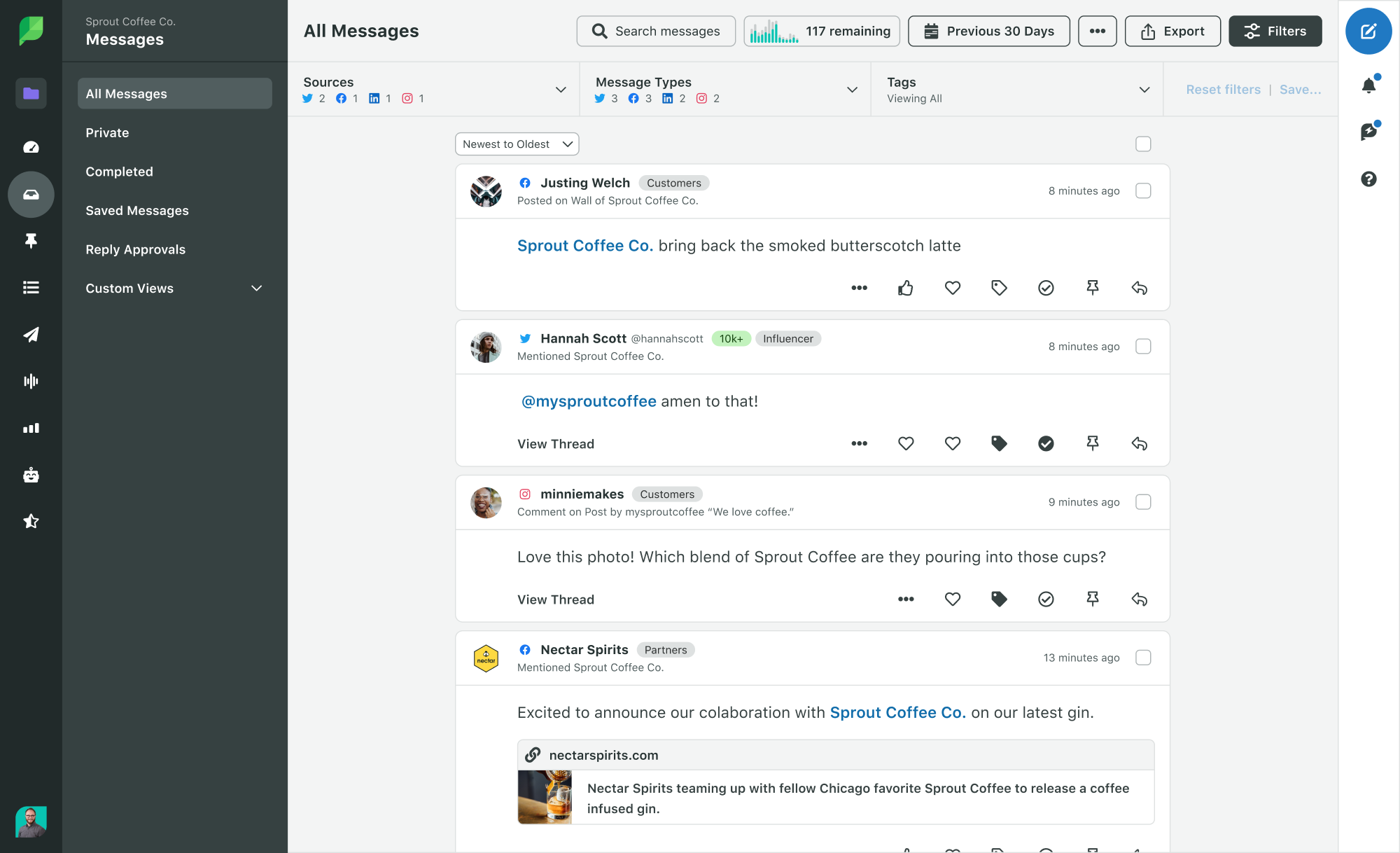
If you don’t have a monitoring tool, this is your sign to get one. In Sprout’s Smart Inbox, you can see and respond to messages across platforms, save top-priority messages, identify volume spikes, assign messages to teammates and more.

A screenshot of Sprout Social's Smart Inbox, an inbox within the platform that consolidates all incoming messages and mentions into one place.

Start your free Sprout trial

Divide up the work

It’s one thing to say you should check your inbox more frequently.

It’s another to actually carve out the time to do so.

During a spike in messages, it helps to divide up the work—especially if you’re extending your monitoring hours past when they typically run.

Here are a few tips:

  • Communicate with your customer care teams: If you have another team or other teammates monitoring social for you, or assisting, let them know that there’s a volume spike and communicate the need for more frequent checking.
  • Create pre-written response templates: Create pre-written, customizable, ready-to-use templates for common questions, and to standardize brand responses. This is not just helpful during periods of higher workloads, but every day.
  • Monitor in shifts after hours: If you’re extending your monitoring into post-work hours, divide up the work to prevent burning yourself or your team out.

If you’re realizing that you don’t have anyone else who can step in and monitor, now’s the time to start training backups to protect yourself from burnout.

Identify top-priority messages and accounts

You don’t want to miss a question from a customer. And you definitely don’t want to miss a comment that could spiral into a crisis.

Monitoring regularly is the first step to ensuring no important messages go unanswered. However, if you wake up to 10,000 messages in your inbox, that’s easier said than done. Using social listening can help you easily identify the overall sentiment of your incoming messages, and quickly find both positive and negative comments.

In Sprout’s Smart Inbox, you can do light listening by filtering messages with specific keywords and from specific accounts—especially important if you have specific influencers, or trolls, to watch out for.

Level up by using Sprout’s Social Listening tool to track how people feel about your brand and viral content, to find accounts talking about you with large followings and identify common words people use when talking about you.

Sprout Social Sentiment Summary dashboard in the social listening tool

Create a communication chain

Your social media crisis plan is a key tool to leverage during a viral moment—even if your viral post is met with soaring positive sentiment and comments.

Having a set chain of communication is a crucial way to make sure you can act fast. If a potential crisis is bubbling up, getting in front of it early can curb it.

Similarly, if something immensely positive happens—like a major influencer or celebrity engaging with your content—having a go-to team member at the ready ensures you can act fast.

Time is everything on social. Having a set team that you can have on-call while your content is viral saves you a runaround.

Continue the hype

Once the madness has calmed, find ways to extend your success and continue riding the viral wave.

When I was the social media manager at Shedd Aquarium, I managed the viral “penguin field trips” campaign.

After the initial viral posts, we kept the campaign going by using the trend we started in fresh ways. We took the penguins on field trips to meet new animals.

We also experimented with taking different animals on field trips to new habitats, like this snake adventure that went slightly viral on TikTok.

Eventually, we took it a step even further by bringing the penguins to locations all over the city to explore.

By using the type of content we knew resonated and building off of it, we were able to create several viral moments within one campaign. Get creative, and find ways to expand on the content that brought you success.

Why social media viral videos aren’t the only thing to aspire to

Achieving a viral post is every brand’s dream. And it does come with an influx of more views and fans.

But rest easy if you haven’t scored a viral moment (yet). Instead of focusing on how to go viral on TikTok as your main goal, focus on building a sustainable social media strategy and fostering your digital community. This is the best way to maximize your long-term growth and build strong channels that make an impact.

If your strategy is a sundae, going viral is a sweet cherry on top: not the core of the dish.

Start creating your own viral video today

The only way to have a chance at achieving a social media viral video, is to start posting.

To massively increase your reach, start creating your own potentially viral video content using these expert tips and guidelines. Incorporating videos into your overall video marketing strategy is a key way to increase reach, brand awareness, conversions and possibly even strike viral gold.

The post How to create a social media viral video appeared first on Sprout Social.


from Sprout Social https://ift.tt/8zeV6Xi
via IFTTT