Thursday, 13 October 2022

The marketer’s guide to reporting on social video engagement

“Have you seen this video?” Whether it’s used as an icebreaker with new friends or as a way to bond with besties, it’s a question we’ve all heard, or asked. People share video with friends twice as much as any other content. And with many social media platforms doubling down on video and TikTok-style shorts, it’s no question that video engagement is key.

If you haven’t brought video into your social media strategy, consider this your “twist my arm” moment.

But video creation requires work. You want your time and effort to go toward content that is effective for your channels and your brand. And to know what videos work, you need the right metrics.

Let’s explore video engagement metrics that help you understand organic performance across your biggest channels.

Dive deeper into video engagement performance with Sprout Social

Sprout’s Premium Analytics give you a full, 360-degree view of how your videos—paid and organic—perform on social.

Fast reporting helps you understand what content impacts your business and strategy, and how.

Request a demo to try Sprout’s Premium Analytics tools and see how they can enhance your strategy.

Before we start, know your goals

If you feel overwhelmed by the dozens of video metrics out there, there’s good news—you can be choosy.

The best way to pick the right metrics is to ask yourself: what are my channel-specific goals?

As Sprout Social’s Senior Social Media Manager Rachael Samuels puts it, “On every network, the metric that relates to the goal or purpose of the video is what you should measure. If you want people to comment or take action, views aren’t the most important but view duration might be. If your goal is awareness, if it’s an ad, if you want your video in front of thousands of people—views are more important.”

Video engagement metrics you need to improve content performance

While everyone knows metrics like views and impressions can inform performance, they might not tell the full story.

Here are some key video engagement metrics to help you dive deeper into your performance data and know where to focus your production efforts.

TikTok metrics to track

As a short-form video app, views are everything on TikTok. The second your video starts playing, it’s counted as a view—including when a video is replayed. Views from you watching your own video, however, don’t add to your total count.

Here are some TikTok metrics to track.

Total likes and total views

These are two individual metrics, but they’re important to compare. A high total views count is exciting. But if your total likes are low, you’re not getting the most out of your content.

The TikTok algorithm uses likes as a key signal when it comes to identifying popular content to organically show to more users. If your likes are low, especially on videos with a high view count, experiment and find new ways to make your content more engaging.

Post time

Most newly-uploaded videos reach peak engagement soon after being published. Publish videos when your audience is more active to rack up more engagement earlier. Look at the post time of your most successful videos to identify your best times to post on TikTok.

Watched full video

Viewers watching your video to the end holds a lot of weight with TikTok’s algorithm. Luckily, the majority of consumers find short-form video to be the most engaging content type.

To achieve a better video completion rate, create engaging, bite-sized videos with sounds and text that keep viewers watching. Tracking this metric will help you understand how well you’re hitting this goal.

Traffic sources

Knowing whether the majority of your traffic comes from your followers or new users in the For You Page tells you how much organic reach your content is getting.

A little background: there are three TikTok feeds, including the Friends Tab, Following Feed and the For You Page. The For You page is where you want your content to show up, and where you can go viral. Tracking video views received from the For You feed will tell you which videos TikTok is pushing to more people.

Average watch time

Like we mentioned, completion rate matters on TikTok. Tracking the average time people watch your content will inform when people are falling off, and what your ideal video length might be.

Keep in mind—TikTok only keeps your data for 60 days. Using a tool, like Sprout Social’s reporting and analytics, empowers you to see your lifetime TikTok data, and even compare your TikTok performance to the performance of your other accounts.

A screenshot of Sprout Social's Post Performance Report showing TikTok content and the average video time watched for each TikTok video displayed.

Facebook video metrics to watch

A video view on Facebook counts when a user watches a video for at least three seconds.

Average video time watched

This can help you understand your audience’s preferred video length.

History Beneath our Feet

For Sandy Ward and Myia Antone, shared knowledge elevates common understanding. The pair spent four days exploring the mountains on each other’s traditional land. Read “The History Beneath our Feet”: https://ift.tt/DCHKfeG

Posted by Patagonia on Monday, January 24, 2022

Sound on vs. Sound off video views

The vast majority of video on the internet are watched without sound. Knowing whether your videos are watched with or without sound can help you prioritize captions, music, voiceover and more. Dig into how sound on vs. sound off video plays compare using Sprout Social’s Premium Analytics tools.

A closeup of Sprout's Premium Analytics data spreadsheet showing sound on versus sound off video views.

Full video views vs. partial

A partial view is the number of times users watch a video for at least three seconds, but no more than 30 seconds and not to the end.

A full video view is the number of times users view your post’s video for at least 30 seconds, or almost to the end for shorter videos.

Seeing these two metrics next to each other can help you visualize if your video retention improves over time.

Sprout Social's video performance graph showing full views versus partial views of videos.

Click-through rate

Click-through rate (CTR) is the number of times users clicked in your post as a percentage of impressions during its lifetime—especially important if your goal is to boost conversions or leads.

Cut out the manual calculation that goes into CTR. Sprout Social’s Premium Analytics feature calculates this metric in a downloadable report in seconds.

Unique video views

This is the number of unique users who viewed your video. If one person watches a video 10 times, it counts as one unique view.

Using Sprout’s Premium Analytics, compare this number against your total views to get a sense of how often your video is being replayed—an important metric considering Facebook favors content that keeps people coming back.

Click to play vs. Autoplay metrics

This can tell you how many people click to play your videos and which videos inspired interest. While videos on Facebook generally autoplay, this feature can be turned off.

A closeup of Sprout's viewing breakdown listing organic views, paid views, click plays and auto plays.Peak live viewers 

If livestreaming is a part of your video strategy, using Facebook’s Live video metrics can help you refine your approach to live audience.

Shares and comments

Facebook post engagements include reactions (Like, Love, Haha, Wow, Sad or Angry), shares, clicks and comments. Total engagements can give you a sense of how effective your video was overall.

People sharing your content is one of the best ways to organically reach new eyes in an algorithm-satisfying way.

95% video views

Facebook prioritizes content that sustains viewer attention. This metric highlights when viewers have watched at least 95% of your video, including those who skip ahead. Find this when you download your Post Performance Report with Sprout’s Premium Analytics.

Stand-out YouTube video metrics

YouTube has more than 2 billion active users and their newest video type—YouTube Shorts—generates more than 15 billion daily views. But beyond its popularity as a social platform, YouTube also has SEO and search applications. The platform is often touted as the most popular search engine behind Google.

Here are a few YouTube metrics to measure whether your videos are standing out.

Average view duration

YouTube prioritizes how much time is spent watching a video. It’s important to know which videos inspire people to keep watching, and how to recreate their success.

Card clicks

YouTube cards are the main type of pop-up you see during a video. There are four different kinds:

  • Video: allows you to link to another YouTube video (see example below)
  • Channel: allows you to link to another YouTube channel
  • Link: YouTube Partners can link to an external website
  • Playlist: can link to a public YouTube playlist
A Sprout youtube video with two video cards at the end linking to other videos in the same series.

Card teaser impressions

This is the number of times that card teasers were displayed to viewers.

Subscribers gained/lost from video 

Looking at how many people subscribed to or unsubscribed from your channel from one video can tell you a lot about its impact.

Likes/Dislikes

While this may just seem like a vanity metric, YouTube’s algorithm weighs Likes and Dislikes when determining which videos to serve.

Key Instagram video metrics

On Instagram, a view is counted when someone has watched a video for three seconds or more.

Saves

When someone saves a video on Instagram, it means they liked it so much that they want to easily rewatch it. Instagram also uses saves as an indicator of what to show in the Explore feed.

Story metrics

Looking at Instagram Story analytics can help you understand their impact and which ones to recreate or turn into Highlights. Keep an eye on:

  • Story taps back: Could indicate people are rewatching your Story, or the previous frame contained too much information
  • Story taps forward: Could indicate people don’t want to stay on your Story
  • Story exits: Who dropped off of or swiped out of your story
  • Story replies: Who took the time to respond to your Stories, if you offer replies

Profile metrics

Looking at the following profile metrics can indicate if a recent video post led to a spike in profile actions:

  • Website clicks
  • Email link clicks
  • Get Directions Clicks
  • Phone Call Clicks

Using Sprout Social’s Premium Analytics feature, you can quickly pull these numbers to understand your audience behavior.

Essential LinkedIn video metrics 

Like Facebook, LinkedIn counts a view after three seconds, and your video view count doesn’t display publicly on your post until your video has reached 500 views.

Click-through rate

LinkedIn prefers native content that keeps users on the platform. Make sure your external links, like the job posting link below, are worth it by looking at which videos drive the most clicks to post links.

Pro tip: LinkedIn’s paid ad analytics open up opportunities for a deeper understanding of video performance. In Sprout’s Premium Analytics, you can look at view conversions to understand how your video directly impacted engagement.

A starbucks linkedin post encouraging people to apply for open jobs

Comments

Posts with a lot of longer comments, like the post below, get the platform’s attention—even more so than reactions (Like, Celebrate, Support, Love, Insightful, Curious.) They’re richer in content and can potentially increase time spent on a post, or dwell time, which LinkedIn’s algorithm favors.

A sprout linkedin post prompting comments.

Followers gained or lost 

Looking at this number after you’ve posted a video vs other types of content can reveal whether video is a powerful tool for you, or hurts you.

Helpful Twitter video metrics

A video view on Twitter is counted when someone has watched your video for at least two seconds with at least 50% of the video visible in their window.

Engagements

Twitter’s algorithm favors engagement as one of several key signals. The more engagements, the more attention. On Twitter, engagements include:

  • Retweets
  • Favorites
  • Replies
  • Mentions
  • URL clicks
  • Hashtag clicks
  • Media views

Tweets that are Liked or commented on by one person may show up in their followers’ feeds, connecting you to new potential fans.

Follow or Unfollow from posts

Use this metric in Sprout’s Premium Analytics to understand which of your videos drive people away, and what videos attract new audience members.

Post media clicks

Post media clicks can tell you how many times viewers clicked your video—to pause it, for example—while watching.

What’s next: Turn video engagement information into action items

You’ve published videos on your social channels.

You have a sleek report highlighting their performance.

…Now what?

Data has a million stories to tell about your brand and channels. Here are a few ways you can level up your social media analytics from data points to actionable insights.

Report impact to stakeholders

Data provides a window into your strategy. It can also back you up when you need more resources for video creation by illustrating video’s impact on your brand to senior leaders.

Similarly, if your higher ups are pushing you to publish video formats that you know are not performing well, data can help prove your point. Use Sprout’s presentation-ready reports to present clear findings to your leadership team, and use Premium Analytics to answer some of their biggest questions about how social affects your business.

Sprout Social's profile performance report

Know where to allocate your ad spend

It doesn’t make sense to boost or make an ad out of a video that doesn’t resonate. Knowing which videos are your most engaging can help you determine where to distribute your budget.

Guide your content strategy

Video content is a lot of work. Especially if you have to coordinate remote video production.

You want to make sure the work and energy you invest goes into the type of content that works best.

Looking at your video engagement data can highlight successful content to recreate and content that’s underperforming.

Here are a few factors that metrics can help you determine:

  • Video length: Looking at view duration and video lengths with higher engagement can help you prioritize the right type of video content.
  • Theme: What types of videos garnered the most engagement? Were they about your product? Funny? Informative?
  • Quality: If all of your viewers drop off of a video at the same time, what’s turning them away? What can you fix?
  • Card clicks: Specifically on YouTube, are a lot of people clicking a card at a specific time? Or is your card missing your audience?
  • Frequency: Use video engagement data to determine how often to post, and when to pull back.
  • Time of day: With social platforms like Facebook and Twitter putting a lot of value on posting time, video engagement data can help inform when your best times to post on social might be.
  • Titles and description copy: Did your top-performing videos have particularly keyword-rich descriptions? What were their titles like?
  • Preview images: Is there imagery that worked particularly well for video clicks?

Identify which videos to repurpose

The more mileage you can get out of one video, the better.

Identifying your high performers can help you determine which videos are worth repurposing and posting on other channels—even beyond social.

A side by side of the same video repurposed on both instagram reels and tik tok

Connect content to intent

Going viral for the right reasons is every social media manager’s dream. But at the end of the day, your social efforts have to positively impact your business’ bottom line.

Video engagement data, when paired with other metrics, can help you connect content interactions with audience intent.

Looking at a successful video and comparing it to website clicks, event registrations, profile views, email signups, etc. at the time it was posted can connect content to action. This can illustrate the real business impact your efforts make to your senior leaders.

Make an impact with video engagement metrics

Video engagement metrics and social media analytics don’t exist in a silo.

By combining some of these metrics with awareness metrics—like impressions—and more, you can start to form a full picture of how video can drive your social strategy, and your business, forward.

It’s hard to be decisive when it comes to social data, but you’re not alone. Use our social media metrics cheat sheet to find the metrics that matter most to you. Then, level up your insights and make data analysis a breeze—request a demo of Sprout’s Analytics tools today.

The post The marketer’s guide to reporting on social video engagement appeared first on Sprout Social.


from Sprout Social https://ift.tt/zuxnX4g
via IFTTT

How to go viral: 9 steps to increase your audience reach

“Make it go viral.” An assignment so notorious it’s become a cliché.

Social marketers know creating viral posts isn’t their most important goal. In fact, it might distract them from reaching their target audience and taking care of their team’s mental health.

That doesn’t mean you can’t learn something from viral posts and campaigns. Strategic viral marketing boosts brand awareness, increases engagement and builds loyalty. The right viral content can help brands gain mega fanbases.

We’ve found that the brands whose viral marketing achieves long-term, sustainable growth follow these nine principles. Use them to expand your brand’s social reach (and they might even help you go viral).

What are the chances of going viral?

First, how likely is it that your post will go viral? According to a Stanford University study from 2016, the chances of going viral are one in a million.

However, trending platforms like TikTok offer more opportunities for brands to blow up on social. But there are no quick hacks to produce a viral video. Going viral requires equal amounts of skill and luck.

Follow the content best practices of these nine brands who have created viral magic to improve your chances.

1. Read the room

Understanding the people you’re trying to reach is the first step towards going viral. If you haven’t already, define your target audience.

A target audience is the group of people who are most likely to be interested in your brand or product. Members of this group often share common interests, hobbies and behaviors. Zero in on your target audience by monitoring who follows your brand, how they interact with you and why they follow you. Keep a pulse on the external factors impacting them, too.

For example, during the first COVID lockdown, the Shedd Aquarium knew their audience was wrestling with uncertainty and anxiety. To help bring happiness to their feeds, they shared a video of a penguin named Wellington exploring the aquarium and meeting other animals at Shedd.

Soon after sharing, delight ricocheted across social media. The original post received 3.7 million views on Twitter alone and kickstarted a viral “Penguin Tour” campaign.

No products were being sold. No special deals touted. The genius of this campaign boiled down to sharing joy and adorable penguins.

2. Post at the right place and time

Each social platform has a unique audience and serves a distinct purpose. Facebook is critical for customer care. TikTok is known for its discoverability. Instagram is a hub for influencer partnerships. And that’s only scratching the surface.

Every platform serves a vital role in the social media ecosystem. After you narrow down your target audience, figure out which platforms they spend the most time on and why. Map out their digital journey with your brand.

Once you identify where, focus on determining when your audience is most engaged. Posting at optimal times can help your content stand out in crowded feeds.

Sprout data determined these are the best average times to post on each platform:

  • Facebook: Mondays through Fridays at 3 am, Tuesdays at 10 am and noon
  • TikTok: Tuesdays 2–3 pm, Wednesdays and Thursdays 1–3 pm
  • Instagram: Mondays at 11 am, Tuesdays and Wednesdays from 10 am–1 pm, and Thursdays and Fridays at 10 am and 11 am
  • Twitter: Mondays, Tuesdays, Wednesdays, Fridays and Saturdays at 9 am
  • LinkedIn: Tuesdays 10 am to noon

Ultimately, the best time for you to post depends on the behavior of your target audience. Experiment and find what works.

When Google jumped on the #NationalCoffeeDay trend, it was clear their target audience was most active on LinkedIn. The post received almost 45,000 likes and over 560 shares from entertained fans—an impressive rate for the platform.

A screenshot of a Google LinkedIn post sharing impressive latte art for National Coffee Day. Google employees impressively spelled out Google on the top of a coffee.

When and where is your audience spending the most time on social? Use your answer to guide your publishing cadence.

3. Make an emotional connection

Creating an engaged brand community requires building an emotional connection with your followers, whether you pull at their heartstrings or make them laugh until they cry. Get in touch with the emotions you want your audience to associate with your brand.

Use your content to make them feel like they can trust you and you understand them. According to the 2022 Sprout Social Index™, company alignment with personal values is 74% more important to consumers than it was in 2021.

By building an emotional connection, you compel people to take action—from following you on social media to shopping at your stores to making a positive impact on the world.

In Starbucks UK’s viral, award-winning #WhatsYourName campaign, they tell an emotional story trans/nonbinary people know all too well.

The video uses the famous Starbucks ritual, writing a customer’s name on a cup, as a symbol of recognition and acceptance. The campaign reinforces that everyone is welcome at Starbucks.

When creating an emotional connection with your audience, lean into your shared values.

4. Quality over quantity

To increase your chances of going viral, invest your resources into making quality content. Avoid deploying too many posts or posting just for the sake of it. That can overwhelm your audience, burn out your team and hurt your engagement rate.

According to Sprout’s research, you should post across all your platforms no more than 11 times per day. Follow these cadence recommendations:

  • TikTok: one to four times per day
  • Instagram: one to two times per day
  • Facebook: four to five times per day
  • LinkedIn: no more than once per day
  • Twitter: three to four times per day
  • Pinterest: no more than once per day

In UGG’s latest viral campaign, #UGGSeason, they share two videos per day on their brand’s TikTok account, a share rate that’s within our recommended range.

@ugg

Yep. That’s the vibe and we have big love for @SIERRA RENA in the Tasman. ❤️‍🔥 #UGG #UggSeason #FeelsLikeUgg #FYP #StreetStyle

♬ UGG Season – Keke Palmer

The campaign videos feature models, creators and actresses donning the famous boots. In recent months, UGG has transformed their brand image, with their boots becoming an essential high fashion staple. By only posting a couple videos per day, they retain a sense of sophisticated mystery.

So far, #UGGSeason has 64.2 million views on TikTok. Remember: quality is always more chic than quantity.

5. All about the “a” word: authenticity

Authenticity is more than a buzzword: it’s an essential aspect of every viral post or campaign.

There are no quick hacks that can help you build long-term exposure. For example, adapting a tongue-and-cheek brand voice just because your competitor is doing it isn’t authentic. Your sophisticated audience will see right through you.

Instead, create content that is genuine, original and rooted in your brand’s identity.

Ask yourself if your content checks every box in the authenticity checklist:

  • Is your content relatable?
  • Does your audience feel like you “get” them?
  • Are you being true to your brand?
  • Do you have an effective content mix—tailored to your audience—on each channel?

The UK bakery, Get Baked, oozes authenticity. When the bakery was reported to a local Trading Standards agency for their use of “illegal sprinkles,” the brand’s boldness on social turned the incident into a viral sensation.

Sprinklegate Update:It’s not good news.We have heard back from Trading Standards, and have been told that we must…

Posted by GET BAKED on Monday, October 11, 2021

Seemingly overnight, they gained hundreds of thousands of followers.

This incident is a good reminder that overly polished content often falls flat. Keep it real with your community.

6. Tap into your audience

When creating content for your brand, don’t forget about an invaluable resource at your fingertips: user-generated content (UGC).

UGC is unpaid or unsponsored social posts that people share about your brand, product or service.

To source the best UGC, ask your audience for the type of content you want to share. Create campaign hashtags and social media contests to encourage your audience to get in on the fun.

The #IceBucketChallenge in 2014 was one of the most successful viral campaigns ever.

AMAZING NEWS! If you took the Ice Bucket Challenge, you helped deliver AMX0035, the first newly developed treatment approved for ALS in years. Over 17 million of us took the Challenge and donated over $115 million to the ALS Association. THANK YOU! AMX0035 slows progression of ALS and extends life for people living with ALS. This is the first approved ALS treatment funded by Ice Bucket Challenge donations. In 2016, we invested $2.2 million to help develop and test AMX0035. THANK YOU to the entire ALS community for their advocacy in pushing the FDA to approve early. And THANK YOU to everyone living with ALS who participated in the clinical trial, particularly those who have passed. We are especially thinking of Pat Quinn and Pete Frates, who championed the Ice Bucket Challenge and inspired the world. We thank them and their families, and the entire ALS community, for changing the fight against ALS forever. THANK YOU!Read more: https://bit.ly/AMX0035-approved

Posted by The ALS Association on Thursday, September 29, 2022

The challenge was simple. Film yourself getting drenched with ice water, make a pledge to donate money to the ALS Association and challenge your friends to do the same.

In total, the challenge had over 17 million participants and raised over $115 million dollars. The challenge quickly accelerated ALS research beyond what many could have imagined.

In 2022, the ALS Association announced that the challenge directly led to the funding of a new ALS treatment that will improve people’s lives.

Don’t underestimate the power of your audience.

7. Make your content useful enough to share

Creating highly relevant, useful and educational content is an easy way to improve your chances of going viral. To increase your social media shares, make your content easily digestible and shareable. Think infographics, short-form videos and interactive content.

In National Geographic’s viral tarantula video, they share the fascinating process that unfolds as the spider sheds its exoskeleton. Many people will never get close enough to see this 7-hour molting process in person. The sped-up video is an educational tool (and incredibly mesmerizing).

The video currently has 1.5 million views and almost 3,000 likes on Twitter. Replicate its success by sharing something informative in a shareable format.

8. Partner with the right influencers and creators

The creator economy is booming. Influencers and creators are now an essential asset in your overall marketing strategy, and they can up the ante on your viral marketing campaign.

Influencers and creators can increase your brand’s reach, boost awareness and help bolster your community.

When you find an influencer or creator you’d like to partner with, ask these crucial questions:

  1. Does this person’s brand align with our brand’s mission?
  2. Which metrics matter to us most? (Note: if you’re trying to go viral, consider seeking out creators with high average impression metrics)
  3. Does our audience overlap with this person’s audience?

By partnering with Dolly Parton and a handful of other creators, Taco Bell took its relaunch of Mexican pizza to the next level.

@tacobell

Two icons in the same dang musical!? Join us LIVE, 9/15 5pm PT / 8pm ET.

♬ original sound – tacobell

Each video in the viral Mexican Pizza: The Musical campaign garnered thousands (sometimes millions) of views.

Whether you’re launching a new product or trying to expand your audience, working with the right influencers/creators can help your brand surge on social.

9. Consider current trends

Staying immersed in internet culture and up to date on current trends can help you capitalize on viral moments. A word of caution: don’t try to jump on every trend.

Use social listening to discover which conversations are happening around your brand and industry.

If your community’s conversations intersect with a viral post or campaign, then you’ve captured lightning in a bottle. Act fast to add your own special twist to the trend.

For example, Chipotle created a viral masterpiece with their take on the #corn trend by recruiting the corn kid himself.

With 7.8 million likes, 250,000 shares and 40,000 comments (and counting), their video is internet gold.

There’s more to going viral than meets the eye

While going viral isn’t the be-all end-all, there are important lessons we can learn from brands who have shot to social media stardom. Even if you can’t control your luck, you can optimize your content to extend your reach for the long-term.

Use this list of best practices to fuel your content strategy. Your content will resonate with the right audience—whether you go viral or not.

Looking to fine-tune your overall social media marketing strategy? Read: What is social media marketing and how to build your strategy.

The post How to go viral: 9 steps to increase your audience reach appeared first on Sprout Social.


from Sprout Social https://ift.tt/1KLTsSC
via IFTTT

Tuesday, 11 October 2022

The complete guide to Instagram templates (+ free downloads)

Managing an Instagram account can take time, so as social media strategists, we’re always looking for ways to make our jobs easier. And one great way to do that is by taking advantage of Instagram templates.

An Instagram template is a reusable graphic or video template that social media managers can customize again and again to easily share Instagram content. These can be used for posts, Reels, Stories and more.

A social media manager’s job consists of so many moving parts:

  • Content creation
  • Content scheduling/publishing
  • Caption writing
  • Online engagement
  • Community building
  • Analysis and reporting
  • And more

Why burden yourself with even more work by requiring yourself to create Instagram content from scratch every single time? Especially because many marketers are managing multiple social media accounts at a time.

So let’s talk more about Instagram templates—why you’d want to use them, what they might look like, successful brands who are already making the most of their own templates and free downloadable templates you can use.

Why use Instagram templates?

Instagram templates make content creation quicker and easier. Which can be necessary because content creation can be a time consuming process.

Some influencers say that creating one single Instagram post can take anywhere from a few minutes to a few months, depending on everything involved in the process (i.e., brand partnerships, photo opps). And the same can go for brands.

Chelse Hensley, social media strategist at Visme, says, “A piece of content created for Instagram can take anywhere from 5 seconds to 3 hours. You can engage your audience in a split-second using features such as Instagram Stories, polls, Q+A’s, or you can build more complex pieces of sticky content like Reels which require a longer time requirement from idea to editing to execution.”

But utilizing a template is a great way to cut down some of the time on that creation process, and there are several benefits to doing so that aren’t all about the time savings.

Create a visual content strategy and brand aesthetic

Using Instagram templates isn’t all about laziness—far from it, actually. Having a set of templates helps to give your feed a more cohesive feel that matches your branding and the types of graphics or patterns you use in your brand visuals.

Take a look at this grid from Instagram planner tool Planoly:

Screenshot of Planoly's Instagram grid, showcasing 9 squares of various Instagram templates.

Their Reels covers use the same style to share the reel topic/title. They utilize similar fonts throughout as well. And we’re able to easily recognize a post from this brand if it were to appear in our feed, because they have a very specific aesthetic all of their templates fall under.

Plug-and-play Instagram templates save time

Creating templates that match your branding might take a bit of setup time—unless you utilize a design tool like Canva or Visme that has thousands of pre-made options—however, once you have a solid set of templates, you don’t have much additional work to do.

This is what we mean by “plug-and-play.” Once you have your core design, each time you need to go in and create new Instagram content, you can replace the old content, adjust some of the colors to give the template a different look and feel, download and share. Easy peasy.

Highlight text-based posts

Information-based or B2B brands often have a difficult time with Instagram marketing because they don’t have a visual product. However, that doesn’t mean they can’t still hop on the bandwagon. By utilizing templates, brands can put educational information or text into a visual format, reaching and engaging an audience all over Instagram.

8 Instagram template examples from brands

You can create recyclable Instagram templates for both your Instagram posts and your stories. To see what types of content you might want to use a template for, take a look at these eight successful brands and their template usage.

Instagram post templates

There are many reasons to use a template for your Instagram posts: sharing a testimonial, inputting educational information and more. Let’s take a look into some real-life examples of Instagram post templates.

Ritual

Screenshot of three Instagram posts from Ritual showing the use of Tweets as a templated post.

One common Instagram trend lately has been taking a Tweet and placing it onto a template to share on your Instagram feed. Ritual does just that with some of their own Tweets as well as some of their mentions.

This is a great way to promote cross-platform content, especially when you have a fun voice on Twitter and want to share it with your Instagram followers as well.

Perelel Health

Screenshot of three Instagram posts from Perelel Health showing the use of Instagram templates..

Sharing educational tips is also a great time to use a template. This example from Perelel Health utilizes a similar look for each of their main graphics before diving into a carousel with even more facts for their audience to read and learn from. Some of the templates have a photo in the background, some are a gradient and others are a solid color.

Keeping a aesthetic vibe while still making sure each template is different is a great way to keep your feed cohesive yet unique. The last thing you want is for every single one of your graphics to look exactly the same. Your audience will get bored very quickly.

Vegamour

Screenshot of three Instagram posts from Vegamour showing the use of Instagram templates.

Vegamour is also queen of educational carousels. Their feature photos showcase a closeup of someone’s hair with the name of the topic they’re discussing before moving onto similarly designed text graphics. It’s smart to use a carousel for something like this with an actual image as the cover photo so it blends seamlessly into your feed.

Classy Career Girl

Screenshot of three Instagram posts from Classy Career Girl showing the use of Instagram templates.

Who doesn’t love a motivational quote? Classy Career Girl uses a simple template for their quote graphics, sharing a classic #QuoteOfTheDay every so often to break up some of their other Instagram content. You can do the same thing for sharing testimonials, case studies, etc.

Instagram Story templates

While your Instagram Stories give you more freedom for sharing unstyled, behind-the-scenes content, you can also choose to create graphics or templates for sharing things like recent blog posts, educational tips and more.

Hungry Root

Screenshot of three Instagram Story posts from Hungry Root showing the use of Instagram story templates to highlight a collaboration.

Hungry Root created a template for sharing graphics based on their partnership with wine company Winc. They created a single template to update with different meals and wine pairings, utilizing the same fonts and logo placement throughout. This template is stunning, simple and eye-catching, making it extremely effective.

Flodesk

Email marketing software Flodesk often has Instagram takeovers on their profile and they save them to a new Story highlight each time. Each one utilizes the same template as the first image in the highlight to keep each takeover cohesive. Hosting takeovers is a fun way to engage your audience as well as create mutually beneficial partnerships so both you and the person taking over can reach new audiences.

Career Contessa

Screenshot of three Instagram Story posts from Career Contessa showing the use of Instagram story templates.

Career Contessa has a number of story highlights, several of which utilize templates to create similar looks. If you’re sharing similar information across several stories, using the same template for all of the stories is a good idea to make sure your audience knows they’re related. You can then change up the colors or other elements when you move onto a different story, topic or series to let your audience know you’ve switched gears.

The Everymom

Screenshot of three Instagram Story posts from The Everymom showing the use of Instagram story templates to highlight questions asked by followers and share a link to articles on their blogs.

The Everymom took advantage of some of Instagram’s story features by leaving a space for the link stickers right inside of the template above. Stories offer a number of stickers, like questions, polls, links, quizzes and more, so you might consider creating a template that you can utilize to add creative backgrounds behind these stickers.

A/B test the performance of Instagram template posts

Just because you’ve created a set of templates doesn’t mean they’re a winner. Make sure to A/B test your new templates and consider creating a few different varieties to see which set performs best. Also pay attention to which color schemes do well—some colors from your branding may work better as dominant colors than others.

You can take advantage of analytics tools like Sprout Social to monitor growth in followers, as well as track the number of impressions and engagements that each of your Instagram posts received.

Screenshot of the Sprout Social Sent Messages Performance Report, showing the impressions and engagements of various Instagram posts.

Testing on social media is key to making sure you’re sharing the most popular content you can. What really grabs your audience’s attention? By A/B testing your Instagram templates, you can land on the best options for your feed.

Free Instagram templates to use in your strategy

Make managing your Instagram much easier by starting with a template. Using templates both for your Instagram posts and Instagram stories can exponentially cut down on your design time, while simultaneously improving your brand strength. Download our free customizable Instagram templates, with both 1:1 and 9:16 formats, to start creating your own stunning Instagram content. You can also resize images for Instagram using our free social media image resizer tool.

The post The complete guide to Instagram templates (+ free downloads) appeared first on Sprout Social.


from Sprout Social https://ift.tt/QfP6FBd
via IFTTT

What is TikTok: The complete platform guide for 2023

Social media moderation: How to respond to world events

Adjusting content or moderating online conversations can make or break a brand. Whether you’re in PR or a Social Media Manager, knowing how to navigate online interactions is important. As is understanding the stakes your brand has in significant cultural moments.

Managing social media moderation is especially critical to plan ahead for as news becomes more continual and even more immediate. With fast-paced social feeds cycling from one event to the next, the internet can feel like the Wild West. In this guide, we will define social media moderation and how to leverage it to communicate during global movements.

What is social media moderation?

Social media moderation is the process of controlling the wanted (positive interactions or information) versus unwanted (offensive or discriminatory content) on platforms like Facebook, Twitter or LinkedIn.

Question mark icon above the title 'what is social media moderation' followed by social media moderation definition

Large-scale global events tend to generate a lot of social media comments and content that are ripe for questionable hot takes. As a brand or business, how do you ensure that the conversations you take part in are appropriate? Enter social media moderation.

Why social media content moderation matters right now

Moderation creates a safe environment

Offering support to audiences when they need it most builds loyalty. Consumers are becoming savvier. They know when there is a disconnect between a brand’s values and how they promote a product or service. In fact, most US consumers (71%) agree it’s important for brands to take a stand on sensitive issues.

List of popular consumers' POVs on brands involvement in sensitive topics with 71% saying they strongly agree or agree.

BBC Sport had a sound approach to setting boundaries on their pages amidst transphobic comments about Olympian Laurel Hubbard.

The BBC Sport account shared that they would:

  • Block people bringing hate to their comments sections.
  • Work to make their accounts kind and respectful places.
  • Keep growing their coverage of women’s sports, and keep covering issues and discussions around equality in sports.

This statement sets an expectation that not all comments can be resolved, but they can be moderated.

When forming your approach to moderation ask yourself: what is the balance of authenticity and remaining true to your brand identity? Speaking on issues like racial justice, LGBTQ+ rights or public health may receive pushback with many different opinions and commentary. By filtering out unwanted or offensive comments, you create a safe environment for your audience.

It provides your audience with a platform they can trust

Social and world events impact your presence and community. When there is high engagement, you want to have control of the information on your social pages. Some users leverage the comments section to share hateful messages or for personal gain to increase their own profile traffic. Moderating any misleading user-generated content ensures your audience has a credible source of truth. It also allows healthy interactions between you and your audience, enhancing your brand’s online presence.

Moderation helps protect your brand image

When running a social media campaign, you’ll have an objective to drive engagement or product awareness. Sometimes user-generated content can deviate from your purpose—even create an unexpected controversy involving your brand image. Implementing moderation reduces the risk of unwanted content while maintaining your brand identity. While not every negative comment is a crisis, the way you approach controversies can help curb one.

Creating a strategic communications plan for social media moderation

Let’s walk through turning this advice into action. Here are three things to think about while creating your strategic communications plan:

Perform a communications audit

Evaluating your current strategic communications is a necessary way to understand your situation. An audit can assist in understanding your audience’s needs and priorities. Conducting a SWOT analysis on your channels and communication style will inform your strategy and prepare you to be proactive rather than reactive to world events.

Assess which moments are right for brand involvement

As mentioned earlier, your core values should guide your social marketing efforts. Especially when relating to your audience. If you’re unsure when you should or shouldn’t be involved, you may want to consult your company’s legal team to assess when a response is needed vs. not needed. If a response is needed, they can help guide your interaction while protecting your brand.

Look at Peloton’s response to violent hate crimes involving Asian Americans. The exercise brand took to social media to announce that they were making a $100,000 donation to the Asian American Federation.

We’re turning our beliefs into action. The violent attacks against Asians in America in recent weeks are unacceptable….

Posted by Peloton on Friday, February 12, 2021

Peloton followers took to social media to applaud the company on its stance because the brand leaned into its company values in relation to the tragic events.

Screenshot of Facebook comments praising Peloton's donation to Asian American Federation

This is also a strong example of getting familiar with the current conversation before posting. Social listening is a great tool to assess the intersections between your audience and the larger situation. Explore the themes and patterns of the conversation and general sentiment. If it doesn’t relate to your audience or brand, it’s better to stay silent rather than be inauthentic.

Form a proactive plan-of-action

Get ahead of any situations that may occur. With a well-designed and strategic guide, you can plan for communication in times of crisis. Your plan should help build support while maintaining brand values. In addition to assessing which occasions are right for your brand, think through the following:

  • Create a list of brand dos and don’ts that can guide your team in moments of uncertainty.
  • Create a flow chart that determines if the situation is relevant to your brand or values. If yes, proceed by mapping out response scenarios. If no, consider pressing pause.
  • Organize response templates that can help inform what to say, so you can be prepared to address comments your brand deems worth responding to.

Another beneficial step is electing a member or team to monitor conversations on your social posts. Having strategic steps like this in place for social moderation will help you be ready should any situation strike.

Social media content moderation and publishing tips

While you can create an action plan to help prepare your brand for most situations, the unpredictability of world events will still involve some nuance in your execution. Let’s walk through common situations brands face when engaging in social media moderation.

When should my brand stay silent on tough issues?

When you’re uncertain when to speak or stay silent, ask yourself if it’s appropriate to contribute to a tough cultural moment. Do you have any data or insights from your community to justify going quiet for a few days? Remember, staying silent is not going dark. To clarify, social silence is a strategic pause on content that is either not relevant to the current situation or does not contain critical information for your audience at the time.

The University of Colorado College of Engineering & Applied Science implemented social silence across all platforms in the beginning of June 2020 for two weeks. The university’s Twitter account paused any content that was not relevant to Black Lives Matter and the protests, allowing their community to focus on the issues at hand. As a result, their engagements recovered quicker than impressions, with engagements in June much higher than in May, yielding a higher engagement rate per impression.

Two weeks of silence allowed their community to focus on the larger societal issues, and it positively influenced the way their audience engaged with content.

Weighing in on societal issues is a common challenge for brands to navigate. Brands must first understand the complex landscape they operate in before engaging, as well as the space they take up by engaging.

When should my brand pause publishing?

On top of not commenting on the cultural moment, you may need to consider pausing the publishing of your social content that is not relevant or critical to your audience at the time. Before hitting pause, ask yourself if the world needs to hear from your brand right now.

When you choose social silence, you are doing three things:

List of key actions social silence supports: fosters positive brand perception, prioritizes critical messages and acknowledges the situation.

How should I respond to public criticism?

How you handle public criticism determines the path forward to maintaining your reputation. The most important tactic: do not ignore negative comments. You should aim to reply to most comments—positive, neutral or negative.

When facing criticism, you want to help fix the situation, not escalate it. Resolving criticism takes a lot of consideration and patience. Contemplate teaching your team the benefit of understanding effective customer service. You should also have guidelines for escalation management and a social media crisis plan to help navigate tough situations.

How do I navigate comments that cannot be resolved?

Individually responding to inbound posts or comments strengthens your brand’s relationship with its customers. However, comments that veer into hate language (racist, sexist and derogatory) may not be resolved or warrant an individual response.

Look into adding an exclusion list to your pages that will automatically filter out unwanted comments. You could also pin your brand’s community engagement guidelines so users will know what types of comments will not be tolerated.

Moderate with confidence

Communicating with your audience during world events may seem overwhelming. With social media moderation, you can tackle and mitigate any tricky conversations that may arise. Moderation is just one of the many tools in your toolkit to respond with ease.

Now that you know how to moderate tough conversations online, consider creating a social media crisis communication strategy. Being able to plan for the worst and adapt quickly is critical for social media. With these assets at your side, you’ll be ready to handle sensitive situations or emergencies that come your way.

The post Social media moderation: How to respond to world events appeared first on Sprout Social.


from Sprout Social https://ift.tt/AjxXpTc
via IFTTT

Monday, 10 October 2022

How Can You Increase Your Domain Authority and How Long Does It Take?

Graphic that says, "How can you increase your domain authority and how long does it take?"

So, you’ve been spending time trying to increase domain authority, but you aren’t seeing the success you thought you would by now.

I understand your frustration, since 42% of marketers are looking at a site’s domain authority based on its backlink quality.

It’s no secret that every brand is vying to rank higher than competitors in search results and take that top spot.

Build link equity, but don’t obsess over domain authority. Treating domain authority like a vanity metric will not get you its full benefits.

You can’t fake authority. So, let me help you understand where you can compete.

Sound good? Let’s look at what our research taught us about what it takes to increase domain authority.

What Is Domain Authority and Why Is It Important?

You may have heard this term before, but you still don’t know what it means – you just know it’s important.

Well, you’re correct – it is important, especially in regard to your search engine rank.

Domain authority refers to the quality and quantity of backlinks—links from other reliable websites to your website—that your site has. The link being relevant is key because your score is influenced by it.

When Moz created the domain authority metric, the scoring system was made with the ability to compare websites or monitor the ranking strength of the site as it developed over time.

For some brands, they don’t have to try to be authoritative, it seems.

For instance, Dropbox. It has a high domain authority because of the visual content shared between individuals for personal and business use. This then creates unique domain backlinks aside from total backlinks, boosting domain authority for Dropbox.

Why is all this important?

Despite not being a Google ranking factor, one study found a connection between domain authority and SERP ranking.

The results of this study suggest that domain authority may be a useful metric for calculating the potential volume of organic traffic from Google.

If you want to increase your SEO rankings, think about your strategy to increase your domain authority.

Don’t give up if you don’t start seeing results right away, though.

Establishing authority might take some time.

Why Does Domain Authority Take Time to Build?

As you may have noticed, backlinks are quite important for determining domain authority. Not just that, one of the two most significant ranking variables is the number of backlinks.

Like SEO, the best way to increase domain authority is a slow game – depending on your efforts.

You can optimize your site more effectively when you have a better understanding of the keywords for which you are recognized as an authority.

But, it goes beyond keywords.

The larger your backlink profile, the greater your chances to increase domain authority.

A logarithmic scale is used to determine domain authority. As a result, solo stats won’t always affect the score in the same way. The higher the metric, the greater its impact.

So how does this affect how long it takes to increase domain authority?

The answer is it depends.

I know that’s not what you want to hear, but it’s never fun explaining how you won’t be hitting those top-ranking spots immediately.

Even with good content and a good strategy, you won’t be in your desired position due to the site being new, having no content history, or a limited backlink profile.

Achieving a high rank is possible – I never said it wasn’t. It will just be a challenge.

So, as you’re playing catch-up, let me clear the air around some myths so you know what to focus on to increase domain authority.

What Our Data Taught Us About How Long It Takes to Increase Domain Authority

These concepts are nice, but it’s important to see how they play out in action. To figure out the truth, my team and I did a breakdown on a few sites’ domain ratings and referring domains to see what factors contributed to their domain growth.

We followed three sites from July 2013 to July 2022 to measure their domain growth. After balancing this data against their referring domains and backlinks, we got insights to find potential correlations that apply to increasing domain authority.

Let’s look at our lessons learned from data insights from Netlify, Digital Ocean, and Linode in the cloud software provider industry.

Netlify: Why Referring Domain Quality Is Important

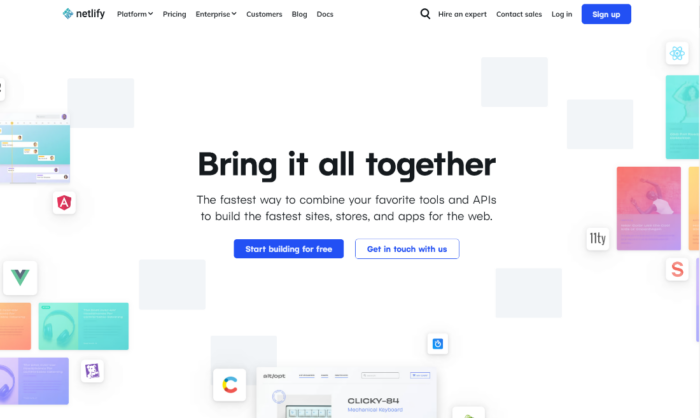
A screenshot of Netlify's homepage as an example of increased domain authority.

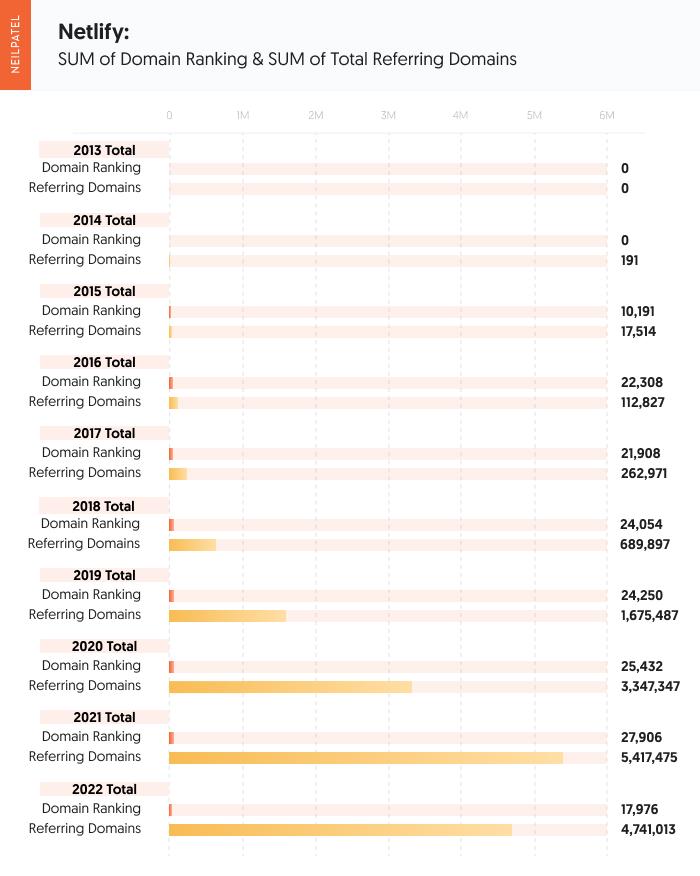
According to tools like Ahrefs, Netlify didn’t start seeing a jump in domain ratings until March of 2015 where they hit 25 with a total of 34 referring domains. Over the course of 2015, Netlify increased their domain authority to an astounding 71 with 201 referring domains.

By 2017, they started with a domain score of 70 with 443 referring domains and ended 2017 with a 78 and 1,531 total referring domains. So, here we saw it took them about a year to increase 8 points. They more than doubled the links going to the website, which shows by the massive gains in domain rating.

In 2018, they increased from 78 to 83 with 3,283 referring domains. Again, just a little more than doubled their link-building efforts.

In the beginning of 2020, they maintained their 83 and rose 3 positions to an 86 with 14,479 referring domains at the end of 2021.

To date, they now sit at 88 for their domain rating with 24,423 referring domains.

Their backlink profile consists of 90% being from sites with a 0-10 URL distribution. With a high domain authority at 88, many sites in that range will want to link to them, but it makes up the majority of their backlink profile.

Only 4% of their URL distribution comes from sites with a domain authority of 50 or higher. A variety of URLs with the majority being .com. 88% of their links are do-follow which helps pass on link equity.

One thing to note – the scores of your referring domains, while they are important, are not the end all be all. Focus on quality rather than quantity.

A graphic showcasing year over year increased domain authority for Netlify.

Digital Ocean: The Referring Domain Leader

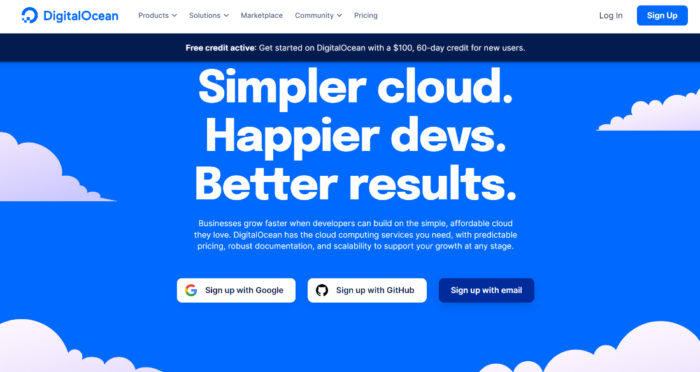
A screenshot of DigitalOcean's homepage.

From our data pull using Ahrefs, Digital Ocean didn’t see a domain rating score until March 31, 2015 when they reached 12,644 referring domains. Digital Ocean’s starting score was 87 and crept up to 89 at the end of 2015 with 17,878 referring domains.

At the beginning of 2016, and at 18,884 referring domains, Digital Ocean was at 89 for its domain rating. Their domain rating was constant through year-end in 2019.

Digital Ocean was still at 89 in 2017 and gained 25.6K referring domains. It isn’t until halfway through 2018 that we see Digital Ocean gain 1 point and hit the 90 mark with 31,690 referring domains.

Digital Ocean stays at a 90 for all of 2019 and most of 2020. In Sept. 2020, they hit 91 with 57,973 referring domains. Almost doubling their referring domains they had when they hit 90 for domain rating, they closed out 2021 with a 91 and 59.5K referring domains.

At the start of 2020, Digital Ocean dropped down to 90 and dropped to 58.8K for referring domains. This indicates that either Digital Ocean was removed from many pages they were linked on or a site they were linked to is no longer active.

They go back and forth from 91 to 90 and back to 91 a few times over the course of 2021 and end 2021 with 72,344 referring domains.

To date, Digital Ocean has maintained its 91 domain rating with an impressive 86,822 referring domains.

Their backlink profile consists of 71% being from sites with a 0-10. With a high domain authority at 91, many sites in that range will want to link to them but it makes up the majority of their backlink profile. Only 4% of their URL distribution comes from sites with a domain authority of 50 or higher. A variety of URLs with the majority being .com. 73% of their links are do-follow which helps pass on link equity.

A table showing increased domain authority from Digital Ocean.

Linode: Evidence On Site Authority

A screenshot of Linode's webpage.

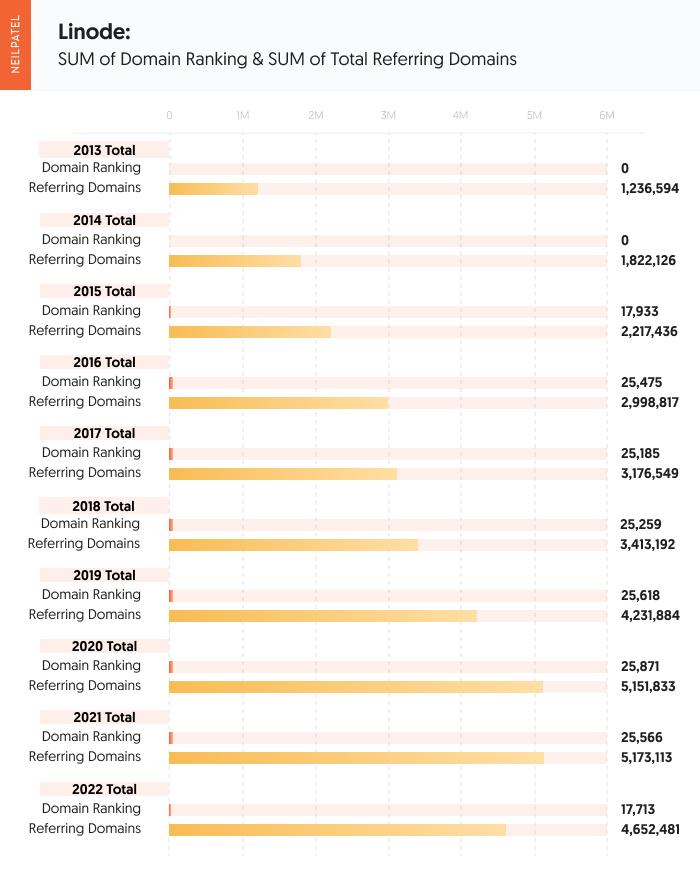
You see a very similar story here with Linode here as well. They did not start having a domain rating of 85 until March 31, 2015, with 6,824 referring domains. Linode ended 2015 with 9,031 referring domains and a domain rating of 85.

Linode started 2016 still at 85. 2016 came to an end, and Linode dropped down to 84 and racked in 9,967 referring domains.

2018 comes and goes and Linode finally hits 85 again late in the year with 11,572 referring domains.

2019 starts at an 85 for domain rating and drops down to 10,915 referring domains. Linode drops to an 84 shortly after and is working to build their referring domains back up. They hit 11,469 referring domains and finally hit an 85 again in early 2019. Their plateau is broken in mid-2019 and they hit an 86 for their domain rating and achieve 14,546 referring domains. By the time 2019 closes out, they land at 86 and 15,957 referring domains.

2020 was fairly constant but Linode sees some changes the following year. 2021 they start off at 86 and slips down to 85 with a year-end of 19,882 referring domains. 2022 starts off by reclaiming 86 for a domain rating and 20,462 referring domains. 2022 to date still stands at 86 and 23,666 referring domains.

Their backlink profile consists of 92% being from sites with a 0 – 10. With a high domain authority at 86, many sites in that range will want to link to them but it makes up the majority of their backlink profile. Only 3% of their URL distribution comes from sites with a domain authority of 50 or higher. A variety of URLs with the majority being .com. 77% of their links are do-follow which helps pass on domain authority.

A table showing increased domain authority from Linode.

What Lessons Did We Learn from Data About How to Increase Domain Authority?

Based on the data from these three websites, it takes about 23,000 – 25,000 referring domains to be in the mid to high 80 scores for domain rating.

The amount of referring domains does seem to correlate with the higher domain rating score.

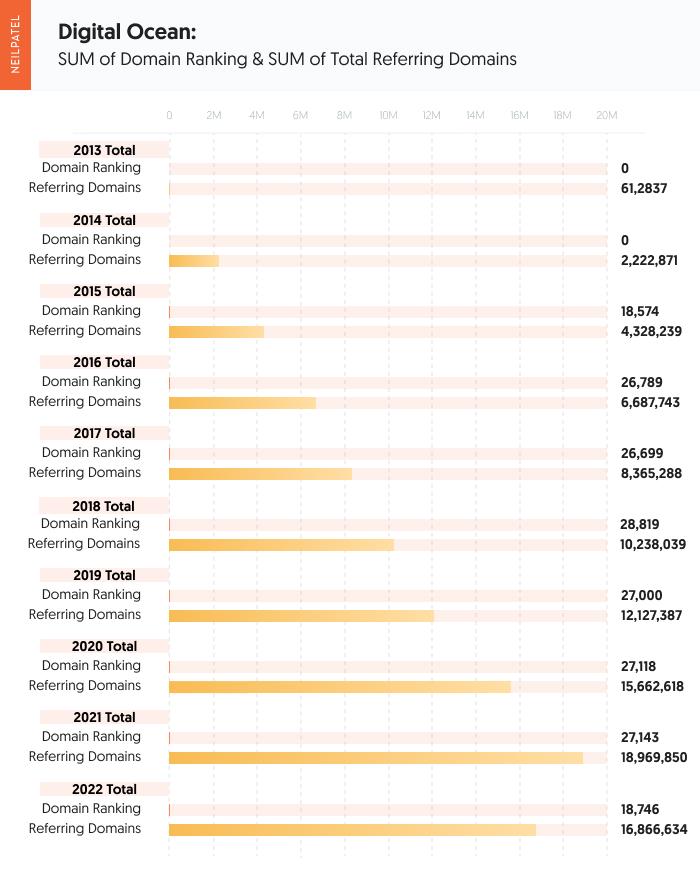
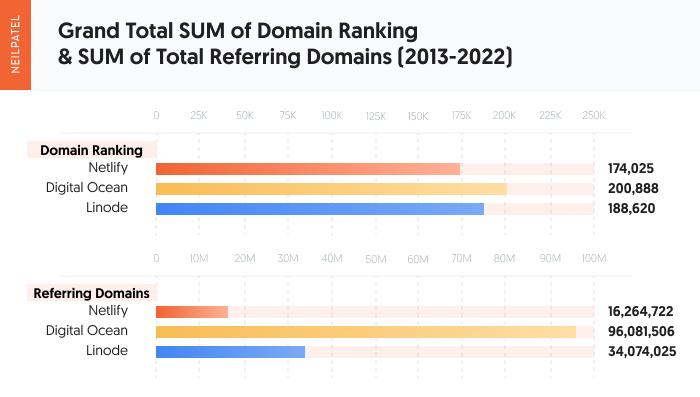
Digital Ocean has more than triple the amount of referring domains than its competitors. They’ve maintained a 91 as their domain rating score with an impressive 86,822 referring domains. Compared to Digital Ocean, Netlify stands at a score of 88 for their domain rating with 24,423 referring domains and Linode at an 86 with 23,666 referring domains.

Of the three, Linode had a much harder time building and maintaining its domain rating score.

They lost referring domains more frequently and did not have the same percentage of referring domains that had a domain rating score of 50 or higher – meaning average or good. While Netlify and Digital Ocean had 4% of their URL distribution come from sites with a domain authority of 50 or higher, Linode had 3%.

However, the small difference between Netlify, with 24,423 referring domains and Linode’s 23,666 referring domains, with a 2-point difference can be attributed to Netlify having a higher percentage of referring domains with a domain rating of 50 or higher.

What does this mean?

Having more quality sites passing off their authority to Netlify is what has boosted their domain rating score.

In regards to how much time it takes to grow your domain rating, using Netlify as our example, it takes about 34 referring domains to hit a score of 25. It took Netlify 1 year to grow from a 25 to a 71 with 304 referring domains. Still, for Digital Ocean, it took them one year to grow from an 87 to an 89.

This indicates that the closer you get to a domain rating of 100, the harder and longer it takes to grow your authority.

It is easy to go from 0 –10, but once a site hits the higher domain rating scores, it is harder to improve it year over year.

So, aside from what to do and do well, how can you speed things up?

A chart showing the grand total sum of domain ranking and sum of total referring domains between Netlify, Digital Ocean, and Linode.

Can You Do Anything to Speed Up the Process?

To increase domain authority means being patient through the process.

But there are a few tips that can help get you to your goal faster.

Try starting with a link audit. This process is how you’ll be able to tell which links pointing to your site are legit and not using weak, black-hat SEO techniques.

There are more items to do after that, though. What if I told you there was a tool that let you learn more about your domain score, where the number of backlinks stand currently, and referring domains?

Try out Ubersuggest.

All backlinks are not created equal, but they all have an impact on SEO results because they are links from other websites to yours.

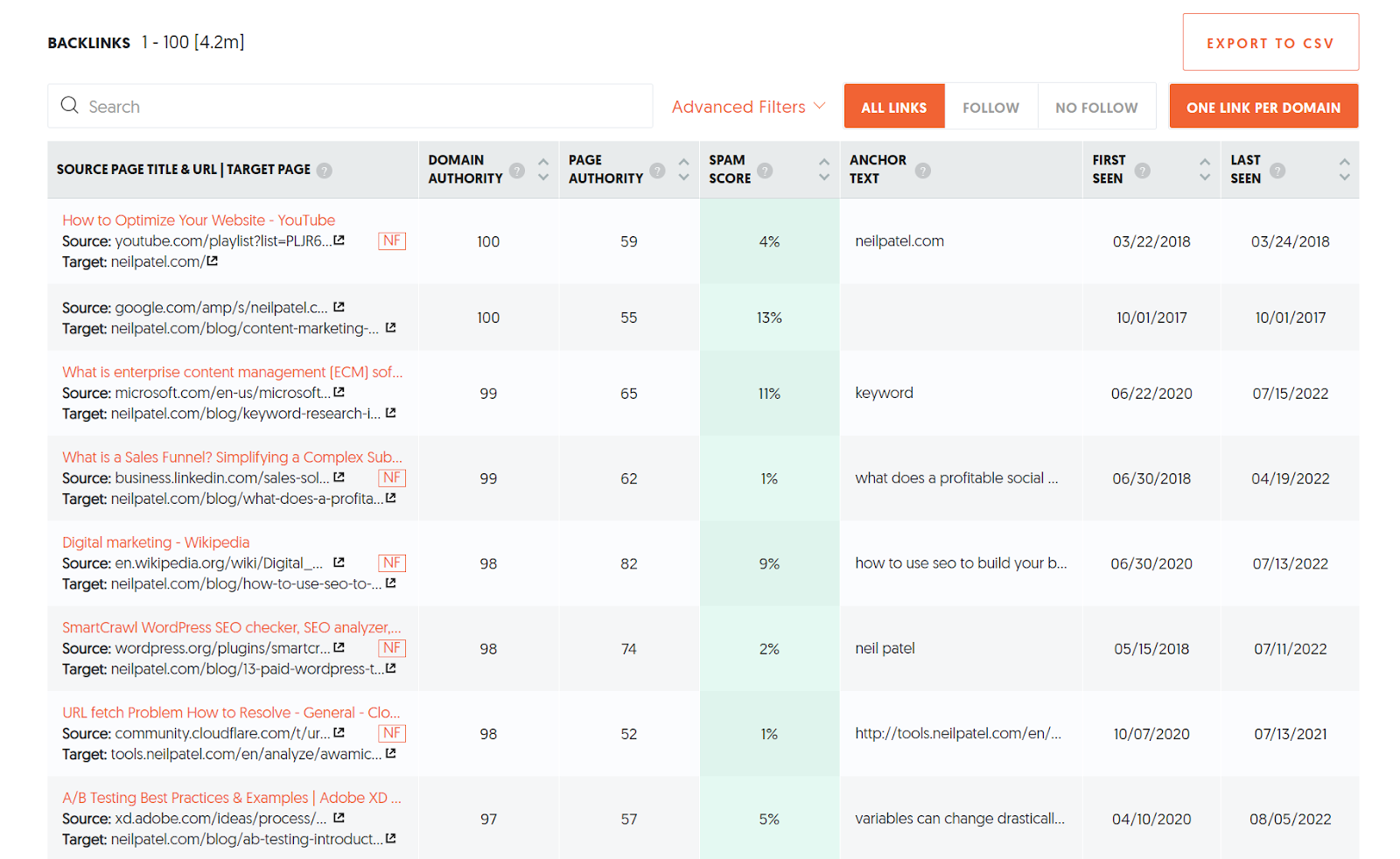
To speed up the process, collect links of high quality. To get started, use the Backlinks feature within Ubersuggest for a free analysis. You will see how backlinks play a role and which websites are linked to your competitors, among other options to speed up an increase in domain authority.

A screenshot of the backlinks feature on Ubbersuggest.

Looking at my site, you can analyze the page authority and domain authority from the source. By taking a look at this information, I can make pivots or double-check anything alarming reports if I see fit.

You can do the same with this tool and see how authoritative your links are.

Common Myths About Domain Authority

Everything about domain authority isn’t always black and white.

However, we can separate some domain authority myths from the facts.

Myth 1: Backlinks really don’t matter that much

This is an interesting one because more links = more traffic leading to better rankings.

Though you will notice even if you have a few quality backlinks, this is better than multiple ineffective ones.

It makes it worth your time when the links are relevant to your niche and known as trusted sources by searchers online.

Myth 2: If a site has a lower domain authority than yours, never get links from them

Domain authority is about all metrics, so getting a link from a page with lower domain authority doesn’t penalize you.

This could be a new site you’re working with. Sites with few links or local links are just fine.

Just because their domain authority is low, don’t worry that they’re going to deliver little to no value or stunt your progress. If they are high-quality sites that also distribute links editorially and connect to other good websites, they are still useful.

Myth 3: Garnering links too quickly could be suspicious

Google zeroes in on spam or spammy-looking links. If they’re triggered by the activity on that page, they’ll take a closer look that could lead them to penalizing the site.

Black hat link building and link buying are among the things that trigger Google that something sketchy is going on.

There’s nothing wrong with speeding up the pace of how many links you gather. After all, it is your goal to increase domain authority, right?

Just make sure the links are coming from good, trusted sites. And never, ever bulk purchase links.

Conclusion

Going at it blind with no plan, trying to increase domain authority could seem challenging.

Though growing your domain authority is possible, it will take time – especially considering the tips you decide to use.

Your rating is affected by a variety of elements, and it may be difficult to evaluate them all.

However, once you understand domain authority, it’s worthwhile to monitor and optimize for it.

You might be able to get a tight grip on your total online presence and website health by including this in your SEO toolkit.

As I mentioned, all metrics count and contribute to your domain authority.

Check your follow or nonfollow links. Notice the audience search intent via keywords using Ubersuggest. Review and revise your content marketing strategy. All these aspects contribute to increasing your domain authority.

The quality of the content you have to share can mean more backlinks, and that material will help grow your domain authority.

It’s easier said than done, but I hope all these insights and data helps you reach your preferred domain authority rank.

If you’ve planned how to increase domain authority, have you been successful? Let us know your methods in the comments.


from Neil Patel's Digital Marketing Blog https://ift.tt/iA37deV
via IFTTT

Sunday, 9 October 2022

Signal is testing Instagram-like Stories feature

A phone is held out in front of a night time skyline. On the screen is the blue and white Signal icon.

Signal, the secure messaging app beloved by millions of privacy-conscious users, is beta-testing an Instagram-inspired Stories feature. Who said cybersecurity couldn't be fun?

In an Oct. 5 post to a Signal community board about new beta features, the app announced testers would soon have access to a new way of sharing photos, videos, and even texts. Just like Instagram, stories disappear after 24 hours and can be shared with all of your Signal connections, a custom list of friends, or any of your Signal groups. In its current iteration, users that turn off the story feature also lose the ability to watch other connections' temporary posts.

Stories, of course, are end-to-end encrypted just like any other message you send via Signal.

Signal's addition this week is yet another example of a kind of social media app homogenization taking place online, ushering in the demise of single-use, feature-specific social apps in favor of one-stop-shop networking platforms. Inspired by Snapchat's popularity in the fleeting, "impermanent" social posting game, Instagram has become synonymous with public and "close friend" 24-hour stories. Twitter and TikTok have since added their own versions of this in Twitter Circle and TikTok Stories. All the while, Instagram is slowly remaking itself in the image of rising apps like TikTok and BeReal, capitalizing on the rapidly evolving market of young users. With its growing user base, Signal is moving along in its footsteps.

The independently-run messaging app is still in the early phases of testing, but initial comments from beta testers seem positive toward the social media add-ons. The "Finsta" might truly be dead.


from Mashable https://ift.tt/3gAdnUY
via IFTTT