Wednesday, 19 October 2022

How to sell on Instagram: A guide for businesses (2023)

Selling on Instagram isn’t as simple as posting product photos and calling it a day. If you want to turn your fans and followers into actual customers, you’re going to need a strategy.

In this guide, we break down how to sell on Instagram, starting with the fundamentals and moving on to advanced Instagram selling strategies. You’ll learn how to use Reels, Stories and other Instagram features to capture the attention of Instagram users and drive sales of your products.

Why businesses should sell products on Instagram

Not convinced Instagram is where you need to be? These three compelling reasons should be motivation enough to start selling products on Instagram:

People are researching products on Instagram

Because Instagram is a visual medium, it’s no surprise that 70% of shoppers research products on the platform. Having a business profile is a good first step, but you’ll also want a store that people can visit to research your products.

Younger consumers expect you to be on Instagram

When it comes to marketing to Gen Z, these younger consumers rely on Instagram to discover and engage with brands. And your presence (or lack thereof) on Instagram can have a big influence on Gen Z buying behaviors.

Your competitors are selling on Instagram

With more than 200 million businesses on Instagram, it’s wise to assume your competitors are already selling products on the platform. So don’t delay in setting up your Instagram shop (which we’ll tell you how to do in the next section).

How to set up Instagram shopping

To start selling on Instagram, you’ll need to have an Instagram business profile. You can convert your personal Instagram account to an Instagram business account in just a few steps. Only then you can create your Instagram shop (we recommend taking a look at Instagram’s commerce policies first).

Next, head over to the Meta Commerce Manager to set up your Instagram shop. You can choose to create a shop for both Instagram and Facebook, or only one of those platforms.

Screenshot from Meta Commerce Manager showing three mobile screenshots of selling on Instagram.

What are the best practices for selling on Instagram?

There is no one-size-fits-all approach to selling your products on Instagram.

That said, some strategies make more sense than others depending on your target audience and what you’re selling.

Below we’ve highlighted best practices for selling on Instagram.

Sell yourself in your bio

Your Instagram bio is valuable real estate, especially if you’re interested in sales.

After all, your bio link represents the sole avenue from your follower to your storefront if you’re not connected to Instagram Shopping.

Make sure that your bio includes a combination of the following:

  • A call-to-action directing followers to your shop
  • A mention of your branded hashtags to encourage user-generated content
  • A trackable link (think: SproutLink or a shoppable Instagram tool) to monitor traffic to your storefront

Post regularly

Instagram is a crowded medium, and if you want people to notice your brand, you need to post regularly. How often is “regularly”? According to Sprout Social Index™ data, the average number of posts on Instagram is 1-2 times a day. If you also share two Instagram Stories per day, you’re likely to improve your engagement.

Post more than just products

This might seem counterintuitive, but hear us out: One of the most effective strategies for selling on Instagram is to not focus on selling. Not all the time, anyway.

If you’re an up-and-coming brand or you’re trying to grow your audience, some non-sales-related content is a great way to warm up potential customers. After all, today’s shoppers expect brands to show off their personalities in various ways.

For example, Suavecito Pomade regularly publishes photos of its products but also sprinkles lighthearted content like memes and dog photos throughout its feed.

These types of posts score tons of engagement and can be a gateway for new followers to discover your brand. As noted in our guide to social media for retail, it’s crucial for brands to create content for every step of the customer journey. That includes folks who are warming up to you or might not even know you yet.

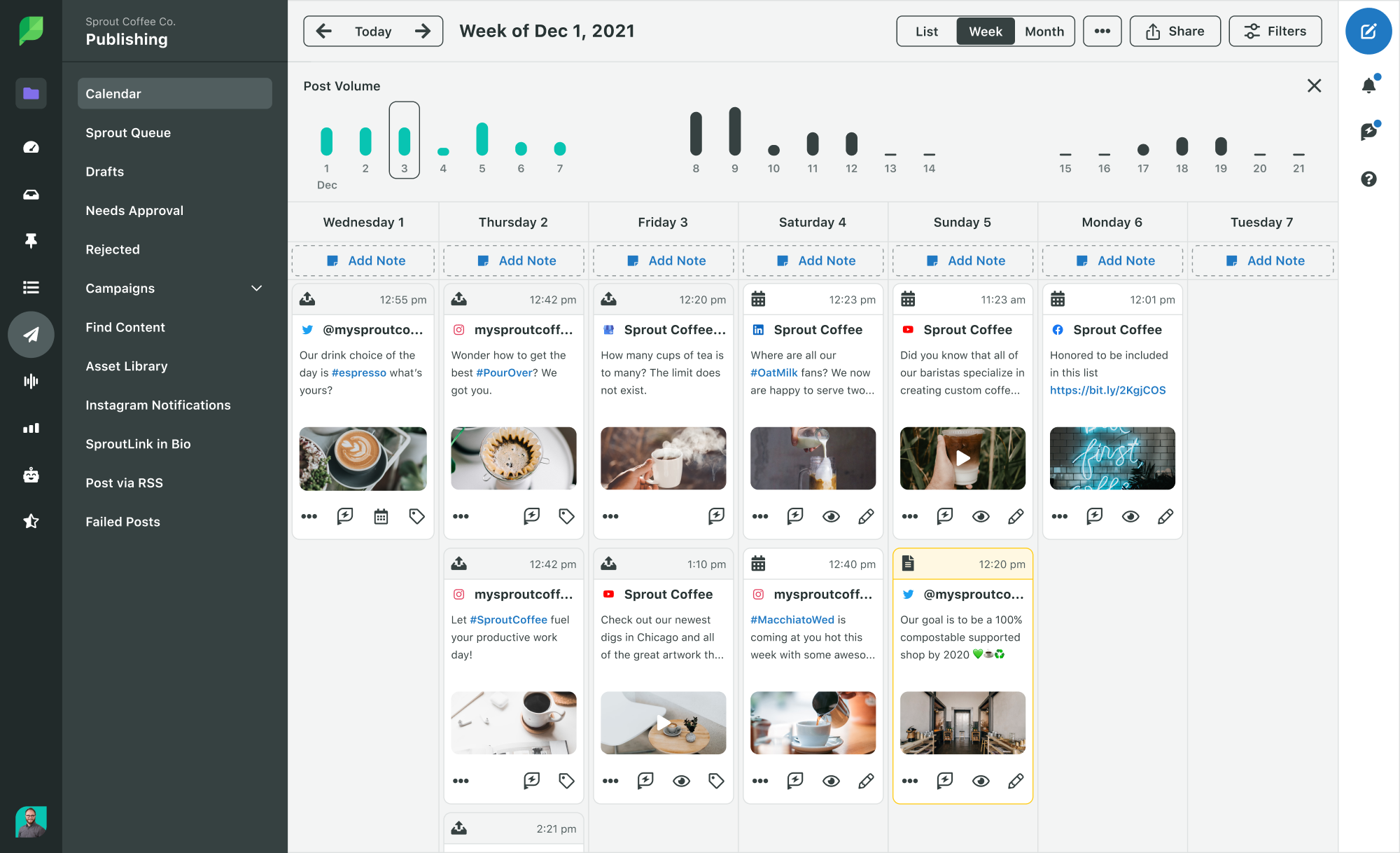
As a side note, this illustrates the importance of creating a social media content calendar. With the help of social media management tools like Sprout Social, you can find a balance between promotional and non-promotional content. Doing so ensures that your followers are consistently engaging with your marketing messages.
These types of posts score tons of engagement and can be a gateway for new followers to discover your brand. In our social media for retail guide, we saw that it’s crucial for brands to create content for every step of the customer journey. That includes folks who are warming up to you or might not even know you yet.

As a side note, this illustrates the importance of creating a social media content calendar. With the help of social media management tools like Sprout Social, you can find a balance between promotional and non-promotional content. Doing so ensures that your followers are consistently engaging with your marketing messages.

Screenshot of the Sprout Publishing Calendar in a weekly view, showing posts across multiple platforms and profiles.

Publish people-centric product photos

Research shows that of four types of brand images (customer-centric, employee-centric, product-centric and symbolic visuals), Instagram users spend the most time engaging with customer-centric images.

Instagram users want to see how people are using products in a real-world setting. For example, Camelbak shows off their products in the great outdoors rather than in a photo studio or on a kitchen counter.

Frequently featuring photos of people, specifically user-generated content, creates a snowball effect. That is, customers will want to take their own snapshots with your product so you’ll feature them on your feed, too. This results in more engagement and reach, creating even more opportunities to win customers.

Make your product photos pop

We’ve said it before and we’ll say it again: Creativity counts on Instagram—especially if you’re trying to sell products.

Remember that you’re fighting for your customers’ attention, and they’re more than likely following competing brands on Instagram.

Here’s an awesome example from IL MAKIAGE. Although the brand has plenty of customer photos to choose from, they keep their content strategy fresh with eye-popping product shots, as well.

You don’t need to be a master photographer to create engaging images. Just review how to capture and format Instagram photos and explore creative filters and apps that can give your snapshots some pizazz.

Use video to showcase your products in action

Depending on the types of products you’re selling, you might want to post more videos than static images. For example, if you’re selling performance bicycles or high-end watches, customers probably want to see those items in action.

Craft compelling captions

Want to avoid bombarding your followers with sales offers? There are plenty of ways to write Instagram captions without coming across as too promotional.

For example, consider how you can show off your products while asking your followers a question. Here’s a great example from Paper Mate.

Meanwhile, check out how JOAH manages to put their products front-and-center by asking for a comment.

See how that works?

There’s some debate about whether salesy captions restrict your reach as part of the Instagram algorithm. To be safe, experiment with different call-to-action phrases.

How to start selling on Instagram

You’ve set up your shop, created engaging images and fine-tuned your CTAs. Now it’s time to start selling!

Enable checkout on Instagram

You can use Instagram to drive people to your website’s online store, but some users may expect to shop entirely within the Instagram app. You can deliver on that expectation by using checkout on Instagram.

Available for eligible US businesses, checkout on Instagram makes it easy for users to quickly complete a purchase and track order updates within the app. And once they’ve made a purchase, Instagram stores their information for an even faster checkout experience with subsequent purchases.

Three screenshots of what shopping for a product from Colourpop Cosmetics on Instagram page looks like.

Publish shoppable posts

If you’re a seller based in an eligible country with a product catalog and Instagram shop, you can create Instagram shoppable posts. All you need to do is tag products in your image or video, then share the post. Users can click on the tags to view information about each product.

If you’re running a promotion for one of the products in your image or video, Instagram will tag it automatically, and the CTA bar will be “View Offer” or “View Sale.”

You can also tag your products if you use a social media management tool such as Sprout. Once you compose your post and add an image, select Tag Image followed by the Product Tagging tab. You can search for your product by SKU or name.
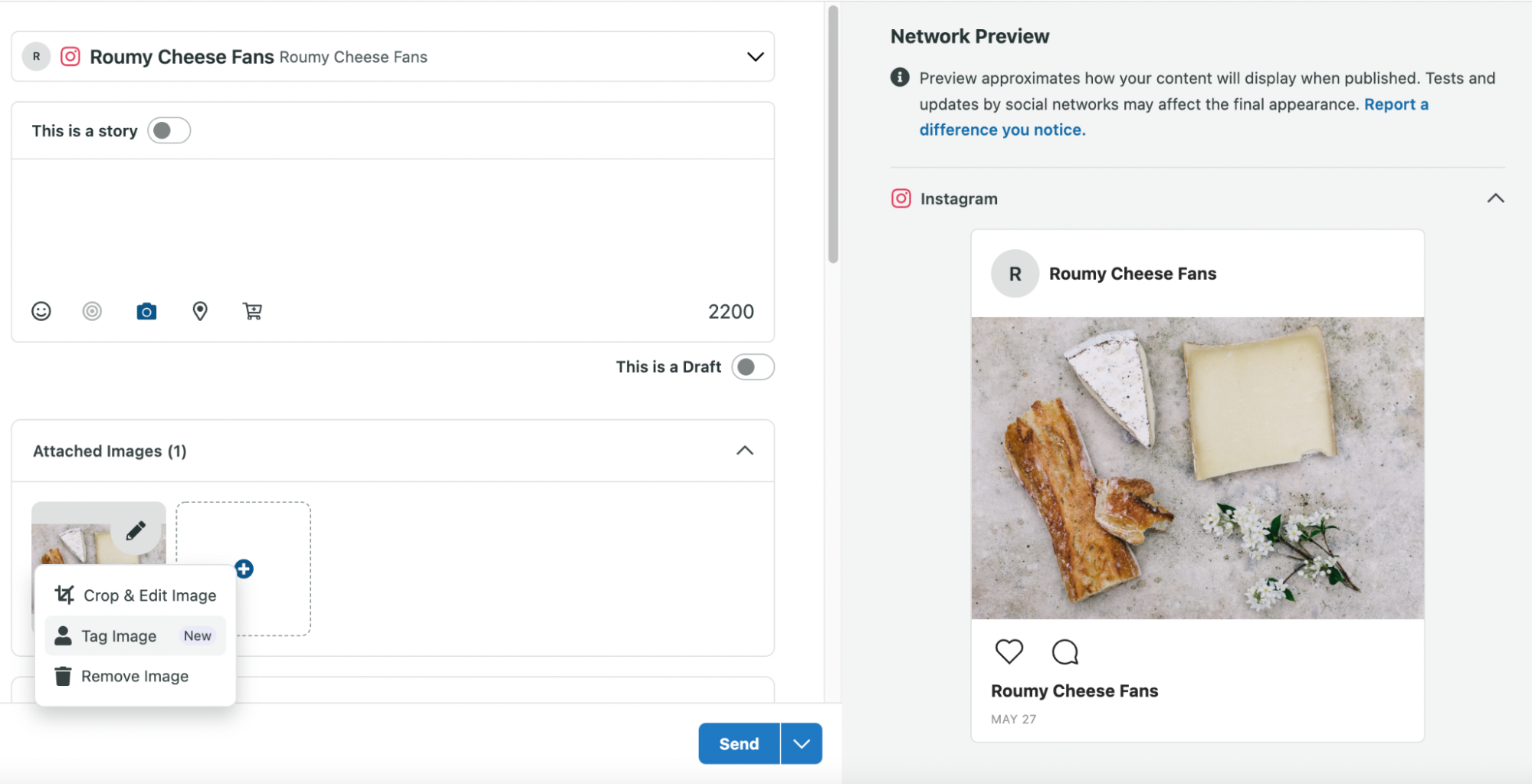
Screenshot of tagging Instagram products through Sprout Social.

Use stickers in Instagram Stories

While you can’t add product tags to Stories, you can add a sticker with a clickable Instagram shopping link that takes users to a product page or other content on your site.

Set up product collections

If you’d like to group similar products, you can create collections. Go to Commerce Manager, then:

  1. Choose your shop and click Edit.
  2. Click +Add New, then Collection.
  3. Choose Create new collection.
  4. Click Confirm.
  5. Add these details to the Featured Collection section:
    • Images — Add at least one product image (4:3 ratio, with minimum dimensions of 800 x 600 pixels).
    • Title — Choose a name for your collection (30 characters max).
    • Text — Add a title and subtitle (30 characters max)(this step is optional).
  6. Click Publish.

If you have a checkout-enabled Instagram store, you can then add your collection to your Instagram profile shop:

  1. From your Instagram profile, click Edit Shop.
  2. Tap Collections, then Add.
  3. Choose the collections you want to display on your profile, then click Done.

Users won’t be able to see the collection until Instagram reviews your shop and collection (usually within 24 hours).

Engage with Live Shopping streams

If you have a US-based business with Instagram checkout, and your products have been in your catalog for at least three days, you can use Instagram Live Shopping to sell products in real time and interact with customers.

Here’s how to set up a Live Shopping post:

  1. Open Instagram and click Your Story on the top left.
  2. Scroll right and tap LIVE.
  3. Tap the shopping bag icon, then click Add next to the products or collections you want to add.
  4. Tap LIVE again when you’re ready to launch your Live Shopping broadcast.
  5. During your broadcast, you can tap the shopping bag icon, then Pin to highlight a product.
  6. When your broadcast ends, click Download so that users can still make purchases through that post.

Showcase products with Reels

You can create dynamic product videos with Reels. Just shoot your video, upload it to Instagram and tag any products you want to add. Then create a cover photo and a call to action.

Promote with Instagram ads

Many brands have found success selling through Instagram ads.

Taking advantage of creative ad types such as Stories and carousels, ads offer tons of flexibility and targeting options to reach customers shopping on Instagram. Plus, you can add an eye-catching CTA that changes from white to a color as users scroll through their feed.

Screenshot of a sponsored Instagram posts from Vicks with a "Shop Now" banner below the image that matches the brand color palette.

In the Vicks example above, the CTA banner coordinates with colors in your ad.

Boost conversions with user-generated content

Many brands are making user-generated content a cornerstone of their Instagram social selling strategies.

Customer photos go hand-in-hand with high engagement rates and let your customers serve as your brand ambassadors. Given how eager consumers are to share product photos, scoring user-generated content is often just a matter of asking.

For example, Grove Collaborative encourages fans and followers to share how they use Grove products on Instagram through their branded hashtags.

Screenshot of Grove Collaborative's Instagram bio that includes a branded hashtag #GroveHome.

Grove Collaborative regularly uses customer photos to highlight their latest products with a sense of authenticity—and to show their appreciation for their customers.

User-generated content shows your customers what your products look like in action. This also gives you a break from traditional planned posts and lets you show your products from different angles, so to speak.

Use influencers to amplify your posts

Influencer marketing has exploded as a way for brands to get their products in front of their target audience through a more compelling and relatable manner.

The concept is simple: Partner with someone who has a highly engaged audience to raise awareness for your brand and potentially discover new customers.

Influencer promotions are effective because they don’t feel as “salesy.” Also, some influencers might have more followers than you do.

Forming relationships with relevant influencers is a cost-effective way to get your Instagram social selling promotions in front of people who could become customers.

Promote upcoming product launches with Instagram Drops

US-based businesses with checkout on Instagram can use Instagram Drops (formerly “product launches”) to promote new products.

Two mobile screenshots of Instagram: the one of the right shows a green arrow pointing to the Shop tab and the screenshot on the left shows cover images for different Instagram drops launching soon.

Instagram users can click the Shop tab to search for view featured drops.

Create Instagram product Guides

You can use Instagram Guides to provide an in-depth look at your products and share them in Stories, in direct messages and in your shop.
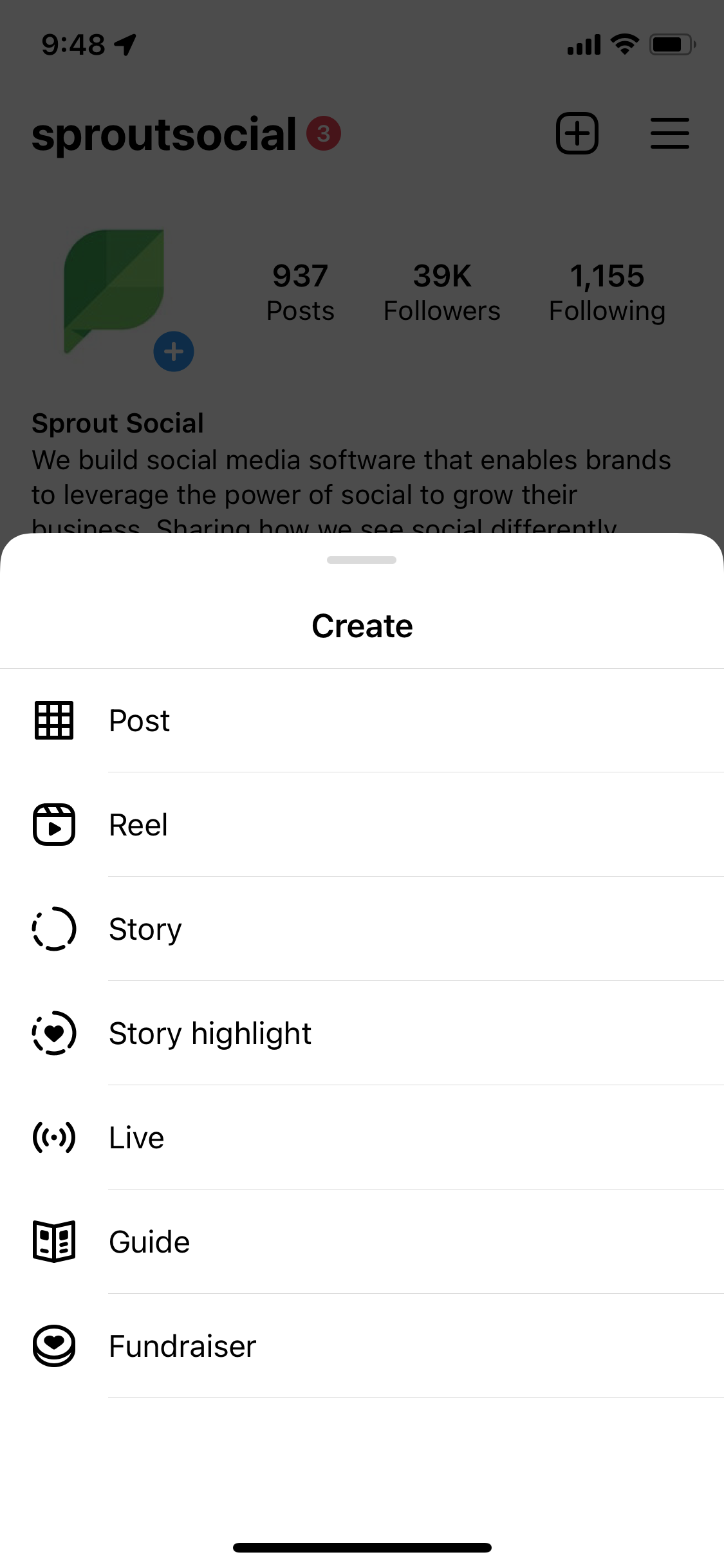
Select the + on your Instagram profile and select Guide.

To get started, click the + at the top of your profile and follow the prompts.

Provide support and sell through Instagram Direct

Eligible business accounts can sell products through Instagram Direct. Access your Instagram professional dashboard via mobile only and tap Get paid in chat. Then, when you’re chatting with a customer who wants to buy your product, you can click Request Payment.

You’ll need to enter your bank account information and other details when you accept your first Instagram Direct payment, and the platform will save it for future transactions.

Two side-by-side mobile screenshots of what it would be like to sell through Instagram Direct messaging.
Source

Monitor your sales performance via Instagram analytics

Lastly, don’t forget about your data.

So much of selling on Instagram revolves around your analytics.

For example, which product photos score the most engagement? How do your Instagram shopping posts perform versus non-promotional ones? How much of a direct ROI are you seeing from Instagram?

Sprout’s Instagram analytics can answer those questions and then some. Our comprehensive reporting makes it a cinch to track paid and organic campaigns all in one place, including those happening beyond Instagram.

Screenshot of the Sprout Social Analytics Cross Channel Group Report.

What are you selling on Instagram?

Hopefully, this guide provided some much-needed motivation and inspiration to score sales on Instagram. As long as you stick to Instagram’s best practices and keep a close eye on your analytics, you’re on the right track.

Learn how Sprout can help you take your Instagram selling strategy to the next level with a free 30-day trial today.

The post How to sell on Instagram: A guide for businesses (2023) appeared first on Sprout Social.


from Sprout Social https://ift.tt/mQ0kRqx
via IFTTT

How to find & vet content creators for your next campaign

If one thing remains true, it’s that there will always be a need for content. Think of content as the connection point between brands and consumers. Whether it’s an email newsletter, a video on TikTok, the words on a billboard or a photo on social media, it’s what drives customers to either make a decision about your brand or, at the very least, makes your brand memorable. As companies grow their brands, the need to communicate with consumers and attract new customers puts the demand for content at an all-time high.

Often, marketing teams focus on building content in-house with teams that typically include strategists and several creatives like writers, designers or video editors. These people know every page of the brand book; therefore, they know what kind of content will support a brand’s story and appeal to its audience. However, there is only so much content a team can create, no matter how nimble or well-staffed, which leads brands to outsource some of their content needs to creators.

Why brands should partner with creators

Content creators are definitely having a moment right now. They’re everywhere. In fact, over 50 million people identify as content creators, which means the creator economy is booming. What makes them such a hot commodity is not only their ability to deliver simplistic content that resonates with brands’ audiences, but also their ability to sell and amplify the narrative of those brands.

The thing is—consumers trust content from creators because it feels authentic. Creators develop content based on their own experiences and infuse their personal stories or vision into what they create. That’s what separates creator content from content built in-house.

When brands are ready to hire creators, they first need to figure out how to find them and then vet them to ensure alignment. These initial touch points will ensure the content they create integrates seamlessly into your brand strategy and has longevity.

How to find content creators

Content creators are not hard to find but before you start your search, think about your goals and what you want to accomplish.

Sometimes brands partner with creators for specific campaigns or launches. Other times, brands hire creators on a retainer to work on ad-hoc content assets for various channels like social media or email.

For example, in my previous work as a social strategist, I developed a list of creators and influencers to reach out to for product launches. While we did our own product shoots in-house, we also wanted more UGC-style photos and video clips to incorporate into our social media feed and email content post-launch. This allowed us to push messaging around our product in new and creative ways without putting too much pressure on our internal resources. When we were ready to find creators, I found that looking to our community and third-party platforms was the most helpful.

Look within your community

Your community is comprised of your customers, superfans and partners. Oftentimes, because they’re your biggest brand advocates, they’re already creating content around your products and services. Don’t hesitate to reach out to the people in your community and ask them if you can share their content. Often, because they are your fans, they’ll be more than willing to do it for free or in exchange for products. However, you can drive brand loyalty even further if you pay them for it and allow them to be a part of future launches or campaigns.

Ask your followers

There is no one more tapped into what’s going on in the creator economy than your followers. They are the ones also following the creators and influencers they love. Try posting a question sticker on your Instagram story so that your followers can make recommendations. Alternatively, you can make a feed post and ask them to tag their favorite creators and influencers in the comments. All you have to do is put out the ask, and the creators will come.

Use creator platforms

Platforms like Minisocial and #Paid connect brands directly to creators and influencers, allowing you to spend less time searching for them and more time focused on your content strategy. You’ll just need to provide a creative brief and establish your creator demographic, and the platforms will do the outreach for you. Of course this route comes with a fee, but depending on your budget and how much time you have to do creator outreach, this may be the better option.

How to vet content creators

Many brands have challenges finding the right creators to partner with. Yes, if you want to hire or collaborate with creators, they may need to fall within your target demo. Maybe you want them to live in the cities where your retail locations are, or maybe you want them to have a large social media following. While those things are important, you should be taking it a step further. The creators you partner with should have values that align with your brand’s.

Look at their previous partnerships

The work creators have done with other brands and their partners reflect their interests, style and overall beliefs. Granted, while creators’ interests change over time, you can use this content as a reference for defining how to go about your own partnership with them. For example, suppose you’re an alcohol brand and see that a creator you’re considering partnering with has previously worked with an alcohol-alternative brand. In that case, you may want to reach out first thing and see if they would be the right fit for your campaign or strategy.

Set up some time to chat

Looking at social media presence or an online portfolio is a great way to get a sense of what creators have worked on. However, it’s not always telling of who they are as people. Setting up a video chat to introduce yourself to the creator and/or talk through a creative brief will help build a human connection to your brand and better understand their strengths, passions and interests in content development.

“What inspires you?”, “what kind of content do you like to create?” or “what’s your favorite piece of content you have created?”—these kinds of questions give you insight into who the creators are and what moves them.

Look to their community

If the creators you want to partner with have an engaged community, you can get a sense of who they are. Check out the comments on the creator’s posts to see how they interact with their community and how their community feels about them. It’s hard to fake good vibes, and that’s the kind of energy you want to bring into a partnership with creators.

Building your content strategy

Once you’ve found and vetted the creators you want to partner with, you will want to figure out how to kick off the content development process. Fortunately, I’ve written another article about how to incorporate creators into your content strategy. In this piece, I share the importance of partnering with micro-creators and influencers and provide four tips on folding creators into your brand’s overall content strategy.

As you continue to build and refine your content strategy, remember to keep it flexible. Things change—especially marketing objectives—so you should always consider how your strategy can adapt to your brand’s needs no matter where you are in your marketing plan. The great thing about content creators is that there are so many out there to choose from, and they’re also evolving just as brands and consumers are. It’s up to you to tap in and get to creating!

The post How to find & vet content creators for your next campaign appeared first on Sprout Social.


from Sprout Social https://ift.tt/zMa7Efb
via IFTTT

Twitter for customer service: 7 pro tips and examples

Twitter gives consumers direct access to the brands they love. A simple mention or DM can turn into a delight-worthy conversation that creates a loyal customer. However, that’s not a given. It all comes down to how you’re using Twitter for customer service.

Support requests vary, so there’s no standard reply formula that can guarantee Twitter customer service success. Instead, brands should build out customer service playbooks to pull from when handling support requests on the network.

To help you create yours, we rounded up seven examples showcasing how top brands use Twitter to deliver stellar support to their customers. Use these as inspiration to guide your support strategy on the network.

Why use Twitter for customer service?

Twitter is an ideal platform for customers to turn to when they need assistance. It’s fast-paced, public and geared toward conversation. It’s where people go to make their voices heard.

That doesn’t mean your support strategy should be limited to responding to issues from upset customers and solving individual support requests. Messages that answer questions or simplify the buying process count as customer service Tweets, too.

When we teamed up with Twitter to uncover data-driven insights on how consumers are connecting with brands on the network, we found that:

  • 74% of consumers following brands on social media reach out on these platforms for customer service or support.
  • 1 in 3 (34%) surveyed Twitter users purchased a product or service after a positive customer experience on Twitter.
  • 53% of surveyed social media users report that they find it helpful to see how brands answer questions or solve issues publicly.

These stats prove that using Twitter for customer service can influence both brand perception and purchase behavior. Not bad for 280 characters or less.

7 tips and examples to improve Twitter for customer service

Let’s dive into seven Twitter customer service examples from top brands that will help you create a strategy that gets people talking—in a good way!

1. Respond to issues quickly

Brands across Twitter are prioritizing speed and consumers are getting used to prompt response times. According to our research, one in three (36%) users report receiving a response from a brand in less than an hour.

To keep your social media response time in line with consumer expectations, you need to have a plan in place to monitor brand mentions.

Here’s a stellar example of a prompt response from Petco. A customer reached out at 12:21 p.m. CT asking about a possibly discontinued dog toy. The Petco social customer care team swooped in less than fifteen minutes later with a potential solution.

While it won’t always be possible to be this quick with your responses at all hours of the day, it is a good rule of thumb to respond to all Tweets sent during business hours, within the hour, and respond to any Tweets sent afterward within 12 hours.

2. Know when to move conversations off-platform

You won’t be able to resolve every support issue in 280 characters. Use an escalation management strategy to determine which problems need more in-depth attention.

Knowing when to move conversations off the platform is particularly important when dealing with private information or when the conversation grows complex and time-consuming.

Here’s an example from Notion’s Twitter account as they help a customer dealing with an unstable app environment. After sending a few Tweets back and forth, they directed the user to a support email address for additional help. They also request a screenshot or recording so they can provide a better customer service experience.

A screenshot of a customer support exchange taking place between the Notion team and a user on Twitter. In the final message in the exchange, the Notion team invites the user to share a screen recording of the issue so they can provide better help.

It’s a good idea to compile a document with each of the items your Twitter support can handle, as well as where to lead customers if something needs more direct or in-depth attention.

You can also use Sprout Social’s Saved Replies feature to help guide your responses and the help you should be giving. Save text responses to your asset library to keep customer service Tweets at the ready. It’s a great way to store links to specific resources and stylistically consistent information like product names and details. Your team can then focus on building a personalized response to individual messages around this core information.

A screenshot of Sprout Social's Asset Library.

3. Showcase your brand’s personality when responding to complaints

When using Twitter for customer service, you still want to keep your brand voice and personality throughout your communication. Creating engaging replies using images/GIFs/emojis can be a great way to stay in touch with your roots.

Of course, whether this is appropriate may depend on your overall industry and the severity of specific complaints. Be sure to cover this item in your overall Twitter customer care strategy.

Take a look at this tweet from Discord, a brand that makes internet-speak a core part of its brand personality.

Their response to this complaint is less formal than most, staying true to their brand personality. Make sure your Twitter customer service responses are always genuine and match your brand.

4. Analyze Tweets and tag common issues to provide better service

Twitter customer service isn’t just about fielding complaints from customers: it can be a valuable source of business inspiration, too.

Take this interaction from Grammarly, for example. A customer with a unique use case for global settings reached out to see if they could accomplish their request using an existing feature. Grammarly’s response let them know that while it wasn’t currently possible, they had routed the feedback to their product team.

This is a great way to let a customer know you acknowledge their request, even if no immediate fix is available. It also supplies their product team with meaningful user feedback that they otherwise might have missed.

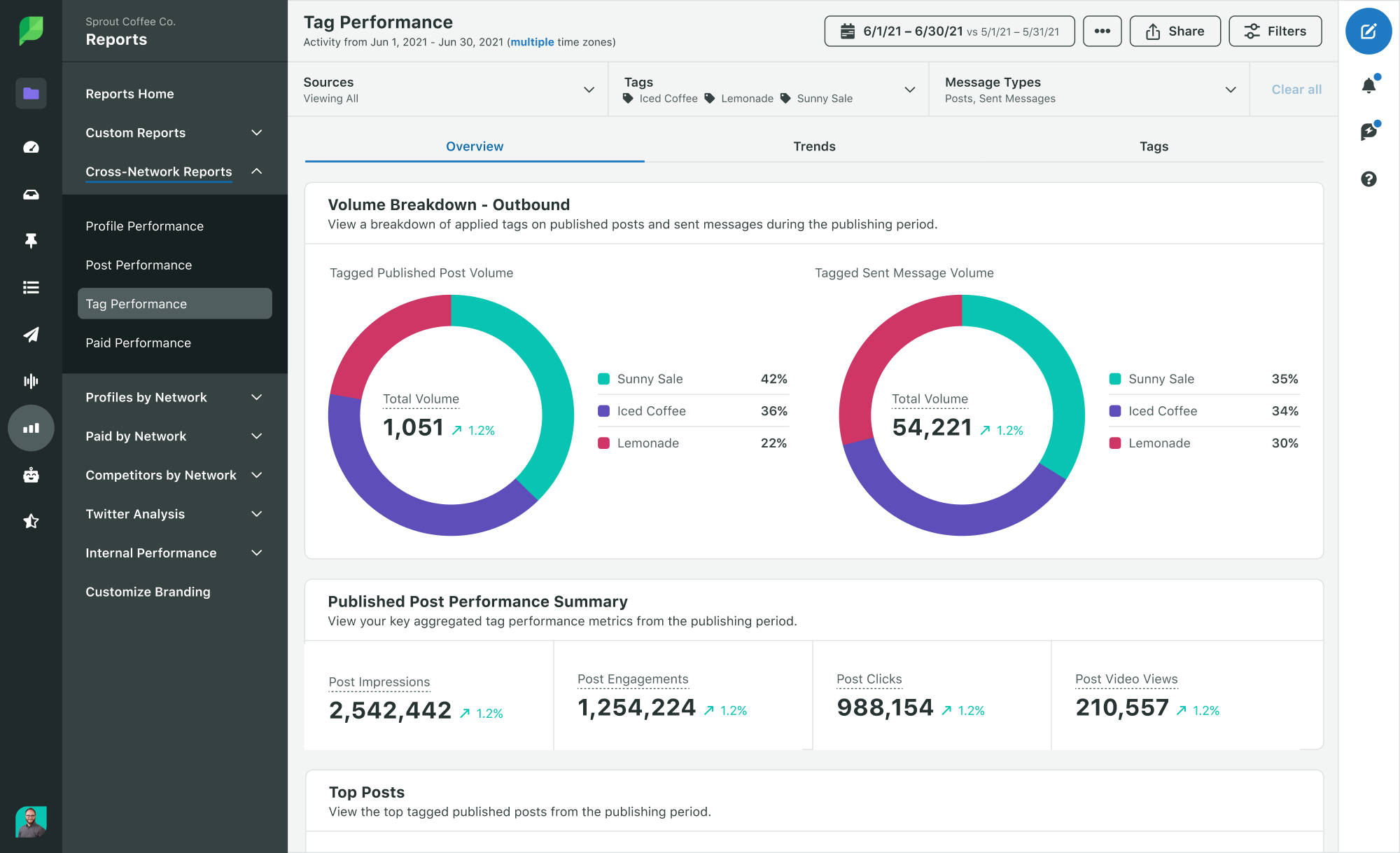
If you want to streamline the internal flow of information, try Sprout’s Tagging feature. With Tags, you can label and support incoming Twitter messages with custom categories, like “feature request” or “product complaint”. You can spot trending issues or business opportunities as messages come in using the Tag Report.

A screenshot of Sprout Social's Tag Performance Report.

5. Automate replies to common issues to save time

If a widespread issue is impacting multiple customers, chances are you’re going to hear about it from more than a few people on social. Addressing similar messages over and over again isn’t just time-consuming—it can also lead to inconsistent responses that cause even more questions than they solve.

Southern California Edison (SCE) is one of the largest utility companies in the U.S. They cover 180 incorporated cities across 15 counties. Even a short outage can drive a ton of questions on social.

SCE uses Sprout to manage the high volume of messages they receive every week. In a recent example of their automation strategy, they use Saved Replies to keep a customer updated on their request status during a point of high traffic.

Their team also uses Sprout’s Bot Builder to quickly respond to customers’ Twitter DMs during nights and weekends when staff isn’t immediately available. These practices keep response times low, without having to staff up for night and weekend support.

6. Leverage Twitter DMs

Just because your followers can’t see your DMs doesn’t mean they don’t matter. Two out of three (65%) surveyed Twitter users like when a brand takes a public Tweet and asks the customer to DM them to take it to a private space and discuss details.

A data callout that reads "65% of surveyed Twitter users like when brands use DMs to get more information on support requests".

Not only do Twitter Direct Messages keep conversations private—they also support longer messages. A Twitter DM can be up to 10,000 characters long, making it much easier to work out complex issues. What goes on in a brand’s DMs should stay between the brand and the customer, so we created a mockup to show you how we manage our Twitter DMs at Sprout:

A screenshot of Sprout Social's Twitter DM prompt.

When someone reaches out to us privately, we send out an automated message to gather some quick information about the request at hand. From there, we connect the customer with the right person for quick and easy resolution.

7. Humanize your support team

One final way to make your Twitter customer service stand out is by letting your audience know that real people are behind the handle.

You can approach this in different ways depending on how your overall brand voice is structured: you might refer to your team as ‘we,’ include initials or names as a sign-off to messages, and use conversational language when appropriate for each response.

Chipotle uses all three approaches. Their personalized responses use names, ‘us/we’ references and a conversational tone to remind customers they’re speaking to an actual person.

If you choose to go this route in your Twitter support strategy, don’t be afraid to use emotion (“we’re excited about this too”) or a more personal tone (“this isn’t what we like to see”). Don’t just rattle off a form reply and add on initials to offset a dry response.

Online customer service can be frustrating for customers who want to know they’re talking to an actual human being. Building in reminders that there’s a person behind the handle is a great way to reassure your audience.

It’s time to start using Twitter for customer service

Good customer service is the foundation of a positive brand reputation, so it’s time to ensure you’re being as helpful as possible. These seven Twitter customer service examples should have you well on your way to creating better customer experiences on the network.

Take advantage of Sprout Social’s customer service features to help keep track of all brand mentions and respond accordingly. Start a free trial to see how Sprout Social can empower you to overhaul your customer care strategy across platforms.

Start Your Free Trial

The post Twitter for customer service: 7 pro tips and examples appeared first on Sprout Social.


from Sprout Social https://ift.tt/axGDznR
via IFTTT

Instagram is reportedly testing adding songs to profiles. Is MySpace back?

A blurry photo of the Instagram logo on a phone screen.

The '00s are back, folks.

Instagram is reportedly working on a feature that allows users to add a song to their profiles.

Developer and notable leaker Alessandro Paluzzi tweeted screenshots of the feature, which he states Instagram is currently trialling. Mashable reached out to Instagram for comment but did not hear back immediately.

Per Paluzzi, the feature would appear in your Instagram profile at the very bottom of your bio, underneath the links section. The developer demonstrated how this would work by adding Rick Astley's "Never Gonna Give You Up" to his profile — which, let's face it, might indicate the likelihood of this feature actually being rolled out.

Does this feature sound familiar? Well, it's just like a MySpace feature from the mid '00s.

Back when the social network was at the height of its popularity between 2005 and 2008, users could add songs to their MySpace profile.

For anyone that was a teen or twenty-something in the '00s, you'll likely remember that this feature was...kind of a big deal. Having the ability to publicly express yourself through the medium of a song choice felt completely new-fangled at the time.

I was 17 in 2005 and the pressure to pick the perfect song prompted existential crises galore. The kinds of questions you'd ask yourself when picking a song would range from: Is this band too mainstream? Am I projecting the indie aesthetic through this song? Will my crush think I'm really cool if I put this song in my profile?

Of course, the ability to add songs to profiles didn't die a death when MySpace fell out of popularity. Exclusive dating app Raya lets its users add songs to their profile so that prospective matches can peruse a dater's pics while a song of their choice plays.

There's no certainty that Instagram will make this feature publicly available. It's being tested right now and it may never see the light of day. But, this nostalgic former teenager hopes it does.


from Mashable https://ift.tt/mbISg15
via IFTTT

What Are Soft 404s and How to Fix Them

Graphic that says, "What are soft 404s and how to fix them."

Have you ever landed on a webpage only to see a big error message serving as a dead end to your reading? As a user, you’re left with little direction and close the tab. As the website owner, that has bad news written all over it. While these pages serve a purpose, they can be harmful to your website if misused.

An example of a “page not found” error used in the wrong context is a soft 404 error. These can wreak havoc on your search engine rankings, website traffic, and even credibility.

Below, I’ll define what a soft 404 error is and cover the difference between regular (or hard) 404 errors. Then I’ll explain how to find these errors and resolve them.

What Are Soft 404 Errors?

Soft 404 errors are pages that return a “not found” error code (404), but the content on the page is not actually missing. The page may be empty, or it may contain partial content from other pages on the site. Soft 404s can be caused by misspellings in URLs, by outdated links, or by problems with the server.

When it’s a soft 404 error, the error is conveyed to website visitors but not to Google crawl bots. This means the pages continue to be crawled and indexed on Search Engine Results Pages (SERPs.)

A soft 404 is not an official status; rather, it is one Google creates to alert you. This means Google and other search engines continue to crawl these web pages until you take action.

What Is the Difference Between (Hard) 404 and Soft 404 Errors?

The difference between hard 404 errors and soft 404 errors is the status they display to search engines.

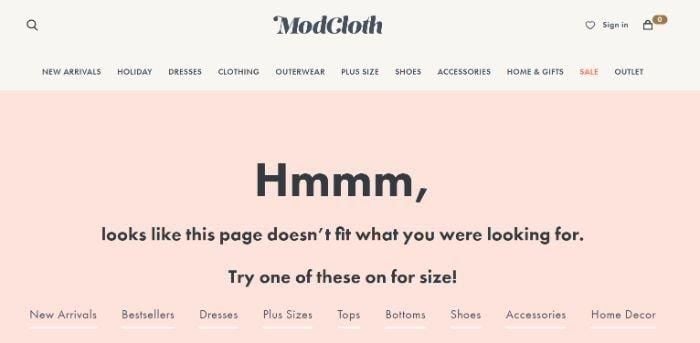
With a hard 404 error, the 404 error code is returned to both page visitors and search engines. This tells both that the page doesn’t exist. Here’s an example of a hard 404 error from the clothing site ModCloth:

Screenshot of Modcloth's 404 page for soft 404 errors.

With a soft 404 error, the 404 error code is displayed to visitors but not search engines.

Instead, they’ll see a 200 OK status which gives them the green light to crawl. So if you’re seeing soft 404 errors in your Google Search Console, it means that there are pages on your site that may be returning 404 errors even though they actually exist.

Can Soft 404 Errors Impact My Site Ranking?

The short answer is yes; soft 404 errors can impact your website’s ranking on SERPs. To understand why, you need to understand how Google crawls a website.

To prevent strain on a website’s server and reduce the workload for the crawl bots, Google uses something called a crawl budget to determine how much and how often to crawl a site. A crawl budget is the number of pages that Googlebot will crawl on your site during each visit. The crawl budget is composed of crawl rate and crawl demand.

According to Google, the definitions are as follows:

  • Crawl Rate is the number of requests per second Googlebot makes to your site when it is crawling it.
  • Crawl Demand is how much Google wants to crawl your site based on popularity, how long it’s been since it crawled, etc.

When you have a large number of soft 404 errors on your website, you’re using a considerable amount of your crawl budget. This means fewer of your existing pages are crawled, leading to fewer and poorer rankings in SERPs.

Think of it this way: If your site has 100 pages, but Google determines your crawl budget is 70, then Google will only crawl 70 percent of your pages. If 10 pages are soft 404 errors, there’s a risk that some or all of those pages will fall into the crawl budget of 70. Thus, you lose out on the search engines crawling valuable pages.

What Problems Can Soft 404s Cause?

Aside from lower rankings in SERPs, other problems are associated with soft 404 errors on your website.

For example, if Googlebot crawls a page with a soft 404 error and finds that the content on the page is not actually missing, it may assume that your site is serving up fake 404 errors. This could lead to your site being penalized by Google.

One of the biggest problems is a poor user experience. Since soft 404 URLs still appear in search results, users may be directed to non-existent pages.

If a user clicks on a link to a page that returns a soft 404 error, they may assume that the page doesn’t exist and leave your site. This can hurt your site’s bounce rate and cause users to spend less time on your site.

There can also be implications for the website’s performance and operations.

While 404 error pages don’t take up as much server space as pages with content, they do still take up bandwidth. If Google and other search engines direct traffic to a non-existent page, you’re still taking hits, which can slow website speed and performance.

How to Find (and Fix) Soft 404 Errors

Since soft 404 errors aren’t an official status, they aren’t as obvious to website owners.

This is where a tool like Google Search Console comes in. According to Google, Search Console “help[s] you measure your site’s Search traffic and performance, fix issues, and make your site shine in Google Search results.”

One issue Search Console can help you to resolve is soft 404 errors.

1. Find Soft 404 Errors in Google Search Console

To use Google Search Console, sign up for an account and connect your domain. It’s a simple process that takes only a few minutes to complete.

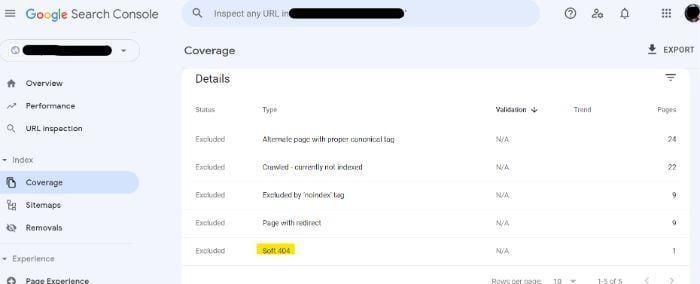
Once connected and Search Console has had time to collect information, you’ll find soft 404 errors in Google Search Console under Coverage:

A screenshot of how to find soft 404 errors in Google Search Console.

It can show in one of two ways: as an error or as excluded (as shown above).

The soft 404s that appear with an error status in Google Search Console are what you want to target first. Those with an excluded status should still be addressed, but Google has stopped crawling those pages for one reason or another.

If you don’t see any soft 404 errors in Google Search Console, you can also use a crawler like Screaming Frog to crawl your site and look for pages that return 404 errors. Just go to the “Response Codes” tab and look for any pages that are returning 404 errors.

2. If the Page Doesn’t Exist: Set Up a Proper 404 or 410 Error

If the soft 404 error you received is real, set up a proper 404 (not found) or 410 (content deleted) error on the server. This ensures website visitors and crawl bots see the correct error.

Is there a difference between the 404 and 410 error codes when it comes to search engines?

According to Google’s John Mueller, not really. Both of these error codes tell Google to stop indexing the URL, which is the outcome you want in either case.

Most Content Management Systems (CMSs) have built-in 404 and 410 error pages. To make the most out of your 404 pages, I recommend adding a few related blog posts or providing a search feature or tool.

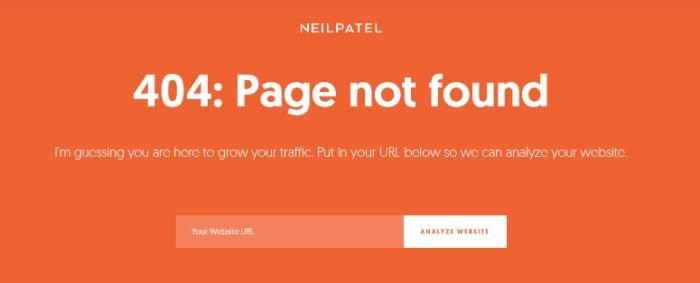
On my site, for example, users can analyze their website SEO from my 404 page:

Screenshot of a 404 error page on Neil Patel's webpage.

If your CMS doesn’t offer one, you’ll need to configure your server and design the page yourself or with the help of a website developer.

While a personalized 404 error page can take time and money, it’s also a great branding opportunity.

3. If the Page Does Exist: Improve the Content and Reindex

Google is good at finding soft 404 errors, but it’s not perfect. It may incorrectly report a page as a soft 404, even if content exists on the page.

This generally occurs when the content is short or irrelevant.

Assuming the page is necessary, you’ll want to bulk up the content to ensure it’s not mistaken for a soft 404. That doesn’t mean using fluff or filler, but relevant and engaging content that improves the quality of your website.

If your webpage needs bulking, consider adding images, charts and diagrams, and data-driven content you can back up with outside references. These lend credibility to your website, which is especially important if the page was returning a soft 404 error. Finding 404 errors can be beneficial for both the backend and front-facing sides of your website and user experience.

4. If the Page Was Moved: Set Up a 301 Redirect

When combining content pages or moving content around, it’s important to set up a redirect as soon as possible. Otherwise, your website visitors may be directed to a 404 page.

If this results in soft 404 errors, then you’ll be happy to know the fix is simple. You just need to set up a permanent 301 redirect to the newer page on your website.

The majority of CMSs have a built-in redirect tool. Simply enter the old URL and the new one, and the traffic is redirected automatically. This guide walks you through setting up redirects on WordPress.

Once set up, the redirect is communicated to search engine crawlers so they crawl the correct pages.

FAQs

What are soft 404 errors?

Soft 404 errors are “page not found” errors that weren’t properly communicated to search engine crawl bots. The error shows correctly to website visitors but not to crawl bots, which means they continue to crawl those pages, wasting time and resources.

What causes a soft 404?

There are a few different things that can cause a soft 404 error. The most common reason is that the page has been moved to a new location and a redirect hasn’t been set up. Other common causes include poor content on the page and pages that return 404 errors even though they actually exist.

Will fixing soft 404 errors increase my website traffic?

When soft 404 errors are resolved, the crawl bots can focus on a larger percentage of your active content pages. As a result, more content appears in SERPs. In theory, this can increase website traffic.

What is the difference between regular 404 and soft 404 errors?

The difference between a regular 404 and a soft 404 error is what is communicated to search engine crawl bots. With a regular 404, the website server delivers the 404 error to the crawl bot. With a soft 404, the website server delivers a 200 OK status, which means the bots continue to crawl the page.

Will Google penalize me for soft 404 errors?

There’s no official penalty for soft 404 errors, though there are natural consequences if the errors aren’t resolved. These include lower visibility on search engine results pages and a poor user experience.

Does having 404s affect SEO?

404 errors can hurt your site’s ranking if they’re not properly handled. If Googlebot crawls a page with a 404 error, it may assume that the page doesn’t exist and stop crawling your site. As a result, your most important pages may not be getting crawled as often as they should, which can hurt your site’s ranking.

Additionally, if users click on a link to a page that returns a 404 error, they may assume that the page doesn’t exist and leave your site. This can hurt your site’s bounce rate and cause users to spend less time on your site, both of which can negatively impact your site’s ranking.

To avoid these problems, be sure to set up a proper 404 or 410 error if a page doesn’t exist, and be sure to set up a 301 redirect if a page has been moved.

Additionally, make sure that all of your pages have good content that is relevant to what users are looking for. You can perform technical SEO audits throughout the year to ensure your pages are up to par. By taking these steps, you can help ensure that your site’s ranking isn’t hurt by soft 404 errors.

How do I fix soft 404 errors?

If the page doesn’t actually exist, creating a customized 404 page or 410 error will help. A 404 error tells users that the page they’re looking for doesn’t exist, while a 410 error tells users that the page has been permanently removed.

To set up a 404 or 410 error, you’ll need to add a “404.html” or “410.html” file to your site.

If the page does exist but is returning a soft 404 error, you’ll need to improve the content on the page and then reindex it. This can be done by adding more relevant content to the page or by improving the page’s title and meta tags.

If the page was moved to a new location, you’ll need to set up a 301 redirect. A 301 redirect tells users that the page has been permanently moved to a new location. To set up a 301 redirect, you’ll need to add a “301.html” file to your site.

Conclusion

When a page is removed from your website, there are proper ways to signal this removal to both website visitors and search engine crawl bots.

The most common method is setting up a 404 error page. If not configured properly, though, the 404 error may not be communicated to crawl bots. Thus, a soft 404 error occurs.

While a soft 404 error can cause issues with search engine rankings as well as user experience, they are easy to find and resolve.

Depending on the circumstances, you might set up a permanent 404, set up a 301 redirect, or improve the page content and reindex it. These fixes take just a few minutes but can significantly impact website performance.

When was the last time you checked for soft 404 errors?


from Neil Patel's Digital Marketing Blog https://ift.tt/qfsBb3z
via IFTTT

Tuesday, 18 October 2022

Save Time with Ubersuggest’s AI Writing Tool

Graphic that says, "Save time with Ubersuggest's AI writing tool."

You’ve heard about AI, but have you ever used it?

Just think of it this way, what if you can use artificial intelligence (AI) to create content for you so you wouldn’t even have to write?

Well, believe it or not, this blog post that you are reading now was written by an AI content writer.

To be fair, no AI tool is perfect, as technology isn’t there yet.

And to give you perspective, the AI wrote this post, and then I had to modify it and add specific sections and steps.

When I looked back and did an analysis, AI wrote roughly 25% of this post.

That’s not too bad. Sure, I had to write 75%, but the hardest part about writing isn’t putting words on a paper, it’s coming up with the ideas and the overall format.

So today, I am going to show you how to write a blog post using AI…keep in mind, over time it will get better as technology improves.

But first, here’s something you should know…

Duplicates and AI Content Writing

Google doesn’t penalize for duplicate content, and even if they did, this AI tool makes 100% unique content for you.

So, you won’t have duplicative or plagiarism issues.

It’s not just mixing words around. It is trying to understand what you are trying to write your article on, do research, and come up with words that encompass everything you are trying to get across.

If you are looking to get more insight about your audience, AI for PPC ad writing could help you personalize the ad copy and SEO to determine their habits and motivations.

Search pros are using AI-powered SEO solutions today to accomplish more and give them an edge, pushing their efficiency beyond their competitors.

According to McKinsey analysts, AI may generate between $1.4 and $2.6 trillion in value in marketing and sales for global businesses alone because of its ability to supplement and advance marketing use AI for SEO.

With that being said, let’s get you started with using an AI content generator for your benefit.

Getting Started With Your AI Content Generator

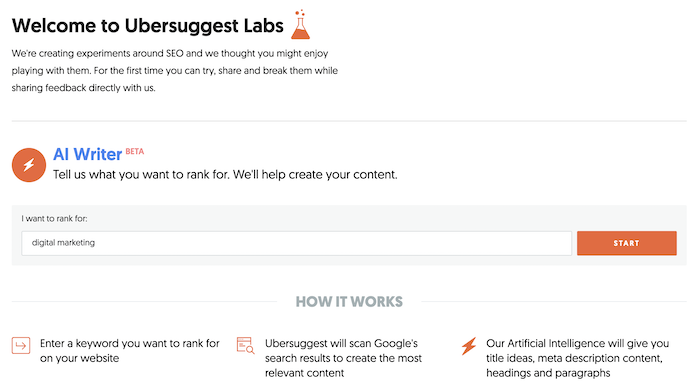
First off, go to Ubersuggest’s AI Writer.

Screenshot of Ubersuggest's AI content generator.

First, enter in the keyword you want an article on. For this example, I chose the term “digital marketing” as my blog is on digital marketing.

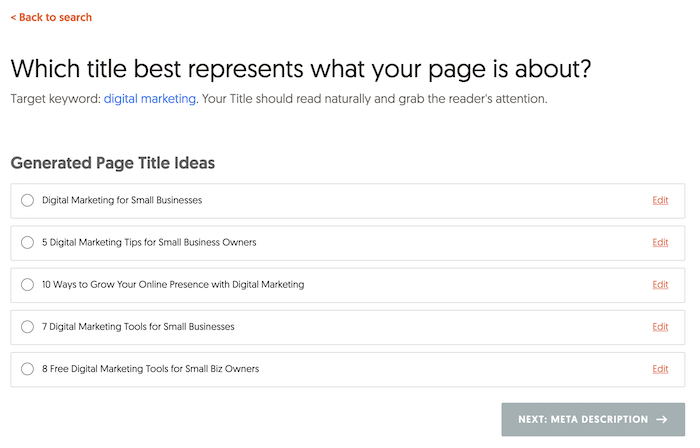
Then you will want to select a title from the list provided. You don’t always have to use it at the very end, but a lot of the titles are based on what people are searching for.

Screenshot of Ubersuggest's AI content generator.

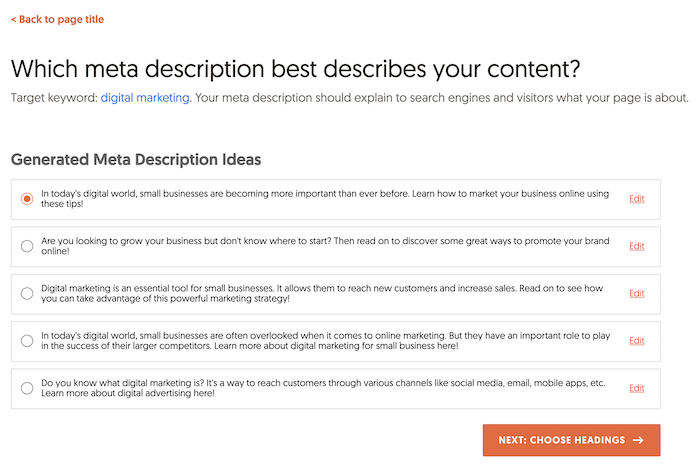
Next, you will want to choose a meta description.

Similar to the above, meta description is also based on keywords that are popular from a traffic perspective.

Screenshot of Ubersuggest's AI content generator.

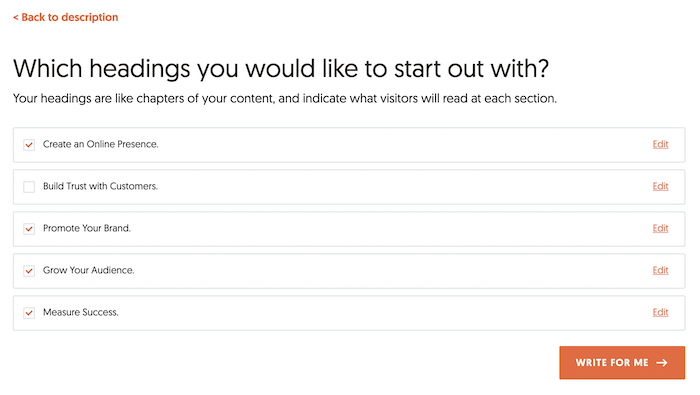
After you select your meta description, you will want to select a few headings.

Keep in mind headings are like book chapters. Pick the ones that work the best, and again, keep in mind you can always adjust the text later on.

Screenshot of Ubersuggest's AI content generator.

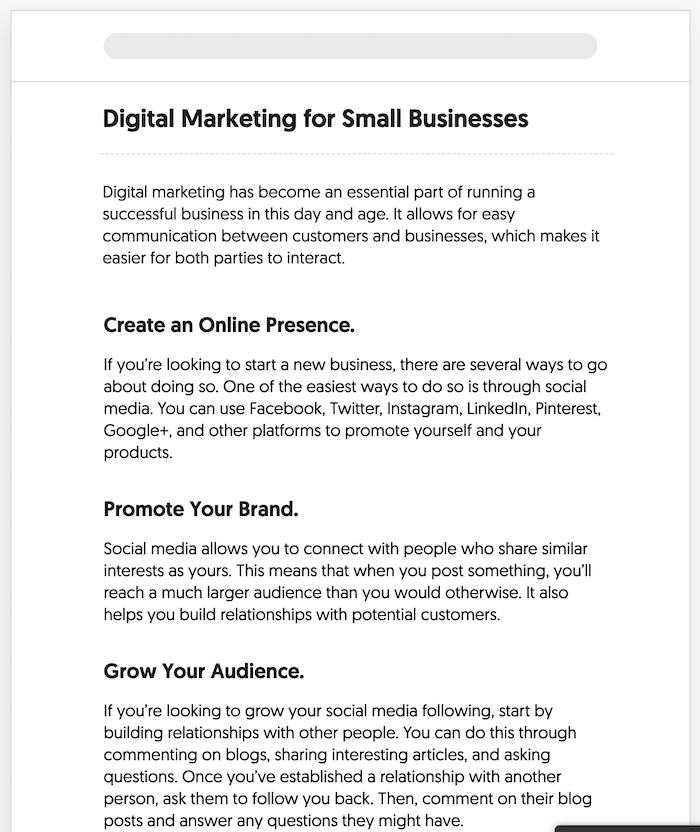
The last step is that Ubersuggest will take all of the data and spit out content for you.

Screenshot of Ubbersuggest's AI content generator.

By no means is the content perfect, and I wouldn’t recommend publishing it as is or any AI content written by any tool for that matter.

Instead, use it as a starting ground.

How you modify articles will give you a unique voice to better connect with your audience.

Modifying Articles With The Ubersuggest AI Writer

While the AI tool won’t always be contextually accurate, most of the time, it is.

More so, the way you make the AI piece amazing is by getting more detailed.

I like to say it’s how you humanize AI content.

So, for example, in the digital marketing article above, in the “create an online presence” section, I would go in-depth on Facebook, Twitter, LinkedIn, and Pinterest on how you can use them for marketing.

As for Google+, it no longer exists, so I would delete that part and expand the other platforms and give step-by-step instructions on how to leverage them.

I would also include screenshots, so each step is clear.

Under the “promote your brand” section, I would discuss ads and other ways to promote your brand, such as running promotions, sales during holidays, or even doing webinars.

I would give examples of other successful ones that businesses have run and give examples of failed campaigns that have been run and break down what you can learn from them.

The “grow your audience” section already talks about what to do if you have no followers. They are all good tips that the AI tool wrote, but the tips are too surface-level. I would dive deep into each one. Get granular in your approach to growing your audience through engaging with other accounts and potential customers online. Email pitches can even help behind the scenes when convincing brands to collaborate with you to promote your brand.[

And the measuring success section was cut off from the above screenshot, but it mentions Google Analytics. I would go more in-depth on how to set up goals in Google Analytics and tie in revenue. Remember, GA4 is going to be the only game in town in 2023, so you want to make a mention of that and possibly go into how to do so there.

Frequently Asked Questions

What is AI-generated content?

To keep it simple, AI-generated content is created by artificial intelligence, performing writing tasks and research faster than humans. The majority of AI systems are capable of carrying out tasks that often call for human intelligence, decision-making, reasoning, or learning. Through “natural language generation (NLG),” AI is able to produce written narratives as part of the content marketing process. With this power, it may create business reports, forecast consumer behavior, plan content, and provide individualized product recommendations.

How do you use Ubersuggest to create AI content?

Once you open the AI tool, follow these steps:

1. Enter the keyword you want an article on.

2. Choose a meta description.

3. Select the headings that will flow best for the article.

4. Wait for the AI content generator to populate the content.

Is all AI content created equal?

AI content is comparable to human capabilities, but there are still holes to fill. Even if you aren’t looking for an entire article to be written via AI, the paragraph rewriting functionality of AI tools is often offered for free, but there are paid plans. Depending on the tool you use (paid or free), you’ll have varying features like text predictions, blog outlines, and more.

What kind of copy can AI create?

AI content writing is seeing advancement with easily generated, high-quality copy. Many tools offer at least blog, marketing, and sales copy. If you’re putting together a website, you can have your landing page written in seconds. These features mainly depend on your preference input, and it outputs suggestions, giving you extra writing assistance.

Do AI content generators check for plagiarism?

It takes deep learning to produce results with accuracy, and plagiarism detection in AI content generators is still evolving. The fact that AI-generated material isn’t entirely original is a major disadvantage from a content marketing standpoint. The copy may pass a plagiarism checker but lack original research, insights, or facts on the topic.

Conclusion

The Ubersuggest AI tool isn’t meant to replace humans or for it to perfectly write your content for you.

It’s meant to give you a start.

You have experienced writer’s block, and we all hate it. The tool solves that part plus it gives you a head start.

It not only gives you title and meta description ideas, but it writes some of the content for you as well as gives you popular headings based on keyword search volume.

All you have to do is adjust and fill in the rest.

So, make sure you give it a try.


from Neil Patel's Digital Marketing Blog https://ift.tt/2Fv6glG
via IFTTT

Season’s greetings: Retailers can expect 18% more social messages during the holidays

It’s beginning to look a lot like the busiest time of year for retailers. As the 2022 holiday shopping season approaches, marketers should have a plan in place to manage social customer care and perfect their social commerce strategy.

Sprout Social analyzed more than 457 million messages across Twitter, Facebook and Instagram to find out how retailers fared through the previous holiday shopping season and what brands can expect for 2022. We discovered social messaging frequency will increase on all platforms, brands need to improve their response rates and consumers will continue to turn to social commerce for holiday shopping needs. Let’s dive into the data.

A look back at social trends from the 2021 holiday season

Powered by online shopping, 2021 holiday retail sales were bright, growing over 14% compared to 2020.

The increase in sales correlated with an increase in social messages. Compared to an average of 2,477 messages received per month by retailers from January through October 2021, retailers received an average of 2,804 messages per month in November through December 2021. This represents an 13% increase in average messages received per month during the 2021 holiday season compared to the rest of the year.

A graphic with teal background and pink up arrow that reads "13% increase in average messages received during the 2021 holiday season (November and December) compared to the rest of the year (January–October)"

The sheer volume of social messages received during November and December is a good reminder for retailers of all sizes to remain present and active on their social platforms.

As businesses prepare their teams for the surge in messages, they also need to have a plan for maintaining fast social responses and a consistent publishing cadence.

In November and December, retailers sent 32% more Twitter messages per month compared to the non-holiday months. However, retailers’ outbound organic messages on Facebook and Instagram dropped slightly during holiday months, pointing to poor response rates that can impact customer care satisfaction—and ultimately the bottomline.

Gearing up for the projected 2022 holiday season

During the upcoming 2022 holiday season, experts predict total retail sales will reach up to $1.47 trillion.

Retailers can expect a 7.5% increase in sales in brick-and-mortar stores and ecommerce channels alike—but some challenges remain. High inflation rates will force consumers to tighten their budgets. To plan for a more competitive holiday season, retailers need a foolproof social media strategy to deliver the best customer experience.

Looking closer at ecommerce, online holiday sales are forecasted to grow by 11-15% year-over-year, which underscores the importance of giving shoppers a superior omnichannel experience.

Given that consumers have grown reliant on the customized experience and convenience of digital shopping, we predict they will flock to social again this year.

A graphic with a light blue background and blue up arrow that reads "18% more social messages per month in the 2022 holiday season compared to non-holiday months"

To no one’s surprise, retailers can expect an influx of messages during the 2022 holiday season—so get your social (and social customer care) teams ready now. Sprout Social’s data science team projects retailers can expect on average 18% more social messages per month this holiday season compared to the non-holiday months in 2022.

Growth expected across all social channels

Retailers should expect to see a spike in messages received across all platforms during the holidays.

A data visualization that compares projected increases in messages on Instagram (27%), Twitter (19%) and Facebook (7%) in the 2022 holiday season.

To maximize your reach and drive engagement, consider a combination of paid and organic social strategies. Paid ads on Facebook, for example, give retailers the ability to build custom audiences and target consumers who have previously interacted with your business in the past. Businesses can also run an Instagram Stories campaign to promote specific offers or tease special announcements—two creative ways to keep customers glued to your brand’s social feed.

As you gear up for the 2022 holiday season, it’s important to lead with the consumer and tailor campaigns around where your audiences spend most of their time online. For example, Instagram link clicks for arts and crafts retailers increased by 44% in November and December 2021—the most of all retail categories.

Response rates need to speed up

Brand response rates are on the decline. According to 2022 Sprout Social Index™, more than two-thirds of consumers expect brands to respond to their social messages within 24 hours. Despite more than half of marketers reporting their organization has a response time of two hours or less, we’ve seen significantly decreasing response rates from 2020 to 2022.

A line graph demonstrating a sharp decline in brand response rates in Jan-Oct 2020 (almost 45%) compared to Jan-Oct 2022 (about 25%).

It’s essential to make sure your social team is prepared to handle the increased volume of messages by following social customer care best practices.

Some businesses may even consider reassigning a few customer service reps to help manage inquiries from social media—or at least have a system in place for social media marketers to redirect messages to the experts.

Once everyone’s gifts are unwrapped and holiday decorations are put away, retailers can use social listening to learn from their holiday experience and apply those insights toward their 2023 social strategy. With listening, retailers can glean information that can inform product development and even improve the customer experience year-round.

Social commerce continues to command attention

Social commerce sales are expected to increase by 25% in 2022. Retailers that want to remain competitive and profitable can’t afford to ignore social and its incredible value during the holiday season.

Since 2021, new social commerce tools have been introduced that have shifted the ecommerce landscape. Twitter Shops, Spotlights, Live Shopping and Product Drops provide new ways to convert brand enthusiasts to buyers on the app. Twitter also saw a 36% increase in holiday messages received last year, suggesting it could be the platform to watch for social commerce in 2022.

Other leading social commerce tools include Instagram’s Drops, shoppable content, clickable link buttons and TikTok’s expanding ecommerce options. Both platforms are ripe with opportunity for influencer and creator partnerships.

As we head into the 2022 holiday season, remember social commerce is an essential part of your larger omnichannel marketing strategy. According to Salesforce, successful brands will merge shopping experiences across both physical and digital spaces. A strong omnichannel strategy—where your social commerce, direct messaging, email strategy and customer experience collide—will guide consumers to purchase online and offline.

‘Tis the season to bring your social “A” game

Social is not only a place for brands to get in the holiday spirit, but also to drive holiday sales. Make sure to add UTMs and tracking tags to all holiday social content so you can show the direct impact on your business.

Beyond sales, how marketers approach social engagement and customer care across various platforms is crucial. The holidays are stressful, and providing shoppers with the best experience possible goes a long way in building customer loyalty and affinity that lasts beyond the holiday season.

Brands need a customer care plan in place that gives social teams the support they need to avoid burnout during the busy season.

Social marketers are most likely managing the brunt of the inbound social messages—so equip them with tools, resources, additional team members and clear workflows to scale smoothly. Not only will this keep your social team in good spirits, customers will appreciate more personalized care and quicker response times.

Don’t lose sight of providing social customer care after the holiday season. Download this checklist to provide exceptional customer service on Instagram year-round.

About the data

All referenced data on social messages received and projected is based on 26,197 public social profiles (14,380 Facebook; 5,079 Twitter; 6,738 Instagram) of active accounts between January 1, 2022 and September 29, 2022. More than 457 million messages sent and received during that time were analyzed for the purposes of this report.

The messages analyzed included Facebook posts and Tweets directed to a brand via tagging or @message, posts and business reviews on public Facebook pages, comments on brand-created Facebook and Instagram content, and retweets with comments.

For questions about the data, please contact pr@sproutsocial.com.

The post Season’s greetings: Retailers can expect 18% more social messages during the holidays appeared first on Sprout Social.


from Sprout Social https://ift.tt/9Xy6Or4
via IFTTT