Thursday, 26 March 2020

Social Spotlight: Four brands that shine through dark times

Welcome to the Social Spotlight, where we dive deep into what we love about a brand’s approach to a specific social campaign. From strategy through execution and results, we’ll examine what makes the best brands on social tick — and leave you with some key takeaways to consider for your own brand’s social strategy.

Overview

Though we’re all adjusting to the new reality of working from home and managing new best practices for our businesses, few in marketing are on the very visible front lines like social marketers. As many brands pause more traditional advertising, close retail locations and scramble to put new infrastructure in place to support working from home, supporting customers and audiences falls more and more in the digital space. While many brands have found innovative ways to extend their offerings to social media, the most successful are doing one thing that’s available to all of us: Holding true to the fabric of the brands they’ve built and adapting them for the current situation. Here are four examples of brands excelling in the new normal:

The Shedd Aquarium 

With its doors closed to the public to limit the spread of the coronavirus, the Shedd’s animal caregivers sought to keep their charges’ routines as normal as possible, and that included providing opportunities for exploration and exercising normal behaviors. For Edward and Annie, a bonded pair of rockhopper penguins, that included taking a walk around the deserted institution to visit with the other residents. The Shedd’s social team captured their walk and shared the video with their fans and followers, leaning into the situation to create an experience that wouldn’t be possible under normal circumstances.

What you can learn: View your limitations as opportunities to try new things

You may not have access to your usual equipment, locations or the physical team you’ve come to rely on, but the good news is that your audience is living with similar realities. We’re all in this together, and the opportunity has never been more ripe to try something new.

Tito’s Vodka

The swiftness of the global pandemic has given rise to a lot of misinformation, especially on the real-time channel of social media. Tito’s employs brand monitoring and social listening to keep a pulse on its brand and industry, and became aware early of misinformation–that vodka was an adequate substitute for hand sanitizer–being proliferated on social. Tito’s responded quickly and authoritatively, noting not only that its vodka wouldn’t properly sanitize but also announcing a company commitment to using its distilleries to produce FDA-approved hand sanitizer over the coming weeks.

What you can learn: Look for opportunities in the uncertainty 

There are brand opportunities you’ve never conceived of, and many of them are becoming apparent as we adjust to a different world. Using social listening, keyword tracking or brand monitoring to surface these opportunities (and threats, which can turn into opportunities, as evidenced by the Tito’s example) should be a key part of your social strategy in uncertain times. The news changes daily, and in order to surf the changes to our shared experience, you need to be aware of them as soon as they happen.

CorePower Yoga

Many of the hardest-hit businesses in the current climate are those that facilitate in-person experiences, and CorePower Yoga’s business model is built on readily available, membership-based access to physical yoga classes and space. The brand acted quickly to adapt that business model for the shelter-in-place reality by offering virtual, online classes. As you might imagine, this massive upheaval in its day-to-day operations was not without hiccups, including technical difficulties with its online portal and membership management challenges. But what CorePower did exceptionally well during this challenging time was to remain transparent and authentic in communicating the challenges (and steps it was taking to resolve them) to its engaged community. Its members knew what was happening and how it was being addressed at all times, bringing them into the experience and giving them the assurance they needed that the brand was on the case.

What you can learn: Be who you are, even in a crisis situation

CorePower made adjustments to its business to serve its customers during the current crisis, but more importantly it retained the open, authentic communication they had come to expect from the brand even as it navigated business-threatening challenges. It didn’t try to pass off the blame for the kinks or throw up its brand hands in frustration, rather it maintained its calm, collected and compassionate brand persona. This consistency and accountability inspires the kind of trust that keeps your customers with you through a crisis.

Alterra Mountain Company

As the controlling entity of 14 of North America’s premier ski resorts, Alterra Mountain Company’s primary business season was cut short by the current pandemic. It was forced to close its resorts in order to quell the spread of the coronavirus, leaving its passholders with many questions about how the company would handle the fact that their pass value was cut in half by the closures. Alterra anticipated these questions and swiftly issued a statement to address them proactively, demonstrating the brand’s understanding (and prioritization) of its audience and what’s important to them.

What you can learn: Be proactive, especially when the message is difficult for your audience

Don’t’ wait for your audience to call you out for your silence, especially when you have difficult news to deliver. Lean on your understanding of their unique needs and relationships with your brand to anticipate their concerns and questions, and work to proactively provide your brand’s stance. Even if the message is hard to swallow, your thoughtful, transparent and proactive action will reinforce how much you care about your audience and what they need from your brand during a difficult time.

This post Social Spotlight: Four brands that shine through dark times originally appeared on Sprout Social.


from Sprout Social https://ift.tt/3dA4mc3
via IFTTT

Battling burnout as a social media manager

In the last decade, social media has rapidly evolved and become a major element of marketing in all industries. As a result, social media practitioners now play a role in more business initiatives than ever. They are key players in managing their company’s reputation, deploying customer service, acquiring customers, spotting trends and navigating breaking news. 

It’s a common misconception that social media jobs are glamorous and as simple as posting entertaining, witty Tweets or colorfully curated Instagram posts. It can be frustrating when friends, family and even colleagues oversimplify your role as a social media manager. 

By all accounts, social media professionals have demanding roles that require critical, creative thinking, organization and collaboration across teams. Those demands coupled with the “always on” nature of social media make burnout a very real challenge. 

We spoke to Leigh Morrison, the Senior Manager of Corporate Social Media at Red Hat, Inc., a leading technology company that provides enterprise open source solutions. She and her team are responsible for managing all the corporate social media handles. Given the complex nature Red Hat’s offerings, the customer and community feedback Red Hat receives on social media every day is invaluable. However, Morrison knows first-hand the challenges and demands that come with that. 

“We’re just beginning to understand the potential psychological effects of social media on holistic health and well-being, and we need to consider how those effects may compound for people in our field,” says Morrison. “It’s important to build in moments to step away, connect in real life and recharge.” 

In 2019, the World Health Organization (WHO) officially declared that burnout is an occupational phenomenon “resulting from chronic workplace stress that has not been successfully managed” Characteristics of burnout include “feelings of energy depletion or exhaustion, increased mental distance from one’s job or feelings of negativism or cynicism related to one’s job and reduced professional efficacy.”

Do you feel unable to log off at the end of the day or on weekends? Are you hesitant to take hard-earned PTO? Are you constantly checking your phone, afraid to miss a beat on social? If so, you might be at risk of burning out, but you’re not alone. 

It’s a common assumption that long-term, habitual use can take a negative toll, particularly on young people. However, according to a study by Harvard University, findings suggest that as long as people are mindful users of social media, strong social networks are associated with positive mental health and well-being. 

Research scientist Mesfin Awoke Bekalu, who co-authored the study, suggests that “the ways that people are using social media may have more of an impact on their mental health and well-being than just the frequency and duration of their use.”

Knowing that your job requires you to be on social platforms frequently, if not all the time, be mindful of how you’re using social both at work and at home. If you’re finding it difficult to set professional and personal boundaries, lean into the community and human connections that make social media such a powerful platform.

How social platforms are combating burnout

Social platforms have taken note and begun to incorporate mental health initiatives into their platforms, so users and social media managers alike can be more mindful of the ways in which they’re using them.

 At the end of the day, if you’re feeling burnt out and looking for a laugh, Tiktok videos are fantastic. Doesn’t this dog video just inspire pure joy? 

@kg.shmoneyyyokay if this doesn’t get attention idk what will ##foryou ##lake♬ bingbong – bingbongshowtime

By the same token, Tiktok is known for its addictive nature. Knowing people were getting sucked into the wormhole, the platform launched Tiktok Tips, as part of the “You’re In Control” series, intended to bring forward platform guidelines and tools that are typically buried in a page of text. Tiktok Tips videos educate users about in-app safety features, share reminders to take breaks and even encourage people to grab a snack or glass of water.

@tiktoktipsPause your scrolling. Time for a night time snack break!♬ original sound – tiktoktips

In 2019, Pinterest integrated a more compassionate search experience into its platform for users experiencing sadness, stress, anxiety, depression and beyond. If a user searches for “stress relief” or “work anxiety” for example, Pinterest might suggest a collection of emotional well-being activities to redirect your energy. For social media pross looking for a break, these activities might be worth a try.

Similarly, Snapchat is launching “Here For You,” which provides safety resources from mental health experts when users search for a term like “thinspo” (a term combining “thin” and “inspiration”) which is suggestive toward a trend damaging to mental health. And Instagram’s “restrict mode” protects your account from unwanted interactions, helping to combat bullying. 

Balancing customer care and self-care

Customer care is a major part of a successful social strategy and requires time, attention and thoughtful engagement. Responding to comments and complaints in the public eye can be stressful. When the world can see anything your brand posts, the pressure is on to craft the perfect message and not make a misstep. 

SMMs responding to comments and complaints often not only consider the customer you’re interacting with but also anyone who might be witness to the public exchange. Redirect conversations to direct messages when possible, to minimize additional scrutiny.

In the 2019 Sprout Social Index, we found that about 56% of consumers would unfollow a brand due to poor customer service. As a result, you might feel anxious when dealing with emotionally charged interactions on social and the scrutiny that comes with it.

Avoid some of the stress by creating a response protocol. Document common scenarios of why customers reach out to you on social media, the sentiment behind them and examples of how to respond—as well as situations where your brand won’t respond at all. That way, while you have an approved foundation for sending a response, so you don’t have to develop a new one in the face of every mean Tweet.

Legitimate customer concerns should never go unaddressed, but be wary of trolls. If your brand is continually targeted by a specific person using hateful or inappropriate language, consider muting or blocking them if that’s an option for your brand.

During a brand, local or global crisis, social media managers play a vital role in leading their brand’s reputation and response. With the recent example of COVID-19, many social pros may feel the strain of fielding more questions and concerns from your followers than usual. To avoid additional stress, take a look at any upcoming content, double-check the tone and reassess publishing, if necessary. What started as a well-intentioned post could be misconstrued as opportunistic or tone-deaf and spark another crisis for you and your brand or company.

Lean into your community

As humans, we’re programmed to crave and seek out connections. That’s the whole point of social, right? If you’re combating burnout, your team and other social media professionals can empathize and support one another. 

“As a manager, my team looks to me to set boundaries and standards. My advice is to talk about it openly, create norms that make it okay to step away, take moments to bond as a team outside of work,” says Morrison. “When I’m in balance, here’s what works for me: Take breaks from technology. Get a buddy who keeps you positive. Celebrate a weekly win. Connect with your peers, preferably offline.“

If your company has a smaller social team, or you work solo, look for additional support from industry peers. Or, if you can offer support, consider opening yourself up to others.

Maximize productivity and minimize burnout

When you’re passionate about your job, you give it your all. That drive is essential and inspiring, but it’s also important to prioritize healthy routines and recharge. Here are a few tips to help: 

  • Schedule your strengths. If you know your focus or creativity peaks in the morning, block off time to focus on your priorities.
  • Take a digital detox. Give yourself time and space to disconnect. Your mind (and your eyes) will thank you. 
  • The rise of workism—the belief that work is the centerpiece of one’s identity and life’s purpose—has made it even more important to your passions outside of work. Cultivate an immersive hobby that focuses your attention inward. 
  • Avoid comparison. While it’s helpful and important to be aware of what your competitors are working on, envy and comparison can be real self-esteem killers. Focus on doing what’s best for you and your own brand.
  • Leverage the tools at your disposal to pick up some of your more time-consuming, manual social management tasks.

Burnout is real, but you’re not alone. Join our community and connect SMMs through shared experiences. We’d love to hear from you on Twitter. How do you combat burnout?


This post Battling burnout as a social media manager originally appeared on Sprout Social.


from Sprout Social https://ift.tt/39hlyzH
via IFTTT

Doctors react to viral coronavirus myths

Doctors react to viral coronavirus myths

From claims that kids don't get COVID-19 to Vanessa Hudgens' "death is inevitable" video, we asked two doctors to weigh in. Read more...

More about Mashable Video, Social Media, Doctors, Vanessa Hudgens, and Covid 19


from Social Media https://ift.tt/3amY3GO
via IFTTT
Why and how to set up your Instagram business profile

Remember back in the day when everyone, regardless of person or brand, had a personal Instagram profile? There were no bells and whistles, just a basic bio and your Instagram feed.

It just goes to show how quickly social media really does change, because in 2016, Instagram introduced business profiles, and they’ve definitely taken off from there.

At first, brands were wary about whether or not they should switch. After all, Facebook’s algorithm favors content from family and friends over brands, so why wouldn’t the Facebook-owned Instagram?

But the benefits are significant. Since the start of business profiles, contact buttons were born, Instagram shopping became more prominent, the platform launched its own analytics and now everyone, from corporations to startups to influencers, has an Instagram business profile.

Why create an Instagram business profile

If you’re a brand looking to create a following on Instagram and use the platform strategically, you’re going to need an Instagram business profile.

This is because there are so many added perks that improve usability as a brand. Let’s dive into a few of the biggest benefits of using a business profile versus a basic personal profile.

1. You’re taken more seriously

Take a look at the differences between the two Instagram profiles below. You’ll probably notice a few of them.

instagram business profile - instagram business vs personal

Business profiles share the brand’s industry, an address and a contact button right on the profile. (Ignore the fact that our Sprout Social business Instagram has story highlights and my personal profile doesn’t – that feature is available on both personal and business profiles.)

Having the ability to offer even more information upfront, as well as additional contact information, gives your business profile a more professional look. And offering even more ways for your audience to get in touch with you has never been a bad thing.

Because the differences between the two types are so obvious, Instagram users can automatically tell when a profile is for a business, and it provides a greater sense of trust.

2. You get access to analytics

This is a big one. Switching to a business account gives you the ability to access built-in insights about your account and its performance.

instagram business profile - instagram analytics

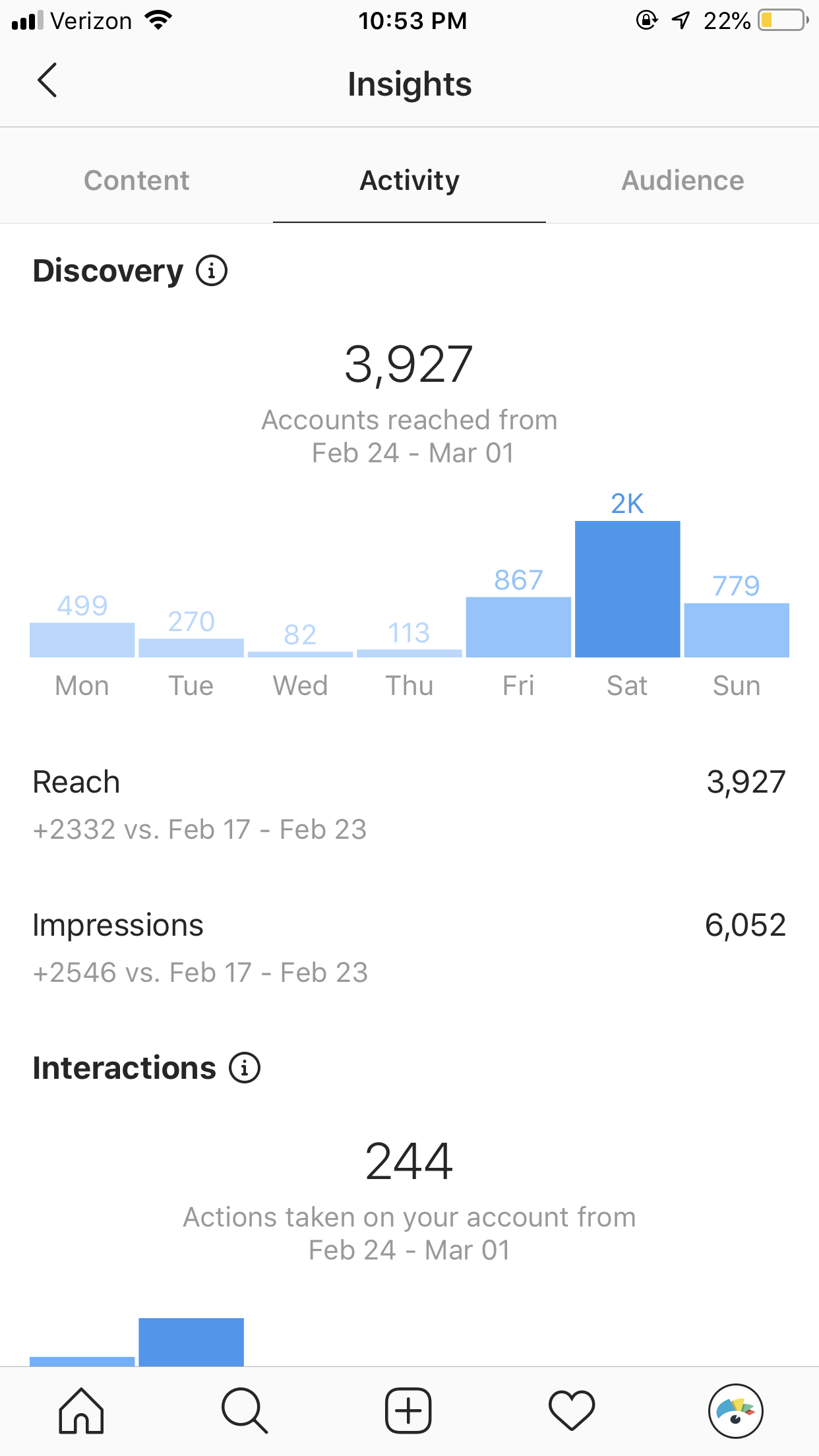
You’re able to take a look at your post performance, follower activity and audience insights. While these insights aren’t extremely in-depth, it’s a great glance at your account success and can give you a basic understanding of how well your content is doing.

And for more details on your analytics, you can always take advantage of Sprout Social‘s analytics options.

3. You can add links to your Instagram stories

Instagram is infamous for its inability to link directly to blog posts and landing pages from your posts, hence the popularity of ‘link in bio’ and tools designed to collect all your recent or important links on one Instagram-accessible page. However, accounts that have more than 10,000 followers gain access to swipe up links within Instagram Storiesbut only if that account is an Instagram business profile.

While it might take awhile to get your Instagram account to 10,000 followers, if you create a successful Instagram strategy, you’ll be linking content in your Stories in no time. Using Story links is a great way to highlight your latest content, highlight short-term deals or resurface timely content and products based on what’s trending.

4. You can take advantage of Instagram advertising

Instagram ads and promoted posts are created through Facebook’s ads manager, which means you must have an Instagram business profile that is attached to your Facebook Page to be able to create Instagram ad campaigns.

To help generate leads, increase conversions and get to that 10,000 follower threshold more quickly, your brand should be taking advantage of Instagram advertising. If you’re struggling to increase your reach and overcome some of the challenges brands face from the Instagram algorithm, paid ads can help you target key audiences.

5. You can schedule your posts ahead of time

Another major Instagram update that’s now a few years old, but had significant value for marketers was the ability for users to automatically schedule their posts instead of having to just schedule a reminder to manually post content.

However, the ability to use a third party tool like Sprout Social to schedule your content ahead of time is only available with Instagram business profiles.

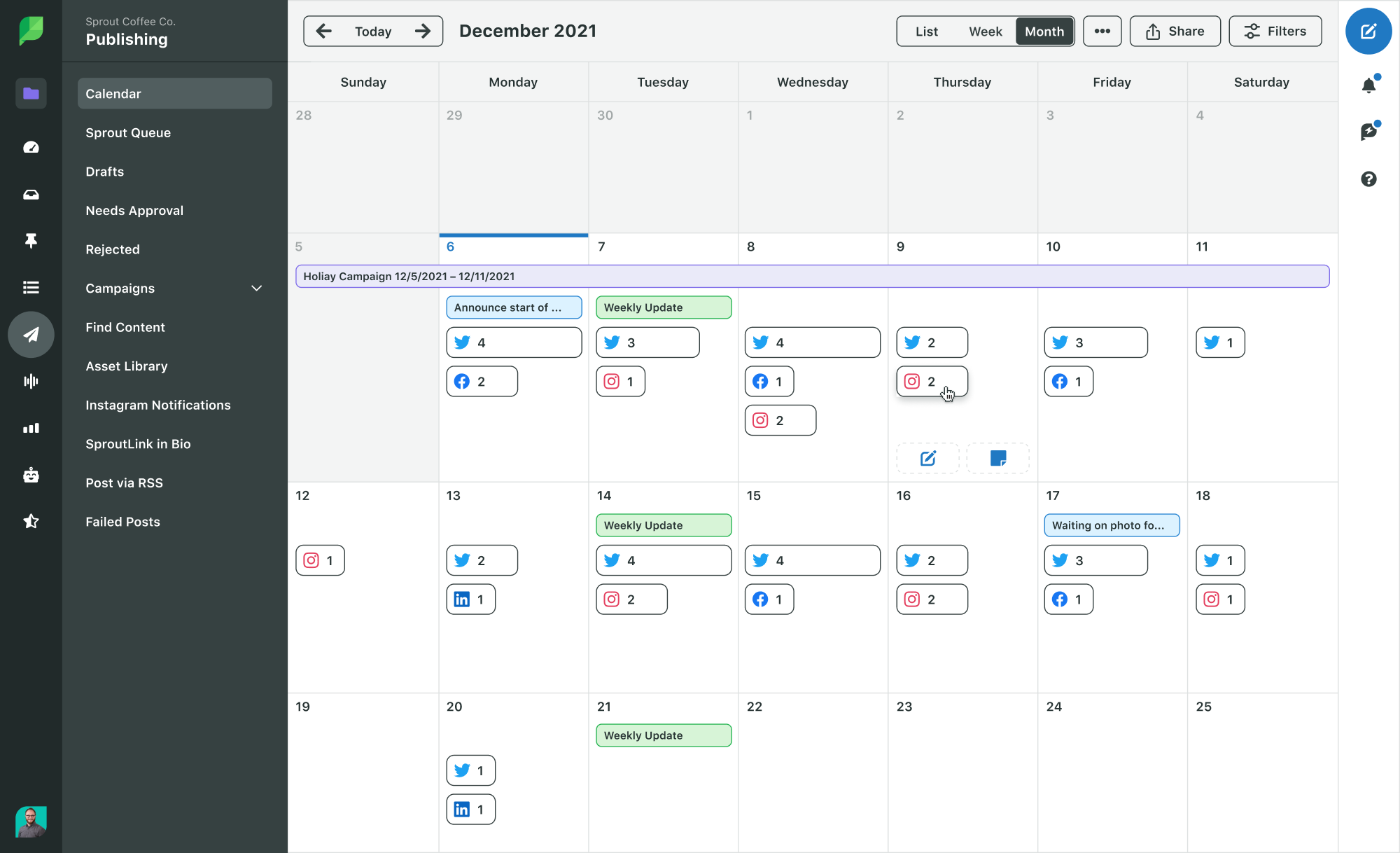
instagram business profile - schedule posts ahead of time

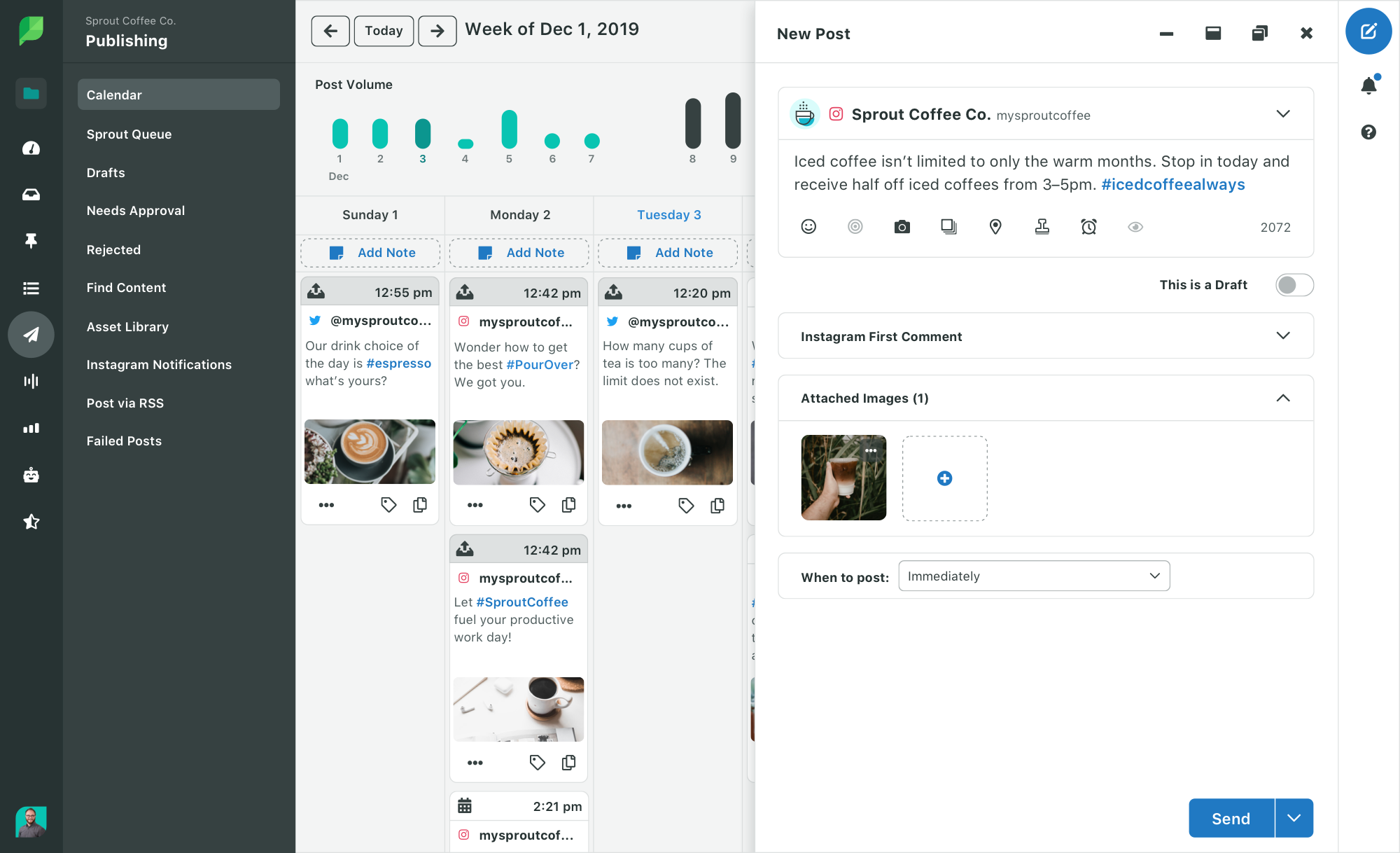
So if you want to make your social media management easier, do yourself (and your marketing team as a whole) a favor and switch to an Instagram business account. With a tool like Sprout, you’ll be able to get a more complete picture of your upcoming content calendar and it will be easier for everyone who contributes to this content to collaborate.

6. You can tag products in your posts

Finally, another great perk that’s only available to business accounts is the ability to turn your feed into an online shop.

Tagging products and turning photos into shoppable posts is a great way to open an entirely new revenue stream for your brand, but you have to switch to or set up your profile as a business account first. Considering that 46% of users make a purchase after seeing a product on Instagram, and even more do further research on that product after viewing, it makes sense to facilitate this type of browsing as much as possible.

How to switch to an Instagram business account

Have you heard enough about the benefits of an Instagram business account? Ready to switch your account over to an Instagram business profile? Let’s walk you through the process so you can start taking advantage of these great perks.

Step 1: Go to your Instagram account settings

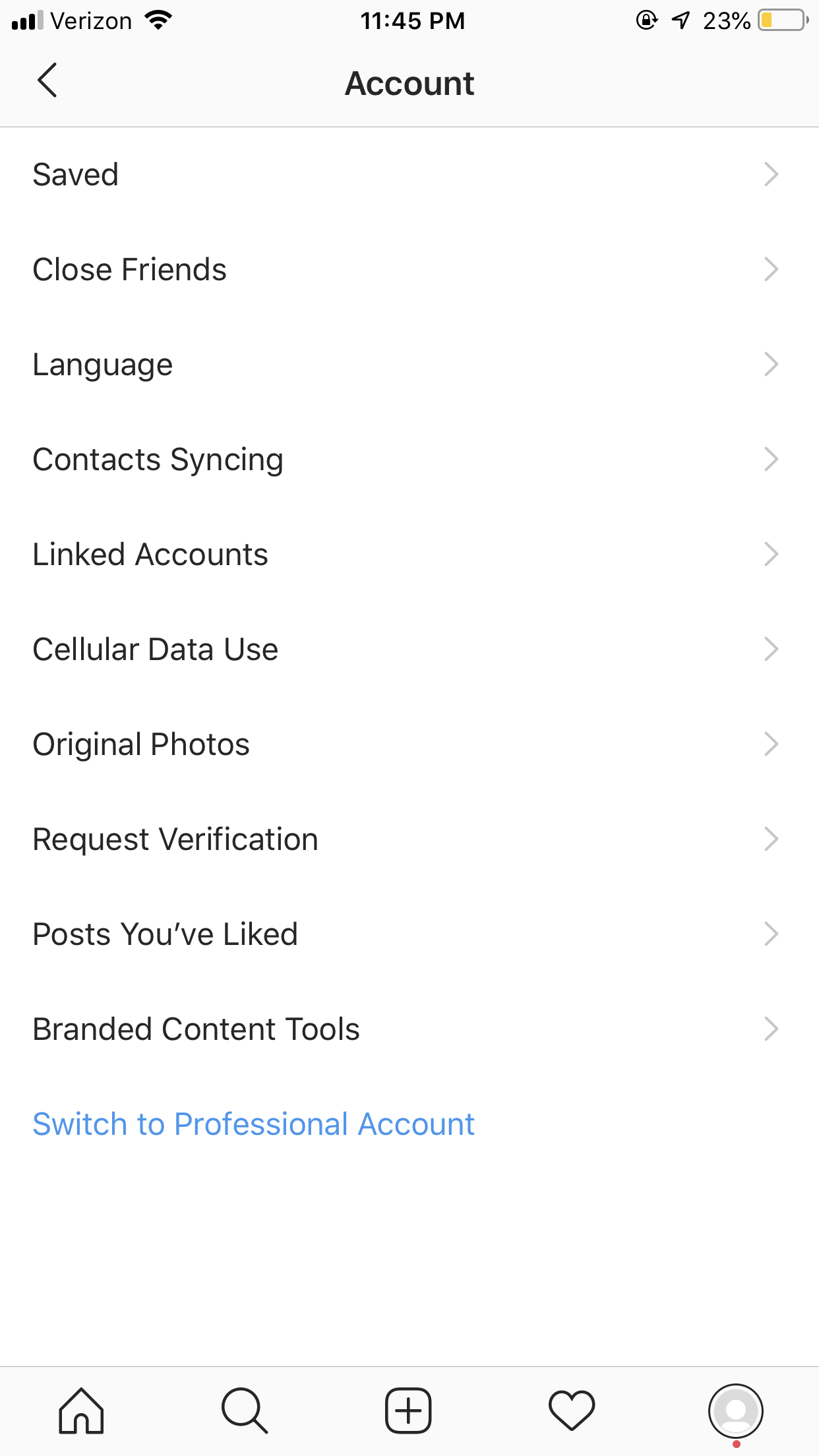
Go to your profile, then tap the hamburger menu in the top right corner of the app. Tap Settings and then tap Account to get started.

Step 2: Switch to Instagram professional account

Once in the account settings, you’ll see a blue call-to-action at the bottom of the page for you to Switch to Professional Account.

Tap that to move forward with your big switch.

instagram business profile - your account settings

Step 3: Choose between a Creator or Business account

Instagram recently rolled out a new type of business account – an Instagram creator account. These are more specifically for influencers, public figures or other types of content producers, whereas a business account is better for brands and businesses that sell a product or service.

instagram business profile - creator vs business account

This is a part of Instagram’s effort to further separate influencers and businesses, making it more obvious for its users when a partnership is an influencer promotion rather than an ad.

The tools surrounding a creator account are slightly different from those accessible in a Business account, but they were created with influencer marketing in mind. There are also more features surrounding messaging and profile flexibility.

The core business profile features are still available, including shoppable posts. This means influencers will be able to tag the products they’re recommending directly within their Instagram posts, offering even more streamlined shopping for all parties involved.

If you plan to partner with businesses as an influencer, you’ll want to create an Instagram creator account. If not, including if you plan to partner with influencers to promote your products or services, you’ll want to create an Instagram business account.

Step 4: Connect your Facebook Page

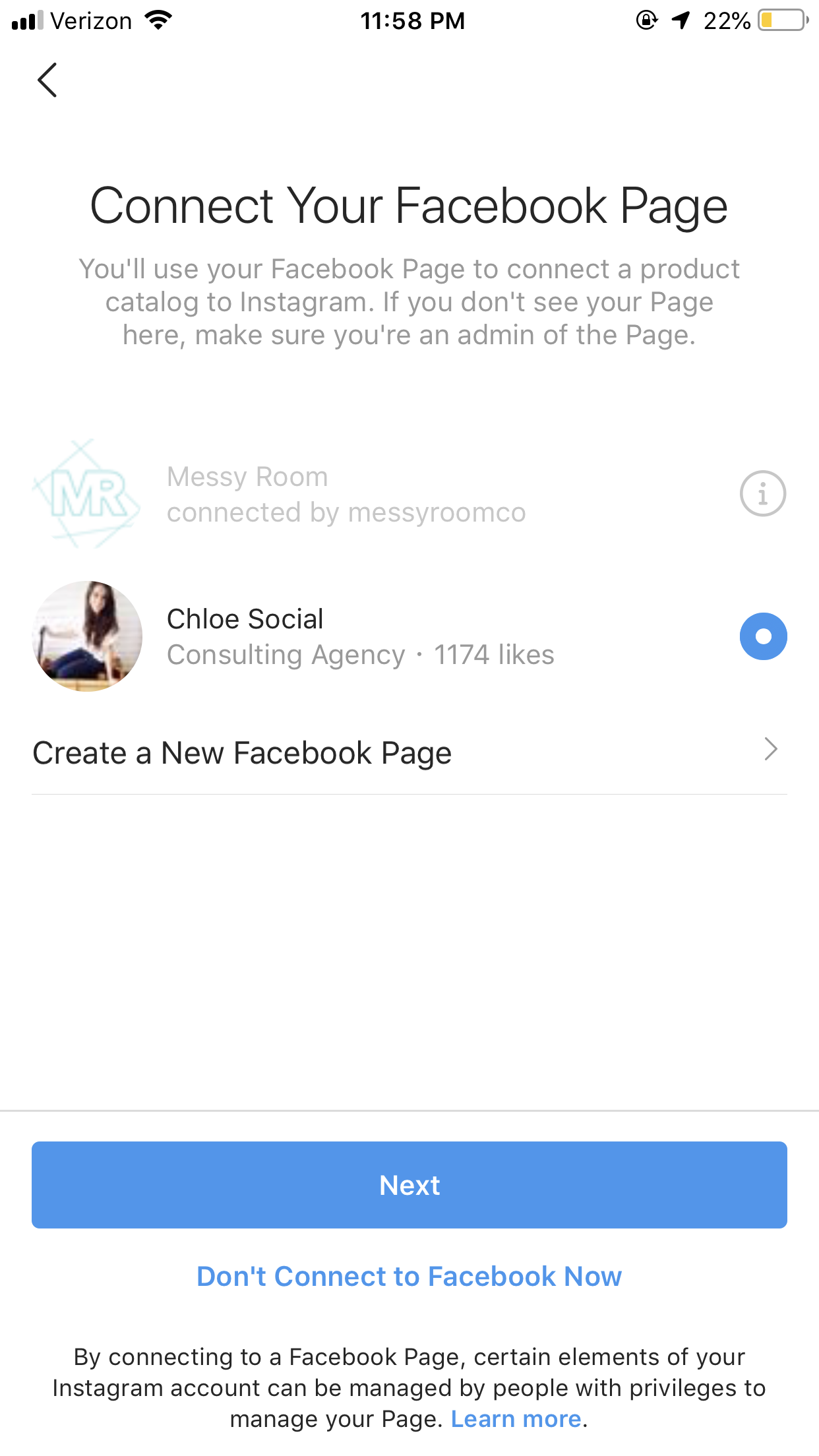
If you’re moving forward in creating or switching to a business profile, your next step is to connect your Facebook Page. You must have admin access to your business Facebook Page to take this action.

Once you confirm which Facebook Page you want to connect, your business profile is ready to go!

instagram business account - connect your facebook page

If you’re switching to a creator profile, all you need to do is select a category for the type of creator you are.

instagram business profile - choose your creator category

How to switch back to a personal Instagram account

If you decide an Instagram business or creator account isn’t for you, it’s possible (and extremely easy) to revert right back to a personal account.

You can also switch between business and creator accounts to find the one that makes the most sense for your brand.

All you have to do is head right back to your account settings, and this time the blue Switch to Professional Account call-to-action will be replaced with two different options: Switch to Personal Account or Switch to Creator Account.

instagram business account - switch back to personal account

Start taking advantage of Instagram business profile tools

Ready to ramp up your Instagram marketing strategy? By switching over to an Instagram business profile, you gain access to so many more great brand tools and perks, allowing you to really wow your audience on the platform.

To learn even more about the power of Instagram for your business, check out our guide to organic Instagram strategies that work.

This post Why and how to set up your Instagram business profile originally appeared on Sprout Social.


from Sprout Social https://ift.tt/2qZBAv4
via IFTTT

Wednesday, 25 March 2020

Why brands need a Twitter dashboard

Imagine driving a car with no speedometer, no fuel gauge and no warning lights. The car might still function, but without those critical indicators, it would only be a matter of time before you run out of gas, blow a tire or get pulled over. Just like a car, businesses using Twitter need a dashboard that makes crucial information easily accessible and actionable. 

It doesn’t matter if you’re an agency working with multiple brands or an enterprise handling dozens of accounts, it’s crucial to have something that covers all the bases. With Sprout’s Twitter dashboard, businesses can publish, engage, collaborate and analyze their efforts all in one place.

What is a Twitter Dashboard?

Back in 2016, Twitter made big waves when it released its own tool, aptly named Twitter Dashboard. As a free tool for small businesses or individual users, it’s great at providing a quick snapshot of Twitter basics like top Tweets, engagements, impressions, new followers and a few other metrics

As an official Twitter partner, Sprout Social has a robust Twitter dashboard that elevates those basics and expands reporting, publishing and management capabilities for businesses of all sizes. 

For businesses and agencies managing multiple Twitter profiles, creating a dashboard is a necessity as it makes all your data and messages accessible from a single location.

The best Twitter dashboards help your business and social media team work more efficiently and effectively. Whether you’re interested in growing your follower count, gathering feedback or measuring how your audience reacts to a new, humorous voice, there’s a number of ways Sprout’s Twitter dashboard will help. 

Reporting and analytics

According to the 2019 Sprout Social Index, 39% of marketers say they struggle to demonstrate the value of social across their organization. With Sprout’s powerful Twitter analytics capabilities baked into the dashboard, social media professionals can track KPIs, measure social ROI and prove the value of their efforts with ease. 

Twitter analytics compiles all the behaviors and actions audiences take when they come across your posts or profile–the clicks, follows, likes, expands and more–and breaks down that data to help you analyze performance and refine your strategy. 

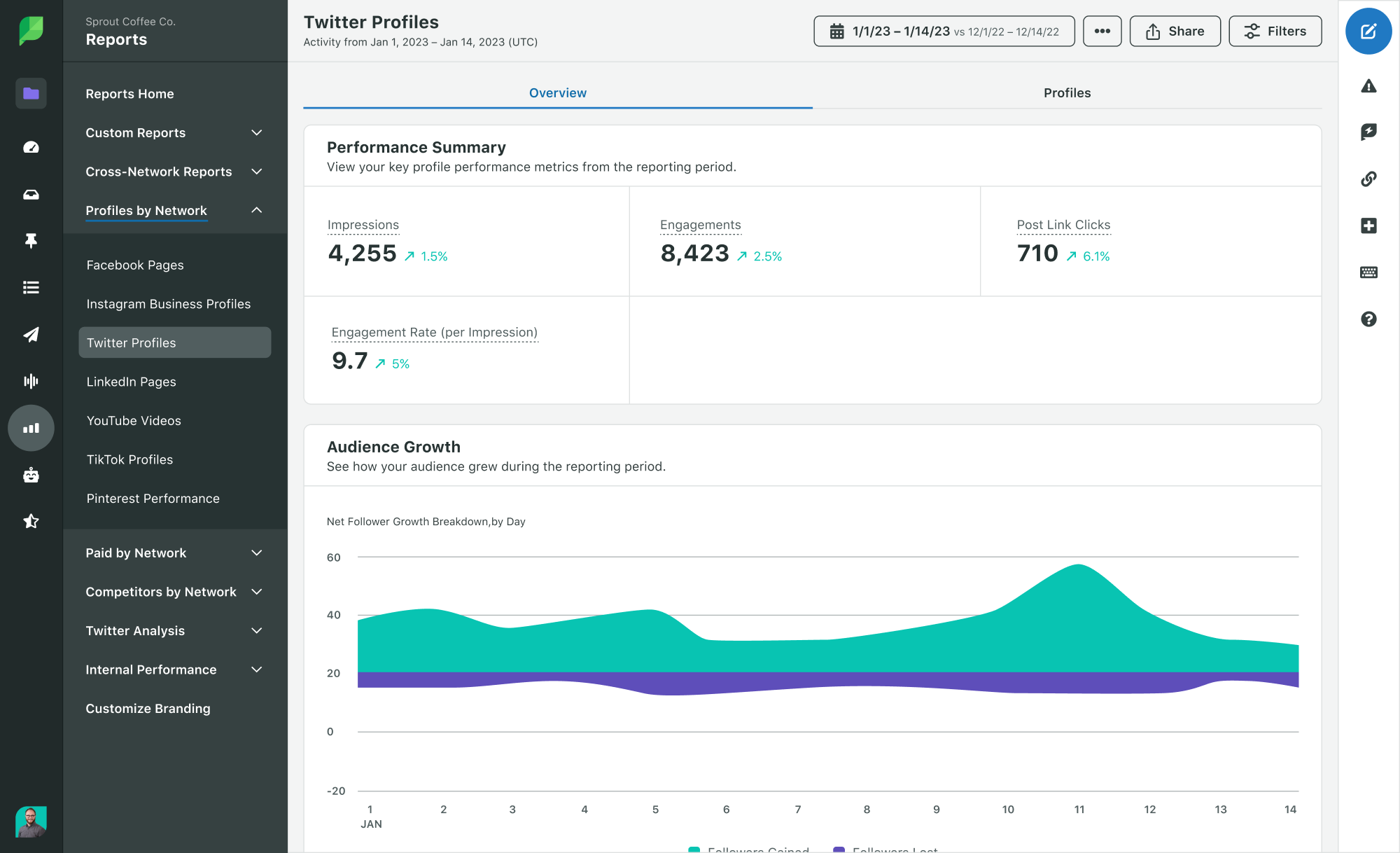
In Sprout’s Twitter Profiles view, users get a high-level snapshot of their data broken down into audience growth, outbound publishing behavior, top posts, impressions and engagement. If you manage multiple profiles, you can view data for all profiles at once, or narrow it down to one at a time. 

Understand your audience on a deeper level

The first step in creating a successful campaign is getting to know your audience. Though you may have an idea of who your audience is, there is social data you can pull to get a deeper understanding. 

The way your brand communicates with a 54-year-old male will most likely be different than how you would with a 20-year-old female. In Sprout’s Twitter analytics dashboard, users can review their audience demographics by age and gender and leverage that to tailor Tweets accordingly. 

Image 2020-03-11 at 11.54.45 AM.png

Rather than make assumptions about what type of content resonates with your audience, Sprout users can drill into data at a message-level to help refine their strategies and messaging. The Twitter Post Performance report pulls every Tweet from a reporting period into a single stream, making it easy to compare message performance. Tweets can also be sorted by likes, Retweets, engagement rate, impression, clicks or whatever metric matters to you most.

Sprout’s Twitter reports automatically pull the top three Tweets by engagement into the dashboard, but it can also be useful to look into posts that are underperforming. What similarities and differences can you spot between top posts and posts that missed the mark? What kind of content types are driving engagement? Is your audience clicking your links?  With the answers all in one place, social media marketers get a more holistic vision of their Twitter performance and ideas of how they might pivot their social strategy if necessary.  

Discover and monitor trends with advanced analytics

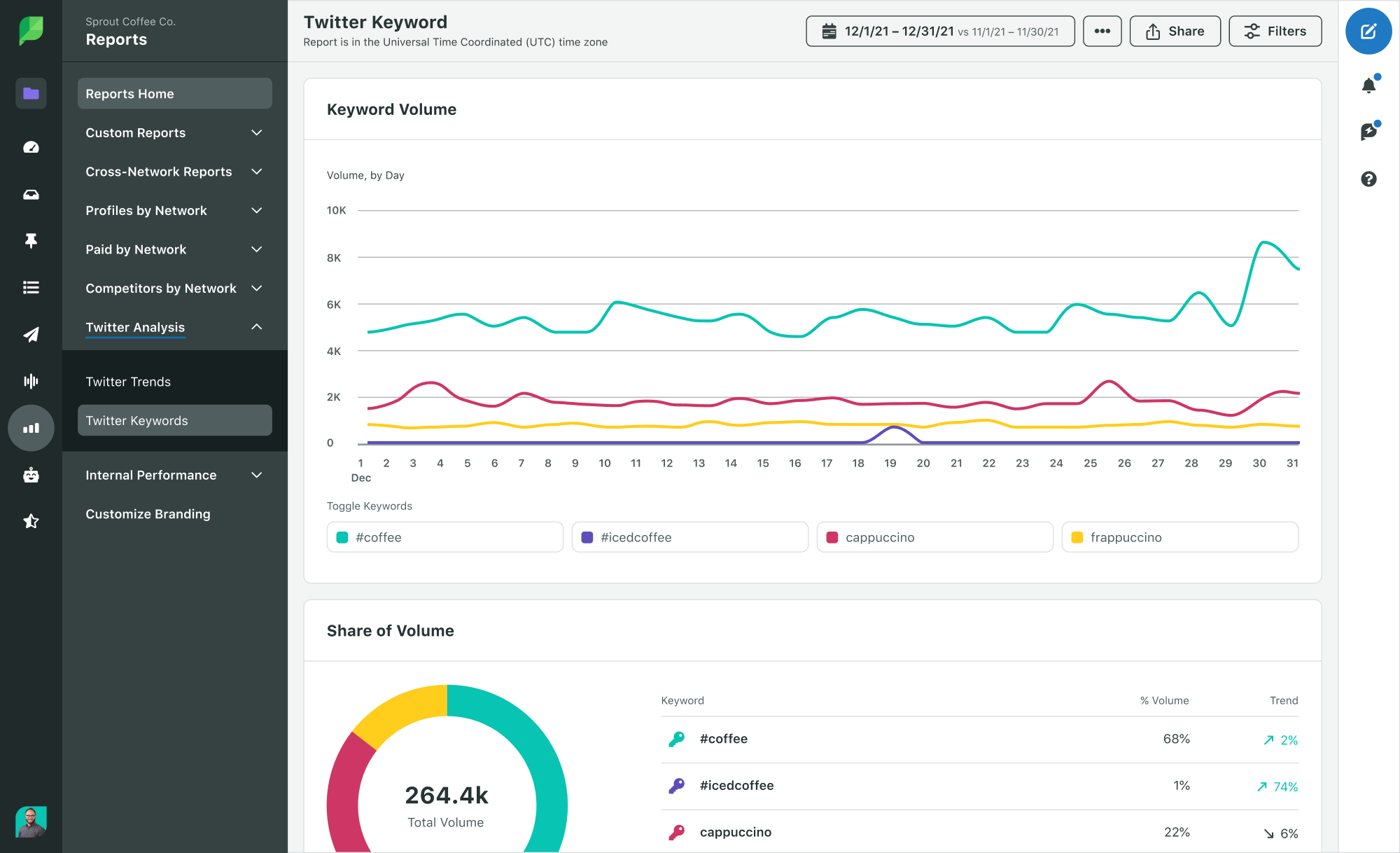
Gone are the days of the cumbersome, basic Twitter search. Sprout’s Twitter Keyword report, available in Professional and Advanced plans, uncovers trends in Twitter traffic for any keyword, hashtag, or complex search query across any date range. Brands can use it to:

  • Keep tabs on your market by tracking your brand against your competitors.
  • Track effectiveness of your past and current hashtag or marketing campaigns.
  • Discover patterns in keyword usage and adjust your marketing efforts accordingly.
  • Track your brand’s products against each other or against competitors’ products.

Once you set up your keywords, you’ll get real-time updates when people Tweet the phrases you set, so you can react quickly and engage with potential leads, contribute to trending conversations, get content ideas, and so much more.

If you’re not sure where to get started with keywords, Sprout’s Twitter Trends report shows the topics and hashtags most frequently mentioned with your Twitter handle. The Trends Report also pulls data on the people and brands most frequently talking about your brand. This is a great way to find influencers and brand advocates.

Build a custom report

Compiling data shouldn’t hinder you from capitalizing on it. Sprout’s reports eliminate time-consuming manual processes in favor of automated, exportable, presentation-ready reports. 

With the Report Builder, brands can quickly build Twitter reports using Sprout’s existing data, analytics and reporting modules. Simply create and export a custom report built to showcase the social metrics and insights most important to you and your clients.

Screen Recording 2020-03-11 at 12.16 PM.gif

Publishing & Engagement

Twitter dashboards are more than just analytics. With Sprout, brands can easily plan and publish content to support their Twitter campaigns and strategy. 

Plan your Tweets with ease 

The native Twitter app is perfect for people that just want to Tweet on-the-go. But businesses need the ability to schedule Tweets ahead of time and put together a complete social media editorial calendar. For that, you need a Twitter dashboard.

You can–and should–Tweet in real-time as well. But when you’re trying to send every Tweet manually, you’ll likely end up with long spans of time where you’re not Tweeting anything because you’re busy or just forget. Stay prepared by using your dashboard to schedule Tweets ahead of time and create a consistent stream of content. 

Sprout users can also leave notes within the calendar to indicate important dates, campaigns or other content considerations. 

Communicate with your followers 

By the end of 2020, customer experience is projected to overtake price and product as the key brand differentiator. To make sure your customers are getting the best experience possible, engage them in conversation. If they ask questions, answer them. 

When Sprout users set up their Twitter dashboard, conversations, direct messages, Retweets and more are pulled into a single stream, making it easy to build relationships and respond to your audience quickly.

Responsive, timely customer care does wonders to keep users happy. In a report by Microsoft of global consumers, 96% of those surveyed say that customer service is an important factor in which brands they feel loyalty to. Twitter is one of the first social media platforms people turn to communicate both frustrations and satisfaction, so it’s essential to stay on top of those conversations.  

Work as a team

Some companies have multiple people managing their social media accounts. A Twitter dashboard makes team collaboration possible because, rather than having to log into the same Twitter account, they can just log into a shared environment in the Sprout app. 

The Sprout Smart Inbox tracks each team member’s activity, whether they’re publishing Tweets, responding to customer questions or completing a task. This helps keep everyone on the same page and ensures team-wide accountability. 

Since Twitter’s native timeline moves so quickly, it can be difficult to keep up with all your brand Mentions. Plus, one teammate may not have the context for a conversation another teammate initiated. With Sprout’s Twitter dashboard, you can see the conversation history of the people you’ve communicated within the past. That way if someone has Tweeted a complaint or compliment multiple times, your team doesn’t have to start from scratch. Plus you can get to know more about your fans and give your Tweets and responses a personal touch.

Can I just use the Twitter Dashboard?

The native Twitter Dashboard has some nice features for users who want to dip their toe in the shallow end of analytics. Sprout has more robust features that help social media professionals maximize the effectiveness of their overall Twitter strategy. 

For instance, Sprout comes with ViralPost, an algorithm that picks the best time to Tweet based on when your audience is most likely to engage. Twitter Dashboard lets you schedule Tweets, but you’ll have to use your best judgment for when to send them.

Twitter Dashboard gives you some analytics, but Sprout’s dashboard provides advanced, in-depth reporting options that give a more holistic view of your efforts.

It’s more than likely that Twitter isn’t the only platform your brand is on. With Sprout’s dashboard, you can also manage Facebook, Instagram and LinkedIn in one place. 

If you haven’t taken advantage of a Sprout 30-day free trial yet, start one today. Once you do, we’d love to hear from you. What features would you like to see included in our next launch? Sound off in the comments below or Tweet your feedback @SproutSocial.

This post Why brands need a Twitter dashboard originally appeared on Sprout Social.


from Sprout Social https://ift.tt/2WHJ1aJ
via IFTTT

Meet #TeamSprout: Madelyn Nelson, Software Engineer

The engineers at Sprout Social are responsible for crafting the platform our customers have come to know and love. Our team is made up of some of the best in the industry who work on mobile, front-end, back-end, quality assurance and infrastructure. They work cross-functionally to solve hard problems and I asked one of our own software engineers, Madelyn Nelson, to give us some insight into her world and what she loves most about working at Sprout.


Describe your role in three words:

If you had to describe your job in a hashtag, what would it be?

Name one of your favorite projects that you’ve worked on:

What’s your favorite programming language?

What’s the first thing you look for when reviewing someone’s code?

What did you want to be when you were a kid?

What is your favorite Sprout tradition?

Describe Sprout’s culture in three words:

What Sprout value is the most meaningful to you?

If you were a social media platform what would you be?

What do you like to do in your free time?

What is something that inspires you?

https://girlswhocode.com/

Want to join Madelyn at Sprout? Check out our open roles, we’re hiring!

This post Meet #TeamSprout: Madelyn Nelson, Software Engineer originally appeared on Sprout Social.


from Sprout Social https://ift.tt/2Uj3m4L
via IFTTT