Marketers and business owners alike know the inherent value of PPC ads.With 64.6% of consumers interacting with Google ads when online shopping, it’s no wonder PPC ad creation is growing exponentially.
While lowered cost is always a good thing, the real importance of good writing skills for PPC ad copy is audience reach and interaction.
With limited character space at your disposal, you need your PPC ad copy to attract audience attention and hold that attention long enough to result in the desired reaction to your CTA.
Which component of your ad is attracting and holding that vital attraction?
Copy.
You need to ensure your copy is doing three things: working hard enough to earn that initial attention from your desired audience, speaking toward a specific pain point or need for that audience, and providing a clear, actionable CTA.
Without these three factors at work compellingly on the page, your PPC ad copy will more likely than not be lost to the ether of the internet.
How Can You Identify “Good” Writing in PPC and Ad Copy?
To best learn how to improve your own ad copywriting skills, look no further than existing ads that have achieved their purpose.
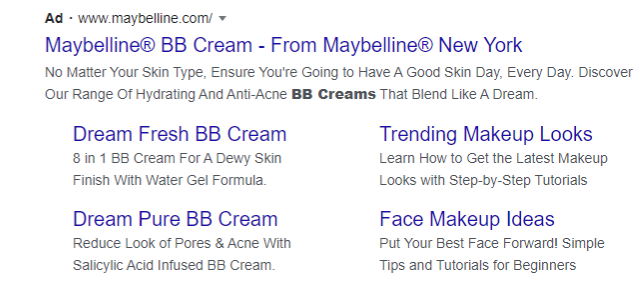
Maybelline Example:
Here, the purpose is simple: purchase the Maybelline BB cream.
The writer drives the searcher to this desired action through copy that is clear and concise.
The copy also draws on the emotional promise of “A good skin day, every day,” promising an ideal vision.
From selecting the CTA to the product description to the harnessing of emotion via the value proposition, this PPC ad is a lesson in strong writing skills.
Field Company Example:
On the other end of the product spectrum is an ad for a cast iron skillet from Field Company.
Here, the purpose is also to drive a purchase, but this ad is missing key components to make it successful.
This ad lacks a strong CTA and is not making a clear bid for the searcher’s next step.
While the writer takes a stab at an effective emotional trigger by sharing the organization’s family-owned background, this piece of information is not as compelling as the Maybelline advertisement.
Although these two ads offer customers quite different products, they harness the same writing skills to sell their product, relying on language to attract, hold, and, ideally, convert.
Successful identification of this audience and a deep understanding of their wants and needs is integral to success.
You may be the best writer in the world, but without a clear understanding of who you are speaking to, what you say doesn’t matter at all.
In addition to audience awareness, PPC copywriters should possess:
Understanding of user experience
Polished writing skills
Marketing awareness
Specialization
These four writing skills support the creation of direct, compelling content. By harnessing all these capabilities, writers can not only reach but also convert their intended audience.
5 Tips for Improving PPC Copywriting Skills
Some of the best ways to improve your writing skills is to make sure your copy speaks to what users are looking for during their buyer journey. Here are some of the top ways to make sure your writing is converting ads into paying customers.
1. Conversational Conversion Writing Skills
While the following tips all address the more technical aspects of honing writing skills for PPC ad creation, the most important factor to keep in mind is your audience.
You are speaking directly to a targeted individual, so you want to ensure all the crafted copy underlines this individual’s interests and challenges and solves the query they were, consciously or subconsciously, seeking.
This can be achieved by using shared language that is specific to your audience.
In this way, the best writers are also the best researchers. You need to truly understand the terminology associated with the product you’re trying to sell.
By incorporating terms specific to your chosen audience, you establish a silent rapport with your audience, building trust and interaction.
2. The Devil Is in the Details
Good writing is in the details. Whether you’re writing a CTA or crafting an ad in response to a history of search queries, you need to be specific and detail-oriented.
When you’re sharpening your writing skills for ad copy, you want to be sure to meet each search at its level of detail.
The more specific the search, the more precise the ad. By the same principle, the less specific the query, the less specific the copy.
Every time a search is queried, a potential customer is identifying what they want.
When you note the level of detail present and respond in kind, you’re infinitely more likely to satisfy that customer’s need.
3. Creating a Call-to-Action
Your CTA needs to do a lot of heavy lifting in your PPC ad copy.
It should be clear, direct, and concise. These conditionals that all rely on strong writing skills.
Remember specifics? They’re important here, too. Your CTA should specifically share what your intended action is for the would-be consumer.
Whether it is “read now” or “enter to win,” the potential customer needs to be clear on their next interaction with the PPC ad.
To sharpen awareness of that next step, be sure to start your CTA with a strong action word.
“Download,” “shop,” and “discover” are just a few examples of many verbs that can encourage your audience to take the intended action.
4. Emotional Charge Writing Skills
In addition to the specificity of action, it’s also important to inspire your audience with the specificity of emotion.
Everyone knows emotions can impact advertising success.
By using words that elicit enthusiasm or emotion, you incite a reaction in your audience, driving them to take the next step.
ABuffer analysis of the IPA dataBANK, which contains 1,400 case studies of ad campaigns, found that campaigns with emotional ad content performed twice as well as their rational counterparts.
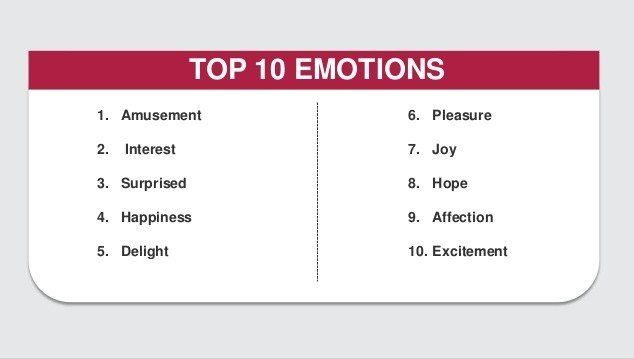
Below are the top ten emotions to evoke when you’re writing ad copy:
The best ad campaigns harness this emotional power, so be sure to include emotionally charged language in your copy.
5. The Art of the Arc
Every good writer knows that every good story has a beginning, a middle, and an end.
This tenet shouldn’t only be present in narrative but also should exist in every piece of writing you execute.
Whether you’re crafting a tweet, an Instagram post, or a PPC ad, your copy should have a clear beginning, middle, and end.
As consumers, we’ve been taught this structure since infancy, so it’s a pattern we’re accustomed to recognizing.
When employed in your PPC ad copy, you create a familiar structure for your audience, allowing them to interact with the ad in a known way.
This familiarity is beneficial as it gives the reader an intuitive path to follow, which ends with the action explicitly stated in your expertly crafted CTA.
3 Tools to Improve PPC and Ad Writing Skills
If you’re looking for more guidance on sharpening your writing skills, there are plenty of resources available.
TheHemingway App helps identify clunky or overly complicated sentences, allowing you to be more concise and direct in your copy.
Try theCopyhackers’ Conversion Copywriting 101, a free course that teaches you how to prioritize purpose and conversion in your writing, regardless of medium.
To improve your headline prowess, check out theCoSchedule Headline Analyzer. This tool helps you optimize your blog headlines for maximum performance and can work for ads as well.
Conclusion
The tools and tips highlighted in this post can make your ads outshine those of your competitors and lend you a creative edge in drafting other marketing copy.
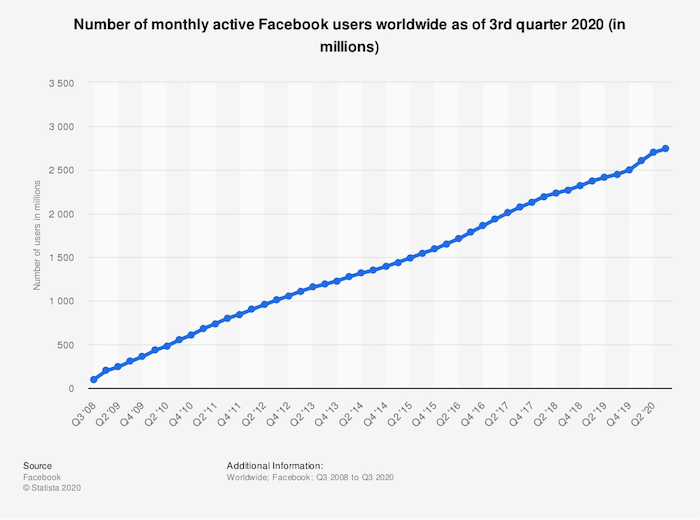
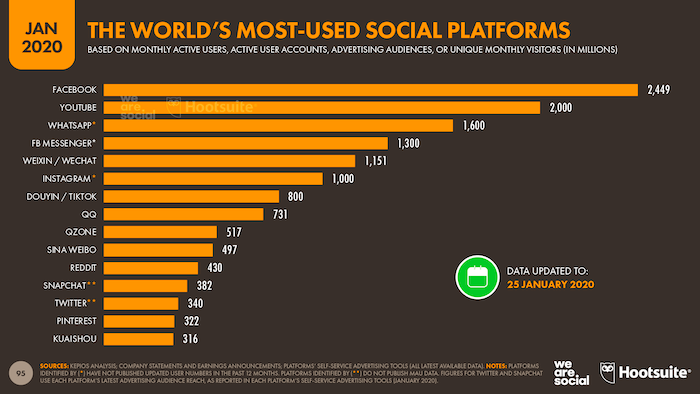
Thing is, that’s just not supported by the user data. In reality, Facebook has barely seen a slowdown in audience growth at any point in the last 12 years. It’s been super consistent:
With approximately 2.5 billion monthly active users, Facebook is comfortably bigger than Twitter, Snapchat, Reddit, and Instagram combined.
So what does this tell us?
Simply put, if you’re a brand, you can’t afford to ignore Facebook. It might not be your audience’s favorite social platform, but they’ll almost certainly be on there, which means you need to be, too. You should be using it to promote your products, advertise your brand, and generally represent your company.
The starting point for all of those things is your Facebook Business Page. Your current and prospective customers or subscribers will visit it to check you out, see what you’re talking about, and engage with your content.
What’s the first thing they’ll see? Your Facebook cover photo. Read on to learn how to make a Facebook cover photo that shows off your brand in the best possible light.
Steps to Create an Effective Facebook Cover Photo
Ever heard of Hitchcock’s rule? Named for the legendary movie director, it states that the size of an object on-screen should be proportional to its impact on the story at that specific moment.
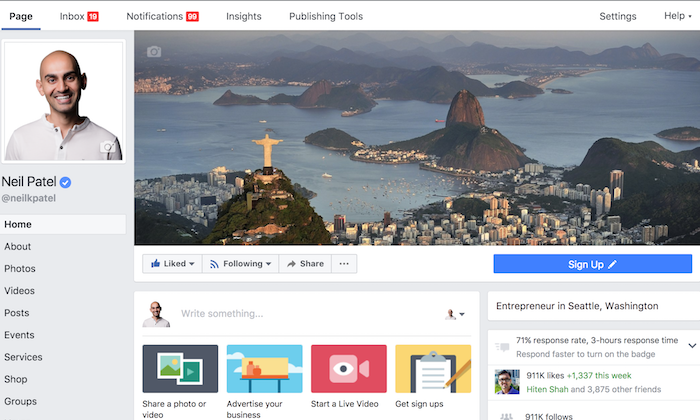
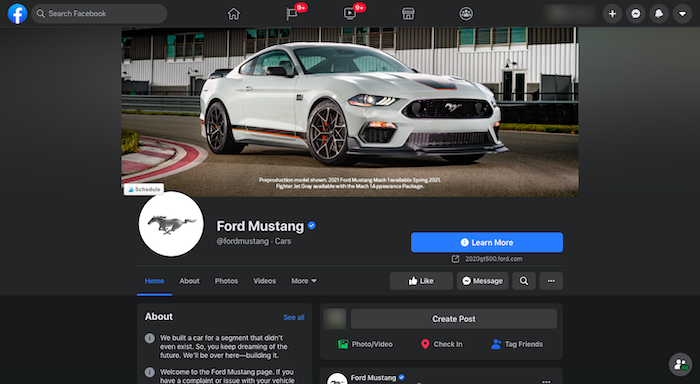
Well, given that your Facebook cover photo takes up almost half the page on desktop …
… it’s reasonable to say Facebook considers it pretty important! You’ve got a whole lot of digital real estate to play with, so you definitely want to make it count.
Designing a Facebook cover photo for your business page is much more than just choosing an eye-catching picture, cropping it to the right dimensions, and publishing it. Here are five key considerations to creating a cover photo that draws your audience in.
1. Keep Your Facebook Cover Photo Simple
Facebook used to say only 20 percent of your cover photo could be made up of text, but it dropped that rule in 2013.
With all that space to play with, and no limit on the amount of text you can include, it’s tempting to cram in as much information as possible. Don’t do that.
When it comes to creating an impactful Facebook cover photo, simplicity is your friend. Focus on communicating a single message as clearly as possible, so your audience is in no doubt of what you’re trying to say.
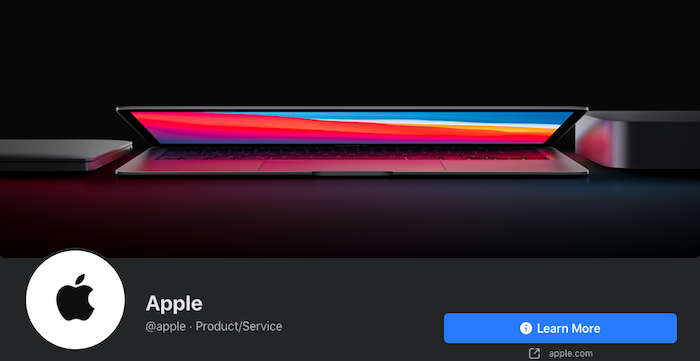
Apple does this better than most. While the tech giant famously doesn’t really “do” social, its branding on Facebook is still spot on.
Apple’s Facebook cover photo is an exercise in simplicity: no words, just one clean and instantly recognizable product image showcasing its iconic MacBook. The use of color is super effective, naturally drawing your eyes to the center of the image.
2. Complement Your Brand Through a Facebook Cover Photo
Can you sum up your entire brand in a single image? It’s not as simple as it sounds! But that’s exactly what you need to do with your Facebook cover photo. If it doesn’t complement your brand, you risk confusing your audience.
Adidas is a huge brand that sells everything from skateboarding sneakers to golf attire. It’s pretty tricky to encapsulate such a huge brand in one picture, so Adidas has chosen to combine three separate images for its Facebook cover photo.
This works really well, allowing the brand to speak to three different markets at the same time. In one cover image, Adidas encapsulates men’s and women’s sportswear, plus streetwear.
3. Keep Your Audience Front of Mind
As humans, we find it easier to connect with people than abstract concepts or inanimate objects. That’s why so many of the best Facebook cover photos feature images of people.
Of course, if you’re going to represent and speak to your audience through your cover photo, you first need to understand who they are. Fortunately, Facebook gives you a couple ways to find this out:
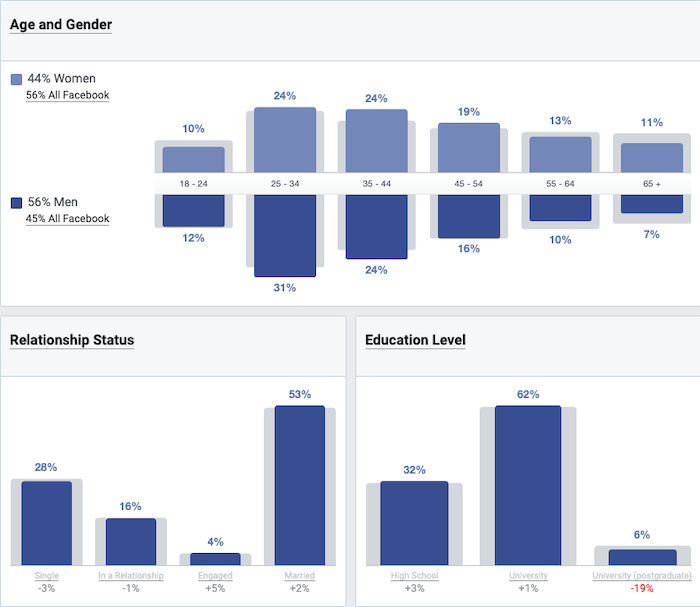
Facebook’s Audience Insights tool allows you to deep dive into the demographics, page likes, location, and Facebook activity of people who follow your page, are based in your area, or are interested in brands like yours. For instance, here’s a bunch of demographic information for people who like Major League Baseball:
By visiting your Facebook Business page, you can find out who engages with it most in the Actions on Page section. It shows you who clicked your contact information, call-to-action (CTA) button, or website, and segments the information by age, gender, device, and location.
So what does all this information tell us? Well, say you discover 80 percent of the people who follow your page are men, 75 percent live in Mexico and speak Spanish as their first language, and 90 percent are between the ages of 18 and 25. Your Facebook cover photo should probably incorporate a young Mexican man and maybe some Spanish text.
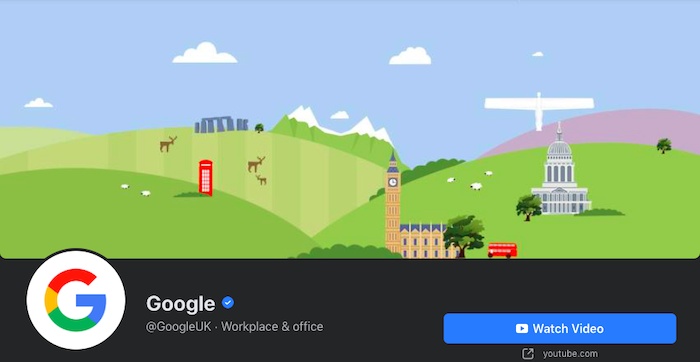
Here are a couple of examples of how Google targets its various audiences through its cover photos. First off, the brand’s UK Facebook page incorporates a bunch of cartoony imagery featuring recognizably British landscapes and structures like the Angel of the North, Stonehenge, and a red London bus.
Meanwhile, the Google Students cover photo features pictures of young people from diverse backgrounds, often working in teams, and all using technology. In other words, they’re exactly the sort of people you’d expect to be interested in a Google page aimed at students.
4. Pair the Facebook Cover Photo With Your Profile Pic
Just as your Facebook cover photo should complement your brand, it should also go hand in hand with your profile picture.
That’s really important because they sit alongside one another at the top of your Facebook Business Page. If they don’t fit together naturally, the results can be pretty jarring.
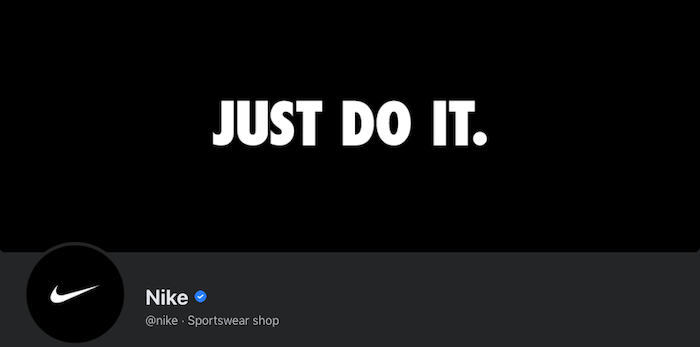
Nike is America’s most famous clothing and footwear brand, with 99% audience recognition, so it’s no real surprise that the company gets its Facebook branding perfect.
With just three words, two colors, and the classic “swoosh” logo, Nike somehow manages to encapsulate its whole brand across its cover photo and profile picture.
5. Promote Your Products and Events Through a Facebook Cover Photo
When your cover photo takes up so much space, why wouldn’t you use it to talk about the things you want to promote? Whether that’s a new product, a special offer, a big piece of content, or an event, your cover photo is a fantastic place to show it off.
For example, PlayStation uses its cover image to showcase a high-profile new release for its PS5 console. Notice how the brand combines this with a CTA urging people to play the game, effectively transforming the top half of its business page into an interactive advert.
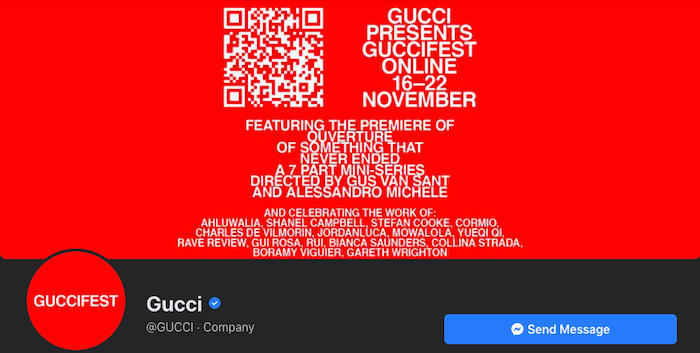
Taking things in a different direction, Gucci’s Facebook cover photo and profile picture are given over to promoting an online event, Guccifest.
Again, the fashion brand has added some interactivity by including a scannable QR code in its cover photo. The whole image is extremely text-heavy, which isn’t what you’d expect from a brand selling a physical product, but in Gucci’s case, this just makes the cover photo even more striking.
4 Steps to Designing an Impactful Facebook Cover Photo
Now that you understand the theory behind creating a striking Facebook cover photo for your business, it’s time to make it happen for your brand. Follow this simple four-step process to turn your Facebook cover photo vision into reality.
1. Pick a Facebook Cover Photo CTA Technique That Works for You
Take another look at all those Facebook cover photo examples I included above. None of them could appear in all five sections.
The PlayStation example is really effective at promoting a product, but it arguably doesn’t pair up well with the brand’s profile picture. Nike keeps things simple, complements its brand, and matches its profile image, but doesn’t directly feature its audience or showcase a product.
Does that mean they’re all bad cover photos? Far from it. Instead, this demonstrates that your Facebook cover photo shouldn’t be all things to all people. Pick out one or two of those techniques and use them to inform your image. For instance:
About to launch a high-profile new product? Use your cover photo to promote it.
Got a really specific audience? Speak directly to them in your cover photo.
Have a recognizable logo or slogan? Keep your cover photo super simple; let your branding do the talking.
2. Choose a Facebook Cover Photo Editing Tool
You don’t need to be a skilled graphic designer to create an effective Facebook cover photo. There are tons of easy-to-use, free photo editing tools that do all the hard work for you.
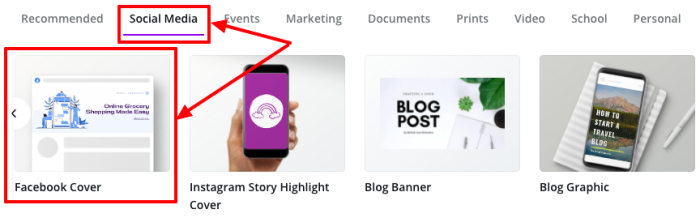
Arguably the most popular is Canva. It’s free to sign up and features a bunch of Facebook cover photo templates cropped to the correct dimensions. To find them, create your own Canva profile, select social media imagery, and choose the dedicated Facebook Cover option:
Just one word of caution here: While Canva is free to use, you’ll need to pay for some of the design elements.
There are lots of other options, too. If Canva isn’t working for you, try PicMonkey, Visme, Snappa, Bannersnack, or countless others.
3. Start With a Photo
Again, unless you’re a qualified graphic designer (or have access to one), you’re likely looking for the simplest possible way to create an impactful Facebook cover photo.
In that case, you definitely want to start by finding a suitable image. Something that encapsulates your brand and speaks to your audience.
Just as there are lots of brilliant graphic design tools available online, there are also tons of fantastic free stock image libraries packed with hundreds of thousands of visuals you can use to design your cover photo.
Alternatively, feel free to incorporate your existing website imagery if you’re planning to use your cover photo to showcase a product or service.
4. Remember to Use the Right Facebook Cover Photo Size
Last but not least, you must use the right dimensions for your cover photo. Otherwise, Facebook will crop or stretch it and all your hard work designing a beautiful, eye-catching image will be wasted.
So what are the right dimensions? There’s no easy answer, as frustrating as that sounds. Because 70 percent of Facebook users access the site on their phones, your cover photo has to work across both desktop and mobile. Yet cover photos display differently based on the device you’re using:
On desktop, the cover photo displays at 820 pixels wide by 312 pixels tall
On mobile, it displays at 640 pixels wide by 360 pixels tall
If you want to use a single image that works across both formats, Buffer recommends cropping it to 820 pixels wide by 462 pixels tall.
As an absolute minimum, Facebook says your cover photo should be 400 pixels wide and 150 pixels tall. It also advises keeping your image to less than 100 kilobytes for the fastest-possible loading.
Conclusion
Remember that your Facebook cover photo isn’t just a striking image. Choosing the right one for you isn’t necessarily about utilizing the brightest colors or the boldest copy.
It has to tie into your brand, speak to your audience, and effectively communicate your message. Ideally, anyone who knows your brand already should find it instantly recognizable.
If you’re struggling, remember the value of keeping things simple. Don’t try to be too abstract or clever. A basic image that clearly represents who you are and what you do will be much more effective than something complex that leaves people scratching their heads.
How are you using your Facebook Business Page to generate leads or sales?
Disclosure: This content is reader-supported, which means if you click on some of our links that we may earn a commission.
What would it be like for your business to never miss another call?
Nothing scares away new business like hard-to-reach customer service or disorganized sales calls. Adopt the best call center software and you will outfit your teams with the tools they need to communicate effectively.
Today, an affordable call center is within reach of any business with an internet connection.
Forget about the requirements of a physical office space, infrastructure, or even a business phone system.
Modern call center software is all you need to get up and running. You still have the hard work of engaging your customers and clients, but all the heavy lifting associated with maintaining a call center is off your plate.
How to Choose The Best Call Center Software For You
I make calls when I’m thinking about committing to a new product or service. Lots of people do.
The human connection is real, intimate, and—unfortunately—easy to mess up.
One dropped call. One mistaken name from an agent who’s spoken to 35 other people within the hour.
It doesn’t take much to lose a lead or earn a 1-star review carved in digital stone on the internet.
You’re looking for a system that establishes trust with customers because they know they can call and speak with the right person quickly.
It must also come with an interface that empowers agents by giving them insight into calls, client histories, and any other information they need to resolve issues in real-time.
Customers need prompt answers from helpful agents. End of story.
The best call center software comes with everything you need to meet these two fundamental call center objectives, and much more.
Let’s go through the core call center features that help businesses make their customers happier and their agents more productive.
Calling Capabilities
Blended call center software will let the same agent receive incoming calls and make outgoing calls. This isn’t the case with every product, as some are limited to a single direction: inbound or outbound.
This can work to your advantage.
If you only need one or the other, you may be able to get a less expensive plan that’s easier to secure and manage. A helpdesk might only need inbound and a sales team might be fine with outbound calls only.
Dialing Capabilities
For outbound call centers, having the right dialing capabilities can make a huge difference in terms of agent productivity (and sanity). The four types you are likely to see are:
Preview dialer: Lets an agent review contact information before they call
Progressive dialer: Automatically dials one contact per available agent
Power dialer: Automatically dials multiple contacts per available agents
Predictive dialer: Automatically dials based on predicted agent availability
Dialers decrease an agent’s down-time considerably and completely eliminate the manual grind process of making calls from their cognitive workload.
Channels
Call center software should be able to accommodate every channel you currently use or plan to use in the future. If you see something billed as omnichannel, it should cover:
Phone
VoIP
Email
SMS
Chat
Social
Video
Ensure that whatever product you choose will let customers interact seamlessly with agents across all supported company channels.
Call Routing
Call center software comes with routing features that segment and direct incoming calls, potentially automating the processes which connect callers with the expert or agent they seek.
Some of the popular call routing features explained:
Automatic Call Distribution (ACD): Greets customers and allows them to select from a main menu or enter extension to route themselves.
Automated attendant: Takes calls when all agents are busy, plays hold music, relays wait times, and reminds callers that their time is valuable.
Intelligent call routing: Uses automation, AI, or interactive voice response to route customers to the most appropriate agent.
Mobile device routing: Allows calls to be routed to mobile devices.
Omnichannel routing: Allows calls to be routed across any channel.
Virtual hold: Gives customers the option to receive a call back when an agent is ready, instead of waiting on the phone.
Warm transfer: Lets customers speak to a new agent before the call is transferred, and allows the previous agent to explain any ground that’s already been covered.
If call center software comes with intelligent call routing, it’s safe to assume it can handle most, if not all, of the capabilities listed above.
Interactive Voice Response
Interactive voice response (IVR) enables customers to use a phone system to access information from a connected database. This could be someone calling to find out their checking balance, hear the status of their order, or pay a bill.
If you have customers routinely calling to access information, you can free up a lot of phone time simply by implementing IVR. It’s a truly self-service solution that helps people get what they want, without ever talking to an agent.
Call Recording
You have probably heard a thousand times that “this call is being recorded for safety, security, or training purposes.” Well it’s all true.
Call recording is extremely important. Supervisors can listen back to trainee calls and give advice about how to improve. In the event of a legal or compliance issue, call recording will cover your bases.
Good call center software makes it as easy as possible to save and store every call in a highly organized, searchable database. If you integrate your CRM, every recording can also be tied to the appropriate customer or client account.
One advanced call recording feature that can be really useful for sales teams is voicemail-to-email. This sends an email with an audio attachment or transcription of the voicemail to the account owner who missed the call. This is a huge time saver, especially for agents who are remote and on the go.
Workforce Management
How efficient is your call center? How do you know?
Reporting and analytics are important features of modern call center software. Look for products with both historical and real-time reporting capabilities to support workforce management and optimization.
By tracking key metrics about calls, wait times, and first contact resolution, among others, those in supervisory roles are better able to forecast staffing needs to fit fluctuating demand.
Integrations, APIs, and SDKs
Put key customer data in front of your agents by integrating customer data sources with your call center software. The top products come with seamless integrations that work out of the box with leading CRMs like Salesforce and Microsoft Dynamics.
Many top call center software options have APIs and software development kits (SDKs) that allow you to build out custom solutions.
The better connectivity you can provide, the richer the customer information your call center will collect.
Done right, you’ll provide marketing, sales, and customer service with data-driven insights to steer their efforts.
Security
Even if your customers aren’t giving their social security number over the phone, they’re sharing personal and potentially sensitive information. It’s unpleasant to imagine how much havoc an attacker could cause with full access to a database of client conversations.
Consider potential vulnerabilities that come with deploying call center software. Does it integrate with your current security stack? If not, be sure to add the cost of securing your new IT perimeter to the total cost of ownership.
The Different Types of Call Center Software
It’s getting less and less important for call center solutions to offer traditional business phone systems. Some do, but most are focused on helping companies migrate gradually to a centralized, cloud-based, multi-channel interface.
As important as the phone is, the reality is that customers are reaching out on more and more channels.
This is why you’ll see the name “call center” being dropped in favor of “contact center.”
It simply reflects that companies have to be able to respond however they are contacted: phone, chat, email, and so on.
Whether you are starting from zero or looking to modernize your existing system, picking the right type of call center software is the first step.
On-Premises Call Center Software
Many companies still maintain their own call centers and it can be important to keep everything in house for compliance reasons.
If this is a concern, make sure you choose an option that supports your infrastructure needs.
Cloud Call Center Software
Cloud-based call center software provides the same capabilities as a traditional call center, but it’s delivered as a service. Companies don’t have to manage any of the hardware or software.
A SaaS call center can be deployed in just a few hours or days, since there isn’t much required beyond headsets and devices to work from.
It’s very easy to run a distributed or work-from-home call center with a cloud-based solution, which is another reason these solutions are so popular.
CCaaS
Contact Center as a Service (CCaaS) centralizes all of the channels your teams use to communicate externally.
Whereas a cloud call center may only give you VoIP, a CCaaS solution is going to loop in text, chat, social, and video as well.
UCaaS
Unified Communications as a Service (UCaaS) has all the capabilities of a CCaaS, with an additional focus of integrating legacy communication technology like fax and teleconferencing.
These products truly unify all forms of communication, helping companies adopt future-proof solutions as they phase out old equipment.
#1 – Five9 — Best For Blended Call Centers
Five9 empowers call center agents to deliver the best possible experience to their customers by providing true omnichannel functionality from anywhere within an intuitive interface.
Agents can switch between chat, email, mobile, social, video, or voice to maintain seamless customer interactions.
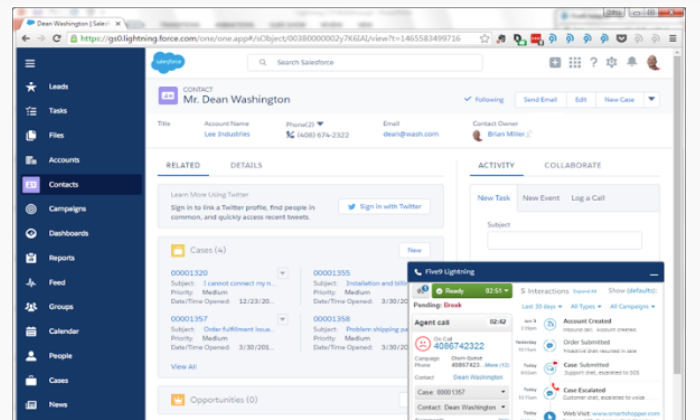
Plus, integrations with top CRM platforms mean that all data is captured, providing an end-to-end contact center solution. Whether agents are reaching out or picking up a call, they always have current information about who they’re speaking with.
There are also built-in workforce management tools that make accurate forecasting and scheduling much easier.
For all the power of Five9 call center software, it’s not overwhelming, and people can quickly master the tools at their disposal, such as:
Predictive, power, progressive, and preview dialers
Intelligent omnichannel routing
IVR
Historic and real-time analytics dashboards
Six built-in CRM integrations
Cloud APIs and SDKs
Blended call centers will definitely notice increased efficiency using Five9. Active blending, one of the intelligent routing features, automatically sends inbound calls to agents working outbound campaigns when call volume is high.
Five9 pricing is based on whether you want inbound, outbound, or blended service. You’ll have to get in touch with sales, but there are three options for how to pay:
Monthly on-demand
Per-minute fees
Annual contracts
The lowest price will come with an annual contract, but companies can scale quickly at low cost with on-demand pricing if need be.
As sleek as it is, Five9 is one of the top call center solutions for companies that need to integrate legacy technology. If you’re thinking about using a cloud-based solution for your blended call center, Five9 can help no matter where you are starting from.
The VoIP quality is great, calls don’t drop, and agents can work from anywhere on their laptop or personal mobile device. It’s a great solution for virtual cloud call centers because of the built-in security, workforce management, and collaborative features.
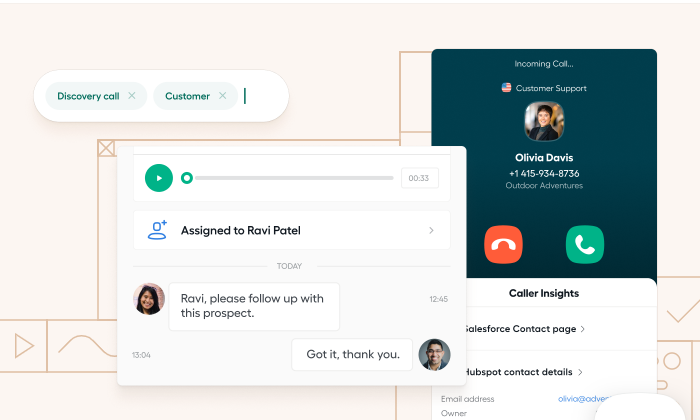
Customers can leave voicemails which can be quickly assigned to the right person. New hires can listen into calls to hear what good service sounds like. In fact, you can host up to five people on the same live call.
One of the biggest perks for teams is the ability to assign, tag, and comment on calls. This is so helpful—assign the call to an individual, tag it to a specific department, and leave a short explanation about what’s going on.
It’s not that other call center software can’t do this—it’s just easier in Aircall.
For all the ease of using Aircall, it is a complete CCaaS that provides
Automatic call-back
Intelligent call routing
IVR
Power dialer
One-click CRM integrations
Call center analytics
Aircall pricing is broken down into three tiers:
Essentials: starting at $30 per user/month
Professional: starting at $50 per user/month
Custom: contact sales
One quick thing: Salesforce integration only comes at the Professional tier, whereas integrations for Pipedrive, Zendesk, Hubspot, Slack and more than 60 others come with Essentials.
Aircall still supports traditional phone systems, which makes it an attractive option for companies that want to expand their call center operations to the cloud at their own pace.
#3 – 8×8 Contact Center — Best For Enterprise
8×8 Contact Center is one of the more robust tools on the market. 8×8 has been around for a long time and can fully support migration to a UCaaS call center.
It’s a powerful solution that can help large organizations in particular. Build out complex IVR paths, optimize a large workforce, and process payments all within a navigable interface.
There may be a little more of a learning curve with 8×8 than with other call center software simply because the platform is so feature rich.
That said, once you have everything set up, the support and online documentation is enough to help people take advantage of 8×8’s advanced features, including:
Call and screen recording
Predictive dialer
Drag-and-drop IVR designer
Speech analytics
Customer surveys
Native CRM and integrations with top products
The pricing for 8×8 Contact Center breaks down into three tiers:
Contact Center – Voice
Contact Center – Omnichannel
Contact Center – Advanced
8×8 is not going to be the most budget-friendly option, even at its voice-only tier.
To include digital channels, you will need the Omnichannel plan. For speech analytics and screen recording, you will need Advanced.
For voice-only call centers, other options from this list will meet your needs at a lower cost. If you are trying to build out an omnichannel contact center, however, 8×8 will give you a level of visibility and control that lighter products can’t.
#4 – Dialpad — Best For Startups
Dialpad is a next-generation UCaaS that completely supports today’s on-the-go, distributed workplace. Choose Dialpad for agile, constantly improving call center software.
You can add agents via the web client or Dialpad app. Both are updated frequently for security and to add new features.
For all the flexibility provided to end-users, Dialpad doesn’t skimp on the backend reporting, recording, or monitoring features. This is huge for companies that are still trying to figure out what’s important.
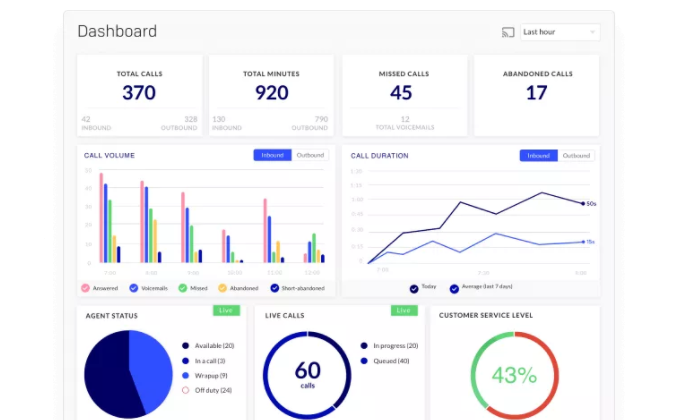
With Dialpad, your team can assess KPIs and discover meaningful trends in real-time. Simply integrate your CRM and watch as Dialpad surfaces the most important metrics from calls on clean dashboards or highly-visible leaderboards.
Some of the other great capabilities of Dialpad include:
IVR
Seamless mobile routing
Call/Voicemail transcription
Warm transfer
APIs and webhooks
Integrations with top SSOs, CRMs, G Suite, and Microsoft 365,
There are two plan options for Dialpad Contact Center:
Pro: starting at $225/month for 3 agents
Enterprise: contact sales, 100 agent minimum
Businesses thrive with Dialpad because of its efficiency. Deployment is simple, integrations are tight, and it performs extremely well for organizations with many remote workers.
#5 – Talkdesk CX Cloud — Best For Salesforce Integration
Talkdesk is a leading CCaaS product that works well for large organizations who need to scale their contact center operations. Quickly provision new agents and securely connect them to sensitive customer data, no matter where they are.
It’s a feature-rich, yet very approachable, solution. People who have never used Talkdesk can sit down and start taking calls.
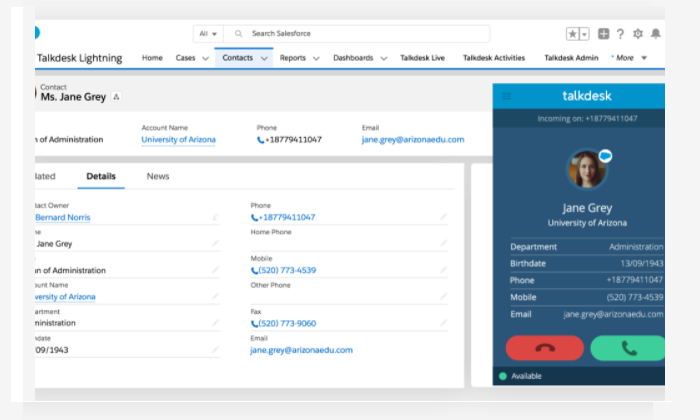
Talkdesk has more than 60 integrations ready to go, but the seamless connection with Salesforce CRM is definitely a key selling point. Agents can see a rich history of who they are talking to and all calls are automatically recorded in the proper place.
When agents forget call details, they can listen back with a few clicks.
Some tasks, like creating new IVRs, take some getting used to, but for the most part, non-technical users are going to be able to get the most out of every feature, including:
Intelligent routing
Warm transfer
Customer sentiment surveys
Real-time dashboards for workforce management
Custom IVR
Guardian Standard fraud prevention
Talkdesk also offers AI-driven add-ons for speech analytics, workforce management, and quality control.
Talkdesk has rolled out affordable solutions for SMB call centers. Adopting something this powerful early on will deliver superior customer engagement, and may even cut down on costs by increasing agent productivity.
Summary
Ten years ago, setting up a call center took months. Today, you can deploy one over the weekend.
To make your choice, focus on how the feature set of each product will:
Enable customers connect to the right agent quickly
Empower agents serve customers and connect with clients
While every option on this list is fairly easy to get set up, Dialpad or Aircall are exceptionally easy in this regard. Aircall will better accommodate legacy technology than Dialpad, if that’s a consideration, and the collaborative features are more mature.
Then again, it depends how you collaborate. The ease of routing calls between devices on Dialpad is phenomenal, which is critical for distrubed call centers.
Five9 has the edge on many other full-scale contact center software when it comes to outbound dialing capabilities. Sales teams can automatically ramp up their call volume without increasing call abandonment numbers. As the inbound call functionality is comparatively rich, Five9 is a great option for a blended call center.
Companies using Salesforce CRM will enjoy using Talkdesk. The integration works with ease and employee familiarity with the Salesforce interface makes adopting Talkdesk that much easier.
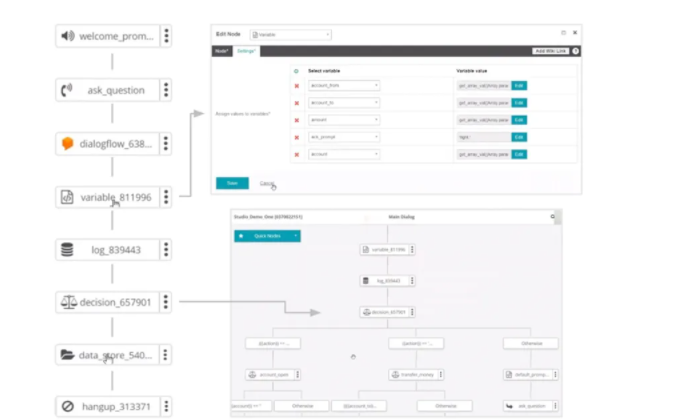
Choose 8×8 if your company is going to benefit from building out complex IVR pathways. It’s easy to design customer journeys in the visual, drag-and-drop editor, which really stands out from the crowd.
Additionally, the security in 8×8 is payment card industry compliant, so you can rest assured that connecting customers to sensitive information via IVR won’t cause problems down the line.
Got a crawling, indexing, or site-wide ranking problem?
SEO traffic isn’t just about having the right content.
One wrong technical SEO setting can bring your entire site down.
And many technical errors are so obscure that they go unnoticed for years.
Even small problems can add up, slowing you down and resulting in less traffic.
Technical SEO audits require specialized skills and in-depth expertise. Google is constantly changing it’s algorithms. If you want the audit done right, you’ll need someone that really knows that they’re doing.
Well, I have good news.
Step-by-step, I’ll walk you through how to choose a technical SEO agency that’s right for your business.
Whether you’re a small business that just needs an audit done right, or a major corporation that needs a complete SEO program, there’s an option for you.
Know Your Goals and Desired Outcomes
Most people only give technical SEO a second thought when things have gone south. It shouldn’t be this way.
Here’s a few examples of when it’s worth making technical SEO a priority.
Example #1: Traffic Drops After Publishing More Content
Let’s say you started your content push to get higher Google rankings.
You created, published, and promoted in-depth blog posts.
After a while, Google rewards your efforts with higher rankings for some keywords. Your site traffic starts to increase.
Things are going well.
So you keep publishing more content. And that’s when things go bad.
Your traffic tanks.
More content doesn’t always yield more traffic. Sometimes, it shrinks your organic traffic from.
I know it sounds crazy but this happens all the time.
Bloated sites with duplicate content make it really hard for Google to figure out which pages of yours to rank.
What does Google do when they’re not sure what to rank? They usually rank nothing.
Duplicate content on your blog, a ton of similar pages that were created automatically, or telling Google to index internal URLs can all lead to problems.
If you see anything like this, get a technical SEO to help you.
Example #2: An Abrupt Traffic Drop
If you play the SEO game long enough, one of your sites will fall off a cliff overnight.
Years ago, our blog at KISSmetrics saw traffic drop by 40% in less than a month.
That dropped our monthly traffic by hundreds of thousands of visitors. The team scrambled to fix that.
Everyone goes through one of these.
And the first thing you want to do is reach out to a technical SEO.
Hopefully, it’s a simple fix like a bad robots.txt file. Even if it’s a bigger problem, you want a serious expert to pinpoint the issue and chart a course to get that traffic back.
4 Characteristics That Make a Great Technical SEO Company
Not all agencies can develop, let alone implement, advanced technical SEO strategies. A reason for this is that it requires specialized skills and vast experience.
So, how do you recognize those who can not only develop a technical SEO plan unique to your business but can also implement it for maximum results?
Such agencies work with a team of experts and the other characteristics I’ll discuss below.
1. Experience With Massive Sites
Smaller websites rarely have issues with technical SEO that are difficult to fix. In most cases, any problems can be solved by checking the robots.txt file, making sure the site is on a good platform (like WordPress or Shopify), and upgrading to a good web host.
If a small site struggles to rank, it’s usually because they need a lot more content and authority. Rarely is there a quick fix.
Large sites, however, are completely different.
When a site has millions of URLs, all sorts of insane problems come up. There can easily be thousands of junk URLs that never should have been indexed to begin with. Or terrible canonical errors that cause rampant duplication problems. Not to mention keeping everything clean between dozens of languages.
For sites like this, make sure you’re working with someone that has tons of experience working on larger sites.
Otherwise, they won’t have the experience need to spot your technical problems quickly.
2. A Holistic Process that Includes Technical SEO
As I’ve mentioned earlier, technical SEO is the backbone that gives your site structure. Occasionally, you will see some quick technical SEO fixes bring you traffic.
But what then?
After you fix your technical SEO, what’s your plan for growing SEO traffic over the long term?
We’ve seen lots of folks work on quick fixes and then never take the next step to growing their site by 2X, 5X, or 10X what they have now.
If it was me, I’d want to work with someone that could keep growing my site year in and year out. That’s where the real impact comes from.
If you have a gnarly technical SEO problem, work with a specialist. But an agency with deep SEO expertise across content, technical SEO, and promotion will take your business to an entirely different level.
And to show their processes and how they achieve results, exceptional technical SEO agencies publish their findings from experiments.
That’s one of the easiest ways to look for a top tier technical SEO agency. Find the folks that product the best content in the space.
After all, if they’re already doing great SEO, they can likely help your business too.
4. Been in the SEO Game Long Enough to Spot Patterns
Technical SEO can move really fast.
Google is always releasing new features, shutting down others, and changing their priorities.
It’s a shifting landscape.
Getting a great technical SEO that knows the rules today isn’t enough. Ideally, you’ll want to work with someone that knows where SEO is going in the coming months and years. Or at least can take a good guess at it.
The last thing anyone wants is to restructure their site and then have Google go in an entirely different direction.
How to Work With a Technical SEO Agency
Once you’ve picked an agency, then what?
How do you work with one? What should you expect when you hire technical SEO specialists?
Typically, the process looks like this.
1. In-house Team Alignment
Most technical SEO agencies work as an extension of your in-house marketing team.
To ensure the partnership between both parties starts smoothly, you should:
Hold an in-house stakeholder meeting to align your teams.
Communicate why you need to work with a technical SEO agency and how their work would impact your site and business.
Make sure everyone is truly onboard with getting help. The agency may help find problems but internal teams need to be motivated to fix them.
Appoint front-facing employees that’ll work directly with the agency.
When you do this, it ensures there’s team alignment between your company and the agency. It also keeps the agency in sync with your goals.
2. Discovery Session
The first task to expect when you contact a technical SEO agency is an invitation to share your business problems and needs relevant to technical SEO.
A reason for this is to understand your business situation better and get ideas from their vast pool of experience on the best approach to take.
This process starts with a discovery session.
The best technical SEO agencies are first there to help organizations develop customized strategies that drive business growth. But for them to help you, expect to share your needs via a discovery session.
3. A Paid Audit
For a lot of marketing agencies, they’ll do a bunch of research for free and pitch you a proposal on how they’ll accomplish your goals.
This usually makes a lot of sense. The marketing agency gives you a taste of what they can do, they charge for the execution of the plan itself.
Technical SEO agencies rarely work like that.
In their case, the value is the research. You’re hiring them to do a ton of digging on your site and surface every problem they can find.
So don’t expect free audits.
The agency usually has a standard rate based on the size of your site.
4. Audit Results
Once the audit is finished, expect a document that goes into every issue that the team found. You can also expect a call to go over all the results.
Have your team ask followup questions, get clarification, and get as much advice on implementation as possible.
Because after this call, you’ll have a choice.
Some technical SEO agencies will help with implementation too. They’ll go over what that looks like. Many will have a proposal ready to go just in case you want to move forward right away.
If you want to implement everything in-house, make sure that this work doesn’t get neglected. It’s easy for it to get lost in the hand-off. Break up the work as necessary and get all deliverables assigned to individuals that can carry them to completion.
5. Ongoing Work
If you’ve decided to work with that agency on an ongoing basis, you’ll get into a regular cadence of status updates, invoicing, and execution.
Since you’ve already completed an audit with the agency by this point, there shouldn’t be any surprises in how they work.
As long as they keep delivering great work, keep working with them.
How to Find The Right Technical SEO Agency For You
To choose a technical SEO agency that’s right for you, I recommend you start with these steps:
Know your desired outcomes for technical SEO.
Make sure the agencies on your shortlist specialize in these goals.
Pick the one with the best track record in that area.
1. Neil Patel Digital – Best For Technical Content Structuring
No doubt, content is king. But content without a strong technical SEO foundation doesn’t yield long-term SEO success.
Ideally, you’d have both. Great content and smooth technical SEO.
At Neil Patel Digital, we excel at developing and implementing SEO-optimized content structuring that meets the necessary technical SEO requirements.
I truly believe we have one of the most comprehensive SEO programs in the world. We’d be a great fit if you really want to go for it.
Quite a few Fortune 500 companies have picked us to do just that.
2. Webris – Best for Technical SEO Audits
Let’s say you feel really good about your SEO strategy. But something on your site is a little off. Or you just want to double check and make sure nothing’s missing.
In that case, a technical SEO audit would be a great fit for you.
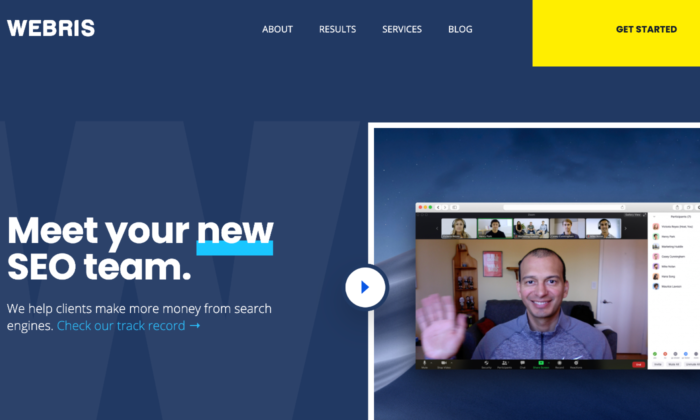
The company I recommend for this kind of work is Webris.
Led by Ryan Stewart, Webris boasts a talented team of advanced technical SEO experts trusted by government agencies and enterprise companies.
3. Salt.agency – Best for Technical Organic Optimization
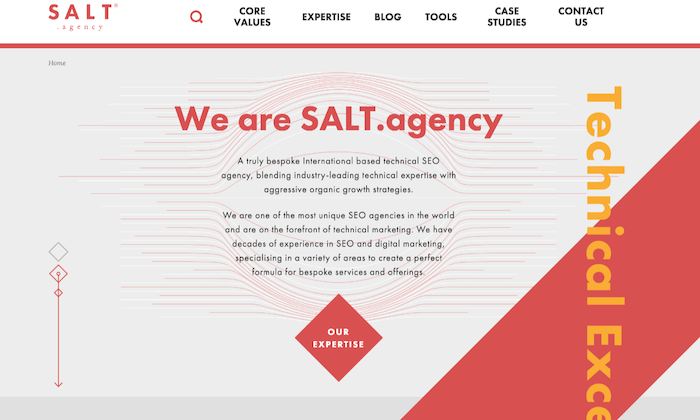
Salt.agency’s core differentiator is how they blend industry-leading technical expertise with organic growth strategies to drive organic optimization.
They’re a good option for business that need more than just a technical SEO audit. If you know that you have SEO problems but aren’t sure where they are, they’ll be happy to dig in and give you guidance on your strategy.
They have offices in Leeds, Boston, and London and customers that include Travel Supermarket, Cloudflare, Hartley Botanic, and many others.
4. Ayima – Best for Enterprise Technical SEO
Ayima positions itself as the technical SEO agency for enterprise companies. And this agency’s minimum project size is $25,000.
This may seem on the high side from afar, but it only reflects Ayima’s vast experience and expertise, working with huge companies like eBay and British Airways.
Ayima didn’t become the technical SEO agency for enterprise brands overnight. The company earned its stripes after transitioning from a search engine technology startup into a technical marketing agency.
In any space, the best agencies have people that have built products in that exact space. They really understand how it all comes together.
If you’re looking for hardcore technical SEO expertise, reach out to them.
5. Orainti – Best for eCommerce Brands
Orainti, a Spanish-based SEO agency, works mostly with ecommerce brands selling globally.
This agency is excellent for developing SEO-optimized multilingual domains and a robust site structure for category pages and products.
Ecommerce sites have a lot of technical SEO problems that are completely unique for them. If you have a large ecommerce site, I’d definitely recommend working with an agency with deep ecommerce experience.
Most importantly, most of Orainti’s services is around technical SEO.
Founded by Aleyda Solis, a veteran SEO practitioner, author, and speaker, Orainti has an impressive portfolio of premium brands likeUnder Armour, Zillow, Sage, Eventbrite, and others.
Have a Plan for Technical SEO from Day One
Most businesses make the mistake of relegating technical SEO to the backseat.
Why?
Because from the onset, it doesn’t have much impact on rankings and traffic.
A little time invested today could gain you thousands of extra visitors without any extra work later.
Don’t wait for things to go south. Make it easy for Google to find, index, understand, and rank your content.
No sense in jumping on the SEO treadmill while trying to carry a bunch of extra weight that will only slow you down.
Get a solid plan for technical SEO from day one.
And if you need help, reach out to an agency that specializes in technical SEO.