Tuesday, 29 December 2020

The Best Project Management Software (In-Depth Review)

Disclosure: This content is reader-supported, which means if you click on some of our links that we may earn a commission.

I’ve managed countless projects, hundreds of teams, and used many different types of management software over the years.

And you want to know a secret? It doesn’t matter which project management tool you use as long as you pick something people like using.

It sounds simple, but project management software is what you make it. Show me a nifty notification feature and I’ll show you an employee who can ignore it.

Getting the team or organization to buy in and trust the software is critical. The best way to make that happen is by choosing a product that actually makes their lives easier.

Let’s go through the factors you should evaluate to determine what project management software is going to help your teams with the challenges they face.

The Top 6 Options for Project Management Software

  1. Zoho Projects – Best for versatility
  2. Wrike – Best for marketing teams
  3. Teamwork – Best for remote teams
  4. Asana – Best for small teams
  5. Smartsheet – Best for large teams 
  6. Trello – Best free project management software

How to Choose the Project Management Software for You

The best project management software for you depends on your projects’ complexity, the size of your team, and the features you need. 

Every option on my list is a fantastic product, but only one is going to be the best fit for you.

So before we dive into my top recommendations, let’s talk about what to look for as you go through the process of finding the right software. 

Number of Users

Most project management software is charged on a per user per month basis. So, it’s crucial to understand how many seats you need and your budget. 

If you have a large team with hundreds of users, you’re better off choosing an enterprise plan with custom pricing to get the most bang for your buck. 

However, if you have less than 15 people, Asana is an excellent choice (free for up to 15 users). 

And if you have fewer than three users, you can use Zoho Projects for free as well. 

Collaboration Tools

Collaborating through email or phone is handy, but it can be hard to keep track of conversations and responsibilities.

The best project management software comes with built-in tools that allow users to collaborate directly within a task, project, or team. This can include flagging tasks with statuses, discussion boards, comment threads, and @mentioning other users to draw someone’s attention.

Another aid to collaboration is project management software that integrates with the tools your teams are already using. G Suite or Microsoft integration is going to make simple tasks like sharing and editing content that much easier.

Project Complexity

For simple and straightforward projects, basic project management software is all you need.

 And you can probably get by using a free forever plan with Trello, Asana, or Zoho Projects. 

However, as your projects get more complex, you need more robust features. So, you may need to upgrade to a paid plan if you go with a basic project management software. 

On the other hand, tools like Wrike and Smartsheet offer more advanced and industry-specific capabilities. But they come with a higher price tag. 

Task Management

Task management is one of the most important features to pay attention to. 

While most project management software includes basic task management, it’s important to consider the advanced capabilities you need. 

Do you need to create task dependencies? Maybe you need to create recurring tasks on a daily, monthly, or yearly basis. Or perhaps you want to assign multiple people to the same task. 

This also includes things like:

  • Checklists and due dates
  • File attachments
  • Task archiving/deleting
  • Task prioritization
  • Automation
  • Subtasks

So, carefully consider how you plan to manage projects and the task management features you need before making any decisions. 

Customization

Every project and team is different. 

So it’s important that your project management software can adapt to meet your needs. Whether that’s a fully branded dashboard, the flexibility to scale, or improved functionality with the right integrations. 

Furthermore, think about how you want to view and share project progress. Different software offers different project views, reporting, and analytics. 

Start by creating a complete list of required features and integrations.

Lastly, consider everything you need your software to do and speak to a sales team to make sure their tool can handle your top priorities within your budget. 

The Different Types of Project Management Software

There are various different types of project management software. Some are much better than others while some are reserved specifically for developers or enterprises with a large budget. 

Let’s walk through them together. 

Cloud-Based

All of my top recommendations are cloud-based software. This means that the software lives on a cloud server and you can access it from any web browser on any device. 

This is the preferred type for most users because it’s easy to use, doesn’t require any infrastructure on your part, and you can access everything regardless of where you are. 

You typically pay for this type of software on a per user per month basis. 

Industry-Specific

Different types of projects may require industry-specific solutions. 

These make your life easier with pre-made templates, automated workflows, and more features specific to the types of projects you’re managing. 

Most of the software on this list offer solutions for industries like:

  • Digital marketing
  • Manufacturing
  • Education
  • Real estate
  • Construction
  • Software development
  • Remote teams

With that said, these companies also offer standard subscriptions at reasonable prices that don’t include industry-specific tools. 

So you don’t have to use these higher-priced solutions unless you want to. 

Most of these solutions come with custom pricing based on your specific needs. So they may be outside your budget, especially if you’re a small company or a brand new business. 

On-Premise

On-premise project management software lives on your servers, rather than on the cloud. And while it’s more secure, you can only access the software from devices on your network. 

You also may need to install new infrastructure or hire an in-house maintenance team to update and maintain the software for you. 

This is why none of the recommendations on this list are on-premise solutions. 

#1 – Zoho Projects Review — Best for Versatility

For most users, Zoho Projects is my top recommendation. 

They offer a free forever plan, and paid plans start at just $3 per user per month. So, it’s incredibly affordable for small businesses and can scale as your business grows. 
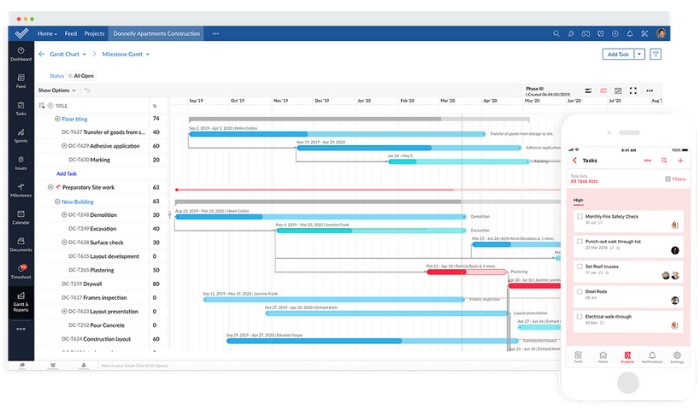
Whether you’re managing simple or complex projects, Zoho has everything you need, including powerful features like:

  • Hosted file storage
  • Task dependencies
  • Recurring tasks
  • Visual workflow builder
  • Time tracking
  • Task assignments and prioritization
  • Chats, forums, and feeds
  • Reporting and analytics

The drag-and-drop interface makes it easy to create workflows and track project progress quickly. Plus, you can view projects using Kanban, Gantt, or calendar views. 

Furthermore, their internal communication tools (chat, forum, and feed) streamline team collaboration where it matters most. 

You can also take advantage of more than 100+ built-in integrations with business tools you’re already using to run and manage your business. 

These integrations include Slack, Zapier, DropBox, and more. 

Zoho’s plans include:

  • Free — up to 3 users, two projects, and 10 MB of storage
  • Standard — $3/user per month and up to 10 projects (between 6 and 10 users)
  • Express — $4/user per month + unlimited projects (between 12 and 50 users)
  • Premium — $5/user per month + unlimited projects (between 15 and 100 users)
  • Enterprise — $6/user per month + unlimited projects (for 20+ users)

Start your 10-day free trial to take Zoho for a test drive today. 

#2 – Wrike Review — Best for Marketing Teams

Over 20,000+ businesses, including Google, Airbnb, and Dell, use Wrike to manage marketing and sales projects worldwide. 

With Wrike, your project management software adapts to meet your needs, rather than the other way around. And features like custom workflows and dashboards, automation, and real-time communication make this an excellent choice for dynamic marketing teams of all sizes. 
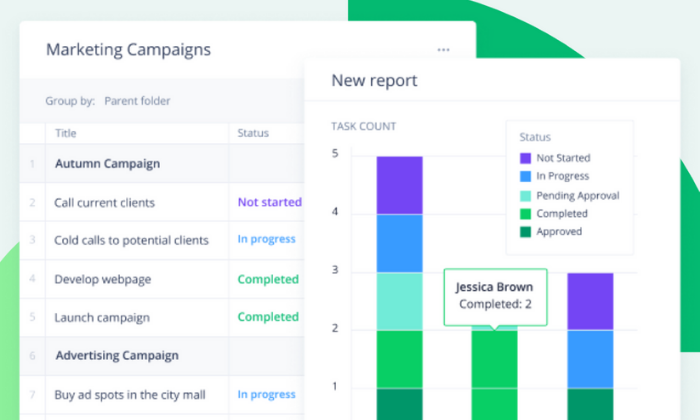
You also get end-to-end visualization so you can hone in on problem areas while maintaining constant forward movement with each project as a whole. 

Furthermore, Wrike includes powerful marketing-specific templates including

  • Campaign management
  • Product launching
  • Marketing operations
  • Content creation
  • Event management

And you can combine those with standard project management features like task management, proofing and approvals, communication tools, and real-time progress visibility. 

Project views include board, spreadsheet, Gantt, calendar, and custom views. 

Wrike also includes seamless integrations with 400+ business tools, like Salesforce, G Mail, and Google Drive. So, you don’t have to worry about software incompatibility issues or anything like that. 

You can start on their free forever plan for up to five users, but you may find it limiting. Paid plans include:

  • Professional — $9.80/user per month (5 – 15 users)
  • Business — $24.80/user per month (5 – 200 users)
  • Enterprise — Custom (5 – unlimited users)

They also offer tailored plans for marketing teams, but you have to contact them for a custom quote. However, it includes specialty templates, Wrike Proof, and more. 

Start your 14-day free trial or sign up for a free forever plan to get started today.

#3 – Teamwork Review — Best for Remote Teams

If you’re managing a remote team (or a soon-to-be remote team), Teamwork is an excellent choice. Their remote work module is specifically for distributed teams who need a flexible way to keep work moving forward. 

20,000+ teams plus big names, including Disney, Netflix, and Spotify, rely on Teamwork for their remote project management needs — and for a good reason. 

The software makes collaboration, task management, and project visibility a breeze regardless of where your team lives (and works). And as Teamwork says, “Just because you’re not in the same room doesn’t mean you can’t be on the same page.”

This remote project management software includes excellent features like:

  • Internal chat software
  • Centralized workspaces
  • Board views
  • Custom project templates
  • Workload balancing
  • Time tracking
  • Gantt charts

Furthermore, you can pick and choose which software you need. Or, you can save 49% by bundling all of Teamwork’s software together. 

At $35/mo per user (minimum of five users), it’s more suitable for businesses with a decent budget. But, their project management module alone is much more affordable, starting at $10/mo per user. 

Alternatively, you can start with a free forever plan for up to five users and two projects. This is an excellent choice for small teams or fast-growth companies. 

Sign up for a 30-day free trial to try Teamwork’s remote project management solution today.

#4 – Asana Review — Best for Small Teams

Asana is an excellent choice for teams of up to 15 people. 

And with millions of users spanning 190+ countries worldwide, you can rest assured you’re in good hands. 

Their free forever plan includes 15 seats, unlimited tasks and projects, assignees, due dates, and everything you need (aside from a few advanced features) to manage projects of all sizes efficiently. 
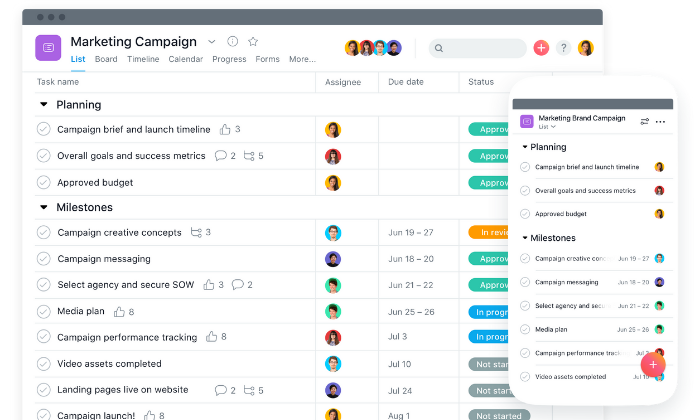
With Asana, you can map out even the smallest steps of every project to ensure forward movement and track your team’s progress along the way. 

Furthermore, you can enjoy features like:

  • Drag-and-drop board views
  • Timeline views
  • Automated workflows
  • Work requests and forms
  • Calendar view
  • Portfolio overviews
  • Workload balance
  • Custom fields
  • Reusable templates

Not only that, but the entire interface is beautiful and easy to navigate. 

You can choose between pre-made industry templates or create your own to get your team on track in no time. 

And with 100+ integrations including Adobe, Slack, Gmail, Chrome, Drive, and more, you can rest easy knowing Asana plays well with the tools you’re already using. 

Plus, you can share files, communicate, and share feedback all in one place. 

With a free price tag (for up to 15 users), Asana’s hard to beat. However, if you outgrow the free plan, you can upgrade to one of their paid plans, including:

  • Premium — $10.99 per user per month
  • Business — $24.99 per user per month
  • Enterprise — custom pricing only

Sign up for a free forever plan to get started with Asana today!

#5 – Smartsheet Review — Best for Large Teams

Smartsheet is a dynamic project management software built for enterprises and large teams. However, the solution is flexible enough to suit businesses and projects of all sizes. 

They specialize in rapid-movement projects with a ton of moving parts. So, you can trust Smartsheet for even the most complicated projects. 
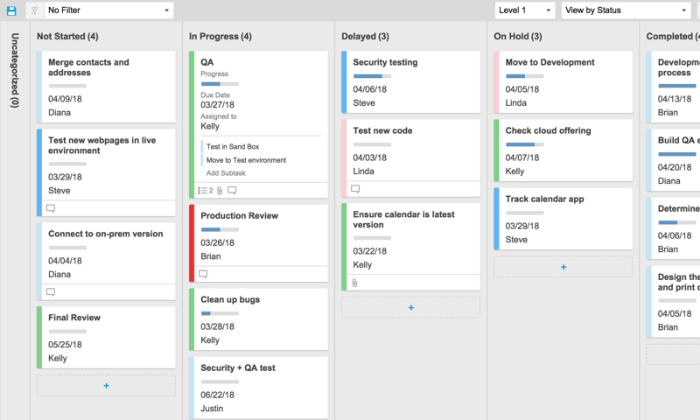
With Smartsheet, you can gain end-to-end project visibility with grid, card, Gantt, and calendar views. Furthermore, you can gather data from forms, automated workflows, and recurring tasks to see what you need to see, and when. 

However, the software goes beyond essential project management. It’s an award-winning work execution platform that’s easy to implement, manage, and maintain. 

Plus, 75% of fortune 500 companies use Smartsheet to get things done. 

So, you’re in good company. 

All plans also include on-demand customer support, continuous education materials, training + certification programs, and consulting services to help you make the most of your new project management software. 

And you also get collaboration tools, all four project views, and extensive mobile apps/integrations with every plan. 

While Smartsheet is overkill for most small businesses, it’s an excellent choice for large companies and enterprises looking to streamline their business processes. 

Their paid plans include:

  • Individual — $14 per month 
  • Business — $25 per user per month (minimum of three users)
  • Enterprise — custom (enterprise-grade features and tools)
  • Premier — custom (enterprise + premium features and tools)

Sign up for a 30-day free trial to try Smartsheets risk-free with no credit card required. 

#6 – Trello Review — Best Free Project Management Software

If you’re on a tight budget, Trello is an excellent free project management software. 

Plus, millions of users, including Pinterest, Peloton, Fender, and Costco, rely on it to map out and manage projects of all shapes and sizes. 

It’s an excellent tool for basic visual project management for any type of project, from home improvement and side hustles to marketing campaigns and full-blown business operations as well. 
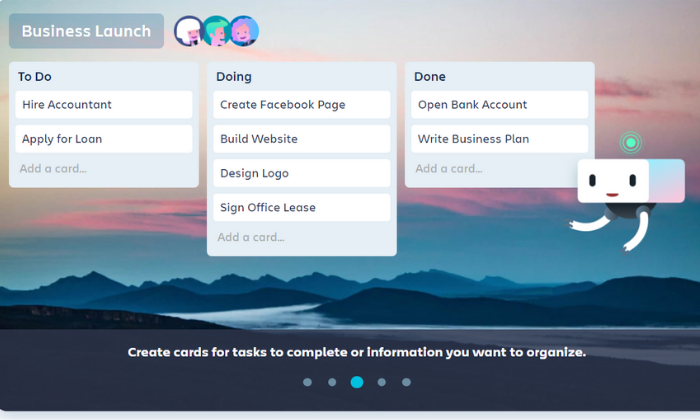
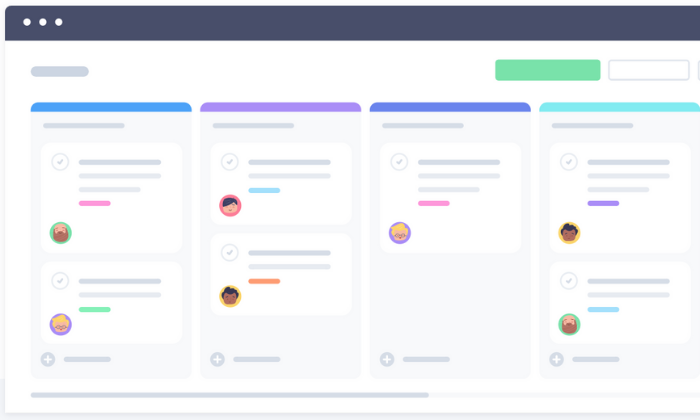
Trello uses boards, cards, and lists to organize projects, making it a familiar and comfortable platform. You can drag and drop cards, move cards to new boards, and cross tasks off as you go along.

Furthermore, you can create automatic workflows with rule-based triggers, calendar commands, and more. 

Plus, the free forever plan includes intuitive features like:

  • Unlimited personal boards
  • Unlimited cards and lists
  • 10 MB file attachments
  • Up to 10 team boards
  • Basic automation
  • And two-factor authentication

It’s an excellent solution for teams of all sizes since everyone can join for free. However, you need to upgrade to a paid plan if you need more than ten team boards. 

And if you outgrow the free plan, you can upgrade to an affordable paid plan for more advanced features. Trello’s paid plans include:

  • Business Class — $9.99/user per month
  • Enterprise — $17.50/user per month 

Sign up for a free forever plan to get started with Trello today.

Summary

Zoho Projects is my #1 recommendation for most users, starting at just $3 per user per month with an extensive free forever plan as well. 

However, there isn’t a one-size-fits-all project management solution. 

So, make sure you understand your needs and requirements before making any decisions. And don’t forget to use the criteria we talked about as you go through the process. 

What’s your go-to project management software?

The post The Best Project Management Software (In-Depth Review) appeared first on Neil Patel.


from Blog – Neil Patel https://ift.tt/3jOI88y
via IFTTT

Best Accounting Software

Disclosure: This content is reader-supported, which means if you click on some of our links that we may earn a commission.

82% of businesses fail because of poor cash flow management and subpar accounting practices. Yikes. It’s no secret that accounting is hard — and there’s a reason people spend their entire lives learning how to do it well. 

But there’s good news. 

You can avoid becoming a part of this statistic without heading to university to get a Bachelor’s (or Master’s) degree in accounting.

Enter… modern-day accounting software. It exists to help even the smallest businesses improve their bookkeeping processes, save time, and make fewer costly mistakes. 

Plus, understanding your numbers can lead to smarter business decisions and improved overall business health/performance as well.

These options are easy to get started and effortless to maintain. Get your books in order today and be better prepared for tomorrow.

The Top 5 Options for Accounting Software: 

  1. FreshBooks – Best for freelancers and solopreneurs
  2. QuickBooks – Best accounting software for small businesses
  3. Zoho Books – Best for businesses with 50+ customers/vendors
  4. Sage50 Cloud – Best desktop accounting solution
  5. Wave – Best free accounting software

How to Choose the Best Accounting Software for You 

Choosing the best accounting software isn’t easy, thanks to the thousands of options that all promise to make your life easier.

Which one offers everything you need without a slew of confusing features you’ll never use? 

If you’re not sure how to answer that question, you’re in the right place. As diverse as the market for accounting software may be, there are really only a few important factors you need to consider when making your decision.

Let’s walk through each consideration in detail to help you evaluate the different products available.

Number of Clients, Vendors, and Users

Certain plans limit the number of clients and vendors you’re allowed to have. This isn’t a major consideration for everyone, but companies that work with a lot of partners and distributors should ensure that they’re not going to hit annoying limits.

It may be the case that you have to upgrade to a premium plan in order to accomodate a large number of vendors or clients, so that’s important to look for if it is going to be an issue.

You also want to think about the number of user accounts you need. How many people in HR will need administrative control? What about other departments?

Client Management

The best accounting software includes intuitive features that let you follow up on invoices and a portal where your clients can pay you.

Minimize the number of steps necessary for a client to complete a payment, and send reminders automatically when invoices are past due.

Direct integration with your CRM software is an obvious plus, as you will be able to tie your accounting and customer database together.

Billing and Invoicing

Most accounting software includes invoicing functionality but in different capacities. Some offer highly customizable invoices while others are easier to use with fewer customization options. 

Furthermore, the software you choose should make paying invoices as easy as possible for your clients. Some other billing and invoicing features to consider include:

  • Automatic payment reminders
  • Payment due dates
  • Late fees
  • Recurring invoices
  • Ability to save client information
  • Payment processing options
  • One-click payments

Lastly, consider the payment processing fees associated with each software. Most charge a set percentage plus a small fee for credit card transactions and 1% for ACH transfers. 

Receipt Management

Many modern accounting tools make it easy to categorize and store digital versions of your receipts. All you have to do is snap a photo of your receipt and attach it to the associated expense in your account. 

However, not every software includes this. So, if this is something you’re interested in, be sure to choose an accounting software with receipt management capabilities. 

Banking

Connecting your bank accounts and credit cards to your accounting software makes account reconciliation a breeze. It also reduces the chances of human errors when making manual entries. 

However, not every software offers this capability on basic plans (but all of my top recommendations do). 

So make sure you opt for a software that includes this functionality. 

Mobile Accessibility

Make sure the software you choose offers a mobile app so you can manage payments, invoices, and cash flow on the go.

It may not seem like an important feature now, but you never know when (and where) you need to access your accounts or send an invoice.

Integrations

It’s important to consider the tools you’re already using to run your business. Why? Because the best accounting software for you integrates seamlessly into your tech stack with minimal hassle or headache. 

So before you get started, make a list of everything you need and the tools you already use. 

Then, make sure the top contenders on your list include your full requirements and the necessary integrations. 

You can even schedule a call with a sales rep for each accounting software to walk through your list of requirements to make sure they can handle everything you’re looking for. 

The Different Types of Accounting Software

When it comes to accounting software, you have several options. Some of them are better than others, but the best choice for you depends on your situation. 

So let’s walk through your options before we dive into my top recommendations. 

DIY Spreadsheets

Spreadsheets are a free, DIY option if you’re on a tight budget. They work okay if you’re just getting started and have a limited number of business transactions. 

However, they’re not a long term solution and they leave a lot of room for human error. 

If you’re looking for a free option, I highly recommend Wave as an alternative. 

Cloud-Based Accounting Software

Most modern-day accounting software is cloud-based, making it easily accessible from anywhere with an internet connection. 

And it’s usually billed on a monthly basis, scalable, affordable, easy to use, and built for small to midsize businesses. 

Every option on this list falls under this category. 

Database Accounting Software

This is a type of highly secure accounting software specific to enterprises and large businesses. 

It’s very expensive and requires an in-house team of engineers and/or financial specialists to install and maintain. 

Because of that, I didn’t include this type of software in my research. 

Now, let’s dive into my top accounting software recommendations based on the size of your business and your specific needs. 

#1 – FreshBooks Review — The Best for Freelancers and Solopreneurs

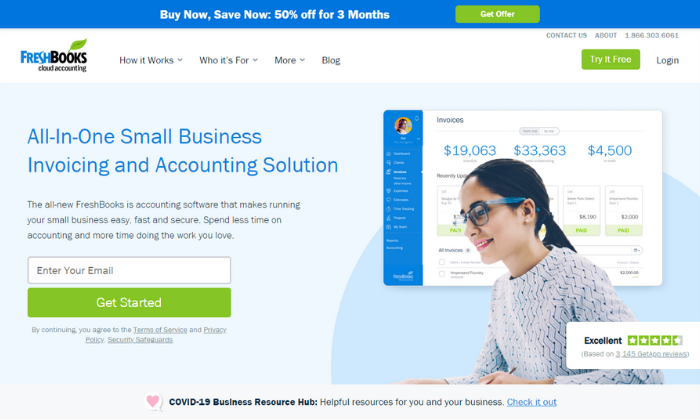
If you’re a freelancer, solopreneur, or small business, FreshBooks is a great accounting software to consider. To date, they serve more than 10 million businesses around the world. 

And the software complies with double-entry accounting standards, providing you with more in-depth insight into your finances and business transactions. 

FreshBooks specializes in invoicing, but the tool also includes small business features, like:

  • Time and expense tracking
  • Recurring invoices
  • Automatic payment reminders
  • Automatic late fees
  • Multiple currencies
  • Project management
  • Client proposals
  • Tax calculations
  • Reporting and analytics

Furthermore, your account dashboard includes a birds-eye view of your business’s financial health. It shows outstanding invoices, total profit, revenue by source, expenses, and unbilled time all in one centralized location. 

Plus, you can manage your books on the go using their robust mobile app. 

And the software integrates with over 200+ business tools like Shopify, G Suite, Stripe, Zoom, Squarespace, and Gusto. So, you don’t have to worry about incompatibility with most of the tools you already use. 

But like most accounting software, FreshBooks charges a transaction fee of 2.9% + $0.30 per transaction for credit cards and 1% for ACH transfers. However, these fees are pretty standard across the industry, and you don’t have to worry about any additional hidden costs. 

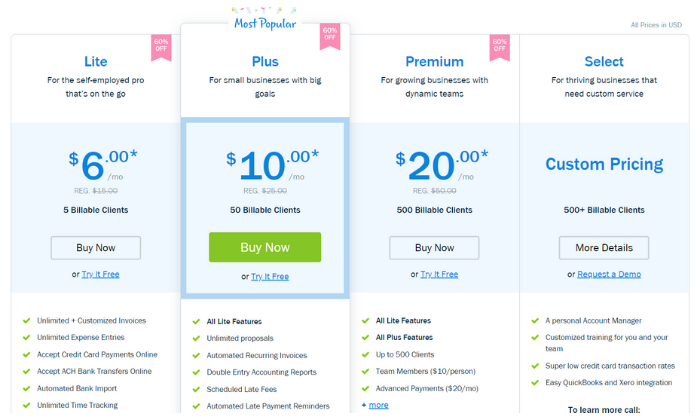
Their paid plans start at $6 per month for up to five clients making it very affordable for freelancers, solopreneurs, and small business owners alike. 

However, FreshBooks can scale alongside your business with other plans, including:

  1. Plus — $10 per month for up to 50 clients
  2. Premium — $20 per month for up to 500 clients
  3. Select — custom pricing for more than 500 clients

Sign up for a free trial to take FreshBooks for a test drive today! Alternatively, you can save 50% off your first three months. However, you have to choose one offer or the other. 

#2 – QuickBooks Review — The Best Accounting Software for Small Businesses

If you’re running a small business or starting a new business from scratch, QuickBooks is a popular choice — and for a good reason. In fact, over 5.6 million users around the world trust them for their accounting needs. 

From small businesses to self-employed individuals, QuickBooks offers an array of excellent accounting solutions to match your needs. 

Furthermore, you can choose from cloud-based, desktop, or POS system deployment, depending on your situation. However, I highly recommend the cloud-based solution for most businesses. 

Plus, the online software integrates with apps like PayPal, Square, and Shopify to simplify cash flow management in one centralized location. 

With their online solution, you can easily access your account anywhere globally with an internet connection. Plus, you can use the mobile app to take pictures of your bills and receipts rather than filing a heap of paper receipts in your office. 

You also get access to features like:

  • Customizable invoices
  • Income and expense tracking
  • GPS mileage tracking
  • Automatic sales tax calculations
  • Bank and credit card integration
  • Expense categories
  • Standard reporting

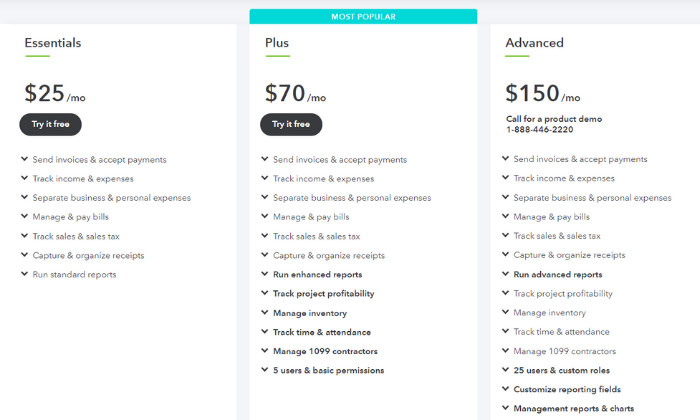
And you can easily upgrade to an advanced plan if you outgrow the basic plan or need more advanced features. Some of their advanced features include 1099 management, inventory management, and time/attendance tracking. 

So regardless of what you need, there’s a plan to suit your needs. 

The cheapest plan starts at $25 per month. And you can add payroll services to your plan, starting at an extra $45 per month + $4 per employee per month with more advanced options available.

Furthermore, QuickBooks charges $0.25 + 2.9% for invoices, 2.4% for swipes, and 3.4% for keyed payments per transaction. Alternatively, they charge 1% for ACH transfers. And you can save up to 40% on transaction fees if you charge more than $7,500 per month. 

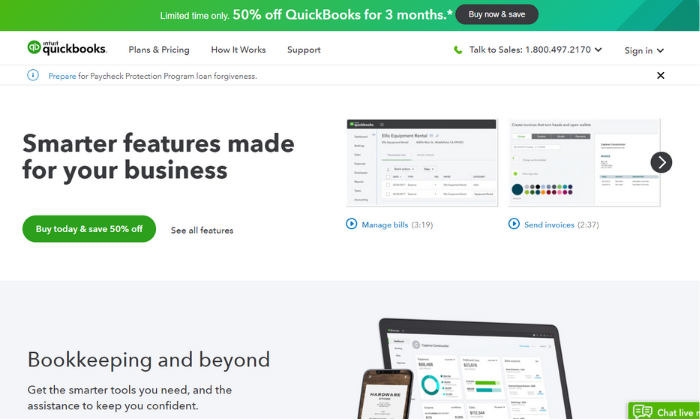
Like FreshBooks, QuickBooks offers a 30-day free trial OR 50% off your first three months. 

Get started with QuickBooks today!

#3 – Zoho Books Review — The Best for Businesses with 50+ Customers/Vendors

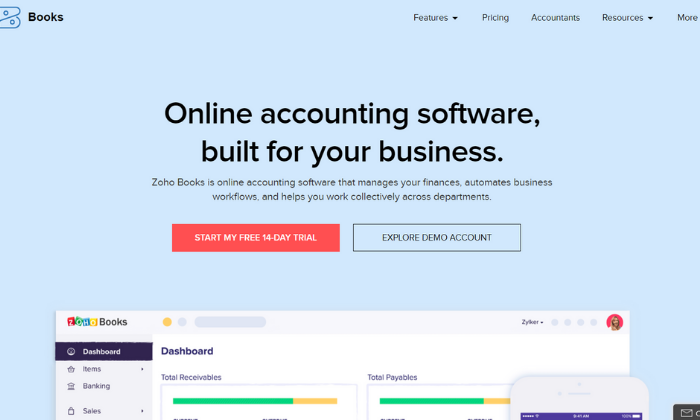
If you manage many clients and vendors, Zoho Books is one of the most affordable accounting software to consider. Their cheapest plan includes up to 50 billable clients, and they also have packages for up to 500 billable clients as well.

So, you don’t have to worry about exceeding your monthly limits. 

Furthermore, Zoho Books includes access to powerful features like:

  • Tax compliance tools
  • Custom quotes and estimates
  • Automatic payment reminders
  • Vendor and expense tracking
  • Inventory management
  • Automatic bank feeds
  • Time tracking
  • Customizable invoices
  • Role-based access
  • 40+ integrations

Zoho Books also offers an intuitive mobile app for managing your accounts on the go. With the app, you can track your mileage, reach out to customers, track your time, create invoices, and more. 

Each plan also includes a private client portal for accepting payments, unlimited phone and email customer support, free SSL encryption, and open rest APIs to connect with third-party applications. 

Furthermore, Zoho offers a wide range of other business tools that integrate seamlessly together. Running a subscription-based business? Or need advanced inventory management? Maybe you need extensive expense reporting for your team. 

Odds are, Zoho offers what you need. You can bundle tools together to save money and create a custom business management system for your business. 

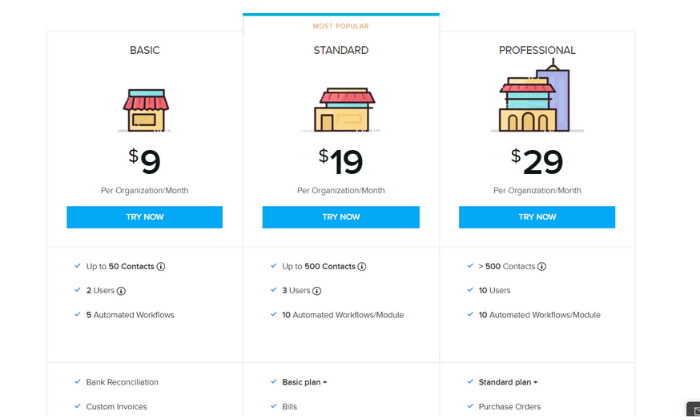
I highly recommend starting with the Basic Plan ($9 per month) and upgrading to an advanced plan when and if you need to. The Basic Plan includes up to 50 contacts, two separate user accounts, and five automated workflows to simplify your accounting processes. 

Zoho’s advanced plans include:

  • Standard — $19 per month for up to 500 contacts
  • Professional — $29 per month for more than 500 contacts

All of which are very affordable for businesses of all sizes. Furthermore, you can add extra users and 50 auto-scans for $2/month and $5/month, respectively. 

Sign up for a 14-day free trial to see if Zoho Books is right for you today!

#4 – Sage 50Cloud Review — The Best Desktop Accounting Solution

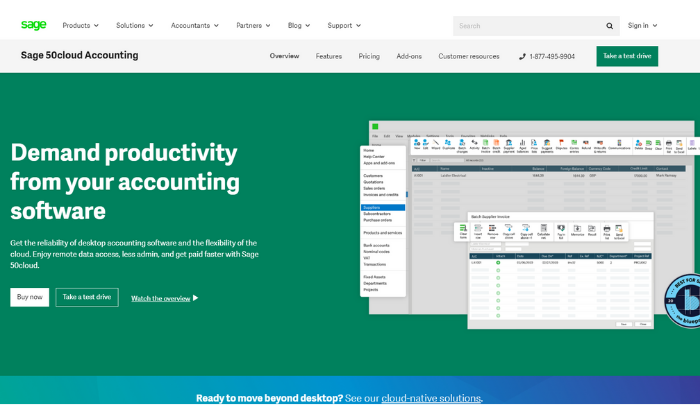
Sage 50Cloud is a desktop accounting application seamlessly connected to the cloud. So, you get the speed and reliability of a desktop software paired with the flexibility and remote accessibility of using the cloud. 

Furthermore, Sage offers cloud-based accounting software, so you’re not limited to the desktop application if that’s not your thing. However, their desktop solution is where they really shine. 

You can securely access your accounts anywhere, anytime, allowing you to work when you want and how you want. So, you’re not limited to your desktop computer despite the benefits of using desktop software. 

Plus, as the #1 rated accounting solution for small businesses, it includes features like:

  • Cash flow management
  • Flexible invoicing
  • Recurring invoices
  • Pay Now functionality
  • Accounts payable + banking
  • Automatic reconciliation
  • Advanced inventory management
  • Job and project costing
  • Payroll processing

As you can see, Sage 50Cloud includes a robust set of features you typically have to pay extra for with the other options on this list (i.e., payroll). 

And with those advanced features comes an advanced price tag. 

So if you’re looking for basic accounting software, you’re better off going with FreshBooks or QuickBooks. However, if you need these advanced features, pricing starts at $50.58 per user per month. 

Their paid plans include:

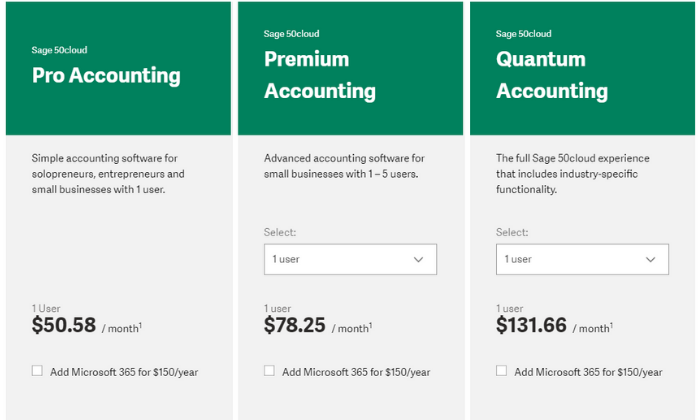
  • Pro Accounting — $50.58 per month for simple accounting
  • Premium Accounting — $78.25 per month for advanced features
  • Quantum Accounting — $131.66 per month for all features

However, you can save a bit more by choosing an annual plan and paying in advance. Additionally, you can subscribe to Microsoft 365 for an extra $150 per year. 

You can try Sage’s cloud-based accounting software free for 30 days with no installations and no credit card required. After that, you can purchase Sage 50Cloud if it’s a good fit for your business. 

Get started today!

#5 – Wave Review — The Best Free Accounting Software

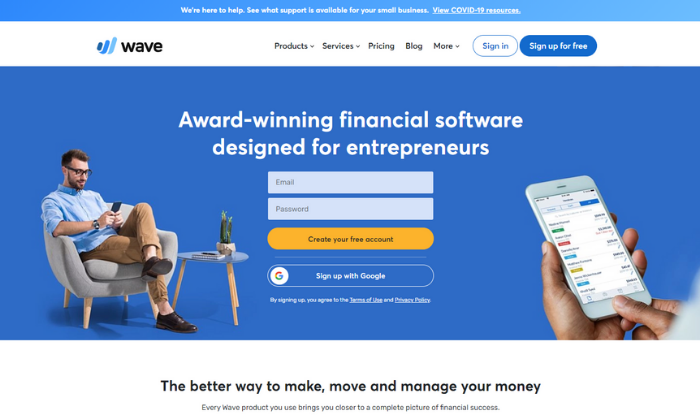
If you have a tight budget or need a simple accounting solution, Wave is an excellent choice. It’s an award-winning finance software for entrepreneurs and businesses of all sizes. 

Plus… their accounting features are entirely free with no hidden fees or monthly payments. However, they charge a standard transaction fee of 2.9% (3.4% for American Express) + $0.30 for credit cards and 1% for ACH transfers. 

You can also add payroll services starting at $20 per month. But accounting, invoicing, and receipt scanning are all free forever. 

This free accounting software includes features like:

  • Unlimited income and expense tracking
  • Unlimited collaborators and accountants
  • Double-entry accounting system
  • Powerful reporting and analytics
  • Bank + credit card connections
  • Tax categories
  • Recurring invoices
  • Automatic payment reminders
  • Unlimited receipt scanning
  • 2-business-day payouts

Plus, you get unlimited email support, as well. And if you’re wondering how Wave stays in business, it’s through their transaction fees and payroll services. So, yes. The software really is free forever, with no hidden fees. 

Furthermore, you can download Wave’s mobile app to access and manage your accounts on the go from anywhere with an internet connection. 

Sign up for a free account to get started today!

Summary

I recommend FreshBooks (for freelancers and individuals) or QuickBooks (for small teams). These two solutions are suitable for most users. They’re incredibly affordable, easy to use, and scalable. Plus, they include all your essential accounting features.

And if you’re on a tight budget, Wave is an excellent free alternative. 

However, the best accounting software for you depends on what you need and what you can afford. So, feel free to use the characteristics we talked about as you go through the process of choosing the right software for your business. 

What’s your favorite accounting software?

The post Best Accounting Software appeared first on Neil Patel.


from Blog – Neil Patel https://ift.tt/31SlWUT
via IFTTT

Best Marketing Automation Software

Disclosure: This content is reader-supported, which means if you click on some of our links that we may earn a commission.

Marketing campaigns get more complex by the day. 

It’s great news for the consumer experience but a nightmare for you as a marketing manager handling thousands of moving parts (and countless employees) on a daily basis. 

To put it lightly, there’s a lot going on behind the scenes. 

Especially complex technical challenges that most consumers and employees will never see or fully understand. 

But thankfully more and more automation tools are popping up to make your life a bit easier.

However, that means choosing the best marketing automation software for your business and team is harder than its ever been. 

From enterprise-grade solutions to the most affordable options, my team and I have researched, tested, and used just about every software you can imagine. And I can honestly say… that’s not an exaggeration. 

But the good news is that I narrowed it down to my top six recommendations, reviewed them, and developed an all-inclusive list of what to consider when making your final decision. 

The Top 6 Options for Marketing Automation Software

  1. Freshworks CRM – Best for small to midsize businesses
  2. Pardot by Salesforce – Best for B2B companies
  3. ActiveCampaign – Best for email marketing automation
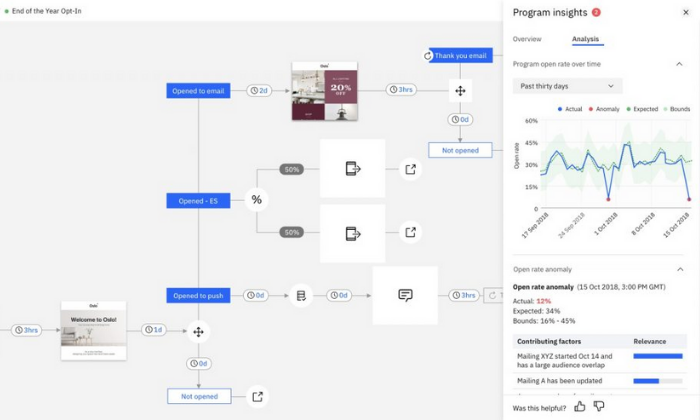
  4. Acoustic – Best for enterprise multi-channel marketing automation
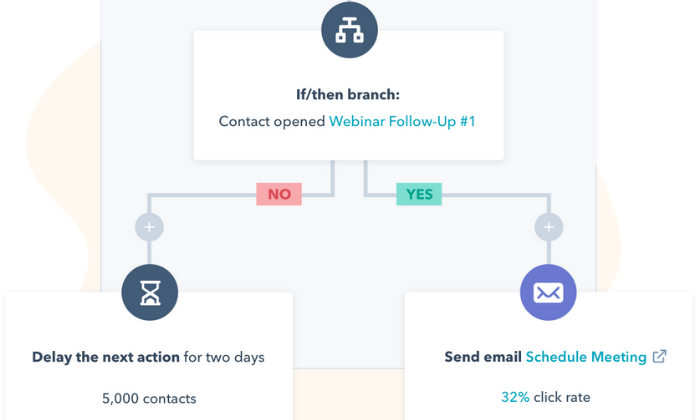
  5. HubSpot – Best for sales, customer service, and marketing automation
  6. Act-On – Best for marketing agencies

How to Choose The Best Marketing Automation Software for You

I stand behind all of my top recommendations. However, choosing the right one for you isn’t always easy because it depends on various factors. 

So, before we dive in, let’s talk about how to narrow things down and find the best marketing automation software for your business. 

Type of Business

B2B businesses have different marketing needs than D2C companies. 

Furthermore, marketing agencies present a new set of marketing automation challenges. Because of that, specialized software may be necessary to meet your specific needs at a reasonable price point. 

The size of your business matters too. Large companies run complex, massive-scale campaigns and have bigger pockets. So, small business tools aren’t a good match.

However, smaller companies will probably find enterprise-grade features confusing and wildly out of budget, which is why those small business tools exist in the first place. 

So, pay attention to who the software is built for when making your final decision. 

Number of Contacts

Most pricing plans depend on the number of contacts or leads you have. The larger your list, the more you need to pay to maintain it and stay in touch with them. 

If you have tens or hundreds of thousands of contacts, enterprise-grade solutions are probably more cost-effective. However, that’s not the case if you have a few hundred or even a few thousand leads on your list. 

Just be sure to keep this in mind and remember that specific plans may limit the maximum number of contacts you can have. 

And if you hit those limits, you’ll need to upgrade to a higher plan or pay an extra fee.

Your Marketing Channels

Different marketing automation software supports various marketing channels. 

And there’s no one-size-fits-all solution. 

From SMS and email marketing to social media and push notifications, it’s crucial to choose a software that handles everything you need.

Smaller businesses with simple campaigns may not utilize a wide range of channels and can get away using a more affordable tool. 

However, large businesses with complex campaigns spanning numerous channels need something more robust to manage all the moving parts. 

Furthermore, some software includes varying channels in different pricing tiers. So, you may start on one level and need to move up to gain access to more marketing channels. Or you may need to move to (or integrate) a new tool altogether. 

It may help to map out your upcoming campaigns and decide which channels you plan to use.

Automation Features

Automation is at the heart of every tool on this list. But some offer more advanced automation features than others. 

Do you need to score leads and prospects? Maybe you want to combine SMS, email marketing, and Facebook ads in the same customer journey. Or perhaps you need the ability to send hyper-targeted emails on autopilot. 

Regardless of the complexity of your campaigns, don’t forget to consider:

  • Split A/B testing
  • Automated email campaigns
  • Event and website tracking
  • Contact management
  • Visual customer journey mapping
  • Automated segmentation and personalization
  • Prospect and lead scoring
  • Dynamic content
  • Transactional emails
  • AI-powered recommendations
  • Action and logic-based triggers
  • Reporting and analytics

You may not need all of them, and some tools don’t include them. So it’s critical to understand what you need (and don’t need) before making your decision.

Additional Features

It’s not uncommon for marketing automation software to include a handful of features typically found in a CRM tool, like live chat or customer support capabilities. 

Before making a final decision, it’s essential to understand which additional features you need to fill the gap between marketing and sales or customer service. 

You may already have these systems in place. So, you won’t need these additional features. But if you don’t, you might be able to save money, hassle, and time by choosing a software that includes everything you’re missing under one roof. 

Hubspot is an excellent example of this. 

It includes customer service, sales, and marketing automation tools in a centralized location to streamline data movement and foster automation across your entire business. 

The Different Types of Marketing Automation Software

Marketing comes in all shapes, sizes, and complexities. 

From physical mailers and print campaigns to social media and email marketing, the best marketing automation software helps you build, automate, and optimize all types of marketing campaigns. 

Marketing automation software is often confused with customer relationship management (CRM). However, the two aren’t the same or interchangeable. 

CRM software focuses on sales activities, while marketing automation software focuses on marketing tasks. Going further, marketing automation software is for generating, nurturing, and qualifying leads. 

On the other hand, CRM software is to close the sale and foster communications or relationships after the sale. 

In a perfect world, the two systems play well together and create a seamless flow of data from your marketing team to your sales team.

Taking things further, there are numerous subsets of marketing automation software, including:

  • Email marketing
  • Social media marketing
  • Advertising management
  • SMS marketing
  • Live chat

Each different tool is powerful on its own. But true marketing automation software lets you create and optimize customer journeys across marketing platforms for varying complexity campaigns. 

#1 – Freshworks CRM– Best Marketing Automation Software for Small to Midsize Businesses

Freshmarketer was one of my favorite marketing automation platforms. There was a lot of customizability to get campaigns just right, but it wasn’t required. I never had to hire a professional service to babysit the software in order for it to work.

Freshmarketer is now Freshworks CRM, and it’s phenomenal. Now, intelligent marketing automation is just one part of an exceptional platform that anyone in the office can use.

SMBs don’t have to worry about hiring a team of super users just to run campaigns, but they get a lot of the marketing automation features they need to attract customers, nurture their audiences, understand their needs, and drive conversions.  

It’s my #1 recommendation for most users—and for a good reason.

From awareness to retention, you get all the automation features you need to gain more leads, turn those leads into customers, and keep those customers around for life. All while doing less work with better results. 

Plus, you don’t need any technical skills or a dedicated support team to get started. And it takes about a minute to get up and running. 

You also get access to incredible features like:

  • Email campaigns and contact management
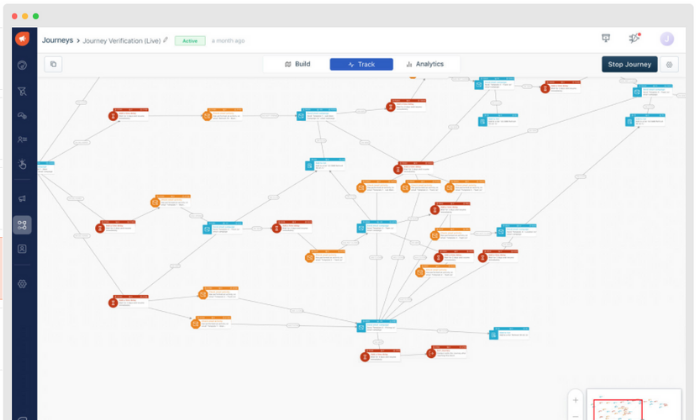
  • Visual drag and drop customer journey builder
  • Website, form, and offline event tracking
  • Conversion rate optimization tools
  • A/B and split testing
  • Advanced personalization
  • Dynamic heat maps
  • Audience segmentation
  • Real-time funnel analytics

Furthermore, the software seamlessly integrates with Freshworks’ other tools, so it’s an excellent choice if you currently use or plan to use any of their business software. 

You can try Freshworks CRM on their limited free forever plan or a 21-day free trial of their paid plans, which are incredibly affordable and accessible for businesses of all sizes. However, they depend on the number of contacts you have, so keep that in mind. 

They offer Growth, Pro and Enterprise plans of the full Freshworks CRM, or just the marketing services. Plans for the full CRM start at $29/month for 1,000 active contacts. Plans for Marketing Cloud start at $19/month for 500 contacts.

#2 – Pardot by Salesforce Review — The Best Marketing Automation Software for B2B Businesses

As a B2B business, you market to other companies, which presents a unique set of marketing challenges. As such, you need a marketing automation tool built for the job. 

Pardot exists to help B2B companies build relationships and turn those relationships into revenue. Plus, it’s a fantastic marketing automation software built around the world’s #1 CRM. 

So, you know you’re in good hands. 

From lead generation to sales alignment, the software offers a wide range of features, including:

  • Dynamic content and data-based personalization
  • Lead-nurturing email automations
  • Prospect and lead scoring
  • Visual multi-part automation creator
  • Advanced segmentation
  • Landing page builder
  • Smart forms + drag and drop builder
  • Social media scheduling, profiling, and analytics
  • Lead activity tracking
  • Campaign performance reporting
  • Lifecycle and funnel reporting
  • Pardot Einstein for lead and behavior scoring

Furthermore, over 2.8+ million worldwide users rely on Pardot for their marketing automation needs, making it one of the most popular platforms on this list. 

But it is a bit expensive, so it’s best suited for larger businesses. Their paid plans include:

  • Growth — $1,250/month for up to 10,000 contacts and basic features
  • Plus — $2,500/month for up to 10,000 contacts with deeper automation + analytics
  • Advanced — $4,000/month for up to 10,000 contacts with AI and all features
  • Premium — $15,000/month for up to 75,000 contacts with supercharge features

They also offer a few add-ons that come free in the Premium plan. Those add-ons include Salesforce Engage ($50/user per month), Analytics Plus ($3,000/month), and Engagement History ($300/year). 

All plans and add-ons are billed on an annual basis. 

#3 – ActiveCampaign Review — The Best for Email Marketing Automations

Email is one of the most important aspects of digital marketing. All the tools on this list include email marketing in one form or another, but ActiveCampaign specializes in it. 

So, it’s an excellent option if you want to hone in and focus on improving your email marketing strategy. It’s also a super affordable tool that includes numerous automation features for leads anywhere in your funnel.

With that said, they also offer omnichannel automation, including instant messaging and SMS, live chat, and Facebook. 

So, you’re not limited to just email marketing automation with ActiveCampaign. 

Their most popular features cover leads at every point in the funnel, including:

  • Engage – Automation maps, site tracking, and subscription forms
  • Nurture – List segmenting, dynamic/predictive content, and event tracking
  • Convert – Contact and lead scoring, split actions, and win probabilities
  • Support – Predictive sending, SMS, A/B split testing, and ecommerce 

You can also set up numerous types of emails like autoresponders, targeted or triggered emails, broadcasts, scheduled emails, and automated funnels. 

And you can design those emails using their intuitive drag and drop designer, or start from one of their 25+ pre-made mobile-responsive design templates. 

Whether you’re just getting started or interested in scaling and optimizing your email marketing strategy, ActiveCampaign is an excellent choice. They offer everything you need to capture, nurture, and close leads at scale. 

ActiveCampaign offers four plans, with the price of each starting at:

  1. Lite — $9 per month with up to three users
  2. Plus — $49 per month with up to 25 users
  3. Professional — $129 per month with up to 50 users
  4. Enterprise — $229 per month with unlimited users

Each tier includes more advanced features, and pricing is based on the size of your list, starting for up to 500 contacts. 

So, keep in mind that you will have to pay more than the prices above as your list grows. 

#4 – Acoustic Review — The Best Enterprise-Grade Multi-Channel Marketing Automation Software

Acoustic offers an array of marketing automation products for centralized cross-platform multi-channel marketing. From personalization and email campaigns to web content management and experience management, they offer something for everyone. 

Acoustic Campaign is their marketing automation tool, encompassing mobile apps, push notifications, SMS, group chats, social media, ads, email, print campaigns, and more. 

You can also combine this with Acoustic Personalization and Acoustic Analytics for a powerful combination of campaign management, data, and using that data to deliver the right message at the right time. 

With Acoustic Campaign, you get access to powerful features, including:

  • Drag and drop campaign builder
  • Action, logic, and AI-recommended triggers
  • Seamless mobile and digital channel campaigns
  • Lead management and scoring
  • Split A/B testing
  • Customer journey mapping
  • Planning and budgeting
  • One-to-one ads and lookalike audiences
  • Advanced personalization
  • Reporting and analytics

Furthermore, they have a community forum where you can publicly ask questions. They also provide an online academy packed full of educational videos and training so you can get the most of your custom automation package. 

Note: Acoustic is built for moderate to large volume campaigns with countless moving parts. So, it’s perfect for businesses managing complicated campaigns across numerous channels. 

But it’s overkill for a lot of businesses and anyone running single-channel campaigns. 

Pricing isn’t available online, and you have to schedule a consultation to learn more. So, keep in mind that you won’t be able to sign up and get started immediately. 

#5 – Hubspot Review — The Best Sales, Customer Service, and Marketing Automation Software

If you’re looking for an easy way to automate your sales, customer service, and marketing processes, Hubspot Growth Suite is an excellent and affordable solution. 

And the best part? Hubspot goes beyond automating your business processes. It also helps integrate and optimize different departments in one centralized location, thus streamlining your entire business’s workflow. 

This means teams don’t have to jump from software to software to get the information they need, and you can automate the data transfer process from one team to the next. 

However, their marketing automation capabilities are powerful on their own, with features like:

  • Blog post and SEO planning
  • Ad tracking and management
  • Social media management
  • AI-powered live chat
  • Email marketing
  • Forms and landing pages
  • Revenue attribution reporting
  • Visual workflow builder
  • Account-based marketing
  • A/B split testing
  • Predictive lead scoring

Hubspot offers basic features, like emails, landing pages, forms, and live chat capabilities for unlimited users absolutely free. So, you can try it out without spending a penny. 

Alternatively, you can sign up for a free demo to see all of their advanced features in action. 

The Growth Suite (sales, marketing, CRM, and customer service) starts at $50 per month for two users and up to 1,000 contacts, making it extremely affordable for most businesses. 

But they also have advanced plans for larger and more complex campaigns, including:

  1. Professional — $1,275 per month for advanced features
  2. Enterprise — $4,200 per month for all features

Each 1,000 contacts after your initial 1,000 cost $16.67 per month. And you can add more users to your sales and service hubs for $8.33 per user/month. 

Plus, if you’re a current member or alumni of Hubspot’s approved incubator, accelerator, or Venture Capital partners with a round of Series A funding under your belt, you can get up to 90% off your first year

#6 – Act-On Review — The Best Marketing Automation Software for Marketing Agencies

As a marketing agency, you handle marketing campaigns for several clients (if not hundreds of them) at any given time. As such, you need marketing automation software with the ability to manage everything, including your own marketing campaigns, in one place. 

And Act-On offers the perfect solution. 

Their scalable software features unique child and parent campaign capabilities, meaning you can easily manage and handle all of your client accounts from a single Act-On login. 

Plus, you can completely brand and customize everything to deliver custom reports to clients in just a few clicks. 

With Act-On, you can learn more about your clients’ audiences to personalize and tailor their message to match. Not only does this make their life easier, but it also means your team can work less to produce better results. 

When you sign up, you get access to powerful marketing features, including:

  • Automated engagement programs
  • Website and landing page tracking
  • Customer/prospect scoring
  • Behavior and demographic segmentation
  • Pre-built email, form, and landing page templates
  • Interactive reporting dashboards

Plus, you can build custom real-time analytic dashboards for internal and external use, so you and your clients always know what’s going on. 

Furthermore, you can use this information to improve customer ROI, build better technology stacks, and optimize entire marketing campaigns on behalf of your clients. From lead gathering and nurturing to transferring contact information to sales, you’re in good hands. 

Sign up for a free demo to learn more and get started today!

Wrapping Things Up

Freshworks CRM is my top recommendation for most businesses. It’s built for small to midsize companies interested in automating their marketing processes to grow their businesses and save time. 

Plus, it’s affordable, easy to use, and packed full of powerful automation features. 

However, it’s not the perfect solution for everyone. So, don’t forget to use the criteria we talked about as you sort through finding the best marketing automation software for you and your team. 

What are your favorite marketing automation tools?

The post Best Marketing Automation Software appeared first on Neil Patel.


from Blog – Neil Patel https://ift.tt/359IuRH
via IFTTT

The Best Payroll Services (In-Depth Review)

Disclosure: This content is reader-supported, which means if you click on some of our links that we may earn a commission.

What would you do with ten extra hours a month?

You’d probably work on growing your business, right? Maybe you’d spend it creating new marketing campaigns to generate more revenue. Perhaps you’d take half a day off to spend time with your family. 

Regardless, the average small business owner spends five hours every pay period running payroll. That adds up to 21 full work-days a year. 

But thankfully, that’s not what your payroll process has to look like. 

The best payroll services simplify and streamline the process of paying your employees. They automate time-consuming tasks and give HR the tools they need to stay on top of taxes, benefits packages, paid time off, and other payroll factors.

Choosing the right payroll service is important, because they all do things a little differently. Let’s talk about the major features you are looking for and how to evaluate the top services available today.

The 6 Best Payroll Service Options for 2021 

  1. Gusto – Best payroll service for small businesses
  2. OnPay – Most flexible payroll service
  3. Paychex – Best for larger organizations
  4. ADP – Best payroll service with built-in HR
  5. QuickBooks Payroll – Best for QuickBooks integration
  6. Wave Payroll – Most affordable payroll service

How to Choose the Best Payroll Service for You

If you’ve spent some time searching for solutions from Google or asking for peers’ recommendations, you know there are hundreds of payroll companies to choose from. 

With so many options, it can feel like a difficult decision. 

To help you narrow things down, let’s walk through what to consider as you go through the process. 

Number of Employees

Most services charge a set monthly fee plus a small fee per employee. So, it’s essential to consider the number of employees you need to pay. 

Some payroll services may limit the number of employees on certain plans while others may forego the per-employee fee altogether. Furthermore, some may also offer features that make it easier to pay many people at once. 

You also need to consider whether you’re paying employees or contractors, because the process and fee structure may be different for each role. 

Basic Payroll Features

The best payroll services exist to simplify the process of paying your employees. So, every payroll service you consider should have a set of critical features, including:

  • Automatic payroll options
  • Self-service portal for full-time and part-time employees
  • Mobile capability to manage payroll on the go
  • Direct deposit so your employees get paid quickly
  • Automatic tax calculations and withholdings
  • W-2 and 1099 employee management

There are other advanced features you may want to consider as well, depending on what you need. This includes things like HR tools, benefits management, wage garnishments, and more. 

Tax Features

Filing tax is a complicated and time-consuming process. It can also result in unfortunate and expensive penalties if you don’t do it right. 

Many payroll services offer tax features that simplify the process, like calculating payroll tax to automatically withholding employee income tax.

So, it’s important to choose a payroll service that offers essential tax features to make your accountant’s life easier. 

Built-In HR Tools

If you offer benefits to your employees, you need a payroll service that helps you effectively manage things like time off, vacation requests, workers’ compensation, insurance, and more. 

Furthermore, services with an employee self-service dashboard make this much more manageable. Employees can log in, update their accounts, request time off, and see an overview of their benefits package. 

The cheaper options on this list tend to ditch HR features. So, carefully consider what you need against your budget before making any decisions. 

Monthly Payroll Limits

If you have salaried employees or a set payroll schedule, most payroll services are adequate. However, if you pay freelancers or contractors on an irregular basis or run payroll more than twice a month, you need to be careful. 

Some services offer unlimited payroll processing, while others limit the number of times you can issue payments every month. 

So, carefully consider how often you need to send payments when making your final decision. 

Integrations

To further simplify your business processes, it’s crucial to consider the business tools you’re already using to run your business. 

It’s important to choose a payroll service provider that integrates seamlessly with those tools. Think about your accounting software, your employee scheduling software, and other essential tools related to payroll. 

The Different Types of Payroll Services

There are several different services to consider, depending on your business’s size and your specific payroll needs. 

So, before we dive into my top recommendations, I want to talk about the different types and how to decide between them. 

1. Hiring someone to do it for you

If you can afford it, hiring someone (either in-house or as a contractor) to run payroll for you is an excellent option. This ensures you find someone who knows how to do it and that they have the time to do it well. 

However, you still need payroll software. They may have their own preferences and expertise, which may help you decide which service is right for your business. 

With that said, many small businesses don’t necessarily need to hire someone. 

The best payroll services make running payroll easy, so anyone on your team can take care of it in a few clicks. 

2. Software as a service (SaaS)

The software as a service (SaaS) model means you pay to use the software. Most service providers charge monthly or annually for this, and as long as you keep paying, you get to keep using it. 

Most SaaS tools are cloud-based, meaning you can access it from a web browser anywhere. 

However, some also offer desktop applications and mobile apps you install on a specific device. 

This is the most common type of payroll service and the most convenient to use because you and your employees can access their accounts from any device, anywhere in the world with an internet connection. 

All of the recommendations on this list are SaaS payroll services. 

3. Enterprise-grade solutions

Most payroll services offer enterprise-grade and industry-specific solutions for large businesses. They come with specialized, custom pricing to match the unique needs of enterprise-grade companies. 

A software like this could be a SaaS tool or an on-premise deployment, depending on what you need and the company you choose. 

Most businesses don’t need this. But if you manage payroll for a large company or find your current solution limited, it may be a good idea to consider an enterprise solution. 

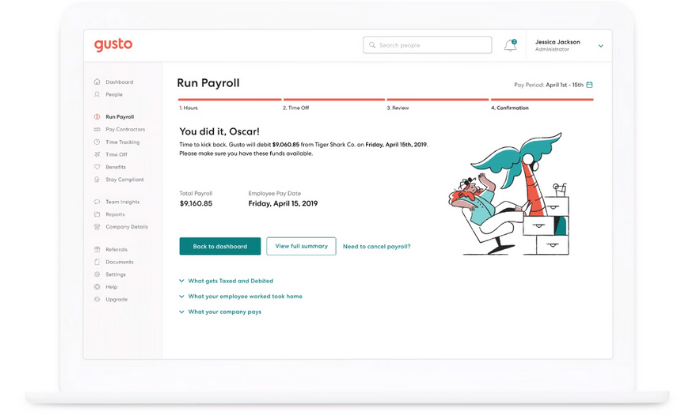
#1 – Gusto Review — The Best for Small Businesses

If you’re a small business looking for a simple payroll service, Gusto is a smart choice. And you’ll be in good company with more than 100,000+ other small businesses around the world. 

Gusto makes onboarding, paying, insuring, and supporting employees as easy as possible. And they don’t call themselves a “people platform” for no reason. 

They offer the right set of tools and services to make your life (and your employees’ lives) easier. 

Running payroll takes just a few clicks, and you can enjoy unlimited payroll runs every month. Need to pay seven different contractors at different times? No problem. 

Need to pay the same employees the same wages every pay period? You can set it up to run automatically without you having to lift a finger. 

Plus, you get access to a wide variety of features, including:

  • Automatic tax calculations
  • Built-in time tracking capabilities
  • Health insurance, 401(k), PTO, workers’ comp, and more
  • Compliance with I-9’s, W-2s, and 1099s
  • Employee self-service onboarding and dashboards
  • Next-day direct deposits (on specific plans)

And the best part? It’s affordable. 

If you don’t have W-2 employees, Gusto starts at $6 per contractor per month. But if you do have full-time or part-time employees, expect to pay a bit more. Their other paid plans include:

  1. Basic — $19 per month + $6 per person per month
  2. Core — $39 per month + $6 per person per month
  3. Complete — $39 per month + $12 per person per month
  4. Concierge — $149 per month + $12 per person per month

Gusto is perfect for most startups and small businesses. But, large companies with complex benefits packages and hundreds of employees may find it limiting. 

Get started with Gusto today!

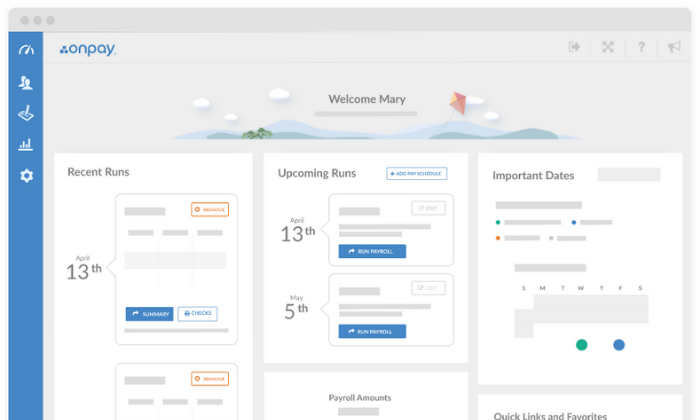
#2 – OnPay Review — The Most Flexible Payroll Service

If you’re looking for an all-in-one payroll system with transparent pricing and virtually unlimited flexibility, OnPay is an excellent choice. 

Whether you’re a small company or a fast-growth startup, OnPay is versatile enough to suit your needs. Plus, you never have to guess how much you’re going to pay every month with their transparent pricing. 

And you can rest easy knowing you have access to every feature OnPay offers regardless of the number of employees you have because they only provide one pricing plan. 

Their software includes access to powerful features, including:

  • Unlimited monthly payroll runs
  • W-2 and 1099 capabilities
  • Automatic tax calculations and filings
  • Employee self-service onboarding and dashboards
  • Intuitive mobile app for management on the go
  • PTO, e-signing, org charts, and custom workflows
  • Integrated workers’ comp, health insurance, and retirement
  • Multi-state payroll

Plus, getting started is super easy. All you have to do is set up your account, add your employees, and start running payroll. Furthermore, OnPay automatically calculates and withholds taxes so you don’t have to worry about manual calculations or human error again. 

They also offer specialized solutions for different industries, including nonprofits, restaurants, and farming/agriculture. 

OnPay is $36 per month plus $4 per person per month. So, you can add new employees to the software for just a few dollars, making it excellent for fast-growing companies and small businesses alike. 

And while OnPay can handle large companies with hundreds of employees, there are better enterprise options available. It’s most suitable for small businesses and fast-growth companies that need simple pricing and flexibility. 

Try OnPay free for 30 days to see if it’s right for you!

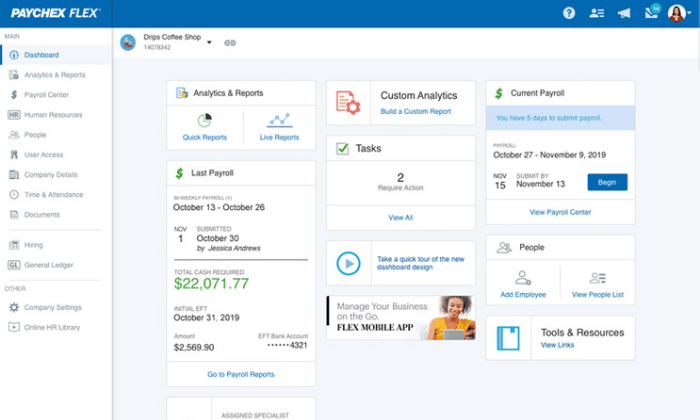
#3 – Paychex Review — The Best for Larger Organizations

Paychex is an excellent choice for businesses with more than 50 employees. They also offer low-tier plans for small businesses, but they’re quite limited compared to the other small business options on this list. 

However, their midsize to enterprise plans are perfect for large companies. 

The larger your business is, the worse small discrepancies and human errors affect your tax calculations. And wrong tax filings equal harsh penalties from the IRS, even if it was an accident. 

So as a large company, it’s imperative to have a payroll service that adapts to meet your needs. Paychex is more than a payroll service. It’s a human capital management (HCM) system designed to help you save time and reduce errors. 

Their enterprise plans include features like:

  • Recruiting and onboarding
  • Performance and learning management
  • Powerful real-time analytics
  • 100% employee self-service
  • Payroll automation features
  • Direct deposit, paper checks, and paycards
  • Salary, hourly, and contract workers
  • Paycheck garnishments
  • PTO and benefits management
  • Job costing and labor distribution

All of which are scalable for enterprises with thousands of employees (or as little as 50). Plus, Paychex services more than 650,000+ companies and has more than 50 years of experience in the industry. 

So, you can rest easy knowing you’re in good hands.

With that said, getting started isn’t as easy as it is with some of the other options on this list. Because each deployment is tailored to your business, you can’t get going on your own. However, they do offer a team of specialists to help you get the ball rolling. 

Contact their sales team for a custom quote to get started!

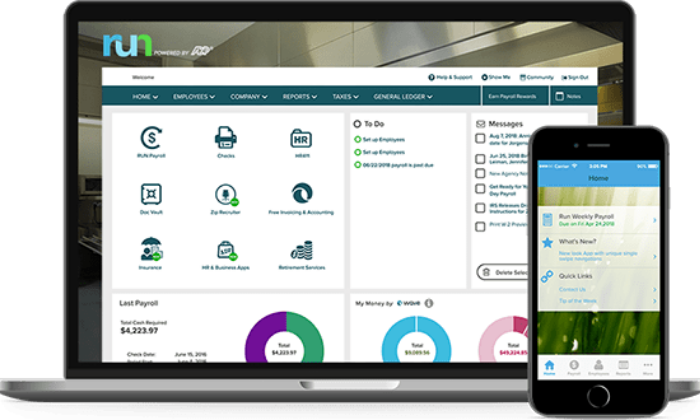
#4 – ADP Review — The Best for Built-In HR Features

ADP is the way to go if you’re looking for a payroll service with the most built-in HR features. It’s perfect for smaller companies without an HR department and growing/large companies looking to streamline the process. 

ADP works with more than 700,000 businesses in 140+ countries, making it one of the most popular payroll services for businesses of all shapes and sizes. 

They offer tailored solutions for small, midsize, and enterprise businesses, so you’re sure to find the perfect solution whether you have five employees or 1000+. 

Their lower-tiered plans include basic payroll features like automatic tax calculations, employee self-service tools, a mobile app, PTO management, and complete compliance support. 

However, ADP offers more than just basic payroll and HR. They also include time tracking, talent recruitment, HR consulting services, advanced employee benefits, and the option to outsource your entire payroll/HR department. 

You can also get unique benefits, like personalized training, legal assistance, background checks, and interview scheduling too. 

Furthermore, ADP offers industry-specific solutions for nine different industries, including:

  • Restaurants
  • Construction
  • Healthcare
  • Manufacturing
  • Retail
  • Nonprofits

Note: ADP pricing isn’t available online, so it may not be suitable for micro or small businesses interested in getting started quickly. If you need something fast and straightforward, my #1 recommendation is Gusto.

Request a free quote to see if ADP is right for you today. 

#5 – Quickbooks Payroll — The Best for QuickBooks Integration

Quickbooks Online is one of the most well-known accounting tools on the market. And if you’re already a user, QuickBooks Payroll is an excellent addition to your tech stack. 

The two tools integrate seamlessly, making account reconciliation and tax season a breeze. 

Furthermore, QuickBooks’ payroll system works in all 50 states. So, whether you have a remote team or work with contractors across the country, you don’t have to worry about making errors or mishandling taxes. 

You can also rest easy knowing your federal, state, and local taxes are automatically calculated plus paid for you every time you run payroll. Plus, the entire process is easily automated after your first round of payments. 

With QuickBooks, you get a full-service payroll system regardless of the plan you choose. 

And the user interface is aesthetically pleasing with direct deposit payments landing in your employees’ bank accounts within 24 – 48 hours. 

The Core Plan starts at $45 per month, plus $4 per employee per month. It includes:

  • Full-service payroll with unlimited runs
  • Automatic payments after the first run
  • Health benefits
  • Wage garnishments
  • Next-day direct deposit
  • 24/7 live chat support
  • All 50 states

So, even their most basic plan includes everything you need to simplify your HR and payroll processes. 

But if that isn’t enough, their advanced plans include:

  1. Premium — $75 per month + $8/employee per month
  2. Elite — $125 per month + $10/employee per month

Get 70% off your first three months to take QuickBooks Payroll for a test drive today!

Note: 1099 contractors and freelancers aren’t included. It comes as an add-on with additional monthly fees. So, this isn’t the most affordable choice if you frequently handle contractors or freelancers. 

#6 – Wave Payroll Review — The Most Affordable Payroll Service

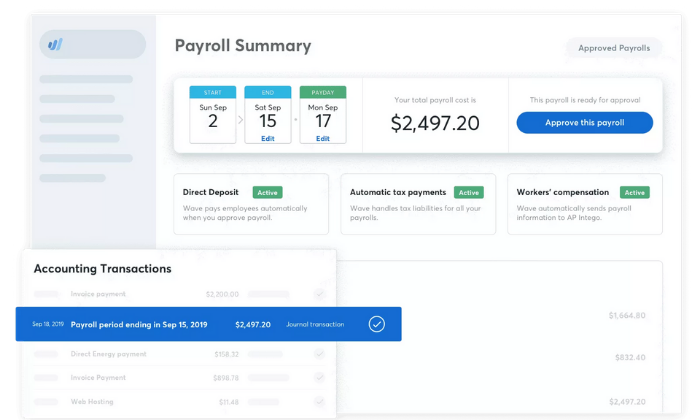
If you’re on a tight budget, Wave Payroll is an affordable payroll option. Wave also offers numerous other small business tools for free, including invoicing, accounting, and receipt management. 

The different apps integrate seamlessly to create an affordable small business accounting and payroll solution. 

With Wave, getting started takes just a few minutes, and running payroll goes even faster. Plus, they offer a 100% accuracy guarantee. You can also pay hourly, salary, and contractors and automatically generate the right tax forms. 

In some states, Wave automatically files and pays your state/federal payroll taxes for you. However, in those states, Wave’s services are more expensive. 

You also get access to features, like:

  • Automatic journal entries (if you use Wave Accounting)
  • Self-service pay stubs and tax forms for your employees
  • Workers’ compensation management
  • Basic payroll reporting
  • Automatic year-end tax forms
  • Timesheets for PTO and accruals

While Wave is one of the most affordable payroll services, it doesn’t sacrifice functionality and essential features. Despite being cheaper than the other options on this list, you still get all the essentials you need to run payroll for your small business. 

In tax service states, Wave is $35 per month + $6 per contractor/employee per month. This service isn’t necessarily cheaper than the other options on this list. 

But, it’s still a great option if you’re a small business owner looking for a simple payroll solution. 

However, it’s $20 per month + $6 per contractor/employee per month in self-service states. At this price, it’s easily the cheapest option with the most features available. 

And don’t forget that Wave Payroll seamlessly integrates with Wave’s free accounting and invoicing software as well. 

So, if you don’t yet have accounting software, this is a smart choice. 

Try Wave Payroll free for 30 days to see if it’s right for you and your business!

Summary

For most users, Gusto and OnPay are my top recommendations. 

They’re all excellent for small and fast-growth businesses with the ability to scale to match your needs. Plus, they’re affordable and easy to use. 

However, different businesses require different solutions. 

So, don’t forget to use the considerations we talked about as you go through the process of choosing the best payroll services for your business. 

What payroll services do you prefer?

The post The Best Payroll Services (In-Depth Review) appeared first on Neil Patel.


from Blog – Neil Patel https://ift.tt/2FsiW9a
via IFTTT