Friday, 29 January 2021

Best Social Media WordPress Plugins

Disclosure: This content is reader-supported, which means if you click on some of our links that we may earn a commission.

Social media plays a crucial role in the success of any brand or business. By integrating your website with social media platforms, it helps expand your reach and drive engagement. 

One of the easiest ways to improve your social media strategy is by using a WordPress plugin. These tools make it easy for website visitors to share your content via social media and ultimately drive more traffic to your website. You can even use these plugins to get more followers on social media. 

But with dozens of social media WordPress plugins to choose from, finding the right one for you and your website can feel like a daunting task.

Whether you’re running a business website, small personal blog, or something in between, I’ve narrowed down and reviewed the best social media WordPress plugins on the market today.

The Top 6 Options For Social Media WordPress Plugins

How to Choose the Best Social Media WordPress Plugin For You

Certain features and functions must be evaluated as you’re shopping around and comparing social media WordPress plugins. This is the methodology that I used to narrow down the top picks listed above. You can use the same methodology and weigh things based on your personal needs. 

Site Performance

In general, performance is the biggest issue with social media plugins for WordPress. These plugins typically come with scripts and stylesheets that can ultimately slow down your website. 

That’s why it’s so important to look for a social media plugin that’s lightweight. Otherwise, load time and other crucial performance metrics will be impacted. Don’t just choose a feature-rich plugin if you don’t need all of its functionality. 

Active Social Profiles

What social media platforms are you currently using to promote your brand? How many of those profiles do you want to integrate with your website?

In terms of social sharing icons in a sidebar, less is typically better than more. Adding ten different social sites to this menu will just clutter your page and probably won’t drive much engagement. 

You should also consider the type of content and how it relates to specific social platforms. For example, it’s usually better to share blog posts on Facebook, Twitter, or LinkedIn. But images are better suited for Pinterest or Instagram. 

Content Goals

What is the main reason why you’re seeking a social media WordPress plugin? 

There’s a big difference between plugins designed to drive site traffic and plugins made for increasing your social media following. 

For example, social sharing plugins help encourage site visitors to share your content via social media. As a result, a wider audience can see your content and land on your website. Other plugins with a simple “Like Us on Facebook” button don’t have the same impact. These are designed to turn your website visitors into social media followers. 

Shortcodes and Custom Display Options

It’s important to have social media icons on your site that are visible yet non-intrusive. The best plugins help you customize how and where those icons are displayed. 

Do you want them at the top of your post? The bottom of the page? What about a floating sidebar? You might want to have share icons on all of your blog posts but not on your landing pages. Does the plugin allow you to customize these settings by post type?

Consider using a plugin that can match your site’s branding as well. This will allow you to change the shapes, sizing, and even colors of the widget. 

The Different Types of Social Media WordPress Plugins

Social media WordPress plugins come in all different shapes and sizes. Before we dive into the reviews of my top picks, it’s important for you to understand the different types of solutions in this category. 

Social Sharing Plugins

These plugins make it easy for website visitors to share your content with their friends and followers on social media. 

For example, let’s say someone reads one of your blog posts and wants to share that post on their Facebook timeline. Rather than making that person to copy and paste the link, a simple social sharing button directly on the page makes this process much easier. With a single click, website visitors can share your content via Facebook, Twitter, Pinterest, LinkedIn, and other social sites.

Some social sharing plugins have features to automate the scheduling and posting of your content via social media. Any time you publish a new blog post, that content will automatically get shared on your social profiles without any extra manual steps from your end. 

Social Feed Plugins

With a social feed plugin, your social media content can be displayed directly on your website. 

Let’s say you upload a new photo to Instagram. Rather than having to manually upload that same photo somewhere on your website, a WordPress plugin can just display it in your social feed. So the bottom of your home page or another landing page could include all of your latest social media posts. 

These plugins are perfect for turning website visitors into social media followers. Then you’ll have the opportunity to engage with those people even when they’re not visiting your website.

Login and Comment Plugins

Asking website visitors to create an account on your website is a great way to personalize content and grow your subscriber list. But not everyone wants to register completely new login credentials with every new site that they visit. 

There are WordPress plugins that allow website visitors to create an account and register by logging in via social media. So, someone could use their Facebook credentials to create an account on your website. There are no lengthy form fields to complete or new passwords to remember. 

Many of these plugins also contain features for social comments. By default, the comments system built into WordPress doesn’t have a social aspect. But you can use plugins so users can comment on your posts from their social media profiles. This helps drive engagement and more conversations on blogs.

Content Locking Plugins

Content locking plugins are one of the best ways to get new followers with a social media WordPress plugin. Here’s how it works. 

You can restrict access to specific content on your site until a visitor completes a certain action. For example, you could lock a blog post that will only be available once a visitor follows one of your social media pages. 

Not only will this grow your following, but it promotes engagement. Only highly engaged users will complete these steps. So, any new followers gained from this strategy must be actively interested in your brand. Just be aware that these plugins could potentially hurt the engagement on your website. If people don’t want to follow you on social media, that locked content will go unread. Try experimenting with just a few posts before you start locking all of the content on your website. 

#1 – Social Snap Review — The Most Versatile Social Media WordPress Plugin

Social Snap is arguably the most flexible social media WordPress plugin on the market today. Unlike other plugins that just focus on a single functionality, Social Snap does it all. 

With 230,000+ downloads, its popularity speaks for itself. 

The plugin integrates with 30+ social networks and apps, including Facebook, Twitter, Pinterest, LinkedIn, WhatsApp, Telegram, Google+, and more. Social share icons are fully customizable and can be placed anywhere on your pages.

Other noteworthy features and highlights of Social Snap include:

  • Automatically display social follower counts
  • Automatically publish new posts on social media
  • Bring old posts back to life with auto publishing for existing content
  • Social login for visitors on your site
  • Click to Tweet button
  • Social meta tags

Social Snap even supports advanced analytics. So you can fully grasp how your audience engages with your website content. 

Pricing starts at just $27.30 per year for a single website. Try it risk-free with a 30-day money-back guarantee. 

#2 – Easy Social Share Buttons Review — The Best For Simple Social Sharing

As the name implies, the Easy Social Share Buttons plugin is designed to encourage social media shares from your website. 

The plugin has 600,000+ installs and powers more than one billion social actions. 
Easy Social Share Buttons is trusted by sites like Kinsta, Asana, Trello, AdEspresso, and more. Its fast setup and simplicity make the plugin a popular choice for WordPress beginners and experts alike. 

Here are some of the top reasons why I recommend this plugin:

  • Works with 50+ social share networks
  • Template builder tool with 50+ templates
  • Click to Tweet button
  • Ability to pin any image on Pinterest
  • 12 different share positions
  • 14 share button displays

The plugin even supports advanced features, like conversion tracking, engagement tracking, custom display methods, and more. 

Easy Social Share Buttons has a lifetime license, and pricing starts at $22 for a single website. All purchases are backed by a 30-day money-back guarantee. 

#3 – Revive Old Posts Review — The Best For Social Media Scheduling and Automatic Posting

Revive Old Posts from Revive Social is another WordPress plugin with a self-explanatory name.

This plugin is trusted by 82,000+ WordPress users, and it’s one of my favorite ways to bring your old content back to life.
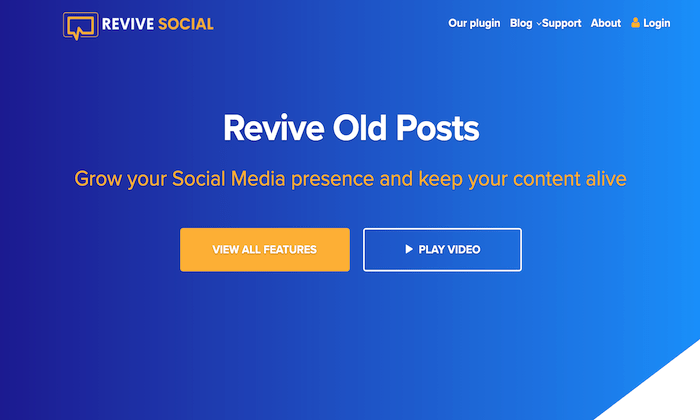
Getting started is easy. Once installed, you just need to give the plugin permission to access your social profiles. This can be completed in a few simple clicks. Next, customize the types of posts you want shared on social media. You can control parameters like minimum and maximum post age to create the posting schedule.

Other noteworthy highlights of Revive Old Posts include:

  • Ability to share new posts when published
  • Share posts multiple times with a content rotation
  • Ability to share blogs, pages, posts, images, products, and more
  • Automatically add hashtags to posts based on category, tags, or custom fields
  • Integration with Google Analytics Campaign Tracking

The plugin even lets you create different variations of your social posts for more variety. This helps you figure out which types of captions convert better than others. 

Pricing starts at $75 per year for a single website. Lifetime access starts at $225.

#4 – Smash Balloon Review — The Best WordPress Plugin For Displaying Social Media Feeds

If you want your social media content displayed on your website, look no further than Smash Balloon. 

More than 1.3 million people use Smash Balloon to share social feeds from Facebook, Instagram, YouTube, and Twitter.
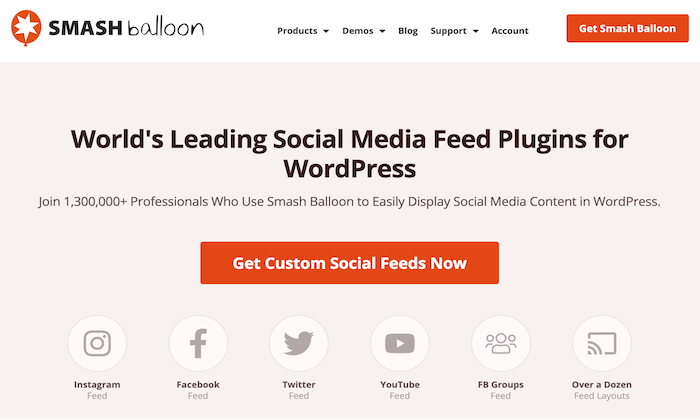
It’s worth noting that each social media platform has a separate plugin. So, if you want to display your Twitter feed on one page and your Instagram feed on another, you’ll need to install each plugin separately.

With that said, Smash Balloon recently released a new plugin called Social Wall. This plugin combines the posts on all of your social profiles into a single feed. 

Here are some other reasons why I recommend Smash Balloon:

  • No-code simple setup
  • Customizable feed design
  • Intelligent caching and backup system to maximize the speed and performance
  • SEO friendly design
  • Display multiple feeds
  • Display likes, shares, and comments

Pricing starts at $49 per year. 

#5 – Social Locker Review — The Best For Getting New Social Media Followers and Driving Engagement

Social Locker is a bit unique compared to some of the other plugins on my list. It’s designed for a specific use case, which isn’t for everyone.

The plugin allows you to “lock” certain content on your website. That content will be unlocked when a site visitor completes an action, such as following your brand on social media.
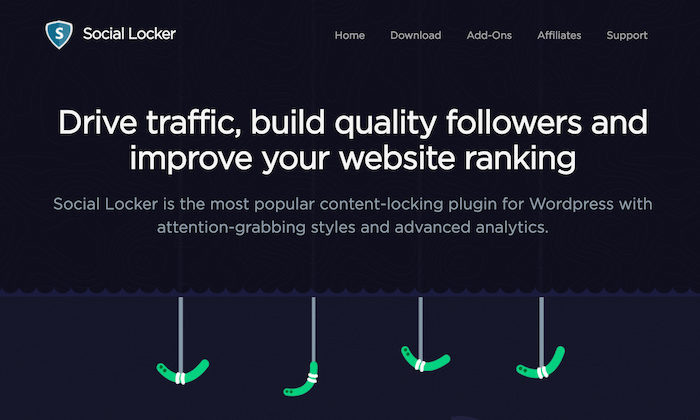
Once the visitor takes the desired action, the locked content can be viewed or downloaded. The idea behind this plugin is to build quality followers on social media. Anyone willing to take this added step to view your content is likely very interested in your brand. 

There are four types of content locks that you can implement with this plugin:

  • Lock downloads
  • Lock promo codes
  • Restricted access for subscribers
  • Sign in to continue reading

It’s a popular solution for bloggers and other content-heavy websites. Download Social Locker and try it free for seven days; no credit card required. 

#6 – WordPress Social Login Review — The Best For User Registration

WordPress Social Login is the easiest way for website visitors to register accounts on your website. 

Instead of forcing them to fill out a new registration form, create a unique user ID, and remember a new password, this plugin allows them to register using their existing social media credentials.
With 60,000+ active installations, this is one of the most popular social media login plugins for WordPress on the market today.

Supported social platforms include:

  • Facebook
  • Twitter
  • Instagram
  • LinkedIn
  • Reddit
  • Tumblr
  • Twitch
  • Foursquare
  • Yahoo
  • Windows Live
  • AOL

The list goes on and on. I like this plugin because it’s simple but still fully customizable. You’ll have complete control over the authentication widget. Developers and designers will enjoy the plugin’s advanced customization capabilities as well.

Best of all? WordPress Social Login is open-source and 100% free to download.

Summary

Websites and social media go hand-in-hand. Using one to promote the other is the smart way to drive traffic and engagement. 

The easiest way to encourage social shares and promote your website content via social media is with a WordPress plugin. 

To recap:

With so many social media WordPress plugins on the market today, it can be difficult to find the right ones for your website. Stick to the recommendations reviewed above. From simple social sharing to content locking and social logins, I made sure to include something for everyone on my list.

The post Best Social Media WordPress Plugins appeared first on Neil Patel.


from Blog – Neil Patel https://ift.tt/3t7y6VB
via IFTTT

What is Passage Indexing & What Does it Mean for SEO?

What is Passage Indexing & What Does it Mean for SEO?

There are few things Google likes more than updating its ranking signals. If you’ve heard about passage indexing, there’s a good chance you have questions. 

What is passage indexing? Is it a significant update that will tank your website traffic? Or is it just another small change in Google’s ever-evolving algorithm and ranking factors?

Take a deep breath and ignore the doom and gloom. 

There’s good news: Passage indexing is not a huge Google update. It’s a small tweak to help the search engine understand content better and deliver the best results to searchers. 

There is no reason to stress about this update, go crazy trying to update your content, or spend thousands of dollars to get someone else to update it for you. 

(If you noticed a considerable drop in traffic recently, I recommend using this guide to diagnose traffic drops using Google Analytics, but most likely, passage indexing was not the cause.) 

However, this is not to say that this change doesn’t matter at all. There are SEO implications, which I’ll explain, and I’ll also share a few tips to help you make the most of passage indexing. 

What is Passage Indexing?

Google passage indexing is an automated feature that pulls sections from pages into search engine results, even if the page covers a slightly different topic from the main one. 

What does that actually mean?

Let’s look at an example: Say you wrote a long-form post about affiliate marketing. Your goal was to cover the topic in its entirety, so you included sections on how to be a successful affiliate marketer, what affiliate marketing tools to use, what affiliate marketing networks are most popular, and how to get started in affiliate marketing. 

That is a ton of useful content, but it also means your entire post probably won’t rank well for terms like “affiliate marketing networks” because only one section covers that topic. 

With passage indexing, Google can pull out sections of your content and rank it independently of the rest of the page. For example, your section on “affiliate marketing tools” might rank for that keyword, even if the entire post isn’t optimized for it.

See? Not such a big deal. 

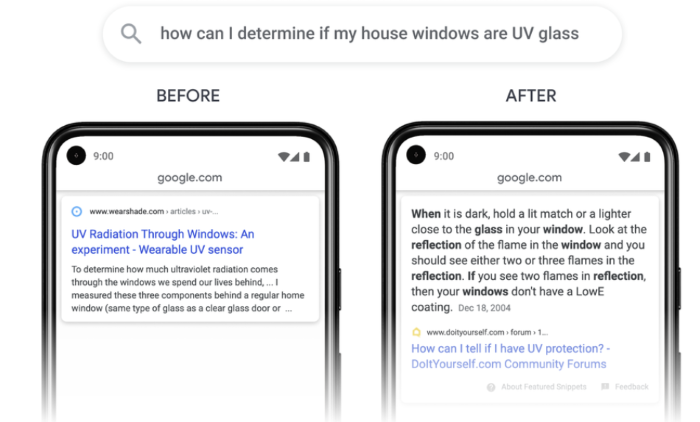
Here’s an example of how passage indexing impacts search results: 

Passage Indexing vs. Featured Snippets

Notice how Google bolds certain words it deems relevant to the search. It’s looking for keywords that show the content is likely to be useful for a specific query. 

Google’s Martin Splitt said he would call the changes “Passage Ranking” because it’s actually a ranking change rather than an indexing change, so you might see those terms used interchangeably. 

Passage Indexing vs. Featured Snippets: What’s the Difference?

Featured snippets offer users an instant answer to short questions, which means users don’t have to click to get the answer to their question.

For example, if you search “what time is it in Paris,” Google provides the answer at the top of the search engine results without requiring you to click on a result. 

Passage Indexing vs. Featured Snippets

Passage indexing is an entirely different system that looks at the content of a page, determines if parts of the page answer a search query, and delivers those results in the SERPs.

How Does Passage Indexing Work?

As with most things from Google, the search engine hasn’t been transparent about how, exactly, the feature works. It keeps things interesting, doesn’t it? 

Here’s what we do know.

According to its blog, Google uses BERT and neural nets to understand content and rank passages better when appropriate. Google still indexes the entire page but looks for content and the meaning of passages while it crawls the full page. Each passage is annotated and can be ranked and scored independently. 

Google also says the shift impacts only seven percent of search queries, so don’t expect huge changes. If your page already ranks well, passage indexing (or passage ranking, if you prefer) may not impact your site at all.

However, sites with useful long-form content that isn’t perfectly optimized may see a small boost in rankings and, therefore, traffic. 

It seems passage indexing is the next step in using AI programs like RankBrain to better understand the context of content rather than looking at formulaic factors like keyword density.

Keep in mind passage indexing doesn’t impact what pages Google indexes, but rather, the ranking for specific passages.

What Is the Difference Between Passage Indexing and RankBrain? 

RankBrain is a machine learning-based algorithm that helps Google process search results and provides users with the most relevant search results. Passage indexing is not an algorithm; it’s an automated system that annotates long passages of content.

How Does Passage Indexing Affect SEO?

How much do you need to be worried about passage indexing when it comes to SEO? For most websites, it will have little to no impact on your SEO. Sites that do notice a change will likely see a small uptick in traffic. 

However, there are some minor changes worth paying attention to. 

Long-form content will have a better shot at ranking for more keywords. That could mean sites with shorter content take a small hit in ranking as longer-form content gets a boost. 

It is also more important than ever for sites to ensure on-page SEO strategies are in place, like using the right heading and optimizing anchor text. Pages with less optimization but better content could outrank you. 

If you’ve been avoiding long-form content, now might be the time to give it a go. Google shows that it’s willing to help users find useful content even if the page’s SEO isn’t perfect. 

However, sites with shorter content, such as e-commerce sites, are unlikely to see any change in their Google ranking. 

What Types of Sites Will Passage Indexing Impact? 

The change will primarily help sites with long-form content that’s not optimized perfectly. Publishers with a well-established SEO strategy, ecommerce sites with shorter content, and sites without long-form content likely won’t see any changes. 

What Are the Benefits of Passage Indexing? 

Now that we’ve covered what passage indexing is, how it works, and what impact it could have on our SEO, let’s talk about why you should care. Are there benefits to this change, or is it just another small shift you can ignore? 

There are a few benefits of passage indexing: 

  1. Longer form content gets a boost: This shift will help long-form content rank higher for more specific keywords. 
  2. Focus on users rather than Google bots: Google is once again showing us it wants site owners to focus more on creating content that users find useful rather than what the search bots want. 
  3. Long-tail keywords are more important than ever: Long-tail keywords and related terms are likely to help trigger passage indexing, so make sure to include phrases and longer terms, just like you would for voice search. 
  4. Could (slightly) reduce the importance of on-page SEO factors: In SEJ’s webinar, Google’s Martin Splitt stressed that this change is meant to help pages with great content that might not be optimized perfectly. Those pages won’t be penalized if they have great content, but don’t ignore on-page entirely. Sites in highly competitive niches will stand out by having great content and on-page optimization. 

It’s also worth noting that this change won’t increase Google penalties or result in a huge drop in traffic for most sites.

This is a slight change intended to help users find sites with useful content that might not be completely optimized.

How Can You Optimize for Passage Indexing?

In an interview, Google’s Martin Splitt was quick to say site owners shouldn’t fall for tools or agencies that claim they can optimize for passage indexing, as it is a small change aimed at helping boost sites with long-form content. 

While I don’t recommend revamping your entire website, there are a few small tweaks you can make, especially for long-form content:

  • Update long-form posts with new stats, links, and resources. 
  • Use clear, keyword-rich (but not overly optimized) headings for each section to help Google understand all the topics a post covers. 
  • If you don’t have long-form content, now is the time. Make sure to cover as much of the topic as possible, answer common questions, and use long-tail keywords. 
  • If you have a page containing a slightly different section related to the main topic, make sure the section is clearly written and optimized for the search terms users would use to find that information. 
  • Spend some time doing long-tail keyword research and integrate those terms in your long-form content.

Overall, don’t go crazy trying to optimize for passage indexing. You could swing too far the other way and end up over-optimizing your site, which can impact your rankings.

Is There a Tool to Help Sites Optimize for Passage Ranking? 

No, according to Martin Splitt, there will be no tool to see if your site is eligible for this change. Your best bet is to follow the suggestions above and focus on creating content that provides what users want. 

How Does Passage Indexing Affect the Future of Search Marketing?

Passage indexing is a small change in Google’s ranking system; however, it’s worth paying attention to.

Google has long said it puts users first, and this is one more push in that direction. SEO matters, but users should remain your core focus. 

It also shows that Google is dedicated to using AI to understand the context of a page. RankBrain, DeepMind, machine learning, and natural language processing help Google get a deeper understanding of context. This is an extension of those efforts. 

For digital marketers, this is good news! Google aims to keep its search results as relevant as possible for users. However, optimization is no longer enough to carry mediocre content. 

Conclusion

I hope by now you have a solid understanding of what passage indexing is, why it matters for your site, and how it could help increase your Google rankings. 

Keep in mind that most website owners won’t need to make any changes and won’t be penalized by Google. Sites with long-form content may see a small boost in rankings and traffic. 

This ranking change also provides some insight into where Google might go in the future. The search engine remains focused on providing users with the best possible user experience, which means marketers should focus their energies on users as well. 

If you need help with SEO and providing a better user experience, let my team help you.

Are you planning to update your digital marketing strategy in response to passage indexing? What changes will you make?

The post What is Passage Indexing & What Does it Mean for SEO? appeared first on Neil Patel.


from Blog – Neil Patel https://ift.tt/3ciNTuR
via IFTTT

Thursday, 28 January 2021

2021 Marketing Trends: Here’s What Nobody is Talking About

marketing trends I know you are ready for 2021 marketing trends because you read this blog and tons of other marketing blogs, right? Here is the thing: I also read the most popular marketing blogs, follow all of the marketing YouTube channels, and listen to the same podcasts you do. And I’ve noticed very few people are talking about what’s really going to happen in 2021 and beyond. Sure, they talk about the importance of voice search and Google going mobile-first. They might mention marketing automation. There are actually more interesting trends that will affect your marketing that no one is really talking about. So, what marketing trends should you actually be focusing on?
Marketing Trend #1: Companies that Rely on Google Analytics Will Lose 

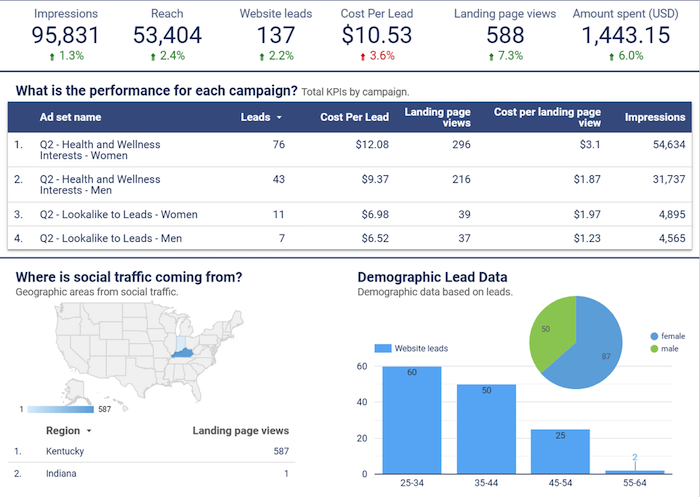
We all love Google Analytics. Heck, I love it so much I log in at least three or four times a day. And here is the kicker: I get so much traffic that my Google Analytics only updates once a day. You are probably wondering, what’s wrong with Google Analytics? There actually isn’t much wrong with it. It’s a great tool, especially considering that it’s free. But marketing is changing. New channels are being constantly introduced, such as voice search. Transactions no longer are as simple as someone coming to your site from an ad and buying. These days there are things like upsells, down sells, repeat purchases, retargeting, and even checkout bumps. On top of that, there are so many different ways you can generate revenue for your online business, such as partnerships, affiliate marketing, and even webinars. This has caused companies to start using analytics solutions that tie into their database better, such as Amplitude.  Or better yet, you will see a big push into business intelligence. A central place where you can tie in all of your data and make better-informed decisions so you can optimize for your lifetime value instead of your short-term income. In 2021, you’ll see more companies adopting business intelligence solutions from paid ones to free ones like Google Data Studio.
marketing trends 2021 google data stuideo
If you haven’t checked out Data Studio, you’ll want to start now because it is easy to pass in all of your business and marketing data into one place. For example, you can pass in more granular data from your Facebook ad campaigns into Data Studio, which would be a bit difficult to do with Google Analytics. Another tool that will give you an edge is Ubersuggest (and its free Chrome extension), as it helps you outperform your competitors in the search engines. For example, Google Analytics no longer provides comprehensive data regarding the keywords sending traffic to your website. So, while you can make assumptions based on top keywords, you’ll never really know for sure. That leaves the door open for your competitors. With Ubersuggest, it only takes a few minutes to dig up keyword data so you can adjust your content and marketing strategies accordingly.

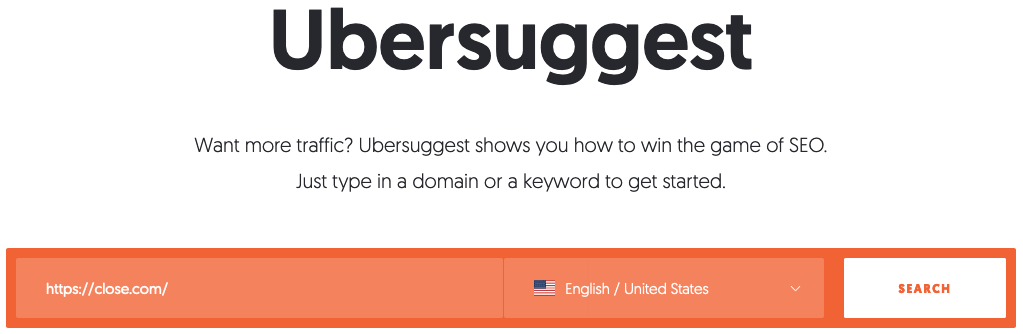
Step #1: Enter Your URL and Click “Search”

marketing trends use ubersuggest For this example, we’re using Close, a leading inside sales CRM with a strong search engine presence.

Step #2: Review the Domain Overview

marketing trends 2021 domain overview screen shotMost importantly, you’ll find the number of organic keywords your domain ranks for. Other data includes:
  • Organic monthly traffic: The total estimated traffic the domain gets for the keywords.
  • Domain score: The overall strength of the website, with 1 the lowest and 100 the highest
  • Backlinks: The number of backlinks to the website from other websites

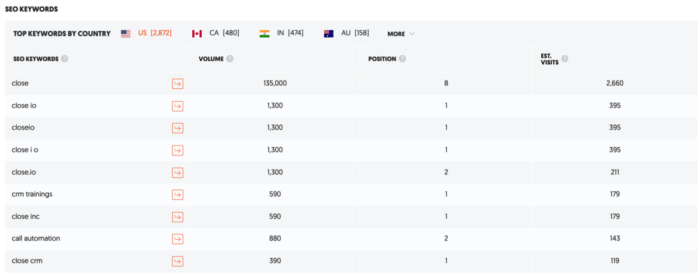
Step #3: Scroll Down to SEO Keywords

marketing trends SEO audit ubersuggest This is the data you won’t find on Google Analytics. The lefthand column is a list of all the keywords your site ranks for. In this case, there are 6,135 of them. This is followed by:
  • Volume: The number of searches the keyword gets each month
  • Position: The position the URL is ranked for in Google search
  • Estimated visits: The estimated traffic the web page gets from Google for the keyword.
Not only does Analytics withhold information on keywords, but there’s nothing about volume, position, and estimated visits. You have to use other tools, such as Keyword Planner, to find this. Ubersuggest brings it all under one roof.

Step #4: Review All Your Keywords

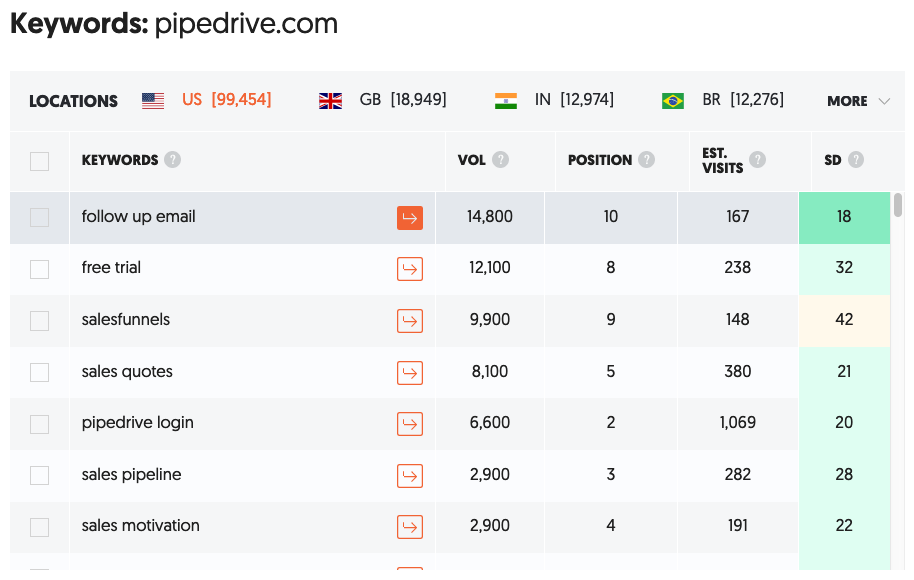
In addition to reviewing all your keywords, complete with volume, position, estimated visits, and SEO difficulty, you can also type in a competitor name and see their keywords. This gives you new ideas of terms to go after. Sticking with the above example, you could run a search for Pipedrive. Here’s what you get: marketing trends 2021 ubersuggest keywords example Now, in addition to the keywords you’re already ranking for, you can uncover those that your competitors are ranking for, thus giving you additional ideas on what to target next. I’ve used Google Analytics since day one, and that’ll never change. However, it’s not capable of doing everything you need to beat your competition. If you want to win big, combine Analytics with other tools, such as Ubersuggest, to access advanced data for making more informed decisions.
Marketing Trend #2: Companies Will Optimize for Voice Search, But Not for Revenue

According to ComScore, over 50% of searches are from voice search. But that’s not really a new trend — everyone has been talking about voice search for years. So, what’s the big deal? Optimizing for voice search is a great way to get your brand out more, but how will it convert into sales? I haven’t seen too many solutions so far when it comes to capitalizing on your voice search traffic, but so far, there is Jetson.ai. If you aren’t familiar with Jetson.ai, it makes it so people can buy from your site using voice search. It doesn’t matter if it is Alexa or Google Home; they work with the most popular devices. What’s cool about Jetson.ai is that it can learn from each customer and customize the interactions. For example, if I keep ordering the same toothpaste from a specific store using voice search, Jetson.ai keeps track of that so you can easily keep ordering the same product over and over again with little to no friction. Heck, it’s easier than logging into your computer or pulling out your phone to make a purchase.

Marketing Trend #3: Your Email List Won’t Convert As Well; Look for Alternative Communication Channels

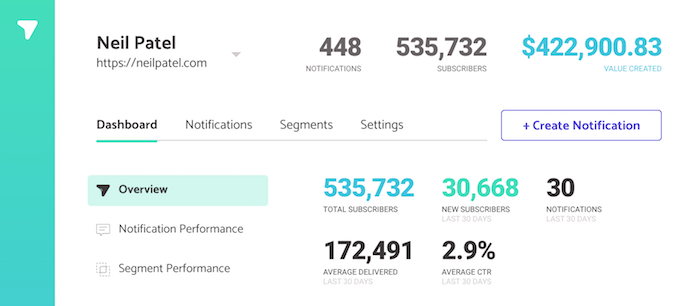
Email; it’s something we all use in the marketing world. But here’s the interesting thing — I’m in a group with a bit over 109 email marketers across different industries in different parts of the world. Can you guess what we are all noticing? Our open rates are staying roughly the same and that’s largely because we all know how to clean and optimizing for deliverability. But our click rates are going down. So far, we have seen our click rates drop by 9.4 percent. That’s crazy, considering as a group, we have over 146 million email addresses. Does this mean email is dead? Of course not! Email is here to stay and will be here for a very long time. However, companies will have to leverage more communication channels. Chatbots are taking off. Not necessarily the Intercom’s or Drift’s of the world but more so the solutions like ManyChat and MobileMonkey. In addition to chatbots, more people are leveraging tools that allow push notifications like Subscribers. It’s so powerful, here is the impact I’ve been able to generate from push notifications so far using Subscribers.
marketing trends chat bot example
You can wait till next year to leverage chatbots for lead generation and customer service, but I’d recommend you start sooner rather than later.

Marketing Trend #4: Moats Will Be Non-Existent, Other than Brands

You’ve probably heard the word “moat” before. If you haven’t, just think about water around a castle.
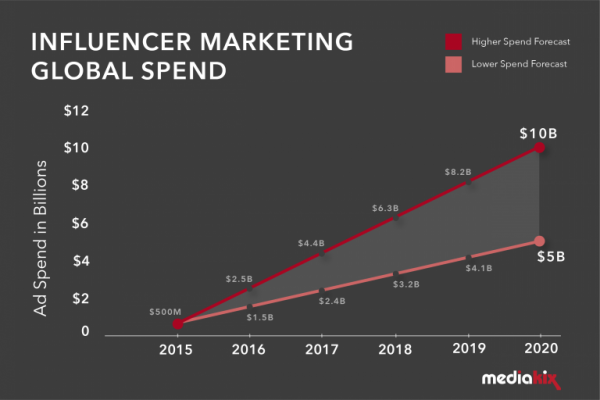
There’s water all around the castle, and a drawbridge is used to get in and out of the castle,  protecting them from invaders. With your business, you may have a moat. It could be a feature, your cost structure, a technological advantage, or even a marketing advantage. Over the years, moats in the online world have slowly disappeared. It’s easy for anyone to copy marketing strategies these days. So, what’s separating you from your competition? Something that works right now might not work next year. But do you know what will still be a strong moat in 2021 and even a stronger one in the future? It’s branding. People buy Jordan shoes because they love Michael Jordan. His brand is stronger than ever, even though he hasn’t played in the NBA for over a decade. His shoes are so popular, it’s helped him boost his net worth to over a billion dollars. Plus owning a basketball team doesn’t hurt either. 😉 But what’s interesting is he made more money after retirement than he did as a basketball player. It’s not just Jordan who built a strong brand — so have the Kardashians. Kylie launched a billion-dollar company, according to Forbes, and it was all because of her personal brand. Her cosmetic company isn’t doing anything revolutionary. She just has a strong brand. The same goes for companies like Ferrari, Tesla, American Express — and the list goes on and on. It’s why companies are spending over 10 billion dollars a year on influencer marketing.
marketing trends influncer marketing
Just look at my agency NP Digital. It’s literally one of the fastest-growing ad agencies out there. When I look at all of my competitors’ numbers, we are growing at a much faster pace because of my brand. Yes, we have a great team, but again, that really isn’t a moat as a lot of agencies have great teams. It’s my brand that gave us a really fast kick start and continues to hopefully push us up. You’ll want to focus on brand building in 2021. Whether it is personal or corporate, it’s the best moat you can build in marketing. Plus, it will help you with Google’s EAT.

Marketing Trend #5: You Have No Choice But to Use Automation

When I first started off as an entrepreneur, I turned to SEO because I couldn’t afford the big ad budgets like my competitors. Heck, I couldn’t even afford to run any paid ads. Over the years, the playing field has become more level. Credit card companies like Brex make it easier for startups to get approved for larger limits and you may not have to pay them back right away. There are financing companies that will give you cash to spend on marketing, so non-venture funded companies can more easily compete. Companies like Lighter Capital offer loans based on your existing revenue. And to top it off, software solutions are now starting to integrate AI to give better recommendations. From Clickflow and RankScience to Distilled ODN, everyone using AI to make SEO and other forms of marketing easier. Heck, BrightEdge can even automate your SEO (or at least a large portion of it). Their automated SEO solution increases page views per visit by 60% and provides 21% more keywords on page one​. Keep in mind their clients are really big (their software starts in the thousands of dollars per month) so they would probably see better results than most companies, but still, you will see many more software companies leveraging AI in SEO. This is being driven by the rise of AI, Rank Brain, and natural language processing. Even with Ubersuggest, I’m working on AI that does the SEO for you, so you no longer have to spend endless hours on SEO while saving you thousands of dollars. In other words, the marketing playing field is getting more even. If you want to do well, you will have to leverage AI and marketing automation to survive. If everyone is leveraging the same AI marketing technology, how can you beat your competitors? Well, it will come down to everything else — price, customer service, upselling, operations, sales. All of that small stuff is what’s going to help you win. This brings me to my next point.

Marketing Trend #6: There Are No More Silver Bullets, We All Have to Optimize for Marginal Gains

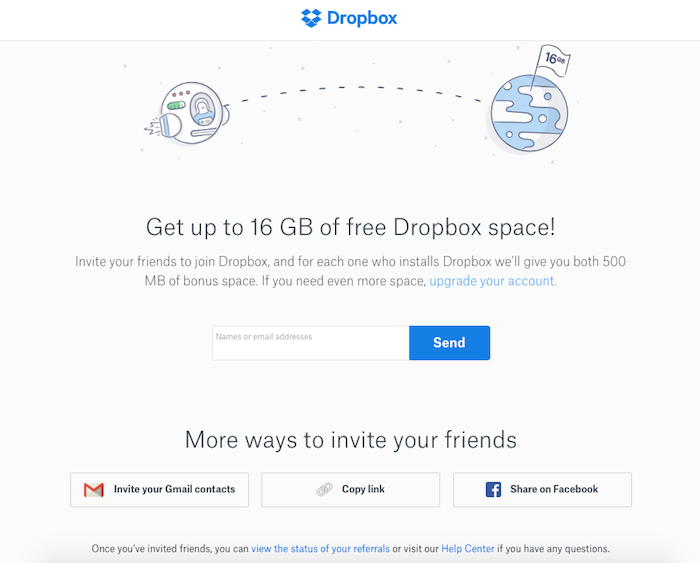
A lot of businesses were built using just one marketing channel. Dropbox grew through referral marketing. Invite more friends, get more free space.
dropbox marketing trends
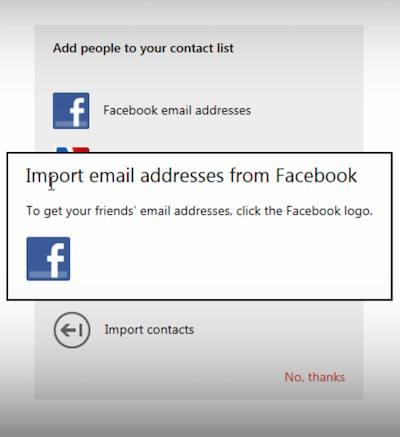
Facebook was built off your email address book. Facebook used to tap into it and invite all of your contacts to use Facebook on your behalf.
marketing trends use facebook
Companies like Quora and Yelp were built off of SEO. All of those rankings really help drive their businesses. But you no longer can build a business through just one marketing channel. Good channels get saturated extremely fast. (Take a look at Facebook organic reach if you need a reminder…) Even if they work and cause explosive growth, it will only last for a short while before your competitors jump on board and make it harder. Marketing will soon be all about “marginal gains.” There’s a British cycling coach named Dave Brailsford. His belief was that if you improved every area related to cycling by just one percent, then those small gains would add up to remarkable improvement. He’s right, that’s how you win a race. The same will be true with your marketing. There will be a big shift from people focusing on one channel and trying to find the “Holy Grail of marketing” to working on slightly improving each area of your marketing. From split testing your title tags to get a few ranking improvements to adding checkout bumps to your order page so you can spend a little bit more on your paid ads to using Google Data Studio to better optimize for your lifetime value—it’s all about the little things. That’s what is going to add up to winning. That’s what you’ll have to shift your mindset to in order to win in 2021 and beyond.

Marketing Trend #7: Depersonalization is the New Marketing

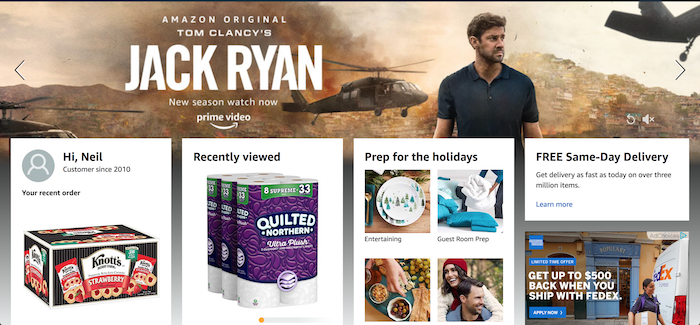
The problem with marketing as it exists today is that 95 percent of your visitors will never convert into a customer. That’s if you are lucky. Chances are you are more likely looking at 97 percent or more of site visitors leaving without converting. The big reason isn’t that your marketing sucks or that all of those visitors are junk and unqualified. It’s that your message doesn’t fit every single one of your visitors. Personalization allows you to convert more of your visitors into customers. A basic example of this is Amazon. When you go to Amazon, they know what you typically buy, so they show you what they think you’ll want to boost their conversions. It works! When I log into Amazon, I see tons of household supplies because that’s what I buy the most often. I never buy dog food (which is smart because I don’t have a dog,) so I’ll never see ads for dog food.
marketing trends depersonalization
Businesses are also trying to personalize each and every single experience, both online and offline. Companies like Amperity are trying to create a customer relationship engine so you can better serve each of your customers, whether it is online or offline. Marketing has become a game of personalization. With ad costs and general marketing costs rising, you have no choice but to figure out how to convert the 97% of your traffic that just never comes back. The problem is, everyone else is using the same exact personalization strategies, and consumers are getting wise.  This is why depersonalization is going to be big. Rather than using names in an email, brands need to dial back the fake personalization efforts and focus on transparency and writing like a real, live person.

Conclusion

These are the marketing trends that will come true, and you need to be prepared for them. Here’s the beautiful part, though. Now you have a chance to act on the information before your competition. Make sure you get in ahead of the crowd. I want to see you not only succeed, but I want you to beat your competition. I believe you can, whether you are a big company or just starting off with very little to no money. What do you think of the trends above? Do you see any marketing trends that few people are talking about? 

The post 2021 Marketing Trends: Here’s What Nobody is Talking About appeared first on Neil Patel.


from Blog – Neil Patel https://ift.tt/33kdNae
via IFTTT

How to Promote Brands Through Gifs

Gif Search: How to Promote Brands Through Gifs

In a Tenor survey, two-thirds of millennials said gifs did a better job conveying emotions than text. It’s true. With gifs, brands can entertain and engage their target audiences in a way plain text or static images just can’t.

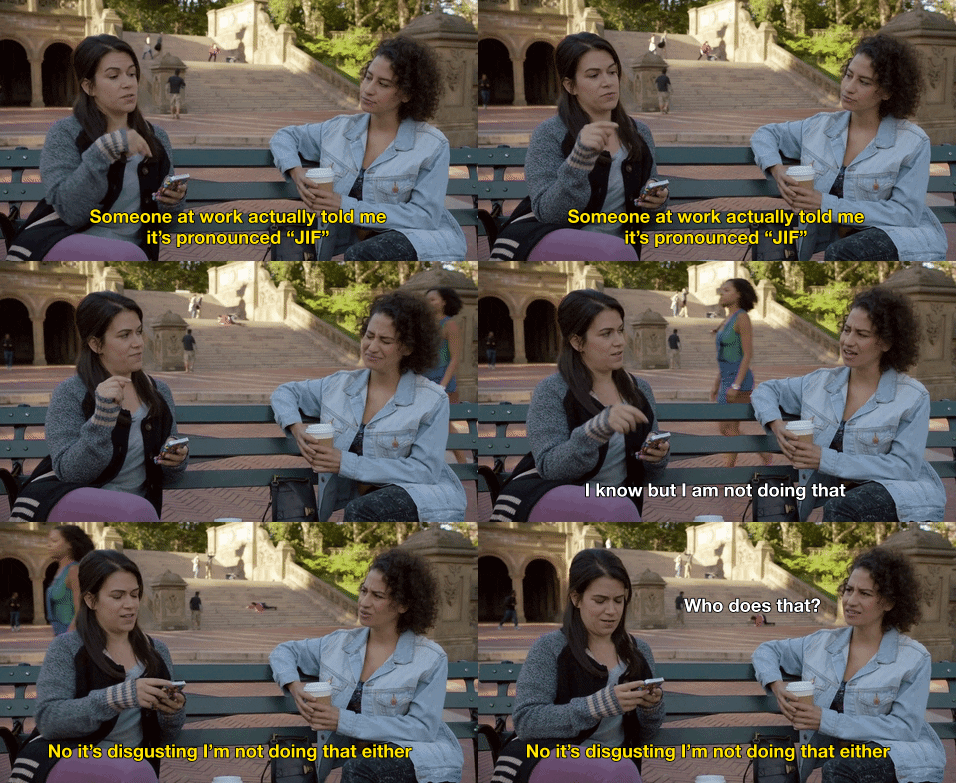
Just look at this gif:

Broad City Gif

In a few frames, it describes the gif/jif debate perfectly—this could take paragraphs in text.

How ow does this relate to marketing? How can you harness the power of gifs to boost your marketing strategy?

In this article, I’ll show you how you can find and use gifs throughout your marketing plan to increase engagement, make your brand relatable, and entertain your audience.

Find Gifs Through a Gif Search Engine

A gif search engine is a repository of gifs you can search by category, popularity, name, gif artist, and several other search parameters, much like an image site.

Typically, you type in a word, short phrase, or quote, and results appear from most to least popular.

This is where gif search engines may most greatly diverge from traditional ones: long-tail keywords may significantly limit your results.

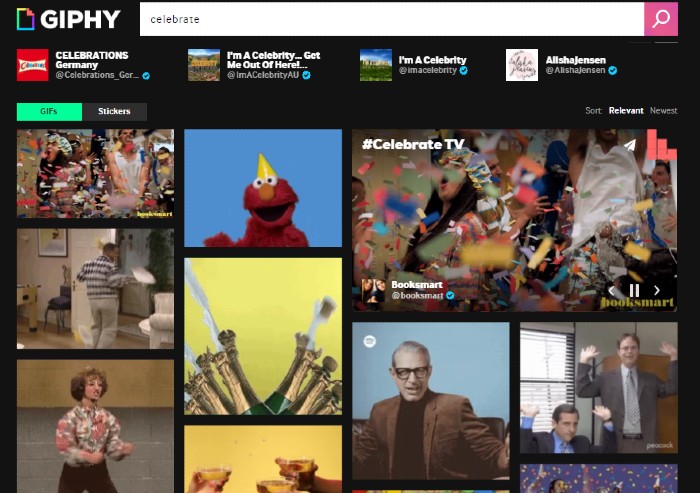
Let’s say I want a celebratory gif, so I search for “celebrate.” This is what comes up:

Celebration gifs

Giphy—the example site above—is arguably the most popular gif search engine. In fact, Giphy is the second-largest search engine online.

(However, it’s not the only option. Other places to find gifs include Tenor, Tumblr, Reddit, and Imgur).

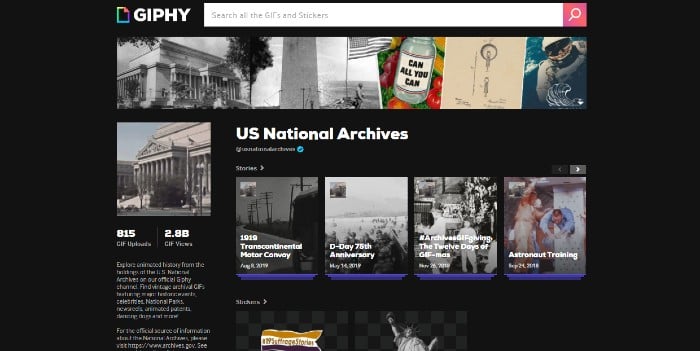
On Giphy, brands can create channels for their gifs, much like YouTube. Even the National Archives has a Giphy channel:

National Archives Gif Channel on Giphy

What Do People Use Gifs For?

Gifs are now used in place of emojis and text in everyday online conversations. Marketers can jump on this train to get our audience’s attention in their endless Twitter, Facebook, and Tumblr feeds and engage with users across all of our marketing platforms.

Gifs have been around since 1987, long before internet use was widespread. It was a simple image of a commercial jet flying through a cloudy sky.

In the early days of the commercial internet, gifs were all over websites — spinning icons, under construction signs, flashing CTA buttons—and it was busy.

Then, gifs evolved into dancing everything—the peanut-butter-jelly banana, and, of course, the dancing baby; probably the first gif to attain pop-culture status.

Dancing Baby Gif

Gifs can be so much more than a tool for humor, though. Marketers can harness their popularity to promote their brands in new ways. Gifs can be used in email marketing, social posts, and blogs—some blogs even create entire articles out of gifs!

Tips for Gif Engine Search Optimization (GEO)

Like other search engines, to use gifs most effectively, you need to learn about gif engine search optimization (GEO).

If you don’t have one already, consider creating an account on a site like Giphy, especially if you’re thinking of creating your own gifs. It’s another way to give your brand visibility using gifs users can share through their social channels.

Remember, it’s not enough to upload your content—you have to optimize it. Here are some tips for optimizing your gifs.

Be Mindful of the Purpose of Your Message and Your Audience When You Use Gifs

Before you share or create a gif, ask yourself what you’re trying to accomplish. What do you want your audience to do with your gif? Some common goals for gifs include:

  • Gaining likes and shares
  • Sparking conversation to increase engagement
  • Raising awareness about a product or service
  • Increasing click-through rates

Now think about the kinds of gifs that are appropriate for your platform and your audience. What will they respond to? If you’re using a pop-culture reference, will they recognize it?

Additionally, make sure your gif truly speaks to your audience and not at them. It’s very easy to choose a gif for its humor or popularity, but it’s also very easy to come off as tone-deaf.

During the 2020 elections, for example, Gap created a gif of blue and red sweatshirts melding together with the message, “The one thing we know is that, together, we can move forward.”

controversial gap gif that's been deleted

The gif was posted while votes were still being counted, which struck many as poorly-timed and, given how contentious things were, out-of-touch. It was subsequently deleted, but, as we know, anything posted online is out there forever.

You should consider more than not just the statements your gifs make—it’s the things people or characters in your chosen gifs have done.

If you’re using celebrities or politicians in your gifs, make sure you do your due diligence on their recent escapades. Have they done anything controversial? If you’re using a fictional character, is there anything about that character that could turn viewers away?

Keep Up With Gif Trends

Staying on trend with gifs can keep your brand relevant and help you show up in searches through trending keywords.

Some gifs create trends—think the dancing baby or the “guy in the crowd” birthday.

Happy Birthday Beard GIF by swerk - Find & Share on GIPHY

Many gifs riff off popular movies, TV shows, events, or celebrities.

One way to keep your gifs and, by extension, your content relevant is by creating an original gif that speaks directly to an event.

Another way to stay on trend is to create a gif using a popular show, movie, or person of interest. That could be a celebrity, politician, or just someone in the news enjoying (or not) their 15 minutes of fame.

For instance, remember Justine Masters from RuPaul’s Drag Race?

Jasmin Masters Gif

This gif had more than 419 million views in 2019, and using something like this could show consumers you’re hip to the latest fads.

Keep an Eye on Gif File Size

When it comes to gifs, smaller is generally better. Giphy lists the following recommendations for uploading gifs to their site:

  • Files 8MB or below are best.
  • Resolution at or below 480 is most effective.

Gifs are not like still images, where high resolution is essential. It’s more about the message than the appearance, especially since most gifs will be viewed on mobile.

Add Tags to Your Gifs

Once you’ve uploaded your gif, don’t forget to add tags, as users search by them. Make sure you include all relevant tags. For instance, if you’re using the Jasmine Masters gif above, you may want to include “Jasmine Masters,” “RuPaul’s Drag Race,” and “And I oop.”

Keep Gifs Short and Sweet

Gifs are not videos, and Giphy recommends keeping gifs below six seconds and 100 frames if possible, though longer is allowed.

Six Ways to Use Gifs to Promote Your Brand

Gifs have become their own language. You can use them to react, show emotion, give support, say the things that are hard to say in writing—just about anything can be told through gifs.

That includes telling your audience why they should choose your brand.

Here are some tips about how to use gifs to promote your brand to your target audience.

Use Gifs to Entertain Your Audience

This is probably the most common use of gifs. Brands use gifs purely to entertain their audience by sharing popular gifs related to their brand or by creating their own.

Here’s one from fast food restaurant Chick-fil-a, created with their signature cow mascot.

Whether you’re using pop culture icons or creating something of your own, keeping things entertaining can draw your audience in.

Use Gifs in Blog Posts

The undeniable king of the gif-laden listicle is Buzzfeed. They’ve created an entire genre of articles based solely on gifs.

Giphy has also gotten into the game, creating blog posts about current events and trending topics that feature gifs in their search engine.

GIF Search Engine - Use Gifs in Blog Posts

Keep in mind that you don’t have to create entire stories out of gifs. Simply using a few well-placed gifs in a blog post could illustrate or emphasize a point better than a still image.

Pro Tip: If your blog post covers a serious topic, consider leaving gifs out.

Use Gifs in Email Marketing

Using gifs in email marketing can be a little tricky, but it could be beneficial if done well.

Ask yourself how your target audience would respond to gifs in your emails. For some, opening an email to a barrage of moving images is a turnoff.

This is where some research could come in handy—for instance, look at how your community is interacting with your brand on social media to see if they appreciate a good gif.

No matter who your audience is, you should use gifs sparingly in your emails. This is for two reasons:

  1. Too many gifs make your emails look busy and confusing. Your audience may lose your message among all the flashing colors and moving pictures.
  2. Gifs can be big files, and they could create lag time when your audience tries to open them.

Finally, if your emails take on a more serious or professional tone, don’t use gifs at all. Gifs give a content piece a lighter tone that may not jive with your message.

Use Gifs to Show Off Your Products

Gifs don’t have to be solely for entertainment. You can use them to highlight product features in a few frames.

This is particularly helpful for social media ads. For example, Subway regularly creates fun, colorful gifs to show off their sandwiches and salads.

Subway sandwich gif

Use Gifs to Boost Engagement

Engagement with gifs can go way beyond likes and shares. Here are two ways you can use gifs to boost engagement.

Reaction Gifs

Reaction gifs are a great way to respond to followers’ comments on your social feeds. Since most social media platforms have integrated gifs, it’s easy to upload one.

Let’s say someone paid your brand a nice compliment. Instead of merely writing “thank you,” which can come across as a bit impersonal or robotic, you could includ a gif like this to show how much you appreciate their feedback:

OMG Thanks gif

If you wanted to inject a little more humor into your response, you could try something like this:

Oh, stop it Gif

Basically, gifs allow you to customize your responses to your brand’s voice and the message you want to convey.

Live Giffing

In 2012, Tumblr introduced the world to live giffing during the presidential debates. Think live tweeting but with gifs.

You can use live giffing during a major TV event, like the season premiere of a popular show, an awards show, or a sports event.

Anything you can relate to your brand may benefit from live giffing. This can be done on any social media site.

Conclusion

Gifs may have started as spinning icons and funny animations, but they’ve evolved into a powerful tool for marketers.

When everyone is using gifs to communicate, it’s a no-brainer that brands should get in on the conversation to increase engagement and promote their products and services.

Look at your marketing strategy and decide when and how you can use gifs to best convey ideas to your audience. Find gifs on search engines or create your own—whatever works best for your brand.

If you need help implementing this and other content marketing techniques, we’re here to help!

How could you use gifs in your marketing strategy?

The post How to Promote Brands Through Gifs appeared first on Neil Patel.


from Blog – Neil Patel https://ift.tt/3clyUQz
via IFTTT