Thursday, 27 May 2021

Technical SEO Audits: Tips For Successful Implementation

technical SEO audits

According to BrightEdge, 68 percent of all online experiences start with a search engine, and 53 percent of website traffic comes from organic search.

Yet, only 0.78 percent of these searchers click results on the second page of Google.

That means if you’re not showing up on the front page of the SERPs, you aren’t getting traffic. 

It’s clear why SEO is a top priority for marketers. In fact, 61 percent say it’s their main focus when it comes to inbound marketing.

If you can get your client’s website to the top of user search, you’ll have a much easier time improving their ROI.

Of course, mastering SEO is no easy task. 

There are so many things to consider, from on-page SEO to off-page SEO, copy, content, and even technical SEO.

A truly effective SEO strategy includes all of these strategies, plus regular optimization to ensure consistent returns. 

This post dives deep into technical SEO and how you can use it to increase organic traffic, show up in search, and improve your overall site experience. 

What Is Technical SEO?

Technical SEO is an area of SEO that covers optimizations that improve search engine ranking by making your site easier for search engines to crawl. For example, improving site load time, checking robot.txt files, and making redirects work properly. 

Essentially, it’s the process of ensuring your website can be seen, crawled, and ranked by search engines. 

Search engines, such as Google, give preference to websites that meet their webmaster guidelines. The basic principles state your website content should be accurate, easy to access, and user-friendly.

If your website loads slowly, has an unresponsive design, or lacks a secure connection, your content will not meet these guidelines.

This is where technical SEO comes in, as it can help you improve the technical characteristics of your website to improve organic traffic.

Why Is Technical SEO Important?

Imagine you wrote the most amazing content in the world. It’s content that everyone should read.

People would pay buckets of money just to read it. Millions are eagerly waiting for the notification that you’ve posted this new, incredible content. 

Then, the day finally comes, and the notification goes out. Customers excitedly click the link to read your article.

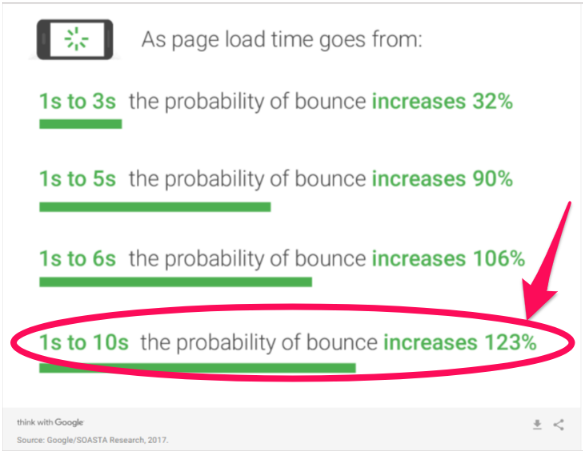
Then, it takes over 10 seconds for your web page to load. Readers are annoyed and they don’t want to wait. 

For every second that it takes for your web page to load, you’re losing readers and increasing your bounce rate.
technical seo for bounce rate

It doesn’t matter how great that piece of content is—your site isn’t functioning well, and you’re losing precious traffic.

That’s just one example of why technical SEO is so critical.

Without it, Google and other search engines are incapable of finding, crawling, and indexing your site.

If search engines can’t access your site, you can’t rank and you become one of the 90.63 percent of websites that get no organic search traffic from Google. Yikes.

Even if your site can be found, user experience issues, like page load times and confusing navigation, can still negatively impact SEO.

Other issues like mobile optimizations, duplicate content, and site security can cause search engines to rank your site lower. 

Elements of Technical SEO

While crawling and indexing are important factors in SEO, there are many more aspects to consider when performing a technical SEO audit. These include:

  • mobile optimization
  • page load speed
  • link health
  • duplicate content
  • schemas
  • crawl errors
  • image issues
  • site security
  • URL structure
  • 404 pages
  • 301 redirects
  • canonical tags
  • XML sitemaps
  • site architecture 

At a minimum, a technically sound website should be secure, quick to load, easy to crawl, have clear and actionable navigation, and not contain any duplicate links or content. 

It should also have systems in place to engage users even if they do hit a dead end, such as content created for 404 errors and 301 redirect pages.

Finally, a site should have structured data to help search engines understand the content. This can come in the form of schema graphs and XML sitemaps.

When conducting a technical SEO audit, be wary of over-optimizing your website. Too many improvements can work against your best intentions and actually damage your SEO rankings.

What Is an SEO Audit?

An SEO audit is the process of evaluating your website to see how well it is performing on search engines. 

SEO audits are a great way to create actionable plans to outperform your competitors, identify opportunities within your website, find and fix exit points, and create better customer experiences.

You should perform technical SEO audits, on-page SEO audits, and off-page SEO audits regularly. 

As you go through your audit, you’ll find places where you can improve or optimize your website performance to improve performance and keep site visitors happy. 

You may not be able to fix every error at once, but you can figure out what’s going wrong and make a plan to fix it.

What Are the Key Elements of a Technical SEO Audit?

There are three key factors to look at during an SEO audit:

  • back-end factors, such as hosting and indexing
  • front-end factors, such as content, keywords, and metadata
  • link quality and outside references

Sometimes, you won’t have the time to address each pain point. So, when deciding which audit insights are worth taking action on, use the 80/20 rule.

The most important part of your site’s SEO is the part that your incoming traffic actually sees.

That’s all washed away if your site isn’t mobile-friendly, though.

With the introduction of the mobile-first index, you need to make sure you understand how your site performs on mobile to ensure proper placement on SERPs.

What does the mobile-first index mean? 

Due to 52.2 percent of global web traffic coming through mobile, Google has adjusted its algorithm to crawl the mobile version of websites. 
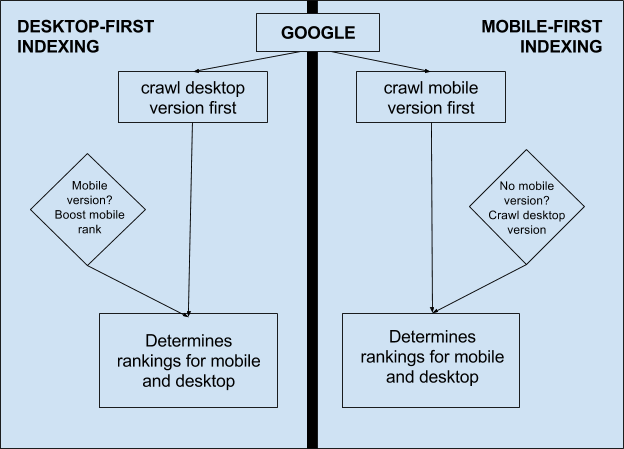
technical seo - mobile first indexing example

It boils down to this—if your site doesn’t perform well on mobile devices, you are not just losing traffic; your site also looks bad to Google. That can result in lower rankings, and even less traffic. 

How to Perform a Technical SEO Audit

SEO guidelines are constantly changing. Every time a major search engine significantly updates its algorithm, SEO has to adapt.

The good news is the frequency of changes in technical SEO tends to be lower. 

After all, it’s not like search engines or readers will suddenly decide they’re okay with slower speeds.

If anything, you will see the average acceptable speed continue to drop. Your site simply has to be faster if you want to keep up with SEO demands.

Your website has to be mobile-friendly. This is only going to become more important over time, too.

It has to work without errors, duplicate content, and poor images.

Search engines also have to be able to crawl it successfully.

These things are all crucial to your success on search engines and site visitors. If you want to prioritize your SEO efforts, make sure you tackle the technical aspects first.

1. Crawl Your Website

The most important part of the SEO audit is the crawl.

Before you do anything else, start a crawl of your website. You can use Ubersuggest to make it a simple process. Here’s how you do it:

  • Step 1: Enter your URL and click “Search.”
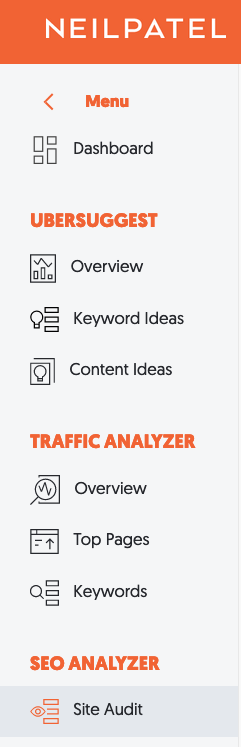
  • Step 2: Click “Site Audit” in the left sidebar.
technical seo ubersuggest sidebar
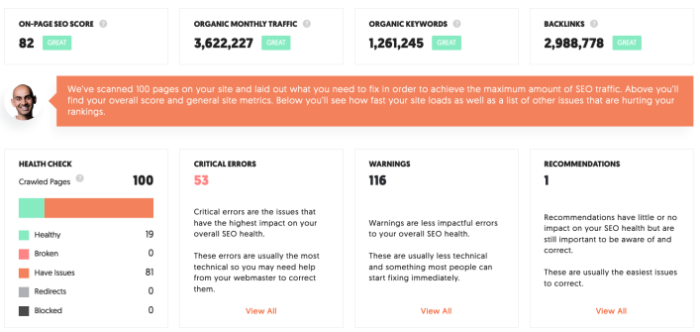
  • Step 3: Run the scan. Upon completion, you’ll see this:
technical seo - Ubersuggest audit page crawl

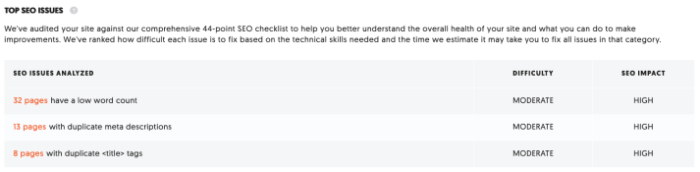
Crawling is useful for identifying problems such as duplicate content, low word count, unlinked pagination pages, and excess redirects. Ubersuggest will even rank issues in order of importance, so you can focus on what matters most. 
technical seo audit with Ubersuggest

If you find anything here, click on it for more information and advice on how to fix it. For example, our website has 32 pages with a low word count.

technical seo audit links

You can then review these pages to determine if you need to add more content.

What does this all mean?

In short, it gives you a glimpse into how the Googlebot is crawling your site.

If you don’t use Ubersuggest for your technical SEO audit, you can also search your site manually. We’ll explain that below.

2. Perform a Manual Google Search

A few Google searches can tell you approximately how well your website is ranking. This will help you figure out where to start your technical SEO audit.

How many of your pages appear in relevant search results?

Does your site appear first when you search for it by name?

Overall, where does your site appear in the results?

To figure out which pages are actually being crawled, you can use a “site:rootdomain” search to see what shows up.

Here’s what this looks like in action: 
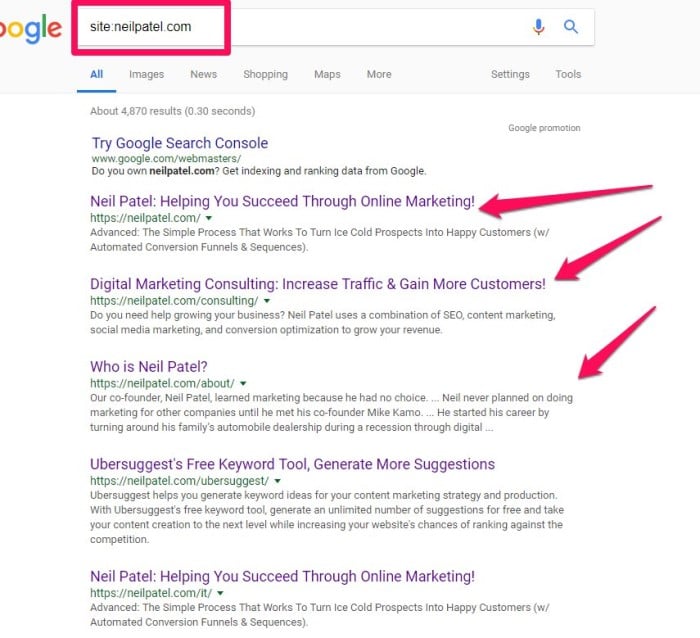
technical seo audit - root domain search

Missing pages don’t automatically mean that your site is un-crawlable, but it’s useful to understand what’s happening behind the scenes.

Your website doesn’t need to be at the very top of your searches, either. By using the site search, it will show you only pages on your own site. 

3. Make Sure Only One Version of Your Site Is Browseable 

If your website has multiple “versions” of itself, you send search engines a mixed message about how to crawl your site.

Basically, the crawlers don’t know which one is the right one.

If search engines don’t even know how to show your site to prospective traffic, your site’s SEO ranking will be negatively impacted.

This could be a mobile and desktop version warring with each other, or a duplicate “https” version and a non-”https” version

The impact of HTTP vs. HTTPS on a site’s SEO is debated in the SEO community. Some sites using AdSense saw a decrease in revenue after making the switch to HTTPS.

For example, Crunchify’s revenue decreased 10 percent after switching to an HTTPS site.

However, it seems that websites without SSL protection are being deprecated on Google SEO moving forward.

Google is even taking steps to make it more known which sites have SSL protection and which do not. Chrome is marking pages as “Not secure” to make it clearer.
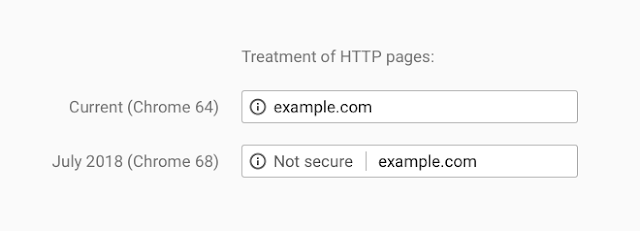
technical seo audit http

With this change from Google, it seems you will need to make sure that your website only uses “https.”

4. Conduct On-Page Technical SEO Checks

When evaluating your site and the results from your crawl, there are tons of things to check. Don’t get overwhelmed! Start by looking for duplicate pages, headers, and title tags.

If you’ve published a lot of content with similar themes, like me, some seemingly unrelated content will show up in your crawl.

That’s okay. You’re looking for duplicates of the same content.

You can use a tool like Copyscape to assess potential technical SEO problems arising from duplicate content.
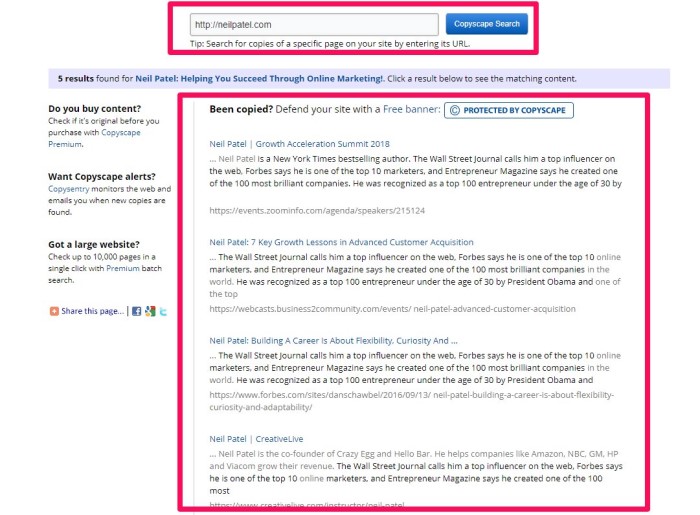
technical seo audit plagiarism

From there, closely examine a few key criteria that Google evaluates in their rankings.

Page Titles and Title Tags

A title tag is an HTML code that tells search engines the title of a page. This information will be displayed on SERPs.

It looks something like this:

technical seo audit serp

You’ll want to make sure these are relevant to the content on your page. The content should also answer the questions your users are asking as fast as possible. 

The optimal length for title tags is between 56-60 characters. You can use a pixel width checker to make sure that your title isn’t truncated. 

Meta Descriptions

Meta descriptions don’t directly impact ranking; but they are still incredibly important because it’s the first thing a user sees in the SERPs. 

Meta descriptions should be compelling, engaging, and give a taste of what the user will find on the page.

Google recently expanded the limit for descriptions from 160 to 320, which provides even more real estate to draw in a click.

Clear Hierarchy

You’ll want to make sure your content is organized, with a clear hierarchy on the page.

This makes it easy for Google to analyze your site and index it for search.
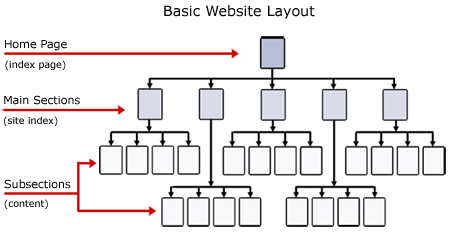
technical seo hierarchy

Essentially, you want to make sure the placement of pages makes sense—all your service pages should be under your “services” tab, for example. Make sure users don’t have to click through four levels of pages to find best-selling products. The goal is to make it easy for Google —and users—to find the information or products they are looking for. 

Keyword Placement

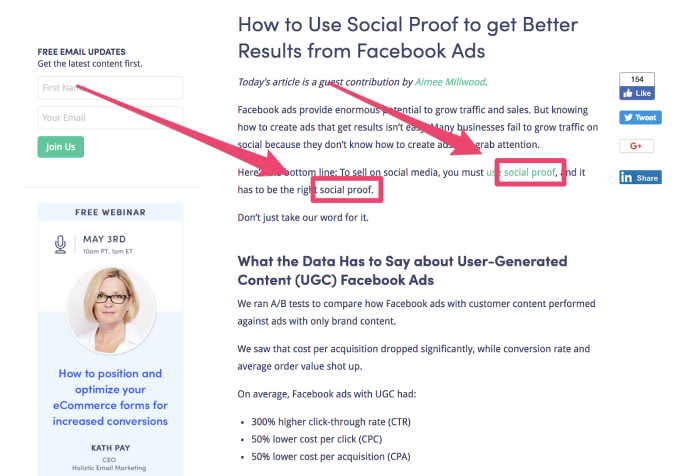
Every page on your site should have a focus keyword included in the first 100 words.

For example, in this post about social proof, it’s included twice in the first 100 words.
technical seo keywords

This helps Google understand what the post focuses on—but don’t stop there.

While keyword stuffing will penalize you, you should be strategic about keyword placement. 

Include them, when possible: 

  • title 
  • alt tags 
  • URL 
  • subheadings (h2, h3, etc.) 
  • meta description 

Overall, on-page SEO checks are incredibly important, but they are only one part of your overarching technical SEO strategy. There are also other SEO checks to consider. 

5. Manage Your Internal and External Links

Sites with logical hierarchies have improved SEO rankings. That’s why it’s important to check your internal and external links—to make sure visitors can navigate your site intuitively. 

Pages might be deleted or moved, which can result in broken links and annoyed site visitors. 

Don’t worry; you don’t have to do this manually.

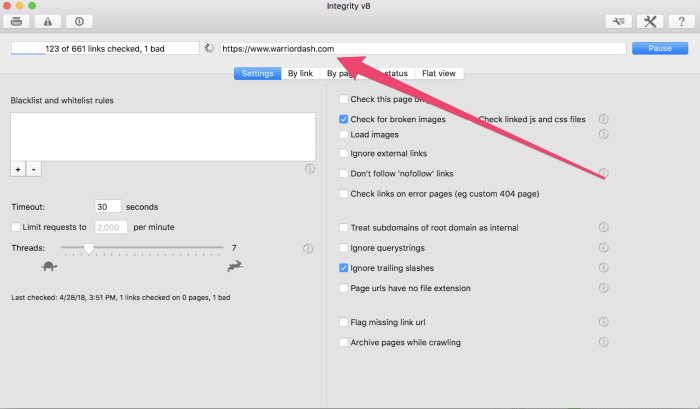
Integrity and Xenu Sleuth can help you identify your broken links on your site. (Note: Integrity only works for Mac.)

While both tools are straightforward to use, I’ll use Integrity as an example.

Once you download it, add your URL in the text bar at the top of the page and click “Go.”
technical seo audit integrity

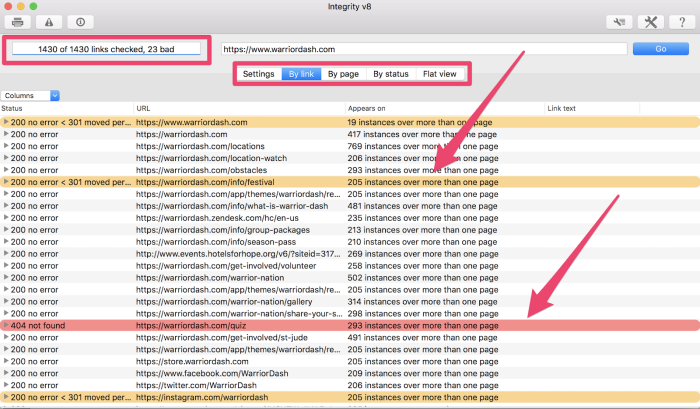
Then the tool will begin testing all the links found on your site and provide you with the results.
technical seo audit backlinks

In the top-left corner, you see a snapshot of links and how many are bad. 

Depending on the size of your site and how many links you have, you might consider viewing the results by link, page, status, or flat view to understand the results. 

You’ll want to change any links marked in red with the “404 not found” label. These dead ends can negatively impact your technical SEO.

Google does score clicks from internal and external links differently, although both have their purpose in improving your SEO.

technical SEO audit links tweet

6. Check Your Site Speed

People are impatient. Google knows this.

Your customers don’t want to wait around. The longer your page takes to load, the higher the chance your customer will bounce.

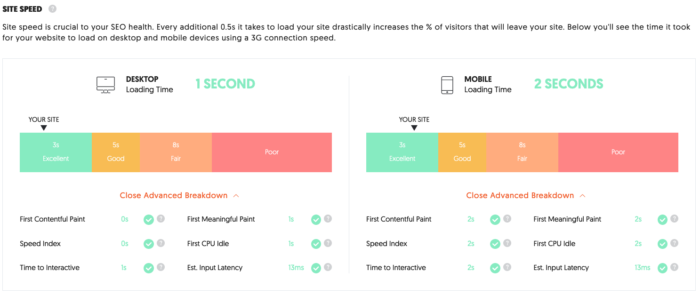
You need to check your site speed, and Ubersuggest can help. Here’s how to get started:

  • Step 1: Enter your URL and click “Search.”
  • Step 2: Click “Site Audit” in the left sidebar.
  • Step 3: Scroll down to “Site Speed.”
Technical SEO - ubersuggest site speed

Ubersuggest displays loading time for both desktop and mobile devices. The results above show my site is in the “excellent” range for both.

In addition to loading time, it also tests:

  • First Contentful Paint
  • Speed Index
  • Time to Interactive
  • First Meaningful Paint
  • First CPU Idle
  • Est. Input Latency

Take action if your website scores less than excellent or good.

You might need to optimize your images, minify JavaScript, leverage browser caching, or more.

Ubersuggest will outline just what you need to do to improve site speed. 

7. Leverage Your Analytics and Compare Site Metrics

This step determines whether your analytics service (e.g., Google Analytics, Kissmetrics, etc.) is reporting live metric data.

If it is, your code is installed correctly.

If not, your code is not installed correctly and needs to be fixed.

If you’re using Google Analytics, you want the tracker code to be placed above the header of each web page.

Once you have an analytics service up and running, compare the metric data to the results of your earlier “site:rootdomain” search.

The number of pages showing in your metric data should be comparatively similar to the number of pages from the “site:rootdomain” search.

If not, certain pages aren’t properly accepting crawl requests.

Check Your Bounce Rate

Google Analytics can be helpful when assessing your page’s bounce rate. 

A high bounce rate means that people aren’t finding what they are looking for on your site. This means you might have to go back and make sure the content is optimized for your audience.

You can check your bounce rate by logging into your Google Analytics account and clicking on Audiences > Overview.

Compare Metrics With the MozBar

In addition, you can use Moz’s tool called The Mozbar to benchmark between pages.

The MozBar is a tool that provides various SEO details of any web page or search engine results page.

The toolbar adds an overlay to your browser and offers a number of features. 

For example, MozBar can be used to highlight different types of links that you view.

technical seo mozbar tool

This is useful on its own, but it also lets you compare link metrics on or between pages.

It also comes with robust search tools to make your life easy.

With it, you can create custom searches by location, down to the city.

Page Authority is also supported by the MozBar.

It ranks each specific page from 1 to 100 in terms of how well it will rank on search engine results pages.

When doing a technical SEO audit, tools like this help you quickly take the temperature of your site’s relationship with search engines.

The less guesswork you have to do, the better quality your SEO audit will be.

8. Check Your Off-Site SEO and Perform a Backlink Audit

Backlinks are critical for SEO success.

This way, Google and other search engines will know that your page is particularly relevant and that other users will find it useful.

Remember that hyperlinks are not the only thing crawlers look for in off-site SEO.

Your site is also crawled for brand mentions. This is why it’s crucial to pay attention to what’s happening both on and off your site.

Perform Your Backlink Audit

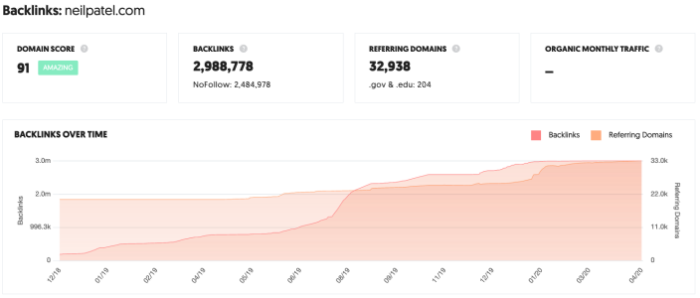
Use a tool such as Ubersuggest to perform a backlink audit and assess the kind of backlinks pointing to your site. Here’s how: 

  • Step 1: Enter your URL and click “Search.”
  • Step 2: Click “Backlinks” in the left sidebar. 
  • Step 3: Review the report. 
technical SEO backlinks ubersuggets
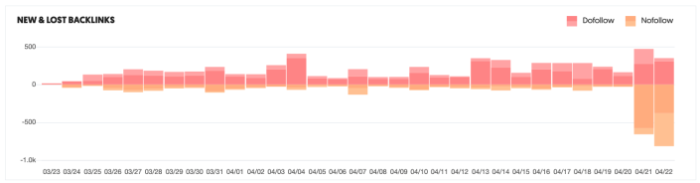
technical seo audit new and lost backlinks

Backlink audits are helpful because:

  • You can assess your current link profile and see how it is affecting your site.
  • You can identify areas where you can focus on getting more high-value links.
  • You can assess your competitors’ number of backlinks and work to outperform them.

Don’t just stop with your site’s backlink audit—you’ll also want to see what the competition is up to. 

Analyze Competitor Keywords

Your competitors were busy upping their SEO capability while you were sleeping. Now, they rank higher for your most important search terms.

Ubersuggest can also help with this.

It allows you to see what keywords other sites are ranking for. It also shows what backlinks are going to those sites.

Basically, you want to explore your competitors’ backlinks and see how they compare to your own. Here’s how you do it:

  • Step 1: Enter your competitor’s URL and click “Search.”
  • Step 2: Click “Keywords” in the left sidebar.
  • Step 3: Review the results. 
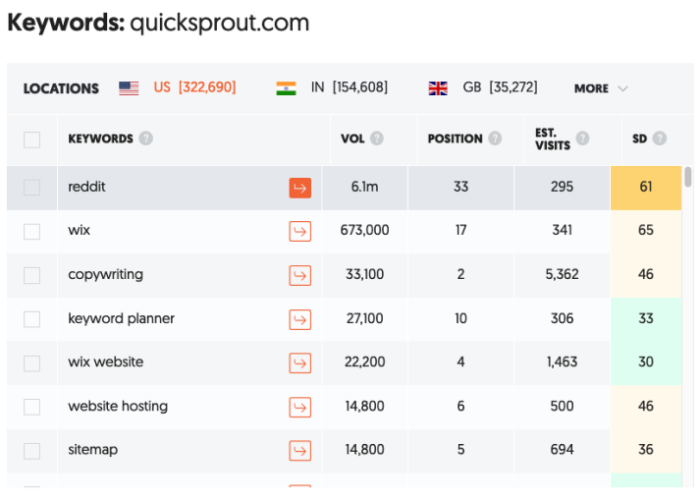
technical seo keywords list
ubersuggest technical SEO audit

This provides a clear overview of what your competitor’s site is ranking for. In addition to a list of keywords, you can review:

  • Volume: the average number of monthly searches for the keyword
  • Position: position the URL is ranked in Google search
  • Estimated Visits: estimated monthly traffic the webpage gets for the keyword
  • SD: estimated competition in organic search, the higher the number, the more competitive the term is 

Engage on Social Media

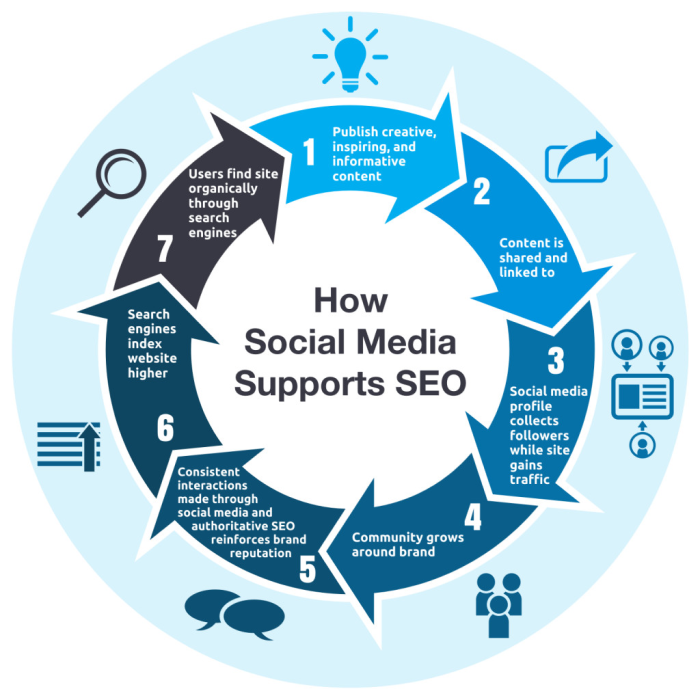
Social media is a conduit for consistent backlinks and engagement. You can use it to support your technical SEO efforts.
technical SEO social media chart

You want to figure out which additional social media platforms are frequented by your target audience.

Simply put, social media can improve your SEO by:

  • Increasing the number of your backlinks. Those who discover your content on social media might be more likely to link to it.
  • Increasing brand awareness, which can help with search queries including your brand’s name.

Social media is an opportunity to increase traffic and mentions beyond what people are searching for on a search engine.

Social media saturation is also simpler than putting together a link-building campaign.

Use the Facebook Sharing Debugger to see what your web content looks like when shared on Facebook.

This tool also allows you to check your Open Graph tags.

Technical SEO: Final Thoughts

There are three different aspects of SEO, and technical SEO is the most important of the three.

It won’t matter how amazing your on-page SEO is if you fail at technical SEO.

It also won’t matter how great you are at off-page SEO if you’re horrible at the technical stuff.

Don’t get overwhelmed by the idea of it being “technical” or complex. Start with the big, critical aspects discussed above and tackle them one problem at a time.

How have you found success with technical SEO on your site?


from Blog – Neil Patel https://ift.tt/2KFkpqG
via IFTTT

Facebook Lookalike Audiences: How to optimize ads to reach new customers

Wish you could take the guesswork out of your social ad targeting?

Don’t we all.

Sure, it’s awesome that marketers have so many choices when it comes to our Facebook advertising strategy and who we serve our ads to.

But navigating the numerous targeting options and factors can be downright daunting.

That’s where Facebook Lookalike Audiences are a game-changer.

Rather than start each campaign from scratch or tweak a bunch of targeting factors, Lookalike Audiences lets you base new ads on your existing audience.

The result? More engagement and conversions with a lot less guessing.

In this guide, we’ll break down the basics of Facebook Lookalike Audiences and what marketers need to know to get started.

What is a Lookalike Audience, Anyway?

Facebook Lookalike Audiences represent an ad-targeting option for a totally new target audience that shares characteristics with your existing ones, based on previous engagements with your business account or ads.

The concept here is simple. Instead of researching a new audience manually, Facebook figures out who’d be most likely to click through your campaigns on your behalf. This is determined by factors such as interests, interactions (think: “likes,” comments, shares) and previous ad clicks.

While Lookalike Audiences are ideal for marketers that have run ads successfully in the past, they’re fair game for first-timers as well. That’s because Facebook allows you to create Lookalike Audiences based on:

  • People who like and follow your Business Page
  • Conversion pixels you’ve created in the past
  • Existing custom audiences

In addition to more accurate targeting by default, this format also provides more experienced advertisers with customization and flexibility. For example, you can broaden your Lookalike Audience to your liking or keep new ad targets almost identical to your own.

If nothing else, Facebook does a pretty good job of holding marketers’ hands through the process of creating a Lookalike Audience to make sure they’re relevant. Doing so is in the best interest of the platform, after all.

Why use Facebook Lookalike Audiences versus other ad formats?

Again, there are plenty of ad formats on Facebook to choose from. What makes Lookalike Audiences so special?

Below are some of the key benefits:

  • They save you a ton of time. If you’ve already gone through the legwork of fine-tuning a Custom Audience, you’ve done the hard part. Lookalike Audiences allow you to squeeze more out of what you’ve already established.
  • In theory, Lookalike Audiences are “proven” versus creating something cold. That’s because they’re based on parameters that show user interest.
  • Lookalike Audiences can easily supplement your existing ads. For the sake of stretching your social media budget, Lookalike Audiences allow you to experiment and target multiple audiences at once without running totally different campaigns.

What scenarios are Facebook Lookalike Audience ads ideal for?

Good question. Let’s look at some of the most common scenarios, for reference:

  • You’re interested in engaging a new audience. Let’s say you want to reach a previously untapped demographic. With a Lookalike Audience, you can expand your targeting without going totally off-base in terms of interests.
  • Your existing ad audience isn’t engaging like it used to. If you suspect you’ve exhausted your customers as-is or your base is too small, these types of ads can help you test the waters.
  • You want to compare two different audiences against each other. Again, Lookalike Audiences can supplement any of your current ads. Comparing performance might open your eyes to new opportunities without blowing out your budget.

What do Lookalike Audience ads look like in action?

In reality, ads based on Lookalike Audiences resemble any other successful Facebook campaign in terms of creatives.

Here are a few examples from Facebook’s own ad success stories which highlight how such ads can be used, piggybacking on the same scenarios we discussed earlier.

This ad from the Teaching Company highlights how Lookalike Audiences can be used to explore new ad targets in terms of geography. For this campaign, the company took a US-only ad and served it in Canada, the UK and Australia based on their best customers. The end result was a 10x boost in monthly average subscriptions to their service.

teaching company facebook lookalike audiences ad

Here’s another example from Shipt. For this ad, the brand created multiple Lookalike Audiences based on current and past customers. Experiencing a 14-point lift in conversions, this is yet another shining example of how targeting based on your existing audience can be so effective.

shipt facebook lookalike audienes ad

This campaign from OLIPOP included Lookalike Audiences of top purchasers as part of a budget experiment, attempting to determine whether increased spending resulted in diminishing returns. The brand found that ramping up their efforts resulted in a significant lift in conversions and add-to-cart events alike.

OLIPOP facebook lookalike audiences ad

How to create a Lookalike Audience on Facebook

Let’s say you’re interested in putting together your first Lookalike Audience.

Excellent!  First things first: log into your Facebook Ads Manager account. On the left-hand corner, you’ll see the “Create Audience” dropdown.

create facebook lookalike audience in ads manager

Again, the platform makes the creation process fairly straightforward but the number of options to choose from can be overwhelming. The breakdown below can help speed things up.

1. Select your audience source

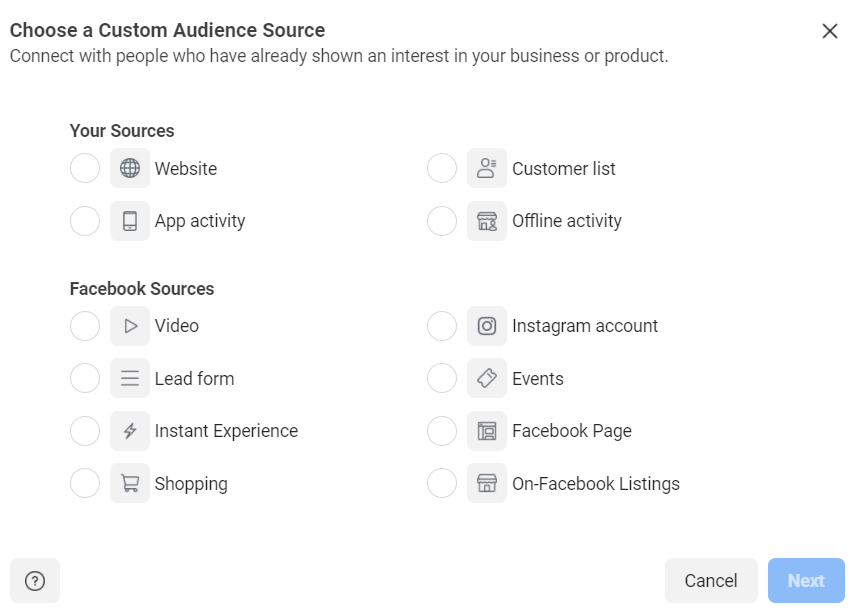
From the word “go,” you have the options we talked about earlier: Pages, Facebook Pixel or an existing Custom Audience.

facebook lookalike audiences choose source

Facebook recommends using “events with value” (AKA value-based sources). That’s because such targeting is based on actual past customer purchasing data. For example, creating a Lookalike Audience based on a remarketing Pixel allows you to base your campaigns around targets with higher (or lower) average order values.

facebook lookalike ads marketing pixel

If you opt to use a Custom Audience as your source, make sure to familiarize yourself with the various Facebook ad targeting options available. For example, you can upload a customer list or base your Lookalike Audience on people who’ve interacted with your website.

facebook custom audience creation


2. Choose your audience location

No big surprises here. Once you select a source, you’ll be prompted to select a region for your Lookalike Audience.

Again, this is helpful if you’re looking to run or experiment with international marketing. This selection allows you to find relevant ad targets based on geography.

facebook lookalike audience region selection

3. Determine your audience size

Finally, you have a choice to choose just how “alike” your Lookalike Audience is.

The smaller the percentage here, the more similar your audience is to your source audience. On the flip side, a larger number makes your audience broader.

facebook lookalike audience similarity

Whether you want a super similar audience or a larger one really depends on your goals and budget. Like any type of Facebook ad targeting, a little bit of experimentation goes a long way.

Note: Lookalike Audience specs and requirements

Before you’re allowed to create your audience, there are a few parameters you need to familiarize yourself with. Although Facebook will prompt you on some of these, make sure to consider the following:

  • Your audience size must be at least 100 people from the same country
  • Facebook recommends between 1,000 and 50,000 of your “best” customers based on lifetime value, order size, or engagement for optimal Lookalike Audiences
  • It can take between six and 24 hours for your audience to actually be created

What can my Facebook Lookalike campaigns teach me?

Just like any other type of ad data, you should note how your Lookalike Audience performs and look at your KPIs.

If your campaigns perform similarly or significantly better than your previous ones, you’re golden. If not, you might consider some tweaking (think: pulling back or ramping up your audience size, experimenting with Custom Audiences versus Pixel, etc).

Either way, make sure you’re keeping an eye on your metrics. You should also assess not only how your ads compare against each other, but how your paid performance compares against your organic social posts.

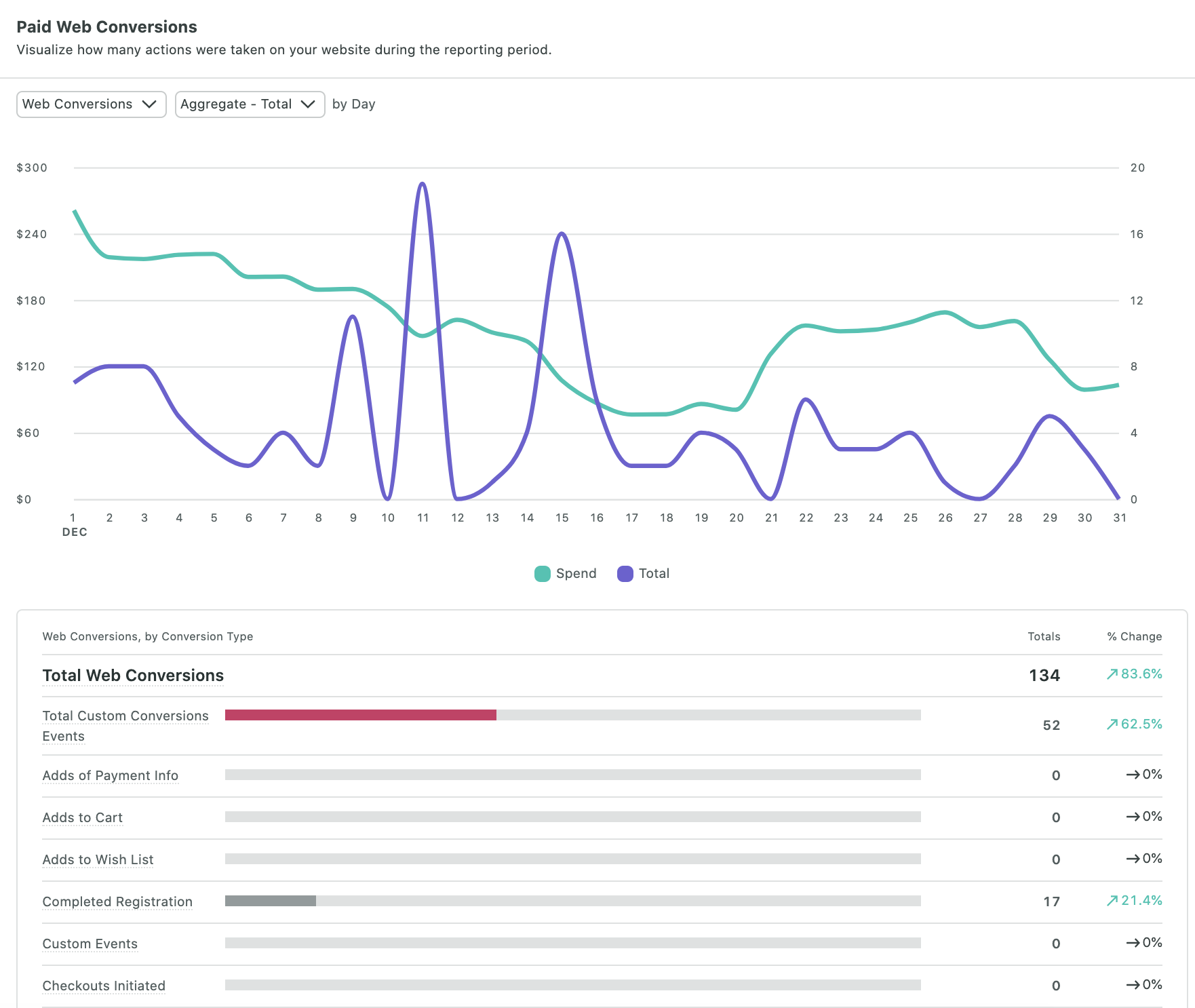
With tools like Sprout Social, you can use our paid ad reporting and analytics to do exactly that. With a holistic view of your Facebook presence, you can better determine your budget in terms of time and resources.

facebook ad reporting in sprout social


Are you taking full advantage of Facebook Lookalike audiences?

Lookalike Audiences are an invaluable tool for social marketers.

Like any other type of ad, they can take time to master but are worth pursuing for the sake of experimenting and reaching new audiences.

Now that you know how to create a Lookalike Audience on Facebook, perhaps it’s time to consider how such ads fit into your paid social strategy.

And if you need to secure a bigger budget to expand your campaigns, we’ve got you covered. Make sure to check out our guide on making a business case for social media to get the buy-in that you need to run a new campaign.

This post Facebook Lookalike Audiences: How to optimize ads to reach new customers originally appeared on Sprout Social.


from Sprout Social https://ift.tt/3hUwKuh
via IFTTT

How to Run Ads With iHeartRadio AdBuilder

How to Run Ads With iHeartRadio AdBuilder

How do you maximize your exposure?

If you ask ten marketers this question, you’ll likely get lots of similar answers: Google Ads, social media marketing, etc. What you’re asking is which platforms offer massive traffic and have strong conversion rates.

Now, imagine you’re a marketer for a local business. How do you maximize your exposure now? Those digital campaigns with tons of traffic aren’t necessarily the answer for a brick-and-mortar store trying to get their community through the door.

There are plenty of businesses that desperately need to expand their reach but haven’t had a breakthrough with digital. That’s why today, we’re going to take a look at the potential of audio ads. iHeartRadio AdBuilder offers some ease and functionality to the world of radio ads, and it just might be a solution for local business owners.

What Are iHeartRadio Ads?

One of the most significant issues small-to-medium-sized businesses (SMBs) have had with audio advertising is it’s not particularly intuitive. The idea behind iHeartRadio’s AdBuilder was to create a programmatic solution automating this process.

AdBuilder is a self-service platform designed to help marketers create and promote audio ads. Beyond buying ad space, AdBuilder supports SMBs by using algorithms to target specific audiences.

SMBs can decide how much they’re comfortable spending, which cities they’d like their ads to play in, and how to focus on well-defined target audiences. AdBuilder radio spots are professionally written and produced with on-staff voice talent.

How Much Do iHeartRadio Ads Cost?

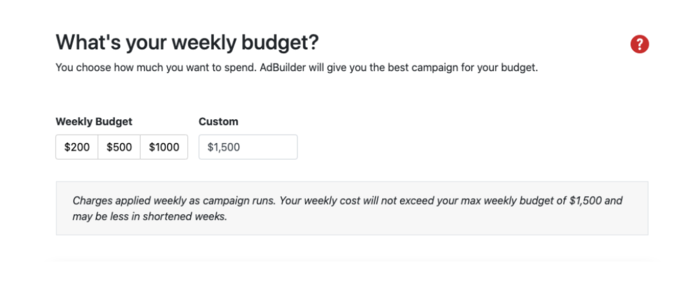
There’s no fixed cost with iHeartRadio Ads. What you pay is entirely up to you based on a series of options for your weekly budget. Depending on the market you choose, you see a minimum budget and a series of recommendations. You can also enter a custom amount of up to $30,000.

How Much Do iHeartRadio Ads Cost

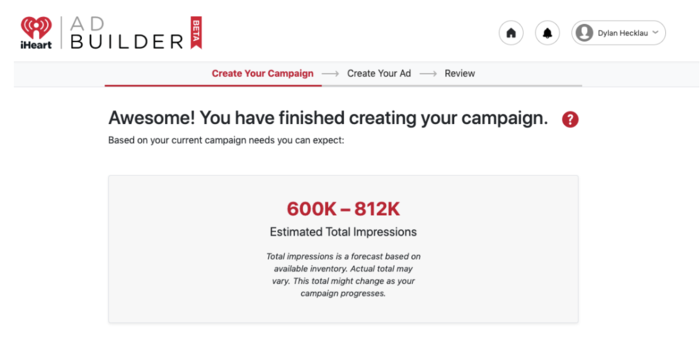
These costs purchase impressions, which are tracked on your account. Your weekly cost won’t exceed your max weekly budget and, even after your campaign is booked, you can modify dates and the budget for your campaigns.

iHeartRadio Impressions

Why Should You Run an iHeartRadio Ad?

Some marketers are looking for massive $30,000 nationwide campaigns; some want to spend $10,000. Some marketers have audio scripts ready; others have never written an audio script in their lives. The level of customization offered by iHeartRadio AdBuilder is unique and makes it worth checking out.

Of course, maximizing exposure is more than just a local business problem. Digital brands that want a specific type of customer or client can benefit from a national presence. Increased exposure means increased sales and can lead to higher quality engagement.

Whether you’re marketing for a local business or a national company, iHeartRadio AdBuilder may have something for you.

How to Set Up Your iHeartRadio Ad Campaign

Not only is iHeartRadio flexible, but it does its best to keep things simple. Setting up your campaign with them can be done in three steps.

  1. Provide Basic Information

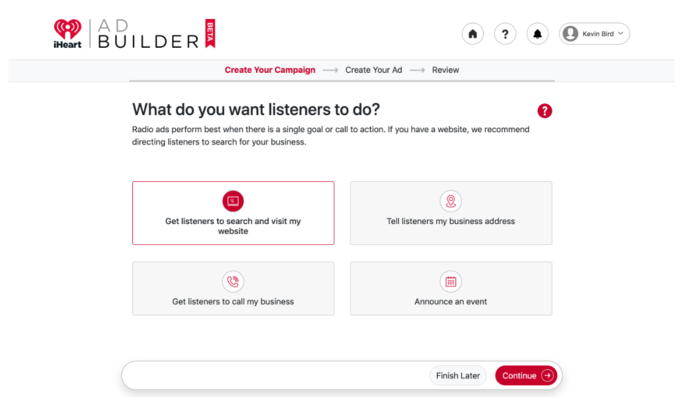
    Create an account and answer a few questions about your business and advertising goals. From there, you’ll determine your advertising goals, select target audiences, and pick a weekly budget. Their team of audio professionals produces a customized ad based on your goals and business.iheartradio ads setup

  2. Approve iHeartRadio’s Ad

    After they’ve produced your custom ad, you can listen to and approve the message. If needed, it can be revised (sometimes at no cost to you) and then be scheduled to play across iHeartRadio stations nationwide or locally.

  3. Your Ad Goes Live

    Once your ad is approved, it goes live and starts airing. The iHeartRadio AdBuilder optimizes your ad budget to reach target audiences at particular times of day, using user data to target listeners via specific stations. You also have access to data reports once your campaign has ended.

5 Tips for an Effective iHeartRadio Ad Campaign

1. Understand the Medium

Savvy marketers take the time to learn about the perks and limitations of audio-only advertising.

One of the most compelling pros of audio advertising is its simplicity. You don’t need an expensive camera or someone to craft a heavily researched, complex article. Your iHeartRadio ad is meant to be consumed in 30 seconds, so minimalism is an absolute must here.

That said, the simplicity of these ads can feel limiting to marketers used to creating long-form content. If you’re struggling to wrap your head around what compelling audio content sounds like, there are a few stages to focus on: Capture, Excite, and Guide.

Breaking down the marketing process into these three stages can help clarify the audio marketing experience.

Capture

The Capture stage is about finding the memorable aspects of your brand and using them to disrupt your audience’s patterns. It’s not just about being controversial or unusual. Truly captivating moments properly and cleverly address your target audience’s pain points.

This moment is a reinterpretation of your elevator pitch, but there’s much more to it in the audio space.

The use of a particular sound effect, a unique jingle, and a specific style of voice actor can contribute to this aspect of advertiser storytelling. There’s a time for mentioning your brand and your unique selling point, but it’s not now. The script here should be more focused on creating mental images and bringing up emotions.

Excite

Now that you have your audience’s attention, it’s time to convince them your brand is worth considering. Be selective about the selling points you include.

Could you streamline five of your best- selling points and shove them into the 30-second ad? Probably. Should you? Not necessarily.

When you captured your audience, you tapped into their emotions and got them excited about your brand. If you start rattling off stats, you’re probably going to lose the excitement. Use one of your unique selling points to showcase what makes you different to keep the enthusiasm up.

Guide

When you guide your audience, you try to get them to follow through on the action you want them to take. Transitioning from excitement to sales is always tricky, but the right kind of call-to-action (CTA) can make this process much more manageable.

By streamlining the messaging and leading potential customers to more in-depth, comprehensive marketing (a landing page, for example), you can focus on making the iHeartRadio ad compelling instead of just informative.

2. Pick Your Target Audience Carefully

It may not be exciting, but ask any successful marketer, and they’ll tell you well-executed research is essential when developing a marketing strategy.

Over the years, the phrase “target market” has been used interchangeably with “target audience.”

A target market is broad (generation, income level, etc.) and tailored to particular groups due to interest, budget, access.

On the other hand, target audiences are specific groups within those target markets. If your target market is Millennials, your target audience may be post-college, female Millennials making at least $50,000 a year.

Good ad campaigns are for target markets. Great ad campaigns are for target audiences.

The specificity makes the research valuable, and knowing who your target audience is can help you make more relevant, compelling ads. With audio, you must understand which stations they listen to and what time of day they’re likely to listen. iHeart AdBuilder does this for you automatically.

3. Analyze Your Campaign Results Regularly

As your marketing campaign grows and evolves, you need to analyze its effectiveness properly.

One of the most valuable tools marketers can use is setting clear, strict deadlines and tangible goals for marketing initiatives.

Don’t just aim for an increased conversion rate; aim for specific numbers in a few metrics. Properly labeling your campaign goals like this sets your brand up for potential success with every new initiative.

If a new campaign performs well, you can identify which KPIs improved. If the new campaign doesn’t meet the projected goals, you can see which metrics underperformed and react accordingly.

4. A/B Test Different Campaigns

Marketers don’t live in a vacuum. More often than not, everyone brings their unique experience and perspective to the table. That human element can make advertising come to life, but it can also create a sort of cognitive bias we can’t always identify internally.

That’s why I recommend brands and marketers test two radically different marketing campaign approaches, especially if this is their first major campaign.

Maybe there’s a comedic iHeartRadio ad you’d like to make, but you’re worried it won’t resonate with your target audience. Perhaps you’re worried your simple iHeartRadio ad won’t stand out in a sea of dynamic competitor ads. This is the time to test out all those ideas.

As long as you’re setting clear, tangible goals and tracking the data, every experiment is a learning opportunity. Test every assumption your campaigns make. Collect more and more data to develop a clearer sense of what your audience responds to.

Once you’ve identified winning strategies, start to optimize.

5. Use Strong, Clear CTAs

Connecting with a target audience is hard enough, but turning connection into conversion is one of the biggest challenges marketers struggle with, iHeartRadio ad or otherwise.

When crafting a compelling CTA, your focus should be on words provoking emotion or enthusiasm. Simple things like adding an exclamation point can make a massive difference.

Pair your CTA with a compelling reason for taking the next step forward. Now, this demands a bit of awareness on your behalf. For example, are you moving this potential customer into the sales funnel or simply further down the marketing pipeline?

Find statements matching the commitment necessary to convert once potential customers reach the next stage. You’ll know you’re doing this right when you have a low bounce rate.

As for the actual language you’ll want to use, here are some options you can work into your ad:

  • Sign up now.
  • Sign up for free.
  • Join free for one month.
  • Get started today.
  • Claim your free trial.

Conclusion

The most frustrating part of using a new marketing platform is the learning curve.

iHeart AdBuilder was seemingly designed with this problem in mind, taking the confusion and guesswork out of radio ads and replacing it with something both accessible and effective.

If your business needs a local boost, or you’re looking for a new way to reach your target audience, AdBuilder just might be the tool you need.

Are you considering radio ads? What kind of audiences are you hoping to target?


from Blog – Neil Patel https://ift.tt/3hXsFFr
via IFTTT