Disclosure: This content is reader-supported, which means if you click on some of our links that we may earn a commission.
You want people to trust your site, and that requires a valid secure sockets layer (SSL) certificate.
SSL certificates are issued by a certificate authority (CA) and they build trust in two important ways:
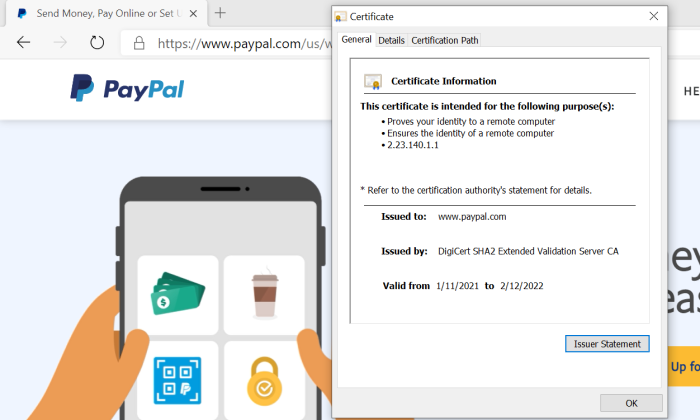
The CA authenticates the identity of the organization that wants the certificate. This way, people know that they are in fact sending their information to PayPal, for example, and not someone who has set up a fake PayPal site.
The SSL certificate encrypts the data travelling between your website and visitors. This way, potential attackers can’t steal the information people share on your site, such as their username, password, or credit card number.
Today, all of the popular browsers like Google Chrome will warn users anytime they attempt to visit a site without an SSL certificate. It’ll say something like “This site is not secure,” or “Any information you share may be vulnerable to attackers.”
Would-be visitors are going to head to a different site where they feel comfortable entering their credit number. I know I would.
There are a lot of different CAs to choose from and they sell a range of SSL certificates designed to help companies establish their online identity and protect their customer’s privacy.
For some people, going with a free SSL certificate is going to be fine. All that’s required is a quick demonstration that you control a particular domain. These are known as DV (domain validated) SSL certificates.
But they are not enough to protect a major website or online store.
For companies that need to establish a greater level of trust, OV (organization validated) or EV (extended validation) SSL certificates involve real-world background checks on the organization making the request.
The rigorous authentication process isn’t free, but it conveys a much higher level of trust. Paid SSL certificate providers also make the process of obtaining and renewing certificates much easier through an intuitive online platform.
Choosing the right provider can seem tricky at first, given that they are all selling the same essential service. There are important differences, though, and you want to figure them out before you decide.
In this post, I’ve reviewed the top SSL certificate providers. These are big names with a long history of protecting websites. The reviews are followed by a short guide that will help you make sense of your options and ask the right questions moving forward.
#1 – SSL.com Review — The Best for Budget-Friendly SSL Certificates
SSL.com is perfectly suited for small and growing businesses that need to secure their sites, but can’t afford to spend thousands of dollars a year.
They are a mid-range product which works for companies that have outgrown their ability to use free SSL certificates, but don’t have especially complex security needs that justify the premium pricing of DigiCert or GlobalSign.
The best part about the budget prices is that the level of encryption is the same as you get with much more expensive SSL certificates.
You might think that the downside would be lower-quality customer service, but nothing could be further from the truth.
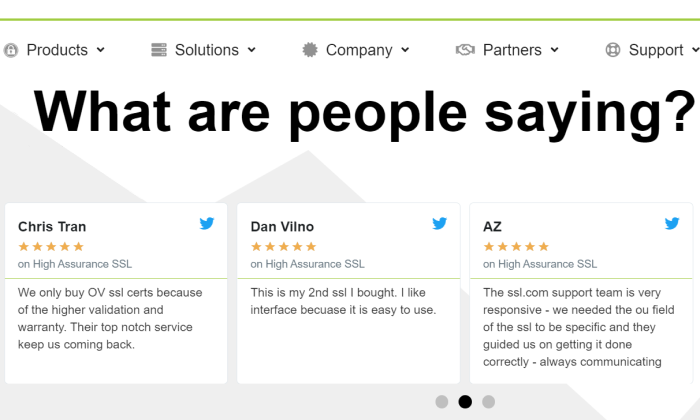
SSL.com offers 24/7 chat, email, and phone support. In review after review, happy customers have thanked their SSL.com customer service agent for walking them through installing their first SSL certificate or helping them handle a complex issue.
I think SSL.com has struck a good balance between price and customer service. It’s not dirt cheap, by any means, but it’s certainly less expensive than some of the enterprise-focused SSL certificate providers.
Along with affordable pricing, SSL.com offers a range of certificates flexible enough to accommodate the needs of many different businesses:
Basic SSL: starting at $36.75/year (domain validation)
Premium SSL: starting at $74.25/year (comes with three subdomains)
High Assurance SSL: starting at $48.40/year (organization validation)
Enterprise EV SSL: starting at $239.50/year
Wildcard SSL Certificate: starting at $224.25/year
Multi-domain UCC/SAN: starting at $141.60/year
Enterprise EV UCC/SAN SSL: $319.20/year
Like other SSL certificate providers, you have to sign a longer contract to get the lowest price. With SSL.com, however, the single-year pricing still comes in lower than competitors.
As you can see above, SSL.com has really low rates for wildcard and Subject Alternative Name (SAN) certificates. This can save a ton of money and streamline certificate management.
Wildcard certificates cover an unlimited number of subdomains. Instead of buying, installing, and renewing a separate certificate for neilpatel.com, info.neilpatel.com, and so on, I just need one Wildcard.
SAN Certificates protect multiple domains. The exact number depends on the SSL certificate provider. More domains covered with fewer certificates will make your life much easier.
Just for comparison, GlobalSign’s EV SSL certificate starts at $599 and it costs extra to add domains and subdomains from there.
With SSL.com, on the other hand, the Enterprise EV UCC/SAN SSL lets you secure up to 500 additional domains for a lot less money. And with GlobalSign, you are limited to 100 additional subdomains per SAN certificate.
Compared to Digicert, the difference is more pronounced as a multi-domain EV is nearly $3,000 per year.
If you think that SSL.com is coming in at the right price for you, give it a shot. The 30-day unconditional refund is not a marketing gimmick. If you are not happy, they will credit your account immediately. Get started now.
#2 – GlobalSign Review — The Best Managed SSL for Enterprise
GlobalSign is the SSL certificate provider of choice for large organizations with complex needs. They have some of the highest rates in the industry, but also some of the happiest customers because of the quality of their service.
If you just need a couple SSL certificates, I would go with something less expensive. On the other hand, if you need a lot of certificates, and managing so many of them is starting to cause problems, then GlobalSign is a wise choice.
Its best-in-breed certificate monitoring and inventory tool, combined with heavy discounts for volume licensing, reduces the total cost of ownership for complete SSL security.
Decrease the frequency of the costly problems associated with certificate expiry, regardless of how many you have to manage. You can even set policy preferences and receive reminders when certificates aren’t compliant, regardless of who issued the certificate.
No more having to track down certificates manually. Everything is available with a quick scan.
Think about it. If your staff saves an extra couple hours each month due to GlobalSign’s intuitive platform and concierge support, then the service has already paid for itself.
I highly recommend GlobalSign for businesses that can’t play the normal waiting game to get new certificates. After GlobalSign authenticates your business, they can issue certificates virtually on-demand because they have pre-vetted all domains.
The initial authentication process is fairly quick (between three and four business days for EV). Some people have reported being able to get certificates quicker due to emergency situations simply by calling up GlobalSign.
GlobalSign offers the full range of traditional SSL certificates:
DV SSL certificate: starting at $249/year
OV SSL certificate: starting at $349/year
EV SSL certificate: starting at $599/year
DV Wildcard SSL certificate: starting at $849/year
OV Wildcard SSL certificate: starting at $949/year
GlobalSign offers SAN SSL certificates for multiple domains at $199/year on top of the base certificate price. So, an OV SAN SSL from GlobalSign would run you $549/year. A single SAN certificate will cover up to 100 additional domains.
You can choose to add subdomains for an additional cost, as well, though a wildcard SSL certificate will be more cost effective if you need coverage for a lot.
The warranty for the GlobalSign EV tops out at $1.5 million. If your digital certificates don’t provide the protection promised, GlobalSign will foot the bill for damages.
This is half a million less than a comparable certificate from DigiCert. Ideally, you’ll never have to worry about the difference, but it’s something to be aware of.
Another nice aspect for enterprise customers is that GlobalSign supports document signing, code signing, digital signatures, and secure email. Being able to centralize all of these SSL security concerns in a single platform can make managing them much easier.
GlobalSign also offers intranet SSL for securing internal servers and applications. This means companies no longer have to run their own CA or use self-signed certificates.
For companies that provide cloud-based services, GlobalSign’s CloudSSL can help them meet the complex security requirements of these next-generation environments.
Not every company will realize the benefit from GlobalSign’s premium suite of managed SSL certificates and services. For simple websites, it’s overkill.
But for enterprises, especially companies with complex SSL security needs, going with GlobalSign is worth every penny.
Request a GlobalSign managed SSL demo today, and see the difference it makes.
#3 – DigiCert Review — The Best for Premium SSL Certificates
Digicert Group owns a handful of the most trusted CAs (GeoTrust, RapidSSL, Thawte, and Verisign) and has become one of the largest SSL certificate providers in the world.
It’s one of the more expensive options, for sure, but Digicert includes security features with its premium SSL certificates that can make a huge difference for the right businesses.
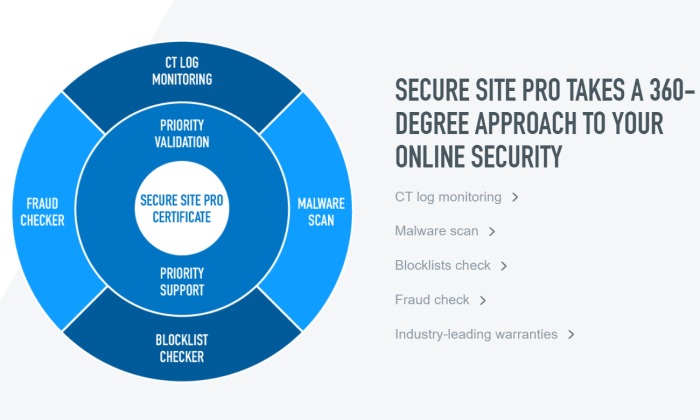
This includes automatic malware detection across all your sites, PCI (payment card industry) compliance scans, and blocklist checks, which ensure that your site isn’t under suspicion on any government or country-specific blocklist.
Importantly, most of these features only come with Digicert’s higher-tier plans. The provider breaks down its offerings into three tiers: Basic, Secure Site, and Secure Site Pro.
You can buy different types of certificates for each tier, but I don’t recommend going with Basic. It costs a lot more than comparable protection from other SSL certificate providers and you miss out on the extra security features that make Digicert’s premium pricing a good buy.
If you need the basic domain validation that comes with Digicert Basic, I’d go with SSL.com. On the other hand, if you are running an ecommerce website where users are entering financial information, Digicert offers a high level of protection that is very appealing.
At the Secure Site tier (which comes with organization validation), pricing breaks down as follows:
Secure Site SSL: starting at $399/year
Secure Site EV SSL: starting at $995/year
Secure Site Multi-domain SSL: starting at $1,296/year
Secure Site Multi-domain EV SSL: starting at $2,785/year
Secure Site Wildcard SSL: starting at $1,999/year
All Secure Site certificates are backed by a $1.75 million Netsure Protection Warranty for your businesses, and a $2 million aggregate Relying Party Warranty for your customers.
This is one of the most comprehensive warranties out there, and this isn’t even the premium DigiCert plan.
You also get priority support, which means that Digicert agents will respond to your concerns faster than they would if you went with the Basic tier. Another good reason to avoid that.
Of course people still run into issues, but Digicert customers with priority support constantly praise the company for their responsiveness and expert advice.
The company really does walk their customers through the installation process for free. They expect you to have questions and they are ready to help.
All of this and more comes with the SecureSitePro tier:
Secure Site Pro SSL: starting at $995/year
Secure Site Pro EV SSL: starting at $1,499/year
These plans are backed by a slightly better warranty, which covers your business up to $2 million. There’s also certificate transparency log monitoring that alerts businesses whenever an unauthorized certificate is assigned to one of their domains.
In addition to priority support Secure Site Pro also includes priority validation, which cuts down the time it takes to issue new certificates.
Not every company needs the extra security, but those that do will appreciate the totality of what Digicert offers with its Site Secure Pro certificates:
All Digicert certificates are managed via CertCentral, which is remarkably easy to use. CertCentral is designed to work at scale, so it doesn’t matter how many certificates you have—it’s going to be easy to manage.
Digicert backs all of their SSL certificates with a 30-day, money-back guarantee. No questions asked, no hassles.
What I Looked at to Find the Best SSL Certificate Provider
You want people to know, without a doubt, that your site is safe and trustworthy.
The exact range of SSL certificates and capabilities you need will depend on the type and number of websites your company operates.
Price is an important factor—especially when you look at long-term costs—but it can’t be the only thing you focus on. In a very real sense, you get what you pay for.
Some companies will be completely covered by the bargain SSL certificates. Others will be extremely grateful they went with a premium product that really delivers the security they need.
To find out which SSL certificate provider is going to work best for your specific situation, pay attention to the following X criteria as you evaluate your options.
Types of SSL Certificates
You want to get the right type of SSL certificates for your site. Understanding the basic differences between them will help you avoid buying more than you need, or not getting enough.
There are three types of SSL certificates you’ll encounter. They vary according to validation level:
Domain Validated (DV): DV certificates show that the certificate authority has validated that you are the owner of a particular domain. These are typically free, but since you don’t have to demonstrate anything beyond control over a domain, they have the lowest level of trust.
Organization Validated (OV): OV certificates show that the certificate authority has validated that your organization is real, has a known physical location, and controls the domain. These are not free and may take several days to acquire, as they require a real-world identity check. As such, OV certificates have a higher level of trust than DVs.
Extended Validation (EV): EV certificates have the most extensive validation process. In addition to checking everything required for an OV, an EV also requires the examination of corporate documents.
Generally speaking, different types of SSL certificates from the same provider will have the same level of encryption. It’s the authentication process that adds the extra level of trust.
The encryption that comes with DV certificates is key. But when encryption is tied to the rigorous identity check of and OV or EV certificates, it becomes much harder for bad actors to carry out phishing or man-in-the-middle attacks.
In some industries, like finance and healthcare, you may have to get an EV SSL certificate. This is just a bullet to bite. This is also true if you have a high-profile website that could be a juicy target for attackers.
Some choose to get OV or EV certificates for branding purposes. This was more important when browsers like Chrome showed a green padlock next to the site’s URL.
Google started phasing that out and now everyone gets the same gray padlock, regardless of the type of validation. Even PayPal doesn’t have a green lock in Chrome any more:
There is, of course, more information about the organization in the certificate details if you get an OV or EV, but who is checking that?
If you can avoid paying for OV or EV, I recommend doing that. Just check to make sure that it’s going to work for your industry and with any payment gateway software you use.
In terms of picking between different vendors, be sure you are making an apples-to-apples comparison.
For example, Secure Site SSL from Digicert is an OV certification, though it doesn’t say so by name, whereas a Single Domain OV certificate from Sectigo makes it more obvious.
Speaking of single domain certificates, there are two important subtypes of SSL certificates:
Wildcard SSL certificates cover an unlimited number of subdomains.
Subject Alternative Name (SAN) SSL certificates cover a certain number of additional domains. These may also be called “multi-domain” or UCC (unified communications certificate).
The exact limitations will vary from provider to provider. With GlobalSign, for example, you purchase the type of SSL certificate you want (DV, OV, or EV) and then pay an extra $199/year for every additional domain, and $99/year for each subdomain.
Alternatively, GlobalSign offers a Wildcard SSL that will secure an unlimited number of subdomains for $849/year.
If you need to secure multiple domains or lots of subdomains on a tight budget, I recommend SSL.com. They have Wildcards starting as low as $225 and SAN certificates that can secure up to 500 domains for $142/year.
One final note: it’s possible to use multiple certificate providers. Many company’s use free SSL certificates from Let’s Encrypt for everything they can, and use paid SSL certificates to cover everything else.
Speed to Issuance
How fast can you get the SSL certificates you need?
While DV SSL certificates can be issued more or less instantly, the OV and EV SSL certificates can take several days and possibly longer.
If you need one of these higher validation certificates badly, then definitely go with an SSL certificate provider who promises in the 1-3 day range, like DigiCert. Of course, you’ll want to check the reviews to see if they walk the walk when it comes to shipping certificates quickly.
SSL.com has some of the fastest turn-around-times, judging from reviews, so they can be a good choice if you need an SSL certificate yesterday.
For companies that develop software, Digicert and GlobalSign solve the problem of issuing certificates at the speed of DevOps.
They set up an enterprise account which lets you pre-validate domains. With Digicert and Globalsign, this is simple to manage, so you pre-validate as many domains as you think you might need, and certificates can then be issued on-demand.
Warranty Policy
One of the major benefits to going with a paid SSL certificate over a free one is that you are covered by a warranty. It’s like an insurance policy. If an incorrectly issued SSL certificate causes problems, you won’t be on the hook for making it right.
These warranties vary depending on which type of certificate you choose. DV SSL certificates are backed by warranties of around $10,000, whereas EV SSL certificates may cover more than $1 million.
DigiCert has one of the most comprehensive warranties. For their EV SSL certificate, your business is covered by a $2 million warranty and your customers are backed by a separate $2 million warranty.
Hopefully you will never need this, but if you do, it’s important to know which companies are backing you with a suitable warranty.
Customer Service
Whether you are purchasing a single SSL certificate or thousands a week, the quality of customer service matters a lot.
There can be a lot of steps to installing and renewing SSL certificates. It’s a little different for every host and type of server. Sometimes the “easy installation” process is going to be more difficult based on your specific hardware.
Being able to pick up the phone and talk to an expert who can walk you through the process is worth a lot. SSL.com has a great reputation, with hundreds of reviewers describing reassuring customer service throughout their first installation of an SSL certificate. The agents stay on the line, from start to finish, ensuring that everything is done right.
Let’s Encrypt is a great option for free SSL certificates, but are you saving money if it takes your paid employees several hours a month to finagle with an unfamiliar system?
This is why companies like GlobalSign and Digicert can charge a lot more for SSL certificates than others. You are paying for the on-demand, concierge customer service so that you don’t have to hire experts yourself.
Conclusion
If you can’t use the best free SSL certificates to protect your sites, it’s important to find the right paid option.
Much is going to depend on finding an SSL certificate provider who offers the range of certificates you need at a price that makes sense. My recommendations are a good place to get started:
SSL.com – Best for budget-friendly SSL certificates
For companies looking for affordable SSL certificates, make SSL.com your first and only stop. On top of their excellent prices, they have a great reputation for helping their customers. If you need a Wildcard or SAN certificate, going with SSL.com could save you thousands of dollars each year.
If you only need OV or EV certificates, and you want a serious warranty to back them up, Digicert is a great choice. There’s definitely a higher price tag, but the platform comes with many additional tools to maintain top-level SSL security across all of your sites.
GlobalSign is my recommendation for enterprise customers who want a provider that helps them manage their complex SSL needs. There is no more user-friendly certificate management system out there, and you can depend on their customer service agents to be there when you need them.
There are many, many more options out there for SSL certificates. These are my top three. They have stood the test of time, helped thousands of companies keep their sites secure, and continuously evolve their technology to stay on top.
To recap:
from Blog – Neil Patel https://ift.tt/3qAZ2LL
via IFTTT
Disclosure: This content is reader-supported, which means if you click on some of our links that we may earn a commission.
Bluehost enables you to get a website up and running in minutes. It’s a reputable web host used by millions to host their online projects, start businesses, and create something new.
What makes Bluehost so popular?
It’s easy to use, even for first-timers, and it’s a great price.
You get a free domain name upon signing up (usually $10-15 per year) and hosting costs as little as $2.95 per month. Bluehost also comes loaded with features to help you get set up quickly.
Find out more about what you get, and why I think Bluehost provides the best value for your money.
Bluehost Compared to the Best Web Hosting Services
Bluehost offers shared hosting plans at an entry-level price. If you’re creating a website as a first-timer, Bluehost is a safe and affordable option. Plus, as I mentioned before, you get a free domain name when you sign up. This is a nice perk that sets it apart from other budget options, along with its customer support options and affordable additional hosting tiers.
I couldn’t name Bluehost as the hosting provider that gives you the best value for your money without seeing how it measured up to other providers on the market.
To determine which hosting provider was genuinely worth your time, I compared dozens of competitors and narrowed it down to the top seven choices. See all of my top picks for cheap web hosting to get a more detailed overview of each one and a buying guide.
Who is Bluehost Best For?
Bluehost is ideal for beginners that are starting a website for the first or second time. Say you’re a blogger getting started in your niche, Bluehost enables you to get an easy start without sweating all the technical details.
Along with their customer support features and easy to navigate cPanel, Bluehost ensures your learning curve is as small as possible and gets your site publicly available to the world with plenty of uptime.
On the other hand, if you’re looking to start an ecommerce business with tons of products and need the best site speed and dedicated hosting, you might want to look at other options first.
Bluehost: The Pros and Cons
Pros
24/7 customer support: Not every company can boast 24/7 customer support, especially at such a low entry-level price. Bluehost’s customer support is there for you as you start your site, and anytime you need extra support troubleshooting site errors that are bound to happen.
One year of a free domain: Possibly one of Bluehost’s most appealing features is the free domain name you get for a whole year. This eliminates the extra step of going through a third-party domain seller or investing more money at your site’s beginning.
Free SSL certificate: An SSL certificate, otherwise known as Secure Sockets Layer certificate, makes sure to authenticate the identity of your website and encrypts important site information. In other words, it’s a must-have for any site you publish. Thankfully, Bluehost provides SSL certification for free.
Quick site setup: With Bluehost, you can easily get your site up and running in no time with their intuitive and guided step-by-step setup. And if you happen to run into any trouble, you can tap into their chat support feature in real-time.
Beginner-friendly: Bluehost is ideal for anyone venturing into creating and maintaining a website for the first time. This is because there isn’t a need for advanced web management knowledge or coding when you set up your site through it. To sweeten the deal, they’ve partnered with WordPress and ensured that installing WordPress is a seamless part of the process.
Cons
Charges for site migrations: Admittedly, when it comes to migration perks, Bluehost isn’t necessarily your best bet. If you want help migrating your site, Bluehost charges at least $149 to migrate your site to or from another platform.
Not the best fit for high traffic sites: If you’re wanting to scale an already high traffic site and need hosting to meet those specific needs, an entry-level Bluehost plan isn’t going to cut it. You can always upgrade to their more expensive managed WordPress tiers, which we’ll get into below.
Bluehost Pricing
Bluehost offers several pricing tiers that are pretty clear cut. But after going through them here, you’re still unsure which one can work best for you, reach out to them for a free consultation.
It’s worth noting the price points for each shared hosting tier I review here are only if you purchase a 36-month hosting plan upfront. If you decide to go with a 12 or 24-month plan, the monthly amounts change accordingly.
Going with a month to month plan will also mean your monthly hosting fee will be a tad more expensive. Regardless, Bluehost still stands as the most affordable and value-filled plan you can choose, especially as a beginner.
Now, here’s how each shared hosting tier breaks down along with its value.
Shared Hosting
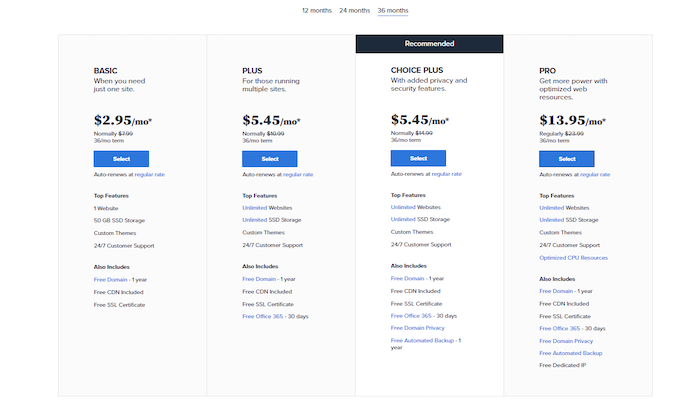
A shared hosting Bluehost plan is hands down one of the easiest ways to get started building your site. You can start with the Basic plan for $2.95, which is good to create one site with 50 GBs of space. That’s generous when you consider they also include free CDN and a free SSL certificate.
It doesn’t stop there. Are you running a few websites? Then you’ll want to try the Plus tier at $5.45 per month. It includes everything in the basic plan tier, plus the ability to host and manage an unlimited number of sites, and you’ll get access to Office 365 for 30 days. Not bad. It’s the most convenient tier if you want to reliably start more than one site from scratch without too much overhead cost.
Their most recommended tier, and the one that gets you the most bang for your buck under the shared hosting plan, is the Choice Plus tier at $5.45 per month with added security features.
You get everything in the first and second tier, plus free domain privacy and free automated backup for a whole year. Since internet security is a growing concern in the online world and the price for this tier is the same as the Plus option, this is the clear winner in my book as far as affordable shared hosting plans are concerned. Added security features can only ever be a plus.
Finally, if you’re looking for a bit more than that, consider the Pro tier, sitting at $13.95 a month. With this plan, you’ll get additional CPU resources as well as a free dedicated IP.
As you can see, Bluehost goes out of their way to personalize each tier, so they’re useful in covering what you need. I recommend you take some time to comprehensively look through each tier and its offerings to get the best deal according to your goals.
VPS Hosting
VPS, or virtual private server hosting, is when hosting is within a shared server but acts as a dedicated virtual space for your site. VPS hosting has become very popular, as it is less expensive than dedicated hosting but gives you better security and potentially better performance than shared hosting.
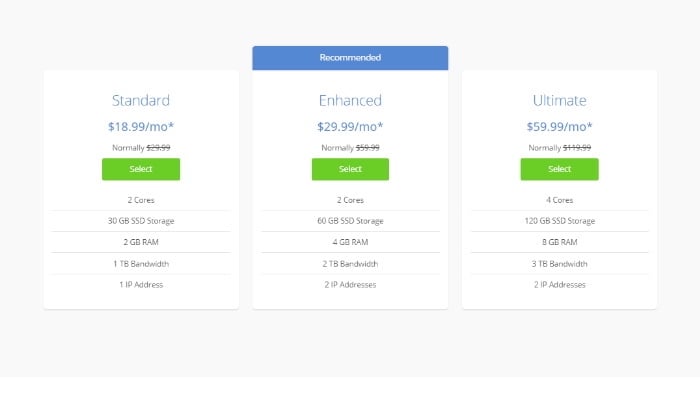
Guaranteed resources are the name of the game when it comes to Bluehost’s VPS Hosting options. They stack up against competitors well, as they charge you only $18.99 for the standard VPN feature. This includes 2 GB of RAM and an additional 1 TB of bandwidth.
Guaranteed resources are the name of the game when it comes to Bluehost’s VPS Hosting options. They stack up against competitors well, as they charge you only $18.99 for the standard VPN feature. This includes 2 GB of RAM and an additional 1 TB of bandwidth.
Looking through each Bluehost offering, it’s clear they’ve positioned themselves as a beginner-friendly web host, but they also burn the candle at both ends by offering affordable dedicated and VPS hosting. That’s a double win as far as hosting you can rely on if you ask me.
Dedicated Hosting
The standout benefits of dedicated hosting are security, privacy, and even more control all around. If you know you’ll want the best of the best to host your site for scale and reliability, then a Bluehost dedicated hosting plan is the way to go.
Is your site growing rapidly? Do you see more traffic coming in day after day? Here’s where you’ll want to look into dedicated hosting, yet another reliable Bluehost plan.
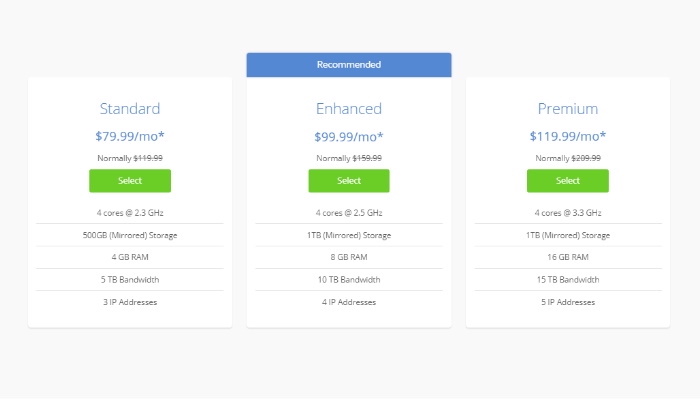
To illustrate the power of a dedicated hosting plan, they start you off at a whopping 500 GB of storage space, 4 GB of RAM, and 5 TB of bandwidth for only $79.99 a month. This puts Bluehost as a premium contender in the market, even for their pricier hosting tiers.
Managed WordPress Hosting
This is an all-in-one managed platform that scales to any demand your website has. All pricing plans for managed WordPress hosting through Bluehost include incredibly fast speeds, marketing tools, and multi-tiered security features.
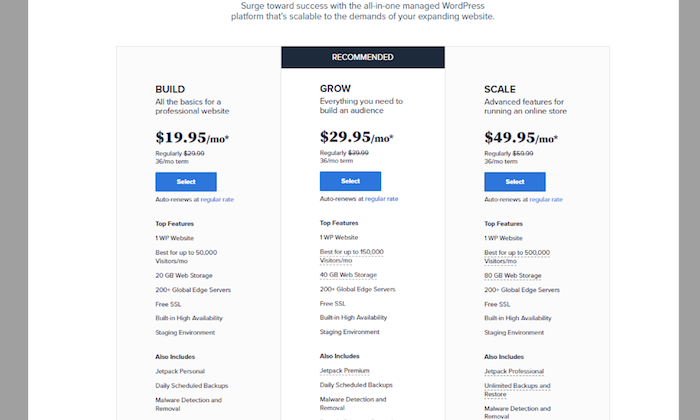
The most dynamic hosting tier Bluehost offers is it’s managed WordPress option. You can either go with the Build, Grow, or Scale option. Each one offers a different hosting package to fit what you’re looking for. To make the best choice if you decide to go with a managed WordPress option, you’ll want to base your decision on the amount of traffic they’re each appropriate for.
Each plan comes equipped with plenty of helpful features built to help your site grow. This means storage space starting at 20 GBs, access to over 200 global servers, scheduled backups, staging environments, and free SSL certification, just to name a few.
What differentiates each managed tier is ultimately their traffic capacity. Here’s a quick overview:
Build – $19.95 a month, best for 50,000 monthly visitors
Grow – $29.95 a month, best for 150,000 monthly visitors
Scale – $49.95 a month, best for 500,000 monthly visitors
At this point, you’ve learned about Bluehost’s hosting pricing. But the fun doesn’t stop there. In addition to the hosting plans, Bluehost has other services.
Hosting
Unsurprisingly, shared hosting is Bluehost’s most popular hosting deal because it lets you get your foot in the door as far as getting your site up and running goes.
I’d say the number one reason Bluehost’s shared hosting stacks up high when you’re comparing it to other hosting providers is their free SSL certification and their free domain name deal. But as far as hosting your site on a server where you’ll share space with other sites like yours, it does its job.
Now, while shared hosting might be the best affordable hosting option for beginners, it won’t be what you want to stick with as your site grows.
That’s why there’s dedicated hosting and VPS hosting. Dedicated hosting is a more robust and reliable hosting option for powerful site performance, and VPS hosting offers increased power, flexibility, and control.
Online Stores
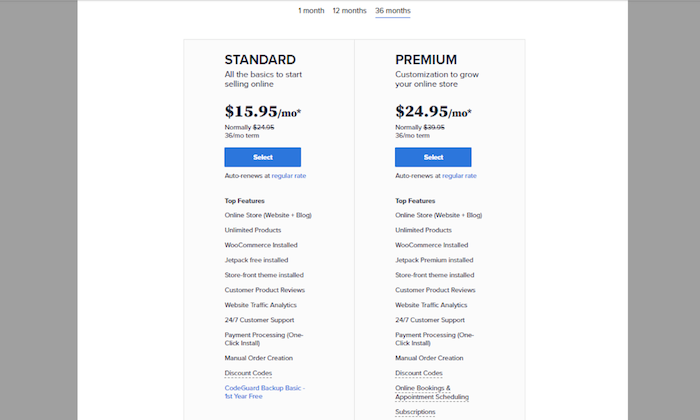
If you’ve already decided you’re going to start your online store with WordPress and WooCommerce, it can be as easy as choosing from the Standard or the Premium store hosting tiers to get started.
For a store with a robust payment processing system that comes equipped with plenty of analytics and the ability to create basic store backups, then go with the Standard deal at $15.95 a month.
Your store might be a bit more complex than a simple storefront with your product listings. If you’re going to capture subscriptions or online booking and appointment scheduling, you’re better off with the Premium tier as a very reliable ecommerce option.
I’d say this is my top pick for a multifaceted online store with a lot of moving parts. I’d rather pay a bit more for all the Premium features than need them and not have them for the sake of saving a few extra bucks.
Live WordPress Support
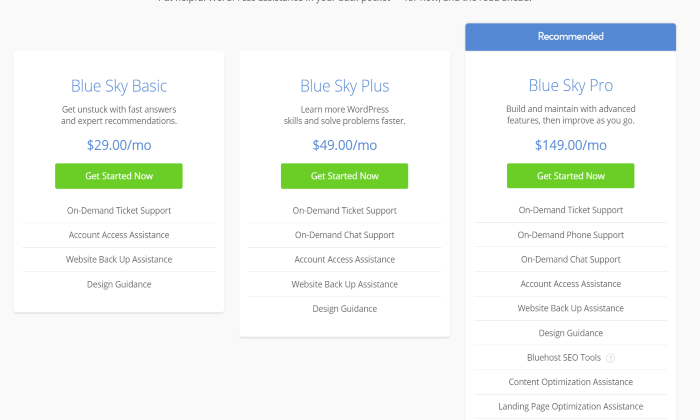
Bluehost offers Blue Sky, a service to teach users how to build, grow, and maintain any WordPress website through individual training and guidance. Live WordPress Support starts at $29 per month for on-demand ticket support and backup assistance and goes as high as $149 per month for SEO tools, help with content optimization and mobile optimization, and access to Constant Contact.
Professional Marketing Services
In addition to hosting services, Bluehost has an offering to assist your business with design and marketing strategies to give you more time to focus on revenue-generating activities and running your business.
The four primary services offered by Bluehost in this realm are:
Full-service website support with design, marketing, and content help
SEO services to optimize your website and target keywords
PPC services to assist with pay-per-click campaigns and best practices to get more customers
Website migration assistance, including one-on-one consultations to review your website before and after any migration
The cost for these services is not listed on the Bluehost website. You’ll need to contact them to discuss pricing and support options.
The Best Web Hosting Services
It’s never a good idea to make your decision based on only one piece of information. I recommend you check out my list of the top cheap web hosting providers to make sure you’re making the best choice for your specific needs. Here’s a quick overview of all my recommendations:
GreenGeeks — Best price for managed WooCommerce hosting
All in all, Bluehost is a reliable web hosting service that gives you the best value for your money. It offers a great entry-level shared hosting plan for as little as $2.75 a month, one free domain name for a year, as well as free SSL certification, and plenty of customer support you can tap into at a moment’s notice.
Any comments on Bluehost as a great hosting service for beginner websites? Let me know in the comments.
Disclosure: This content is reader-supported, which means if you click on some of our links that we may earn a commission.
You’re starting a new site. You Google the domain name to see if it’s available, but it’s already been snatched up by someone else. Bummer.
This happens more often than not, especially if you have a good name in mind.
What if you really want a domain name that has already been claimed? Or what if you’re sitting on a valuable domain and looking to sell?
I would hire the best domain broker to negotiate a fair deal on your behalf.
In this post, I’ll review the leading domain brokers you can hire right now. They’ll handle all the heavy lifting that goes into acquiring or selling a premium space of online real estate.
And if you are on the fence about whether or not you really need a domain broker, I’ve included some other options that might work as well.
#1 – Namecheap — The Best If You Can Afford to Be Flexible About Your Domain Name Extension
Are you wedded to getting that perfect .com domain name or are you a little more flexible about the exact wording and domain extension?
If you have a little wiggle room and you’re willing to be inventive, I suggest seeing what you can get on Namecheap. This is a domain registrar, not a broker, but you’re going to find an outrageous selection of available domain names for way less than you would be able to get through a broker.
You won’t get help negotiating—it’s totally DIY, whether you are buying or selling—but you won’t pay any upfront fees and there’s only a 10% commission fee on domains you sell through the marketplace platform.
And if you buy your new domain name directly from Namecheap, there’s no commission at all.
I think you’d be surprised about what you can find. There are domains on Namecheap available for $0.99 for the first year. You won’t get a .com or a .org for that price, but many of the new extensions like .store or .link are available. And .com names start at $8.88 for the first year.
The reason I recommend Namecheap to people considering a domain broker is that they don’t always know what’s out there. They may be twisting themselves into knots trying to get a five-star domain name when there is something perfectly serviceable out there for purchase right now.
If you can afford to be flexible, Namecheap will help you find something. The search tool is amazing. You can enter up to 5,000 keywords in the search tool’s Beast Mode. This will produce thousands of results for open domains with those keywords.
Beast Mode can also offer suggestions based on transforming your keywords. Say you are looking for hireme.com—Beast Mode will find hire.me, for example.
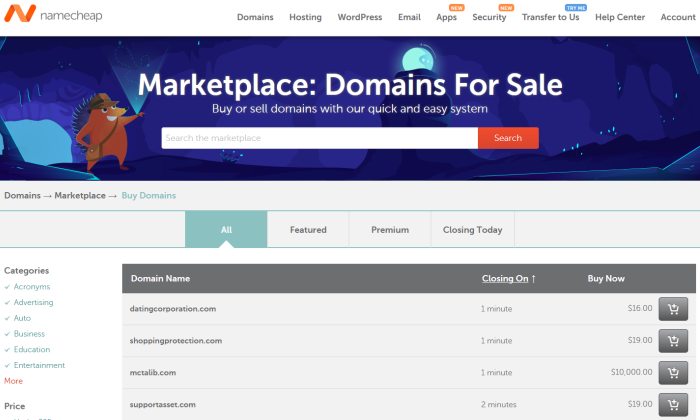
The marketplace on Namecheap is very easy to use. It’s peer-to-peer, the only catch is that any domains on there have been purchased through Namecheap already. So if you wanted to sell or resell a domain on Namecheap’s marketplace, it would have to be one you already bought through them. Just be aware that 10% comes out of your final sale as commission to Namecheap.
Namecheap takes care of all the backend transactional stuff, so you’re not drawing up purchase agreements with people you’re never going to talk to again.
Odds are you’ll be able to find something very affordable, especially if you are willing to go with a newer domain extension.
#2 – Domain.com — The Best for Buying .com Domains Without a Broker
It must be a good sign when a domain registrar itself owns the best domain name for its industry. Domain.com isn’t a true domain broker because you won’t be able to sell through them, but they are the premier destination for scooping up prime internet real estate on your own.
So, if you aren’t ready to shell out a commission fee for a broker, but you want a solid domain name with a .com extension, this is the first place you should look.
Namecheap is another good registrar for snagging domains yourself, but Domain.com has a more extensive selection of premium .com domain names.
Domain.com offers both a standard domain search and one for premium domains. As more and more common words and phrases have gotten claimed over the years, it’s become harder to get a .com that’s short and easy to remember.
With Domain.com’s premium domain search, though, you can grab one of these for your site.
Now, they won’t come cheap. A quick search will likely return some eye-popping price tags for domain names you had your heart set on.
But the helpful folks at Domain.com are available to help secure your dream URL at a price you can stomach. Their staff is available 24/7 via phone or live chat. In this way, Domain.com functions like a brokerage, because you have their assistance and guidance throughout the purchasing process if you need it.
It’s not going to be the white-glove service you get with a true domain broker, but you’re also not going to be paying 15-20% commission on top of the price of the domain.
And, even if the initial purchase is expensive, premium domains bought through Domain.com won’t renew at an exorbitant price. Instead, they will renew at the standard rates for the extension.
So, even if you buy a .com for several hundred dollars, it will renew at just $9.99 for one year, $19.98 for two, and so on.
And, as a registrar instead of a broker, Domain.com serves as a one-stop shop for everything you need. You can get web hosting, email, SSL certificates, and increased security for your new site. In short, you can purchase everything you need to protect and grow your investment.
If you aren’t ready to hire a broker, Domain.com is your best bet for securing a premium domain on your own.
I’m talking about two-word .com domains that are easy to remember. You can get less-coveted types of domain names and newer domain extensions on Domain.com, but Namecheap will probably be more affordable.
Domain.com is a great marriage of traditional domain registrar, detailed domain search, and brokerage-level support and assistance.If you want to stake your claim to a prime domain name, start searching through Domain.com today.
#3 – GoDaddy Domain Brokerage — The Best for Buying Domains Under $5,000
Tons of people use GoDaddy Domain Brokerage to buy a domain name that’s currently owned by someone else. Here’s why: it’s really straight-forward to use and there is virtually no work on your end.
Plus, GoDaddy brokers will go after any domain you want, regardless of the price.
I recommend it highly for people that don’t want to spend more than $5,000 on a domain. The truth is that this is a fairly low number in this space. A .com domain with words you’d find in a real dictionary is usually going to cost five to six figures—maybe a lot more.
You’ll find that GoDaddy has a higher commission rate (20%) than what you get by going with a smaller domain broker. The trouble is that those smaller firms don’t always agree to take on clients looking to buy small fish domains of less than $5,000.
GoDaddy doesn’t care about the cost. Once you connect with a broker, they will chase down any domain your heart desires. So if your budget tops out at a few thousand bucks, GoDaddy is a great place to start.
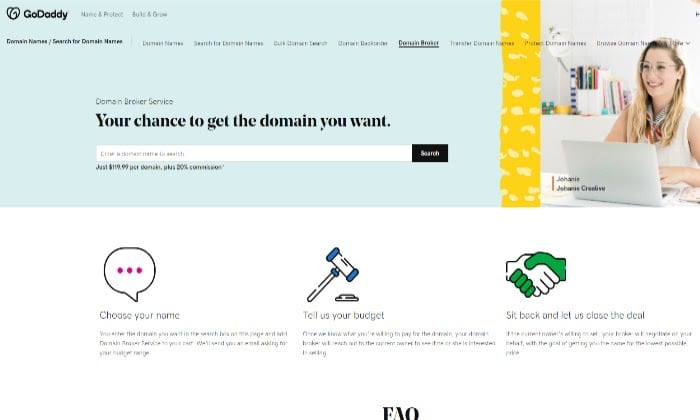
Simply reach out to GoDaddy and tell them the domain you want. You’ll get an email back asking you to name the price you are willing to pay.
From there, GoDaddy handles everything else. The broker spends up to 30 days tracking down the domain owner and trying to negotiate a price. If the broker is successful, the domain is yours. Simply follow the guided steps and you’ll be in control.
It’s not impossible to get a domain on your own, but GoDaddy takes out all the legwork. Plus, the company has a ton of name recognition. Instead of you reaching out as a private individual or company, the seller is dealing with one of the biggest names in the business. Both parties are going to feel more comfortable having a trusted broker handle the arrangements.
GoDaddy takes care of all the legal legwork, too, but you won’t provide the strategic guidance that other domain brokers offer. This is basically a simple point-and-shoot service.
An upfront fee of $119.99 is required to start and GoDaddy takes a 20% commission if the deal goes through. Do note that you won’t get the fee back if the sale doesn’t go through.
The higher-than-average commission rate and upfront fees are a reflection of the fact that GoDaddy will broker deals of any size. Other firms can afford lower commissions and waive upfront costs because they only take on deals above $5,000.
Essentially, the other brokers can afford to take a smaller slice because they are only ever going after a bigger pie.
$5,000 is not a hard and fast number. But if you are in this neighborhood, you may have difficulty finding a broker who’s not going to charge an upfront fee to make it worth their time.
GoDaddy won’t broker sales, but you can use the company’s auction site to sell a domain. There’s also a free domain appraisal tool, which can help you figure out where to start the bidding.
Not everyone is looking to spend tens of thousands of dollars on a domain name. They still want a broker to get things done fast and right the first time.
With GoDaddy Domain Brokerage, the transaction is as smooth and hands-off as possible. If you can spell the domain you want, GoDaddy will make a run at it for you.
#4 – VPN.com— The Best for Keeping Your Identity Under Wraps
VPN.com can help you broker the sale or acquisition of a domain if you want to stay anonymous.
The company specializes in strategic stealth acquisitions, working on behalf of Fortune 500 companies, founders, high-net-worth individuals, and other organizations that need to fly below the radar.
The truth is that people with resources are often forced to overspend to get domain names. I don’t want to speak ill of domain owners out there, but some have been known to turn the screws on potential buyers because they know they can.
VPN.com keeps this from happening. Masters of discretion, the company is a favorite for celebrities, athletes, politicians, and other people that have to be conscious about sharing their identity.
Think about it. What’s a domain owner going to charge when the seller hears that Oprah wants it?
These stealth acquisitions take finesse and experience to manage properly. The simple act of inquiring about a particular domain name gives a lot of information away. VPN.com knows just how to handle all of the communications to keep your name out of sight until the ink is dry.
Unlike a lot of the other top domain brokers, VPN.com offers a range of online services. As you might guess, the company handles virtual private networks (VPNs). Secure communications are not a problem.
For people that need to jump through the hoops of a stealth acquisition, VPN.com will help you protect your investment. The company has in-house legal counsel. You’ll know what to do if people are infringing on your domain and be able to register your brand in every country.
There are absolutely no upfront costs, though VPN.com typically works with buyers and sellers of domains worth more than $5,000.
I’m guessing the crowd interested in stealth acquisitions will be onboard with that, but I wanted to mention it. If your sale is successful, there is a 15% commission.
For those who require the utmost discretion, VPN.com is a domain broker you can work with. And if you have a premium domain to sell, and you are not sure what it’s worth, reach out to VPN.com for a free appraisal today.
#5 – Domain Booth— The Lowest Commission for a Top Domain Broker
In the future, I could see DomainBooth charging insane rates for their brokerage service. But for now, you can get one of the best domain brokers on the market for an exceptionally low 12.5% commission.
So, you’re still going to pay, but it’s 2.5% lower than other top-quality brokers. If you are negotiating a deal for a five- or six-figure domain, the savings can be significant.
DomainBooth is something of a recent arrival on the domain broker scene. In 2015, then-26 year old founder James Booth made quite a splash by brokering more than $5 million in domain names in his company’s first 12 months.
This was no flash in the pan, either. Today, DomainBooth is one of the top performing domain brokers, outpacing some of the established players in the game. Booth actually had the second highest domain sales of any broker in 2020, according to Escrow.com.
The firm specializes in extremely short domains–two letters, a number and a letter, three letters, and one-word domains for the most part. I would definitely talk further with DomainBooth if you are interested in something like this.
There’s just not another broker of this calibur charging such low commissions. The minimum fee for buying is $500 and for selling it’s $1,000, which is to say the company is focused on buying domains greater than $5,000 and selling those greater than $10,000.
You will not pay a dime unless DomainBooth is successful in negotiating the deal.
For as young a company as it is, DomainBooth has developed a rich network of buyers and sellers. You can list your domain for sale in the DomainBooth newsletter for $750. This puts it in front of a lot of interested buyers in different markets who you would be hard pressed to reach on your own.
By getting DomainBooth as your broker, you’re putting yourself in a good position to get the most value out of your purchase or sale. There’s still a commission, but it’s not going to be as high as it is for other brokers with similar performance.
#6 – Grit Brokerage— The Best If You Regularly Buy Premium Domains
Grit Brokerage is one of the recognized players in the space. The company has negotiated big-name deals and helped brands secure their position online.
I recommend them to businesses that are in the market for premium domains frequently. It may not be something you need all the time, but it’s also not enough for you to get a single solid domain for your company and be done with it.
If you have to work domain acquisition into your overall brand and marketing strategy, Grit Brokerage is an ideal broker to work with. It’s like having a domain expert in your office, except they’re not on the full-time payroll.
The company can walk you through the ins and outs of upgrading to a better domain in your industry, or branching out and capitalizing on a multiple domain SEO strategy.
Grit.org is the parent company of Grit Brokerage. The organization is focused on empowering people to build better companies and communities. If you work with Grit, its brokers will invest their time in helping you grow by acquiring the right domains at a fair price.
This is a challenge, even for companies with deep pockets and bright ideas. It took Elon Musk more than a decade and $11 million to get tesla.com. Until then, the company had settled for teslamotors.com and constantly took a hit in search rankings.
Not everyone’s battle to get the top domain is so brutal, but it’s never easy these days.
You’ll have to get in touch with Grit Brokerage for pricing, but it’s not hard to make contact. The founder and senior partners all have their cell phones listed on the website. Imagine the kind of service and availability they provide to paying clients.
#7 – MediaOptions— The Best for Domains Over $75,000
If you are going after that perfect domain name—maybe it’s an exact match to your business name or a major keyword in your industry—it’s not going to be cheap.
And it’s going to be ludicrously expensive if you don’t have a seasoned negotiator in your corner.
When you don’t have flexibility—you need that domain—it’s time to call up MediaOptions and get help from the most successful company in the business.
It was founded by Andrew Rosener, who has been the top domain broker in the world for the last three years according to Escrow.com. He’s the creator of the Rosener Equation, which people use to value domains, and has testified in court as an expert witness on domains.
Rosener’s knowledge of the space is a big part of MediaOptions’ continued success. The company has brokered hundreds of millions of dollars in domain deals over more than a decade in business.
I highly recommend this broker for businesses that need a prime piece of web real estate. MediaOptions has a lot of experience with stealth acquisitions as well as a track record of locating domain owners that don’t want to be found.
Essentially, MediaOptions has mastered every step of the domain acquisition process that trips people up. You won’t spin your tires trying to track down and convince a domain owner who doesn’t want to sell. The expert broker knows how to get the best outcome in that touchy conversation.
And, because MediaOptions knows how to play the game, your identity will remain hidden. So you won’t be over a barrel to get the exact domain you want.
I also recommend MediaOptions if you have a high value domain to sell. Over two decades, the company has crafted the most successful outbound sales process of any brokerage. This includes a rich network of buyers and sellers, the top domain newsletter in the industry, and timely press releases.
There is no better team to hire, and MediaOptions can afford to be choosy about their clientele. To qualify for premium domain brokerages services, the domain in question must have a sale value of $75,000 or higher.
Generally speaking, this is going to be domains that are one or two words with a meaningful volume of exact match search.
If that description sounds like what you are looking for, five or six figures (if not more) is very normal. Acquiring one of these domains will pay for itself very quickly by catapulting your sites to the top of Google’s page one search results.
Because these ultra-premium domains are so valuable, negotiating their sale or acquisition takes someone who knows what they are doing. You should anticipate that the party on the other end of your potential deal has an expert on their side. So should you.
MediaOptions is your best bet. The company’s results and reputation speaks for itself. The fact they charge 15% commission is another plus. I know it’s standard rate for the industry—but, given MediaOptions success, I feel like they could charge more.
If you need the best, and you are willing to spend to get it, having MediaOptions as your domain broker will give you the best chance at a good outcome. Get in touch today.
What I Looked At To Find The Best Domain Brokers
There are a few basic ground rules for choosing domain brokers because there is literally zero certification required.
Anyone can say they are a domain broker, but you should only consider ones that:
Have been around for a few years, at least
Maintain a spotless reputation
Use a recognized payment system, such as PayPal or Escrow.com
Handle all of the negotiations confidentially
If you are going to hire a broker, this is the bare minimum. There’s a lot of money changing hands online for domain names. The market attracts scammers you definitely want to avoid.
All my recommendations for domain brokers have you covered. They are well-known and respected in the industry, and they will be able to steer you clear of the people who aren’t.
Now, there’s a range of broker services out there. You can get help with the nuts and bolts of the deal, so you’re not drawing up purchase agreements or tracking down a domain owner.
Some domain brokers offer more of a consulting relationship. They help you with domain marketing, acquisitions, and strategy to establish and protect your brand over the long term.
There’s a ton to know about domains and it’s always changing. Getting a good domain broker means you don’t have to worry about any of it.
You really only have to focus on a few things in order to connect with the right one.
How Important Is the Exact Domain?
The significance you attach to a particular domain name determines the type of broker you should be looking for. Let me explain with two examples:
Example 1: You need a domain that’s short, easy to say and spell, and you want it right now. The exact name is not a huge deal. Ideally, the name is related to your business, but you’re flexible and willing to be inventive.
Example 2: You have trademarked your business, you know the exact domain name you want, and it can’t be anything else. You are willing to spend as much time and money as it’s going to take to get this exact domain name.
Both of these people could benefit from domain brokers, but they need very different types of service.
If the exact domain name isn’t the end of the world, you could start simply by seeing what’s out there. Namecheap and Domain.com make it very easy to be your own broker, even if you’ve never bought a domain before.
Alternatively, you could reach out to GoDaddy Domain Brokerage if you don’t want to deal with an auction or the back-and-forth of negotiations. Simply tell the broker what you want and how much you’re willing to pay, and GoDaddy will spend the next 30 days trying to make it happen.
Now, if you are going after a specific domain and can’t compromise, I highly recommend getting help from someone like VPN.com, Grit Brokerage, DomainBooth, or MediaOptions.
These folks know the space—which is crucial, because getting the exact domain you want at a fair price is really challenging.
Even just finding the person who owns the domain can be impossible. I’m serious. Sometimes the owners don’t want to be found. They bought the domain years ago for some pet project that didn’t take off, and now—out of inertia or spite—they won’t let go.
Whatever the reason, these domain owners are tired of being pestered by people. It’s not uncommon for them to set up dummy accounts, fake addresses in other countries, and a whole mess of obstacles to keep people away.
The really expert domain brokers know how to get around all these barriers and track people down like a sheriff on the frontier.
Here’s the other thing to think about if you are in the market for an exact name domain: everyone knows they are valuable. There’s no low-hanging fruit left.
Whoever owns the domain you want so badly is probably not some schlub. They might even sell domains for a living. If you approach that negotiation without someone on your side who knows as much as the seller does, things could go south quickly.
Upfront Costs and Commissions
Domain brokers all charge for their service a little differently. It’s important to understand exactly how this works. You may wind up paying fees even if you don’t get the domain you want.
Some brokers charge an upfront fee to get started and then take a commission based on a percentage of the sale.
Keep a close eye on this percentage, as premium domains are often five and six figures. Commissions will add a significant extra expense to the price of a domain, or cut into the profits of one you sell through a broker.
Even if you choose to be your own broker on Domain.com, there’s still a commission for using the platform to execute your trade.
You’ll find that some brokers work only on commission. There’s no upfront fee. These firms only see money if they get you what you want at a price you’re willing to pay.
If your budget is not that high, the commission-only brokers may not take you on as a client. They are not massive companies and can’t afford to spend their time negotiating deals with a small commission.
On the other hand, GoDaddy charges an upfront fee but its brokers will go after whatever you want. Just point and shoot.
A 10-20% commission fee is within the standard range. I know it’s going to be a chunk of change, but it can be totally worth it.
The best domain brokers are in business because they consistently help clients get a better deal than they could by themselves. They can help you acquire a domain for a fraction of what it would cost on the open market. If you are selling, they can get you max out the value of your sale.
At the end of the day, using a domain broker is a strategy, not a turnkey solution. You have to understand the pricing structure in order to pick an appropriate broker and avoid surprises down the line.
Stealth Acquisitions
What if you don’t want people to know you’re a buyer or a seller? Like it’s really important that your identity or the name of your business is kept totally under wraps?
All the brokers I looked at keep your identity shielded to some extent, but sometimes it requires a little more finesse. If anonymity is a must for you, you’ll want to find a broker that specializes in stealth acquisitions.
Here’s why it’s important.
If the person who owns a domain gets a call from a broker, they automatically know that there’s significant interest in their online property. Someone hired the broker, after all.
Put yourself in the seller’s shoes. They’re going to try and get as much money as they possibly can from the sale. Wouldn’t you?
The only thing stopping them from jacking up the price is what they believe you are willing to pay. So, if they can do a little research and find out that you are a company with deep pockets or a startup that just got funding, they’re going to aim for the top of your budget.
Just because you can spend six or seven figures for a domain doesn’t mean you want to.
Whatever your reason for staying anonymous, if it is a major concern, you want to pick one broker that knows how to execute stealth acquisitions. When you get in touch, ask them about war stories and some of the crazy maneuvers they’ve had to pull in order to get their clients their dream domain.
If they’re really good at this, the broker is going to have no shortage of ridiculous-sounding tales about the games they’ve played to broker touchy deals. That’s my experience, anyway. You have to work with someone who knows how to play the game.
VPN.com has a track record of negotiating domain acquisitions for politicians, celebrities, and organizations with really well-known brands. It’s a good place to start. MediaOptions and DomainBooth would also be worth shortlisting, if you need discretion.
Conclusion
An effective domain broker makes the process of acquiring or selling a domain a breeze.
Let’s face it, selling or buying a domain successfully can take a lot of upfront work. Once you’ve researched which domain name you want and made sure it’s already registered, the next step is to look into which domain broker fits your needs.
As they say, domain brokers aren’t all created equal. Here’s a quick rundown of the domain brokers I recommend and reviewed here:
Namecheap – The best if you can afford to be flexible about your domain name extension
Domain.com – The best for buying .com domains without a broker
Now I’d like to hear from you. Are there any domain brokers you’ve had a great experience with worth mentioning? Let me know in the comments. I’m all ears!
from Blog – Neil Patel https://ift.tt/37xLjhr
via IFTTT
Disclosure: This content is reader-supported, which means if you click on some of our links that we may earn a commission.
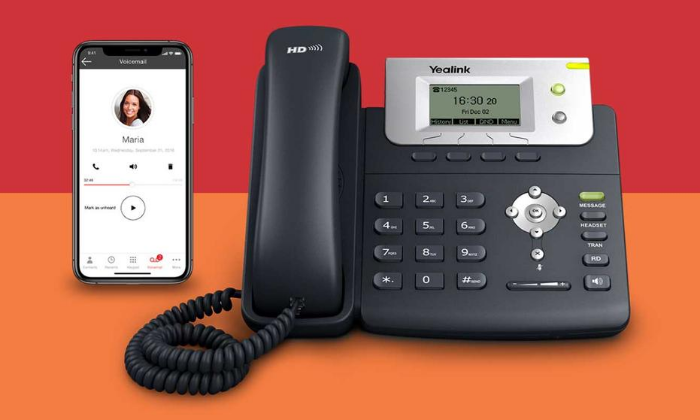
Do you want to skip the read and get right to my top pick? The best VOIP phone services for most people are Nextiva, Ringcentral, or Ooma.
Simple tasks used to be really hard with old phone systems. You probably had to call your vendor to re-route a call path or set an employee up with a secure at-home workstation.
With the best VoIP phone services, these actions take a few clicks.
Buying VoIP for your business is going to save you money over a traditional phone line. And if you are using a clunky VoIP service from an ancient provider, you may be able to switch to something sleeker without losing anything except the frustration.
To write a really helpful post for my readers, my team got in touch with leaders who have used VoIP in different ways. You can find about 80 percent of what you need to know about VoIP anywhere on the web—here’s the 20 percent you can’t find anywhere else.
We spoke with:
Gregg, who manages IT services for a living. He knows the good and bad of different VoIP options and helps businesses stay protected from hacks.
Jason, who has been working in call centers for nearly 30 years and just bought VoIP for his enterprise organization. He’s attuned to what’s important for your employees, whether they’re remote or in an office.
Makan, who’s set up dozens of high-volume telemarketing teams. He’s learned how to reduce the risk of regulatory fines and identify top performers in an industry with exceptionally high turnover.
Sarkar, who manages sales teams in the B2B SaaS space. He walked us through how to sync VoIP and CRM software with the fewest possible headaches.
Look, I know what works for a company like mine. By speaking with a range of experts, I figured my team could help more types of buyers.
There are companies looking to outfit offices in 20 countries. Others have to protect patient data. Some folks just want to stop using their personal mobile number for work.
Here are the seven best VoIP phone service providers you can start using right away. After the reviews, you’ll find an in-depth buyer’s guide.
#1 – Nextiva Review — The Best for Offices with Work-From-Home Employees
I hear a lot about the trends of working from home, but I don’t think anyone can say for sure what “office life” is going to look like two or three years from now. If you want your teams to stay functional no matter which way the wind blows, Nextiva is a solid choice.
It’s cloud-based VoIP, so your employees can come into the office, set up a desk at home, or use their phone on the go. Unlike an on-premises phone system, employees can use their phone without a VPN because they’re calling through Nextiva.
So, you have way less to worry about with security—which is definitely on the minds of managers who have people calling from hotels, coffee shops, and their home network.
The experts my team spoke with categorized it as a true plug-and-play system for businesses that want a dial tone without IT headaches. If your system is built on ten phones or fewer, you will have very little trouble getting Nextiva installed.
One thing that Jason pointed out, however, was that you’ll need to put some thought into compliance if you plan to take credit card numbers over the phone. But, for the most part, security is handled by Nextiva because everything is routed through their cloud.
Nextiva can scale to hundreds of phones if need be. There will be some backend configuration to get everything going, but Nextiva will help you deploy with a guided installation process.
And unlike some of the other companies that offer this type of flexibility, Nextiva can outfit your entire office. Whatever your setup, you’ll be able to transition it to Nextiva’s modern platform.
Level up your business phone by connecting it with email, text, and video—or centralize every channel within a single window for your employees.
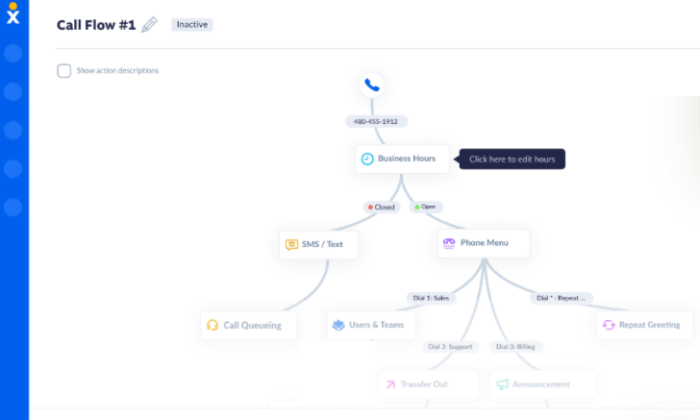
All the call handling and user administration features you’d expect are included. And when I say they are easy to use, check out the Call Flow Builder that lets visualize how routing is set up:
It can be tricky to configure auto attendants in some platforms, but it’s drag-and-drop easy with Nextiva.
The company has done a lot to make everything as easy as possible on end users. If you’re wondering whether or not you have the necessary internet speed at your office, you can test it right now on Nextiva’s website. Simulate the traffic required for two or 200 phones. You’ll get info on speed, but also jitter and everything that goes into whether or not you can reliably make calls.
You can also use the site to test the speed of remote workers who need to be on call, which Jason highly recommended. If their home network doesn’t support VoIP, you may be looking at an expensive hiring blunder.
Nextiva offers 24/7 support for every plan. That’s not typical, especially for VoIP at such an affordable price:
Essential: starting at $18.95 per month per user
Professional: starting at $22.95 per month per user
Enterprise: starting at $32.95 per month per user
Ultimate: starting at $57.95 per month per user
These are the annual prices—it’s a little bit more per user to pay month to month, but you don’t have to sign a contract.
The Essential plan is going to work for many teams. It includes unlimited voice and video calling, a free local and toll-free number, and 1,500 toll-free minutes. That’s a lot more than you are going to get with other entry-level plans.
Unlike RingCentral, there’s no user cap for the Essential plan. This means you can offer more people unlimited voice and video at a low price, rather than having to upgrade once you hit 20 users.
For conference calling and business SMS, you’ll need the Professional plan. This comes with Salesforce, HubSpot, and Zendesk integration. Essential only has integration with Outlook and Google Contacts.
At the Enterprise tier, you get integrations with CRM software and single sign-on, which is a huge boon to remote workers.
Nextiva One is the company’s omnichannel solution. If customers reach out to you through a variety of channels in addition to phones, this might be a good idea.
Your employees can see all communication with each account, which is really helpful if people are logging help desk tickets, chatting, reaching out on social media, and so on.
Jason argued that omnichannel also makes administrators’ lives easier. “I don’t have 10 systems to manage,” he described to us, “it’s all within the same system.”
You can coordinate ecommerce with a call center or tie multiple brick and mortar stores into a single system.
You also have one bill as opposed to dozens and you’re not chasing down information across multiple platforms. If a customer has an issue, you can go back through the entire record quickly, regardless of how they got in touch.
Organization is just easier with Nextiva. Staying on the same page with customers and your employees is as simple as logging into the system, no matter where you are.
For teams that don’t have an office to coordinate activity, Nextiva is the best VoIP solution.
It’s a product that employees new and old can start using immediately on whatever device they have. Should they ever have an issue, Nextiva’s reputable customer service is there to provide support.
If you are looking at the way features break down in the different packages and you don’t find a perfect fit, just reach out to Nextiva. You can purchase any feature a la carte.
Build your system, your way, in less time with Nextiva. Get in touch for a seven-day free trial of the Essential package, or a demo of any other package they offer.
#2 – RingCentral Review — The Best for High-Volume Outbound Calling
RingCentral gives you unlimited calling, texting, and video conferencing at a competitive price. If you just need the phones and texting, you can get an even better deal.
Forget about per-minute charges and set up employees with VoIP that’s easy to use. For call centers, customer service, sales—anyone who has people on the phone constantly will appreciate RingCentral. This is especially true if you have to train new employees all the time.
First off, they’ll be able to use the interface. It’s intuitive to anyone who has used a computer. Administrators and managers will find they can shorten the time it takes to turn rookie hires into skilled ambassadors for your company.
“You save a lot of money because you can identify hires that aren’t doing a good job and wasting their time,” Makan told us. He’s set up a lot of telemarketing call centers with RingCentral and has really valued the ability to “tell right away who’s worth the money.”
The ability to track calls, KPIs, and listen back to recordings was like night and day for him compared to working on a landline. Teams can listen back to calls that went well (or poorly) to get a sense of how to better capitalize on each opportunity.
The reporting features aren’t going to take a data scientist to glean insights from. Find your top performers and figure out what they’re doing. Identify people who aren’t a good fit and let them go.
I hear a lot of marketing word salad like “this tool optimizes performance,” all the time. RingCentral walks the walk.
“You can actually predict your sales,” Makan said, “I know it’s difficult to fathom, but it’s true.”
He was able to figure out that 2,500 calls lead to one listing. This told him the number of minutes people needed to be on the phone in order to stay profitable. Over time, he could see how many listings an employee should be generating in their first month, second quarter, and so on.
You’re likely going to measure different KPIs, but it’s the same idea. With the kind of visibility that RingCentral provides, you can distill the numbers to simple metrics that hold employees accountable. You know ahead of time what your sales are going to look like, and you can scale up or down accordingly.
There’s a lot about RingCentral that’s well suited for large-scale calling. Admins don’t have to be IT wizards to add new users and give them access to specific resources. They’ll be able to provision new hires quickly. When someone leaves, they’ll be able to switch around accounts and recycle the number, so you don’t wind up paying for lines you’re not using.
If you have turnover—as many high-volume calling occupations do—you need to be mindful of your database integrity. RingCentral makes it easy to limit access to resources and revoke it if need be.
You’re definitely going to be using a CRM (or some form of database) to call at scale. RingCentral integrates with a lot of them. You want to keep that information private.
Another liability for call centers that RingCentral helps you navigate is compliance, which is crucial if you are making a lot of cold calls or using an auto dialer. There’s a TCPA safe dialer, which helps agents avoid bringing a “robo-call” lawsuit down on your company. Instead of worrying about messing something up, they can focus on the person they are talking to.
The DNC list features are also easy to use. Integrate with third-party tools to constantly update your list, and quickly show your employees how to maintain your own internal list.
RingCentral is HIPAA compliant, which means the standard for privacy and security is incredibly high. Fines for HIPAA violations are very steep, and that’s not the worst that could happen.
Selecting from RingCentral’s range of packages, you can replace your phones with VoIP and save a little money or completely outfit an omnichannel call center.
RingCentral MVP (formerly RingCentral Office) has four tiers to choose from:
Essentials: starting at $19.99 per month per user
Standard: starting at $27.99 per month per user
Premium: starting at $34.99 per month per user
Ultimate: starting at $49.99 per month per user
These are the prices if you sign up for a year of service, which reflect a 33% discount on the monthly rate.
The Essentials plan is capped at 20 users. You get unlimited talk and text, as well as document sharing, which can be helpful for sharing sales and customer service scripts. You also get team messaging, which is especially helpful in the days where not everyone is coming into a physical office.
With Standard, you get unlimited fax, video conferencing and integrations with Google Workspace, Microsoft 365. There’s no cap on users, either.
But if you are going for high-volume calling, I really recommend getting Premium. You get the CRM integration that is so important for dialing into your metrics and communicating effectively at scale.
At $10 above the average cost of VoIP, Premium is a steal. Remember, that VoIP average is for voice only and with RingCentral MVP you’re getting texting, video, and advanced call handling features that other “average” plans do not include.
Managers will be able to listen in on live calls and “whisper” advice. The employee can hear them, the caller can not. From what I found, features like this from other vendors were usually reserved for plans that cost upwards of $50. So in that sense, I’d consider RingCentral MVP well below the average price-wise.
RingCentral offers contact center software, as well, which will unify your communications. Your agents will be able to see a complete record of a customer’s history. When did they call, when did they chat? It’s all right there. You’ll have to get in touch with RingCentral for Contact Center pricing.
This is my number one pick for people who have to make a ton of calls. RingCentral helps you protect yourself from a number of the liabilities that come with outreach at scale. It also gives you the viability and tools to stay efficient and maximize each employees’ ability to contribute.
#3 – Ooma Office Review — The Best for Adding VoIP to Existing SMB Phone Systems
If you are holding off on replacing that aging phone system, Ooma can help you install business-class VoIP with minimal disruption to your work.
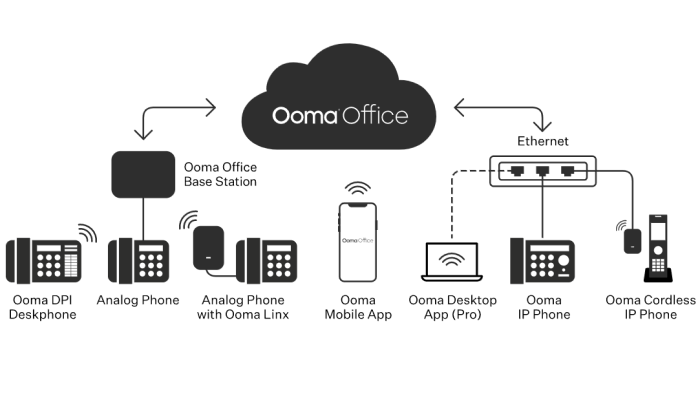
Any phone you have that’s still working—analog or IP—is going to hook right into your new Ooma system. You can also buy phones from them at a great price and they will be preconfigured, ready to go out of the box.
Ooma Office is going to work fine for most users, coming with 35 VoIP capabilities and a really powerful mobile app. Employees can make calls and collaborate with their colleagues in the app, whether they are in the office or on-the-go.
One thing Gregg pointed out was how expensive it can get to customize your setup if you have to pay per extension. With Ooma, every user gets a number of free extensions: one for conferences, one for online faxing, and one for a Virtual Receptionist.
Virtual Receptionist is Ooma’s term for an auto attendant. You can set it to play custom messages about business hours, let callers dial by name, select a preferred language, or route the caller to another extension.
With other vendors—especially ones that cost as little as Ooma—you often wind up paying extra to enable online faxing. Some VoIP phone service providers don’t even accommodate it.
When Jason sent his business requirement document to vendors, “two companies bailed out right away” because they weren’t able to set up fax machines. Most of the other vendors told him “they don’t really do that,” but they would try in order to get the business.
With Ooma, each of your users can set up their own fax extension for free. Problem solved.
When it comes to integrating VoIP with existing equipment, Ooma minimizes the steps you have to take and maximizes your flexibility. Connect to Ooma Office via WiFi, ethernet, or use the base station to get analog devices on board.
Think of it as a cloud-based VoIP solution that’s really good at accommodating your existing equipment. It might take some time to configure a large office, but the administrator portal is straightforward. It’s not the prettiest interface of all time, but it’s stupid simple to use.
While Ooma offers solutions for enterprise, their VoIP phone services for small businesses really stand out from the pack. There are no contracts, affordable pricing, and the customer service is fantastic.
Usually to get the best price on VoIP, you need to sign up for a year at least. Ooma’s price is what it is. For small business, Ooma pricing breaks down into two tiers:
Ooma Office: starting at $19.95 per month per user
Ooma Office Pro: starting at $24.95 per month per user
Upgrading to Pro, you get the desktop app, video conferencing, call recording, enhanced call blocking, and voicemail transcription. You’ll also be able to host conference calls of up to 25 people, whereas Ooma Office has a limit of 10.
You don’t have the choice of selectively upgrading users with Ooma Office—it’s all employees on one plan or all employees on another. But, at just $5 per user to upgrade, you’re still falling in the average range for VoIP.
And, if you upgrade, you can set people up on their computers with a softphone, which means you have less hardware to buy.
You can avoid buying phones without upgrading by having people call from the mobile app (which is included with Ooma office), though Gregg warned us that VoIP can be hard on a cell phone. “Yes, you save money because you’re not buying physical equipment,” he said, “but it can drain the battery life right out of the device.”
Transition to the cloud at your own pace. Keep your equipment and manage it yourself with way less work than a traditional set up. Get a quote, sign up with Ooma, and start saving money today.
#4 – Phone.com Review — The Most Affordable Professional-Grade VoIP
Phone.com is a smart choice for businesses that are looking for budget-friendly VoIP. You can have unlimited calling or pay less for a set block of minutes each month.
One of the really cost-effective features of Phone.com is that you can mix and match plans. Give the sales team unlimited plans and save money on each employee that only uses the phones occasionally.
And, with the Basic plan, you’re still getting most of the standard VoIP features like call handling, auto attendants, hold music and so on. You’ll have to upgrade to get HIPAA-compliant video conferencing, for example, but you can host up to 10 people in a regular session with Basic.
With most other vendors, you have to upgrade the plan for all your users. Phone.com can really help you keep costs down by giving users the features they need. This is one of those licensing irregularities that Gregg told us about, where it can work out well if you know what you’re doing.
Phone.com lets you pick what you need. Call recording and inbound faxing is extra, though you’ll be able to send faxes from your phone with any plan.
Nextiva and RingCentral are a little bit more robust, especially when it comes to reporting and analytics. In terms of CRM integration, Phone.com is limited to AllProWebTools and Zoho.
But some businesses just need a reliable phone with call handling capabilities they can manage themselves. Phone.com does more than that, and it’s just enough cheaper than those other options to net a sizable savings.
Offer your customers the ability to text when they have questions. Phone.com keeps all of your employees’ messages organized. Come for the phone system, stay for the messaging.
To use IP phones, you’ll have to be on an upgraded plan. The company offers really great prices on popular phones of all styles. You can use what you’ve got, too, as Phone.com supports a range of hardware.
Using your own equipment will definitely lessen the initial outlay, but in talking with Gregg we learned that older phones can get hacked. Just make sure that the processor isn’t too far behind what Phone.com is trying to sell you, and get ready to do some of the configuration yourself. You really can just plug and play if you buy equipment through Phone.com.
Pricing for Phone.com is low across the board:
Basic: starting at $10.39 per user each month
Plus: starting at $15.99 per user each month
Pro: starting at $23.99 per user each month
To get these prices, you’ll have to sign up for an annual subscription, which saves you 20 percent of the month-to-month price.
Basic comes with 300 minutes, which are pooled for all your users. This just means Basic users share minutes instead of having to worry about going over individually each month.
Each user also gets 1,000 pooled text segments. A segment is limited to 160 characters, which is way less than most phones can send in a normal text message these days. So it’s not 1,000 texts per month, unless you like to keep things brief.
Volume licensing brings the price down, both for users and for additional phone numbers. With 25 or more users, the price of Basic drops down to $8.99, Plus to $14.99, and Pro to $21.99.
Considering that Pro can hold its own with many of the call center VoIP solutions I’ve looked at, it’s worth checking out if you need a lot of phones on a tight budget. With HIPAA-compliant voice and video, it could be a good option for medical practices looking to support telehealth.
You really have to get input from every person and department using the phone system. Figure out the technology and functionality you need to support. If Phone.com fits the bill, it’s going to be a smaller one than you’ll find anywhere else.
Phone.com gives you a low price that scales up much better than OpenPhone, Grasshopper, and other lightweight VoIP solutions.
I wouldn’t use it to set up a call center—you’re going to have to fully rely on your CRM for all but the most basic reporting and analytics—but you’ll be able to get plenty of phones set up for normal business needs.
If you are thinking about cutting the cord with your traditional phone line, this option is going to save you the most money. Sign up with Phone.com today, no contract necessary.
#5 – Grasshopper Review — The Best If You Need More Extensions than Phone Lines
Grasshopper is a great option for small companies that want to establish a professional identity without buying a very complex system.
I’m thinking about the restaurant owner that wants numbers for a few locations without having to pay for a traditional phone line going to each one. Or maybe the law firm that wants a few numbers with lots of extensions.
If you outline your business requirements and it turns out you only need the essentials, don’t pay more for things you don’t need. Grasshopper is going to set you up with everything you need for one flat rate each month.
You’ll get a suite of features designed for the daily work of a modern business, without the clutter aimed at larger organizations. There’s no need to upgrade just to access a particular feature. Every Grasshopper plan comes with unlimited calling, as well as every feature the company offers, such as setting up a phone tree, personalized greetings, call routing, and more.
There are even a few features, like instant response, that you won’t always get with other providers. If you miss a call, Grasshopper will automatically send a text message.
Simultaneous call handling and call forwarding lets you pass off calls to teammates when you’re busy. Voicemail transcription makes it easier to catch up on calls after hours.
Manage everything I just listed directly from the mobile app. Route calls exactly where they need to go—it’s just a few swipes on your cell.
You also get unlimited extensions with Grasshopper Small Businesses plans, and several free extensions with their other plans. Route calls to other numbers, mobile devices, informational extensions to answer FAQs, or a polite out-of-office voicemail.
Getting charged for extensions was something Gregg said people should watch out for in the contact they sign. The total cost can “go up real quick” if you have to pay for an extra line just to set up a voicemail extension.
With Grasshopper, you don’t have to worry as much. The entry level plan comes with one number and three extensions—perfect for the sole proprietor or founder to greet their callers with a professional menu and connect them with the right person.
Let’s take a closer look at your three options with Grasshopper.
Solo: starting at $26 per month for one number and three extensions
Partner: starting at $44 per month for three numbers and six extensions
Small Business: starting at $80 per month for five numbers and unlimited extensions
As I said, it’s really just the basics. There’s no CRM integration or call recording, so think about Grasshopper as a way to replace your phone system rather than revolutionize it.
That said, if you’ve been trying to work magic with free VoIP like Google Voice, the ability to set up call routing may feel downright revolutionary.
It’s also going to cost less and be way easier to set up than it’s more robust competitors. Toll-free numbers might take a day to start working, but typically your number is ready to go when you sign up.
If you want to add an extra line, it’s $10 per month. That’s a lot more than Phone.com for extra lines, which is why I don’t recommend Grasshopper if you need a ton. Plus, the interface isn’t built for handling a big system anyway.
But for the small office, it’s perfect. It doesn’t matter where you or your business partners work—people can be out in the field when a call comes into the office, or in a different city altogether. Grasshopper makes it easy to ensure your calls get where they need to go.
This product is a little different than the other VoIP options on my list. It’s a sales engagement platform, so it’s not designed to replace your phone system. Rather it’s designed to give outbound reps the perfect tool for prospecting, selling, and closing deals.
Is the team remote? Do people like to work out of the office? Not a drama. Your users can phone in from anywhere and start working through your hottest contacts.
It contains a CRM and auto dialer software built into the platform. You’re not trying to make technology play nice—it’s all set up when you open the box. You can integrate with your own CRM if you want, or simply import your leads and start making up to 80 calls an hour.
I don’t know what your reps’ pace is now, but 80 calls per hour is smoking. There’s no “telemarketer” delay when the call connects, just crisp conversation like it’s over a phone line.
And, because the CRM is tied in, reps can see exactly who they’re talking to, what stage of the pipeline they’re in, and any notes left in the account.
Sarkar said that pretty much everyone in the B2B SaaS game is telephoning through sales engagement platforms now. The auto dialer makes your agents far more efficient by eliminating the busy work of dialing. “You barely have to click anything,” he said.
With PhoneBurner, you’re not manual dialing, tabbing through pages to find a number, or copy/pasting emails frantically before the next call. Instead, you can drop voicemails without waiting for the beep, send an appropriate email, or move a prospect to another folder with a single click.
For Makan, auto dialer software was crucial for large-scale outreach in telemarketing, but it was a pain to set up. You have to specifically program the CRM and the auto dialer. From there, it’s expensive to get the CRM software tuned to your industry. He mentioned one popular CRM option that cost $25,000 and $50,000, “just to get you all set up with the phones.”
With PhoneBurner, a lot of that work is off your plate. It’s not going to groom your database for you, but the fundamental CRM/auto dialer integration is already in place.
The company takes it a step further by offering one of the most comprehensive onboarding packages that I have seen for any product. Their team works with you on goals before you set up, runs you through a test session, and then trains your team on how to use the platform.
You also learn how to build reports so you can track performance. It’s easy to do this wrong, on any platform, but your PhoneBurner advisor is walking companies through the process, week in week out. They’ll get you set up with dashboards, leaderboards, and all of it is going to be customized to your goals.
Leads are distributed automatically, based on rules you set. Toggle between pre-set configurations, like Round Robin or First Come First Served, or customize your own settings. Make sure leads get to the right agent every time, with only a small amount of work on the manager’s part.
PhoneBurner isn’t cheap, but remember that this isn’t an apples-to-apples comparison with the other VoIP providers because you are getting the auto dialer and CRM built in.
Standard: starting at $126 per user each month
Professional: starting at $152 per user each month
Premium: starting at $169 per user each month
These are the prices if you sign up for a year, which are discounted 15 percent compared to paying monthly. You’re getting unlimited dial minutes, which is obviously important if your reps are making a thousand calls each week. With PhoneBurner, that’s not hard to do.
Call recording is stored free for 30 days with the Standard plan, 60 days with Professional, and there’s no limit for Premium plans. There are also limits on the number of contacts you can store, which start at 10,000 on the Standard plan.
You’ll need to upgrade to Professional to get softphone capabilities. It’s not a big deal if you already have phones, but I imagine that’ll bother folks that want to use their tablet or computer.
With Premium, you get a dedicated inbound line, as well as some of the handling features. I would not recommend using PhoneBurner for serious inbound traffic—the other VoIP options are going to be way cheaper—but some teams will appreciate having a custom voicemail and the ability to forward calls.
On average, a rep can make 233 percent more calls with PhoneBurner than they can with a regular line. Does the math pencil out for you? For Makan, it took 2,500 calls to generate a listing. What’s your metric?
#7 – OpenPhone Review — The Best Way to Run Your Business From a Mobile Phone
Jason warned us about going with the “newest and cheapest option,” so I was a little bit skeptical when I heard about OpenPhone. It’s only a few years old and it’s $10 per month.
That’s way less than the average cost of VoIP, cheaper even than some of the “budget” options I looked at.
But the more I discovered about the company, the more I liked it. OpenPhone is new, but certainly not fly-by-night. It’s a recent graduate of Y Combinator, the startup accelerator that helped launch AirBnB, DoorDash, DropBox, and Reddit.
Like those companies, OpenPhone has come to market with a new set of assumptions about how people are living and working. Instead of trying to replace a business phone system, as many Cloud-PBX’s claim to do, OpenPhone simply turns your mobile into a better phone for business.
It’s really aimed at the modern startup or small business, especially if the owner is one of those people who steers the ship from their phone. You’ll get a business number for your mobile phone. Go local, toll-free, or keep your own number, you choose. Porting your old number is 100% free.
Set up an auto-attendant so callers can get the information they need and connect with the right person. Establish a professional identity for your business in minutes. You’ll be reaching people on a stronger footing because you always know if an incoming call is business or personal.
There’s no hardware necessary and no more giving out your mobile number. Keep your privacy. Get numbers for your team and let them keep their privacy, too.
Where OpenPhone really steps away from the crowd is the shared inbox. You can have multiple people call and text from the same number. They can even make calls from that number at the same time.
A lot of phone systems don’t include text messaging, let alone allow multiple users text in the same thread. With OpenPhone, you can text the way you normal humans do:
Tag users with @mentions to bring the right people into the conversation quickly. Group messaging is really helpful for collaboration, especially since you can send files, videos, and GIFs.
You’re just not limited with texting the way you are on a lot of other VoIP phone services. You can send snippets from templates as part of a campaign or auto-reply to missed calls and texts.
Managing contacts isn’t hard either, as you get limited CRM integration with Google Contacts or via Zapier. You can use HubSpot for a more robust CRM solution as well, which allows you to store recordings and view message histories with ease.
Keep in mind this is not going to be a full-blown CRM solution the likes of which I’ve described with PhoneBurner and others. You’ll need to get into HubSpot to make changes to contacts, for example.
Because it’s a young company, there will be additional and deeper integrations “in the future,” which I know can be frustrating. But if you are a young company as well, HubSpot’s free CRM software plus OpenPhone is just about the cheapest way I can think of to deliver the essential benefits of connecting VoIP and your CRM.
Standard: starting at $10 per user each month
Premium: starting at $25 per user each month
Enterprise: contact sales
Standard has most of what I’ve mentioned already, along with unlimited calling and texting. Bear in mind that it’s unlimited within the fair usage policy. According to the terms of service, for the Standard plan, you’re looking at 1,000 texts and calling minutes per month.
Though it’s not truly unlimited, that’s pretty generous. Phone.com caps their entry level plan at 300 minutes and 1,000 text segments, which is likely a smaller number of texts.
The Premium plan comes with HubSpot integration and more collaborative features, like the ability to transfer calls and an advanced auto attendant that gives you a wider range of call routing features.
Extra lines are $5. So, for the price of standard VoIP (around $25 pretax), you could get a company of four set up on the Standard plan.
There are other free ways to get a business number for your mobile phone. Go for it. Getting off the ground you need to save every dollar—I get it—but there’s a point where the inconvenience of trying to work around something like Google Voice starts to cost you money.
OpenPhone solves most of those problems for $10 per month.
How much does a single missed opportunity cost you? For a barber, maybe it’s a call from a stranger who would have spent thousands of dollars as a regular over the next few years. If only you’d been able to catch them.
It’s well worth checking out, and I have a feeling you’ll be hearing a lot about this company in the future. Try OpenPhone for free today.
What I Looked at to Find the Best VoIP Phone Services
I’ve been a small business owner who needed the cheapest possible business line for the “Contact Us” button on my Facebook page. I think it was still called TheFacebook.com, back then.
Now I’ve got people reporting to me about our VoIP options in Brazil.
Growing from a one-man show to NP Digital, I’ve been on a few sides of this conversation. We’ve built a marketing machine and I know how we use VoIP—but my team wanted to get a wider picture of what’s going on to help more of my readers.
Some of you have on-call IT support and months to demo the best options. Others are completely on their own running a business and can’t sacrifice more than a weekend in order to find the best VoIP phone service.
Either way, you need to be able to separate the options that are working well for other businesses from the one that’s going to work best for you.
My team reached out to other leaders in the field to see what things looked like from their perspective. We don’t sell VoIP, for example. So, it was really interesting to think through buying VoIP with Gregg, who runs a managed services provider.
VoIP is just one of the IT services Gregg’s company manages, but over a few decades, he’s seen plenty of things go wrong, helped people out of bad contracts, and restored their business integrity after hacks. He offered a lot of insight on VoIP security and what people can do to make sure they’re not spending money on stuff they don’t need.
Technically, Gregg is a competitor with some of the services I recommend, but he was very frank and offered advice you are not going to find on any review site.
We also talked to Makan, who set up call centers for telemarketing in real estate. These are call centers where each employee is making something like 1,000 calls each week. His practical advice is hardwon in an industry that has a staggering attrition rate.
“You’re going to let go of eight out of every ten people who work for you,” Makan told us. New hires have to be brought up to speed, coached, and—when they have to go—be safely de-provisioned in order to prevent your database from leaving with them.
And simple employee mistakes can cost thousands of dollars in legal fines because telemarketing is so highly regulated.
But if you can do it right, the payoff is huge. Makan was able to use call center analytics to surface important metrics that guided his hiring, onboarding, and training. “We no longer have to keep employees for like a year and a half to see if it works or not,” he said.
In searching for the best VoIP provider, you’ll read a lot about using analytics to optimize performance. It’s not just marketing lingo. Makan explained how you can basically predict your sales with VoIP tied to a CRM, and scale hiring up or down accordingly.
Sarkar, a sales manager in B2B SaaS, also pushed the importance of VoIP/CRM integration. We talked a lot about how your sales strategy informs the buying decision.
Are you in a mature market that needs to handle inbound inquiries, or are you selling a novel product that requires you to hit the phones and educate prospects over a cold call?
Configuring a general purpose CRM to work with your VoIP, can be a ton of work. Sarkar helped us see how some companies save a lot of time and effort by using a sales engagement platform like PhoneBurner. It has all the outreach capabilities built in. That means less setup and fiddling to get up to speed, with a better experience for your sales teams and customers.
There’s just a lot to think about, depending on where you’re coming from. Jason has worked in call centers since 1992. He’s seen the market evolve from deskphones to headsets to AI. His eye for distinguishing meaningful advances from shiny objects that get you nowhere is unrivaled.
Jason also recently purchased an enterprise VoIP system for the company he’s with now. Talking through his experience was extremely helpful in understanding how enterprise buyers have to work through their options methodically and coordinate with multiple departments in order to find a VoIP service that works across the entire organization.
And even though the scale is different, a lot of his guidance serves as practical advice for the small business owner. How do you know if remote workers have good enough internet for VoIP? How do you evaluate the quality of integration between VoIP and your key business software?
You may not have to buy as many phones or connect as many locations as Jason, but these questions still matter.
We covered a lot of ground in the interviews and research. Here are the three biggest takeaways that I think will benefit anyone shopping for VoIP:
The ability to self-manage is crucial: It used to be that you had to call your service provider to make any changes to your phone system. Want to add a user? Change a call path? The options I chose are simple enough to administrate without having to loop in IT. Small business owners without an IT staff can see why that’s important, but large businesses benefit too. It keeps overhead down as they scale. Admins won’t need technical support to accomplish their daily work.
The problem is that some of the “bigger names” in the industry are stuck in the past. “It’s very cumbersome and convoluted,” Gregg told us. “End users are not making changes to it.” Avoid those and go with something you can manage yourself.
Identifying all of your business requirements early will save a lot of pain: Check in with every department that’s going to be using VoIP. If you are a small business, check in with every team. What do they need, what would be nice to have, and what’s superfluous in their eyes? Leave no stone unturned. Your solution has to cover executives and receptionists, who will be using VoIP in different ways. You may be able to replace equipment like fax machines and conference phones—or you may have to find something that plays nice with inventory you want to keep.
Jason created a detailed business requirements document and sent it to vendors. A few dropped out right away, which saved everyone time. Yet a simple oversight by his IT team delayed the deployment of their new system by half a year.
VoIP plus your other software and channels is the key: I’m really going to hammer on the CRM integration below because it was so important to almost every expert we talked with. But let me emphasize here the opportunity you have by connecting VoIP to your other business software. You can really dial in with analytics—some providers offer voice recognition technology that pulls all sorts of insights about your employee’s conversations.
And if your voice communication is tied in with live chat, email, texting, video, and social media, employees have everything in one place. They are looking at a complete relationship during every conversation, regardless of where it started. It also makes your billing a lot less complicated, especially if you have multiple offices. One bill for all your communications.
I looked for VoIP you can use right away. Admins will be able to make sure everyone is set up, and new hires will gain fluency quickly in the modern system. No more six-month deployments.
Companies like Ooma, RingCentral, and Nextiva can set up large offices very quickly. And if you have a small office, you may be able to get started this afternoon.
I wanted to find a few different products that work across every channel. These omnichannel solutions are more expensive, for sure, but they were worth it for virtually every expert my team talked with. It makes everyone more efficient because they’re not logging into different accounts and losing track of conversations.
I also looked at products that have a more limited selection of integrations and channels. These are way cheaper. Not everyone is trying to run a call center with VoIP—it could just be they want an 800 number on their ecommerce website. As long as their callers are routed correctly or greeted by a professional voicemail after hours, it’s all good.
Really, a lot of people get VoIP because they don’t want to give out their personal number for business anymore. OpenPhone will do just that. Grasshopper is perfect for the small office that needs the essentials covered and nothing more.
Alternatively, you can find a great deal on basic plans from some of the larger VoIP service providers. Ooma Office is a good deal no matter how you slice it. The Essentials plan from Nextiva is well within the small business price range, and can completely remove the need for an expensive traditional phone line.
Let’s walk through the big factors you have to consider. Evaluate your options like an expert by taking in the perspective from industry veterans and sales leaders.
Baseline VoIP Features
I want to focus on what makes these products different, not overwhelm you by describing every feature for every product. Once you start digging into VoIP, you’ll find that 30-40 different features is the low end in terms of what you get.
Every option I picked covers what I consider the baseline VoIP features, with some minor exceptions. You won’t hear me call them out unless there’s something superlative about how a vendor does it.
To be make my list of recommendations, the providers had to include:
Call handling features like call forwarding, call transferring, call waiting, and extensions, so that you never miss a call, no matter where you are.
Menus and auto attendants that let callers dial a certain department, listen to business hours, and so on.
Call recording that provides a history and playback of all calls, which is useful for training and sometimes necessary for legal reasons.
A mobile app that turns your cell phone into a business line
Online fax to replace the need for traditional machines while also digitizing documents automatically.
Softphone capabilities to let you make calls from desktops and tablets with just a headset.
Video calls and conferencing for meetings, webinars, telehealth, and more.
Voicemail transcription that turns your missed calls into a quick read by text or email
Some of the “entry-level” VoIP packages aimed at companies with five to ten employees only come with limited versions of these features. You may have to pay extra for call recording, for example, or go with a more expensive plan to get unlimited online fax.
Plans vary between basic business phone systems and premium solutions for call centers. The latter come with much more customizable call handling features, multi-level auto attendants, and deep reporting features that a small team isn’t going to miss.
Making a Cost-Effective VoIP Purchase
Traditional phone service, after tax, would be somewhere around $50 – $70 per month. In my research, I found many users switching to VoIP because they were paying a lot more than that.
I think this is how people “cut their phone bill in half” by switching to VoIP. They were getting dragged over the coals by their current phone provider. For people with a reasonable phone bill, the savings may not be so dramatic.
“It’s not some magic savings,” Gregg told us. “You’ll be saving a little, but not as much as you would think with your monthly phone service.”
But, since you’re probably going to be paying per-phone, even a $10 savings each month will add up quickly. The more intelligently you can select a provider, the greater your savings will be.
Let’s run through how to assess the sticker price, the real price, and everywhere you can cut costs by finding a system that fits your business.
Gregg said VoIP costs about $25 per user per month on average, which is basically what I found in my research. This is if you are paying for the phones outright or using softphones. If you’re renting desk phones, it’s typically about $10 per month extra, bringing the cost of VoIP to about $35 per user each month.
Call it $40 per month after taxes and fees. It’s not providers padding the bill, just the unavoidable government-mandated surcharges for the Universal Service Fund, which brings telecom to rural parts of the country and supports 911 emergency numbers.
Now you are definitely going to see VoIP for cheaper than $25 per line. I’ve included simple VoIP solutions like Phone.com and OpenPhone that are less than half that.
Typically, the tradeoff with the really low cost plans is that you’re getting a set block of minutes per month, whereas plans of $25+ tend to come with unlimited calling in North America.
For sales, customer service, and other use cases that require people on the horn all day, unlimited calling is a must-have. When you go over your set block of minutes, your VoIP savings can disappear.
If you are using auto dialer software over VoIP, you really need to avoid per-minute pricing. Makan did the math out during our conversation: if you have 100 employees expected to make 200 calls a day, you’re looking at 100,000 minutes per week. That’s way too much call volume to survive being billed by the minute.
Some providers, like RingCentral, Ooma, and Nextiva, offer plans in the $20 range for unlimited calling. So you can pay below average, but not have to worry about massive overage charges.
Another factor that can potentially lower the total cost of VoIP is understanding the licensing. For instance, is it going to cost you extra to add an extension? Are you paying per user, per line, per call path? Vendors don’t all charge the same way.
Gregg cautioned us that a lot of people don’t understand exactly how they’re paying in the contract. They go to customize something on their end, thinking it’s free, and then get shocked when the bill comes at the end of the month.
With Grasshopper, even the cheapest plan they offer comes with three extensions for free. This is great for a small business that wants one line for a few departments, or a startup that needs a basic phone tree.
Phone.com costs less to add a new number than Grasshopper, but you don’t get free extensions. The different arrangements can be confusing, but if you take the time to understand what you need, you can play it to your advantage.
If you are really trying to get VoIP on a budget, Jason warned us that you have to be a little cautious. It’s really easy to spin up a VoIP company these days—the technology is not new—and he laid out some horror stories of badd apple vendors pretending to offer reputable service and dropping clients as soon as they get their money.
“And since it takes about 30 days to port over a number, you’re kind of out of luck if that happens,” he said. The U.S. Department of Justice has prosecuted these cases, clawing back millions of dollars from phony VoIP fraud schemes.
Better to be safe than sorry, and use a VoIP provider like Grasshopper or Ooma that’s been around awhile. Or, a household name like RingCentral that is a publicly traded company. “I can’t imagine they would dump you in 10 days or anything like that,” Jason said.
Cloud-Based or On-Premises System
You can get VoIP infrastructure installed in your office (on premises), or use the internet to connect to the service (cloud-based). Either way, you’re paying less than you would for a traditional phone line, but there are important differences to understand.
There is a much higher initial cost of equipment if you go with an on-premises deployment. You have to buy the PBX, phones, routers, switches, etc., whereas a cloud-based provider hosts all of that themselves.
You can buy desk phones with a cloud-based solution and many people do. But, you don’t have to so long as you outfit employees with a softphone or a VoIP mobile app.
“When it’s cloud-based, you don’t have the big outlay,” said Gregg. “But you’re not really missing out by not getting the equipment because these systems come with a ton of functionality.” Some of the key capabilities he talked about were:
Your employees can work from anywhere in the world with internet
You’ll be able to self-manage features menu systems and call routing
You can scale up without buying equipment, and scale down without waste
You don’t have equipment to maintain and monitor
These are four of the top reasons why I only recommended cloud-based solutions.
Like any solution someone else is hosting, you do sacrifice a little backend control. You are limited to the features they provide, whereas an on-premises system can be completely customized to fit your exact needs.
But the end user can do the vast majority of what they need to with Ooma or Grasshopper. A shop-owner with zero IT experience can add an extension for a new employee or make changes to information about holiday hours provided by their auto attendant.
Most people get the control they need without the responsibility that comes with maintaining a system. If you need hundreds of phones and super customized configuration, an on-premises system may be your only option. That’s going to require IT overhead—hiring an MSP like Gregg to install, maintain, monitor, and replace your equipment—or hiring an in-house staff.
For many business owners, it would be a dream not to stress about the phones. The cloud-based providers I looked at offered nearly 100% uptime, and some offer financially-backed SLAs.
Like Gregg told my team, “You’re not so worried about the end at the main office being up at all times because your employees are connecting directly to the cloud-based server.”
The simplicity here is even more important if people are telecommuting or working out of the office a few days a week. It’s much harder to secure communications between external users and an on-premises system.
I’ll say more about that in the security section, but modern employees need access to company services at all hours. As such, cloud-based is becoming a lot more popular.
Greg told us flat out, “If you’re SMB in the ten phones range—give or take—it’s not worth it to do on-prem anymore.”
Larger companies will have more to think about, but VoIP providers like Nextiva, RingCentral, and Ooma can help you get set up regardless of what kind of deployment you need. With these vendors, you can really get the best of both worlds or make the transition to cloud at your own pace.
What Kind of Internet Speed Do I Need for Clear Calls?
Calls have to be clear. You can’t compromise on that, or you’ll wish you had your landline whatever the price.
So how do you make sure your setup handles VoIP?
Here’s the nuts and bolts of what I found: VoIP is not going to work on DSL. Cable might be okay for a small office, but it won’t be the greatest.
Fiber is what you want. It has the bandwidth you need and the upload/download speeds are the same, unlike cable.
Everyone we talked to about VoIP told us that running low on bandwidth is going to start causing issues—dropped calls, echoing on the line, and terrible conversations.
Here’s the thing, VoIP doesn’t need a blazing fast connection.
Gregg said that 100 kbps is good. 140 kbps is “like the most ideal, pristine phone call.”
So, if you’re on a 1 mbps line, you could potentially make ten phone calls. “Granted, you always wanna overcompensate for fall offs and whatnot, but that’s all you need speed wise,” he added.
Nextiva and RingCentral have VoIP plans aimed at smaller companies that don’t have commercial office infrastructure. They will let you test your connection right on their website. You’ll get all the information you need to figure out if you’re ready for VoIP, or you need to upgrade your internet first.
We’re not talking about a massive pipe here, the problems you run into are the stability of the connection. If you’re downloading a song, who cares if it takes two or three extra seconds? You wouldn’t notice. But when you’re having a conversation, even a slight delay is going to be a huge pain.
Any delay over 150 ms (that’s milliseconds) and your meaningful conversation is now impossible. For reference, a call over a landline has a delay of about 45 ms, so 150 is definitely the upper limit of what you want.
Any higher than that, you’re talking over someone or they missed what you said.
Making cold calls, helping an irate customer—it’s hard enough already. No one wants to repeat what they’ve said. And it’s not going to be good if someone mishears a credit card number.
“Where it becomes an issue,” said Gregg, “is if you have a cable modem that only has 5 mbps on your upstream, and everybody in the office is uploading stuff to Dropbox, OneDrive, and things like that, eating up that bandwidth.”
Remember the dark days where someone couldn’t be on the internet and the phone at the same time? Don’t go back. Make sure you’ve got the bandwidth to accommodate all of your users with all of their tasks.
Network and Hardware Considerations
Now you can have all the bandwidth in the world and still get bad VoIP quality if your network isn’t configured properly.
Small businesses don’t have to worry so much about this. According to Gregg, “If you only have five phones, maybe even as high as 10 phones, sure you could just dump them in on a network.”
He advised running a separate VLAN for anything beyond 10 phones in a single location in order to avoid quality issues. Separate the phones from the computers and prioritize voice traffic in the routers. This way, whatever your employees are doing won’t affect the quality of your calls.
Even with the so-called “plug and play” systems, you’re going to want to put some thought into network configuration if you are putting in more than 10 phones. “I mean you can just plug them in,” said Gregg, “but I wouldn’t be too hopeful about the quality.”
But it’s not just phones to think about. “The fax machines in the conference rooms really threw me for a loop,” Jason explained. “I’m like: I’m just buying a phone system!”
You have to be methodical. Where do the phone lines need to go? Are they connected to the security system? If you have PoE, you can just plug the ethernet cable into the phones, but if not, you’ll have to make sure there’s power running everywhere you want a station.
With a cloud-based service, you’re going to have to let the vendor behind your firewall.
Jason had an issue where one of his guys missed a key thing about the firewall requirements, and it delayed his VoIP deployment by about six months. “I was not too happy,” was all he said about that.
If you have a lot of traditional phones and fax machines that you want to keep using, I’d recommend Nextiva, RingCentral, or Ooma. They offer analog telephone adapters (ATAs) that allow you to VoIP-enable landline devices.
This allows you to phase out your old system gradually, instead of trying to Hercules your company through a massive (and much more expensive) transformation. It’s going to be painful to switch no matter what, but how long can you justify investing more money in an old PBX that’s twice as hard to use for half the functionality?
One last thing about using old phones. It’s great if you can use what you have or get a deal somewhere rather than going through the vendor.
Yet Gregg has encountered problems with aging phones. Hackers will try and log into the phones to start making spam calls. “We were seeing upwards of 100,000 attempts a day on a single phone system,” he recalled. The processors on the older phones weren’t powerful enough to withstand all the incoming requests, and the attack crashed the system.
So, definitely be on the lookout for deals and try to make the most with the equipment you already own. But just be cautious about buying a phone that has an older processor, because it might be a vulnerability.
Plus, when you buy a phone directly from your VoIP vendor, it’s pre-provisioned. It’s got a secure connection out of the box. When you start piecemealing things, you may lose that desirable plug-and-play functionality.
Make Sure Remote Workers Are Up to Speed
Cloud-based VoIP gives you complete freedom to go remote with ease. Connecting external users to an on-premises system has a lot more hurdles in terms of cost and security.
But even if you go cloud, which I highly recommend, there are a few things to be thinking about.
Remote workers need a solid internet connection for VoIP. When Jason hires someone working from home, the job post says they have to have a locked and secure WiFi.
He also has them take a speed test to make sure that their connections are robust enough to be able to take phone calls. He requires a minimum of 20 mbps download and 10 mbps upload.
It’s just a generic speedtest, nothing fancy. He sends them the link, they send back screenshots to verify. Jason said most people “blow those upload/download times out of the water,” but you need to be sure.
With telecommuting employees, you also have to think about training and management at a distance. I know I’ve said that the premium VoIP plans from vendors like RingCentral and Nextiva are aimed at the call center crowd. Well it’s also true that those features become really important for collaboration when there is no office.
Sharing documents within the platform, like phone scripts, or the ability for a manager to listen in on a new hire’s first live calls—you can provide more support to develop your employees, even when people are working from home.
For a small team, OpenPhone can work really well. People can share an inbox, tag calls, leave comments, and ensure that no opportunities are missed.
People love to be able to work on the go, even if they’re not fully remote. One thing that surprised Jason was how important the mobile app was to the executives. They wanted everything forwarded to their cell.
Mobile apps are great, but they’re not without their downsides. Gregg said VoIP on mobile was great for saving money, but he wasn’t so keen on it as a full-time stand-in for using a computer or desk phone. “It’s nice in a pinch,” he said, “but if you wanna watch a cell phone battery drain out before your eyes, that’s a great way to go.”
Integration with CRM
My team asked Jason what the biggest thing you can do to help reps and agents is, and he said integration with your CRM.
This was a tune we heard from everyone, and it dovetails with my own experience. CRM software is a total game changer when it comes to growing your business and providing service to customers.
Look for a VoIP phone service that has integration with your CRM. If you don’t have one, Nextiva and PhoneBurner have one built in that you can start using immediately.
The technology’s not new by any means, but CRM software has gotten really good in the last couple of years, and a lot less expensive. When you combine a CRM’s ability to track customer information with quality voice communication, the resulting experience for your employees is amazing.
A customer calls and their account information pulls right up on screen. There’s no digging for a file or asking for a customer to provide their name, ID, order number, etc.
Sarkar talked with us about how it increased his sales reps’ efficiency. “You get to have more conversations by cutting out the extra time you spend figuring out who’s calling.”
Really, every interaction is streamlined, which makes your reps and agents way more productive. If a customer has an order, the rep can see where it is. There are no extra steps to verify who’s calling, or ask them to dig up a purchase order number.
Saving seconds on every repetitive task adds up quickly. Employees can click-to-dial numbers within the CRM. Account information is centralized and agents can leave notes about calls. Everything is stored in a way that makes sense.
Makan put it well when he said, “Compared to a traditional phone system, voice over IP integrated with the CRM is hands down like: before iPhone [versus] after iPhone.”
The ability to record calls within the CRM was a huge factor for a lot of the people we spoke with. “In the past,” Jason said, “the systems that I’ve had for recording were kind of separate from the CRM, so I had to go chase that down. If somebody called in, I’d have to be like who do you talk to? When did you call? And that would be kind of a nightmare.”
When Jason moved to a new VoIP provider, integration with their CRM was the deciding factor. His company communicated on so many channels, all of which are recorded. The integration makes the process of listening back much easier.
“If you complain about a rep or something like that,” Jason said, “I can take your phone number, plug it in, and find every single call you’ve ever made over the last year, every chat, every email, every contact. It’s super simple. [It] saves me on time tracking down calls.”
For Makan, call recording was essential for assessing employee performance. “Traditionally, you give someone a dummy phone,” he said. “You don’t know how many calls they made, who they talked to, or what the level of conversation was.”
With VoIP, you can do quality control much easier. Listening back to the calls is easy. What went right? What could be improved? Identify who needs training and who’s not a good fit.
Makan explained how it really helps managers conserve their time and energy for quality candidates. They know who to invest in and who to send on their way. “I mean, you can tell in like 60-90 days. Any excuse they give, you can just listen to the quality of the calls.”
Be on the lookout for VoIP providers that showcase direct integrations with your CRM (and other software, for that matter). You absolutely have to demo it to see how that integration drives and works on a day-to-day level. If you want that “super simple” experience Jason was talking about for recording calls, the integration has to be tight.
Also be aware that the initial setup of your CRM and VoIP is going to take some time, especially if you are tying in multiple channels like talk, text, and chat. You need to customize it to fit your industry and use-case because the software is fairly general purpose out of the box.
“You can really geek out on it,” said Makan, “and that’s the challenge.”
Sarkar was a big fan of sales engagement platforms because they have the CRM built-in and they are already tuned for the job. Obviously you don’t want to use them for customer service, but something like PhoneBurner is going to supercharge a sales team with a lot less configuration required.
Convenient Compliance Tools Employees Can Use Without Thinking
There are a lot of regulations protecting consumers from getting robo-calls or having their credit card information stolen. So if you are making a lot of calls or taking financial information over the phone, there’s going to be telemarketing and privacy laws you don’t want to mess with.
I’m glad those regulations are there, but new hires (or just plain carelessness) can break a law by accident and get your company a heavy fine. I found that a single call to someone on the national Do-Not-Call registry could result in a five-figure penalty.
A single slip up could cost anywhere from $11,000 to $43,000. And that’s per call, as in you could get multiple fines if one of your employees screws up. If it happens multiple times, I doubt the government’s going to hit you with a smaller fine.
Or think about HIPAA compliance for healthcare providers. Accidentally exposing a patient’s protected health information can result in jail time. This is true even if the company didn’t know a violation had occurred.
And yet companies make calls and share private information all the time without going bankrupt or winding up in the slammer. This is because they use good VoIP providers that make compliance convenient for employees. Your agents get the proper tools so that they can focus on the customer instead of how to stay in the clear of arcane compliance laws.
Regardless of how big a business you are, if you are making a lot of outbound calls (especially if you’re using auto dialer software), you need to update your DNC list and use it to scrub those numbers from your call lists.
RingCentral, Nextiva and include easy-to-use features to make sure your DNC list is up to date. PhoneBurner has integrations with DNC.com in order to keep people safe.
Makan, whose agents made thousands of calls a week, said that Zoho CRM in conjunction with RingCentral was the cheapest possible way to set your employees up for success. You just have to keep up on your DNC list grooming, “because that’s something you’re gonna run into a lot, and they need to scrub the numbers that they call up.”
Recording calls is another area where compliance is important. These laws vary state to state. In New York, you don’t have to tell people the call is being recorded. In New Jersey, you do.
Products like RingCentral let you automatically notify people that the call is being recorded, so you’re covered. This allows your teams to think less about how to make legal calls.
Jason told us about one of the features that sold him on going with their VoIP provider. It’s illegal to record credit card numbers, so employees need to remember to pause the recording while they take that information.
“And as you can imagine,” he said, “if you take 1,000 or 1,500 calls a month, you’re bound to forget that a couple of times, or miss it, or forget to pause, or forget to unpause, which is a big no-no in our area.”
The VoIP service he chose automated this process within their CRM so employees didn’t have to think about it. As soon as their cursor was in the payment info box, the call stopped recording.
“So my reps don’t have to remember to turn that off, and that’s just super easy,” Jason said. “I don’t have to worry about PCI (Payment Card Industry) compliance. I don’t have to worry about, ‘Hey, if you forget, tell me so I can go delete the call out of the system.’ What if we delete the wrong call?”
Take every opportunity you can to automate compliance. The potential liabilities from a single oversight are enough to justify the cost of spending a little more each month on your VoIP, CRM, and training.
Security
No one wants to pay for $20,000 worth of phone calls they didn’t make. That’s what happened to a client of Gregg’s before they properly secured their VoIP. Someone hacked it and used it to start blasting out scam calls.
Security is a major concern for any internet-based service, and VoIP is no exception.
It’s pretty straightforward for on-premises systems if all your phones are in one location. Set rules in your router so that no one can connect to the phone system except the phone service provider.
Gregg said, “As long as that’s configured you’re solid, and you can’t get hacked because the traffic can’t get there from anybody else.”
Securing an on-premises system gets a lot harder if you have people working from home, which is why a lot of companies are opting to go the cloud-based VoIP route. Residential addresses don’t have static IP addresses, so you can’t set rules in your router.
“The only appropriate way to do it is using a VPN service,” explained Gregg. “If you leave the ports open so that anyone can connect, you’ll see that the phone system will get hammered constantly.”
With cloud-based VoIP, the provider is ensuring that the right people are calling into their system. You still have to maintain good security hygiene at your company—long passwords, principle of least privilege, and de-provisioning old accounts.
These last two points are really important. You need to make sure that employees only have access to the data that they absolutely need. If possible, they should have read-only access. And when employees leave, you have to de-provision them.
For one thing, you don’t want to pay for old accounts that aren’t in use. If you have high turnover, be careful to re-use old numbers you’re already paying for, rather than buying extra ones. You don’t want to be shocked by a bill that has dozens of lines you’re not using.
“People need to be aware of sabotage,” said Makan. “If you get a disgruntled employee, they can wipe out the database, if you don’t back it up. Or they copy it. Or they just start corrupting the numbers and changing things in there.”
If you adhere to the principle of least privilege and are on top of booting old users out of the system completely, the risk of sabotage is near zero. If not, you’re putting your data integrity in jeopardy.
VoIP phone services like RingCentral, Nextiva, and Ooma make it easy for administrators to keep track of who has what privileges. You won’t need an infosec credential to keep all the accounts locked down.
Conclusion
My top recommendations are Nextiva, Ringcentral, and Ooma. They are affordable, reliable, and easy to set up.
If you need a full-fledged VoIP platform on the cheap, consider Phone.com.
Grasshopper is great if you’re more worried about having enough different extensions instead of unique, dedicated phone lines.
Need something that’s more suited to support your sales teams’ efforts. Look at PhoneBurner for a sales engagement platform that includes an auto dialer.
If you’re a solo operator or just someone who is sick of having to use your personal number for running your business, OpenPhone gives you an easy and cheap way to get a professional number and VoIP service.
So, to recap all my top picks:
Nextiva – Best for offices with work-from-home employees
RingCentral – Best for high-volume outbound calling
Ooma Office – Best for Adding VoIP to Existing SMB Phone Systems
Phone.com – Most affordable professional-grade VoIP
Grasshopper – Best if you need more extensions than phone lines
PhoneBurner – Best off-the-shelf VoIP for sales teams
OpenPhone – Best way to run your business from a mobile phone
Regardless of the route you go, don’t forget to consider your requirements, budget, and the criteria we talked about as you go through the process of choosing the best VoIP phone service for your business.
Have you used a VoIP service provider in the past? What was your experience like?
from Blog – Neil Patel https://ift.tt/3kt4nBe
via IFTTT