Tuesday, 28 June 2022

Monday, 27 June 2022
Pinterest analytics: a guide for marketers
Pinterest is a great platform for sharing and discovering images, ideas and content. It’s also relevant for B2C marketers that want to increase engagement with their brand. With Pinterest analytics tools, you can see who’s most interested in your content and how they’re interacting with it.
In this guide, we’ll explain how to interpret Pinterest analytics, best practices for increasing your reach among Pinterest users and the key terms you need to know.
Pinterest analytics requirements
To start off, you need to make sure your Pinterest account is a business account. It’s a fast and easy process. With a business account, you can access Pinterest analytics and set up ad campaigns.
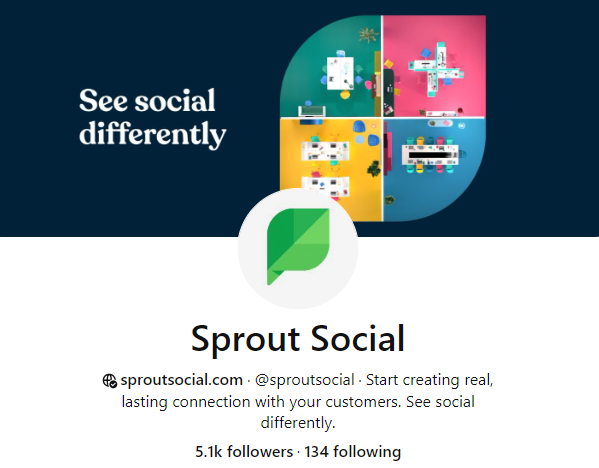
Next, claim your website. Once you do that, your Pinterest profile will display a small globe icon next to your URL, verifying your identity. You’ll also be able to see analytics for Pins that users create from your website, and those Pins will include your profile photo and a “follow” button.
You can claim your website in one of three ways:
- Add an HTML tag to your website.
- Download Pinterest’s HTML file and upload it to your site.
- Add a TXT record to your domain name system (DNS).
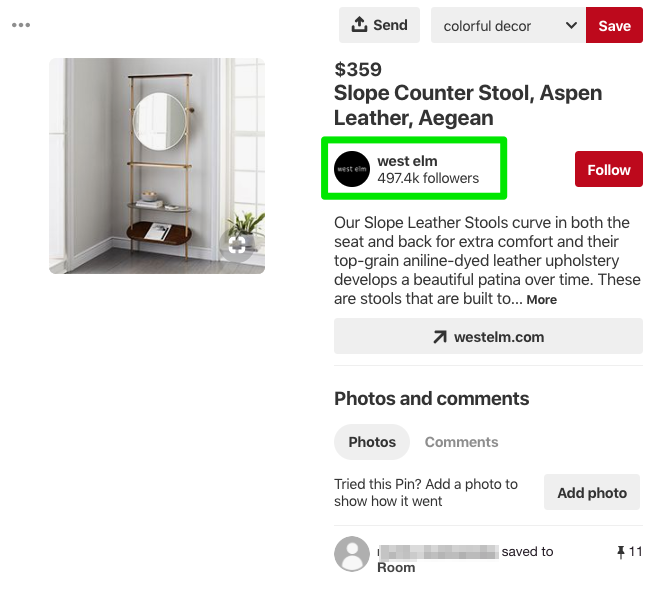
When Pinterest users save a Pin from your claimed website, your profile photo appears as subtle branding.
Creating a business account and claiming your website are the two essential steps for gaining access to your analytics and key metrics. You can also:
- Install a save button so users can easily Pin from your website. It’ll also generate analytics on which Pins send you referral traffic from Pinterest.
- Add a Pinterest tag to measure actions someone takes after seeing your promoted Pins (paid ads).
- Add Rich Pins for your products, articles and apps. These provide a little more information in the Pin when a user Pins from your site.
Pinterest analytics terminology
Pinterest analytics terminology is similar to that of other networks. If you’re already working with Facebook and Twitter reports, these Pinterest terms should feel familiar.
Profile overview
In native Pinterest analytics, you’ll see statistics like impressions and viewers. Pinterest Impressions are the number of times one of your Pins shows up in a feed, search results or category results. Viewers are the number of people who have seen at least one of your Pins.
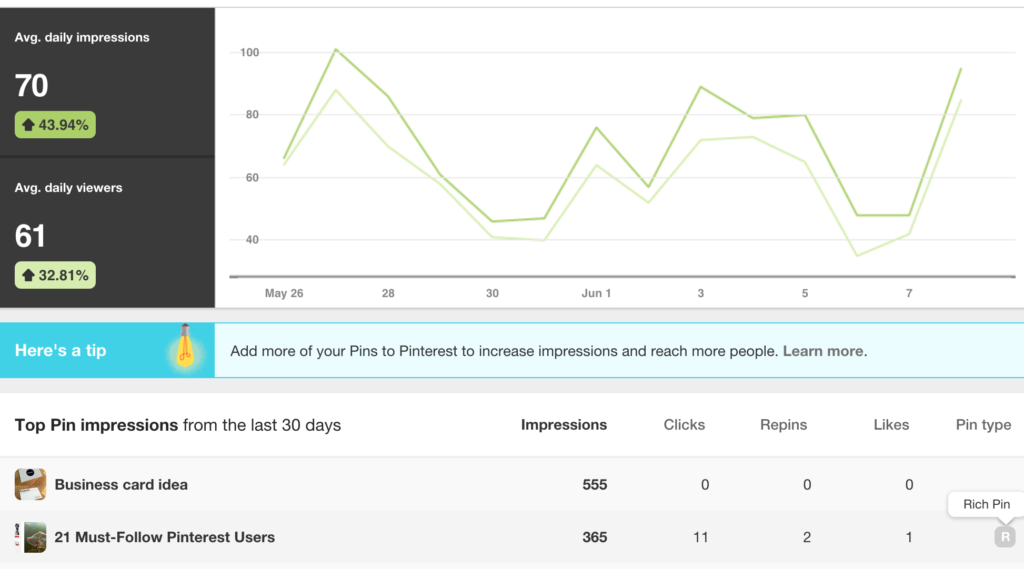
Looking at both the viewers and impressions helps you understand how engaged your audience is. If your Pins have a lot of views but few impressions, that could mean you need to improve your SEO to ensure your Pins show up in search results.
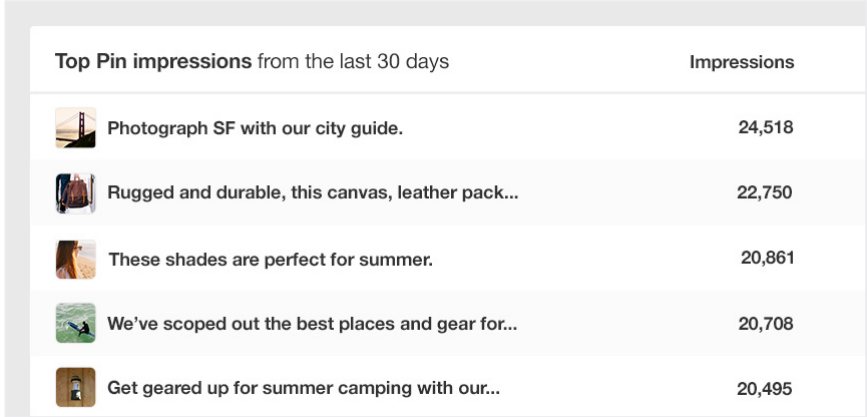
Another helpful feature of Pinterest’s native analytics is the Boards with top Pin impressions. This table gives you information on which boards are performing well, which will help you understand what to focus on. If you’re constantly posting on one board but finding that the Pins are not resonating, then it might be time to cut your losses on the board or adjust your Pinterest strategy.
Audience growth
Pinterest uses “followers” as Twitter does. A new follower is someone who follows your account, not just one of your boards. Pinterest will notify you anytime someone follows you or your boards.
In Sprout Social, your Smart Inbox will tell you when you have new comments and posts, and the Sprout Pinterest Profiles Report will show your audience growth for the reporting period you define.
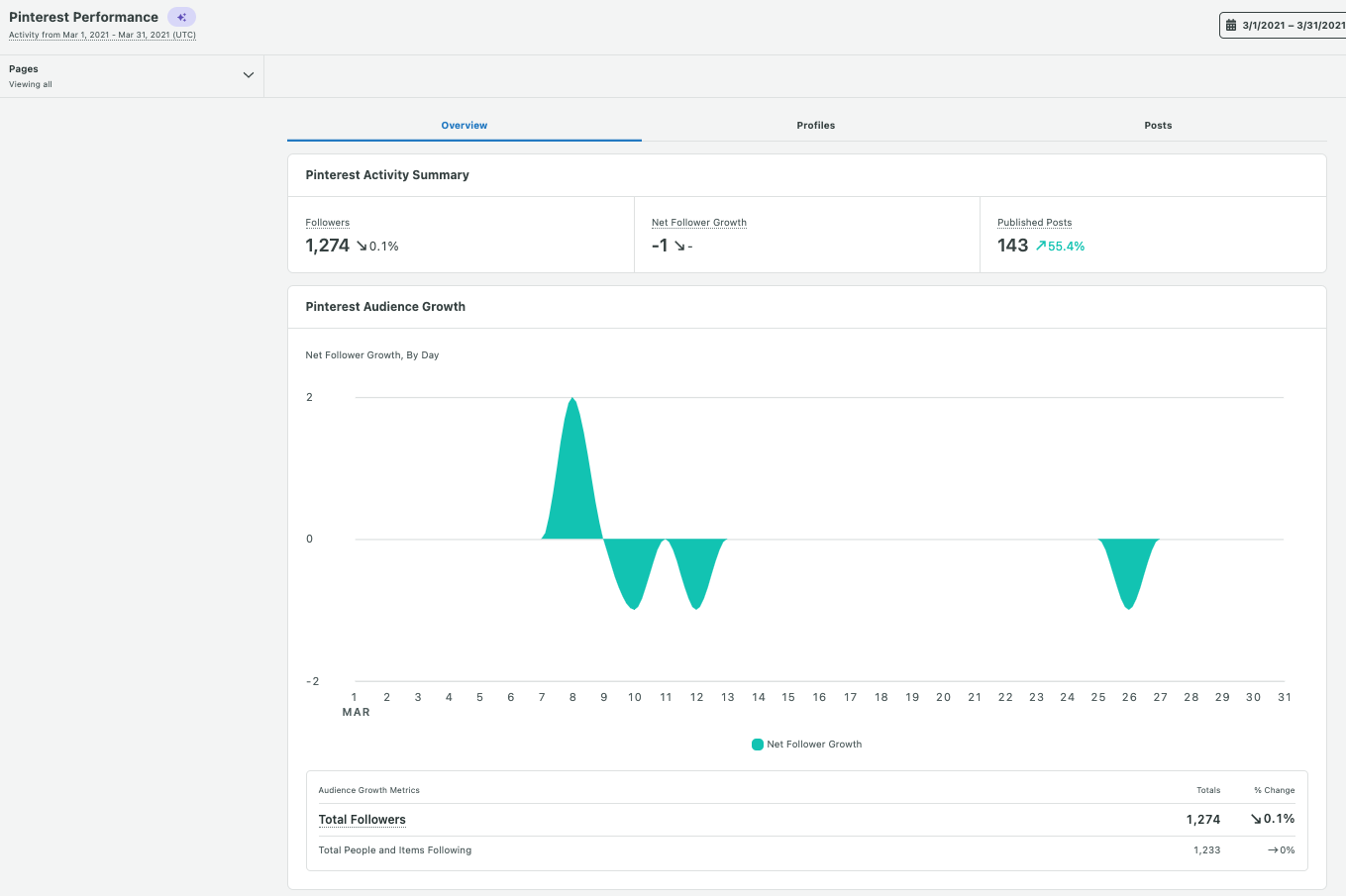
The Pinterest Profiles Report includes data on followers and overall pin performance. When you’re looking at your audience growth, these metrics can reveal how well your content is performing. Are your Pins engaging enough to earn a follow? Is your brand keeping track of top-performing content?
Publishing
The Sprout Pinterest Profiles report provides an overview of how consistently you Pin on the network, your Pins Sent and your Average Pins Per Day. If you see gaps in your publishing or notice that you Pin more often on some days you may need to reevaluate your strategy.
Pinterest strategy is a long game for brands, and you’ll need to post consistently for the best results.
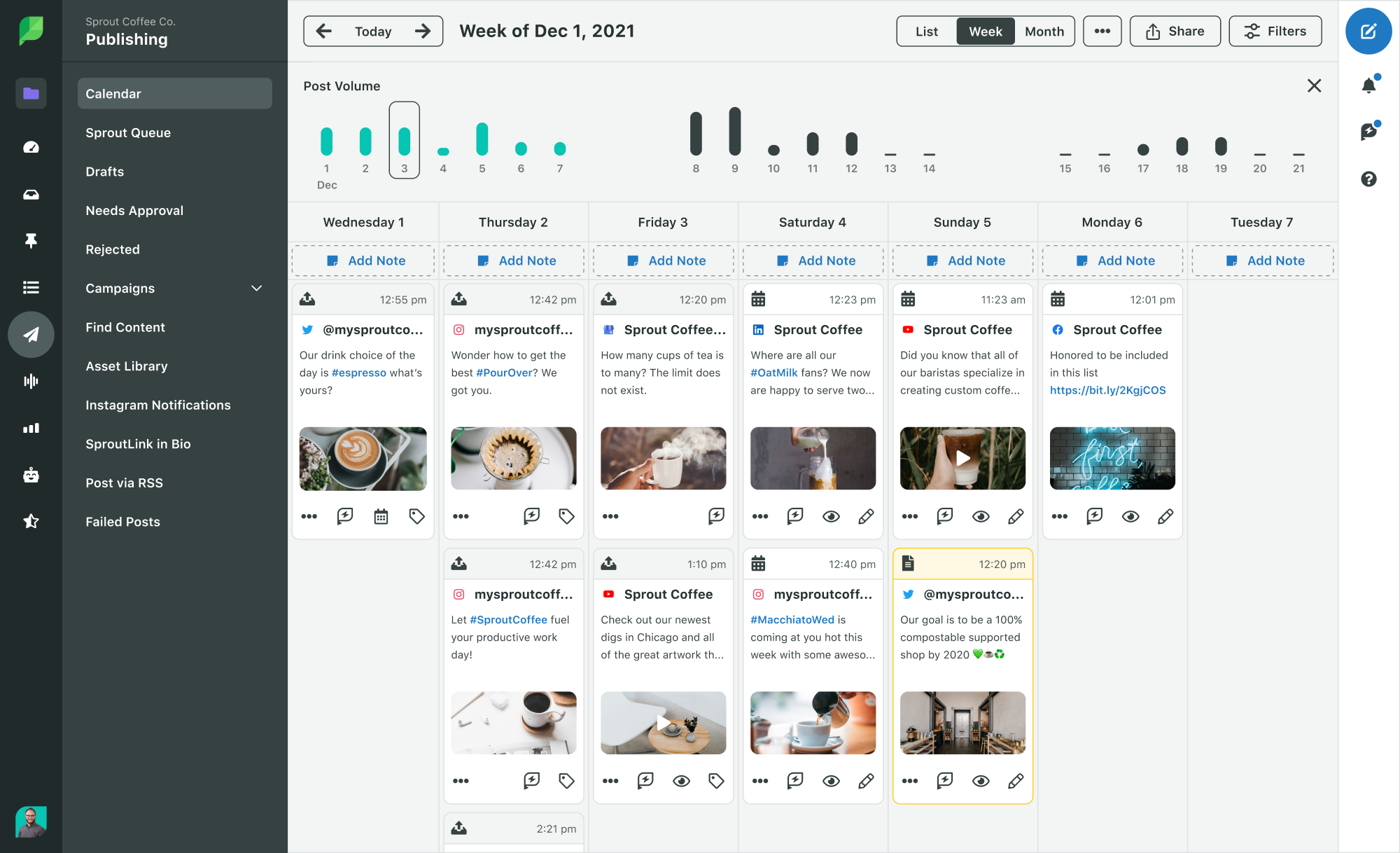
To do this, use a feature like Sprout’s Publishing Calendar to schedule your posts. Collect or create your Pins, then schedule them out so you don’t have to worry about timing. Your scheduled Pins will show up next to all of your other network posts, giving you a great overview of your content calendar.
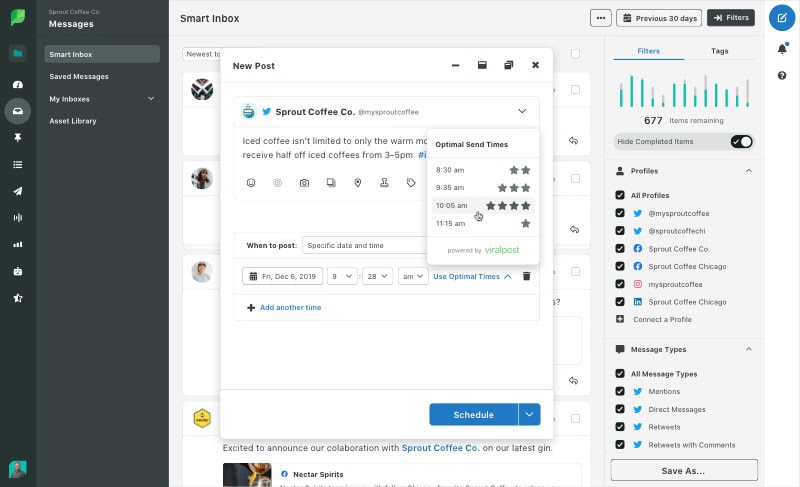
Sprout’s scheduling feature lets you either select post times or automate post timing with ViralPost. If you choose ViralPost, the software will schedule the posts at times that historically have the highest engagement. This proprietary feature learns as you post, so the more you post, the more it understands when your audience is around.
Individual Pin analytics
Pinterest provides several metrics that help you analyze the performance of your individual Pins.
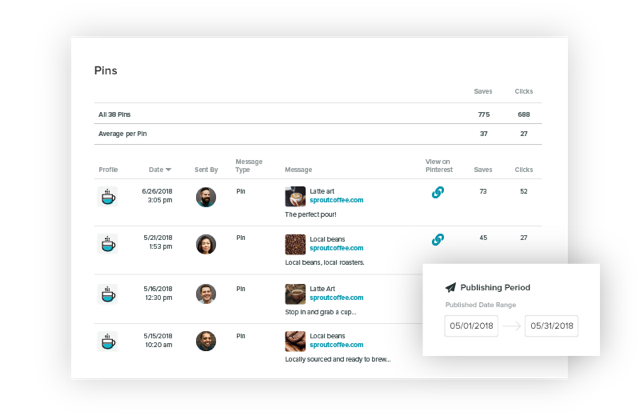
The individual Pins (Message Type) are categorized as either Pins or Saves.
In your account, they all display as Pins, but how they got there is what differentiates them:
- Pins are original — you scheduled them, uploaded them natively or created them from a website.
- Saves are someone else’s Pin that you saved to your own board.
For each Pin or save, you can see the number of user comments, saves and clicks. A click is when a user opens your Pin and/or clicks through to the linked website from the Pin. Your top Pins are those with a high number of saves or clicks.
Website Pins
Once you’ve claimed your website, you can see what content users are saving to Pinterest.
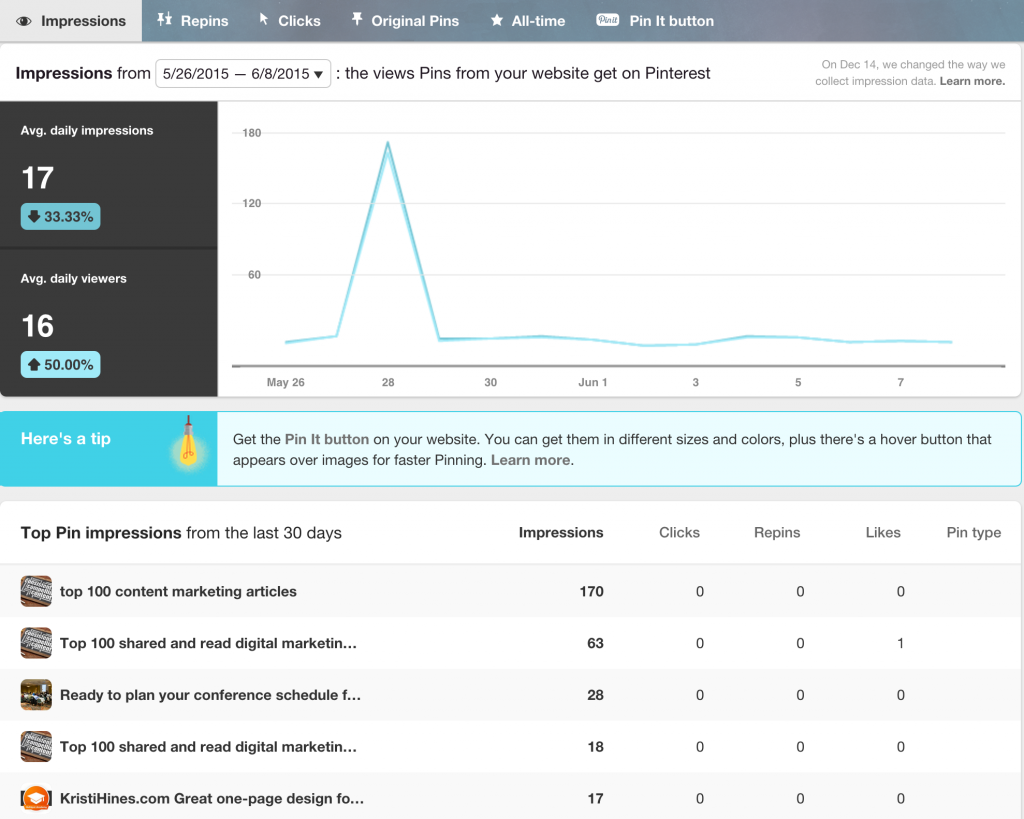
In the Website section of your native analytics, you’ll find some helpful charts that rank top Pins originating from your website by impressions, saves and clicks.
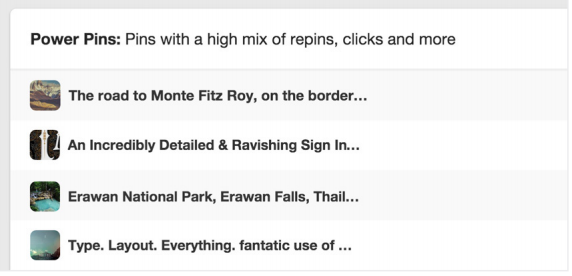
Identifying your most popular Pins can help you determine how to fine-tune your Pinterest strategy. In your Pinterest dashboard, click on the All-time category to see your Power Pins—or Pins that have a high number of saves, clicks and repins.
Audience insights
The key to understanding what resonates with your audience is knowing already who you’re marketing to. It’s not enough to know who the average user on Pinterest is, though it’s helpful if you’re just starting out on the platform.
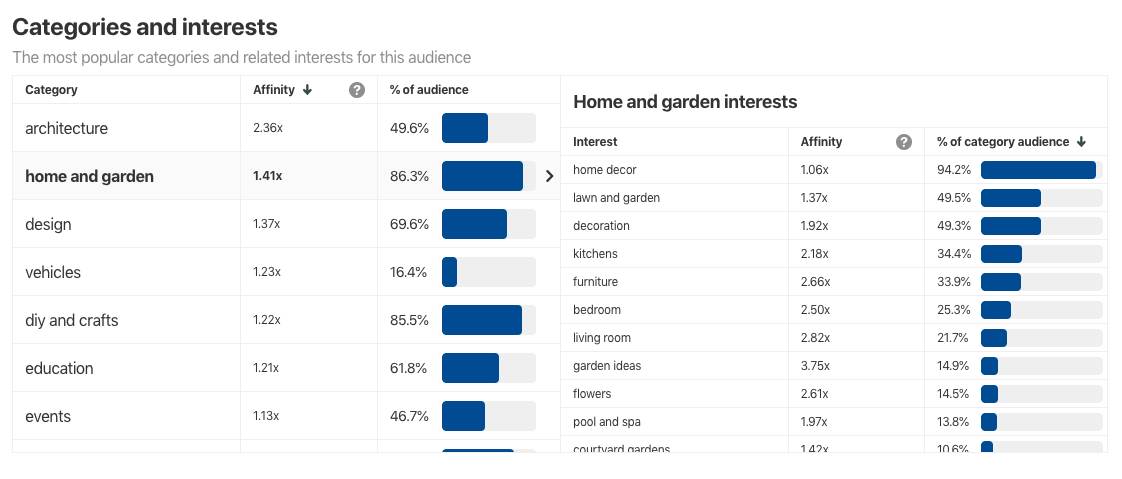
The Audience Insights page on Pinterest gives you a glimpse into your own audience and Pinterest’s overall audience. There’s also a helpful comparison tool to assist you in benchmarking your audience. You can look at categories and interests to see relevant keywords. For example, the “food and drink” category also shows how many are interested in snack mix recipes and sweets.
Additional audience demographic information includes age, gender, location (by metro area and country) and device. Use this information to your advantage by creating Pins for the categories that appeal to your audience. The sub-interest breakdowns also help you find keywords to use in your Pins and in your advertising strategy.
Every audience category has an affinity score, which indicates how interested your audience is in the topic compared to the rest of Pinterest. A high-affinity score means that your Pins on that topic are resonating with that audience.
Ramp up your marketing with Pinterest analytics
With roughly 430 million monthly average users, Pinterest could become an important part of your social media campaigns—as long as you understand Pinterest analytics.
Pinterest analytics will give you insight into what type of content is working well, so you can create more of it. The website analytics also give you information on what parts of your site’s content viewers are finding most useful. The lessons you learn from Pinterest may also help you optimize your strategies on other social platforms.
Stay ahead of the competition. See Sprout Social’s report on social media trends, and start scheduling your posts with Sprout today.
The post Pinterest analytics: a guide for marketers appeared first on Sprout Social.


from Sprout Social https://ift.tt/NBKJtZF
via IFTTT
Thursday, 23 June 2022
How to conduct a Facebook competitor analysis report
A bit of competition can bring out the best in people. On social, a Facebook competitor analysis can bring out the best in your brand.
According to the 2022 Sprout Social Index™, over 80% of marketers check their social data on a daily or weekly basis to inform everything from content strategy to market research. These decisions aren’t made with owned data alone. Competitor data is essential to getting the full picture.
Using Facebook data to bolster your competitive intelligence can provide you with the insights needed to zig where others zag. It’s no wonder Facebook is the most-used platform by marketers worldwide.
If you’re ready to engage in some old-fashioned competitive sleuthing, you’re in the right place. Here’s everything you need to know to start monitoring your competition on Facebook.
What is a Facebook competitor analysis?
A Facebook competitive analysis is the process of evaluating your competitor’s Facebook activity for benchmarking data. These reports also provide insights into the strengths and weaknesses of your competitor’s social media strategy overall.
Conducting a Facebook competitor analysis involves reporting on key brand growth and engagement metrics for your brand and its rivals. Your team can use this social data to set a baseline for audience growth, publishing and engagement goals.
These findings can help you define what it means to offer superior content and service on social media, increasing the business impact of your presence on the network.
Why should you do a Facebook competitive analysis?
If you plan on conducting a social media competitive analysis, make Facebook your top priority. Over two-thirds of consumers anticipate spending more time on Facebook over the next year, making it a goldmine of strategic insights. If that’s not enough, here are some other reasons to consider:
Establish more relevant KPIs
Competitive benchmarking on Facebook can take the guesswork out of goal setting.
For example, say you’re trying to set a new engagement goal. Looking at your historical data can help you set an achievable target, but without competitive insights, you risk setting goals that aren’t in line with industry standards.
Your Facebook competitor analysis can motivate you to aim higher with your social content while keeping your strategy attainable and actionable.
Identify content gaps
Competitive analyses can illuminate cracks in your content strategy while supplying the information needed to fill them.
For instance, an oral health care brand conducting a Facebook competitive analysis might notice that Quip incorporates month-long observances and hashtag holidays into their content strategy.
It’s National Dentist’s Day *and* Women’s History Month, and Leonie von Meusebach-Zesch is one of the most interesting…
Posted by quip on Saturday, March 6, 2021
Since these posts do well from an engagement standpoint, that brand may consider how they can put their own unique spin on similar events.
Create better content for your followers
Coming up with new content ideas is a top challenge for many social media marketers.
Rather than starting to brainstorm from a blank slate, use industry data to create some much-needed guardrails. That’s where your Facebook competitor analysis comes in.
The analysis will help you identify your rival’s content themes. As you notice them, ask yourself how your brand might approach something similar. What would you do differently? What opportunities are they not taking advantage of?
Eventually, you’ll come up with a unique piece of inspired content that stands independently from its source material.
Understand the strength of customer service efforts
More than half of US consumers turn to Facebook the most for customer service needs, making it the preferred network for customer care.
A quantitative and qualitative review of your competitor’s Facebook pages can help you clearly define what they are and aren’t getting in terms of customer service. This will show you exactly what it takes to gain a competitive edge on social.
Facebook competitive analysis tools will help you keep a pulse on what your audience expects from brands on the network. Eventually, you’ll find ways to one-up their service offerings, cementing your spot as the brand people turn to for a better customer experience.
Test new Facebook features
Facebook started as a social network for college students. Now, it’s a social network, a marketplace, a media platform and so much more.
This creates an ever-flowing river of new opportunities for marketers. The only downside is, it can feel overwhelming to keep up.
A Facebook competitor analysis can help you identify which Facebook features are worth embedding into your strategy. If a competitor seems to be gaining a lot of traction from using a specific tool, that’s a clear sign to get in on the action.
How to analyze competitors on Facebook with Sprout
You could do some of this research manually, but Sprout will make the process much more efficient. Sprout’s Facebook Competitors Report lets you track metrics for any Facebook page to compare them against your own. Here’s how to use it:
Step 1: Set your filters
Use the Filter Menu to customize the data you want to see in your report.

You’ll find three different filters within the menu: Pages, Competitor Pages and Date Range.
- Use Pages to select which owned Facebook pages you’d like to include in the report.
- Use Competitor Pages to manage and select competitor Facebook pages
- Use the Date Range date picker to select a time period for your report.
Step 2: Check the summary
The top widget in the Facebook Competitor Report is a summary table. This features averages of key metrics including Fans, Public Engagements and Public Engagements per Post.

Use the trends highlighted in the summary as starting points for your competitive investigation. For example, if you notice that your fan average is lagging behind, that may be the first item to review and cover in your report.
Step 3: Dig into the numbers
You’ll find three different chart widgets in the Facebook Competitor Report:
- The Audience Growth chart shows how your audience grew compared to your competitors’ during the selected time period.
- The Publishing Behavior chart shows the different types of posts you and your competitors published during the selected time period.
- The Engagement chart evaluates how people are engaging with posts based on publish date.
Each of these charts goes deeper into the high-level metrics available in the Summary table. They also provide averages of each metric for both owned and competitor Facebook pages. Use this information to benchmark your performance against your competitors’ averages.
Step 4: Review post-level data
Use the Top Posts widget to review the most popular posts published during your selected time period.

The Top Posts widget will help you analyze published content across all competitors to understand what’s resonating within your shared audience. As you review the data, stay on the lookout for qualitative trends as well. What type of visuals and messaging drive the most engagement? Are there any topics people seem particularly excited about?
Understanding these trends will come in handy during your next brainstorm.
Step 5: Share findings
There are a few different ways you can distribute your report from Sprout.

If you’d like to limit the number of disparate files floating around people’s inbox, try the link sharing option. This will allow you to share reports with multiple stakeholders regardless of whether they have a Sprout account or not.
Understanding your Facebook competitor analysis
Numbers are nothing without the right context.
For example, what if one of your competitors ran an enticing social media contest during your reporting period? That would definitely have an impact on either their engagement or audience growth. If your report lacks that context, it can result in an unfair assessment of your team’s performance.
Use storytelling to give your data meaning. Include the “why” behind your most interesting numbers so that your teammates understand the full story behind the report as well.
May the best brand win
A Facebook competitor analysis can be exactly what you need to level up on the network. Understanding where their strengths and weaknesses lie is the first step to understanding how to outperform them on social.
Compiling that data takes a lot of work, especially when analyzing multiple competitors. Sprout Social can eliminate all the data collection work so you can focus on planning your next steps. Sign up for a trial today to test out the Facebook Competitor Report free for 30 days.
The post How to conduct a Facebook competitor analysis report appeared first on Sprout Social.


from Sprout Social https://ift.tt/12NxOhW
via IFTTT
Wednesday, 22 June 2022
NGL: the app that lets you share anonymous thoughts with mutuals

From ad trackers to algorithms that monitor your online activity, it can be difficult to remain truly anonymous. You can make your social media profiles private, but it doesn’t change the fact that every post, tweet, and comment is tied to a name. NGL is a new app that allows you to share your thoughts and opinions with your followers anonymously.
“NGL” is a social media abbreviation that stands for “not gonna lie,” a phrase that people use before confessing a thought or opinion. Launched in 2021 and available worldwide on both Apple and Android, NGL hopes to provide a safe space for young people online.
NGL might remind folks of ask.fm, also a website used to ask questions and share thoughts anonymously. However, since ask.fm doesn't have a tracker or any monitoring, it was often used to bully and harass people with no consequences. NGL prioritizes safety by using AI content moderation. NGL has built-in algorithms that can detect and filter out harmful content associated with hate speech and cyberbullying. The app also offers the option to report and block users.
“This means we stay on trend, we understand lingo, and we know how to filter out the bad stuff,” says NGL on their webpage.
To use NGL, users must connect the app to their Instagram handle. NGL will then provide a link that you can copy and paste onto your Instagram Story, which your mutuals can tap on to respond. The questions and comments will show up on NGL’s “Inbox” feature.
While NGL does claim to be completely anonymous, the app does provide “hints” on who the responding users might be. The app is free, but there are also different subscription tiers.
Ready to know what your mutuals really think of you? Here’s how to get started with NGL:
1. First, download the app onto your phone either through the App Store or Google Play.

2. When you open NGL, you will be prompted to enter your Instagram handle.

3. After you’re linked to Instagram, NGL will present you with a link that you can copy and paste onto your Instagram story. While the default prompt is “send me anonymous messages,” you can change the prompt by clicking the icon of a die in the prompt box.

4. To share the NGL prompt to your Instagram story, all you have to do is tap on the “Create” option on your story page and add the link.

5. After you’ve shared the prompt to your story, you can access the responses in the “Inbox” tab on the NGL app.


from Mashable https://ift.tt/vXxhzUJ
via IFTTT
10 chatbot marketing examples to boost your bot strategy
The chatbots have arrived.
The instant gratification of @-mentions, DMs and chatbots has influenced the trajectory of social messaging and customer care. The need for conversational commerce remains high as customers want to interact with brands in a way that feels natural (and efficient). Over 70% of customers expect a conversational care experience when they engage online with brands.
According to the Sprout Social Index™, nearly 55% of brands use private/direct messaging for marketing purposes, showcasing the enormous opportunity that 1:1 communication provides.
More brands are adopting chatbots for customer care requests because they can address concerns around the clock, but these digital personal assistants can provide much more.

How your brand can bloom with chatbot marketing
Your brand can benefit from chatbot marketing in several ways. Here are a few:
Save time and resources while serving more customers
Chatbots are available 24/7, allowing them to service more customers whenever they need help. Bots can answer frequently asked questions, provide discount codes—and so much more. They can also create tickets for a human agent to address during working hours. When social bots resolve simple issues, human agents can focus their attention on more complex problems.
Essentially, these instant replies provide the quick solutions and information consumers crave, leading to a positive customer experience. If executed properly, bots can help boost your brand image and reputation as well.
Provide a personalized experience by segmenting traffic
Chatbots can segment inbound traffic by leading the conversation based on the customer’s needs. For example, if a customer asks about pricing packages, a chatbot could identify them as a warm lead and suggest that the user complete an order. Many chatbots complete orders directly in the chat, freeing the customer from going to the website on their own.
Removing those extra steps on the customer’s end reduces friction in their journey. The chatbot is a catalyst that speeds up the step from browse to buy. Since bots provide almost all of the necessary details about a service or product, they can hyper-personalize the chat experience.
Capture data to refine your marketing strategy
The messaging data bots collect can provide insights into your audience’s needs and wants. Social messaging data can highlight important voice of customer feedback. The information you gain from this data can inform other chatbot marketing strategy tactics, future campaigns and your product roadmap.
Provide support via familiar channels
Integrating chatbots on social messaging channels like Twitter Direct Messages, Instagram Direct Messages, WhatsApp and Messenger allows brands to connect with customers online in a quick way. Using these familiar channels also makes your brand more accessible to audiences who will never reach out via email or phone. Meet your audience where they are and use a chatbot to carry out your marketing strategy at scale.
10 chatbot examples to boost your bot strategy
There’s a huge difference between a bot answering “yes” or “no” questions and a bot that provides meaningful experiences.
The positive impact of chatbots hinges on the quality of a brand’s bot. This begs the question: What makes a “good” chatbot?
We’ve put together a list of chatbot examples that show practical uses of bots online and the diverse range of businesses rolling them out. Check out why these brands are deemed the best of the bots and what your business can learn from them.
Ecommerce chatbot examples
1. HelloFresh
HelloFresh is one of our favorite chatbot marketing examples because it ticks all the boxes of what a bot should do.
For starters, their Messenger chatbot is self-aware—in the sense that HelloFresh immediately acknowledges you’re speaking with a chatbot, as opposed to a customer service rep.
Your customers are smart. They know when they’re talking to a bot and when they’re not. HelloFresh manages to show off their brand voice by playfully introducing the bot as Brie.

Also, note that HelloFresh provides a variety of prompts to help guide the conversation from point A to point B. The bot suggests questions, likely based on the most common questions their human reps receive. Users have the option of typing in a question as well.
As you’ll see with most of our chatbot marketing examples, these bots try to stay away from totally open-ended messages that could result in errors. Remember: bots should make for better user experience, not a more complicated one.
In addition to answering questions, the bot has a built-in social selling component by offering bot-exclusive discount codes if the user asks about them. Instead of just offering the discount in the chat, Brie takes it a step further by automatically redirecting to HelloFresh’s Hero Discount Program page. The page highlights the discount program, along with testimonials and frequently asked questions. Using the bot to push this program is a great example of how brands can track and assess the ROI of these helpful digital assistants.
Expect these sorts of offers to become more common as brands look for new incentives to encourage people to interact with their bots.


2. Domino’s Pizza
With the rise of mobile and social shopping, brands are constantly looking for ways to drive revenue from their social channels.
Domino’s has a chatbot for Messenger and their website. Staying true to its brand voice, the chatbot is named Dom. The bot allows customers to place orders and customize their pizzas all within the chat, making it a cinch to buy your favorite pie. Dom has the ability to save and repeat orders and find the closest store to you.
This is arguably one of the best chatbot marketing examples for highlighting how a bot can take something done via mobile and make it just as good (if not better) on social. Although digital ordering is nothing new, ordering through a chatbot requires no native downloads or sign-ups on an app.

3. Sephora
Sephora became one of the first brands to integrate chatbots when they began using them in 2017 via Kik. Today, Sephora’s beauty bots boast a bounty of features.
Want to browse products? Book an appointment? Try on makeup using augmented reality technology? Your virtual beauty coach can do all of that and then some.
Sephora elevates customer care to the next level, creating a compelling experience while supporting brick-and-mortar sales with chatbot services on Messenger and Kik.
Similar to Domino’s, Sephora lets users take a variety of actions without having to leave the chat. The bots answer basic customer service questions like order tracking and product availability, but each platform leverages its own unique features to offer a more personalized shopping experience.
On Kik, the beauty bot asks users to take a quiz so they can provide recommendations based on their preferences. If a user wants to purchase a product, they are redirected to the mobile site or Sephora. The bot also features makeup tips, tutorial videos and reviews.
The beauty bot on Messenger is more extensive. Like Kik, the bot offers beauty coaching via makeup tutorials and product reviews, but it also provides news stories, trend reports and two unique features, Sephora Reservation Assistant and Sephora Virtual Artist.
The Reservation Assistant books appointments for makeover services at stores while Virtual Artist allows you to try on looks via AR technology. Beauty enthusiasts can use Color Match to find their perfect shade of lipstick or foundation. And, of course, users can also use Messenger to connect with a live agent.
4. River Island
London-based fashion company River Island uses chatbots to help streamline their customer service. This popular High Street fashion brand has over 350 stores internationally and a strong online presence with millions of followers across social media, so they get thousands of online inquiries each day.


River Island’s chatbot, RI-bot, is available on Messenger and Twitter Direct Message. Customers can use RI-bot to check on orders, ask about a product, locate a store and more. The bot provides links to the website’s frequently asked questions page as well.
The brand launched the chatbot in mid-April 2020. Within six months, they earned 15 million content engagements and 6.1 million post links. With these kind of metrics, River Island proves to be fashion-forward and future focused.
Chatbot marketing examples
5. Mountain Dew
As the self-proclaimed “unofficial fuel of gamers,” Mountain Dew used a chatbot to directly connect with this customer base, leveraging advocacy and engagement to take their bot and brand to the next level.
The energy drink brand teamed up with Twitch, the world’s leading live streaming platform, and Origin PC, a PC gaming rig manufacturer, for their “Rig Up” campaign.
As Twitch’s first branded chatbot, DEWBot played a major role in the larger promotion of Rig Up, an eight-week streaming series where fans could tune in to see exclusive content and win prizes, including the grand prize of a fan-assembled Super Gaming Rig worth $50,000.
Mountain Dew streamed episodes in their Twitch studio, featuring top gaming hosts, industry insiders and professional players. Each episode highlighted a core gaming rig component for the grand prize. The chatbot pushed out polls so fans could vote on rig components. The poll data allowed on-air hosts to update the community in real-time, including the crown winning rig feature. Each weekly vote earned viewers an entry into the grand prize drawing for the Super Rig.
By the end of the campaign, Mountain Dew won a Shorty Award for Best Use of Chatbots and saw some impressive metrics. Viewers watched over 11.6k hours of branded content and the campaign earned 48 influencer shoutouts. Mountain Dew’s Twitch fans increased by 265% and the channel engagement increased by 572%. The campaign also reaped long-term benefits by collecting insights about Mountain Dew’s Twitch community for future promotions.
6. Arsenal Football Club
The English soccer powerhouse Arsenal Football Club (FC) uses bots to engage with their audience while promoting their brand. The sports team is also a great example of timely content delivery and how you can use bots for more than just customer service.
Meet Robot Pires, the digital doppelganger of the French football coach and former professional player.
Robot keeps soccer fans up to date with the latest news about the clubs, upcoming fixtures, real-time match updates and more. Plus, he can help you purchase tickets for the next game, view player stats or find videos including player interviews and moments from some of the team’s greatest victories. Superfans can dive in even deeper with reports, analysis and play-by-play match commentary.
The sports team scores extra points for creating a personalized marketing experience as well. Users can customize alerts, follow their favorite topics and players, and more. This online coach is available on Slack, Skype, Telegram and Messenger.

Customer service chatbot examples
7. KLM Royal Dutch Airlines
KLM Royal Dutch Airlines is an excellent example of using chatbots in hospitality. KLM’s bots streamline their internal operations by providing fast, personalized customer care.
The airline’s bot is nicknamed “BB” for “BlueBot” and available on Messenger. BlueBot is multilingual and provides 24/7 real-time service for various travel inquiries. Users can book tickets, view baggage information, ask about refunds, check flight status and more.

If BB can’t answer a question, the bot will connect you with a live agent. The chatbot also offers emoji direction services, which give travelers information based on their location. The bot will show directions to a destination of choice once the user sends a relevant emoji and their location on Messenger.
8. Babylon Health
Chatbots are common in the healthcare space and many brands use them to help patients and provide telemedicine services. Babylon Health uses AI-powered bot technology with Symptom Checker, which is available via the app and their website.
Although a robot should never replace a physician or confirm a diagnosis, Babylon’s bot can provide information based on medical history, analyze symptoms, identify potential causes and set up patients with a live consultation with a doctor for next steps. Patients can also use the bot to book appointments. Essentially, the Babylon’s bot streamlines their customer service so patients can get the care they need faster.
9. Plum
Plum, a money management company, stands out with their chatbot-exclusive service. In other words, they are a bot. This London-based fintech company implements AI technology to help users manage their personal finances. The bot is supported through Plum’s mobile app and Messenger.
What’s notable about Plum is their onboarding process. The conversation with Plum is entirely prompted, giving the customer a choice to sign-up or learn more information in smaller “chunks.” The interactivity of Plum’s bot certainly beats a boring wall of text or a traditional Q&A.
The bot’s casual tone, emojis and conversational calls-to-action keep the reader naturally scrolling and tapping rather than feeling like they’re being sold to. This is a prime example of how to funnel a customer through a conversation to eventually lead them to take action.

10. Sprout Social
Last but not least, is our chatbot! We provide a prompt-heavy bot to provide customers with exactly what they need.
Customer support? Account issues? Features and pricing plans? It’s all there and just a tap or two away.
And like most bots, we provide our customers with the option to speak directly to one of the lovely humans on our support team.
What’s even cooler than our own bot is Sprout’s chatbot builder.
Despite popular belief, you don’t need to be a technical wizard or programmer to get started with social bots. Sprout’s Bot Builder provides a variety of pre-built bot templates that make the process even easier. You can optimize your bot for customer care, shopping and leads.

Based on your business’ needs, you can put together actions and workflows that also show off your brand’s personality.
Whether it’s a few simple queries or something more complex, we can help you build an awesome experience for your customers.
Plan a smarter strategy with chatbot marketing
If you want to learn more about what bots can do for your business, we recommend checking out Sprout’s ultimate guide to chatbots.
And if you’re interested in building your own bot, watch the video below to see how Sprout can help.
The post 10 chatbot marketing examples to boost your bot strategy appeared first on Sprout Social.


from Sprout Social https://ift.tt/K8aUnpJ
via IFTTT