Tuesday, 6 February 2018

Why Redesigns Sabotage Your SEO Rankings (And How to Avoid It)

It seems like most companies redesign their website every year or so.

New trends gain steam, so they want to be more ‘contemporary’ or ‘flat.’

Or new color schemes are en vogue. So every site you visit looks Asana-bright.

Everyone now wants to update their site on the same regular basis.

I love experimenting with new color schemes and trends, too.

Except for one tiny thing.

I hate redesigns.

Design updates are good. They allow you to incrementally make improvements to make sure your site is up-to-date.

But full-scale redesigns?

Where you completely overhaul the site architecture and page content?

You should avoid those like the plague.

I know that sounds surprising. But I’m going to share a few examples of how and where website redesigns go bad.

Especially when it comes to destroying all of the hard-earned SEO rankings you’ve built up over time.

Site architecture changes cause you to lose links.

There are hundreds of rankings factors for SEO.

But backlinks still reign supreme.

External links have been considered ‘votes’ since the beginning of (internet) time. Their quantity, diversity, and authority pass the most influence to raise your position in the SERPs.

Internal links don’t count for as much value. However, they do have a direct influence over someone’s website experience.

I’ll explain.

In 2011, Google Panda was released. It was one of the first reported cases where Google confirmed the use of qualitative factors.

They used a survey with questions like:

  • Would you trust information from this website?
  • Is this website written by experts?
  • Would you give this site your credit card details?
  • Do the pages on this site have obvious errors?
  • Does the website provide original content or info?
  • Would you recognize this site as an authority?
  • Does this website contain insightful analysis?
  • Would you consider bookmarking pages on this site?
  • Are there excessive adverts on this website?
  • Could pages from this site appear in print?

And they had people individually rate different websites.

Fast forward a few years, and Google also started taking user behavior into account.

They don’t just want to rank websites based on links or content length. They also want to look at the overall experience of that website.

They want to make sure that people find what they’re looking for.

So the better experience visitors have, the more credit the site will get.

What’s one way to ruin an otherwise nice experience?

Broken links that derail someone’s path through your site.

When most companies redesign websites, they start messing with the site architecture.

They create new pages and ditch old ones. Or they take content from one page and add it to another.

Then, they switch up their menus and navigation schemes.

It seems harmless on the surface. The new experience might even be superior to the old one.

But what they don’t realize is that they’re often creating a TON of problems for SEO.

For starters, site architecture changes can ruin hub pages you’ve worked hard to build.

These are like clusters of related pages on your site. And they can help increase your perceived authority on those topics.

Page-level changes also create broken internal links throughout the site.

You know the drill. You try to click on a new page to find related information, only to be met by a 404 error.

One or two isn’t a big issue. Redesigns, however, often create a ton of them all at one time.

For example, let’s say you’re redesigning a hotel or ecommerce website.

Chances are, you’re using a detailed parent-child structure to organize pages.

That means you might have “Rooms” at the top, followed by the individual types of rooms underneath.
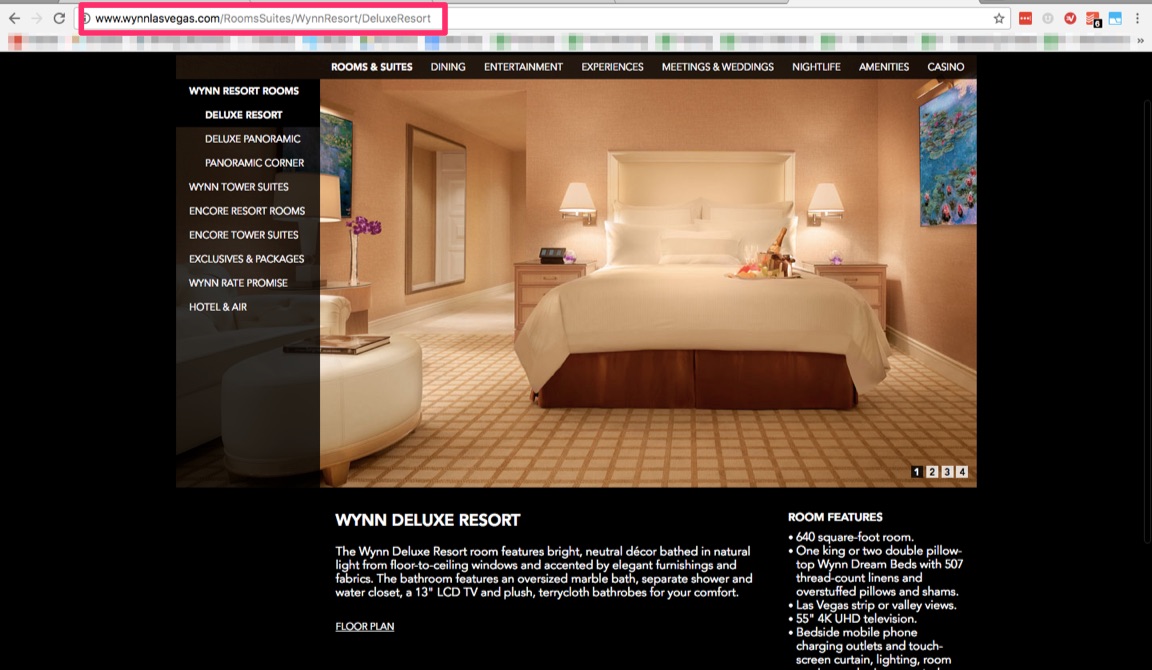
The problem is that these structures often changes over time.

Maybe you come out with new products or services. Maybe you migrate old rooms into new ones.

One seemingly small change can often create a ripple effect throughout your site.

It might make perfect sense to move your featured rooms up a level or two.

However, any changes to your URL structures doesn’t create one or two broken links.

It can literally create hundreds to thousands.

Take blogs for example.

Let’s say you’ve worked hard over the years to create hundreds or thousands of blog posts.

But when it comes time to move over to a new CMS during a site redesign, someone wants to remove the date strings from the URLs.

Heck, all it takes is literally a single click inside WordPress to update Permalink Settings.
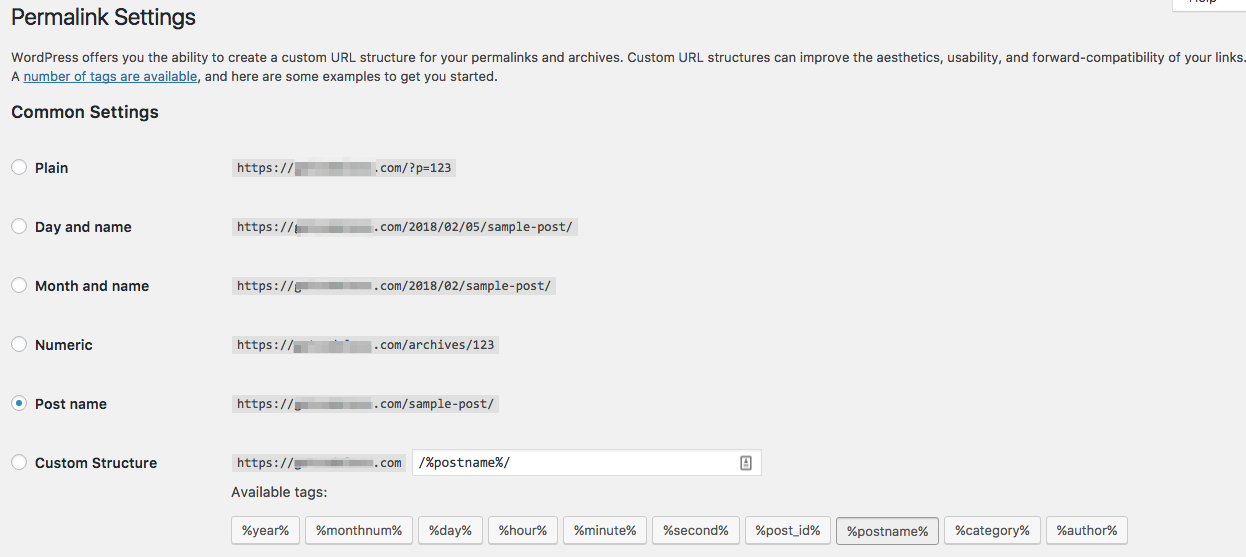
So yes, it seems harmless.

I’ve actually seen this mistake time and time again.

Poor, unsuspecting business owners who have their entire websites practically break.

Tens of thousands of page URLs break overnight.

And you know what happens to their rankings?

They drop like a rock.

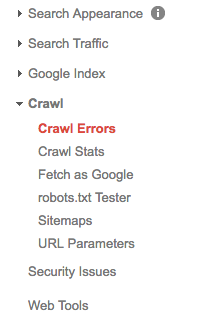
Fortunately, Google Search Console can help you spot broken links under the Crawl Report.
My favorite tool for technical SEO audits is Screaming Frog.

It will crawl every page on your site, uncovering tons of on-site SEO issues.

For example, you can start by looking for the “Client Error (4XX)” report under Response Codes.

Most of these will be 404 errors, when the status is reported as “Not Found.”

So far, we’ve been focusing almost exclusively on broken internal links.

But that’s not the only way redesign changes can affect your site links.

Think about it this way.

Older, high-authority pages or posts tend to acquire the most backlinks.

The highest value links are also the hardest to get. These include editorial links, for example, that come from journalists or other influencers.

That also means you can’t control them.

So when your page or post URL changes, you will lose all of those external links, too.

This, again, happens all the time.

Permalink updates, moving the blog from a subfolder to subdomain, or even just new product pages replacing old ones can force you to lose all those backlinks.

The best solution? Don’t change old page URLs!

At least, not if you can help it.

Otherwise, another way to side-step this problem is through setting up 301 redirects.

These are ‘permanent’ redirects, telling search engines that the new page has now replaced the old one.

The Quick Page/Post Redirect Plugin for WordPress is one of the most popular options.

It’s also incredibly easy to use. All you have to do is drop in the old “Request” URL and then direct it to the new “Destination” one. The only caveat is that redirects like these should be used sparingly.

What you don’t want to see, is something like this:

Loading up on too many 301 redirects can cause other unintended consequences.
And they’re usually a sign that there’s a bigger, underlying issue at play.

It means the site architecture has changed dramatically.

Here’s why too many redirects can also affect your SEO rankings.

Too many 301 redirects can cause slow page speeds.

“301” redirects have long been considered the best for SEO.

They indicate a ‘permanent’ change, as opposed to a ‘temporary’ one like a 302 gives off.

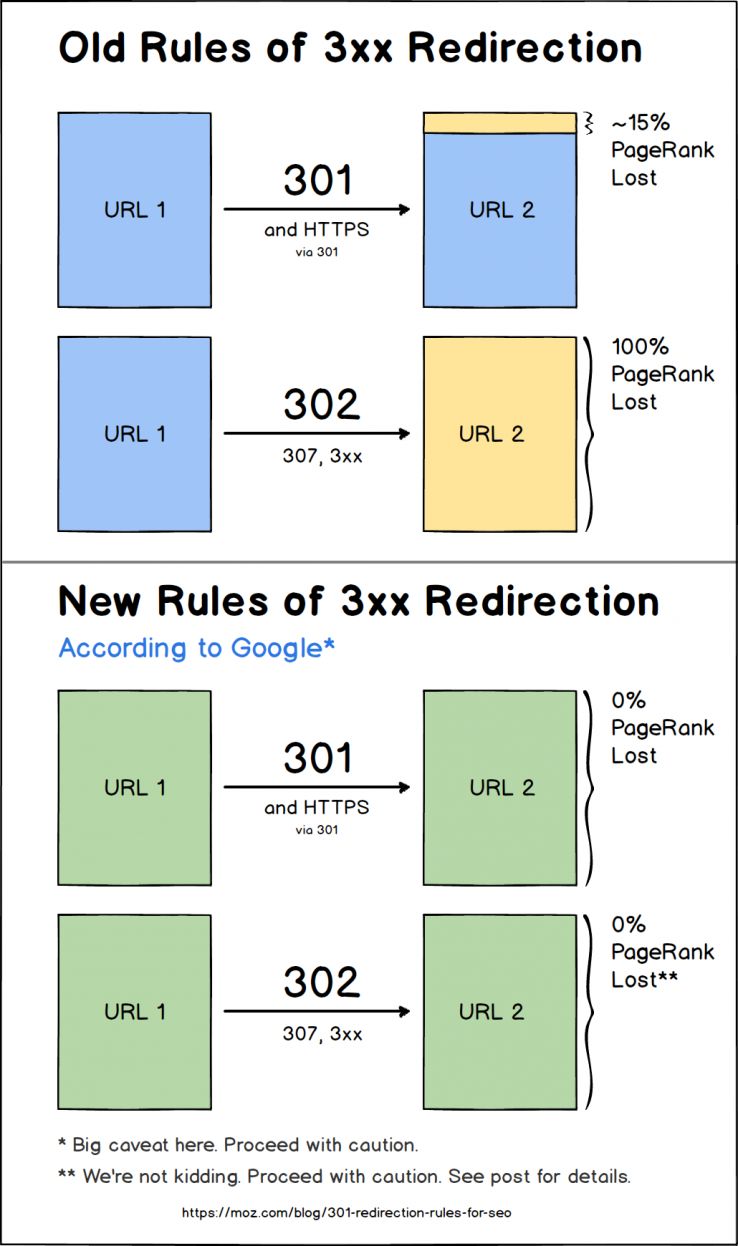
Either way, SEOs still feared that redirects would somehow limit the amount of PageRank that flowed through to the site.

Even Google’s own Matt Cutts once indicated some loss.

But in 2016, Google webmaster analyst, Gary Illyes, confirmed that all 3XX links pass full value:

Another Googler, John Mueller, confirmed the same findings.

Why does this all matter?

Because redirects are often now used to update websites to HTTPS. So some SEOs think this is Google’s way to help make sure people adopt it.
Last year, Google Chrome users started seeing new security warnings.

Previously, up to 70% of users would ignore website security warnings. So Google rolled out new ‘Not Secure’ messages for sites that don’t set-up SSL certificates.

Moving from HTTP to HTTPS isn’t as simple as you might think, though.

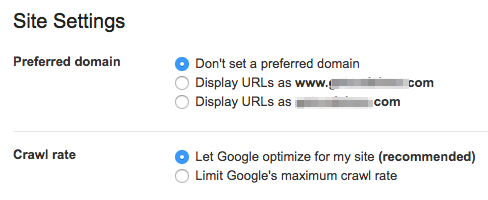
For example, you can just flip a switch inside Google Search Console to pick the ‘preferred domain’ of your site.

That way, you avoid potential canonicalization issues of your site recognized as two: a “www” and “non-www” option.
As discussed, any URL changes can cause you to lose links.

Architecture changes can break internal links. But you can also lose out on ‘link equity’ if sites link to HTTP and not the new HTTPS-version of your site.

Again, why are we harping on redirects?

Because too many can slow down your site’s performance.

And page speed has been officially confirmed as a ranking factor.

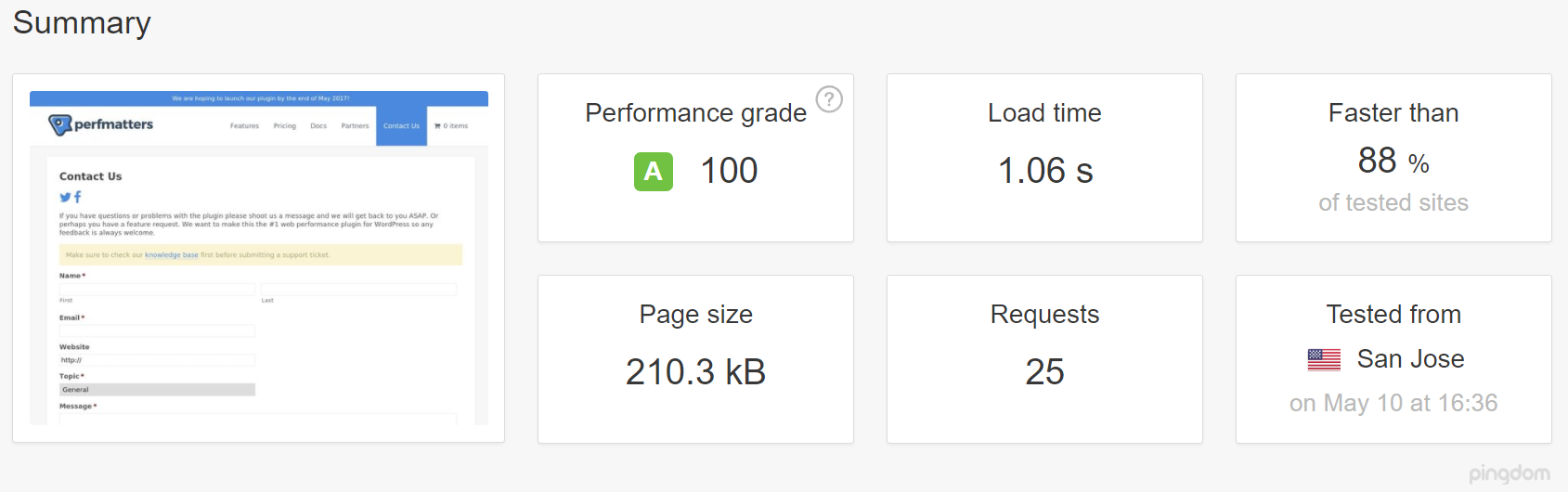
Kinsta ran a test on WordPress to see how redirects affect page speed.

First, they used Pingdom to run a page speed report with no redirect.

The page loaded in around 1.06 seconds. That’s a good score!
Next, they ran the test again. But this time, through a redirected URL.

And check out how it affected page load time:
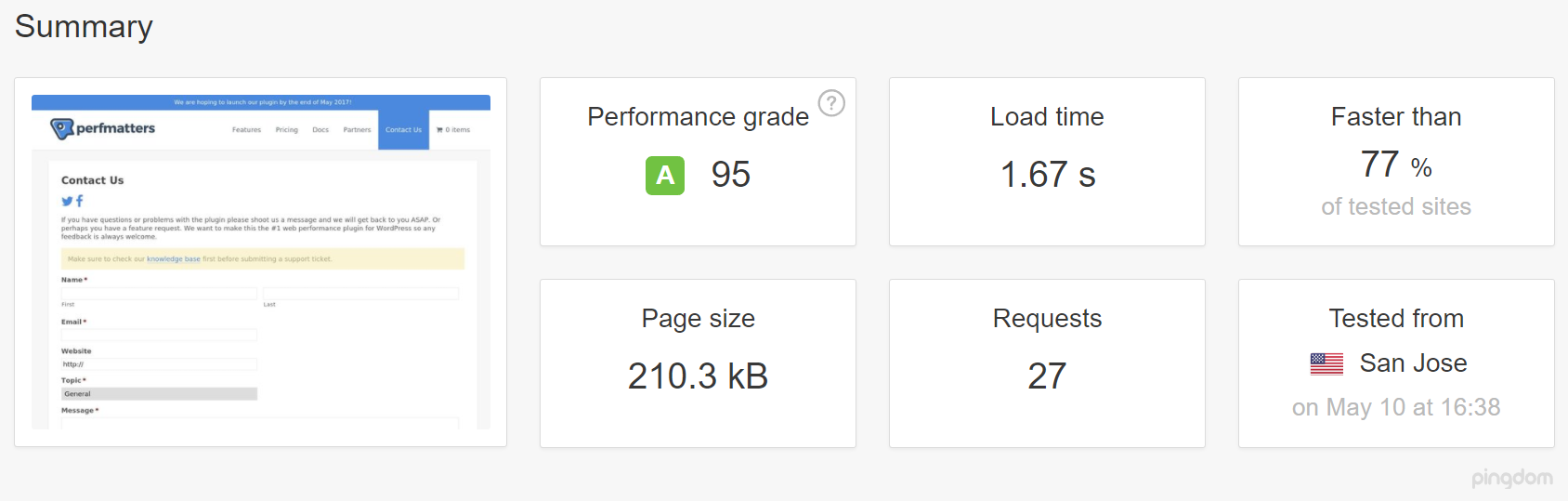
Crazy, right?!

A redirect increased page load time by 58%.

That’s just a single page redirect, too.

Multiply this across dozens of redirects and you can see the problem.

Even worse, are when multiple redirects occur right after another.

This often happens if you’ve updated a page more than once. As in, multiple redesigns over the years.

One URL redirects to another, which redirects to another. And page speed slows to a crawl.

My favorite tool for diagnosing redirects is the redirect mapper tool from Patrick Sexton.

All you have to do is drop in your URL:
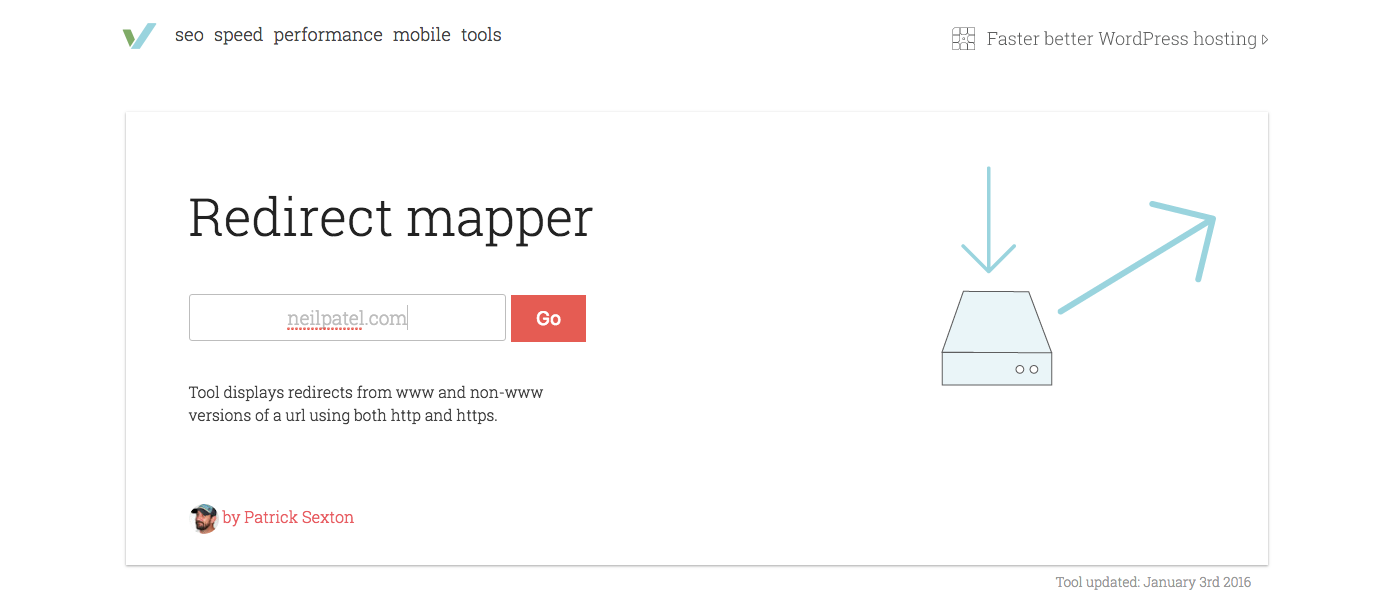
Hit “Go,” and you’ll instantly get feedback on different 301 redirects set up over the years:
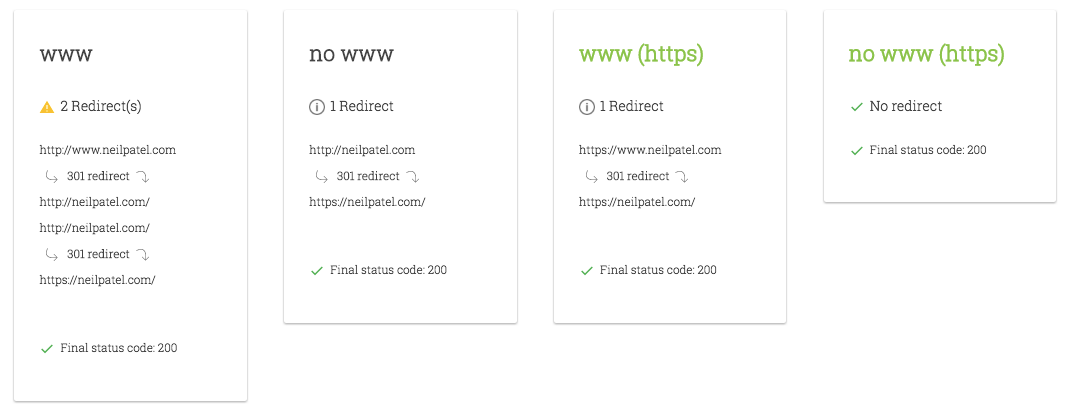
Again, fewer is better. Google, themselves, literally says to eliminate as many as possible.

Which could be a problem if you’ve updated content during redesigns.

Here’s why.

Updated content messes with keyword targeting and page optimization.

Why would you ever setup two redirects for a single page?

That doesn’t make sense, right?

Of course not. At least, not intentionally.

Yet, it still happens all the time.

Here’s why.

Five years ago, you sold one product or service. Three years ago, it changed. And this year, it’s changing again.

In other words, the purpose behind the page evolves over time. So all of the content on the page changes, too.

It even happens with Skyscraper content. You take a lot of old posts that are underperforming, and redirect them to a new one.

Instead of relying too much on redirects, they should simply ‘refresh’ those old posts. Adding new content and images can boost SEO traffic by 111%.

Multiple redirects in a row cause performance issues.

However, continually changing page content also messes with your keyword targeting and on-site optimization.

Here’s how.

Let’s go back to a hotel example.

Initially, maybe they only have one two room types. But after a renovation, those are expanded.

The original website architecture might just list those first few rooms on the same page. But now, there’s too many.

So you change the “Rooms” page to a category page, that lists out ones underneath it.

The problem is that now your “Rooms” page also has zero content. It just serves as a drop-down now:
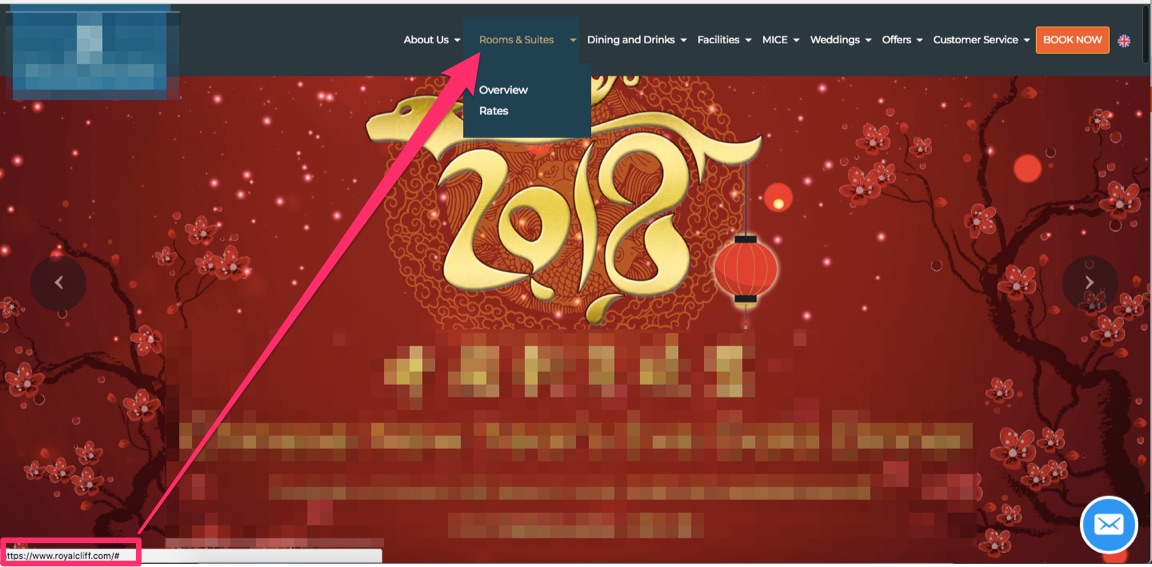
If that “Rooms” page was ranking previously, it isn’t anymore.

Now, you have thin content issues, for starters. This is when there’s less than ~300 words on individual pages of your site:
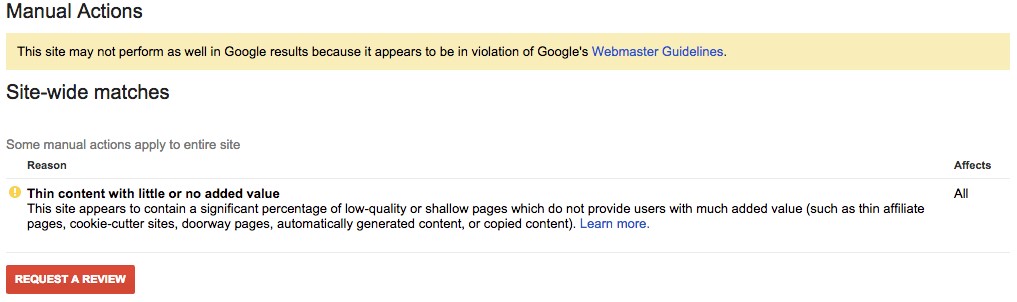
Page length matters because Backlinko’s analysis showed that “the average first-page result on Google contains 1,890 words.”

50% of search queries also contain four words. That means someone is typing in a long-tail keyword to find something specific on that page.

It’s hard to give people the information they’re craving if you’ve literally removed all (or most) of the content.

Content changes during site redesigns also wreck havoc on page metadata.

One of three things usually happens in this case:

  1. The page content has changed, so the old metadata is no longer relevant
  2. New metadata is copied and pasted from other sites
  3. Or the designers and developers completely neglected to add any metadata to updated pages

Once again, Screaming Frog can help you diagnose these issues.

Drop in your URL and search for the meta description option. I like to start here, because it usually indicates a bigger problem at play.

For example, check out the following example. I’ve blurred the site’s name to protect the innocent.
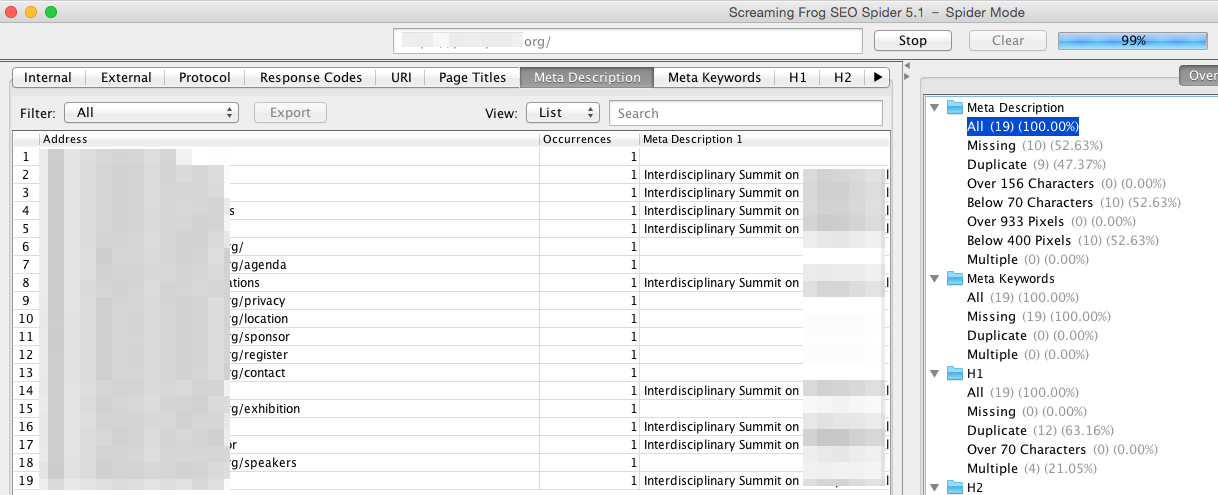
Two problems are happening here.
First, the same keyword is being repeated on multiple pages. This could lead to duplicate content issues and reduce their ability to get one main page to rank for that term.

Second, there’s a ton of pages missing a meta description entirely.

Meta descriptions technically don’t help you rank. They do, however, help you increase your SERP click-through rates (CTR). And new data suggests that CTR can often affect rankings directly.

If a page doesn’t have a meta description, search engines will often pull content directly from the page.

But in most cases, it’s random text that gets truncated because it exceeds length requirements.

So it’s not ideal. And people won’t click.

Here’s another common problem to look for:
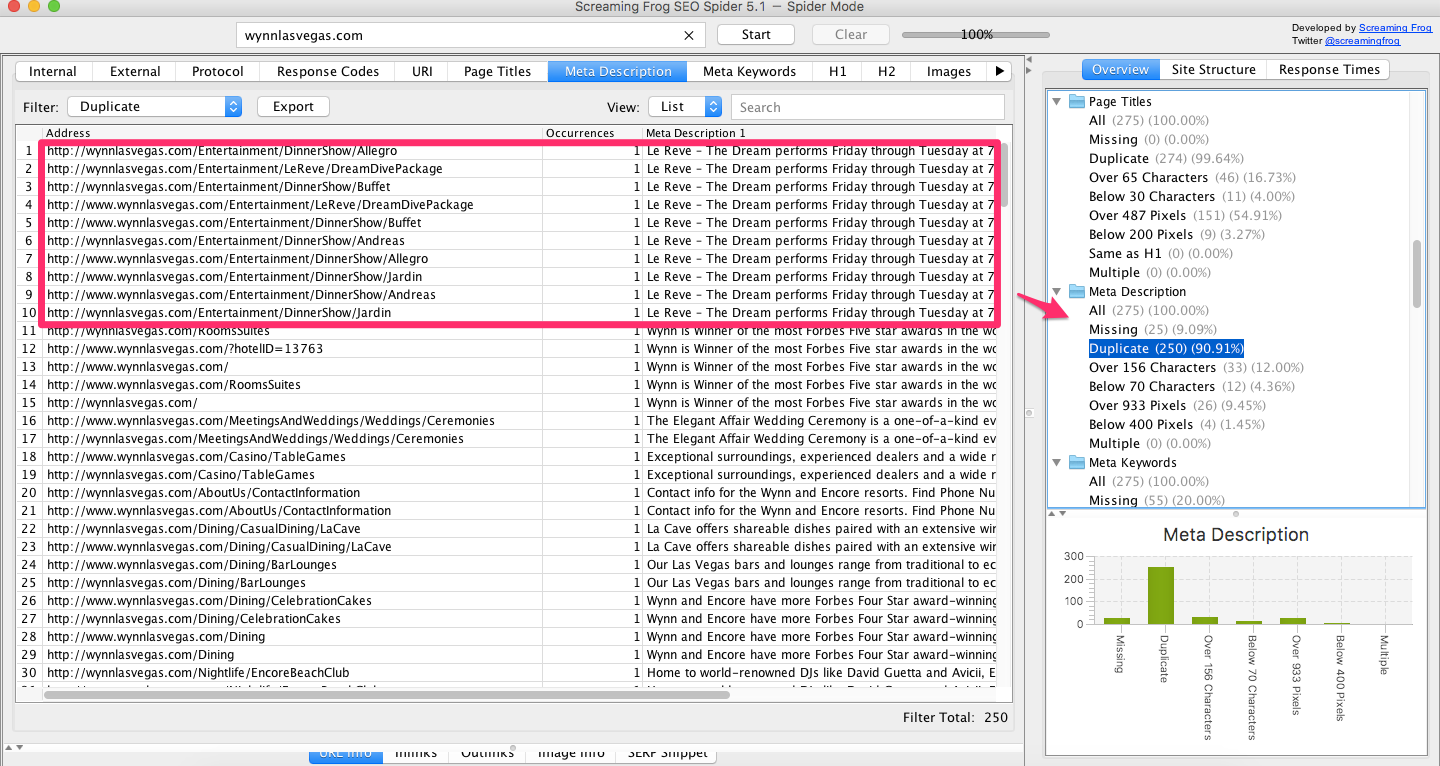
We’re looking at different restaurante pages on one website. However, they all share the same exact meta description.

Once again, this is a red flag.

The duplicate metadata cannibalizes the chances of your primary page ranking well for this term.

And these inconsistencies typically indicate a larger problem at play.

Most firms that specialize in design will not touch the page’s metadata.

SEO isn’t a high priority for them. They might not have the specialists on staff.

So this is what happens. You get websites shipped that look fantastic, but don’t perform.

Pages have the same copied metadata. Or worse, title tags and descriptions are missing completely.

And at the end of the day, the only thing that matters is how your website performs — not how it looks.

Redesigns screw up ‘user flow’s that are already working.

My biggest problem with website redesigns is that they often screw up what’s already working.

If your business is up-and-running, chances are you already have purchases rolling in each day.

Redesigns that change site architecture or page content often screw this up.

You’re completely jeopardizing revenue.

And ultimately, your website’s ability to generate revenue is its most important aspect.

Changing all of that, without knowing if the new design is going to convert as well as the old design, is a huge gamble.

Results might increase. But you don’t know for sure. That’s exactly the problem.

Think about it this way.

A website’s macro-conversion, like a purchase, is made up of micro-conversions.

To get a sale, you first have to get people to your site. Then get them to visit certain pages. Then possibly opt-into something before they had over payment.

These ‘user flows’ are already playing out across your website.
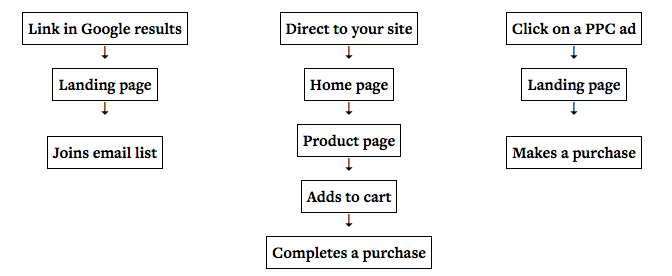
Changing the sequence of these steps can have massive ramifications on the end goal.

This is the point behind conversion optimization that most people miss.

They think ‘conversion optimization’ means to change a button color or headline.

But in reality, changing how people flow through your site can often have a bigger impact on purchases.

One study, for example, found that optimizing an ecommerce checkout flow could result in an additional $87,175/month. That ~3% conversion increase could add another 23.94% to their top line.
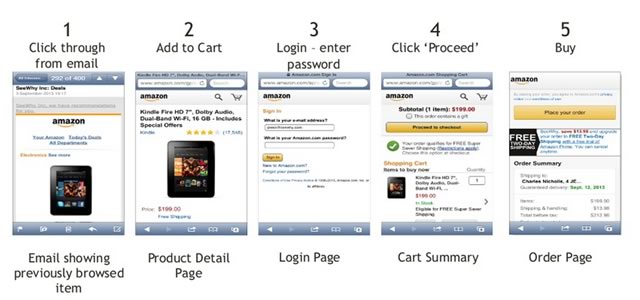
Micro-conversions also extend to the internal links on your pages. These are like the beginning to a new path through your site.
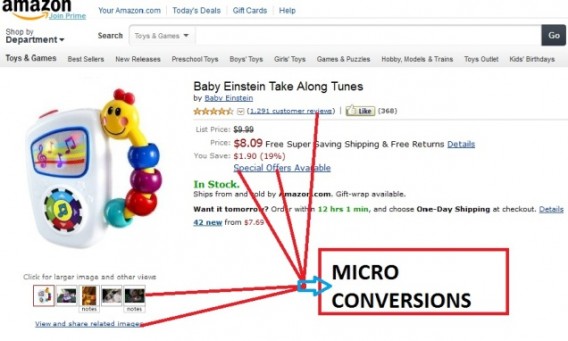
Changing these links doesn’t seem like that big of a deal. However, now you can see, that it could have a big impact on how people purchase your products or services.

How do you avoid this?

Again, updating your site design is a good thing. But do it incrementally so you can test the effects on each page.

For example, here’s how my Quick Sprout blog looked a few days ago:
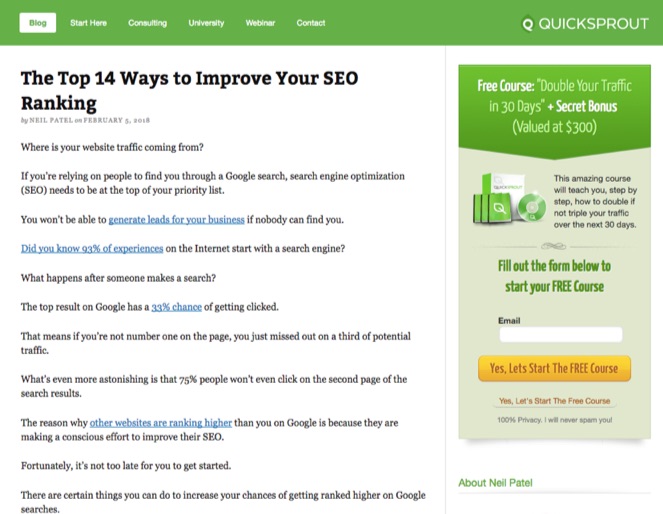
Now, compare that to how it looked a few years ago. You can do this yourself using the Wayback Machine.

Pretty similar, right?

Sure, it looks more ‘clean’ and ‘polished’ now. The design is still relevant for today.

However, I did not want to change what was already working. That’s how I like to run website redesigns. I’ll tweak element by element or page by page.

Then, I’ll use something like Crazy Egg to run tests after each change.

If numbers go down, I’ll revert back to the old design. Even if it seems a little ‘outdated.’

But if numbers go up, I’ll start carrying those new design updates over to my other pages.

That way, you should never, ever lose SEO rankings as a result of a website redesign.

Or, more importantly, you won’t lose revenue, either.

Conclusion

Website design updates should happen regularly.

Design trends change pretty frequently. And you want to make sure your website properly reflects your brand.

What you don’t want to do, however, is sabotaging everything else that’s working.

Large-scale site redesigns can often create tons of problems.

Site architecture changes can lead to performance issues. Content changes ruin your keyword targeting. And changing micro-conversions can drag down your macro-conversions.

The way your website looks is important. But only to a certain point.

The more important issue at play is whether revenue is increasing or decreasing.

Website redesigns can easily screw up your SEO. That causes rankings to fluctuate and traffic to decrease.

Declining traffic, then, brings down revenue with it.

Avoid this trickle-down issue by not changing what’s already working. If you’re going to update something, do it on small elements, first.

That way, you can test the impact in isolation. You can see if it’s going to increase or decrease results on a small scale.

Then, you can pull back to the old design if it’s not working without losing too much traffic or revenue.

And if it is working, you can start applying those proven updates to the rest of your site.

Websites aren’t just fashion statements. More often than not, functionality and performance should outweigh the appearance.

Have you ever experienced traffic drops right after a new website redesign?

About the Author: Neil Patel is the cofounder of Neil Patel Digital.


from The Kissmetrics Marketing Blog http://ift.tt/2BK7p1N
via IFTTT

9 Facebook Video Metrics Brands Need to Benchmark Right Now

9 Snapchat Sins You're Probably Guilty of

TwitterFacebook
Read more...More about Snapchat, Social Media, Mashable Reels, Sn Reels, and Tech


from Social Media http://ift.tt/2BZhmUM
via IFTTT

Sunday, 4 February 2018

The Most Overlooked SEO Factor You’ve Probably Been Neglecting

SEO isn’t very technical.

But it becomes technical because so many marketers and content creators are using the latest “hack” to increase their rankings. The more information there is, the more differing opinions you hear, the more complicated it becomes.

But at the end of the day, it boils down to a couple things:

  • Getting backlinks to your site
  • Satisfying users

The more quality sites you have pointing to yours, the more credible Google will view your site. Backlinks maybe aren’t as important as they once were, but they’re still valuable.

This blog post will cover #2. You need to satisfy users. That covers a lot of things, but there’s one that’s often overlooked.

So here’s the best, most overlooked SEO that I can give you.

Drumroll please…

Make sure users don’t go back to the search page

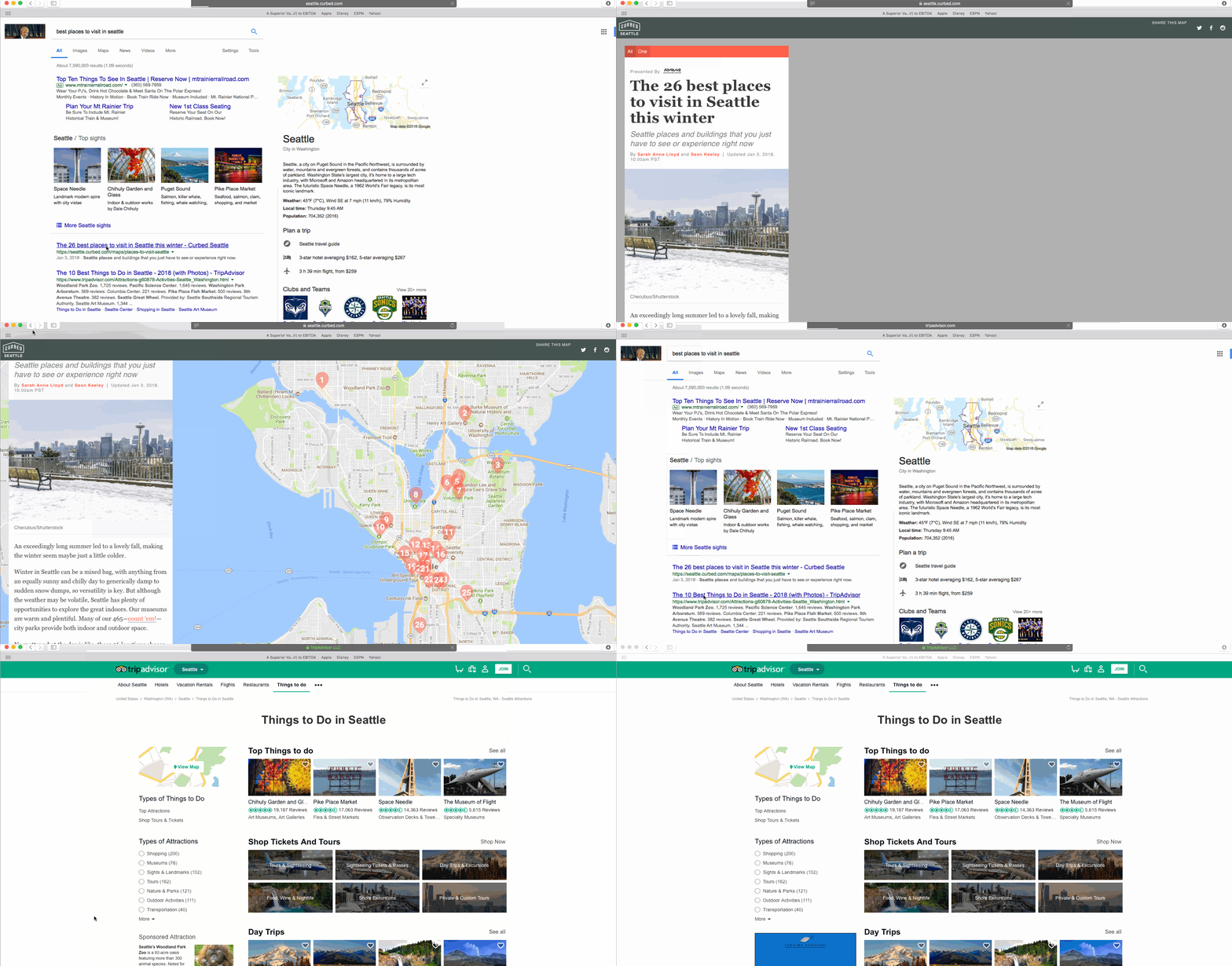
What do I mean by that? Here it is in practice:

For this search, the second site I visited is viewed as more valuable by Google because I didn’t go back to the SERP to find a better site.

Rand Fishkin refers to this as pogo-sticking. He says:

For every search result, there’s some different pogo-sticking rate. But great pages and sites tend to have the trait that they’ve got really low pogo-sticking rates….That means that a searcher is made happy, and they’re not coming back and doing other searches and clicking other results. Sometimes this might be okay. Maybe there are some sorts of searches where Google says, “Oh, lots of people do click multiple times, and lots of people do bounce back and forth and it’s fine.” But for the vast majority of searches this is really important to get right.

While you will likely have to stay on the first website for a few moments, if Google notices that you go back to the SERP and click on another site and don’t go back, that means that that site was more useful for you.

People search Google for a reason. They either want to find a website (i.e. branded searches) or they have a question that needs to be answered. That’s Google’s job. They answer questions for people.

People are becoming increasingly used to asking a machine a question and getting an answer. Siri, Alexa, and Google Home provide answers for people. They don’t even need to search to find answers.

You know why Wikipedia ranks so well? Because each article has thousands of words, and it answers the question that the searcher was looking for. And it’s continuously updated with new information.

It continues to rank well because people know that Wikipedia has lots of great information, so it becomes a preferred result of many searchers. They’ll seek out Wikipedia over other sites.

This comes down to answering questions and satisfying users.

Making users never want to click the back button

That’s your goal. To make sure a user who visits your site from a search never thinks about clicking the back button.

So, how do you do that?

Well, for branded searches it’s pretty easy. If someone searches for your company name, your company will be the 1st result and they’ll visit your site. The question is answered; there isn’t a worry about them clicking the back button.

If you have a blog or any online publication it becomes much more difficult. Those 9 other sites on the SERP are your competition, and they think that they can deliver a better answer to users.

Here are some examples of well-ranked sites that answer users questions without getting in the way.

Rotten Tomatoes

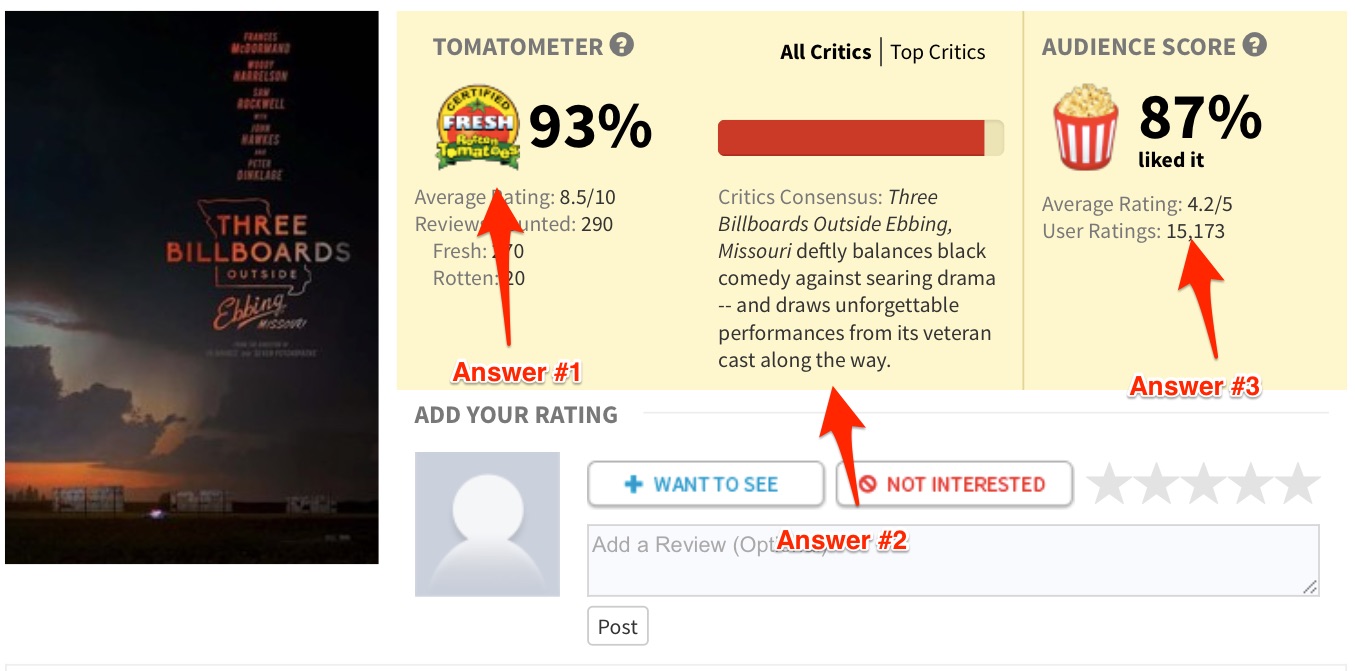
If you want to know if critics and an audience liked a movie, you go to Rotten Tomatoes. There isn’t any other place that can consistently answer that question.

I’ve heard the movie Three Billboards Outside Ebbing Missouri is good. So, I Googled it:

Was Three Billboards Outside Ebbing Missouri Good?

Rotten Tomatoes was the first result. I clicked and they gave me an answer:

My question is answered – looks like it’s a good movie!

My question is answered – looks like it’s a good movie!

Putting this information at the top of the page with the yellow background helps visitors find the information they need quickly. There no need to scroll through a long page to find the answer.

Yahoo! Answers

Is Yahoo Answers a bit stale?

Yes.

But it continues to ranks well because it answers users questions.

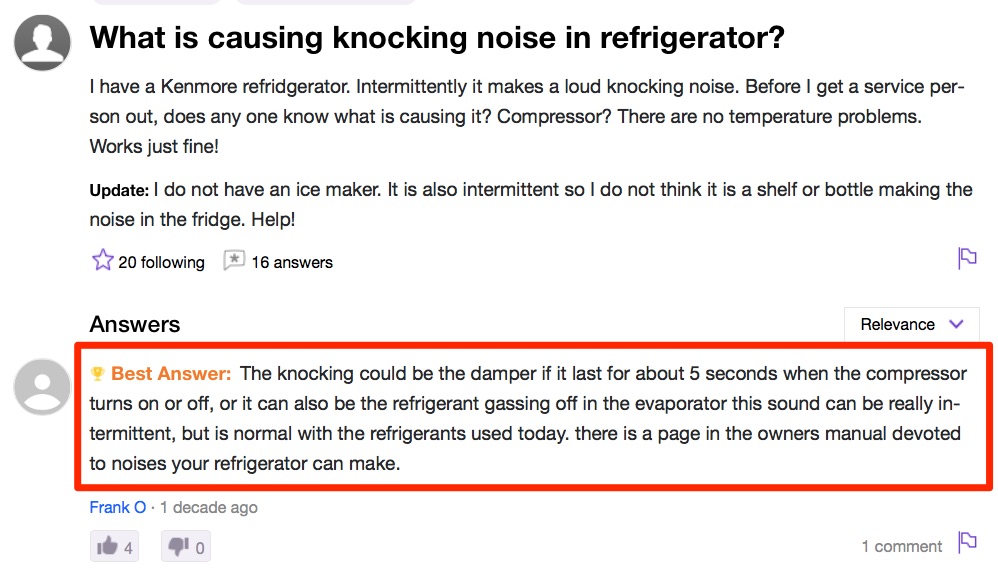
Let’s try a query. Recently I had a “knocking” noise coming from my refrigerator. So, hesitant to call a repairman, I decided to Google it:

what is causing knocking noise in my refrigerator?

Yahoo Answers was one of the first results. I clicked on the result, and they delivered the answer:

A simple answer that makes sense. Thanks, Yahoo Answers.

Check out when that question was answered. A decade ago! Yet it’s still a favorite result from searchers.

You can remember hundreds or thousands of times where you’ve searched for something and wound up finding your answer on Yahoo Answers.

The only issue Yahoo! Answers has is that it isn’t authoritative. For example, an unqualified person can answer a medical question and if it’s rated as the answer then that is what users will see. It becomes Google’s job to put these results much lower than they would have been and place a site like Mayo Clinic higher, which they (usually) do.

wikiHow

Just think of how many times you’ve had to Google something that starts with…”how to…”

The brillance of wikiHow is that they set out to answer every question that begins with “how to…” and they do a good job of it.

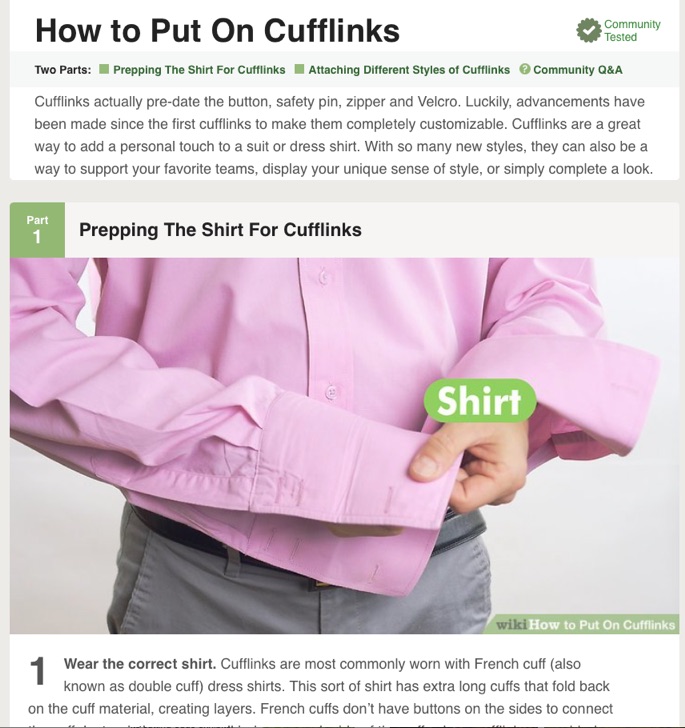
I recently had to put a suit on that came with cufflinks. In a moment of embarrassment, I didn’t know exactly how to put cufflinks on. I didn’t want to look like a fool and ask one of my buddies to help me put my cufflinks on.

So I Googled it and landed on Wikihow. And they provided me with this wonderful answer (with pictures):

Who is going to click the back button when they get the best answer here?

Think about how much time that took someone to write that article. They started with a blank page and wrote detailed step-by-step instructions that were crisp and to the point. Then they added pictures and gifs to help the visual learners. It probably took at least a few hours, but now they outrank everyone, including YouTube.

Tips to help you

So how do you create content that satisfies users? Here are a few of my tips:

Make it Easy For The People That Scan

Most people won’t read your entire article when they are looking for an answer to a simple question. They’ll scan and find their answer and move on. You need to help these “scanners” find their answer. It starts with putting the answers and important parts in the headers.

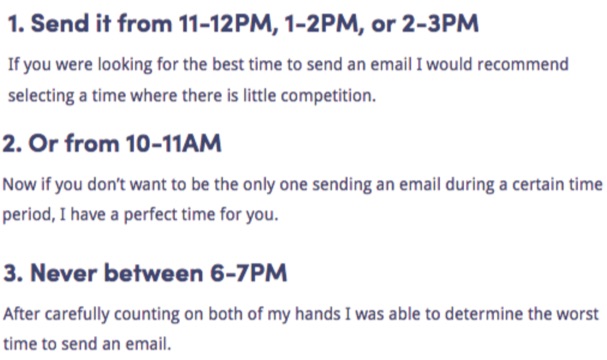
KISSmetrics has a blog post that discusses the best time to send a newsletter. People that are coming to that page are looking for an answer. So the answers are placed in the headers:

Take a look at the blog post to see the full list of tips. If you were coming from google looking for the best time to send a newsletter, you’d quickly find your answer. Why would you hit the back button?

If you have a blog post like this, then you should put the answers in the headers.

Use lightboxes and bold words to emphasize

You can also bold words and use large font to highlight the parts you want to get across.

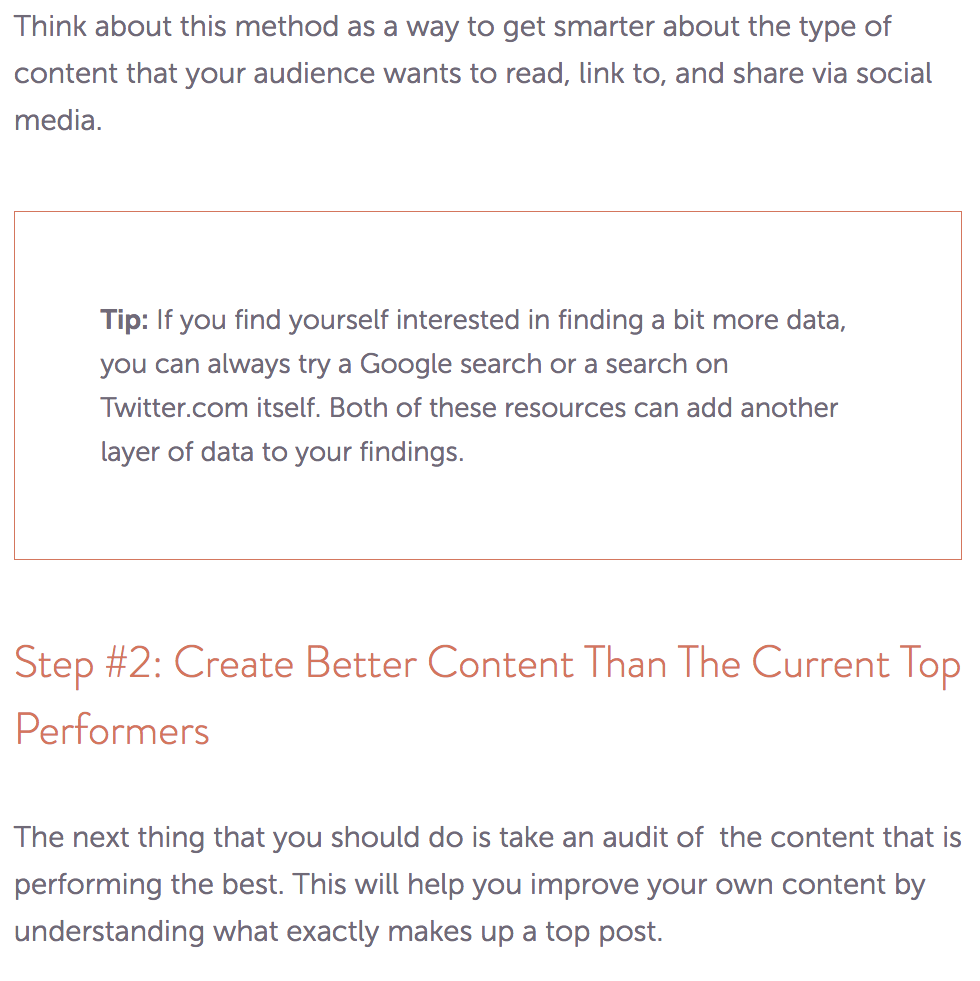
This blog post from CoSchedule uses an unobtrusive box to show readers their tips:

This post fits well with the overall design of the blog post. I recommend you follow a similar template.

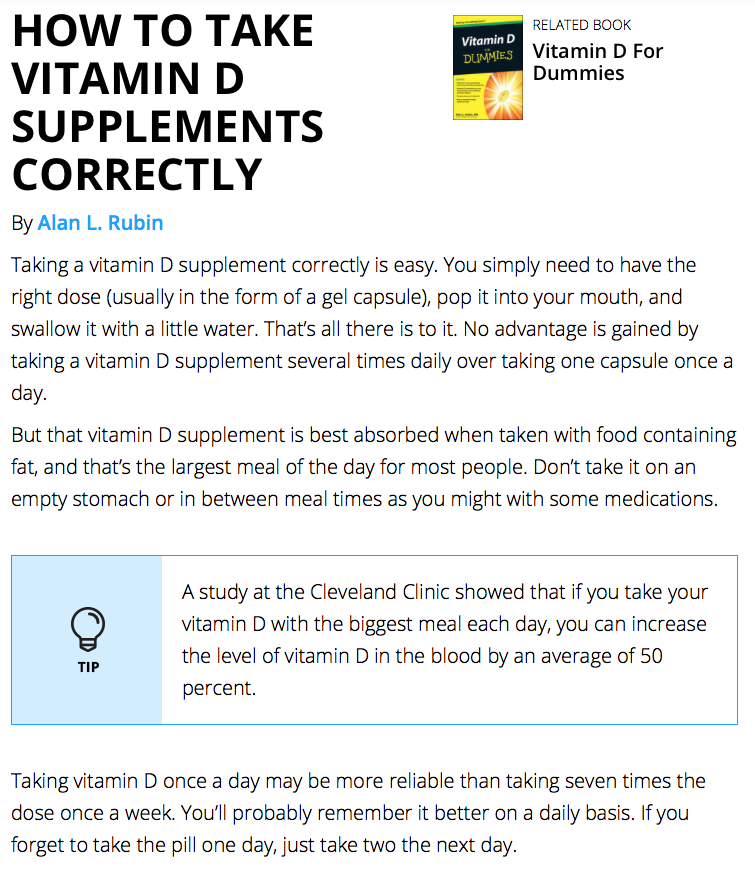
Dummies.com puts tips in a box as well, making it easy to find the most important information:

Quora is a great Q&A platform, but sometimes people don’t want to search through dozens of answers on Quora in order to get their answer.

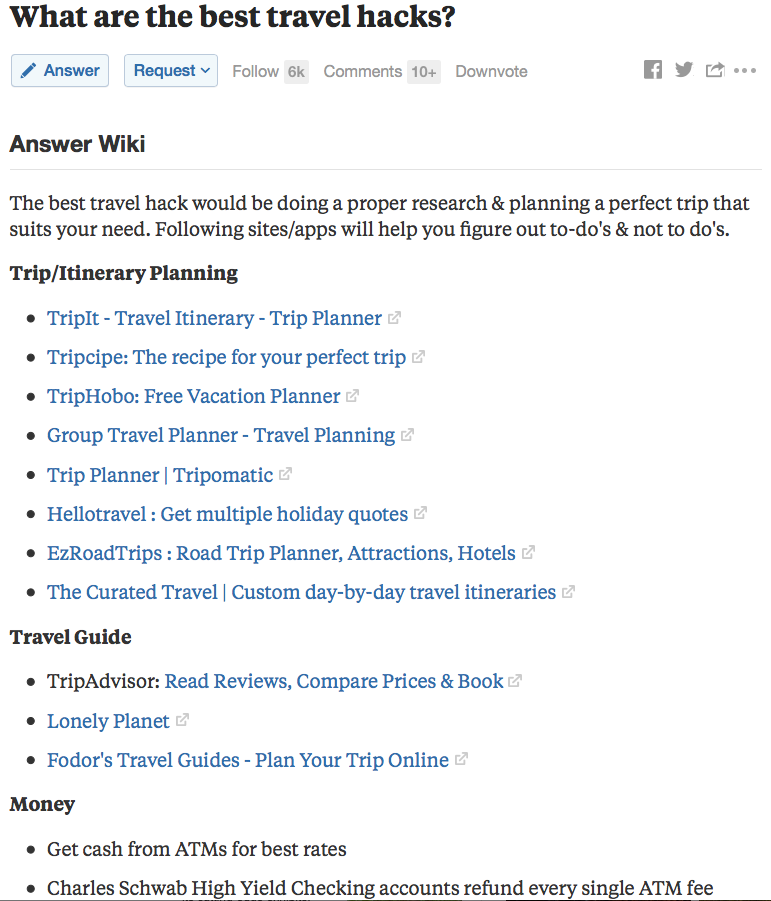
So Quora has an “Answer Wiki”:

Here are all the answers from the Quora community, organized into one section. Is there a better travel hacks page on the web? All the information you’ll need is on one page.

Provide summaries

Often times people searching just want a quick answer. They don’t want to read a 3000-word article to answer their question. This is why summaries placed at the top of your article can be helpful.

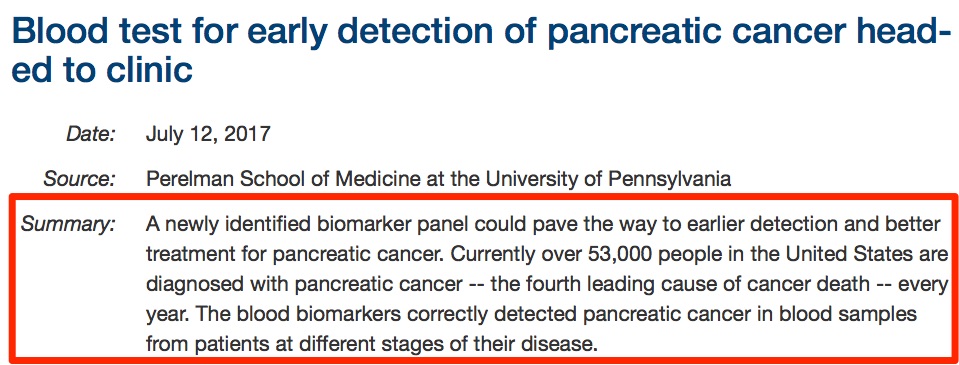
Examine.com answers a common question at the top of the page:

There’s your answer. No searching a web page or hitting Command + F to find an answer. It sits right at the top, immediately below the question. If I wanted more information, I’d scroll and read the entire article.

In a similar fashion, ScienceDaily puts a summary at the top of each article:

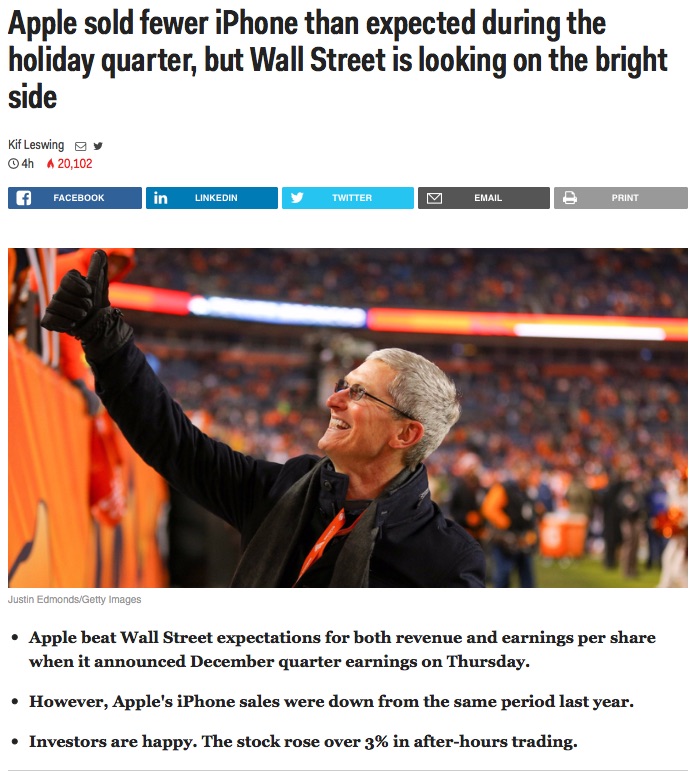
Business Insider is reducing news stories to bullet points:

You can also place the bullet points at the bottom of the article.

It’s important to remember that word count and detailed articles still matter. Yes, Business Insider uses bullet points, but they also have an entire news article.

Don’t skimp on quality or use bullet points because it’s easier for you. It’s about making it easier for visitors. Again, it’s about satisfying users. They won’t click pogo-stick (hit the back button) and they’ll be sure to visit your site again.

Use Videos and GIFs for Instructional Content

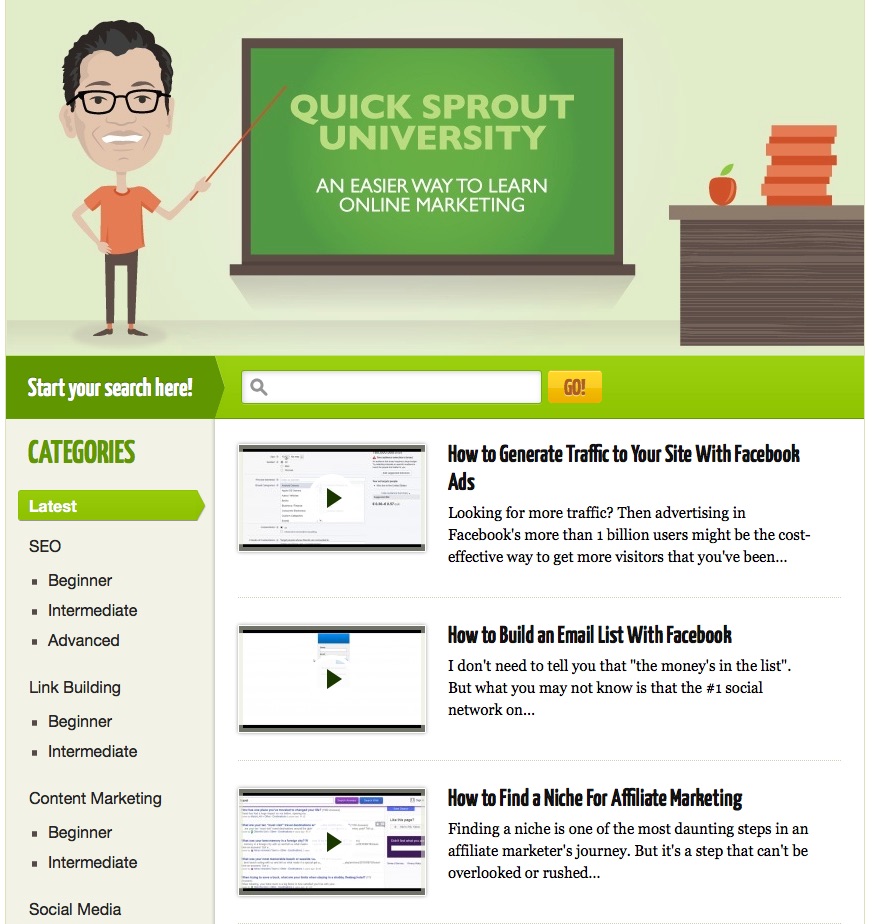
If your content contains a lot of how-tos and tactical information, it may be useful to spend some time creating videos. I’ve done that with Quicksprout University:

The university has hundreds of videos, along with the transcript of each video.

When a visitor lands on this page, they know what to do. Watch the video, read the description, and the transcript can help them reference certain parts of the video.

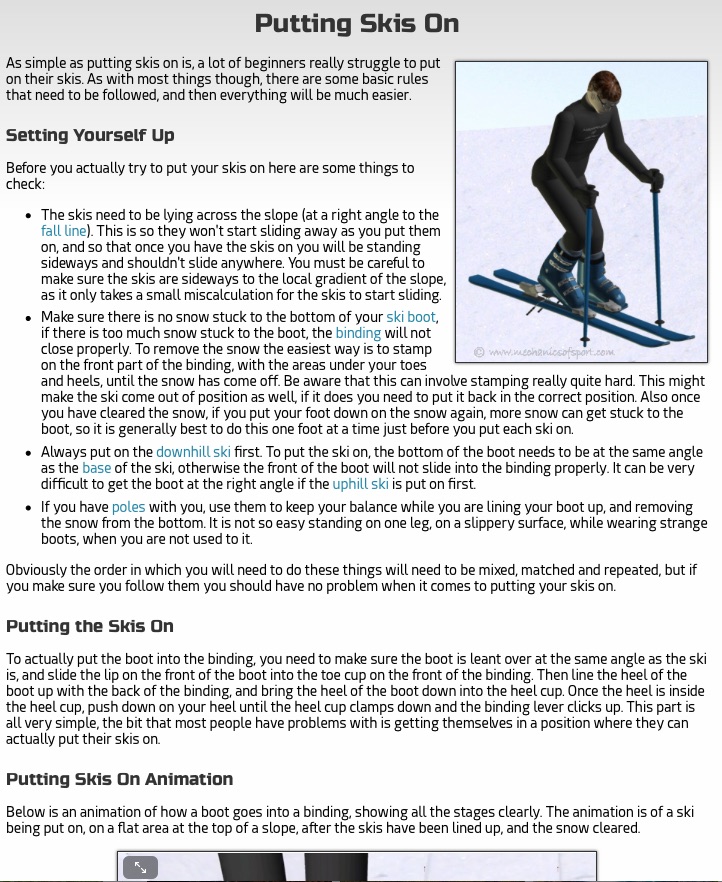
Mechanics of Sport contains great how-to content for learning how to ski and snowboard. Just check out their page and video for instructions on putting skis on:

There are four sections to this page:

  • Setting Yourself Up
  • Putting the Skis On
  • Putting Skis On Animation
  • Common Mistakes

Take a look at that page and ask yourself, “if I wanted to know how to put skis on, is there a page that could answer the question better than this?”

You should be asking yourself the same question when you’re creating how-to content. Look at the entire body of work and ask yourself if there’s any site that answered the question or gave the instructions better. If there is, you still have work to do.

Don’t use elements that make visitors want to leave

Sometimes marketers will get in the way. They’ll shoot themselves in the foot by adding too much to a page, and it ends up making visitors click the back button and never coming back.

That’s why it’s important to not add things that make visitors leave. Here are some things you’ll want to avoid:

  • Autoplay videos
  • Obtrusive advertisements
  • Slow page loading
  • Paywalls
  • Surveys (i.e. fill out a survey before viewing content)
  • UNresponsive design
  • No message match (what visitors click on and what they see on your page don’t match)

If visitors must leave, try to get some information from them

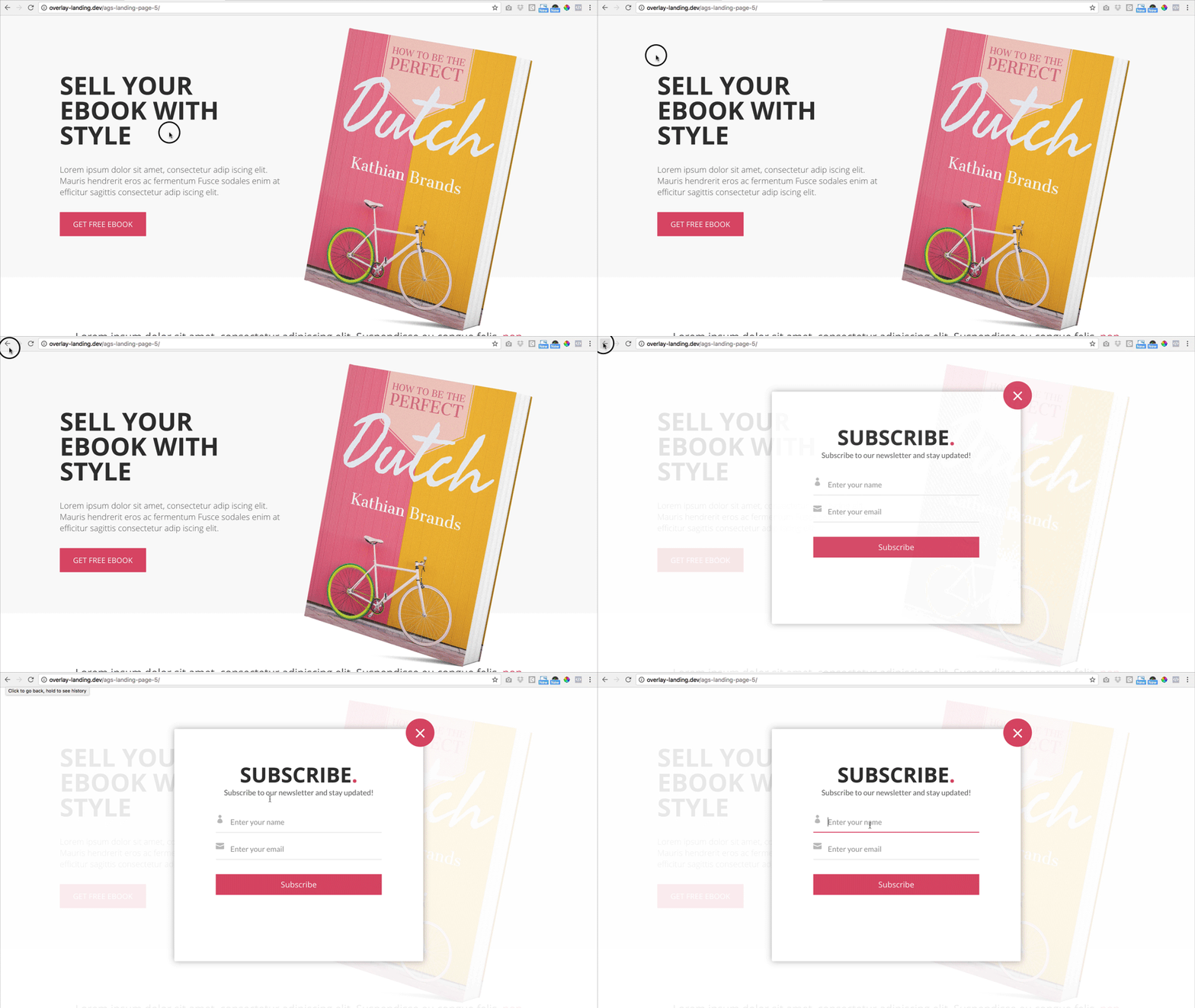
Overlays work based on mouse movement. If the software detects that your mouse is moving up towards the top of the screen, with the intention of closing the tab or clicking the back button, the overlay will appear. Here it is in action:

These are becoming more common around the web, and yes they are annoying, but they are also very effective.

Your goal is to get something from each visitor; the most common first step is the visitor’s name and email address. And overlays can deliver that. They’re great for building your email list.

My thinking is this: if visitors are going to leave my site, I at least want some information from them. The overlay is the best tool for that.

I’d recommend experimenting with an overlay. Over the long term, the best option is to hire a developer to create one for you. That way you aren’t paying hundreds (or thousands) of dollars every month to keep it running.

If you can’t start with a developer, or prefer to use a tool, I’d recommend Hello Bar or Sleeknote.

Just remember not to use interstitials or popups on mobile devices – or you’ll get an SEO penalty.

Want more SEO tips? I’ve got 3 more in this video:

Conclusion

SEO can get complicated pretty quickly.

There are so-called experts around the web promising easy ways to increasing rankings using a simple hack. Or worse, trying to sell you their service and promising you the first spot on Google.

Yet through all this noise, we often forget the fundamentals – satisfying users.

As content creators, we need to provide users with great content that helps people find what they’re looking for. That’s an answer, a how-to, or something thought provoking.

The goal is to get users to stay and consume our content. To make sure they don’t click the back button.

About the Author: Neil Patel is the cofounder of Neil Patel Digital.


from The Kissmetrics Marketing Blog http://ift.tt/2GLBcGA
via IFTTT

Saturday, 3 February 2018

7 Social Media Trends to Watch and Capitalize On in 2018

The trend is your friend.

Why? Because trends often become the norm, and getting in early allows you to harness its power without too much competition or noise. Write something off as “just” a trend, and you may be late to the party of the year.

Remember when Facebook was a “trend”? Or Twitter? Instagram? Now, those are a key component to your digital marketing plan (and if not, they should be).

You’ve got to reach and engage with your audience where they spend time online. And where is that? Say it with me: social media.

  • In its State of Social 2018 Report, Buffer found that businesses are overwhelmingly on the social train. 96% use Facebook, with Twitter (89%), LinkedIn (70%), Instagram (70%), and YouTube (57%) rounding out the top five. The report also revealed that 85% of businesses plan to create more video content on those platforms than they did last year.
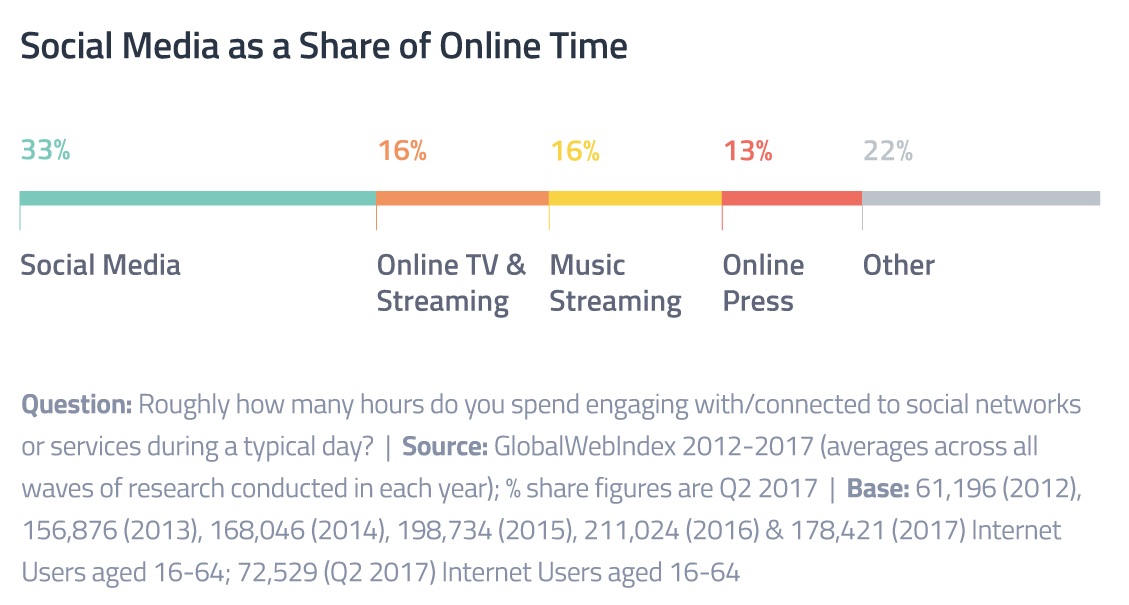
  • We spend an average of 2 hours and 15 minutes on social media each day, which accounts for one-third of our online time, and twice as much as any other activity.

  • Customers spend anywhere from 20-40% more on companies that engage with them on social media.
  • The most popular social media platforms in January 2018 include Facebook (2.2 billion users), YouTube (1.5 billion), WhatsApp (1.3 billion), Facebook Messenger (1.3 billion), and WeChat (980 million). Three of the top five are messenger apps.
  • There were 2.46 billion social media users in 2017. That number is expected to hit 2.62 billion in 2018, and 3.02 billion by 2021.
  • Social media is popular with Baby Boomers, Generation X, Millennials, and Generation Z.

The statistics paint a very clear picture: social media must be an integral part of your marketing mix in 2018 and beyond. Ignore it at your peril.

That said, social media is an evolving beast, with new features popping up all the time.

Some are destined for the trash heap of history – remember how much “fun” poking was on Facebook? – while others become cornerstones of the platform that we can’t remember living without.

So what to do, which platforms to use, and what trends to try?

Here’s seven for the new year:

  1. Social Listening
  2. Live Streaming and Video
  3. Influencer Marketing
  4. Facebook Continues to Set the Pace
  5. Increased Engagement on Messaging Platforms
  6. Instagram Stories
  7. Augmented Reality

1. Social Listening

This may not be completely new, but it’ll take on increased importance in 2018 and the years to come. Social media in all its forms is only getting bigger and more popular, and by extension you’ll have to start paying more attention to it.

But that goes beyond just having a few accounts on a few different platforms. You’ll even have to do more than “just” having an active presence on those platforms. You need to listen to what people are saying about you, your competition, your brand, and your products, and respond accordingly. The good, the bad, and the ugly.

People are talking about you more often than just when they’re engaging directly with you. People are making complaints, lavishing praise, and showing off your stuff on many different platforms and networks. Some you belong to, and some you don’t.

But that’s beside the point: if they’re talking to or about you, they expect a response from you.

In fact, 60% of consumers that post a complaint on social media expect a response in less than 60 minutes. You’ve got one hour to notice and respond. And if you don’t, 88% of them are unlikely to buy from you again or recommend you to friends and family.

Enter social listening.

You need systems in place to monitor many different channels for your particular keywords and phrases, and to bring those mentions to your attention so you can examine them for both insight and opportunities.

What are people saying about your brand? How do they feel about your latest product? What problems or complaints do they have? An active social listening strategy can provide those answers and more.

And as we increasingly use social media for everything, there’s a lot of insight you could harvest, to say nothing of the improved customer experience you can provide by responding to issues and complaints in a timely and convenient manner.

The bigger you get, the more important it is to be aware of what others are saying about you on Facebook, Twitter, Instagram, Reddit, review sites, and more.

A simple way to get started is Google Alerts. You can quickly set up email notifications for the words and phrases you want to monitor by entering them into the search bar, setting your preferences on frequency, sources, region, and more, and clicking the “Create Alert” button. It’s just that easy.

But to truly get the most out of social listening, you need a service or tool that specializes in it. A few of the best include Brandwatch, Hootsuite Insights, Mention, ReviewTrackers, Talkwalker, and TrackReddit.

Respond quickly to complaints. Collect valuable data on your customers. Manage a crisis. Find influencers. Generate reports. Analyze your competition. Understand your audience and industry better. Measure impact. Gauge brand sentiment. Enhance customer service and engagement.

The list of what social listening can’t do is much shorter than what it can do. If you’re not already using it, I highly recommend you start. Sign up and start listening today.

Being aware of public opinion and sentiment towards your brand are as important as the product or service itself. Social listening gives that to you.

2. Live Streaming and Video

Video – whether recorded or live – is becoming the social media tactic you can’t afford to ignore. That’ll only get more apparent in 2018.

According to a recent post by Hubspot, 43% of social media users want to see more video content from marketers, businesses now publish an average of 18 videos each month, the average video retains a little over one-third of its viewers (37%) to the very end, and 85% of businesses have in-house personnel and resources for video creation.

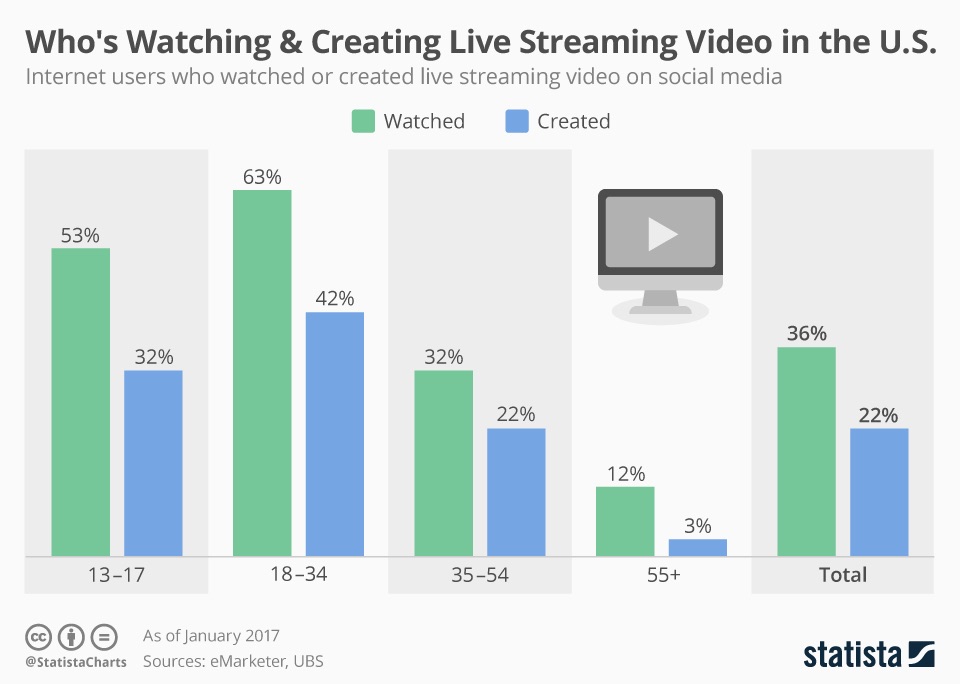
Do you? Are you using video and its younger-but-equally-popular brother, live streaming, as part of your social media efforts? You should. Consider:

Viewers respond positively to live video streaming because of the immediacy and engagement it creates with their favorite brands and personalities.

Brands and personalities can quickly deliver an enhanced customer experience with live video. The four most popular types are explainers, product demos, how-tos, and testimonials, but you can do so much more: live events, announcements, product reveals, interviews, behind-the-scenes, Q&A sessions, demonstrations, and on and on.

Most social media platforms now have native live streaming capabilities or easy integration, so you can pick and choose where and when to do it. Facebook Live, YouTube Live, Periscope, Twitter, Snapchat, Twitch, and Instagram Live are all great platforms to try depending on where your customers and audience are hanging out.

To set yourself up for success, let your followers and fans know you’ll be live streaming beforehand. Post about it, send a reminder, create a daily or weekly or monthly schedule, be consistent, get the word out to generate as big an audience as possible.

Then click that “Go Live” button. Be authentic, informative, and remember to breath. Connect and build a relationship with your audience, and they’ll become not only loyal, but vocal advocates on your behalf.

3. Influencer Marketing

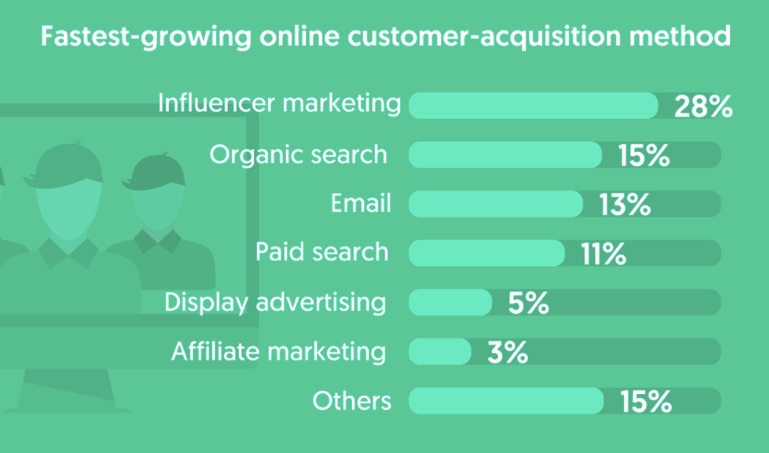
Some have called this one dead and done, but influencer marketing is not only still alive, it’s growing. That’s not to say it hasn’t evolved, though.

In 2018, it’s less about riding the coattails of whomever is most popular at any given moment, and more about building meaningful relationships and finding the influencers that reflect your brand ethos.

Many companies have found themselves in defense mode after partnering with an influencer based solely on numbers, only to discover later that they’ve shared sexist, racist, grossly inappropriate, or bigoted content on their channels. 73% of marketers list “finding the right influencer” as the biggest challenge.

YouTuber PewDiePie, for example, has over 60 million subscribers and makes millions of dollars each year on the platform. In February of 2017, he had lucrative partnerships with Google and Disney…that is until he was fired from both after he posted objectionable and anti-Semitic material. Not the kind of exposure Google and Disney were trying to get.

Don’t make that mistake. Launching a successful influencer marketing campaign should never be based on the number of followers or fans. You need to look for relevancy to your industry, products, and target audience – Kim Kardashian to promote your new robo-advisor might not be the best fit – their average amount of comments and other engagement metrics, and the overall sentiment towards them (you can find that with social listening).

Choose wisely, as your designated influencer is an reflection of your brand. You want it to be a positive one. Once you’ve identified one, reach out and connect. Build the relationship. Ask for their ideas if their interested, but don’t feel obligated to grant them complete control and freedom. Influencer marketing works best when it’s a true partnership.

But what about the $64,000 question: does it work?

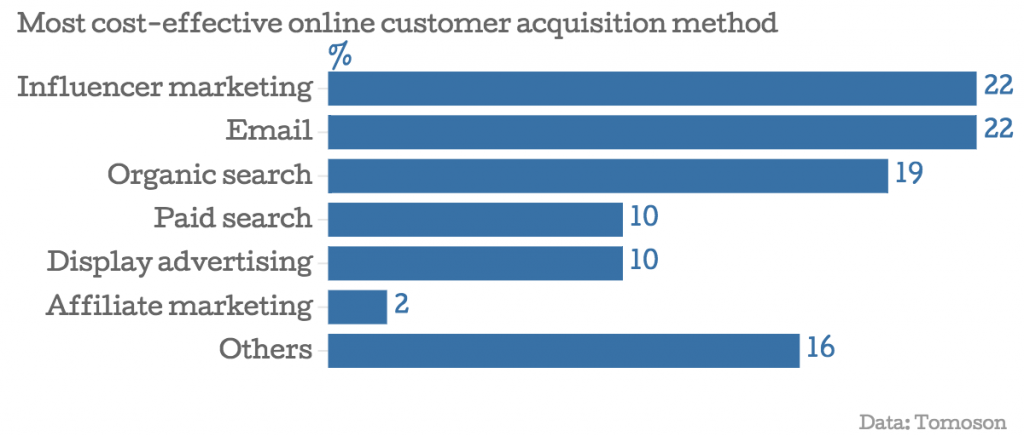
  • Influencer marketing was tied for first with email marketing as the most cost-effective online acquisition channel. Marketers in the same poll listed blogs (37%), Facebook (25%), and YouTube (6%) as the top three platforms for the tactic.
  • Don’t automatically associate “celebrity” with “influencer”. In fact, Markerly found that the rate of engagement decreases as the number of followers rises. Those with 10+ million followers saw likes 1.6% of the time, and comments only 0.04% of the time, compared to 8% and 0.5% respectively for those with less than 1000 followers. They suggest working with a micro-influencer in the 10k-100k range of followers for maximum reach and engagement.

  • Marketers in a Linqia survey listed Facebook (87%), Instagram (87%), blogs (48%), Twitter (44%), and Pinterest (40%) as the platforms most important to their influencer campaigns. Do you need to use all of them. Absolutely not. Find your audience, identify relevant influencers on that platform, and go from there.
  • The same survey identified CPE (cost-per-engagement) and CPC (cost-per-click) as the two most preferred pricing models.

Are you game to give it a go? The payoff for a well planned and strategic influencer marketing campaign can far exceed your wildest expectations. Expect this tactic to continue to grow in 2018.

4. Facebook Continues to Set the Pace

It’s easy to consider Facebook past its prime. It’s been around since 2004 – a lifetime in the digital realm – and the news and trends frequently focus on what’s new and emerging.

That’s a major mistake. Facebook is the platform to rule all platforms. Was, is, and will continue to be. If you only engage on two platforms, it should be Facebook and one other. Three? Facebook and two others. You get the idea.

The social media behemoth had 1.40 billion daily active users and 2.13 billion monthly active users as of December 2017. And that’s not all:

  • Facebook averages more than 8 billion video views each day.
  • 91% of millennials are on the platform.
  • Over 800 million users “like” something on it every day.
  • Males have an average of 145 friends, while females have 166. Your content or post reaches an exponentially bigger audience with each share and like.

Long story short: be active on Facebook. Regardless of your age group or target, they are on that platform.

With numbers like that, Facebook could just sit back and count its ad revenue. But it doesn’t. It continues to evolve and innovate at a breakneck speed.

In 2018, there’s a lot going on at Facebook. These three should be on your radar:

  1. Facebook Messenger – Originally integrated with Facebook itself, it’s now a standalone – and very popular – app. It boasts 1.3 billion users, and 11% of the worldwide population uses it monthly. 60 million businesses are on it, as are half of all teenagers in the United States. It’s a bigger platform than Instagram, Twitter, and Snapchat combined, and it hosts 7 billion conversations daily. And with A.I. and chatbot integration, the channel has the potential to be huge.
  2. Facebook Spaces. Let’s ignore the whole virtual vs augmented reality debate for now. Both are gaining in popularity and prevalence. Both are opening up unparalleled opportunities for engagement. Facebook has launched its own virtual reality meeting place called Spaces for use with Oculus Rift or the HTC Vive. Users can build and customize their own appearance, connect with others, draw 3D objects, and immerse themselves in a 360-degree virtual environment. You can even host live events as you would with live video streaming. As it grows and improves, businesses will be able to present fully-realized stores, behind-the-scenes features, and more to their audience. It’s not quite there yet…but stay tuned.
  3. Facebook Watch. We live in an on-demand culture these days. We want what we want when we want it. If you can deliver that to your customers, you’re ahead of the curve. The new Watch feature is a video-on-demand service for long-form content and shows. Ball in the Family – the reality show built around three basketball players and their father – is hosted on the platform. Businesses can create videos and shows to engage with their community, connect directly with their users, and more.

Facebook may be old by social media standards, but it’s proof-positive that you can teach an old dog new tricks.

5. Increased Engagement on Messaging Platforms

We already mentioned Facebook Messenger, but that’s not the only circus in town. The popularity of messaging platforms is exploding. WhatsApp (1.3 billion monthly active users), WeChat (963 million MAUs), and Facebook Messenger (1.2 billion MAUs) are leading the charge.

And with easy integration of both artificial intelligence and chatbots, you can automatically increase engagement and the customer experience.

Facebook research shows that 54.5% of US social media users prefer messaging channels over email, phone and online chat, and 67 percent of business owners plan to increase their messaging over the next two years.

Messaging allows you to reach your audience at scale and on their preferred channel. 89% of consumers would like to use it to communicate with businesses, but only 48% of businesses are able to do so. Those numbers don’t add up.

In fact, users would rather give up using the telephone, their morning coffee, and sex before they’d give up messaging. On average, 77% of users keep messaging notifications turned on so they never miss a thing. FOMO is a powerful motivator.

And I know from firsthand experience that you get achieve an 88% open and 56% click-through rate using Facebook Messenger.

Allow me to state the obvious: messaging is big, effective, and only getting bigger. With it, you can deliver messaging sequences, automate conversations with your users, create a sales funnel, and push out announcements, resources, and new content, to name just a few.

A chatbot – yes, the majority of bots are good – can automate your sales, help desk, complaint department, and more. You can communicate with your customers on their turf and whenever they want to, not the other way around.

Not convinced? Check out these ten examples of effective chatbots on Messenger to see how useful and entertaining they can be.

If you’re itching to give it a try, look to popular platforms and services to build and launch your own (many without the need for coding skills):

Bots aren’t evil. And messaging isn’t going away anytime soon. Take full advantage of both.

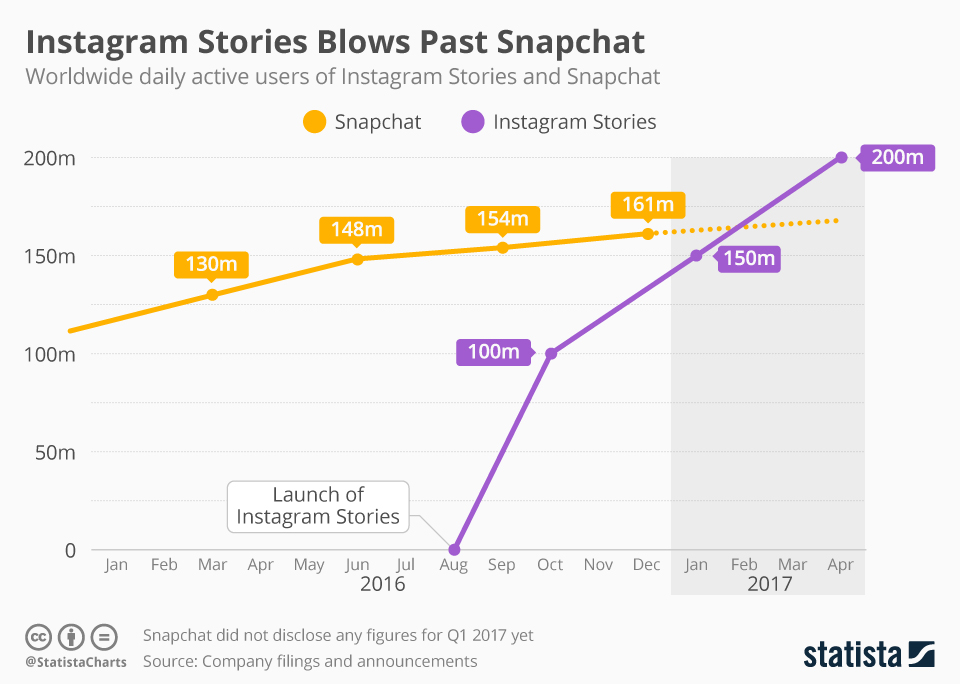
6. Instagram Stories

Introduced in August 2016 to compete with a similar feature on Snapchat, Instagram Stories quickly grew to over 100 million daily active users (DAU) in just a few months, hit 200 million DAUs in well under a year, and now boasts an impressive 250 million DAUs. It’s growth and popularity far outpaces that of Snapchat, and is still trending upward.

Are you using it?

About half of all businesses on Instagram post at least one Story each month, while 20% of those stories generate at least one direct message. How’s that for engagement?

The Story feature allows users to post both videos and photos that disappear in 24 hours. You can add filters, stickers, text, and drawings. You can even create simple polls to ask questions and collect valuable data on your audience.

Using the Instagram Story feature is not complicated, and even if you’ve never used Instagram before, you’ll quickly discover all it has to over.

Instagram itself has an impressive 800 million monthly active users, which is more than Twitter, Snapchat, and Pinterest combined. It should most definitely be part of your social media tool belt.

Include the recent Instagram Shopping functionality – a feature that allows you to tag up to five items within an image with a clickable link to more information – and you can increase engagement and sales even more.

7. Augmented Reality

While virtual reality creates an immersive experience, it does have some major drawbacks. For starters, it limits the mobility of the user wearing the VR headgear. And since most of us access the online world via our mobile devices, that’s a big issue.

That’s where augmented reality (AR) has a distinct advantage. Because users don’t have their vision restricted, mobility is not impeded. In fact, AR typically promotes greater mobility as users search for virtual elements within the physical world.

It’s already taking the gaming industry by storm. Remember Pokémon Go? The company behind it – Niantic – will be releasing Harry Potter: Wizards Unite in the near future. It will presumably have the same opportunity that Pokémon Go had for businesses to market themselves in partnership with the game.

Purchase a “lure”, and it not only lured the Pokémon to your business, but it also lured players to your physical location to capture them. Win-win.

Augmented reality is poised to have a similar impact on social media, allowing online personalities and products to be brought directly into homes, photos, and videos. And as it doesn’t require additional hardware other than your smartphone, most of us are already equipped to enjoy it.

Face filters and lenses fall under the AR umbrella, too.

Lens Studio by Snapchat gives everyone the ability to create and share custom lenses and “magical AR experiences”. Let your followers and fans play with your brand and products in the real world.

With augmented reality you can let your hair down and have some fun while still spreading brand awareness and engaging with leads and customers. Get in on it.

Conclusion

I personally think these seven will be the ones to watch in 2018. Pick one, pick a few, and try them out.

I also have marketing strategies for you to try in 2018:

Social media is all about connection, relationships, and engagement.

But to do that, you need to stay current on the latest trends and popular features. Don’t jump on the bandwagon of every one – some will not be a good fit for you, your brand, and your customers – but it’s worth selectively choosing those that make sense to your business and goals.

Trends come. Trends go. But some survive to become tomorrow’s mainstays. Get in before the masses, and you stand to win big.

What other social media trends have you noticed in the past few months? What are you most excited about trying?

About the Author: Neil Patel is the cofounder of Neil Patel Digital.


from The Kissmetrics Marketing Blog http://ift.tt/2nFqVmJ
via IFTTT